
bisslog-schema-py


bisslog-schema-py is a lightweight framework to organize and document the key elements of a distributed system, focusing on its use cases and service design.
It structures the metadata without exposing any underlying technical or implementation-specific details.
The goal is to design and document a distributed system from a service-centric perspective, emphasizing business use cases and their criticality, while remaining technology-agnostic.
🚀 Installation
You can install bisslog-schema using pip:
pip install bisslog_schema
For YAML support, you may also need to install PyYAML:
pip install bisslog_schema[yaml]
or
pip install pyyaml
Example YAML for Service Definition
Here is an example of how to define a service and its use cases using YAML:
---
name: "webhook receiver"
type: "microservice"
description: "Receives events from external platforms and converts them into company events for internal processing"
service_type: "functional"
team: "code-infrastructure"
tags:
  service: "webhook-receptor"

use_cases:
  addEventAdmitted:
    name: "add event type admitted to platform"
    description: "Updates adding event type admitted to platform if not exists, otherwise updates"
    triggers:
      - type: "http"
        options:
          route: "/webhook/event-type-admitted/{uid}"
          apigw: "internal"
          authenticator: "employee"
          method: "post"
          mapper:
            path_query.uid: uid
            body: data
            headers.user: creator
    external_interactions:
        - keyname: "marketing_division"
          type_interaction: "database"
          operation: "get_last_sales_from_client"
  # More use cases...
Note: The criticality field can use either named levels (e.g., "high") or direct numeric values (e.g., 90).
🔧 CLI Usage
Validate metadata files through the command line, ensuring they conform to the expected schema.
bisslog_schema analyze_metadata service.yaml --format-file yaml
Options
--path: Specify the path to the metadata file. If not provided, it will search in the default locations.--format-file: Specify the format of the metadata file. Supported formats areyamlandjson. Default isyaml.--encoding: File encoding (default: utf-8)--min-warnings: Minimum warning percentage (optional)
💻 Loading Service Metadata
You can load service definitions from YAML or JSON files using the read_service_metadata function.
It automatically searches for metadata files in predefined locations if a path is not provided.
You can specify the path to the metadata file as an argument or as an environment variable in SERVICE_METADATA_PATH.
Example
from bisslog_schema import read_service_metadata

service_info = read_service_metadata()
print(service_info.name)
for use_case_keyname, use_case in service_info.use_cases.items():
    print(f"{use_case.keyname}: {use_case.name}")
Main Concepts
ServiceInfo
The ServiceInfo class models a service in the system.
Each service can define:
name: Service namedescription: Brief explanation of the service's responsibilitytype: Logical category (e.g., "microservice", "library")service_type: Service type (e.g., "functional", "technical")team: Responsible teamtags: Arbitrary metadata tags for classificationuse_cases: List ofUseCaseInfoobjects representing the service's use cases
Service metadata can be loaded dynamically from external YAML or JSON files.
Service Definition Example:
The following example illustrates a service definition with its use cases and external interactions:
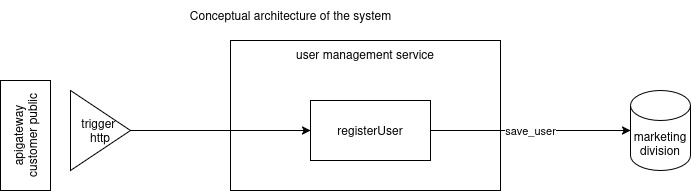
This is the YAML representation of the service definition:
---
name: "user management"
type: "microservice"
description: "Handles creation, update, and retrieval of user accounts in the system"
service_type: "functional"
team: "identity-platform"
tags:
  service: "user-management"

use_cases:
  registerUser:
    name: "register user"
    description: "Registers or creates a new user in the system"
    actor: "end user"
    criticality: "high"
    type: "create functional data"
    triggers:
      - type: "http"
        options:
          route: "/user"
          method: "post"
          apigw: "customer-public"
          mapper:
            body: user_data
    external_interactions:
      - keyname: users_division
        type_interaction: "database"
        operation: "create_user"
    tags:
      accessibility: "public"
UseCaseInfo
The UseCaseInfo class represents a use case belonging to a service, with the following fields:
keyname: Unique identifier for the use case.name: Human-readable name.description: A detailed description of what the use case does.actor: The entity (user, system, platform) that initiates the use case.type: Logical operation type (e.g., "create", "read", "update", "delete").criticality: Business importance of the use case, represented as aCriticalityEnum.tags: Metadata tags for further classification.triggers: List ofTriggerInfoentries defining how the use case is triggered.external_interactions: List ofExternalInteractionRepresents any external systems or APIs this use case depends on or interacts with.
TriggerInfo and TriggerOptions
Triggers define how a use case is initiated.
Available trigger types (enumerated by TriggerEnum) include:
HTTP: HTTP request initiation.WebSocket: WebSocket-based interaction.Consumer: Event-driven trigger (e.g., queues).Schedule: Time-based scheduled triggers.
Each trigger may have associated options (e.g., route, method, authenticator).
ExternalInteraction
ExternalInteraction
The ExternalInteraction class represents an external interaction in the system, such as database access or external service calls.
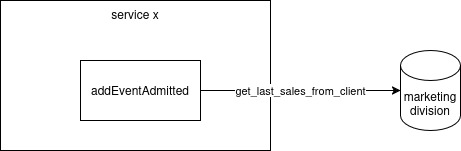
keyname: Unique identifier for the interaction. For example,marketing_division.type_interaction: String representing the type of interaction (optional). For example,database.operation: Specific operation or action being performed (optional). For example,get_last_sales_from_client.type_interaction_standard: Standardized type of interaction resolved fromtype_interactionusing aliases (optional).
Example of External Interaction:
use_cases:
  addEventAdmitted:
    external_interactions:
        - keyname: "marketing_division"
          type_interaction: "database"
          operation: "get_last_sales_from_client"
CriticalityEnum
CriticalityEnum provides a standardized set of criticality levels for use cases:
| Level | Value |
|---|---|
| NONE | 0 |
| VERY_LOW | 10 |
| LOW | 20 |
| MEDIUM | 50 |
| HIGH | 70 |
| VERY_HIGH | 90 |
| CRITICAL | 100 |
This scale helps prioritize use cases based on their business or operational impact.
Why use bisslog-schema-py?
-
Technology-agnostic: Focus on service and use case modeling, independent of the underlying implementation.
-
Organized metadata: Centralizes your distributed system documentation.
-
Extensible: Easily expandable with new fields and trigger types.
-
Integration-friendly: Can be used for CI/CD validation or automated documentation generation.
🧪 Running library tests
To Run test with coverage
coverage run --source=bisslog_schema -m pytest tests/
To generate report
coverage html && open htmlcov/index.html
📜 License
This project is licensed under the MIT License. See the LICENSE file for details.
1 maintainer

Metadata
1 maintainer
Release files for bisslog-schema 0.0.10
For a detailed explanation of source distributions (sdists) and built distributions (wheels), please see the package formats documentation.
Source distribution (sdist)
| File | Size | Uploaded | Provenance | |
|---|---|---|---|---|
| bisslog_schema-0.0.10.tar.gz | 89.0 kB | Without provenance | Details |
Built distribution (wheel)
| File | Interpreter | ABI | Platform | Reset |
|---|---|---|---|---|
| bisslog_schema-0.0.10-py3-none-any.whl | Python 3 | none | any | Details |
Total release size: 146.2 kB
Release files / bisslog_schema-0.0.10.tar.gz
| Download URL | bisslog_schema-0.0.10.tar.gz |
|---|---|
| Size | 89.0 kB |
| Tags | Source |
|
SHA-256 checksum How to use checksums |
ecfc9a9b68200886d2eadc1d42d195e7b7a8d92888bb08a77195d071a08eb6d5
|
|
BLAKE2b-256 checksum How to use checksums |
774d7d915664d231e49bad5aa3cfc5a3db9ea2fba0b8f45060e7f0a937e76fa5
|
| Upload date | |
|
Uploaded using Trusted Publishing? What is trusted publishing? |
No |
| Uploaded via |
twine/6.2.0 CPython/3.13.7
|
Release files / bisslog_schema-0.0.10-py3-none-any.whl
| Download URL | bisslog_schema-0.0.10-py3-none-any.whl |
|---|---|
| Size | 57.2 kB |
| Tags | Python 3 |
|
SHA-256 checksum How to use checksums |
eda48969735ea04d6d29c9c644f473f6a7eadb6d64a192e1b8e36146901fe8ca
|
|
BLAKE2b-256 checksum How to use checksums |
638106f1496e1bb1a99193f4384effeb3e3ac78ab200fadf3abce7daacd92ea4
|
| Upload date | |
|
Uploaded using Trusted Publishing? What is trusted publishing? |
No |
| Uploaded via |
twine/6.2.0 CPython/3.13.7
|
Security for bisslog-schema 0.0.10
Provenance
Provenance describes where a file came from. On PyPI, provenance is shared via attestations, which provide a verifiable record of the build or publishing details. View details, limitations and caveats.
No provenance found
None of the files in this release were uploaded with provenance metadata.
A note on package security
PyPI is a repository for distributing packages, not a service for auditing them. While third-party security researchers and our staff do their best to detect and remove malicious packages, PyPI cannot guarantee the quality, security or suitability of any given package.
To learn more about protecting yourself from malicious actors, visit our package security documentation.














