
A simple, self-hosted bulk mailing application with a web-based UI.
Verified details
These details have been verified by PyPIProject links
GitHub Statistics
Maintainers

Project description

Send personalized bulk emails from your own machine, using your own SMTP account. No subscriptions, no third-party servers, no data leaving your computer.
Why bit-by-mail
Most bulk email tools are SaaS platforms, where you upload your recipient list to someone else's server and pay a monthly fee for the privilege. bit-by-mail flips that: it's a lightweight local app that runs on your machine and sends through your own email provider. Your data stays yours, and there's nothing to pay for.
Features
- Local and private — runs entirely on your machine; nothing is uploaded anywhere
- Bring your own SMTP — works with Gmail, Outlook, Yahoo, or a custom domain; supports multiple accounts with a default sender fallback
- Dynamic personalization — one template, personalized per recipient using variables from your CSV (
{{FirstName}},{{InvoiceAmount}}, etc.) - Personalized attachments — send different files to different recipients in the same campaign (certificates, invoices, reports)
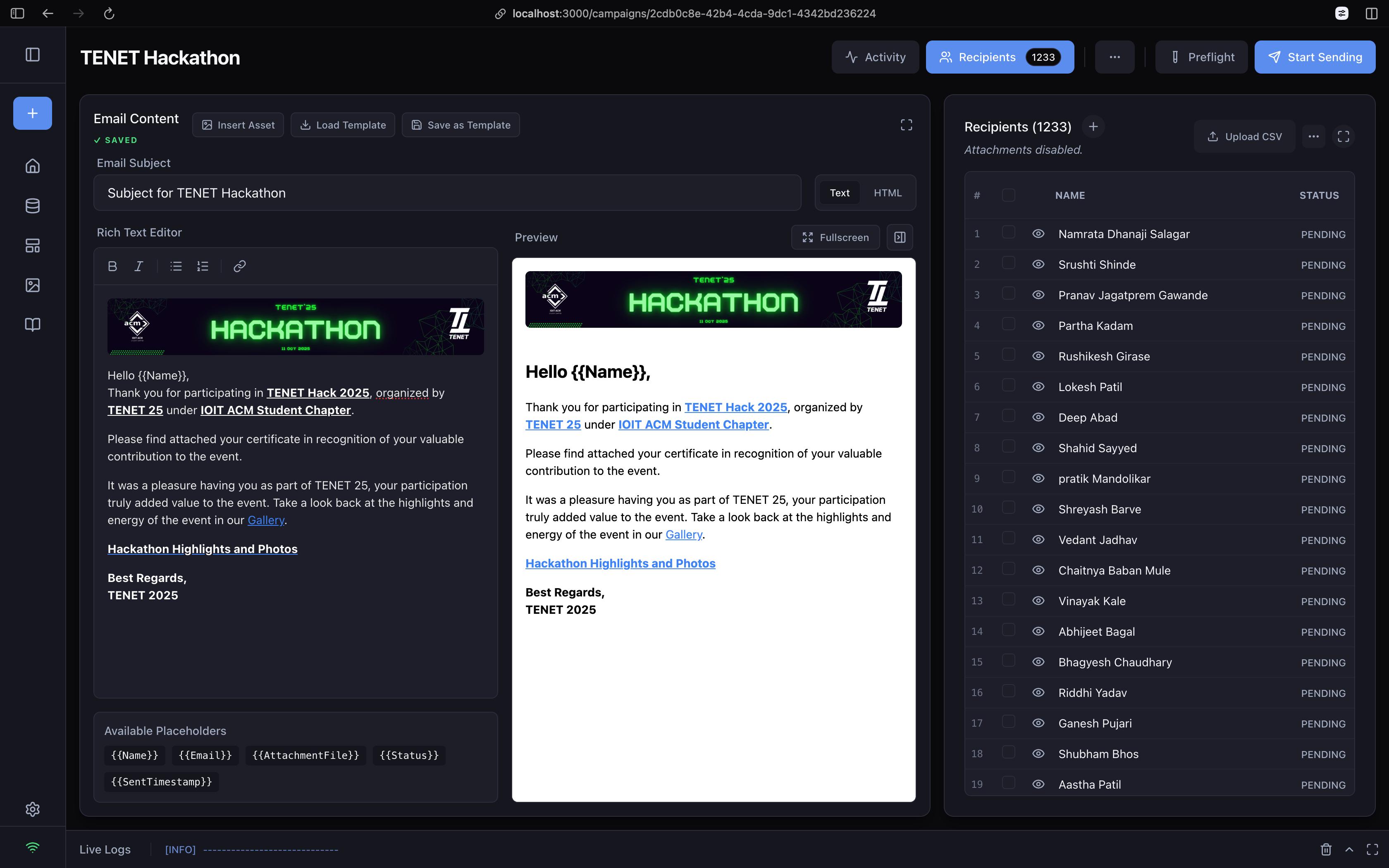
- Rich text or raw HTML — use the WYSIWYG editor, or drop into a Monaco-based HTML editor for full control
- Preflight checks — simulates the send beforehand to catch missing variables, missing attachments, or invalid addresses
- Reusable libraries — save recipient databases and templates so you're not rebuilding them every time
- Live analytics — real-time dispatch logs, success/failure tracking, and exportable CSV delivery reports
Getting Started
Install
pip install bit-by-mail
Requires Python 3.9 or later.
Launch
bit-by-mail
# or, for short:
bbm
The app opens automatically in your browser at http://localhost:8888.
Connect your email account
- Go to Settings in the sidebar.
- Click Add Account and enter your SMTP details (e.g.
smtp.gmail.com, port587). - Enter your email and password.
Using Gmail? Google blocks sign-ins with your regular password. Generate an App Password instead and use that.
Prepare your recipient list
Recipients are loaded from a CSV file with a header row.
| Column | Required | Notes |
|---|---|---|
Name |
Yes | Used for personalization |
Email |
Yes | Recipient address |
AttachmentFile |
No | Separate multiple files with ; |
| anything else | No | Any extra column becomes a placeholder automatically |
Example:
| Name | AttachmentFile | TicketType | |
|---|---|---|---|
| John Doe | john@example.com | john_pass.pdf | VIP |
| Jane Smith | jane@example.com | jane_pass.pdf; map.png | Standard |
Run a campaign
- Campaigns → New Campaign
- Upload your CSV, or import a saved database
- Write your subject and body, using placeholders like
{{Name}}or{{TicketType}} - Check the Preview panel to confirm placeholders render correctly
- Run Preflight to catch problems before sending
- Click Start Sending
Advanced
Asset Library — store image URLs (including Google Drive links) and drop them into your templates without re-uploading each time.
Throttling — add a delay (in seconds) between sends in Campaign Settings to stay under provider rate limits and avoid spam filters.
Resume on failure — if a campaign is interrupted, bit-by-mail remembers who's already been sent to. Hit send again and it only processes the recipients still marked PENDING.
Troubleshooting
- Emails aren't sending — double-check your SMTP host and port, and confirm you're using an app password rather than your account password if your provider requires one.
- Placeholder shows up literally in the email (e.g.
{{FirstName}}) — the column name in your CSV doesn't match the placeholder exactly; names are case-sensitive. - Attachment not found errors during Preflight — check that file paths in
AttachmentFileare correct relative to where you're running the app, and that multiple files are separated by;with no typos.
Rich Text/HTML Editor with Live Preview & Placeholders
Contributing
Issues and pull requests are welcome. If you run into a bug or have an idea for a feature, open an issue on GitHub.
License
See the LICENSE file for details.
Project details
Verified details
These details have been verified by PyPIProject links
GitHub Statistics
Maintainers
Release history Release notifications | RSS feed


Download files
Download the file for your platform. If you're not sure which to choose, learn more about installing packages.
Source Distribution
Built Distribution
Filter files by name, interpreter, ABI, and platform.
If you're not sure about the file name format, learn more about wheel file names.
Copy a direct link to the current filters
File details
Details for the file bit_by_mail-2.3.0.tar.gz.
File metadata
- Download URL: bit_by_mail-2.3.0.tar.gz
- Upload date:
- Size: 3.9 MB
- Tags: Source
- Uploaded using Trusted Publishing? Yes
- Uploaded via: twine/6.1.0 CPython/3.13.12
File hashes
| Algorithm | Hash digest | |
|---|---|---|
| SHA256 |
258f75dcf64990e0f081802b0814984235c0af43166ae4b3fef36c41931e3c0d
|
|
| MD5 |
61155b345826b17c317bc07970b17d0a
|
|
| BLAKE2b-256 |
32a0f077ccb712e4e63ac3d7d77fad690786632c27cbe4088dfec84c21f5773c
|
Provenance
The following attestation bundles were made for bit_by_mail-2.3.0.tar.gz:
Publisher:
publish.yml on IOIT-ACM/bit-by-mail
-
Statement:
-
Statement type:
https://in-toto.io/Statement/v1 -
Predicate type:
https://docs.pypi.org/attestations/publish/v1 -
Subject name:
bit_by_mail-2.3.0.tar.gz -
Subject digest:
258f75dcf64990e0f081802b0814984235c0af43166ae4b3fef36c41931e3c0d - Sigstore transparency entry: 2094736810
- Sigstore integration time:
-
Permalink:
IOIT-ACM/bit-by-mail@b8b84fda1d6a96b2d2dc6dd435d17e9646d730c4 -
Branch / Tag:
refs/tags/v2.3.0 - Owner: https://github.com/IOIT-ACM
-
Access:
public
-
Token Issuer:
https://token.actions.githubusercontent.com -
Runner Environment:
github-hosted -
Publication workflow:
publish.yml@b8b84fda1d6a96b2d2dc6dd435d17e9646d730c4 -
Trigger Event:
push
-
Statement type:
File details
Details for the file bit_by_mail-2.3.0-py3-none-any.whl.
File metadata
- Download URL: bit_by_mail-2.3.0-py3-none-any.whl
- Upload date:
- Size: 3.9 MB
- Tags: Python 3
- Uploaded using Trusted Publishing? Yes
- Uploaded via: twine/6.1.0 CPython/3.13.12
File hashes
| Algorithm | Hash digest | |
|---|---|---|
| SHA256 |
fc439c8e79bb5c818caaf9816ac0556a5f154d92a7a5622a2405aa971dc0aa07
|
|
| MD5 |
a9c9a8e16dd050070132fa3de8fda2eb
|
|
| BLAKE2b-256 |
9d54d68a758eac226c0ba1d30ea48d6b7812fd22183982e9f101d6ee06f44220
|
Provenance
The following attestation bundles were made for bit_by_mail-2.3.0-py3-none-any.whl:
Publisher:
publish.yml on IOIT-ACM/bit-by-mail
-
Statement:
-
Statement type:
https://in-toto.io/Statement/v1 -
Predicate type:
https://docs.pypi.org/attestations/publish/v1 -
Subject name:
bit_by_mail-2.3.0-py3-none-any.whl -
Subject digest:
fc439c8e79bb5c818caaf9816ac0556a5f154d92a7a5622a2405aa971dc0aa07 - Sigstore transparency entry: 2094737209
- Sigstore integration time:
-
Permalink:
IOIT-ACM/bit-by-mail@b8b84fda1d6a96b2d2dc6dd435d17e9646d730c4 -
Branch / Tag:
refs/tags/v2.3.0 - Owner: https://github.com/IOIT-ACM
-
Access:
public
-
Token Issuer:
https://token.actions.githubusercontent.com -
Runner Environment:
github-hosted -
Publication workflow:
publish.yml@b8b84fda1d6a96b2d2dc6dd435d17e9646d730c4 -
Trigger Event:
push
-
Statement type:






