
bitbang-python




Turns your local Python web app into a URL you can open from anywhere.
bitbang wraps a WSGI or ASGI app (Flask, FastAPI, Quart) and prints a URL and QR code. Open the URL in any browser and you're connected to the app -- peer-to-peer, end-to-end encrypted, with no account, no port forwarding.
This is the Python implementation of BitBang. For remote access to a whole machine (shell, files, proxy) without writing code, see bitbang-cli.
Install
pip install bitbang              # Linux / macOS
python -m pip install bitbang    # Windows (or any platform)
Quick test
bitbang-fileshare ~/Downloads            # Linux / macOS
python -m bitbang fileshare ~/Downloads  # Windows (or any platform)
This prints a URL and QR code. Anyone with the link can browse and download files directly from your machine, or upload files to the shared directory. To verify it works outside your local network, scan the QR code from a phone on cellular (turn off WiFi).
Flask / FastAPI integration (or any WSGI / ASGI framework)
Take an existing app and give it a URL:
# Flask
from bitbang import BitBangWSGI

app = Flask(__name__)
adapter = BitBangWSGI(app)
adapter.run()  # Prints QR code and public URL
# FastAPI
from bitbang import BitBangASGI

app = FastAPI()
adapter = BitBangASGI(app)
adapter.run()  # Prints QR code and public URL
The examples/ directory contains a minimal version of each:
cd examples/simple_fastapi && python3 app.py
cd examples/simple_flask && python3 app.py
Bundled apps
Fileshare shares local files without uploading them to a third-party service. Files transfer directly from your machine to the recipient, and the recipient can upload files back. It's also intended as an example of a simple BitBang application -- it's a straightforward Flask app.
bitbang-fileshare big_sourcetree.tar.gz       # Share a single file
bitbang-fileshare ~/Documents/project         # Share a directory (uploads enabled)
python -m bitbang fileshare c:\ide\files      # Windows
Webcam streams video from your webcam to a browser over WebRTC media channels -- an easy-to-set-up monitoring camera using a laptop, for example.
bitbang-webcam                  # Linux / macOS
python -m bitbang webcam        # Windows (or any platform)
Python API
These options are available from the BitBangWSGI constructor (same options for BitBangASGI):
adapter = BitBangWSGI(app,
    program_name='BitBang',    # Identity name, shows in browser title
    server='bitba.ng',         # Signaling server (default: bitba.ng)
    ephemeral=False,           # Use a temporary identity (not saved to disk)
    identity_path=None,        # Use a specific identity file
    regenerate=False,          # Delete and regenerate identity
    debug=False,               # Verbose logging + browser debug UI (?debug)
    pin=None,                  # PIN string to protect access
    pin_callback=None,         # Function(path, pin) -> bool for custom auth
    ice_servers=None,          # Custom TURN server config
)
If your app uses argparse, add_bitbang_args and bitbang_kwargs wire up the standard CLI flags:
from bitbang.adapter import BitBangWSGI, add_bitbang_args, bitbang_kwargs

parser = argparse.ArgumentParser()
parser.add_argument('path')
add_bitbang_args(parser)
args = parser.parse_args()

adapter = BitBangWSGI(app, **bitbang_kwargs(args, program_name='myapp'))
These options appear on the command line as:
--ephemeral              Use a temporary identity
--identity PATH          Use a specific identity file
--regenerate             Delete and regenerate identity
--server HOST            Signaling server hostname
--turn-url URL           TURN server URL (e.g. turn:myserver.com:3478)
--turn-user USER         TURN server username
--turn-credential PASS   TURN server credential
--pin PIN                PIN to protect access
--debug                  Enable verbose logging and browser debug UI
With --debug, the printed URL includes ?debug, which activates a browser-side debug UI showing connection steps. Without it, the browser shows a simple "Loading..." while connecting.
Identity and URLs
Each app gets its own persistent RSA keypair, stored at ~/.bitbang/<program_name>/identity.pem. The public key hash becomes the app's 128-bit ID, used in its URL -- so the URL stays the same across restarts. Use --regenerate for a new URL, or --ephemeral for a one-time session.
TURN
When a direct peer-to-peer connection isn't possible, bitba.ng provides a TURN relay, which carries only ciphertext. You can supply your own TURN server via the command-line options or the ice_servers constructor argument (browser-native WebRTC format). The defaults work fine for most setups.
How it works
Browsers normally connect to web servers over a TCP socket. BitBang replaces this with a WebRTC data channel:
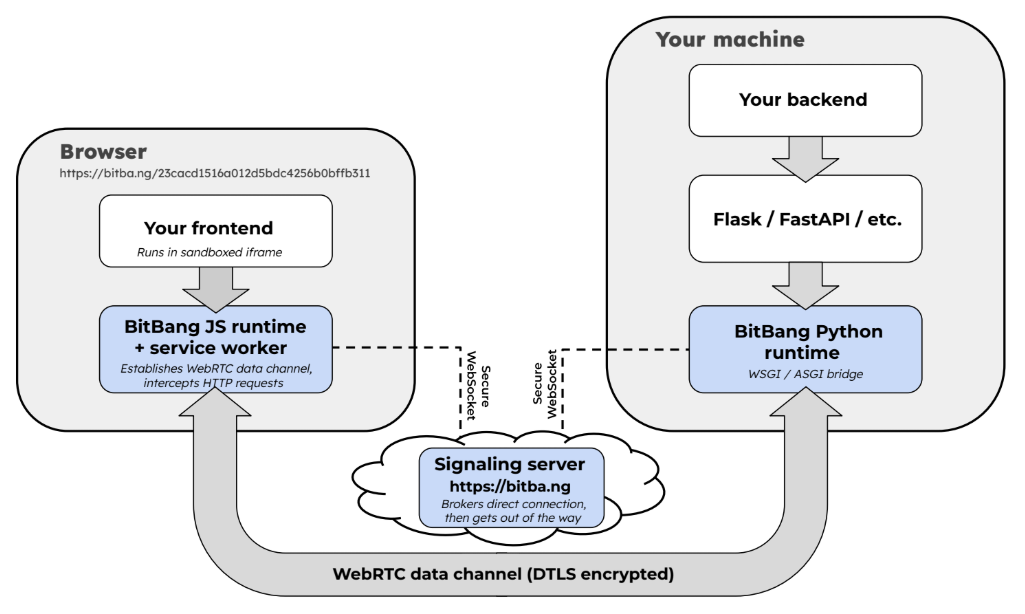
The signaling server brokers the WebRTC handshake, then has no further involvement and never sees application data. The full story -- architecture, trust model, and origin -- is in the BitBang project README, the whitepaper, and Trustless Signaling document.
License
MIT
Contributing
Issues and pull requests are welcome.
1 maintainer

Metadata
1 maintainer
Release files for bitbang 0.1.57
For a detailed explanation of source distributions (sdists) and built distributions (wheels), please see the package formats documentation.
Source distribution (sdist)
| File | Size | Uploaded | Provenance | Actions |
|---|---|---|---|---|
| bitbang-0.1.57.tar.gz | 85.4 kB | Without provenance | Details for bitbang-0.1.57.tar.gz |
Built distribution (wheel)
| File | Interpreter | ABI | Platform | Actions Reset |
|---|---|---|---|---|
| bitbang-0.1.57-py3-none-any.whl | Python 3 | none | any | Details for bitbang-0.1.57-py3-none-any.whl |
Total release size: 157.5 kB
Release files / bitbang-0.1.57.tar.gz
| Download URL | bitbang-0.1.57.tar.gz |
|---|---|
| Size | 85.4 kB |
| Tags | Source |
|
SHA-256 checksum How to use checksums |
f00bdbd04a2d48c1ff8908591c0e4e95d1689d0932a5f4f28b670efc6154c31c
|
|
BLAKE2b-256 checksum How to use checksums |
abce3d829f1e6ce2096bde102fa53c427f3f70b5a304334d0a0bc71a0a93af3e
|
| Upload date | |
|
Uploaded using Trusted Publishing? What is trusted publishing? |
No |
| Uploaded via |
twine/7.0.0 CPython/3.13.14
|
Release files / bitbang-0.1.57-py3-none-any.whl
| Download URL | bitbang-0.1.57-py3-none-any.whl |
|---|---|
| Size | 72.0 kB |
| Tags | Python 3 |
|
SHA-256 checksum How to use checksums |
26d8da64aaeb6194b283d05a04f4c0acd402ec14beb882847387f0fc7ff52858
|
|
BLAKE2b-256 checksum How to use checksums |
af4b162638885c84e019ea2bc0f7262cdc976eef799ba9e590f4d24fece6c26d
|
| Upload date | |
|
Uploaded using Trusted Publishing? What is trusted publishing? |
No |
| Uploaded via |
twine/7.0.0 CPython/3.13.14
|
Security for bitbang 0.1.57
Provenance
Provenance describes where a file came from. On PyPI, provenance is shared via attestations, which provide a verifiable record of the build or publishing details. View details, limitations and caveats.
No provenance found
None of the files in this release were uploaded with provenance metadata.
A note on package security
PyPI is a repository for distributing packages, not a service for auditing them. While third-party security researchers and our staff do their best to detect and remove malicious packages, PyPI cannot guarantee the quality, security or suitability of any given package.
To learn more about protecting yourself from malicious actors, visit our package security documentation.














