
BitBully — Fast Perfect-Play Connect Four Solver for Python & C++

A high-performance Connect Four solver with Python bindings, optimized bitboards, opening books, and perfect play.
Built in C++ for speed, with a clean Python API for analysis, benchmarking, research, and interactive use.






Why BitBully?
- Perfect play for Connect Four
- Fast C++ core with Python bindings via
pybind11- Optimized bitboards, transposition tables, threat detection, and advanced search
- Opening-book support for constant-time early-game lookups in milliseconds
- Benchmarked to solve the empty board in under 200 seconds on modest hardware (with no opening books)



From opening to victory: BitBully can analyze and solve positions across all stages of the game.
Quickstart
Installation
pip install bitbully
Usage
import bitbully as bb

agent = bb.BitBully()
board = bb.Board()

while not board.is_game_over():
    board.play(agent.best_move(board))

print(board)
print("Winner:", board.winner())
Table of Contents
- Features
- Who is this for?
- Quickstart
- Installation
- Build and Install
- Python API Docs
- Usage
- Benchmarking
- Advanced Build and Install
- Contributing & Development
- License
- Contact
- Further Resources
- Acknowledgments
Features
- Fast Solver: Implements MTD(f) and null-window search algorithms for Connect-4.
- Bitboard Representation: Efficiently manages board states using bitwise operations.
- Advanced Features: Includes transposition tables, threat detection, and move prioritization.
- Python Bindings: Exposes core functionality through the
bitbully_corePython module usingpybind11. - Cross-Platform: Build and run on Linux, Windows, and macOS.
- Open-Source: Fully accessible codebase for learning and contribution.
Who is this for?
-
Just want to play or analyze Connect-4 in Python? → Read Quickstart + Usage (High-level Python API)
-
Interested in performance, algorithms, or C++ integration? → See Low-level C++ bindings (advanced)
-
Working on research, solvers, or databases? → See Opening Books and BoardCore
Installation
Prerequisites
- Python: Version 3.10 or higher, PyPy 3.10 or higher
Build and Install
From PyPI (Recommended)
The easiest way to install the BitBully package is via PyPI:
pip install bitbully
This will automatically download and install the pre-built package, including the Python bindings.
Python API Docs
Please refer to the docs here: https://markusthill.github.io/BitBully/.
The docs for the opening databases can be found here: https://markusthill.github.io/bitbully-databases/
Usage
⚠️ Note
bitbully_coreexposes low-level C++ bindings intended for advanced users. Most users should use the high-levelbitbullyPython API with the classesBoardandBitBully.BitBully currently supports standard Connect-4 (7 columns × 6 rows). Generalized board sizes are not supported.
🚀 BitBully: Getting Started with a Jupyter Notebook

This notebook introduces the main building blocks of BitBully:
Board: represent and manipulate Connect Four positionsBitBully: analyze positions and choose strong moves
All examples are designed to be copy-pasteable and easy to adapt for your own experiments.
Jupyter Notebook: notebooks/getting_started.ipynb
🎮 Play a Game of Connect-4 with a simple Jupyter Notebook Widget
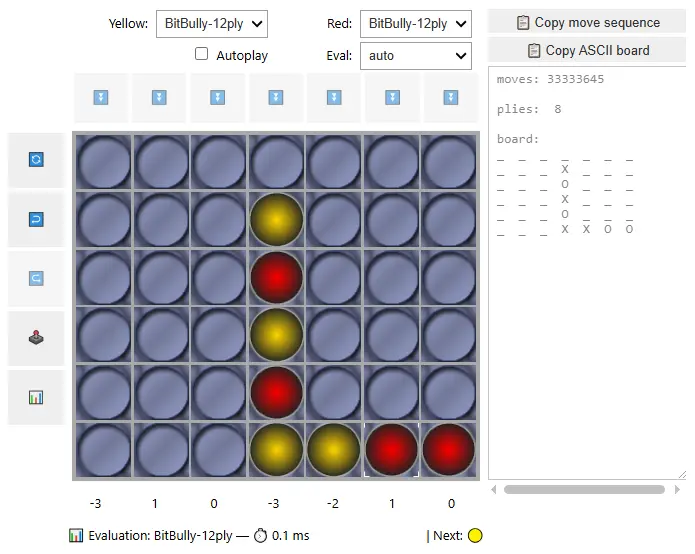
BitBully includes an interactive Connect-4 widget for Jupyter built with ipywidgets + Matplotlib.
GuiC4 renders a 6x7 board using image sprites, supports move evaluation, provides undo/redo, can trigger a computer move using the BitBully engine (optionally with an opening book database). It's intended for quick experimentation and demos inside notebooks (best with %matplotlib ipympl).
Jupyter Notebook: notebooks/game_widget.ipynb
High-level Python API (recommended)
Empty board + play moves incrementally
import bitbully as bb

board = bb.Board()
assert board.play(3)          # single move (int)
assert board.play([2, 4, 3])  # multiple moves (list)
assert board.play("001122")   # multiple moves (string)

print(board)
Initialize directly from a move sequence
import bitbully as bb

board_a = bb.Board([3, 3, 3, 1, 1])
board_b = bb.Board("33311")

assert board_a == board_b
print(board_a)
Create positions (moves, strings, arrays) and round-trip them
import bitbully as bb

# From a move list
b1 = bb.Board([3, 3, 3, 1, 1])

# From a compact move string
b2 = bb.Board("33311")

assert b1 == b2
print(b1)

# From a 2D array (row-major 6x7 or column-major 7x6 both work)
arr = b1.to_array()  # default: column-major 7x6
b3 = bb.Board(arr)

assert b1 == b3
Legal moves and remaining moves
import bitbully as bb

board = bb.Board("33333111")

print(board.legal_moves())                 # all legal columns
print(board.legal_moves(order_moves=True)) # ordered (center-first)
print("Moves left:", board.moves_left())
print("Tokens:", board.count_tokens())
Some board utilities
import bitbully as bb

board = bb.Board("332311")
print(board)

print("Can win next (any):", board.can_win_next())
print("Can win next in col 4:", board.can_win_next(4))

assert board.play(4)  # play winning move
print(board)

print("Has win:", board.has_win())
print("Game over:", board.is_game_over())
print("Winner:", board.winner())  # 1
Solver Quickstart: evaluate a position and pick a move
import bitbully as bb

agent = bb.BitBully()          # loads default opening book ("12-ply-dist")
board = bb.Board()             # empty board

print(board)

scores = agent.score_all_moves(board)
print("Move scores:", scores)

best_col = agent.best_move(board)
print("Best move:", best_col)
Play a small game loop (agent vs. itself)
import bitbully as bb

agent = bb.BitBully()
board = bb.Board()

while not board.is_game_over():
    col = agent.best_move(board, tie_break="random")
    assert board.play(col)

print(board)
print("Winner:", board.winner())  # 1, 2, or None for draw
Tie-breaking strategies for best_move
import bitbully as bb
import random

agent = bb.BitBully()
board = bb.Board("341")  # arbitrary position

print(board)

print("Center tie-break:", agent.best_move(board, tie_break="center"))
print("Leftmost tie-break:", agent.best_move(board, tie_break="leftmost"))

rng = random.Random(42) # optional own random generator
print("Random tie-break (seeded):", agent.best_move(board, tie_break="random", rng=rng))
Different Search Algorithms
import bitbully as bb

agent = bb.BitBully()
board, _ = bb.Board.random_board(n_ply=14, forbid_direct_win=True)

s1 = agent.mtdf(board)
s2 = agent.negamax(board)
s3 = agent.null_window(board)

assert s1 == s2 == s3
print("Score:", s1)
Low-level C++ bindings (advanced)
Use the BitBullyCore and BoardCore classes directly in Python:
BoardCore Examples
The low-level BoardCore API gives you full control over Connect-4 positions:
you can play moves, generate random boards, mirror positions, and query win
conditions or hashes.
Create and Print a Board
import bitbully.bitbully_core as bbc

board = bbc.BoardCore()
print(board)          # Human-readable 7x6 board
print(board.movesLeft())   # 42 on an empty board
print(board.countTokens()) # 0 on an empty board
Play Moves and Check for Winning Positions
import bitbully.bitbully_core as bbc

board = bbc.BoardCore()

# Play a small sequence of moves (columns 0–6)
for col in [3, 2, 3, 2, 3, 4, 3]:
    assert board.play(col)

print(board)

# Check if the side to move has an immediate winning move
print(board.canWin())      # False
print(board.hasWin())      # True, since the last move created 4-in-a-row
You can also check if a specific column is a winning move:
board = bbc.BoardCore()
board.setBoard([3, 3, 3, 3, 2, 2, 4, 4])

print(board.canWin())  # True
print(board.canWin(1))  # True  – playing in column 1 wins
print(board.canWin(3))  # False – no win in column 3
Set a Board from a Move List or Array
import bitbully.bitbully_core as bbc

board = bbc.BoardCore()

# From a move sequence (recommended)
assert board.setBoard([0, 1, 2, 3, 3, 2, 1, 0])

# Convert to 7x6 array (columns × rows)
array = board.toArray()
print(len(array), len(array[0]))  # 7 x 6

# From a 7x6 array of tokens (1 = Yellow, 2 = Red)
array_board = [[0 for _ in range(6)] for _ in range(7)]
array_board[3][0] = 1  # Yellow in center column bottom row
b2 = bbc.BoardCore()
assert b2.setBoard(array_board)
Generate Random Boards
import bitbully.bitbully_core as bbc

board, moves = bbc.BoardCore.randomBoard(10, True)

print(board)   # Random, valid board
print(moves)   # List of 10 column indices
print(board.canWin())  # Usually False for random boards in this setup
Mirroring Boards and Symmetry
import bitbully.bitbully_core as bbc

board = bbc.BoardCore()
board.setBoard([0, 1, 2])      # Left side

mirrored = board.mirror()      # Mirror around center column
print(board)
print(mirrored)

# Double-mirroring returns the original position
assert board == mirrored.mirror()
Hashing, Equality, and Copies
import bitbully.bitbully_core as bbc

b1 = bbc.BoardCore()
b2 = bbc.BoardCore()

moves = [0, 1, 2, 3]
for m in moves:
    b1.play(m)
    b2.play(m)

assert b1 == b2
assert b1.hash() == b2.hash()
assert b1.uid() == b2.uid()

# Copying a board
b3 = b1.copy()           # or bbc.BoardCore(b1)
assert b3 == b1

b3.play(4)               # Modify the copy
assert b3 != b1
assert b3.hash() != b1.hash()
These examples are based on the internal test suite and show typical ways of
interacting with BoardCore programmatically.
BitBullyCore: Connect-4 Solver Examples
The BitBullyCore module provides a high-performance Connect-4 solver written in C++
and exposed to Python. You can evaluate positions, score all legal moves, or run the
full MTD(f) search.
Solve a Position with MTD(f)
import bitbully.bitbully_core as bbc

# Construct a position: alternate moves into the center column
board = bbc.BoardCore()
for _ in range(6):
    board.play(3)  # Column 3

solver = bbc.BitBullyCore()
score = solver.mtdf(board, first_guess=0)

print("Best score:", score)
mtdf returns an integer score from the perspective of the side to move
(positive = winning, negative = losing).
Score All Moves in a Position
scoreMoves(board) returns a list of 7 integers:
the evaluated score for playing in each column (0–6).
Illegal moves (full columns) are still included in the list.
import bitbully.bitbully_core as bbc

board = bbc.BoardCore()
board.setBoard([3, 4, 1, 1, 0, 2, 2, 2])

solver = bbc.BitBullyCore()
scores = solver.scoreMoves(board)

print("Move scores:", scores)
# Example output:
# [-3, -3, 1, -4, 3, -2, -2]
Using the Solver in a Loop (Move Selection)
import bitbully.bitbully_core as bbc
import time

board = bbc.BoardCore()
solver = bbc.BitBullyCore()

for move in [3, 4, 1, 1, 0, 2, 2, 2]:  # Example opening
    board.play(move)

start = time.perf_counter()
scores = solver.scoreMoves(board)
best_move = max(range(7), key=lambda c: scores[c])
print(f"Time: {round(time.perf_counter() - start, 2)} seconds!")
print("Scores:", scores)
print("Best move suggestion:", best_move)
# best move is into column 4
Further Examples using the BitBully Solver
You can initialize a board using an array with shape (7, 6) (columns first) and solve it:
from bitbully import bitbully_core

# Define a Connect-4 board as an array (7 columns x 6 rows)
# You may also define the board using a numpy array if numpy is installed
# 0 = Empty, 1 = Yellow, 2 = Red
# Here, the left column represents the bottom row of the board
board_array = [
    [0, 0, 0, 0, 0, 0],
    [0, 0, 0, 0, 0, 0],
    [0, 0, 0, 0, 0, 0],
    [1, 2, 1, 2, 1, 0],
    [0, 0, 0, 0, 0, 0],
    [2, 1, 2, 0, 0, 0],
    [0, 0, 0, 0, 0, 0]
]

# Convert the array to the BoardCore board
board = bitbully_core.BoardCore()
assert board.setBoard(board_array), "Invalid board!"

print(board)

# Solve the position
solver = bitbully_core.BitBullyCore()
score = solver.mtdf(board, first_guess=0)
print(f"Best score for the current board: {score}") # expected score: 1
Run the Bitbully solver with an opening book (here: 12-ply opening book with winning distances):
from bitbully import bitbully_core as bbc
import bitbully_databases as bbd
import importlib.resources

db_path = bbd.BitBullyDatabases.get_database_path("12-ply-dist")
bitbully = bbc.BitBullyCore(db_path)
b = bbc.BoardCore()  # Empty board
bitbully.scoreMoves(b)  # expected result: [-2, -1, 0, 1, 0, -1, -2]
Further Usage Examples for BitBully Core
Create all Positions with (up to) n tokens starting from Board b:
from bitbully import bitbully_core as bbc

b = bbc.BoardCore()  # empty board
board_list_3ply = b.allPositions(3, True)  # All positions with exactly 3 tokens
len(board_list_3ply)  # should be 238 according to https://oeis.org/A212693
Opening Book Examples
BitBully Databases provide fast lookup tables (opening books) for Connect-4, allowing you to query evaluated positions, check if a board is known, and retrieve win/loss/distance values.
Load an Opening Book
import bitbully_databases as bbd
import bitbully.bitbully_core as bbc

# Load the 8-ply opening book (no distances)
db_path = bbd.BitBullyDatabases.get_database_path("8-ply")
book = bbc.OpeningBookCore(db_path, is_8ply=True, with_distances=False)

print(book.getBookSize())  # e.g., 34515
print(book.getNPly())      # -> 8
Accessing Entries
Each entry consists of (key, value) where:
- key is the Huffman-encoded board state
- value is the evaluation (win/loss/draw or distance)
k, v = book.getEntry(0)
print(k, v)
Evaluating a Board Position
import bitbully.bitbully_core as bbc

board = bbc.BoardCore()
board.setBoard([2, 3, 3, 3, 3, 3, 5, 5])  # Sequence of column moves

value = book.getBoardValue(board)
print("Evaluation:", value)
Check Whether a Position Is in the Opening Book
The books only contain one variant for mirror-symmetric positions:
board = bbc.BoardCore()
board.setBoard([1, 3, 4, 3, 4, 4, 3, 3])

print(book.isInBook(board))              # e.g., False
print(book.isInBook(board.mirror()))     # e.g., True, checks symmetric position
Benchmarking
This section describes how BitBully was benchmarked against a strong Baseline solver, how the reported numbers were obtained, and how to interpret the reported p-values.
Setup
The benchmark compares BitBully against the Baseline on identical Connect-4 positions, measuring wall-clock solve time per position.
Position generation
- For a fixed search depth
nply, random but legal Connect-4 positions are generated. - Each position is constructed by playing a random sequence of
nplymoves from the empty board (non-trivial positions, meaning that they do not contain a winning position for the player to move next.). - The same position is evaluated by both solvers.
Solvers
- Opening books are deactivated for both solvers.
- BitBully: evaluated using its
mtdfsearch with transposition tables enabled. Transposition Table size: $2^{20}=1,048,576$ entries. - Baseline: evaluated using its standard
solveroutine, with transposition tables enabled. Transposition Table size: $2^{24}=16,777,216$ entries. - For correctness, both solvers must return the same game-theoretic score; execution aborts if a mismatch occurs.
Timing: Each solver is timed independently on the same board.
Repetitions
- For each
nply, the experiment is repeatednrepeatstimes (typically 25–2000, depending on search depth). - In this case, transposition-table resets are enabled to control caching effects.
Aggregation & Reported Metrics
From the recorded timings, the following statistics are computed:
- Mean ± Standard Deviation: Arithmetic mean and sample standard deviation of solve times (in seconds).
- Speed-up: Speed-up = mean(Baseline) / mean(BitBully). Values > 1 indicate that BitBully is faster on average.
- Paired Statistical Test (p-value):A paired Wilcoxon signed-rank test is applied to the timing pairs.
Statistical Significance & p-Value Interpretation
To assess whether observed speed differences are statistically meaningful, a Wilcoxon signed-rank test is used:
Why Wilcoxon?
- Timing distributions are often non-Gaussian and heavy-tailed.
- Measurements are paired (same position, two solvers).
- Wilcoxon is non-parametric and robust to outliers.
Test definition
- Null hypothesis (H₀): BitBully is not faster than Baseline.
- Alternative hypothesis (H₁): BitBully is faster than Baseline.
p-value meaning
- The p-value is the probability of observing the measured (or more extreme) speed advantage if H₀ were true.
- Very small p-values indicate overwhelming evidence that BitBully is faster.
- Values ≥ 0.05 indicate that the observed difference is not statistically significant at the 5% level.
Notes & Caveats
- We left the size of the transposition table for Baseline as-is, likely giving it a slight advantage over BitBully.
- Benchmarks measure solve time, not node count or memory usage.
- Results might depend on compiler optimizations, hardware, and cache behavior.
- Small p-values are expected for large
nrepeatswhen even modest speed differences are consistent.
The full benchmark code and analysis notebook are included in the repository for reproducibility.
Machine Setup
FUJITSU LIFEBOOK N532 from 2012.
WSL Setup:
+------------------+-------------------------------------------+
| OS               | Linux 6.6.87.2-microsoft-standard-WSL2    |
| Distribution     | Ubuntu 22.04.4 LTS                        |
| Architecture     | x86_64                                    |
| CPU              | x86_64                                    |
| Cores (phys/log) | 2 / 4                                     |
| RAM              | 8 GiB                                     |
| GPU              | None / Unknown                            |
| Python           | CPython 3.11.0rc1                         |
| Compiler         | gcc (Ubuntu 13.1.0-8ubuntu1~22.04) 13.1.0 |
| Fingerprint      | ea68f7b392a21300                          |
+------------------+-------------------------------------------+
Output of systeminfo on Windows CMD (reformatted):
┌────────────────────────┬────────────────────────────────────────────────┐
│ Manufacturer / Model   │ FUJITSU LIFEBOOK N532                          │
│ System Type            │ x64-based PC                                   │
│ BIOS                   │ AMI 1.12A (02.07.2012)                         │
├────────────────────────┼────────────────────────────────────────────────┤
│ Operating System       │ Windows 10 Pro                                 │
│ OS Version             │ 10.0.19045 (Build 19045)                       │
│ Install Date           │ 25.08.2020                                     │
│ Time Zone              │ UTC+01:00 (Central Europe)                     │
├────────────────────────┼────────────────────────────────────────────────┤
│ CPU                    │ Intel Core (Family 6, Model 58)                │
│ Nominal Frequency      │ ~2.9 GHz                                       │
│ CPU Count              │ 1 physical processor                           │
├────────────────────────┼────────────────────────────────────────────────┤
│ Physical Memory        │ 16 GB RAM                                      │
│ Available Memory       │ ~6 GB                                          │
│ Virtual Memory (Max)   │ ~20 GB                                         │
├────────────────────────┼────────────────────────────────────────────────┤
│ Virtualization         │ Hypervisor detected (Hyper-V / WSL active)     │
└────────────────────────┴────────────────────────────────────────────────┘
Results (BitBully vs Baseline)
- Times in seconds: (Mean ± Std)
| nply | nrepeats | BitBully [s] | Baseline [s] | Speed-up | p-value | Significant |
|---|---|---|---|---|---|---|
| (empty board) 0 | 25 | 197.5023 ± 7.8470 | 386.3228 ± 17.3956 | 1.96 | 2.98e-08 | * |
| 1 | 50 | 117.0179 ± 42.2797 | 151.0143 ± 55.6900 | 1.29 | 4.73e-05 | * |
| 2 | 250 | 59.7311 ± 60.7071 | 68.5259 ± 68.1356 | 1.15 | 0.000299 | * |
| 3 | 500 | 27.6295 ± 27.4619 | 31.9983 ± 33.9760 | 1.16 | 2.7e-10 | * |
| 4 | 500 | 11.0583 ± 12.9979 | 15.5146 ± 20.8694 | 1.4 | 2.33e-37 | * |
| 5 | 500 | 4.1296 ± 5.0585 | 5.8230 ± 7.2602 | 1.41 | 1.04e-47 | * |
| 6 | 1000 | 2.1579 ± 2.8749 | 3.2826 ± 4.6897 | 1.52 | 5.26e-92 | * |
| 7 | 1000 | 0.9930 ± 1.2125 | 1.4714 ± 2.2783 | 1.48 | 2.52e-72 | * |
| 8 | 1000 | 0.5269 ± 0.6483 | 0.8201 ± 1.2421 | 1.56 | 3.44e-62 | * |
| 9 | 1000 | 0.2537 ± 0.3188 | 0.3709 ± 0.6311 | 1.46 | 3.54e-41 | * |
| 10 | 1000 | 0.1523 ± 0.1849 | 0.2035 ± 0.2979 | 1.34 | 4.68e-20 | * |
| 11 | 1000 | 0.0808 ± 0.1201 | 0.1102 ± 0.1997 | 1.36 | 8.42e-17 | * |
| 12 | 1000 | 0.0487 ± 0.0761 | 0.0601 ± 0.1179 | 1.23 | 0.00366 | * |
| 13 | 1000 | 0.0254 ± 0.0429 | 0.0293 ± 0.0525 | 1.15 | 0.0028 | * |
| 14 | 2000 | 0.0176 ± 0.0286 | 0.0180 ± 0.0325 | 1.02 | 1 | |
| 15 | 2000 | 0.0110 ± 0.0204 | 0.0104 ± 0.0221 | 0.94 | 1 | |
| 16 | 2000 | 0.0065 ± 0.0131 | 0.0060 ± 0.0136 | 0.93 | 1 |
Interpretation of the Benchmarking Results
The benchmarking results highlight two distinct performance regimes: early-game (low ply) and mid-to-late-game (higher ply) positions.
Early game (0–6 ply).
Starting from an empty board (nply = 0), BitBully requires on average ~198 seconds solving the whole game, while the Baseline solver needs ~386 seconds, resulting in an almost 2× speed-up. This gap remains clearly visible up to about 6 ply, where BitBully consistently outperforms the Baseline, with small p-values indicating strong statistical significance.
This regime corresponds to the hardest positions in Connect-4: the branching factor is maximal and the solver must explore a large fraction of the game tree. Here, BitBully's search strategy, move ordering, and pruning heuristics pay off most.
Transition region (7–12 ply). As more tokens are placed on the board, the average solve time drops rapidly for both solvers—from seconds to tens of milliseconds. BitBully still maintains a consistent advantage (≈ 1.2×–1.5×), and the differences remain statistically significant. However, the absolute time savings shrink quickly: improving from 0.8 s to 0.5 s is far less noticeable than shaving minutes off an empty-board solve.
Late game (≥14 ply). Beyond roughly 14 ply, solve times become negligible (on the order of a few milliseconds or less) for both solvers. In this region, many positions are tactically forced, shallow, or immediately decidable via pruning. Measured differences are dominated by some BitBully overhead and partially by noise, and no statistically significant advantage can be established.
Advanced Build and Install
Prerequisites
- Python: Version 3.10 or higher
- CMake: Version 3.15 or higher
- C++ Compiler: A compiler supporting C++-17 (e.g., GCC, Clang, MSVC)
- Python Development Headers: Required for building the Python bindings
From Source
-
Clone the repository:
git clone https://github.com/MarkusThill/BitBully.git
cd BitBully
git submodule update --init --recursive # – Initialize and update submodules.
-
Build and install the Python package:
pip install .
Building Static Library with CMake
-
Create a build directory and configure the project:
mkdir build && cd build
cmake .. -DCMAKE_BUILD_TYPE=Release
-
Build the a static library:
cmake --build . --target cppBitBully
Contributing & Development
Whether you're fixing a bug, optimizing performance, or extending BitBully with new features, contributions are highly appreciated. The full development guide provides everything you need to work on the project efficiently:
📘 Complete Development Documentation https://markusthill.github.io/BitBully/develop/
It covers all essential workflows, including:
- Repository setup: cloning, submodules, virtual environments
- Development environment: installing
devdependencies, using editable mode - Code quality tools: ruff, mypy/pyrefly, clang-format, pre-commit, commitizen
- Building the project: local wheels, CMake, cibuildwheel, sdist
- Testing: running pytest, filtering tests, coverage, CI integration
- Release workflow: semantic versioning, version bumping, tagging, PyPI/TestPyPI publishing
- Debugging & tooling: GDB, Doxygen, mkdocs, stub generation for pybind11
- Platform notes: Debian/Linux setup, gcov matching, MSVC quirks
- Cheatsheets: Git, submodules, CMake, Docker, Ruby/Jekyll, npm, environment management
If you're contributing code, please:
- Follow the coding standards and formatting tools (ruff, mypy, clang-format).
- Install and run pre-commit hooks before committing.
- Write or update tests for all behavioral changes.
- Use Commitizen for semantic commit messages and versioning.
- Open an issue or discussion for major changes.
Pull requests are welcome — thank you for helping improve BitBully! 🚀
License
This project is licensed under the AGPL-3.0 license.
Contact
If you have any questions or feedback, feel free to reach out:
- Web: https://markusthill.github.io
- GitHub: MarkusThill
- LinkedIn: Markus Thill
Further Ressources
- BitBully project summary on blog
- BitBully Databases project on GitHub and project summary on my blog
- A blog post series on tree search algorithms for Connect-4:
Acknowledgments
Many of the concepts and techniques used in this project are inspired by the outstanding Connect-4 solvers developed by Pascal Pons and John Tromp. Their work has been invaluable in shaping this effort:
- http://blog.gamesolver.org/
- https://github.com/PascalPons/connect4
- https://tromp.github.io/c4/Connect4.java
- https://github.com/gamesolver/fhourstones/
1 maintainer

Metadata
1 maintainer
Release files for bitbully 0.0.79
For a detailed explanation of source distributions (sdists) and built distributions (wheels), please see the package formats documentation.
Source distribution (sdist)
| File | Size | Uploaded | |
|---|---|---|---|
| bitbully-0.0.79.tar.gz | 8.2 MB | Details |
Built distributions (wheels)
Total release size: 22.9 MB
Release files / bitbully-0.0.79.tar.gz
| Download URL | bitbully-0.0.79.tar.gz |
|---|---|
| Size | 8.2 MB |
| Tags | Source |
|
SHA-256 checksum How to use checksums |
75dd1bdfbb39302aeab2db57dcd6214de9411e87d6aae226ba944bc45c7eb940
|
|
BLAKE2b-256 checksum How to use checksums |
6b047f6d7e6604b54a9d72d311111ea9f6bd6b3798605be4d15b0180a0d808d7
|
| Upload date | |
|
Uploaded using Trusted Publishing? What is trusted publishing? |
Yes |
| Uploaded via |
twine/6.1.0 CPython/3.13.12
|
Provenance
Provenance describes where a file came from. On PyPI, provenance is shared via attestations, which provide a verifiable record of the build or publishing details. View details, limitations and caveats.


PyPI Publish Attestation
PyPI verified that this artifact, at this checksum, originated from the publisher listed below.
Signed by GitHub Actions, verified by PyPI on Jun 17, 2026.
Transparency logRelease files / bitbully-0.0.79-pp311-pypy311_pp73-win_amd64.whl
| Download URL | bitbully-0.0.79-pp311-pypy311_pp73-win_amd64.whl |
|---|---|
| Size | 528.3 kB |
| Tags | PyPy 3.11 PyPy 3.11 7.3 Windows x86-64 |
|
SHA-256 checksum How to use checksums |
b17a2e8e699e711abbf4c00a7dfba0066673a5e395961ef70e93959968c8c2d3
|
|
BLAKE2b-256 checksum How to use checksums |
9ebe4c7762bd032f53930c73384838a33cac3f76596f240e21acd11b5f03aa26
|
| Upload date | |
|
Uploaded using Trusted Publishing? What is trusted publishing? |
Yes |
| Uploaded via |
twine/6.1.0 CPython/3.13.12
|
Provenance
Provenance describes where a file came from. On PyPI, provenance is shared via attestations, which provide a verifiable record of the build or publishing details. View details, limitations and caveats.
PyPI Publish Attestation
PyPI verified that this artifact, at this checksum, originated from the publisher listed below.
Signed by GitHub Actions, verified by PyPI on Jun 17, 2026.
Transparency logRelease files / bitbully-0.0.79-pp311-pypy311_pp73-manylinux_2_27_x86_64.manylinux_2_28_x86_64.whl
| Download URL | bitbully-0.0.79-pp311-pypy311_pp73-manylinux_2_27_x86_64.manylinux_2_28_x86_64.whl |
|---|---|
| Size | 366.8 kB |
| Tags | Linux glibc 2.27+ x86-64 Linux glibc 2.28+ x86-64 PyPy 3.11 PyPy 3.11 7.3 |
|
SHA-256 checksum How to use checksums |
a607dfb9bf08f48b84d085c60a5ffbeef1b58f8a4f15446c7c6eb888e720b164
|
|
BLAKE2b-256 checksum How to use checksums |
98539033279b013c931acb877b6da549ba9227e69c3005b197adabd1a5712734
|
| Upload date | |
|
Uploaded using Trusted Publishing? What is trusted publishing? |
Yes |
| Uploaded via |
twine/6.1.0 CPython/3.13.12
|
Provenance
Provenance describes where a file came from. On PyPI, provenance is shared via attestations, which provide a verifiable record of the build or publishing details. View details, limitations and caveats.
PyPI Publish Attestation
PyPI verified that this artifact, at this checksum, originated from the publisher listed below.
Signed by GitHub Actions, verified by PyPI on Jun 17, 2026.
Transparency logRelease files / bitbully-0.0.79-pp311-pypy311_pp73-macosx_11_0_arm64.whl
| Download URL | bitbully-0.0.79-pp311-pypy311_pp73-macosx_11_0_arm64.whl |
|---|---|
| Size | 263.6 kB |
| Tags | PyPy 3.11 PyPy 3.11 7.3 macOS 11.0+ ARM64 |
|
SHA-256 checksum How to use checksums |
8ebe58815b865a9e1f290ec9a4b5b3e2cc443d1d45b791096a4c879fe28651ab
|
|
BLAKE2b-256 checksum How to use checksums |
3255a1567b30d6a38730d256f0f9f6173f20494e49d9822dc00a1da574084474
|
| Upload date | |
|
Uploaded using Trusted Publishing? What is trusted publishing? |
Yes |
| Uploaded via |
twine/6.1.0 CPython/3.13.12
|
Provenance
Provenance describes where a file came from. On PyPI, provenance is shared via attestations, which provide a verifiable record of the build or publishing details. View details, limitations and caveats.
PyPI Publish Attestation
PyPI verified that this artifact, at this checksum, originated from the publisher listed below.
Signed by GitHub Actions, verified by PyPI on Jun 17, 2026.
Transparency logRelease files / bitbully-0.0.79-pp310-pypy310_pp73-win_amd64.whl
| Download URL | bitbully-0.0.79-pp310-pypy310_pp73-win_amd64.whl |
|---|---|
| Size | 527.0 kB |
| Tags | PyPy 3.10 PyPy 3.10 7.3 Windows x86-64 |
|
SHA-256 checksum How to use checksums |
8ece4872b11984ab49a79f7845b0249e122d66a905925d27d0199e9d58f3deec
|
|
BLAKE2b-256 checksum How to use checksums |
c7b5331107af3eec89b91f206e254ff19fc895c4c2cfeaf8138517734c416ed6
|
| Upload date | |
|
Uploaded using Trusted Publishing? What is trusted publishing? |
Yes |
| Uploaded via |
twine/6.1.0 CPython/3.13.12
|
Provenance
Provenance describes where a file came from. On PyPI, provenance is shared via attestations, which provide a verifiable record of the build or publishing details. View details, limitations and caveats.
PyPI Publish Attestation
PyPI verified that this artifact, at this checksum, originated from the publisher listed below.
Signed by GitHub Actions, verified by PyPI on Jun 17, 2026.
Transparency logRelease files / bitbully-0.0.79-pp310-pypy310_pp73-manylinux_2_27_x86_64.manylinux_2_28_x86_64.whl
| Download URL | bitbully-0.0.79-pp310-pypy310_pp73-manylinux_2_27_x86_64.manylinux_2_28_x86_64.whl |
|---|---|
| Size | 365.2 kB |
| Tags | Linux glibc 2.27+ x86-64 Linux glibc 2.28+ x86-64 PyPy 3.10 PyPy 3.10 7.3 |
|
SHA-256 checksum How to use checksums |
3aa243541a6963ad7656ee16735536cde5019a13f7ccab04e538aa82906536c2
|
|
BLAKE2b-256 checksum How to use checksums |
b7f88911b85479ce4cf669a423d6a370317df2633b926c42a54af53cb52fc9c5
|
| Upload date | |
|
Uploaded using Trusted Publishing? What is trusted publishing? |
Yes |
| Uploaded via |
twine/6.1.0 CPython/3.13.12
|
Provenance
Provenance describes where a file came from. On PyPI, provenance is shared via attestations, which provide a verifiable record of the build or publishing details. View details, limitations and caveats.
PyPI Publish Attestation
PyPI verified that this artifact, at this checksum, originated from the publisher listed below.
Signed by GitHub Actions, verified by PyPI on Jun 17, 2026.
Transparency logRelease files / bitbully-0.0.79-pp310-pypy310_pp73-macosx_11_0_arm64.whl
| Download URL | bitbully-0.0.79-pp310-pypy310_pp73-macosx_11_0_arm64.whl |
|---|---|
| Size | 262.5 kB |
| Tags | PyPy 3.10 PyPy 3.10 7.3 macOS 11.0+ ARM64 |
|
SHA-256 checksum How to use checksums |
202f3f6d92cb1695b9ddce3ecaad52a0c337d7e34cf2ed052a05a159b674874e
|
|
BLAKE2b-256 checksum How to use checksums |
c845b438c78da6c34e56ce9861975a3097ea71ef9ee4ab4e37e9dcca8d7b1c7c
|
| Upload date | |
|
Uploaded using Trusted Publishing? What is trusted publishing? |
Yes |
| Uploaded via |
twine/6.1.0 CPython/3.13.12
|
Provenance
Provenance describes where a file came from. On PyPI, provenance is shared via attestations, which provide a verifiable record of the build or publishing details. View details, limitations and caveats.
PyPI Publish Attestation
PyPI verified that this artifact, at this checksum, originated from the publisher listed below.
Signed by GitHub Actions, verified by PyPI on Jun 17, 2026.
Transparency logRelease files / bitbully-0.0.79-cp314-cp314-win_amd64.whl
| Download URL | bitbully-0.0.79-cp314-cp314-win_amd64.whl |
|---|---|
| Size | 541.3 kB |
| Tags | CPython 3.14 Windows x86-64 |
|
SHA-256 checksum How to use checksums |
1b3b687de82184e84dfdaf59c08cdcff952df6b18aeb5124ff2ed5a44ac0dd4c
|
|
BLAKE2b-256 checksum How to use checksums |
d779e77d15b1aeea3f1e2ef742530082bfab6661ac70da39ee51c6f527548da5
|
| Upload date | |
|
Uploaded using Trusted Publishing? What is trusted publishing? |
Yes |
| Uploaded via |
twine/6.1.0 CPython/3.13.12
|
Provenance
Provenance describes where a file came from. On PyPI, provenance is shared via attestations, which provide a verifiable record of the build or publishing details. View details, limitations and caveats.
PyPI Publish Attestation
PyPI verified that this artifact, at this checksum, originated from the publisher listed below.
Signed by GitHub Actions, verified by PyPI on Jun 17, 2026.
Transparency logRelease files / bitbully-0.0.79-cp314-cp314-musllinux_1_2_x86_64.whl
| Download URL | bitbully-0.0.79-cp314-cp314-musllinux_1_2_x86_64.whl |
|---|---|
| Size | 1.3 MB |
| Tags | CPython 3.14 Linux musl 1.2+ x86-64 |
|
SHA-256 checksum How to use checksums |
ba14abdbf4b0806294ec87215ee7440b0f052d14f2afa577465f84393df81b91
|
|
BLAKE2b-256 checksum How to use checksums |
46c2271c090ad4778a0941d887d03e0458bb2d50964e5245b4f762d49cae4b70
|
| Upload date | |
|
Uploaded using Trusted Publishing? What is trusted publishing? |
Yes |
| Uploaded via |
twine/6.1.0 CPython/3.13.12
|
Provenance
Provenance describes where a file came from. On PyPI, provenance is shared via attestations, which provide a verifiable record of the build or publishing details. View details, limitations and caveats.
PyPI Publish Attestation
PyPI verified that this artifact, at this checksum, originated from the publisher listed below.
Signed by GitHub Actions, verified by PyPI on Jun 17, 2026.
Transparency logRelease files / bitbully-0.0.79-cp314-cp314-manylinux_2_27_x86_64.manylinux_2_28_x86_64.whl
| Download URL | bitbully-0.0.79-cp314-cp314-manylinux_2_27_x86_64.manylinux_2_28_x86_64.whl |
|---|---|
| Size | 368.3 kB |
| Tags | CPython 3.14 Linux glibc 2.27+ x86-64 Linux glibc 2.28+ x86-64 |
|
SHA-256 checksum How to use checksums |
cfacb8a014b5312387a063cc8bb284a01b2c354d3833bd4e9cc56539daf7ef1e
|
|
BLAKE2b-256 checksum How to use checksums |
6ca008ddd042687a04975d77235f559349ea8618a8703b122fc7198611d2eb30
|
| Upload date | |
|
Uploaded using Trusted Publishing? What is trusted publishing? |
Yes |
| Uploaded via |
twine/6.1.0 CPython/3.13.12
|
Provenance
Provenance describes where a file came from. On PyPI, provenance is shared via attestations, which provide a verifiable record of the build or publishing details. View details, limitations and caveats.
PyPI Publish Attestation
PyPI verified that this artifact, at this checksum, originated from the publisher listed below.
Signed by GitHub Actions, verified by PyPI on Jun 17, 2026.
Transparency logRelease files / bitbully-0.0.79-cp314-cp314-macosx_11_0_arm64.whl
| Download URL | bitbully-0.0.79-cp314-cp314-macosx_11_0_arm64.whl |
|---|---|
| Size | 264.6 kB |
| Tags | CPython 3.14 macOS 11.0+ ARM64 |
|
SHA-256 checksum How to use checksums |
93e514b9c5e221c0bd28e05b4d8a5c1e995bdc59424a9c37ef2176d4e09a9fc9
|
|
BLAKE2b-256 checksum How to use checksums |
9d2b50ca3738b211c7b4109f620dd0e1003d84d41b3bf159c704e78c2954c263
|
| Upload date | |
|
Uploaded using Trusted Publishing? What is trusted publishing? |
Yes |
| Uploaded via |
twine/6.1.0 CPython/3.13.12
|
Provenance
Provenance describes where a file came from. On PyPI, provenance is shared via attestations, which provide a verifiable record of the build or publishing details. View details, limitations and caveats.
PyPI Publish Attestation
PyPI verified that this artifact, at this checksum, originated from the publisher listed below.
Signed by GitHub Actions, verified by PyPI on Jun 17, 2026.
Transparency logRelease files / bitbully-0.0.79-cp313-cp313-win_amd64.whl
| Download URL | bitbully-0.0.79-cp313-cp313-win_amd64.whl |
|---|---|
| Size | 530.2 kB |
| Tags | CPython 3.13 Windows x86-64 |
|
SHA-256 checksum How to use checksums |
8d4e0b0c55e27f025d6fc5908507ca38854e6bfe533a5da06d254db9efaa5be7
|
|
BLAKE2b-256 checksum How to use checksums |
bce00cc6a518d1ce1ee35797a221cdb66acdf82038d70d10bc7c04aeee9348eb
|
| Upload date | |
|
Uploaded using Trusted Publishing? What is trusted publishing? |
Yes |
| Uploaded via |
twine/6.1.0 CPython/3.13.12
|
Provenance
Provenance describes where a file came from. On PyPI, provenance is shared via attestations, which provide a verifiable record of the build or publishing details. View details, limitations and caveats.
PyPI Publish Attestation
PyPI verified that this artifact, at this checksum, originated from the publisher listed below.
Signed by GitHub Actions, verified by PyPI on Jun 17, 2026.
Transparency logRelease files / bitbully-0.0.79-cp313-cp313-musllinux_1_2_x86_64.whl
| Download URL | bitbully-0.0.79-cp313-cp313-musllinux_1_2_x86_64.whl |
|---|---|
| Size | 1.3 MB |
| Tags | CPython 3.13 Linux musl 1.2+ x86-64 |
|
SHA-256 checksum How to use checksums |
b464b531439f20254a78b77ff0843c9a06c0ef2098b9bdb248d746895db4a0aa
|
|
BLAKE2b-256 checksum How to use checksums |
cd111ed42a437f296c2fff4cf97d4258b161fd88e2a84f6d39f1d4c4241f632f
|
| Upload date | |
|
Uploaded using Trusted Publishing? What is trusted publishing? |
Yes |
| Uploaded via |
twine/6.1.0 CPython/3.13.12
|
Provenance
Provenance describes where a file came from. On PyPI, provenance is shared via attestations, which provide a verifiable record of the build or publishing details. View details, limitations and caveats.
PyPI Publish Attestation
PyPI verified that this artifact, at this checksum, originated from the publisher listed below.
Signed by GitHub Actions, verified by PyPI on Jun 17, 2026.
Transparency logRelease files / bitbully-0.0.79-cp313-cp313-manylinux_2_27_x86_64.manylinux_2_28_x86_64.whl
| Download URL | bitbully-0.0.79-cp313-cp313-manylinux_2_27_x86_64.manylinux_2_28_x86_64.whl |
|---|---|
| Size | 368.2 kB |
| Tags | CPython 3.13 Linux glibc 2.27+ x86-64 Linux glibc 2.28+ x86-64 |
|
SHA-256 checksum How to use checksums |
45f4d23ea53111f7b42a597c29d771dd12be868d7191486d3de4fcff6475efd3
|
|
BLAKE2b-256 checksum How to use checksums |
46066169507cf3c209775d174009c0958ab55ef80441eb4b413d0a6b28075212
|
| Upload date | |
|
Uploaded using Trusted Publishing? What is trusted publishing? |
Yes |
| Uploaded via |
twine/6.1.0 CPython/3.13.12
|
Provenance
Provenance describes where a file came from. On PyPI, provenance is shared via attestations, which provide a verifiable record of the build or publishing details. View details, limitations and caveats.
PyPI Publish Attestation
PyPI verified that this artifact, at this checksum, originated from the publisher listed below.
Signed by GitHub Actions, verified by PyPI on Jun 17, 2026.
Transparency logRelease files / bitbully-0.0.79-cp313-cp313-macosx_11_0_arm64.whl
| Download URL | bitbully-0.0.79-cp313-cp313-macosx_11_0_arm64.whl |
|---|---|
| Size | 264.0 kB |
| Tags | CPython 3.13 macOS 11.0+ ARM64 |
|
SHA-256 checksum How to use checksums |
c5ca71bc3f8152e48008ab76b83af48535fdc23c981cba2a506b8ac834ab99e1
|
|
BLAKE2b-256 checksum How to use checksums |
43322026017d951ca590788a129ae16652dfbee11702e4855a89cd02fb4da29d
|
| Upload date | |
|
Uploaded using Trusted Publishing? What is trusted publishing? |
Yes |
| Uploaded via |
twine/6.1.0 CPython/3.13.12
|
Provenance
Provenance describes where a file came from. On PyPI, provenance is shared via attestations, which provide a verifiable record of the build or publishing details. View details, limitations and caveats.
PyPI Publish Attestation
PyPI verified that this artifact, at this checksum, originated from the publisher listed below.
Signed by GitHub Actions, verified by PyPI on Jun 17, 2026.
Transparency logRelease files / bitbully-0.0.79-cp312-cp312-win_amd64.whl
| Download URL | bitbully-0.0.79-cp312-cp312-win_amd64.whl |
|---|---|
| Size | 530.2 kB |
| Tags | CPython 3.12 Windows x86-64 |
|
SHA-256 checksum How to use checksums |
519aa31039741eb452e4bce947f5ffec95ca34a03ad0add4bcb16cd6ce1dd424
|
|
BLAKE2b-256 checksum How to use checksums |
883488a90fa4c088c59264076e26f66bf2b7c33ae923385d5eb1b402af6c82ca
|
| Upload date | |
|
Uploaded using Trusted Publishing? What is trusted publishing? |
Yes |
| Uploaded via |
twine/6.1.0 CPython/3.13.12
|
Provenance
Provenance describes where a file came from. On PyPI, provenance is shared via attestations, which provide a verifiable record of the build or publishing details. View details, limitations and caveats.
PyPI Publish Attestation
PyPI verified that this artifact, at this checksum, originated from the publisher listed below.
Signed by GitHub Actions, verified by PyPI on Jun 17, 2026.
Transparency logRelease files / bitbully-0.0.79-cp312-cp312-musllinux_1_2_x86_64.whl
| Download URL | bitbully-0.0.79-cp312-cp312-musllinux_1_2_x86_64.whl |
|---|---|
| Size | 1.3 MB |
| Tags | CPython 3.12 Linux musl 1.2+ x86-64 |
|
SHA-256 checksum How to use checksums |
1cf9f17348e459391280770985fae16b7bd9426a7f25ba5103bf46b231c01c01
|
|
BLAKE2b-256 checksum How to use checksums |
9d5721c03b93037624a6faadb66f72e54e38a6efa62211676d9afd9e2233dec5
|
| Upload date | |
|
Uploaded using Trusted Publishing? What is trusted publishing? |
Yes |
| Uploaded via |
twine/6.1.0 CPython/3.13.12
|
Provenance
Provenance describes where a file came from. On PyPI, provenance is shared via attestations, which provide a verifiable record of the build or publishing details. View details, limitations and caveats.
PyPI Publish Attestation
PyPI verified that this artifact, at this checksum, originated from the publisher listed below.
Signed by GitHub Actions, verified by PyPI on Jun 17, 2026.
Transparency logRelease files / bitbully-0.0.79-cp312-cp312-manylinux_2_27_x86_64.manylinux_2_28_x86_64.whl
| Download URL | bitbully-0.0.79-cp312-cp312-manylinux_2_27_x86_64.manylinux_2_28_x86_64.whl |
|---|---|
| Size | 368.7 kB |
| Tags | CPython 3.12 Linux glibc 2.27+ x86-64 Linux glibc 2.28+ x86-64 |
|
SHA-256 checksum How to use checksums |
26516578891c398a2e32481d17fb8c36e78019468ac555e64f6245ec1a9712c1
|
|
BLAKE2b-256 checksum How to use checksums |
3eeb3a2f05bc31413d1b1b73bdf7284ff659c7f43cd21b275db5e91d6093e179
|
| Upload date | |
|
Uploaded using Trusted Publishing? What is trusted publishing? |
Yes |
| Uploaded via |
twine/6.1.0 CPython/3.13.12
|
Provenance
Provenance describes where a file came from. On PyPI, provenance is shared via attestations, which provide a verifiable record of the build or publishing details. View details, limitations and caveats.
PyPI Publish Attestation
PyPI verified that this artifact, at this checksum, originated from the publisher listed below.
Signed by GitHub Actions, verified by PyPI on Jun 17, 2026.
Transparency logRelease files / bitbully-0.0.79-cp312-cp312-macosx_11_0_arm64.whl
| Download URL | bitbully-0.0.79-cp312-cp312-macosx_11_0_arm64.whl |
|---|---|
| Size | 264.0 kB |
| Tags | CPython 3.12 macOS 11.0+ ARM64 |
|
SHA-256 checksum How to use checksums |
cb603d962bf39dc5ea97d4a6ae26443dc7b08b935b990bdafd8bd8e0ffb0cc67
|
|
BLAKE2b-256 checksum How to use checksums |
d0b8d0681ab66ba56c0e6512649bb1f68d3e576853f37ff3095acf84ab4a4e28
|
| Upload date | |
|
Uploaded using Trusted Publishing? What is trusted publishing? |
Yes |
| Uploaded via |
twine/6.1.0 CPython/3.13.12
|
Provenance
Provenance describes where a file came from. On PyPI, provenance is shared via attestations, which provide a verifiable record of the build or publishing details. View details, limitations and caveats.
PyPI Publish Attestation
PyPI verified that this artifact, at this checksum, originated from the publisher listed below.
Signed by GitHub Actions, verified by PyPI on Jun 17, 2026.
Transparency logRelease files / bitbully-0.0.79-cp311-cp311-win_amd64.whl
| Download URL | bitbully-0.0.79-cp311-cp311-win_amd64.whl |
|---|---|
| Size | 528.1 kB |
| Tags | CPython 3.11 Windows x86-64 |
|
SHA-256 checksum How to use checksums |
96a5a1de9a9431d07f72f48aac1b495ee4ed7a008d32d1154058c88416c6387f
|
|
BLAKE2b-256 checksum How to use checksums |
231b59036cb9ff9892f73b9c8fd5b25c49f333e84d47eebf75e3883bf6467196
|
| Upload date | |
|
Uploaded using Trusted Publishing? What is trusted publishing? |
Yes |
| Uploaded via |
twine/6.1.0 CPython/3.13.12
|
Provenance
Provenance describes where a file came from. On PyPI, provenance is shared via attestations, which provide a verifiable record of the build or publishing details. View details, limitations and caveats.
PyPI Publish Attestation
PyPI verified that this artifact, at this checksum, originated from the publisher listed below.
Signed by GitHub Actions, verified by PyPI on Jun 17, 2026.
Transparency logRelease files / bitbully-0.0.79-cp311-cp311-musllinux_1_2_x86_64.whl
| Download URL | bitbully-0.0.79-cp311-cp311-musllinux_1_2_x86_64.whl |
|---|---|
| Size | 1.3 MB |
| Tags | CPython 3.11 Linux musl 1.2+ x86-64 |
|
SHA-256 checksum How to use checksums |
20355afe44aa0d4a066af49f5961ca3f3a3d2a77830d62d7cc6a6d26f9ad52f8
|
|
BLAKE2b-256 checksum How to use checksums |
23faf64dd5c3d137e66cdf4ed8b503f4ef44a86a1a046fabd5b62b5c17677aa4
|
| Upload date | |
|
Uploaded using Trusted Publishing? What is trusted publishing? |
Yes |
| Uploaded via |
twine/6.1.0 CPython/3.13.12
|
Provenance
Provenance describes where a file came from. On PyPI, provenance is shared via attestations, which provide a verifiable record of the build or publishing details. View details, limitations and caveats.
PyPI Publish Attestation
PyPI verified that this artifact, at this checksum, originated from the publisher listed below.
Signed by GitHub Actions, verified by PyPI on Jun 17, 2026.
Transparency logRelease files / bitbully-0.0.79-cp311-cp311-manylinux_2_27_x86_64.manylinux_2_28_x86_64.whl
| Download URL | bitbully-0.0.79-cp311-cp311-manylinux_2_27_x86_64.manylinux_2_28_x86_64.whl |
|---|---|
| Size | 366.1 kB |
| Tags | CPython 3.11 Linux glibc 2.27+ x86-64 Linux glibc 2.28+ x86-64 |
|
SHA-256 checksum How to use checksums |
9282e9fbd381cb3fc7802300a6f9948657115c5b9795ad0055f5153379777eae
|
|
BLAKE2b-256 checksum How to use checksums |
37dfa509fde9ca58d7147cd79bb0155c8f6182f22b5f8f2901c2d1bf1ed62d16
|
| Upload date | |
|
Uploaded using Trusted Publishing? What is trusted publishing? |
Yes |
| Uploaded via |
twine/6.1.0 CPython/3.13.12
|
Provenance
Provenance describes where a file came from. On PyPI, provenance is shared via attestations, which provide a verifiable record of the build or publishing details. View details, limitations and caveats.
PyPI Publish Attestation
PyPI verified that this artifact, at this checksum, originated from the publisher listed below.
Signed by GitHub Actions, verified by PyPI on Jun 17, 2026.
Transparency logRelease files / bitbully-0.0.79-cp311-cp311-macosx_11_0_arm64.whl
| Download URL | bitbully-0.0.79-cp311-cp311-macosx_11_0_arm64.whl |
|---|---|
| Size | 263.7 kB |
| Tags | CPython 3.11 macOS 11.0+ ARM64 |
|
SHA-256 checksum How to use checksums |
6af0fffe1b839f5c614d55035c14dc202b7300a76e641a54ef521765109dd25a
|
|
BLAKE2b-256 checksum How to use checksums |
adefccc015e1c4f38d0459a30e5b97b40582abe31ee3682c58d1042fa4d5cefa
|
| Upload date | |
|
Uploaded using Trusted Publishing? What is trusted publishing? |
Yes |
| Uploaded via |
twine/6.1.0 CPython/3.13.12
|
Provenance
Provenance describes where a file came from. On PyPI, provenance is shared via attestations, which provide a verifiable record of the build or publishing details. View details, limitations and caveats.
PyPI Publish Attestation
PyPI verified that this artifact, at this checksum, originated from the publisher listed below.
Signed by GitHub Actions, verified by PyPI on Jun 17, 2026.
Transparency logRelease files / bitbully-0.0.79-cp310-cp310-win_amd64.whl
| Download URL | bitbully-0.0.79-cp310-cp310-win_amd64.whl |
|---|---|
| Size | 526.8 kB |
| Tags | CPython 3.10 Windows x86-64 |
|
SHA-256 checksum How to use checksums |
5fd7d23f852b05052f721284c3790c40d36e2039d806aa282d602ad0b0c69c98
|
|
BLAKE2b-256 checksum How to use checksums |
7434acb6aaffb94ecf3f950da716362bfb314e0c53d799f4deedfdc29d0efae7
|
| Upload date | |
|
Uploaded using Trusted Publishing? What is trusted publishing? |
Yes |
| Uploaded via |
twine/6.1.0 CPython/3.13.12
|
Provenance
Provenance describes where a file came from. On PyPI, provenance is shared via attestations, which provide a verifiable record of the build or publishing details. View details, limitations and caveats.
PyPI Publish Attestation
PyPI verified that this artifact, at this checksum, originated from the publisher listed below.
Signed by GitHub Actions, verified by PyPI on Jun 17, 2026.
Transparency logRelease files / bitbully-0.0.79-cp310-cp310-musllinux_1_2_x86_64.whl
| Download URL | bitbully-0.0.79-cp310-cp310-musllinux_1_2_x86_64.whl |
|---|---|
| Size | 1.3 MB |
| Tags | CPython 3.10 Linux musl 1.2+ x86-64 |
|
SHA-256 checksum How to use checksums |
6c8c5c81f1053af461c83e46bbabeff929a58ec0fe56c01d3e084a30755fbf95
|
|
BLAKE2b-256 checksum How to use checksums |
e5abf03ebbf87d2777f3895bc0d85df0d705f06cea722089b695f75e7cceb63a
|
| Upload date | |
|
Uploaded using Trusted Publishing? What is trusted publishing? |
Yes |
| Uploaded via |
twine/6.1.0 CPython/3.13.12
|
Provenance
Provenance describes where a file came from. On PyPI, provenance is shared via attestations, which provide a verifiable record of the build or publishing details. View details, limitations and caveats.
PyPI Publish Attestation
PyPI verified that this artifact, at this checksum, originated from the publisher listed below.
Signed by GitHub Actions, verified by PyPI on Jun 17, 2026.
Transparency logRelease files / bitbully-0.0.79-cp310-cp310-manylinux_2_27_x86_64.manylinux_2_28_x86_64.whl
| Download URL | bitbully-0.0.79-cp310-cp310-manylinux_2_27_x86_64.manylinux_2_28_x86_64.whl |
|---|---|
| Size | 364.3 kB |
| Tags | CPython 3.10 Linux glibc 2.27+ x86-64 Linux glibc 2.28+ x86-64 |
|
SHA-256 checksum How to use checksums |
6ae0898f9fa058a9bc74d39e2c2762220b913ee2d4aa796e52dc232c7aefd121
|
|
BLAKE2b-256 checksum How to use checksums |
efb2b3bf14d149ee396ce405b0747664367e92848dea08b6a8624d7b170a2b14
|
| Upload date | |
|
Uploaded using Trusted Publishing? What is trusted publishing? |
Yes |
| Uploaded via |
twine/6.1.0 CPython/3.13.12
|
Provenance
Provenance describes where a file came from. On PyPI, provenance is shared via attestations, which provide a verifiable record of the build or publishing details. View details, limitations and caveats.
PyPI Publish Attestation
PyPI verified that this artifact, at this checksum, originated from the publisher listed below.
Signed by GitHub Actions, verified by PyPI on Jun 17, 2026.
Transparency logRelease files / bitbully-0.0.79-cp310-cp310-macosx_11_0_arm64.whl
| Download URL | bitbully-0.0.79-cp310-cp310-macosx_11_0_arm64.whl |
|---|---|
| Size | 262.6 kB |
| Tags | CPython 3.10 macOS 11.0+ ARM64 |
|
SHA-256 checksum How to use checksums |
267492d0ef0199c765ad036cda642bc913531ad84468c25bc5bac7bf72e836f9
|
|
BLAKE2b-256 checksum How to use checksums |
21b98f35cff6a3fb63c9625ea22aaa342ecfdc364e5cfbe9d285e8347a18dafe
|
| Upload date | |
|
Uploaded using Trusted Publishing? What is trusted publishing? |
Yes |
| Uploaded via |
twine/6.1.0 CPython/3.13.12
|
Provenance
Provenance describes where a file came from. On PyPI, provenance is shared via attestations, which provide a verifiable record of the build or publishing details. View details, limitations and caveats.
PyPI Publish Attestation
PyPI verified that this artifact, at this checksum, originated from the publisher listed below.
Signed by GitHub Actions, verified by PyPI on Jun 17, 2026.
Transparency log













