
bitchat-cli
Serverless, peer-to-peer chat over a Bluetooth LE mesh — right in your terminal.
Wire-compatible with the bitchat app for public chat: exchange text, images, voice notes, and files one hop with a real bitchat phone in range.







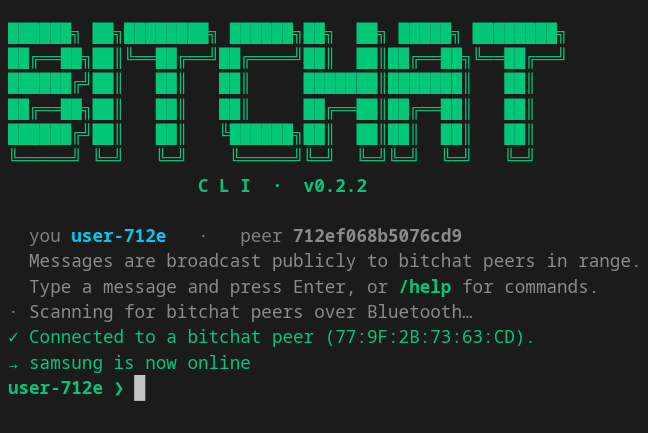
✨ Features
- 🛰️ Serverless & decentralized — no internet, accounts, or servers. Just Bluetooth.
- 📡 Talks to the real app — interoperates with bitchat on iOS/Android for public/broadcast chat.
- 🖼️ Media support — send and receive images, voice notes, and files (
/send <path>); received media is saved to~/.bitchat/downloads/and opened automatically. - 🔐 Signed messages — every packet is Ed25519-signed, matching the format the app requires.
- 🎨 Themed terminal UI — timestamps, a stable color per peer, and clear status glyphs. Honors
NO_COLOR. - 🐍 Pure Python — built on
bleak, runs on Linux, macOS, and Windows.
📦 Installation
Requires Python 3.8+ and a working Bluetooth LE adapter.
From PyPI (recommended):
pip install bitchat-cli
From source:
git clone https://github.com/dearabhin/bitchat-cli.git
cd bitchat-cli
pip install -e .
🚀 Usage
Once installed, launch it from anywhere:
bitchat # or: bitchat-cli
From a source checkout you can also run python -m bitchat_cli.
It immediately starts scanning for nearby bitchat peers, connects to any in range, and broadcasts whatever you type. Type a message and press Enter to send it publicly.
💬 Commands
| Command | Description |
|---|---|
<message> |
Any text not starting with / is broadcast publicly to peers. |
/send <path> |
Send an image, voice note, or file to peers (alias: /file). |
/w |
List known peers (peer ID → nickname). |
/name <nickname> |
Change your nickname and re-announce. |
/clear |
Clear the screen. |
/help |
Show the list of available commands. |
🔧 How it works
bitchat-cli uses bleak as a BLE central that discovers, connects to, and exchanges packets with real bitchat peers in range. It implements bitchat's binary wire protocol — announce / leave / public-message / file-transfer packets, PKCS#7 padding, fragment reassembly, and Ed25519 packet signing — so it can take part in public chat with the official app.
[!NOTE] Scope & limitations. Only public/broadcast chat is supported. Private (Noise-encrypted) messaging, multi-hop mesh relaying, and advertising as a BLE peripheral are not implemented —
bleakis central-only, so this client works one hop with peers it is connected to and is not itself discoverable when idle.
🧪 Protocol self-test
Verify the wire-protocol implementation without any Bluetooth hardware (needs only cryptography):
python selftest.py
Run it from a source checkout — it imports the bitchat_cli package and covers packet encode/decode, signatures, fragmentation, and the media file format.
🤝 Contributing
Contributions are welcome!
- Fork the repository and clone your fork.
- Install in editable mode:
pip install -e . - Create a branch, make your change, and run
python selftest.py. - Open a Pull Request with a clear description.
🙌 Credits
An independent Python port of bitchat — the serverless BLE-mesh chat app. All the wire-format credit belongs to the upstream project; this CLI just speaks its language.
📄 License
Released under the GNU GPL-3.0.
1 maintainer

Metadata
1 maintainer
Release files for bitchat-cli 0.2.3
For a detailed explanation of source distributions (sdists) and built distributions (wheels), please see the package formats documentation.
Source distribution (sdist)
| File | Size | Uploaded | |
|---|---|---|---|
| bitchat_cli-0.2.3.tar.gz | 35.0 kB | Details |
Built distribution (wheel)
| File | Interpreter | ABI | Platform | Reset |
|---|---|---|---|---|
| bitchat_cli-0.2.3-py3-none-any.whl | Python 3 | none | any | Details |
Total release size: 71.1 kB
Release files / bitchat_cli-0.2.3.tar.gz
| Download URL | bitchat_cli-0.2.3.tar.gz |
|---|---|
| Size | 35.0 kB |
| Tags | Source |
|
SHA-256 checksum How to use checksums |
67c6c5842bc9cd459b5bfab7eb5d308f34f8eead7bde55bdffebb5758bbf7dde
|
|
BLAKE2b-256 checksum How to use checksums |
aa4c218fbe66469ff633fc0f1f51976cc83d4355c1f99a648dc5d489d05e4cda
|
| Upload date | |
|
Uploaded using Trusted Publishing? What is trusted publishing? |
Yes |
| Uploaded via |
twine/6.1.0 CPython/3.13.12
|
Provenance
Provenance describes where a file came from. On PyPI, provenance is shared via attestations, which provide a verifiable record of the build or publishing details. View details, limitations and caveats.


PyPI Publish Attestation
PyPI verified that this artifact, at this checksum, originated from the publisher listed below.
Signed by GitHub Actions, verified by PyPI on Jun 24, 2026.
Transparency logRelease files / bitchat_cli-0.2.3-py3-none-any.whl
| Download URL | bitchat_cli-0.2.3-py3-none-any.whl |
|---|---|
| Size | 36.1 kB |
| Tags | Python 3 |
|
SHA-256 checksum How to use checksums |
48505df3a5f7462702527e766d1eba3616a2580a2c5b87cc935ce674d2d296ec
|
|
BLAKE2b-256 checksum How to use checksums |
da429e1d5436abbde977b997be60641644c3bb13df5547e9c9357cc22610da18
|
| Upload date | |
|
Uploaded using Trusted Publishing? What is trusted publishing? |
Yes |
| Uploaded via |
twine/6.1.0 CPython/3.13.12
|
Provenance
Provenance describes where a file came from. On PyPI, provenance is shared via attestations, which provide a verifiable record of the build or publishing details. View details, limitations and caveats.
PyPI Publish Attestation
PyPI verified that this artifact, at this checksum, originated from the publisher listed below.
Signed by GitHub Actions, verified by PyPI on Jun 24, 2026.
Transparency log













