
Implements a powerful analytics library using Redis bitmaps.


Project description


Bitmapist: a powerful analytics library for Redis
Bitmapist makes it possible to implement real-time, highly scalable analytics. The library is very easy to use, enabling you to create reports easily.
Leveraging Redis bitmaps, you can store events for millions of users using a very little amount of memory (megabytes).
[!TIP] Instead of Redis as a backing store, consider using bitmapist-server.
It is our custom data store that exposes a (partial) Redis-compatible API, fully compatible with Bitmapist. It is 443x more memory efficient for this particular use case, improving scalability and cost-effectiveness.
Use cases
Bitmapist can answer questions like:
- Has user 123 been online today? This week? This month?
- Has user 123 performed action "X"?
- How many users have been active this month? This hour?
- How many unique users have performed action "X" this week?
- How many % of users that were active last week are still active?
- How many % of users that were active last month are still active this month?
- What users performed action "X"?
Additionally, it can generate cohort graphs that can do following:
- Cohort over user retention
- How many % of users that were active last [days, weeks, months] are still active?
- How many % of users that performed action X also performed action Y (and this over time)
- And a lot of other things!
Caveat: Avoid large IDs
You should be careful about using large IDs as this will require larger amounts of memory. IDs should be in range [0, 2^32).
Installation
Can be installed very easily via:
$ pip install bitmapist
Or, if you use uv:
$ uv add bitmapist
Usage and examples
Setting things up:
from datetime import datetime, timedelta, timezone
from bitmapist import setup_redis, delete_all_events, mark_event,\
                      MonthEvents, WeekEvents, DayEvents, HourEvents,\
                      BitOpAnd, BitOpOr

now = datetime.now(tz=timezone.utc)
last_month = now - timedelta(days=30)
Mark user 123 as active and has played a song:
mark_event('active', 123)
mark_event('song:played', 123)
Answer if user 123 has been active this month:
assert 123 in MonthEvents('active', now.year, now.month)
assert 123 in MonthEvents('song:played', now.year, now.month)
assert MonthEvents('active', now.year, now.month).has_events_marked() == True
How many users have been active this week?:
iso_year, iso_week, _ = now.isocalendar()
print(len(WeekEvents('active', iso_year, iso_week)))
Iterate over all users active this week:
for uid in WeekEvents('active'):
    print(uid)
If you're interested in "current events", you can omit extra now.whatever
arguments. Events will be populated with current time automatically.
For example, these two calls are equivalent:
MonthEvents('active') == MonthEvents('active', now.year, now.month)
Additionally, for the sake of uniformity, you can create an event from
any datetime object with a from_date static method.
MonthEvents('active').from_date(now) == MonthEvents('active', now.year, now.month)
Get the list of these users (user ids):
iso_year, iso_week, _ = now.isocalendar()
print(list(WeekEvents('active', iso_year, iso_week)))
There are special methods prev and next returning "sibling" events and
allowing you to walk through events in time without any sophisticated
iterators. A delta method allows you to "jump" forward or backward for
more than one step. Uniform API allows you to use all types of base events
(from hour to year) with the same code.
current_month = MonthEvents()
prev_month = current_month.prev()
next_month = current_month.next()
year_ago = current_month.delta(-12)
Every event object has period_start and period_end methods to find a
time span of the event. This can be useful for caching values when the caching
of "events in future" is not desirable:
ev = MonthEvent('active', dt)
if ev.period_end() < now:
    cache.set('active_users_<...>', len(ev))
As something new tracking hourly is disabled (to save memory!) To enable it as default do::
import bitmapist
bitmapist.TRACK_HOURLY = True
Additionally you can supply an extra argument to mark_event to bypass the default value::
mark_event('active', 123, track_hourly=False)
Unique events
Sometimes the date of the event makes little or no sense, for example,
to filter out your premium accounts, or in A/B testing. There is a
UniqueEvents model for this purpose. The model creates only one
Redis key and doesn't depend on the date.
You can combine unique events with other types of events.
A/B testing example:
active_today = DailyEvents('active')
a = UniqueEvents('signup_form:classic')
b = UniqueEvents('signup_form:new')

print("Active users, signed up with classic form", len(active & a))
print("Active users, signed up with new form", len(active & b))
Generic filter example
def premium_up(uid):
    # called when user promoted to premium
    ...
    mark_unique('premium', uid)


def premium_down(uid):
    # called when user loses the premium status
    ...
    unmark_unique('premium', uid)

active_today = DailyEvents('active')
premium = UniqueEvents('premium')

# Add extra Karma for all premium users active today,
# just because today is a special day
for uid in premium & active_today:
    add_extra_karma(uid)
To get the best of two worlds you can mark unique event and regular bitmapist events at the same time.
def premium_up(uid):
    # called when user promoted to premium
    ...
    mark_event('premium', uid, track_unique=True)
Perform bit operations
How many users that have been active last month are still active this month?
active_2_months = BitOpAnd(
    MonthEvents('active', last_month.year, last_month.month),
    MonthEvents('active', now.year, now.month)
)
print(len(active_2_months))

# Is 123 active for 2 months?
assert 123 in active_2_months
Alternatively, you can use standard Python syntax for bitwise operations.
last_month_event = MonthEvents('active', last_month.year, last_month.month)
this_month_event = MonthEvents('active', now.year, now.month)
active_two_months = last_month_event & this_month_event
Operators &, |, ^ and ~ supported.
Work with nested bit operations (imagine what you can do with this ;-))!
active_2_months = BitOpAnd(
    BitOpAnd(
        MonthEvents('active', last_month.year, last_month.month),
        MonthEvents('active', now.year, now.month)
    ),
    MonthEvents('active', now.year, now.month)
)
print(len(active_2_months))
assert 123 in active_2_months

# Delete the temporary AND operation
active_2_months.delete()
Deleting
If you want to permanently remove marked events for any time period you can use the delete() method:
last_month_event = MonthEvents('active', last_month.year, last_month.month)
last_month_event.delete()
If you want to remove all bitmapist events use:
bitmapist.delete_all_events()
When using Bit Operations (ie BitOpAnd) you can (and probably should) delete the results unless you want them cached. There are different ways to go about this:
active_2_months = BitOpAnd(
    MonthEvents('active', last_month.year, last_month.month),
    MonthEvents('active', now.year, now.month)
)
# Delete the temporary AND operation
active_2_months.delete()

# delete all bit operations created in runtime up to this point
bitmapist.delete_runtime_bitop_keys()

# delete all bit operations (slow if you have many millions of keys in Redis)
bitmapist.delete_temporary_bitop_keys()
Cohorts
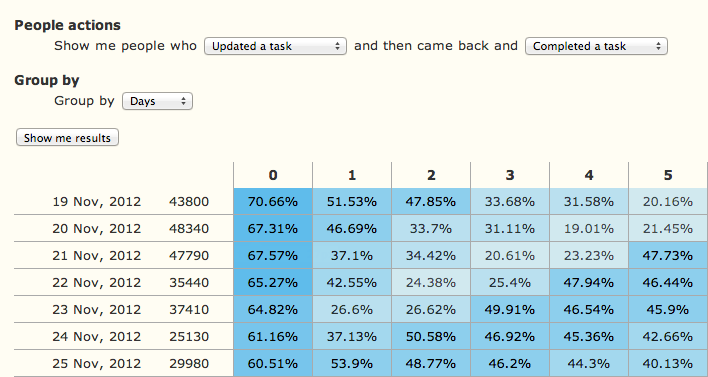
With bitmapist cohort you can get a form and a table rendering of the data you keep in bitmapist. If this sounds confusing please look at Mixpanel.
Here's a simple example of how to generate a form and a rendering of the data you have inside bitmapist:
from bitmapist import cohort

html_form = cohort.render_html_form(
    action_url='/_Cohort',
    selections1=[ ('Are Active', 'user:active'), ],
    selections2=[ ('Task completed', 'task:complete'), ]
)
print(html_form)

dates_data = cohort.get_dates_data(select1='user:active',
                                   select2='task:complete',
                                   time_group='days')

html_data = cohort.render_html_data(dates_data,
                                    time_group='days')

print(html_data)

# All the arguments should come from the FORM element (html_form)
# but to make things more clear I have filled them in directly
This will render something similar to this:
References
If you want to read more about bitmaps please read following:
- http://blog.getspool.com/2011/11/29/fast-easy-realtime-metrics-using-redis-bitmaps/
- http://redis.io/commands/setbit
- http://en.wikipedia.org/wiki/Bit_array
- http://www.slideshare.net/crashlytics/crashlytics-on-redis-analytics
Contributing
Please see our guide here
Local Development
We use uv for dependency management & packaging. Please see here for setup instructions.
Once you have uv installed, you can run the following to install the dependencies in a virtual environment:
uv sync
Testing
Quick Start with Docker (Recommended)
The easiest way to run tests locally is with Docker:
# Start both backend servers
docker compose up -d

# Run tests
uv run pytest

# Stop servers when done
docker compose down
This runs tests against both Redis and bitmapist-server backends automatically.
Alternative: Native Binaries
To run tests with native binaries, you'll need at least one backend server installed:
Redis:
- Install
redis-serverusing your package manager - Ensure it's in your
PATH, or setBITMAPIST_REDIS_SERVER_PATH
Bitmapist-server:
- Download from the releases page
- Ensure it's in your PATH, or set
BITMAPIST_SERVER_PATH
Then run:
uv run pytest
The test suite auto-detects available backends and runs accordingly:
- Docker containers running? Uses them
- Native binaries available? Starts them automatically
- Nothing available? Shows error
Configuration
Environment Variables
Customize backend locations and ports if needed:
# Backend binary paths (optional - auto-detected from PATH by default)
export BITMAPIST_REDIS_SERVER_PATH=/custom/path/to/redis-server
export BITMAPIST_SERVER_PATH=/custom/path/to/bitmapist-server

# Backend ports (optional - defaults shown)
export BITMAPIST_REDIS_PORT=6399
export BITMAPIST_SERVER_PORT=6400
Testing Specific Backends
# Test only Redis
uv run pytest -k redis

# Test only bitmapist-server
uv run pytest -k bitmapist-server
Releasing new versions
- Bump version in
pyproject.toml(or useuv version)uv version --bump minor
- Update the CHANGELOG
- Commit the changes with a commit message "Version X.X.X"
git commit -m "Version $(uv version --short)"
- Tag the current commit with
vX.X.Xgit tag -a -m "Release $(uv version --short)" "v$(uv version --short)"
- Create a new release on GitHub named
vX.X.X - GitHub Actions will publish the new version to PyPI for you
Legal
Copyright: 2012 by Doist Ltd.
License: BSD-3-Clause
Release history Release notifications | RSS feed


Download files
Download the file for your platform. If you're not sure which to choose, learn more about installing packages.
Source Distribution
Built Distribution
Filter files by name, interpreter, ABI, and platform.
If you're not sure about the file name format, learn more about wheel file names.
Copy a direct link to the current filters
File details
Details for the file bitmapist-3.119.tar.gz.
File metadata
- Download URL: bitmapist-3.119.tar.gz
- Upload date:
- Size: 47.4 kB
- Tags: Source
- Uploaded using Trusted Publishing? No
- Uploaded via: uv/0.9.22 {"installer":{"name":"uv","version":"0.9.22","subcommand":["publish"]},"python":null,"implementation":{"name":null,"version":null},"distro":{"name":"Ubuntu","version":"24.04","id":"noble","libc":null},"system":{"name":null,"release":null},"cpu":null,"openssl_version":null,"setuptools_version":null,"rustc_version":null,"ci":true}
File hashes
| Algorithm | Hash digest | |
|---|---|---|
| SHA256 |
5117d131b22469b24017bf2717ea78cac45e153247aa8792dddc9178ca821b15
|
|
| MD5 |
b48a8f97547f3cb420e2c3b64537f37b
|
|
| BLAKE2b-256 |
728d294c9f0542c0e579cba0adc6cb02249d3f93562619d59e9f70c659c6f8f7
|
File details
Details for the file bitmapist-3.119-py3-none-any.whl.
File metadata
- Download URL: bitmapist-3.119-py3-none-any.whl
- Upload date:
- Size: 50.4 kB
- Tags: Python 3
- Uploaded using Trusted Publishing? No
- Uploaded via: uv/0.9.22 {"installer":{"name":"uv","version":"0.9.22","subcommand":["publish"]},"python":null,"implementation":{"name":null,"version":null},"distro":{"name":"Ubuntu","version":"24.04","id":"noble","libc":null},"system":{"name":null,"release":null},"cpu":null,"openssl_version":null,"setuptools_version":null,"rustc_version":null,"ci":true}
File hashes
| Algorithm | Hash digest | |
|---|---|---|
| SHA256 |
eb3f0470e34ad96589652f63613668fc982a8e9cfbaf0dbd5f9c95cd90688497
|
|
| MD5 |
4b93a72d27988cca6e182f8cb81204fd
|
|
| BLAKE2b-256 |
242f7774f004bfd4b9365c4a6bad3ed98840ceaa673e434a83a0e1b0ffc05ed0
|






