
The bit level data interchange format



Introduction
Bitproto is a fast, lightweight and easy-to-use bit level data interchange format for serializing data structures.
The protocol describing syntax looks like the great protocol buffers, but in bit level:
proto example

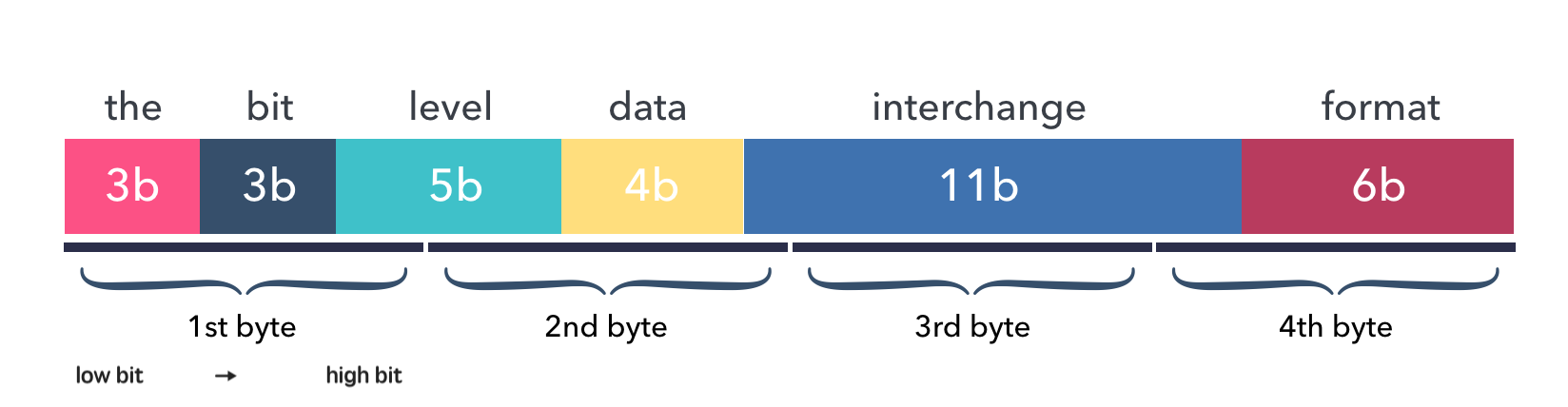
message Data {
    uint3 the = 1
    uint3 bit = 2
    uint5 level = 3
    uint4 data = 4
    uint11 interchange = 6
    uint6 format = 7
}  // 32 bits => 4B
The Data above is called a message, it consists of 7 fields and will occupy a total
of 4 bytes after encoding.
This image shows the layout of data fields in the encoded bytes buffer:
Code Example
Code example to encode bitproto message in C:
struct Data data = {.the = 7,
                    .bit = 7,
                    .level = 31,
                    .data = 15,
                    .interchange = 2047,
                    .format = 63};
unsigned char s[BYTES_LENGTH_DATA] = {0};
EncodeData(&data, s);
// length of s is 4, and the hex format is
// 0xFF 0xFF 0xFF 0xFF
And the decoding example:
struct Data d = {0};
DecodeData(&d, s);
// values of d's fields is now:
// 7 7 31 15 2047 63
Simple and green, isn't it?
Code patterns of bitproto encoding are exactly similar in C, Go and Python.
Features
- Supports bit level data serialization, born for embedded development.
- Supports protocol extensiblity , for forward-compatibility.
- Easy to start, syntax is similar to the well-known protobuf.
- Supports languages: C (without dynamic memory allocation), Go, Python.
- Blazing fast encoding/decoding, benchmark.
- We can clearly know the size and arrangement of encoded data, fields are compact without a single bit gap.
Schema Example
An example for a simple overview of the bitproto schema grammar:
proto pen

// Constant value
const PEN_ARRAY_SIZE = 2 * 3;

// Bit level enum.
enum Color : uint3 {
    COLOR_UNKNOWN = 0
    COLOR_RED = 1
    COLOR_BLUE = 2
    COLOR_GREEN = 3
}

// Type alias
type Timestamp = int64

// Composite structure
message Pen {
    Color color = 1
    Timestamp produced_at = 2
    uint3 number = 3
    uint13 value = 4
}

message Box {
    // Fixed-size array
    Pen[PEN_ARRAY_SIZE] pens = 1;
}
Run the bitproto compiler to generate C files:
$ bitproto c pen.bitproto
Which generates two files: pen_bp.h and pen_bp.c.
We can have an overview of the generated code for the C language:
// Constant value
#define PEN_ARRAY_SIZE 6

// Bit level enum.
typedef uint8_t Color; // 3bit

#define COLOR_UNKNOWN 0
#define COLOR_RED 1
#define COLOR_BLUE 2
#define COLOR_GREEN 3

// Type alias
typedef int64_t Timestamp; // 64bit

// Number of bytes to encode struct Pen
#define BYTES_LENGTH_PEN 11

// Composite structure
struct Pen {
    Color color; // 3bit
    Timestamp produced_at; // 64bit
    uint8_t number; // 3bit
    uint16_t value; // 13bit
};

// Number of bytes to encode struct Box
#define BYTES_LENGTH_BOX 63

struct Box {
    // Fixed-size array
    struct Pen pens[6]; // 498bit
};
You can checkout directory example for a larger example.
Why bitproto ?
There is protobuf, why bitproto?
Origin
The bitproto was originally made when I'm working with embedded programs on micro-controllers. Where usually exists many programming constraints:
- tight communication size.
- limited compiled code size.
- better no dynamic memory allocation.
Protobuf does not live on embedded field natively, it doesn't target ANSI C out of box.
Scenario
It's recommended to use bitproto over protobuf when:
- Working on or with microcontrollers.
- Wants bit-level message fields.
- Wants to know clearly how many bytes the encoded data will occupy.
For scenarios other than the above, I recommend to use protobuf over bitproto.
Vs Protobuf
The differences between bitproto and protobuf are:
-
bitproto supports bit level data serialization, like the bit fields in C.
-
bitproto doesn't use any dynamic memory allocations. Few of protobuf C implementations support this, except nanopb.
-
bitproto doesn't support varying sized data, all types are fixed sized.
bitproto won't encode typing or size reflection information into the buffer. It only encodes the data itself, without any additional data, the encoded data is arranged like it's arranged in the memory, with fixed size, without paddings, think setting aligned attribute to 1 on structs in C.
-
Protobuf works good on forward compatibility. For bitproto, this is the main shortcome of bitproto serialization until v0.4.0, since this version, it supports message's extensiblity by adding two bytes indicating the message size at head of the message's encoded buffer. This breaks the traditional data layout design by encoding some minimal reflection size information in, so this is designed as an optional feature.
Known Shortcomes
-
bitproto doesn't support varying sized types. For example, a
unit37always occupies 37 bits even you assign it a small value like1.Which means there will be lots of zero bytes if the meaningful data occupies little on this type. For instance, there will be
n-1bytes left zero if only one byte of a type withnbytes size is used.Generally, we actually don't care much about this, since there are not so many bytes in communication with embedded devices. The protocol itself is meant to be designed tight and compact. Consider to wrap a compression mechanism like zlib on the encoded buffer if you really care.
-
bitproto can't provide best encoding performance with extensibility.
There's an optimization mode designed in bitproto to generate plain encoding/decoding statements directly at code-generation time, since all types in bitproto are fixed-sized, how-to-encode can be determined earlier at code-generation time. This mode gives a huge performance improvement, but I still haven't found a way to make it work with bitproto's extensibility mechanism together.
Documentation and Links
Documentation:
- Website: https://bitproto.readthedocs.io
- Documentation in Chinese: https://bitproto.readthedocs.io/zh/latest
- Quick start tutorial
- Grammar guide, in one page
Editor syntax highlighting plugins:
Faq:
Blog posts:
- Dev notes in Chinese: https://hit9.dev/post/bitproto-notes
License
1 maintainer

Metadata
1 maintainer
Release files for bitproto 1.3.2
For a detailed explanation of source distributions (sdists) and built distributions (wheels), please see the package formats documentation.
Source distribution (sdist)
| File | Size | Uploaded | |
|---|---|---|---|
| bitproto-1.3.2.tar.gz | 57.5 kB | Details |
Built distribution (wheel)
| File | Interpreter | ABI | Platform | Reset |
|---|---|---|---|---|
| bitproto-1.3.2-py3-none-any.whl | Python 3 | none | any | Details |
Total release size: 124.2 kB
Release files / bitproto-1.3.2.tar.gz
| Download URL | bitproto-1.3.2.tar.gz |
|---|---|
| Size | 57.5 kB |
| Tags | Source |
|
SHA-256 checksum How to use checksums |
15c30d214db1ca0bd5e5316887f54dd77f0f194a47685bc9e600e78b5bce8904
|
|
BLAKE2b-256 checksum How to use checksums |
0beeeefc43a0bbce2f4acdb225c9a18c0c6fa9b830fe58f2f19e20cc2e2c1cd2
|
| Upload date | |
|
Uploaded using Trusted Publishing? What is trusted publishing? |
No |
| Uploaded via |
uv/0.11.7 {"installer":{"name":"uv","version":"0.11.7","subcommand":["publish"]},"python":null,"implementation":{"name":null,"version":null},"distro":{"name":"Ubuntu","version":"24.04","id":"noble","libc":null},"system":{"name":null,"release":null},"cpu":null,"openssl_version":null,"setuptools_version":null,"rustc_version":null,"ci":null}
|
Release files / bitproto-1.3.2-py3-none-any.whl
| Download URL | bitproto-1.3.2-py3-none-any.whl |
|---|---|
| Size | 66.7 kB |
| Tags | Python 3 |
|
SHA-256 checksum How to use checksums |
a2d9d7988dc703b35826ed24088ad8dee080e9f7a96aace6aa5959e8f3aab8d1
|
|
BLAKE2b-256 checksum How to use checksums |
1e5a127bfff6a73abf1cdc46e81de40a9498bee3f74a3c828b276f53f5125c7e
|
| Upload date | |
|
Uploaded using Trusted Publishing? What is trusted publishing? |
No |
| Uploaded via |
uv/0.11.7 {"installer":{"name":"uv","version":"0.11.7","subcommand":["publish"]},"python":null,"implementation":{"name":null,"version":null},"distro":{"name":"Ubuntu","version":"24.04","id":"noble","libc":null},"system":{"name":null,"release":null},"cpu":null,"openssl_version":null,"setuptools_version":null,"rustc_version":null,"ci":null}
|














