
bitssh






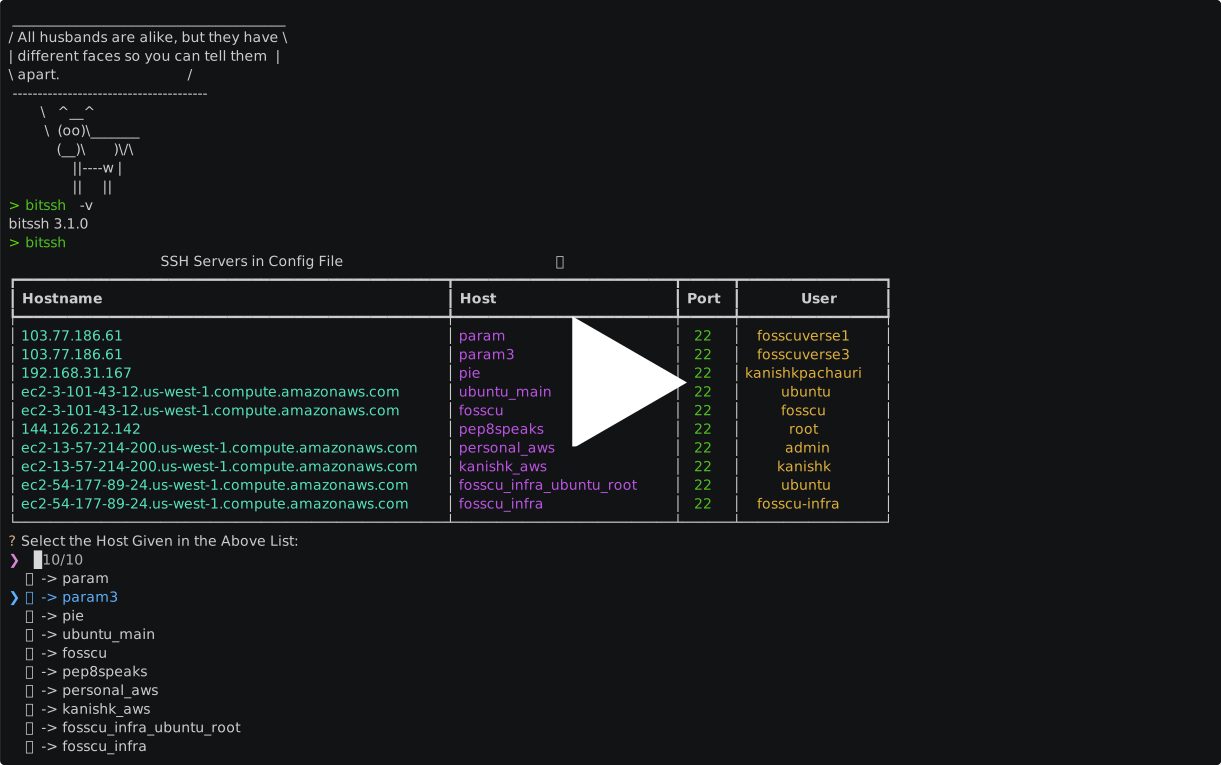
A New and Modern SSH connector written in Python.
Terminal user interface for SSH. It uses ~/.ssh/config to list and connect to hosts.

Demo
Installation
Install bitssh with docker
docker run --rm -it -v ~/.ssh:/root/.ssh mrsunglasses/bitssh:latest
Install bitssh with uvx (recommended)
uvx bitssh
Install bitssh with uv tool (recommended)
uv tool install bitssh
Install bitssh with pip (no recommended)
  pip3 install bitssh

  bitssh
Install from source
  git clone https://github.com/Mr-Sunglasses/bitssh

  cd bitssh

  python3 -m pip3 install -e .

  bitssh
Usage
Connecting to a Host
Simply run bitssh to see all your SSH hosts and connect to one:
bitssh
This displays a table of all hosts from ~/.ssh/config and launches a fuzzy search prompt to select a host. Once selected, bitssh opens an SSH connection to that host.
Check Version
bitssh -v
bitssh --version
Adding a Host
Interactive mode (guided prompts):
bitssh add
Non-interactive mode (CLI flags):
bitssh add --host myserver --hostname 192.168.1.1
bitssh add --host myserver --hostname 192.168.1.1 --user root --port 2222
bitssh add --host myserver --hostname 192.168.1.1 --user admin --identity-file ~/.ssh/id_rsa
| Flag | Description |
|---|---|
--host |
Alias for the SSH connection (required) |
--hostname |
IP address or domain (required) |
--user |
Login username |
--port |
SSH port (default: 22) |
--identity-file |
Path to private key file |
Removing a Host
Interactive mode (multi-select prompt):
bitssh remove
Non-interactive mode (specify one or more hosts):
bitssh remove --host myserver
bitssh remove --host srv1 srv2
SSH Config Reference
bitssh reads hosts from ~/.ssh/config. Example configuration:
Host myserver
    Hostname 192.168.1.1
    User admin
    Port 22

Host production
    Hostname ec2-xxx-xxx-xxx-xxx.compute-1.amazonaws.com
    User ubuntu
    Port 22
    IdentityFile ~/.ssh/aws-key.pem
See the OpenBSD ssh_config reference for all available options.
Troubleshooting
[...]/.ssh/config: no such file or directory
- Check if you have
~/.ssh/configfile - If you don't, create it with
touch ~/.ssh/config
Here's a sample ~/.ssh/config file that is recognized by bitssh:
Host abc
	Hostname xxx.xx.xx.xx
	User test1
	port 22

Host pqr
	Hostname ec2-xxx-xxx-xxx-xxx.compute-1.amazonaws.com
	User ubuntu
	port 22

Host wxy
	Hostname xxx.xx.xxx.xx
	User test2
	port 22
You can check the OpenBSD ssh_config reference for more information on how to setup ~/.ssh/config.
Contributing
Contributions are always welcome!
See CONTRIBUTING.md for ways to get started.
Please adhere to this project's code of conduct.
Authors
License
💪 Thanks to all Wonderful Contributors
Thanks a lot for spending your time helping bitssh grow. Thanks a lot! Keep rocking 🍻

🙏 Support++
This project needs your shiny star ⭐. Don't forget to leave a star ⭐️


1 maintainer

Metadata
1 maintainer
Release files for bitssh 3.7.1
For a detailed explanation of source distributions (sdists) and built distributions (wheels), please see the package formats documentation.
Source distribution (sdist)
| File | Size | Uploaded | |
|---|---|---|---|
| bitssh-3.7.1.tar.gz | 18.5 kB | Details |
Built distribution (wheel)
| File | Interpreter | ABI | Platform | Reset |
|---|---|---|---|---|
| bitssh-3.7.1-py3-none-any.whl | Python 3 | none | any | Details |
Total release size: 30.9 kB
Release files / bitssh-3.7.1.tar.gz
| Download URL | bitssh-3.7.1.tar.gz |
|---|---|
| Size | 18.5 kB |
| Tags | Source |
|
SHA-256 checksum How to use checksums |
6925d38c4f365feed6a2358b79393c52d3dc6b263f07db763c964135ab95421f
|
|
BLAKE2b-256 checksum How to use checksums |
8e105487a1c5d01d92a7e8fa02b78e1680633bb7717c11224a0ce9201145eba7
|
| Upload date | |
|
Uploaded using Trusted Publishing? What is trusted publishing? |
Yes |
| Uploaded via |
twine/6.1.0 CPython/3.13.12
|
Provenance
Provenance describes where a file came from. On PyPI, provenance is shared via attestations, which provide a verifiable record of the build or publishing details. View details, limitations and caveats.


PyPI Publish Attestation
PyPI verified that this artifact, at this checksum, originated from the publisher listed below.
Signed by GitHub Actions, verified by PyPI on Apr 30, 2026.
Transparency logRelease files / bitssh-3.7.1-py3-none-any.whl
| Download URL | bitssh-3.7.1-py3-none-any.whl |
|---|---|
| Size | 12.4 kB |
| Tags | Python 3 |
|
SHA-256 checksum How to use checksums |
d72925e1fabe6671ef9d28f8b0c75ad870243707de1da16c2dd2faddcdbd1b73
|
|
BLAKE2b-256 checksum How to use checksums |
d3a43f2f23668f8a02e16a3b3201216b33711d69e1804863da4feae126e21b50
|
| Upload date | |
|
Uploaded using Trusted Publishing? What is trusted publishing? |
Yes |
| Uploaded via |
twine/6.1.0 CPython/3.13.12
|
Provenance
Provenance describes where a file came from. On PyPI, provenance is shared via attestations, which provide a verifiable record of the build or publishing details. View details, limitations and caveats.
PyPI Publish Attestation
PyPI verified that this artifact, at this checksum, originated from the publisher listed below.
Signed by GitHub Actions, verified by PyPI on Apr 30, 2026.
Transparency log













