
biz.dfch.AsdSte100Vocab







Table of Contents
- Introduction
- Installation
- Create your own vocabulary entries
- Related Projects
- Make a Release
- License
Introduction
This is a Python library, that implements an ASD-STE100 Issue 9 compatible dictionary, that includes the Technical Nouns (TN) and Technical Verbs (TV) from the rule R1.5 and rule R1.12. A word has these properties:
name, the name of a word itemstatus, is this wordAPPROVEDorREJECTED?source, where does this word come from?type_, the word type (similar to "part of speech")category, the TN or TV category or "default"spellings, all correct spellings of theWorditem (this is not a "lemma")meanings, contains one or more meanings for anAPPROVEDword itemalternatives, alistthat contains one or more alternatives for aREJECTEDword itemnote, an optional note forWorditemste_example, an example that shows how to use theWorditem correctlynonste_example, an example that shows an incorrect use of theWorditem
biz.dfch.AsdSte100Lookup uses this library for its word lists and the display of these words.
ASD-STE100: Copyright by (c) ASD.
I am in no way affiliated with ASD. ASD does not endorse my work.
NOTE: the previous name on pypi was biz-dfch-ste100vocab. From version v0.8.0 this library name is biz-dfch-asdste100vocab.
Installation
biz-dfch-asdste100vocab is on PyPI. Create a virtual environment and install the library with pip:
pip install biz-dfch-asdste100vocab
Or install with uv:
uv add biz-dfch-asdste100vocab
Create your own vocabulary entries
When you want to create your own word entries, you install the dev dependencies:
uv sync --extra dev
# or
uv pip install -e ".[dev]"
# or
pip install -e ".[dev]"
Then use this command:
uv run vocab new
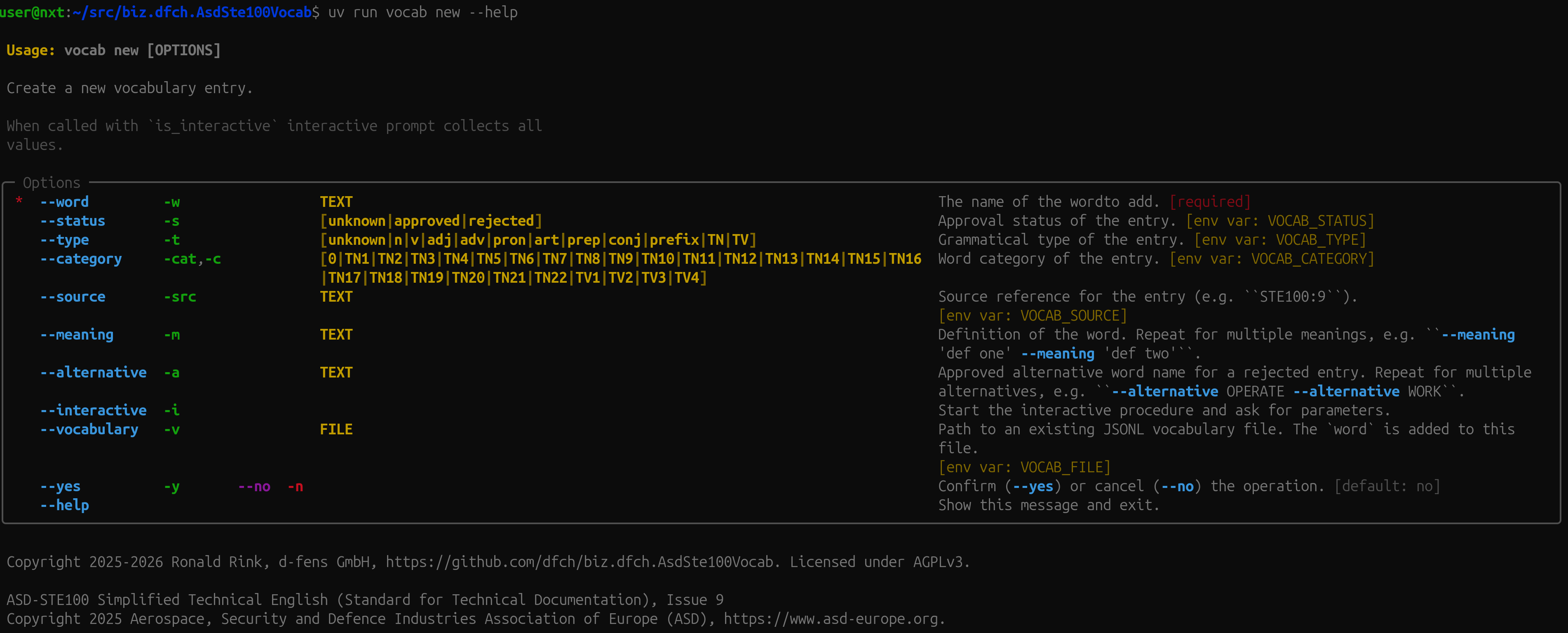
You can use an .env file (or environment variables, see --help) to define recurring parameters (see example below) and you can use --interactive (or -i) for an interactive wizard. Each time you start the program, it will create a new JSONL entry.
The specified file must exist. The program will only append to an existing file, but not create a new file.
Example .env file
cat .env
VOCAB_STATUS=approved
VOCAB_SOURCE=ARBITRARY-SOURCE
VOCAB_TYPE=TN
VOCAB_CATEGORY=TN21
VOCAB_FILE=./vocab.jsonl
Related Projects
This library is part of the ASD-STE100 tooling family:
- biz.dfch.AsdSte100Vocab — this repo: the ASD-STE100 Issue 9 vocabulary library
- biz.dfch.AsdSte100Rules — the ASD-STE100 Issue 9 ruleset library
- biz.dfch.AsdSte100Nlp — WordNet-based synonym lookup for ASD-STE100 words
- biz.dfch.AsdSte100Lookup — an interactive CLI to look up words and rules
- biz.dfch.AsdSte100Mcp — an MCP server exposing vocabulary and rules lookup tools
Make a Release
1. Make sure that all tests are satisfactory
Before you make the release, make sure the CI pipeline is green on the dev branch:
uv run --frozen ruff format --check
uv run --frozen ruff check
uv run --frozen pylint $(git ls-files '*.py') || true
uv run --frozen python -m unittest discover -v -s tests -t . -p "test_*.py"
2. Increase the version
Update the version in pyproject.toml:
version = "x.y.z"
3. Commit and push to dev
git add pyproject.toml
git commit -m "chore: bump version to vx.y.z"
git push origin dev
4. Merge dev into main
git checkout main
git merge dev
git push origin main
5. Create and push a version tag
This will create a binary artifact of the application and add it to the release.
export VERSION=x.y.z
git tag v${VERSION}
git push origin v${VERSION}
Then, select the dev branch to continue your work.
git checkout dev
Pushing the tag automatically triggers the publish.yml workflow, which will:
- build the
sdistandsheelwithuv build(this step creates the artifact) - create a GitHub Release with auto-generated release notes
- upload the files as a release artifact (this step adds the artifact to the release)
License
This library is licensed under the GNU Affero General Public License. See LICENSE for more information.
ASD-STE100 Simplified Technical English (Standard for Technical Documentation), Issue 9
Copyright 2025 Aerospace, Security and Defence Industries Association of Europe (ASD), https://www.asd-europe.org.
This library or the maintainer is not affiliated with ASD. ASD does not endorse this library or the maintainer.
1 maintainer

Release files for biz-dfch-asdste100vocab 0.8.1
For a detailed explanation of source distributions (sdists) and built distributions (wheels), please see the package formats documentation.
Source distribution (sdist)
| File | Size | Uploaded | |
|---|---|---|---|
| biz_dfch_asdste100vocab-0.8.1.tar.gz | 498.3 kB | Details |
Built distribution (wheel)
| File | Interpreter | ABI | Platform | Reset |
|---|---|---|---|---|
| biz_dfch_asdste100vocab-0.8.1-py3-none-any.whl | Python 3 | none | any | Details |
Total release size: 1.0 MB
Release files / biz_dfch_asdste100vocab-0.8.1.tar.gz
| Download URL | biz_dfch_asdste100vocab-0.8.1.tar.gz |
|---|---|
| Size | 498.3 kB |
| Tags | Source |
|
SHA-256 checksum How to use checksums |
62dc2105c2700fbc5c84aeb9b0a6dd92988bbd96c9951689d486f0081bf58e8b
|
|
BLAKE2b-256 checksum How to use checksums |
c6adb3357b4063a7bf6aa73653cc0ce7cddfa0594aa8c2723ceb979a9fc4bd0e
|
| Upload date | |
|
Uploaded using Trusted Publishing? What is trusted publishing? |
Yes |
| Uploaded via |
twine/7.0.0 CPython/3.13.14
|
Provenance
Provenance describes where a file came from. On PyPI, provenance is shared via attestations, which provide a verifiable record of the build or publishing details. View details, limitations and caveats.


PyPI Publish Attestation
PyPI verified that this artifact, at this checksum, originated from the publisher listed below.
Signed by GitHub Actions, verified by PyPI on Aug 2, 2026.
Transparency logRelease files / biz_dfch_asdste100vocab-0.8.1-py3-none-any.whl
| Download URL | biz_dfch_asdste100vocab-0.8.1-py3-none-any.whl |
|---|---|
| Size | 524.8 kB |
| Tags | Python 3 |
|
SHA-256 checksum How to use checksums |
bd6a8ef424ba65b8d7e3c604edd98ffa482c81932950fff0913dd2900871a81f
|
|
BLAKE2b-256 checksum How to use checksums |
e35498d5725693e594d8421c20732168ce75c946976bbf259c03390e2d44bf46
|
| Upload date | |
|
Uploaded using Trusted Publishing? What is trusted publishing? |
Yes |
| Uploaded via |
twine/7.0.0 CPython/3.13.14
|
Provenance
Provenance describes where a file came from. On PyPI, provenance is shared via attestations, which provide a verifiable record of the build or publishing details. View details, limitations and caveats.
PyPI Publish Attestation
PyPI verified that this artifact, at this checksum, originated from the publisher listed below.
Signed by GitHub Actions, verified by PyPI on Aug 2, 2026.
Transparency log













