
BizMap





📖 Documentation: lucas-simao.github.io/bizmap
Who reads and writes this column — across all your services — and what triggers it?
BizMap reads your code and maps every entrypoint (HTTP route, job, queue consumer, database trigger) through the functions it calls to the tables and columns they read and write, across repositories and languages. It is static and deterministic: no LLM, no tokens, no account, no server.
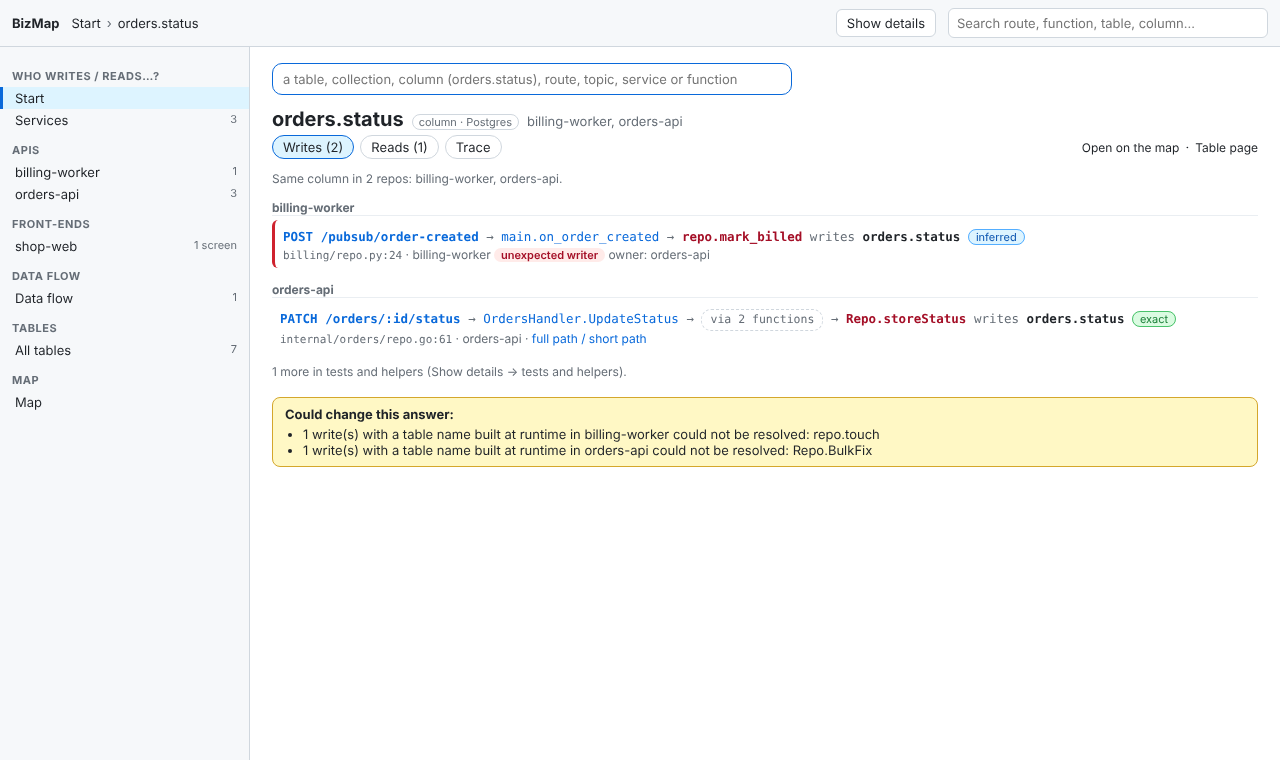
bizmap export --format html on a fictional three-repo shop: the page opens on who writes / reads X? and answers like bizmap who-writes.
Documentation · Demo repository · Changelog · PyPI
Install
pipx install bizmap # or: pip install bizmap (Python 3.11+)
Quickstart
bizmap scan . --mermaid          # writes bizmap.graph.json (+ bizmap.graph.mmd)
bizmap who-writes orders.status  # every writer, from the route / consumer / job that runs it
bizmap who-reads orders          # every reader
bizmap trace collection:orders   # where its data comes from and goes (feeds, queues, HTTP)
bizmap export --format html --out bizmap.html   # one offline page that opens on "who writes / reads X?"
bizmap why orders.status         # writers, readers, what triggers them, who calls in
bizmap report                    # how much of the code BizMap understood
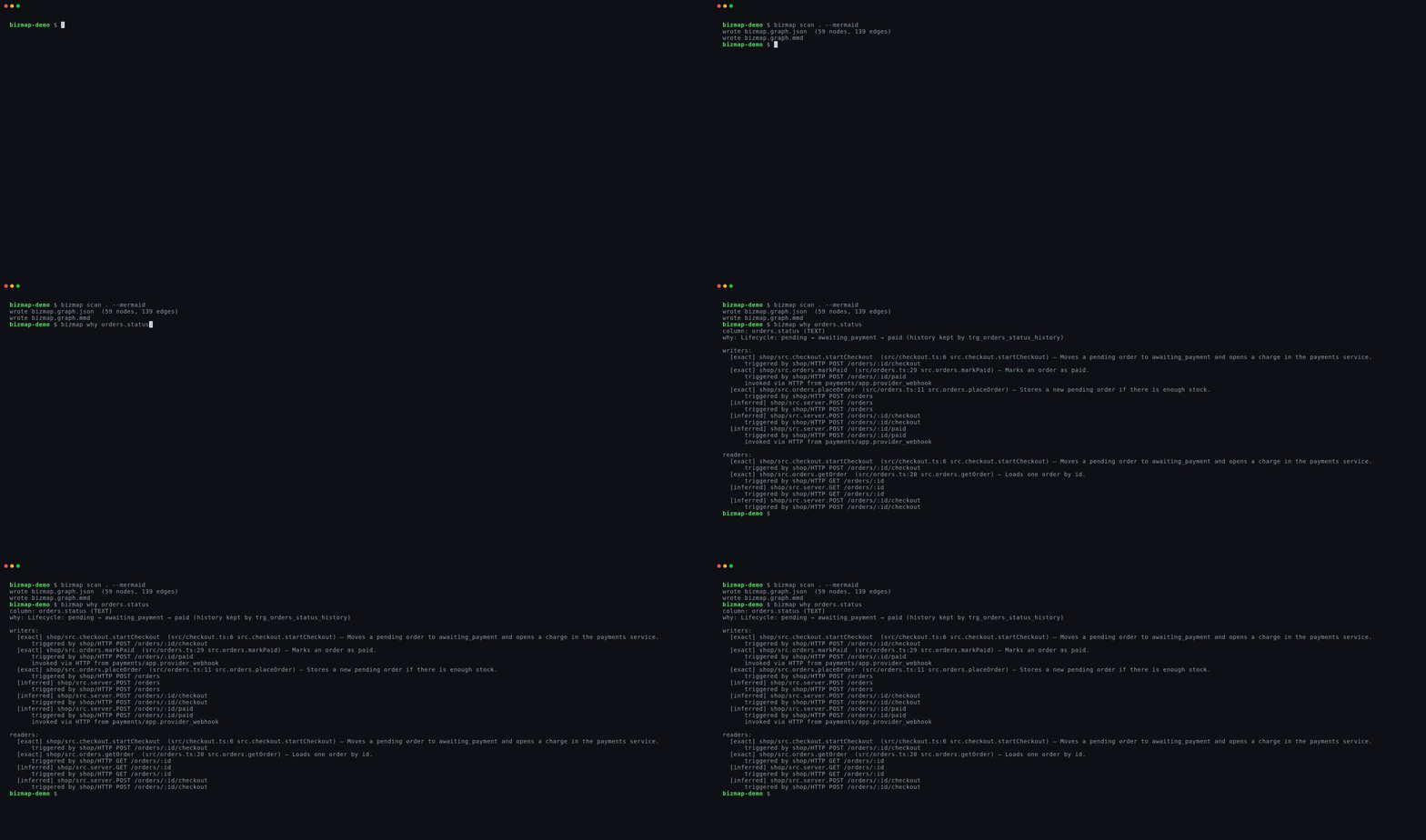
Recorded on bizmap-demo: a TypeScript shop and a Python payments service sharing one Postgres database.
Several services at once — one graph, HTTP calls between them matched:
bizmap scan --discover .                    # every git repo under the current folder
bizmap report --cross-service               # which routes reach which services over HTTP
bizmap scan ./web ./api ./billing           # or list them (or a bizmap.yaml with `repos:`)
Try it on the demo in one minute:
git clone https://github.com/lucas-simao/bizmap-demo && cd bizmap-demo
bizmap scan . && bizmap why orders.status
What it answers
- Can I drop or rename
orders.status? — every reader and writer, in every repo. - Which endpoints touch
users.email? — useful for LGPD/GDPR data mapping. - What happens to the database when the front-end calls
placeOrder()? - What does this pull request touch? — as a comment, on every push.
Every answer points at file:line and carries a confidence (exact,
inferred, unknown). What BizMap cannot see — dynamic SQL, a URL built at
runtime, a service that was not scanned — is reported as such, not guessed.
Ask from the terminal
$ bizmap who-writes table:orders
Who writes orders (table · Postgres · billing-worker, orders-api)

billing-worker
  pubsub order-created → consumer.handle_order_created → repo.mark_billed  writes orders (status)  [exact]
      billing/repo.py:24

orders-api
  PATCH /orders/{id}/status → OrdersHandler.UpdateStatus → Repo.SetStatus  writes orders (status)  [exact]
      internal/orders/repo.go:33

Could change this answer:
  1 write(s) with a table name built at runtime in orders-api could not be resolved: Repo.BulkFix
bizmap who-reads does the same for readers and bizmap trace follows the
data across tables, queues and services. A name that matches different things
(a Firestore collection and a Postgres table called orders) is listed, never
guessed. --format json (stable, bizmap.query/v1) for tools, --format md
for a PR, --lang pt-BR. See the docs.
What it finds
| Routes / triggers | Data access | Outbound HTTP | |
|---|---|---|---|
| Go | Echo (groups, const paths, wrappers), ticker/cron jobs | pgx, database/sql, sqlx |
net/http (env/const/Sprintf URLs) |
| Python | FastAPI, Flask (routers, blueprints, factories), Celery, RQ, Cloud Tasks, Pub/Sub, Firebase Functions, while True workers |
SQLAlchemy Core/ORM, raw SQL, SQL dicts/constants, Firestore, Supabase | httpx, requests, aiohttp |
| JS / TS | Express, Fastify, Hono (chains, mounts), Supabase Edge Functions | pg/postgres, Supabase |
fetch, axios, ky, ofetch, got (instances, factories, tsconfig paths) |
| SQL | CREATE TRIGGER |
schema replayed from schema.sql / migrations / Alembic, views, RLS policies |
— |
| Database | |
|---|---|
| PostgreSQL | schema, migrations, views, triggers and the tables their functions write, RLS policies |
| Supabase | Postgres + from() / rpc() + Edge Functions |
| Firestore | collections, document refs, transactions and batches, Firebase triggers |
Details per detector: Languages and detectors.
Pull request comment
The GitHub Action posts one comment per PR (updated on each push) with the routes, functions, tables and columns the change reaches — across services — and flags migrations that drop or rename columns still in use.
# .github/workflows/bizmap-impact.yml
on: pull_request
permissions:
  contents: read
  pull-requests: write
jobs:
  bizmap:
    runs-on: ubuntu-latest
    steps:
      - uses: actions/checkout@v4   # the base commit is fetched if missing; fetch-depth: 0 also works
      - uses: lucas-simao/bizmap@v0.15.0
        with:
          path: .
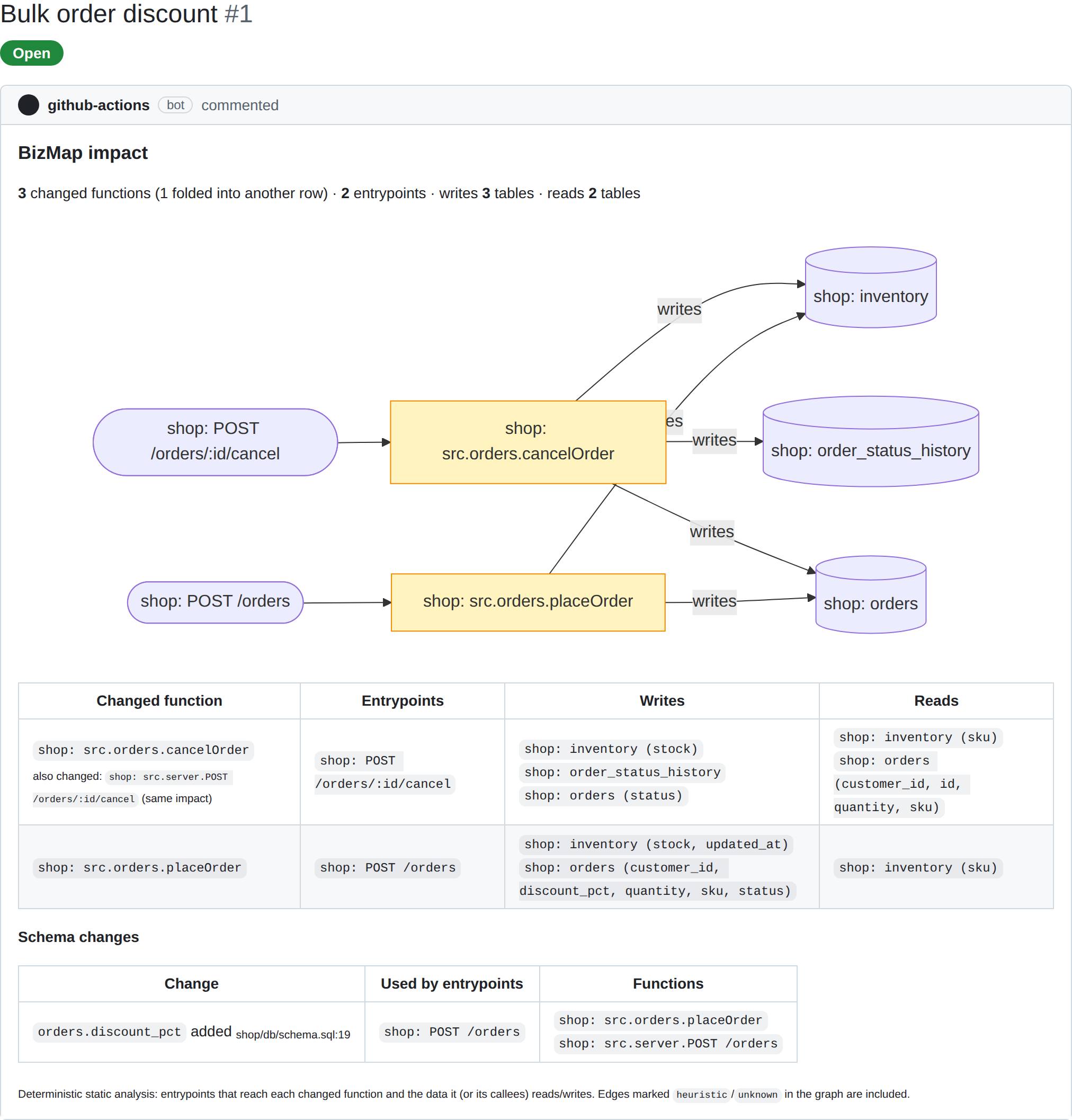
Live examples: bizmap-demo pull requests. Inputs, outputs and behaviour: GitHub Action.
Ask the graph from your coding agent (MCP)
bizmap mcp serves the graph to Claude Code, Cursor, Claude Desktop or any MCP
client — read-only and offline — so an agent can ask what writes
orders.status? or what does this diff touch? instead of grepping.
bizmap scan . --out bizmap.graph.json
claude mcp add bizmap -- bizmap mcp --graph "$PWD/bizmap.graph.json"   # Claude Code
Cursor (.cursor/mcp.json):
{ "mcpServers": { "bizmap": { "command": "bizmap", "args": ["mcp", "--graph", "${workspaceFolder}/bizmap.graph.json"] } } }
Tools (search, call_graph, function_data, table_usage, impact,
why_column) and other clients: MCP server.
Interactive map (HTML)
bizmap export --graph bizmap.graph.json --format html --out bizmap.html # --lang pt-BR
One self-contained, offline HTML file. It opens on the question you came with —
who writes / reads orders.status? — answered like bizmap who-writes (entrypoint →
via N functions → the writer, confidence, file:line, and what could change the answer),
then a summary strip, findings (an unexpected writer, tables written by several services,
names built at runtime, orphan functions), a services × tables matrix and a map around
the entity you pick.
Below that, it reads the system like a book: services, then domains (routes grouped by path), then a route's call tree down to the tables and columns it reads and writes. Front-ends list their screens, the routes each one uses and the calls that matched no route. Search finds any route, function, table or column.
Details: export · the start screen.
Documentation
| Getting started | Install and walk through the demo |
| Configuration | bizmap.yaml: services:, database:, repos:, excludes, overrides |
| Commands | scan, why, who-writes, who-reads, trace, report, impact, registry, mcp, export |
| MCP server | Let Claude Code, Cursor or any MCP client query the graph |
| GitHub Action | The PR comment |
| Graph format | bizmap.graph.json, node and edge types, confidence |
| FAQ and limitations | What static analysis can and cannot see |
How it compares
- Code search / call graphs (Sourcegraph, CodeQL, tree-sitter code-graph MCP servers) know functions and calls, but not which table and column a function touches, nor which route in another repo an HTTP client hits.
- Data-pipeline lineage (dbt, OpenLineage, warehouse catalogs) starts at the warehouse or at runtime; it does not see the application code that writes the data.
- Commercial code-level lineage (Gable, Foundational) does this for data teams as a hosted platform. BizMap is the open-source, local, developer-first take on it.
Releasing
Bump the version (pyproject.toml, src/bizmap/__init__.py, graph version,
docs/graph-schema.md, README and docs/github-action.md @vX.Y.Z), date the CHANGELOG section, merge, then
push a tag on that commit:
git tag -a vX.Y.Z <commit> -m "vX.Y.Z" && git push origin vX.Y.Z
.github/workflows/release.yml checks that the tag is on main and matches the
version and the CHANGELOG, runs the tests, builds, publishes to PyPI with Trusted
Publishing (no token) and creates the GitHub release with that CHANGELOG section.
One-time setup is described at the top of the workflow. Tags on commits older
than the workflow (v0.3.3–v0.3.5) are published with Actions → Release → Run
workflow (from main) and the tag name. Limit the pypi environment to
main and v* tags (Deployment branches and tags) so no other branch can
publish.
Development
From a clone of the repository:
pip install -e ".[dev]"
ruff check src tests
pytest -q
tests/test_snapshots.py keeps a golden, line-per-link summary of every example in
tests/snapshots/*.txt and checks that each example scans to byte-identical JSON under
several PYTHONHASHSEED values. When a detector change is intended, refresh with
BIZMAP_UPDATE_SNAPSHOTS=1 pytest tests/test_snapshots.py and review the +/- diff
in the PR.
Fixtures are synthetic (orders, users, invoices, …); no proprietary code is
included. MIT licensed. Contributions that add detector rules for new frameworks are
especially welcome — please include a minimal example and let the snapshot diff show
what changed.
1 maintainer

Metadata
1 maintainer
Release files for bizmap 0.15.0
For a detailed explanation of source distributions (sdists) and built distributions (wheels), please see the package formats documentation.
Source distribution (sdist)
| File | Size | Uploaded | Provenance | Actions |
|---|---|---|---|---|
| bizmap-0.15.0.tar.gz | 1.0 MB | With provenance | Details for bizmap-0.15.0.tar.gz |
Built distribution (wheel)
| File | Interpreter | ABI | Platform | Actions Reset |
|---|---|---|---|---|
| bizmap-0.15.0-py3-none-any.whl | Python 3 | none | any | Details for bizmap-0.15.0-py3-none-any.whl |
Total release size: 1.6 MB
Release files / bizmap-0.15.0.tar.gz
| Download URL | bizmap-0.15.0.tar.gz |
|---|---|
| Size | 1.0 MB |
| Tags | Source |
|
SHA-256 checksum How to use checksums |
27467aed7c4bf658d4da24160f2b0fc76e509ddb3c3ba2ac845230d9a75e2329
|
|
BLAKE2b-256 checksum How to use checksums |
d1f50643cefacf654a629571532d8b6f1afb92f50a034e83cc22b34142168636
|
| Upload date | |
|
Uploaded using Trusted Publishing? What is trusted publishing? |
Yes |
| Uploaded via |
twine/7.0.0 CPython/3.13.16
|
Provenance
Provenance describes where a file came from. On PyPI, provenance is shared via attestations, which provide a verifiable record of the build or publishing details. View details, limitations and caveats.


PyPI Publish Attestation
PyPI verified that this artifact, at this checksum, originated from the publisher listed below.
Signed by GitHub Actions, verified by PyPI on Nov 22, 2026.
Transparency logRelease files / bizmap-0.15.0-py3-none-any.whl
| Download URL | bizmap-0.15.0-py3-none-any.whl |
|---|---|
| Size | 633.2 kB |
| Tags | Python 3 |
|
SHA-256 checksum How to use checksums |
45d8e4933ddbecb81aaa3ee7184f63535d57d3fadbf70c52697fe034d4beff98
|
|
BLAKE2b-256 checksum How to use checksums |
2e1bb3f52ead5dee26f84235a0c26178b076188bc56d4875e90bf700e627705f
|
| Upload date | |
|
Uploaded using Trusted Publishing? What is trusted publishing? |
Yes |
| Uploaded via |
twine/7.0.0 CPython/3.13.16
|
Provenance
Provenance describes where a file came from. On PyPI, provenance is shared via attestations, which provide a verifiable record of the build or publishing details. View details, limitations and caveats.
PyPI Publish Attestation
PyPI verified that this artifact, at this checksum, originated from the publisher listed below.
Signed by GitHub Actions, verified by PyPI on Nov 22, 2026.
Transparency logSecurity for bizmap 0.15.0
Provenance
Provenance describes where a file came from. On PyPI, provenance is shared via attestations, which provide a verifiable record of the build or publishing details. View details, limitations and caveats.
Full provenance
Both files in this release have been uploaded with provenance metadata.
Attestation for bizmap-0.15.0.tar.gz
PyPI Publish Attestation
PyPI verified that this artifact, at this checksum, originated from the publisher listed below.
Signed by GitHub Actions, verified by PyPI on Nov 22, 2026.
Transparency logA note on package security
PyPI is a repository for distributing packages, not a service for auditing them. While third-party security researchers and our staff do their best to detect and remove malicious packages, PyPI cannot guarantee the quality, security or suitability of any given package.
To learn more about protecting yourself from malicious actors, visit our package security documentation.














