
A python tool for Bangla text processing

Project description
bangla-text-processing-kit
A python tool kit for processing Bangla texts.
- bangla-text-processing-kit
How to use
Installing
There are three installation options of the bkit package. These are:
bkit: The most basic version of bkit with the normalization, cleaning and tokenization capabilities.
pip install bkit
bkit[lemma]: Everything in the basic version plus lemmatization capability.
pip install bkit[lemma]
bkit[all]: Everything that are available in bkit including normalization, cleaning, tokenization, lemmatization, NER, POS and shallow parsing.
pip install bkit[all]
Checking text
bkit.utils.is_bangla(text) -> bool: Checks if text contains only Bangla characters, digits, spaces, punctuations and some symbols. Returns true if so, else return false.bkit.utils.is_digit(text) -> bool: Checks if text contains only Bangla digit characters. Returns true if so, else return false.bkit.utils.contains_digit(text, check_english_digits) -> bool: Checks if text contains any digits. By default checks only Bangla digits. Returns true if so, else return false.bkit.utils.contains_bangla(text) -> bool: Checks if text contains any Bangla character. Returns true if so, else return false.
Transforming text
Text transformation includes the normalization and cleaning procedures. To transform text, use the bkit.transform module. Supported functionalities are:
Normalizer
This module normalize Bangla text using the following steps:
- Character normalization
- Zero width character normalization
- Halant normalization
- Vowel-kar normalization
- Punctuation space normalization
import bkit

text = 'অাামাব় । '
print(list(text))
# >>> ['অ', 'া', 'া', 'ম', 'া', 'ব', '়', ' ', '।', ' ']

normalizer = bkit.transform.Normalizer(
    normalize_characters=True,
    normalize_zw_characters=True,
    normalize_halant=True,
    normalize_vowel_kar=True,
    normalize_punctuation_spaces=True
)

clean_text = normalizer(text)
print(clean_text, list(clean_text))
# >>> আমার। ['আ', 'ম', 'া', 'র', '।']
Character Normalization
This module performs character normalization in Bangla text. It performs nukta normalization, Assamese normalization, Kar normalization, legacy character normalization and Punctuation normalization sequentially.
import bkit

text = 'আমাব়'
print(list(text))
# >>> ['আ', 'ম', 'া', 'ব', '়']

text = bkit.transform.normalize_characters(text)

print(list(text))
# >>> ['আ', 'ম', 'া', 'র']
Punctuation space normalization
Normalizes punctuation spaces i.e. adds necessary spaces before or after specific punctuations, also removes if necessary.
import bkit

text = 'রহিম(২৩)এ কথা বলেন   ।তিনি (    রহিম ) আরও জানান, ১,২৪,৩৫,৬৫৪.৩২৩ কোটি টাকা ব্যায়ে...'

clean_text = bkit.transform.normalize_punctuation_spaces(text)
print(clean_text)
# >>> রহিম (২৩) এ কথা বলেন। তিনি (রহিম) আরও জানান, ১,২৪,৩৫,৬৫৪.৩২৩ কোটি টাকা ব্যায়ে...
Zero width characters normalization
There are two zero-width characters. These are Zero Width Joiner (ZWJ) and Zero Width Non Joiner (ZWNJ) characters. Generally ZWNJ is not used with Bangla texts and ZWJ joiner is used with র only. So, these characters are normalized based on these intuitions.
import bkit
text = 'র্যাকেট'
print(f"text: {text} \t Characters: {list(text)}")
# >>> text: র্যাকেট Characters: ['র', '\u200d', '্', 'য', '\u200c', 'া', 'ক', 'ে', 'ট']
clean_text = bkit.transform.normalize_zero_width_chars(text)
print(f"text: {clean_text} \t Characters: {list(clean_text)}")
# >>> text: র্যাকেট Characters: ['র', '\u200d', '্', 'য', 'া', 'ক', 'ে', 'ট']
Halant (হসন্ত) normalization
This function normalizes halant (হসন্ত) [0x09CD] in Bangla text. While using this function, it is recommended to normalize the zero width characters at first, e.g. using the bkit.transform.normalize_zero_width_chars() function.
During the normalization it also handles the ত্ -> ৎ conversion. For a valid conjunct letter (যুক্তবর্ণ) where 'ত' is the former character, can take one of 'ত', 'থ', 'ন', 'ব', 'ম', 'য', and 'র' as the next character. The conversion is perform based on this intuition.
During the halant normalization, the following cases are handled.
- Remove any leading and tailing halant of a word and/or text.
- Replace two or more consecutive occurrences of halant by a single halant.
- Remove halant between any characters that do not follow or precede a halant character. Like a halant that follows or precedes a vowel, kar, য়, etc will be removed.
- Remove multiple fola (multiple ref, ro-fola and jo-fola)
import bkit
text = 'আসন্্্ন আসফাকুল্লাহ্ আলবত্ আলবত্ র্যাব ই্সি'
print(list(text))
# >>> ['আ', 'স', 'ন', '্', '্', '্', 'ন', ' ', 'আ', 'স', 'ফ', 'া', 'ক', 'ু', 'ল', '্', 'ল', 'া', 'হ', '্', '\u200c', ' ', 'আ', 'ল', 'ব', 'ত', '্', '\u200d', ' ', 'আ', 'ল', 'ব', 'ত', '্', ' ', 'র', '\u200d', '্', 'য', 'া', 'ব', ' ', 'ই', '্', 'স', 'ি']
clean_text = bkit.transform.normalize_zero_width_chars(text)
clean_text = bkit.transform.normalize_halant(clean_text)
print(clean_text, list(clean_text))
# >>> আসন্ন আসফাকুল্লাহ আলবৎ আলবৎ র্যাব ইসি ['আ', 'স', 'ন', '্', 'ন', ' ', 'আ', 'স', 'ফ', 'া', 'ক', 'ু', 'ল', '্', 'ল', 'া', 'হ', ' ', 'আ', 'ল', 'ব', 'ৎ', ' ', 'আ', 'ল', 'ব', 'ৎ', ' ', 'র', '\u200d', '্', 'য', 'া', 'ব', ' ', 'ই', 'স', 'ি']
Kar ambiguity
Normalizes kar ambiguity with vowels, ঁ, ং, and ঃ. It removes any kar that is preceded by a vowel or consonant diacritics like: আা will be normalized to আ. In case of consecutive occurrence of kars like: কাাাী, only the first kar will be kept like: কা.
import bkit

text = 'অংশইে অংশগ্রহণইে আাারো এখনওো আলবার্তোে সাধুু কাাাী'
print(list(text))
# >>> ['অ', 'ং', 'শ', 'ই', 'ে', ' ', 'অ', 'ং', 'শ', 'গ', '্', 'র', 'হ', 'ণ', 'ই', 'ে', ' ', 'আ', 'া', 'া', 'র', 'ো', ' ', 'এ', 'খ', 'ন', 'ও', 'ো', ' ', 'আ', 'ল', 'ব', 'া', 'র', '্', 'ত', 'ো', 'ে', ' ', 'স', 'া', 'ধ', 'ু', 'ু', ' ', 'ক', 'া', 'া', 'া', 'ী']

clean_text = bkit.transform.normalize_kar_ambiguity(text)
print(clean_text, list(clean_text))
# >>> অংশই অংশগ্রহণই আরো এখনও আলবার্তো সাধু কা ['অ', 'ং', 'শ', 'ই', ' ', 'অ', 'ং', 'শ', 'গ', '্', 'র', 'হ', 'ণ', 'ই', ' ', 'আ', 'র', 'ো', ' ', 'এ', 'খ', 'ন', 'ও', ' ', 'আ', 'ল', 'ব', 'া', 'র', '্', 'ত', 'ো', ' ', 'স', 'া', 'ধ', 'ু', ' ', 'ক', 'া']
Clean text
Clean text using the following steps sequentially:
- Removes all HTML tags
- Removes all URLs
- Removes all emojis (optional)
- Removes all digits (optional)
- Removes all punctuations (optional)
- Removes all extra spaces
- Removes all non bangla characters
import bkit

text = '<a href=some_URL>বাংলাদেশ</a>\nবাংলাদেশের   আয়তন ১.৪৭ লক্ষ কিলোমিটার!!!'

clean_text = bkit.transform.clean_text(text)
print(clean_text)
# >>> বাংলাদেশ বাংলাদেশের আয়তন লক্ষ কিলোমিটার
Clean punctuations
Remove punctuations with the given replace_with character/string.
import bkit

text = 'আমরা মাঠে ফুটবল খেলতে পছন্দ করি!'

clean_text = bkit.transform.clean_punctuations(text)
print(clean_text)
# >>> আমরা মাঠে ফুটবল খেলতে পছন্দ করি

clean_text = bkit.transform.clean_punctuations(text, replace_with=' PUNC ')
print(clean_text)
# >>> আমরা মাঠে ফুটবল খেলতে পছন্দ করি PUNC
Clean digits
Remove any bangla digit from text by replacing with the given replace_with character/string.
import bkit

text = 'তার বাসা ৭৯ নাম্বার রোডে।'

clean_text = bkit.transform.clean_digits(text)
print(clean_text)
# >>> তার বাসা    নাম্বার রোডে।

clean_text = bkit.transform.clean_digits(text, replace_with='#')
print(clean_text)
# >>> তার বাসা ## নাম্বার রোডে।
Multiple spaces
Clean multiple consecutive whitespace characters including space, newlines, tabs, vertical tabs, etc. It also removes leading and trailing whitespace characters.
import bkit

text = 'তার বাসা ৭৯   \t\t নাম্বার   রোডে।\nসে খুব \v ভালো ছেলে।'

clean_text = bkit.transform.clean_multiple_spaces(text)
print(clean_text)
# >>> তার বাসা ৭৯ নাম্বার রোডে। সে খুব ভালো ছেলে।

clean_text = bkit.transform.clean_multiple_spaces(text, keep_new_line=True)
print(clean_text)
# >>> তার বাসা ৭৯ নাম্বার রোডে।\nসে খুব \n ভালো ছেলে।
URLs
Clean URLs from text and replace the URLs with any given string.
import bkit

text = 'আমি https://xyz.abc সাইটে ব্লগ লিখি। এই ftp://10.17.5.23/books সার্ভার থেকে আমার বইগুলো পাবে। এই https://bn.wikipedia.org/wiki/%E0%A6%A7%E0%A6%BE%E0%A6%A4%E0%A7%81_(%E0%A6%AC%E0%A6%BE%E0%A6%82%E0%A6%B2%E0%A6%BE_%E0%A6%AC%E0%A7%8D%E0%A6%AF%E0%A6%BE%E0%A6%95%E0%A6%B0%E0%A6%A3) লিঙ্কটিতে ভালো তথ্য আছে।'

clean_text = bkit.transform.clean_urls(text)
print(clean_text)
# >>> আমি   সাইটে ব্লগ লিখি। এই   সার্ভার থেকে আমার বইগুলো পাবে। এই   লিঙ্কটিতে ভালো তথ্য আছে।

clean_text = bkit.transform.clean_urls(text, replace_with='URL')
print(clean_text)
# >>> আমি URL সাইটে ব্লগ লিখি। এই URL সার্ভার থেকে আমার বইগুলো পাবে। এই URL লিঙ্কটিতে ভালো তথ্য আছে।
Emojis
Clean emoji and emoticons from text and replace those with any given string.
import bkit

text = 'কিছু ইমোজি হল: 😀🫅🏾🫅🏿🫃🏼🫃🏽🫃🏾🫃🏿🫄🫄🏻🫄🏼🫄🏽🫄🏾🫄🏿🧌🪸🪷🪹🪺🫘🫗🫙🛝🛞🛟🪬🪩🪫🩼🩻🫧🪪🟰'

clean_text = bkit.transform.clean_emojis(text, replace_with='<EMOJI>')
print(clean_text)
# >>> কিছু ইমোজি হল: <EMOJI>
HTML tags
Clean HTML tags from text and replace those with any given string.
import bkit

text = '<a href=some_URL>বাংলাদেশ</a>'

clean_text = bkit.transform.clean_html(text)
print(clean_text)
# >>> বাংলাদেশ
Multiple punctuations
Remove multiple consecutive punctuations and keep the first punctuation only.
import bkit

text = 'কি আনন্দ!!!!!'

clean_text = bkit.transform.clean_multiple_punctuations(text)
print(clean_text)
# >>> কি আনন্দ!
Special characters
Remove special characters like $, #, @, etc and replace them with the given string. If no character list is passed, [$, #, &, %, @] are removed by default.
import bkit

text = '#বাংলাদেশ$'

clean_text = bkit.transform.clean_special_characters(text, characters=['#', '$'], replace_with='')
print(clean_text)
# >>> বাংলাদেশ
Non Bangla characters
Non Bangla characters include characters and punctuation not used in Bangla like english or other language's alphabets and replace them with the given string.
import bkit

text = 'এই শূককীট হাতিশুঁড় Heliotropium indicum, অতসী, আকন্দ Calotropis gigantea গাছের পাতার রসালো অংশ আহার করে।'

clean_text = bkit.transform.clean_non_bangla(text, replace_with='')
print(clean_text)
# >>> এই শূককীট হাতিশুঁড়  , অতসী, আকন্দ  গাছের পাতার রসালো অংশ আহার করে
Text Analysis
Word count
The bkit.analysis.count_words function can be used to get the word counts. It has the following paramerts:
"""
Args:
  text (Tuple[str, List[str]]): The text to count words from. If a string is provided,
    it will be split into words. If a list of strings is provided, each string will
    be split into words and counted separately.
  clean_punctuation (bool, optional): Whether to clean punctuation from the words count. Defaults to False.
  punct_replacement (str, optional): The replacement for the punctuation. Only applicable if
    clean_punctuation is True. Defaults to "".
  return_dict (bool, optional): Whether to return the word count as a dictionary.
    Defaults to False.
  ordered (bool, optional): Whether to return the word count in descending order. Only
    applicable if return_dict is True. Defaults to False.

Returns:
  Tuple[int, Dict[str, int]]: If return_dict is True, returns a tuple containing the
    total word count and a dictionary where the keys are the words and the values
    are their respective counts. If return_dict is False, returns only the total
    word count as an integer.
"""

# examples

import bkit

text='অভিষেকের আগের দিন গতকাল রোববার ওয়াশিংটনে বিশাল এক সমাবেশে হাজির হন ট্রাম্প। তিনি উচ্ছ্বসিত ভক্ত-সমর্থকদের আমেরিকার পতনের যবনিকা ঘটানোর অঙ্গীকার করেন।'
total_words=bkit.analysis.count_words(text)
print(total_words)
# >>> 21
Sentence Count
The bkit.analysis.count_sentences function can be used to get the word counts. It has the following paramerts:
"""
Counts the number of sentences in the given text or list of texts.

Args:
  text (Tuple[str, List[str]]): The text or list of texts to count sentences from.
  return_dict (bool, optional): Whether to return the result as a dictionary. Defaults to False.
  ordered (bool, optional): Whether to order the result in descending order.
    Only applicable if return_dict is True. Defaults to False.

Returns:
  int or dict: The count of sentences. If return_dict is True, returns a dictionary with sentences as keys
    and their counts as values. If return_dict is False, returns the total count of sentences.

Raises:
  AssertionError: If ordered is True but return_dict is False.
"""

# examples
import bkit

text = 'তুমি কোথায় থাক? ঢাকা বাংলাদেশের\n রাজধানী। কি অবস্থা তার! ১২/০৩/২০২২ তারিখে সে ৪/ক ঠিকানায় গিয়ে ১২,৩৪৫.২৩ টাকা দিয়েছিল।'

count = bkit.analysis.count_sentences(text)
print(count)
# >>> 5

count = bkit.analysis.count_sentences(text, return_dict=True, ordered=True)
print(count)
# >>> {'তুমি কোথায় থাক?': 1, 'ঢাকা বাংলাদেশের\n': 1, 'রাজধানী।': 1, 'কি অবস্থা তার!': 1, '১২/০৩/২০২২ তারিখে সে ৪/ক ঠিকানায় গিয়ে ১২,৩৪৫.২৩ টাকা দিয়েছিল।': 1}
Lemmatization
Lemmatization is implemented based on our this paper BanLemma: A Word Formation Dependent Rule and Dictionary Based Bangla Lemmatizer
Lemmatize text
Lemmatize a given text. Generally expects the text to be a sentence.
import bkit

text = 'পৃথিবীর জনসংখ্যা ৮ বিলিয়নের কিছু কম'

lemmatized = bkit.lemmatizer.lemmatize(text)

print(lemmatized)
# >>> পৃথিবী জনসংখ্যা ৮ বিলিয়ন কিছু কম
Lemmatize word
Lemmatize a word given the PoS information.
import bkit

text = 'পৃথিবীর'

lemmatized = bkit.lemmatizer.lemmatize_word(text, 'noun')

print(lemmatized)
# >>> পৃথিবী
Stemmer
Stemming is the process of reducing words to their base or root form. Our implementation achieves this by conditionally stripping away predefined prefixes and suffixes from each word.
Stem word
import bkit

stemmer = bkit.stemmer.SimpleStemmer()
stemmer.word_stemer('নগরবাসী')
# >>> নগর
Stem Sentence
import bkit

stemmer = bkit.stemmer.SimpleStemmer()
stemmer.sentence_stemer('বিকেলে রোদ কিছুটা কমেছে।')
# >>> বিকেল রোদ কিছু কম
Tokenization
Tokenize a given text. The bkit.tokenizer module is used to tokenizer text into tokens. It supports three types of tokenization.
Word tokenization
Tokenize text into words. Also separates some punctuations including comma, danda (।), question mark, etc.
import bkit

text = 'তুমি কোথায় থাক? ঢাকা বাংলাদেশের রাজধানী। কি অবস্থা তার! ১২/০৩/২০২২ তারিখে সে ৪/ক ঠিকানায় গিয়ে ১২,৩৪৫ টাকা দিয়েছিল।'

tokens = bkit.tokenizer.tokenize(text)

print(tokens)
# >>> ['তুমি', 'কোথায়', 'থাক', '?', 'ঢাকা', 'বাংলাদেশের', 'রাজধানী', '।', 'কি', 'অবস্থা', 'তার', '!', '১২/০৩/২০২২', 'তারিখে', 'সে', '৪/ক', 'ঠিকানায়', 'গিয়ে', '১২,৩৪৫', 'টাকা', 'দিয়েছিল', '।']
Word and Punctuation tokenization
Tokenize text into words and any punctuation.
import bkit

text = 'তুমি কোথায় থাক? ঢাকা বাংলাদেশের রাজধানী। কি অবস্থা তার! ১২/০৩/২০২২ তারিখে সে ৪/ক ঠিকানায় গিয়ে ১২,৩৪৫ টাকা দিয়েছিল।'

tokens = bkit.tokenizer.tokenize_word_punctuation(text)

print(tokens)
# >>> ['তুমি', 'কোথায়', 'থাক', '?', 'ঢাকা', 'বাংলাদেশের', 'রাজধানী', '।', 'কি', 'অবস্থা', 'তার', '!', '১২', '/', '০৩', '/', '২০২২', 'তারিখে', 'সে', '৪', '/', 'ক', 'ঠিকানায়', 'গিয়ে', '১২', ',', '৩৪৫', 'টাকা', 'দিয়েছিল', '।']
Sentence tokenization
Tokenize text into sentences.
import bkit

text = 'তুমি কোথায় থাক? ঢাকা বাংলাদেশের রাজধানী। কি অবস্থা তার! ১২/০৩/২০২২ তারিখে সে ৪/ক ঠিকানায় গিয়ে ১২,৩৪৫ টাকা দিয়েছিল।'

tokens = bkit.tokenizer.tokenize_sentence(text)

print(tokens)
# >>> ['তুমি কোথায় থাক?', 'ঢাকা বাংলাদেশের রাজধানী।', 'কি অবস্থা তার!', '১২/০৩/২০২২ তারিখে সে ৪/ক ঠিকানায় গিয়ে ১২,৩৪৫ টাকা দিয়েছিল।']
Named Entity Recognition (NER)
Predicts the tags of the Named Entities of a given text.
import bkit

text = 'তুমি কোথায় থাক? ঢাকা বাংলাদেশের রাজধানী। কি অবস্থা তার! ১২/০৩/২০২২ তারিখে সে ৪/ক ঠিকানায় গিয়ে ১২,৩৪৫.২৩ টাকা দিয়েছিল।'

ner = bkit.ner.Infer('ner-noisy-label')
predictions = ner(text)

print(predictions)
# >>> [('তুমি', 'O', 0.9998692), ('কোথায়', 'O', 0.99988306), ('থাক?', 'O', 0.99983954), ('ঢাকা', 'B-GPE', 0.99891424), ('বাংলাদেশের', 'B-GPE', 0.99710876), ('রাজধানী।', 'O', 0.9995414), ('কি', 'O', 0.99989176), ('অবস্থা', 'O', 0.99980336), ('তার!', 'O', 0.99983263), ('১২/০৩/২০২২', 'B-D&T', 0.97921854), ('তারিখে', 'O', 0.9271435), ('সে', 'O', 0.99934834), ('৪/ক', 'B-NUM', 0.8297553), ('ঠিকানায়', 'O', 0.99728775), ('গিয়ে', 'O', 0.9994825), ('১২,৩৪৫.২৩', 'B-NUM', 0.99740463), ('টাকা', 'B-UNIT', 0.99914896), ('দিয়েছিল।', 'O', 0.9998908)]
Named Entity Recognition (NER) Visualization
It takes the model's output and visualizes the NER tag for every word in the text.
import bkit

text = 'তুমি কোথায় থাক? ঢাকা বাংলাদেশের রাজধানী। কি অবস্থা তার! ১২/০৩/২০২২ তারিখে সে ৪/ক ঠিকানায় গিয়ে ১২,৩৪৫.২৩ টাকা দিয়েছিল।'
ner = bkit.ner.Infer('ner-noisy-label')
predictions = ner(text)
bkit.ner.visualize(predictions)

Parts of Speech (PoS) tagging
Predicts the tags of the parts of speech of a given text.
import bkit

text = 'গত কিছুদিন ধরেই জ্বালানিহীন অবস্থায় একটি ছোট মাছ ধরার নৌকায় ১৫০ জন রোহিঙ্গা আন্দামান সাগরে ভাসমান অবস্থায় রয়েছে ।'
pos = bkit.pos.Infer('pos-noisy-label')
predictions = pos(text)

print(predictions)
# >>> [('গত', 'ADJ', 0.98674506), ('কিছুদিন', 'NNC', 0.97954935), ('ধরেই', 'PP', 0.96124), ('জ্বালানিহীন', 'ADJ', 0.93195957), ('অবস্থায়', 'NNC', 0.9960413), ('একটি', 'QF', 0.9912915), ('ছোট', 'ADJ', 0.9810739), ('মাছ', 'NNC', 0.97365385), ('ধরার', 'NNC', 0.96641904), ('নৌকায়', 'NNC', 0.99680626), ('১৫০', 'QF', 0.996005), ('জন', 'NNC', 0.99434316), ('রোহিঙ্গা', 'NNP', 0.9141038), ('আন্দামান', 'NNP', 0.9856694), ('সাগরে', 'NNP', 0.7122378), ('ভাসমান', 'ADJ', 0.93841994), ('অবস্থায়', 'NNC', 0.9965629), ('রয়েছে', 'VF', 0.99680847), ('।', 'PUNCT', 0.9963098)]
Parts of Speech (PoS) Visualization
"It takes the model's output and visualizes the Part-of-Speech tag for every word in the text.
import bkit

text = 'গত কিছুদিন ধরেই জ্বালানিহীন অবস্থায় একটি ছোট মাছ ধরার নৌকায় ১৫০ জন রোহিঙ্গা আন্দামান সাগরে ভাসমান অবস্থায় রয়েছে ।'
pos = bkit.pos.Infer('pos-noisy-label')
predictions = pos(text)
bkit.pos.visualize(predictions)

Shallow Parsing (Constituency Parsing)
Predicts the shallow parsing tags of a given text.
import bkit

text = 'তুমি কোথায় থাক? ঢাকা বাংলাদেশের রাজধানী। কি অবস্থা তার! ১২/০৩/২০২২ তারিখে সে ৪/ক ঠিকানায় গিয়ে ১২,৩৪৫.২৩ টাকা দিয়েছিল।'
shallow = bkit.shallow.Infer(pos_model='pos-noisy-label')
predictions = shallow(text)
print(predictions)
# >>> (S (VP (NP (PRO তুমি)) (VP (ADVP (ADV কোথায়)) (VF থাক))) (NP (NNP ?) (NNP ঢাকা) (NNC বাংলাদেশের)) (ADVP (ADV রাজধানী)) (NP (NP (NP (NNC ।)) (NP (PRO কি))) (NP (QF অবস্থা) (NNC তার)) (NP (PRO !))) (NP (NP (QF ১২/০৩/২০২২) (NNC তারিখে)) (VNF সে) (NP (QF ৪/ক) (NNC ঠিকানায়))) (VF গিয়ে))
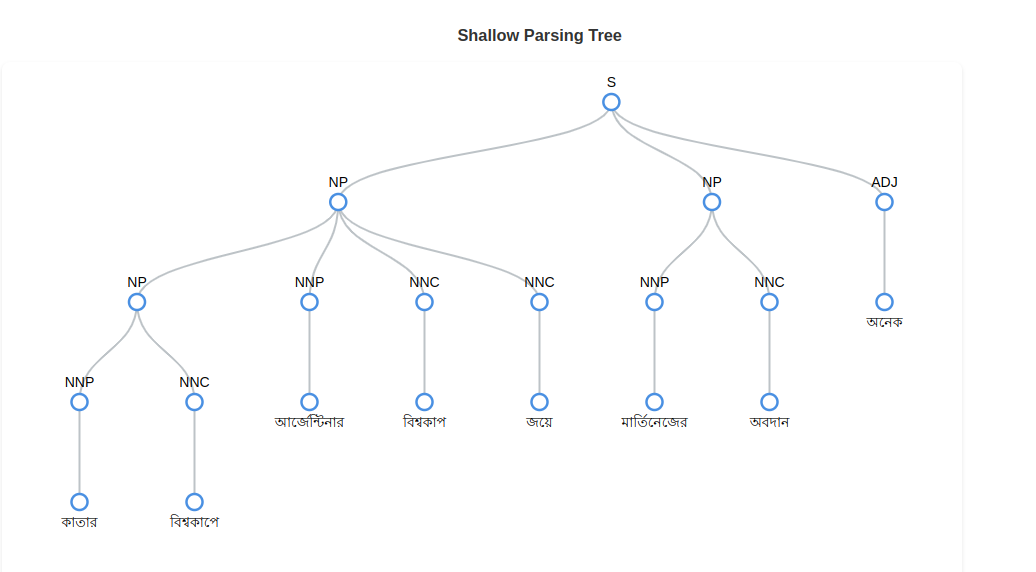
Shallow Parsing Visualization
It converts model predictions into an interactive shallow parsing Tree for clear and intuitive analysis
from bkit import shallow
text = "কাতার বিশ্বকাপে আর্জেন্টিনার বিশ্বকাপ জয়ে মার্তিনেজের অবদান অনেক।"
shallow = shallow.Infer(pos_model='pos-noisy-label')
predictions = shallow(text)
shallow.visualize(predictions)
Dependency Parsing
Predicts the dependency parsing tags of a given text.
from bkit import dependency

text = "কাতার বিশ্বকাপে আর্জেন্টিনার বিশ্বকাপ জয়ে মার্তিনেজের অবদান অনেক।"
dep =dependency.Infer('dependency-parsing')
predictions = dep(text)
print(predictions)
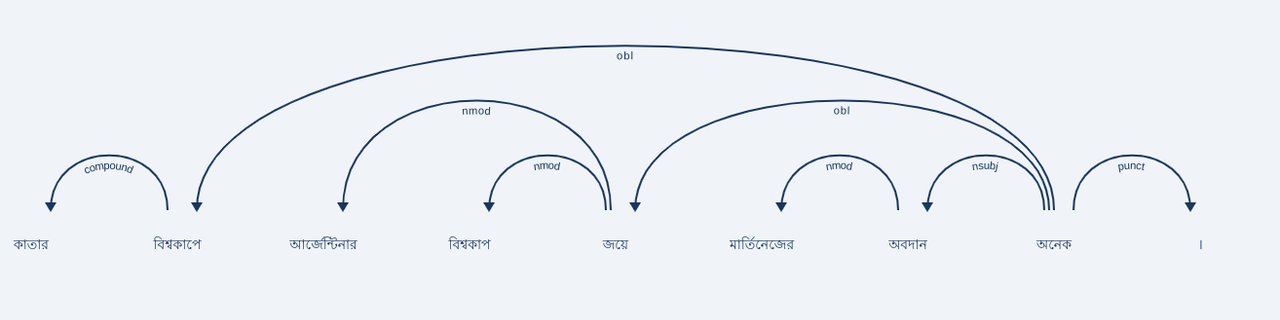
# >>>[{'text': 'কাতার বিশ্বকাপে আর্জেন্টিনার বিশ্বকাপ জয়ে মার্তিনেজের অবদান অনেক ।', 'predictions': [{'token_start': 1, 'token_end': 0, 'label': 'compound'}, {'token_start': 7, 'token_end': 1, 'label': 'obl'}, {'token_start': 4, 'token_end': 2, 'label': 'nmod'}, {'token_start': 4, 'token_end': 3, 'label': 'nmod'}, {'token_start': 7, 'token_end': 4, 'label': 'obl'}, {'token_start': 6, 'token_end': 5, 'label': 'nmod'}, {'token_start': 7, 'token_end': 6, 'label': 'nsubj'}, {'token_start': 7, 'token_end': 7, 'label': 'root'}, {'token_start': 7, 'token_end': 8, 'label': 'punct'}]}]
Dependency Parsing Visualization
It converts model predictions into an interactive dependency graph for clear and intuitive analysis
from bkit import dependency
text = "কাতার বিশ্বকাপে আর্জেন্টিনার বিশ্বকাপ জয়ে মার্তিনেজের অবদান অনেক।"
dep = dependency.Infer('dependency-parsing')
predictions = dep(text)
dependency.visualize(predictions)
Coreference Resolution
Predicts the coreferent clusters of a given text.
import bkit

text = "তারাসুন্দরী ( ১৮৭৮ - ১৯৪৮ ) অভিনেত্রী । ১৮৮৪ সালে বিনোদিনীর সহায়তায় স্টার থিয়েটারে যোগদানের মাধ্যমে তিনি অভিনয় শুরু করেন । প্রথমে তিনি গিরিশচন্দ্র ঘোষের চৈতন্যলীলা নাটকে এক বালক ও সরলা নাটকে গোপাল চরিত্রে অভিনয় করেন ।"
coref = bkit.coref.Infer('coref')
predictions = coref(text)
print(predictions)
# >>> {'text': ['তারাসুন্দরী', '(', '১৮৭৮', '-', '১৯৪৮', ')', 'অভিনেত্রী', '।', '১৮৮৪', 'সালে', 'বিনোদিনীর', 'সহায়তায়', 'স্টার', 'থিয়েটারে', 'যোগদানের', 'মাধ্যমে', 'তিনি', 'অভিনয়', 'শুরু', 'করেন', '।', 'প্রথমে', 'তিনি', 'গিরিশচন্দ্র', 'ঘোষের', 'চৈতন্যলীলা', 'নাটকে', 'এক', 'বালক', 'ও', 'সরলা', 'নাটকে', 'গোপাল', 'চরিত্রে', 'অভিনয়', 'করেন', '।'], 'mention_indices': {0: [{'start_token': 0, 'end_token': 0}, {'start_token': 6, 'end_token': 6}, {'start_token': 10, 'end_token': 10}, {'start_token': 16, 'end_token': 16}, {'start_token': 22, 'end_token': 22}]}}
Coreference Resolution Visualization
It takes the model's output and creates an interactive visualization to clearly depict coreference resolution, highlighting the relationships between entities in the text
from bkit import coref

text = "তারাসুন্দরী ( ১৮৭৮ - ১৯৪৮ ) অভিনেত্রী । ১৮৮৪ সালে বিনোদিনীর সহায়তায় স্টার থিয়েটারে যোগদানের মাধ্যমে তিনি অভিনয় শুরু করেন । প্রথমে তিনি গিরিশচন্দ্র ঘোষের চৈতন্যলীলা নাটকে এক বালক ও সরলা নাটকে গোপাল চরিত্রে অভিনয় করেন ।"
coref = coref.Infer('coref')
predictions = coref(text)
coref.visualize(predictions)


Download files
Download the file for your platform. If you're not sure which to choose, learn more about installing packages.
Source Distribution
Built Distribution
Filter files by name, interpreter, ABI, and platform.
If you're not sure about the file name format, learn more about wheel file names.
Copy a direct link to the current filters
File details
Details for the file bkit-0.0.9.tar.gz.
File metadata
- Download URL: bkit-0.0.9.tar.gz
- Upload date:
- Size: 2.4 MB
- Tags: Source
- Uploaded using Trusted Publishing? No
- Uploaded via: twine/5.1.1 CPython/3.10.12
File hashes
| Algorithm | Hash digest | |
|---|---|---|
| SHA256 |
5b3779ca1b9868a760e40f89a6e00ce112e199688bd5601652c5cca638b2ec87
|
|
| MD5 |
1d4364c0934f8e9eac268acd106045f6
|
|
| BLAKE2b-256 |
ef018be0812bb7dfc6399216750d3f6cb623bc711ab5eb081ae6ec7e0e17c8db
|
File details
Details for the file bkit-0.0.9-py3-none-any.whl.
File metadata
- Download URL: bkit-0.0.9-py3-none-any.whl
- Upload date:
- Size: 2.4 MB
- Tags: Python 3
- Uploaded using Trusted Publishing? No
- Uploaded via: twine/5.1.1 CPython/3.10.12
File hashes
| Algorithm | Hash digest | |
|---|---|---|
| SHA256 |
168ebcdb96a0aa9ede5e6d72f6bfab7e1e94a354c52dc4eceff7ee163663f003
|
|
| MD5 |
ae0fec0c8aed5c8aa337cd01ee488eb9
|
|
| BLAKE2b-256 |
faf76bc996cf8fc00a6b6ce53ee0cc01f81c4000b554429fdef95c2705341a44
|






