
A small backtesting utility.
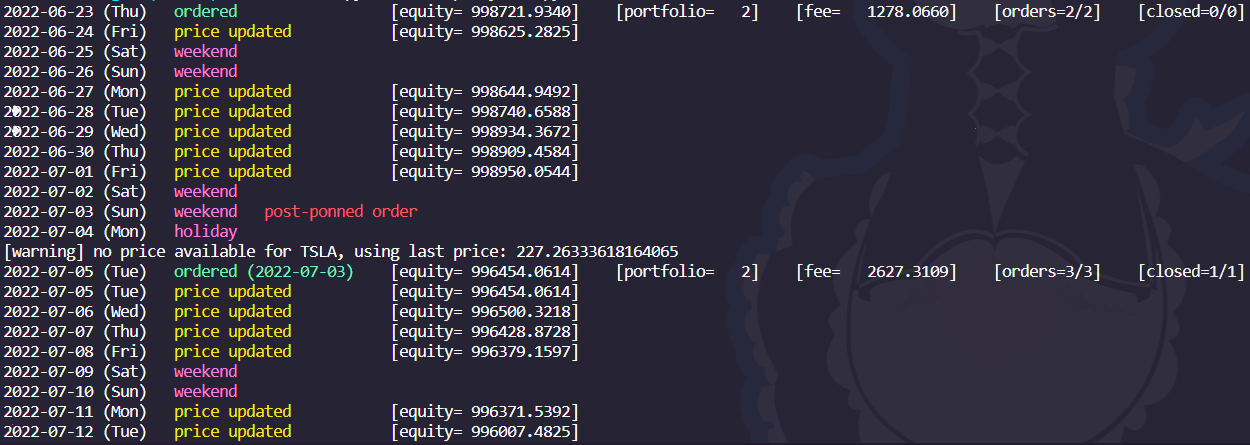

Install
pip install --upgrade bktest
Usage
bktest [OPTIONS]
Options
| Option | Value | Default | Format | Description |
|---|---|---|---|---|
--start |
<start date> |
orders' first date |
date (ISO-8601) |
The starting date of the backtesting. If the value is before the first ordering day, the value will be discarded. |
--end |
<end date> |
orders' last date |
date (ISO-8601) |
The ending date of the backtesting. If the value is after today, the value will be discarded. |
--offset-before-trading |
<days> |
1 |
int |
Number of day to offset to push each date of the portfolio before trading it. |
--offset-before-ending |
<days> |
0 |
int |
Number of day to continue the backtest after every orders. |
--order-file |
<file> |
path |
The single order file to use. The file must contain symbol, quantity and date information. | |
--single-file-provider-column-date |
<column> |
date |
string |
Change the date column name to use. |
--single-file-provider-column-symbol |
<column> |
symbol |
string |
Change the symbol column name to use. |
--single-file-provider-column-quantity |
<column> |
quantity |
string |
Change the quantity column name to use. |
--order-files |
<directory> |
path |
The directory of order file to use. The filename must be a date. The file must contain symbol and quantity information. | |
--order-files-extension |
<extension> |
csv |
[csv, parquet, json] |
Change the file extension to use when listing for order files. |
--initial-cash |
<amount> |
100_000 |
number |
Change the initial cash to use for the backtesting. |
--quantity-mode |
<mode> |
percent |
[percent, share] |
If the mode is share, all quantities will be interpreted as integers. If the mode is percent, all values will be multiplied by the current cash value. |
--weekends |
false |
Enable ordering on weekends. | ||
--holidays |
false |
Enable ordering on holidays. | ||
--symbol-mapping |
<mapping> |
path (.json) |
Specify a custom symbol mapping file enabling vendor-id translation. | |
--no-caching |
false |
Disable prices caching. | ||
--fee-model |
<model> |
expression or constant |
Specify a fee model to use. The value can be a constant. Or an expression that allow the usage of the price and quantity variable. Example: abs(price * quantity) * 0.1 |
|
--holiday-provider |
<name> |
nyse |
[legacy, nyse] |
Specify which holiday provider to use. |
--rfr-file |
<directory> |
path |
The directory of rfr file to use. The file must contain a column with date information and a column with the rfr information in %. | |
--rfr-file-column-date |
<column> |
date |
string |
Change the date column name to use. |
Exporters
Multiple exporters can be enabled at one time.
Console
The console exporter allows a quick look at the backtest.
| Option | Value | Default | Format | Description |
|---|---|---|---|---|
--console |
false |
Enable the console exporter. | ||
--console-format |
<format> |
text |
[text, json] |
Change the output format. |
--console-file |
<file> |
out |
[out, err] |
Change the output file. |
--console-hide-skips |
false |
Do not the skipped days. | ||
--console-text-no-color |
false |
Disable colors in the output. (only if the format is text) |
Dump
The dump exporter generate a dump of the portfolio at each day.
| Option | Value | Default | Format | Description |
|---|---|---|---|---|
--dump |
false |
Enable the dump exporter. | ||
--dump-output-file |
<file> |
dump.csv |
path |
Specify the output file. |
--dump-auto-delete |
false |
Automatically delete the previous dump file if it is present. |
QuantStats
Generate a tearsheet from the backtest data.
| Option | Value | Default | Format | Description |
|---|---|---|---|---|
--quantstats |
false |
Enable the quantstats exporter. | ||
--quantstats-output-file-html |
<file> |
report.html |
path |
Specify the output file containing the tearsheet. |
--quantstats-output-file-csv |
<file> |
report.csv |
path |
Specify the output file containing raw returns. |
--quantstats-benchmark-ticker |
<ticker> |
SPY |
symbol |
Specify the ticker to use as a benchmark in the tearsheet. |
--quantstats-auto-delete |
false |
Automatically delete the previous report files if they are present. |
Generate a tearsheet from a custom template.
| Option | Value | Default | Format | Description |
|---|---|---|---|---|
--pdf |
false |
Enable the pdf exporter. | ||
--pdf-template |
<file> |
tearsheet.sketch |
path |
Specify the template file. |
--pdf-output-file |
<file> |
report.pdf |
path |
Specify the output file. |
--pdf-auto-delete |
false |
Automatically delete the previous report file if present. | ||
--pdf-debug |
false |
Enable the pdf renderer's debugging tools. | ||
--pdf-variable |
[<key> <value>] |
[] |
string string |
Add a custom variable. |
--pdf-user-script |
[<file>] |
[] |
path |
Add a user script. |
Specific Return
Generate a tearsheet from the specific return backtest data.
| Option | Value | Default | Format | Description |
|---|---|---|---|---|
--specific-return |
<file> |
path |
Enable the specific return exporter by proving a file. | |
--specific-return-column-date |
<column> |
date |
string |
Specify the name of column containing the dates informations. |
--specific-return-column-symbol |
<column> |
symbol |
string |
Specify the name of column containing the symbols informations. |
--specific-return-column-value |
<column> |
specific_return |
string |
Specify the name of column containing the value informations. |
--specific-return-output-file-html |
<file> |
sr-report.html |
path |
Specify the output file containing the tearsheet. |
--specific-return-output-file-csv |
<file> |
sr-report.csv |
path |
Specify the output file containing raw returns. |
--specific-return-auto-delete |
false |
Automatically delete the previous report files if they are present. |
Data Sources
Only one data source can be used at once.
Yahoo
| Option | Value | Default | Format | Description |
|---|---|---|---|---|
--yahoo |
false |
Enable yahoo as the data source. |
CoinMarketCap
| Option | Value | Default | Format | Description |
|---|---|---|---|---|
--coinmarketcap |
false |
Enable coinmarketcap as the data source. | ||
--coinmarketcap-force-mapping-refresh |
false |
Force a mapping refresh. This is usually only done automatically the first time of using this data source. | ||
--coinmarketcap-page-size |
<size> |
10_000 |
number |
Specify the page size while building the mapping. |
FactSet
| Option | Value | Default | Format | Description |
|---|---|---|---|---|
--factset |
false |
Enable factset as the data source. | ||
--factset-username-serial |
$FACTSET_USERNAME_SERIAL |
Specify the factset's username serial to use. | ||
--factset-api-key |
$FACTSET_API_KEY |
Specify the factset's api key to use. |
File
Use a static file as a price data source.
If another data source is specified, files sources will be used first in a delegated data source. Meaning that if the data are not available in the file, the next data source will be used.
.parquet
| Option | Value | Default | Format | Description |
|---|---|---|---|---|
--file-parquet |
<file> |
path |
Use a static .parquet file as a the data source. |
|
--file-parquet-column-date |
<column> |
date |
string |
Specify the name of column containing the dates informations. |
--file-parquet-column-symbol |
<column> |
symbol |
string |
Specify the name of column containing the symbols informations. |
--file-parquet-column-price |
<column> |
price |
string |
Specify the name of column containing the prices informations. |
1 maintainer

Metadata
1 maintainer
Release files for bktest 2.1.0
For a detailed explanation of source distributions (sdists) and built distributions (wheels), please see the package formats documentation.
Source distribution (sdist)
| File | Size | Uploaded | |
|---|---|---|---|
| bktest-2.1.0.tar.gz | 37.9 kB | Details |
Built distribution (wheel)
| File | Interpreter | ABI | Platform | Reset |
|---|---|---|---|---|
| bktest-2.1.0-py3-none-any.whl | Python 3 | none | any | Details |
Total release size: 85.1 kB
Release files / bktest-2.1.0.tar.gz
| Download URL | bktest-2.1.0.tar.gz |
|---|---|
| Size | 37.9 kB |
| Tags | Source |
|
SHA-256 checksum How to use checksums |
6a07bd06926b604bdfc3e50f7cc24e89add06beee44a27a5eb5f59bc8a850cd2
|
|
BLAKE2b-256 checksum How to use checksums |
9c4336186b58a77e4bbb9f7f9af40ad513a159a3c71f91b6443560bc01408225
|
| Upload date | |
|
Uploaded using Trusted Publishing? What is trusted publishing? |
No |
| Uploaded via |
twine/5.0.0 CPython/3.12.3
|
Release files / bktest-2.1.0-py3-none-any.whl
| Download URL | bktest-2.1.0-py3-none-any.whl |
|---|---|
| Size | 47.1 kB |
| Tags | Python 3 |
|
SHA-256 checksum How to use checksums |
d17ba428a2ad58af07769b4dbac93fdaeb735ca931a9586ea68c8e4394451bb3
|
|
BLAKE2b-256 checksum How to use checksums |
211e43629bb420c94df3360045c3e88ae226454d16fbfe33f6e171cb1e44f90f
|
| Upload date | |
|
Uploaded using Trusted Publishing? What is trusted publishing? |
No |
| Uploaded via |
twine/5.0.0 CPython/3.12.3
|














