
A command-line tool for managing Odoo dependencies.

Project description
bl


Why BL
Because ak is a bit slow and I was tired of waiting around
Install
pipx install bl-odoo
Usage
For all those command bl will try to look in the current directory. If it does find the spec file
it will try to look in the child odoo directory. (i.e. you can launch bl in the root of you project)
You can also override the default paths and verbosity with:
-c/--config: path to the project spec file (default:spec.yaml)-z/--frozen: path to the frozen spec file (default:frozen.yaml)-o/--config-override: path to an override config to extend the project specification-j/--concurrency: number of concurrent tasks (default:28)-b/--use-bindfs: use bindfs instead of creating symlinks (requiresuser_allow_otherin/etc/fuse.conf)-w/--workdir: working directory, defaults to the directory of--config--log-level: one ofDEBUG,INFO,WARNING,ERROR,CRITICAL(default:WARNING)
Build
bl build [-c PATH_TO_SPEC] [-z PATH_TO_FROZEN] [-o CONFIG_OVERRIDE] [-j CONCURRENCY] [-b/--use-bindfs] [-w WORKDIR] [--log-level LEVEL]
What does it do
It does what ak build does
Params
PATH_TO_SPECpath to your spec (default:spec.yaml)PATH_TO_FROZENpath to your frozen spec (default:frozen.yaml)CONFIG_OVERRIDEpath to an override config to extend the project specificationCONCURRENCYnumber of module clone simultaneously (default:28)--use-bindfsuse bindfs instead of creating symlinks (requiresuser_allow_otherin/etc/fuse.conf)WORKDIRworking directory; if omitted, the directory containingspec.yamlLEVELlog level (see--log-levelabove)
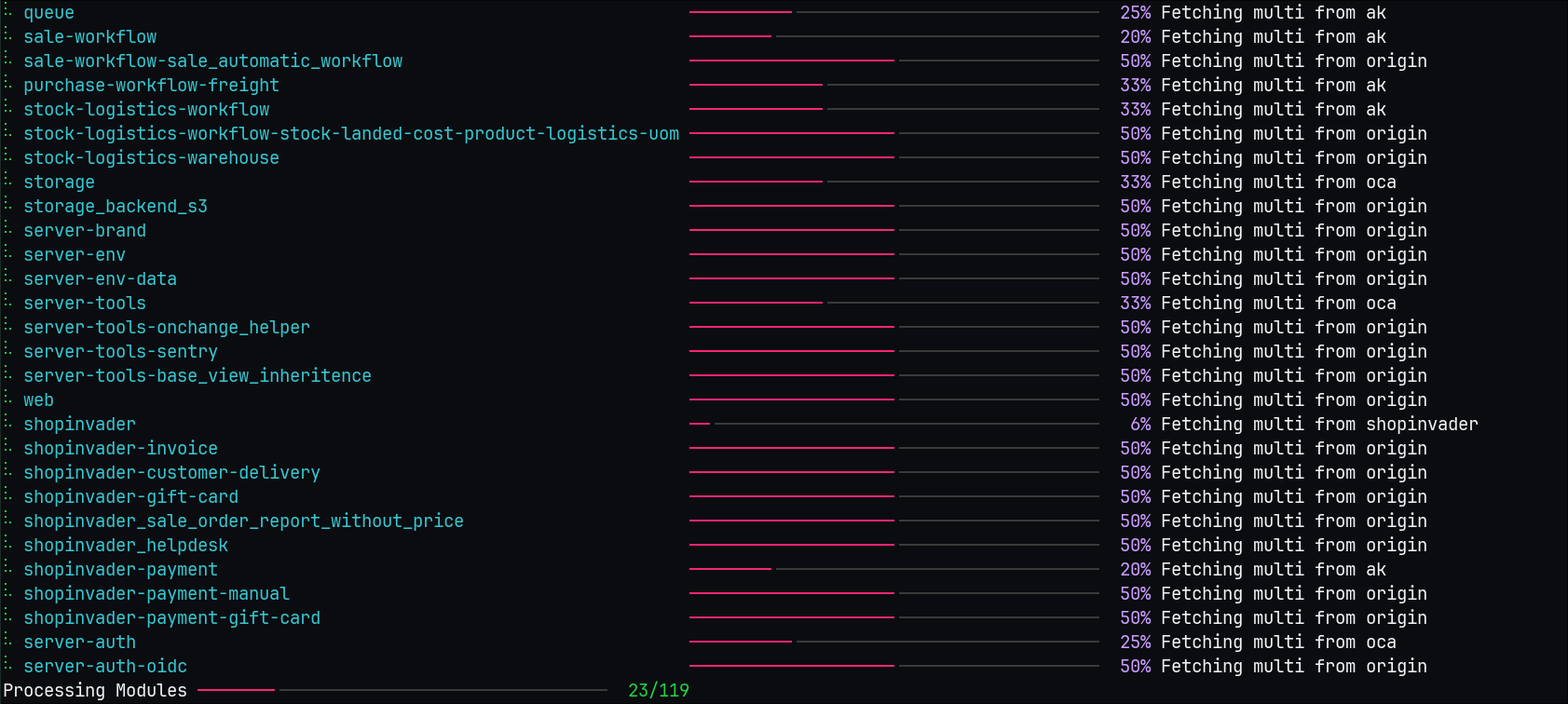
How it looks
Freeze
bl freeze [-c PATH_TO_SPEC] [-z PATH_TO_FROZEN] [-o CONFIG_OVERRIDE] [-j CONCURRENCY] [-w WORKDIR] [--log-level LEVEL]
What does it do
It does what ak freeze does
Params
PATH_TO_SPECpath to your spec (default:spec.yaml)PATH_TO_FROZENpath to your frozen spec (default:frozen.yaml)CONFIG_OVERRIDEpath to an override config to extend the project specificationCONCURRENCYnumber of module clone simultaneously (default:28)WORKDIRworking directory; if omitted, the directory containingspec.yamlLEVELlog level (see--log-levelabove)
Diff
bl diff [-c PATH_TO_SPEC] [-z PATH_TO_FROZEN] [-o CONFIG_OVERRIDE] [-j CONCURRENCY] [-w WORKDIR] [--log-level LEVEL]
What does it do
Shows diff for all dirty repos in the project.
Params
PATH_TO_SPECpath to your spec (default:spec.yaml)PATH_TO_FROZENpath to your frozen spec (default:frozen.yaml)CONFIG_OVERRIDEpath to an override config to extend the project specificationCONCURRENCYnumber of module clone simultaneously (default:28)WORKDIRworking directory; if omitted, the directory containingspec.yamlLEVELlog level (see--log-levelabove)
Clean
bl clean [-c PATH_TO_SPEC] [-o CONFIG_OVERRIDE] [-w WORKDIR] [--log-level LEVEL] [--remove] [--unlink] [--force] [--dry-run]
What does it do
By default it scans all repos in the spec for dirty git state and resets them with git reset --hard.
Params
PATH_TO_SPECpath to your spec (default:spec.yaml)CONFIG_OVERRIDEpath to an override config to extend the project specificationWORKDIRworking directory; if omitted, the directory containingspec.yamlLEVELlog level (see--log-levelabove)--removedeletesrcandexternal-srcdirectories--unlinkalso clean the links directory--forceremove confirmation prompts--dry-runjust output what it would do
Init
bl init [DESTINATION]
What does it do
Initializes a new project from the docky-odoo-template-shared template using Copier.
Params
DESTINATIONdestination directory (default: current directory)
Odoo is taking a really long time to clone
Yes !
You can add a locales entry to your odoo repo in spec.yaml like so:
odoo:
  modules:
    - account
    ...
  remotes:
    odoo: https://github.com/odoo/odoo
  merges:
    - odoo 14.0
  locales:
    - fr
    - en
It will only download the french and english translation instead of all of them
- without locales: 849MB and 40 seconds fresh build
- with locales fr, en: 169MB and 27 seconds fresh build
⚠️ WARNING: you must list all the odoo modules you need if you use the locales property
I have warnings about patch globs
There is a new property to handle git am <patch_glob> (the old one still works but I hope to remove it at some point)
Before:
folder_name:
  modules:
    ...
  remotes:
    ...
  merges:
    ...
  shell_command_after:
    - git am ../../patches/patch_folder/*
After:
folder_name:
  modules:
    ...
  remotes:
    ...
  merges:
    ...
  patch_globs:
    - ../../patches/patch_folder/*
Benchmarks
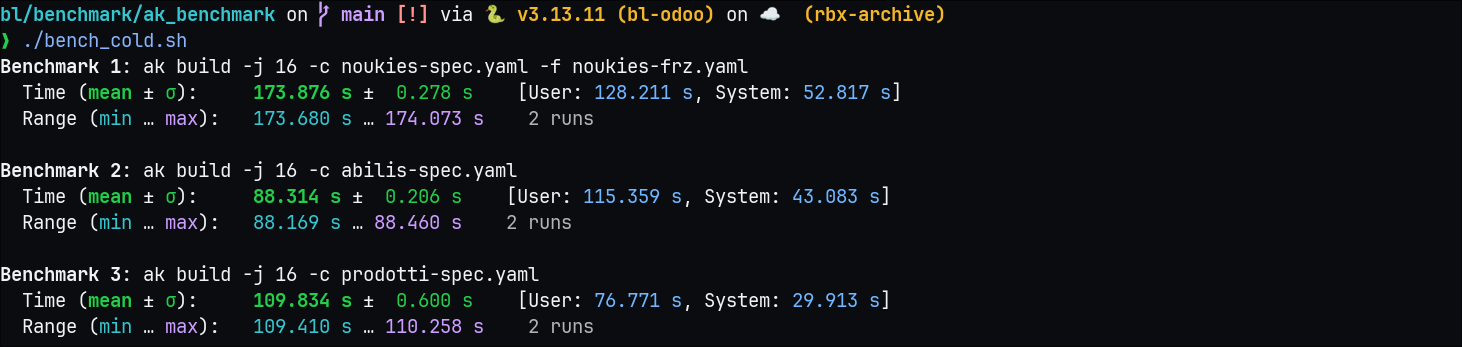
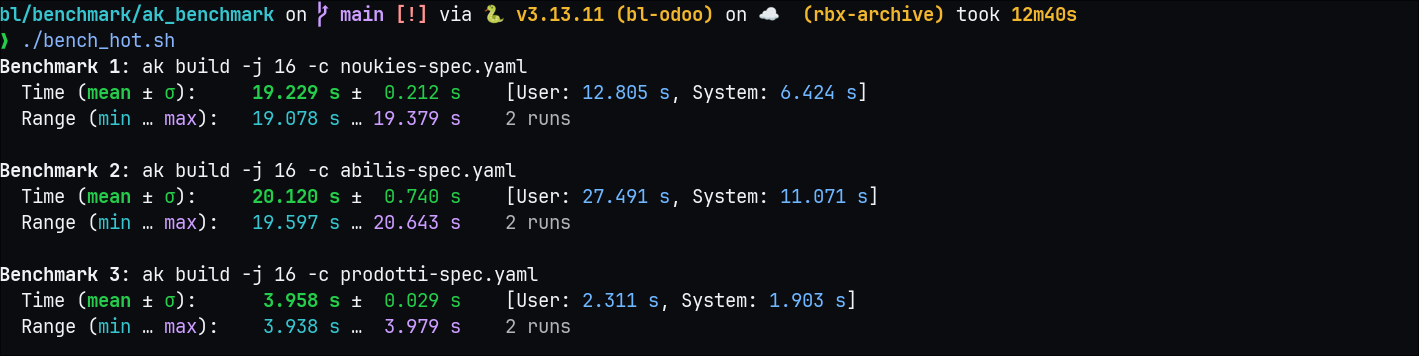
Ak benchmarks
Fresh install
Already cloned once
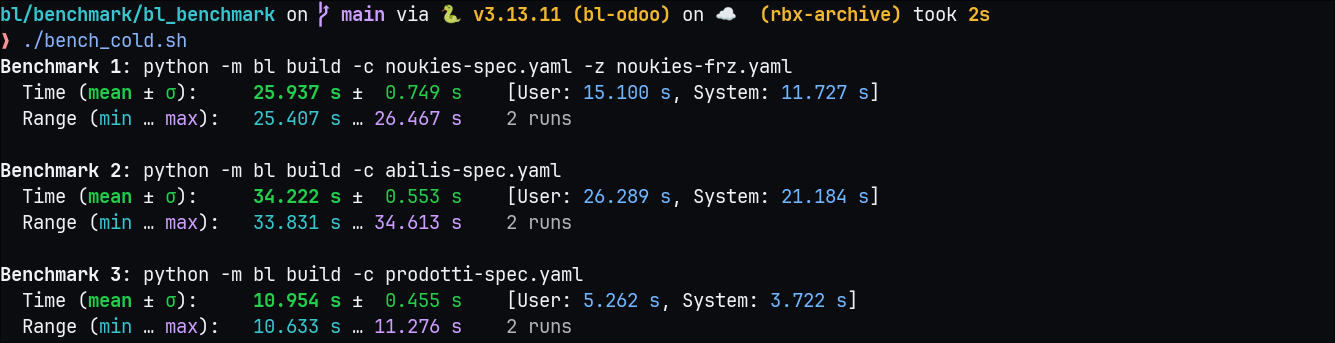
Bl benchmarks
Fresh install
Already cloned once
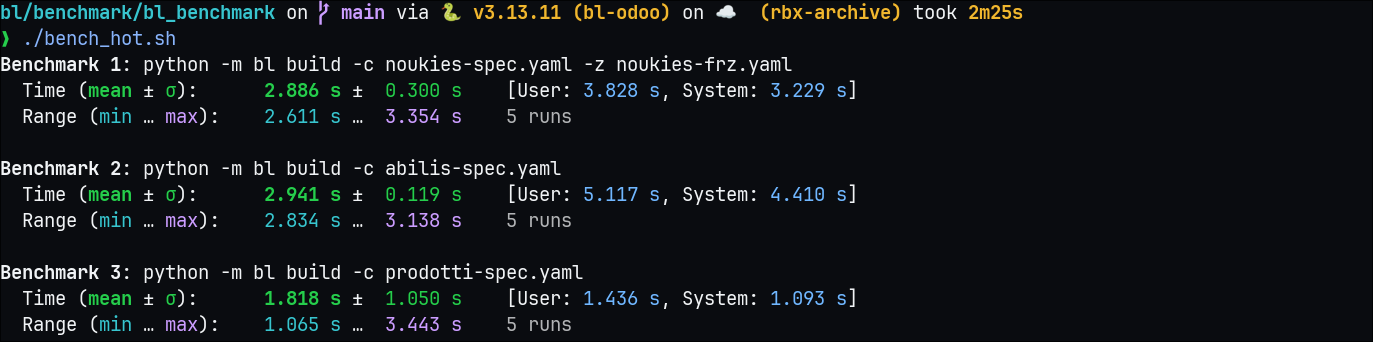
Results
| Type | AK | BL |
|---|---|---|
| Cold | ~100s | 2 - 10x faster |
| Hot | 3-20s | 2 - 10x faster |
Release history Release notifications | RSS feed


Download files
Download the file for your platform. If you're not sure which to choose, learn more about installing packages.
Source Distribution
Built Distribution
Filter files by name, interpreter, ABI, and platform.
If you're not sure about the file name format, learn more about wheel file names.
Copy a direct link to the current filters
File details
Details for the file bl_odoo-0.0.0.tar.gz.
File metadata
- Download URL: bl_odoo-0.0.0.tar.gz
- Upload date:
- Size: 41.6 kB
- Tags: Source
- Uploaded using Trusted Publishing? No
- Uploaded via: uv/0.11.22 {"installer":{"name":"uv","version":"0.11.22","subcommand":["publish"]},"python":null,"implementation":{"name":null,"version":null},"distro":{"name":"Ubuntu","version":"24.04","id":"noble","libc":null},"system":{"name":null,"release":null},"cpu":null,"openssl_version":null,"setuptools_version":null,"rustc_version":null,"ci":true}
File hashes
| Algorithm | Hash digest | |
|---|---|---|
| SHA256 |
489225c384804cf395b02bdac1740b76d93e1d88259c5823a33f9bc58ad07c11
|
|
| MD5 |
6785f72847379a83977255626c0e5ccc
|
|
| BLAKE2b-256 |
938b2be933e780144fe39b0acd50008a69770260fffeb662abe584cbecb49618
|
File details
Details for the file bl_odoo-0.0.0-py3-none-any.whl.
File metadata
- Download URL: bl_odoo-0.0.0-py3-none-any.whl
- Upload date:
- Size: 25.6 kB
- Tags: Python 3
- Uploaded using Trusted Publishing? No
- Uploaded via: uv/0.11.22 {"installer":{"name":"uv","version":"0.11.22","subcommand":["publish"]},"python":null,"implementation":{"name":null,"version":null},"distro":{"name":"Ubuntu","version":"24.04","id":"noble","libc":null},"system":{"name":null,"release":null},"cpu":null,"openssl_version":null,"setuptools_version":null,"rustc_version":null,"ci":true}
File hashes
| Algorithm | Hash digest | |
|---|---|---|
| SHA256 |
56d91d0ee8b52d14d27dc33c73a140142728a1d91aa2385037bf204e62c6ef04
|
|
| MD5 |
d4dc6e743665e0592e5fe9f9348fbe02
|
|
| BLAKE2b-256 |
613a1021b8bfacdb645f98a875f30ccd51683aabc1629945240be6cc85bdec6c
|






