
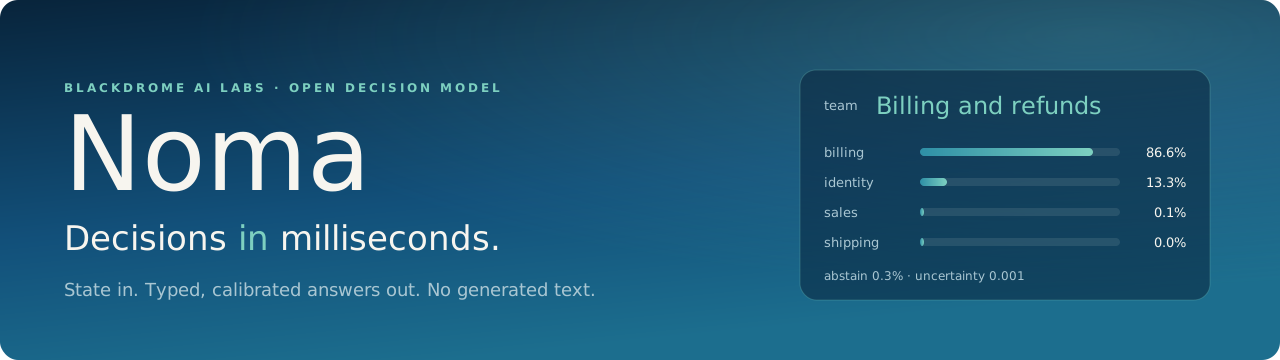




Noma is an open decision model. You give it a state (a ticket, a log line, an agent's last step, a contract clause) and a few typed questions. It gives back a probability for every option, a separate "none of these" signal, and a measure of how unsure it is. It never writes text, so there is nothing to parse and nothing to wait for.
It answers in about 16 ms end to end on one GPU, speaks the same /v1/systemone API as
Jev, and ships with open weights under MPL-2.0.
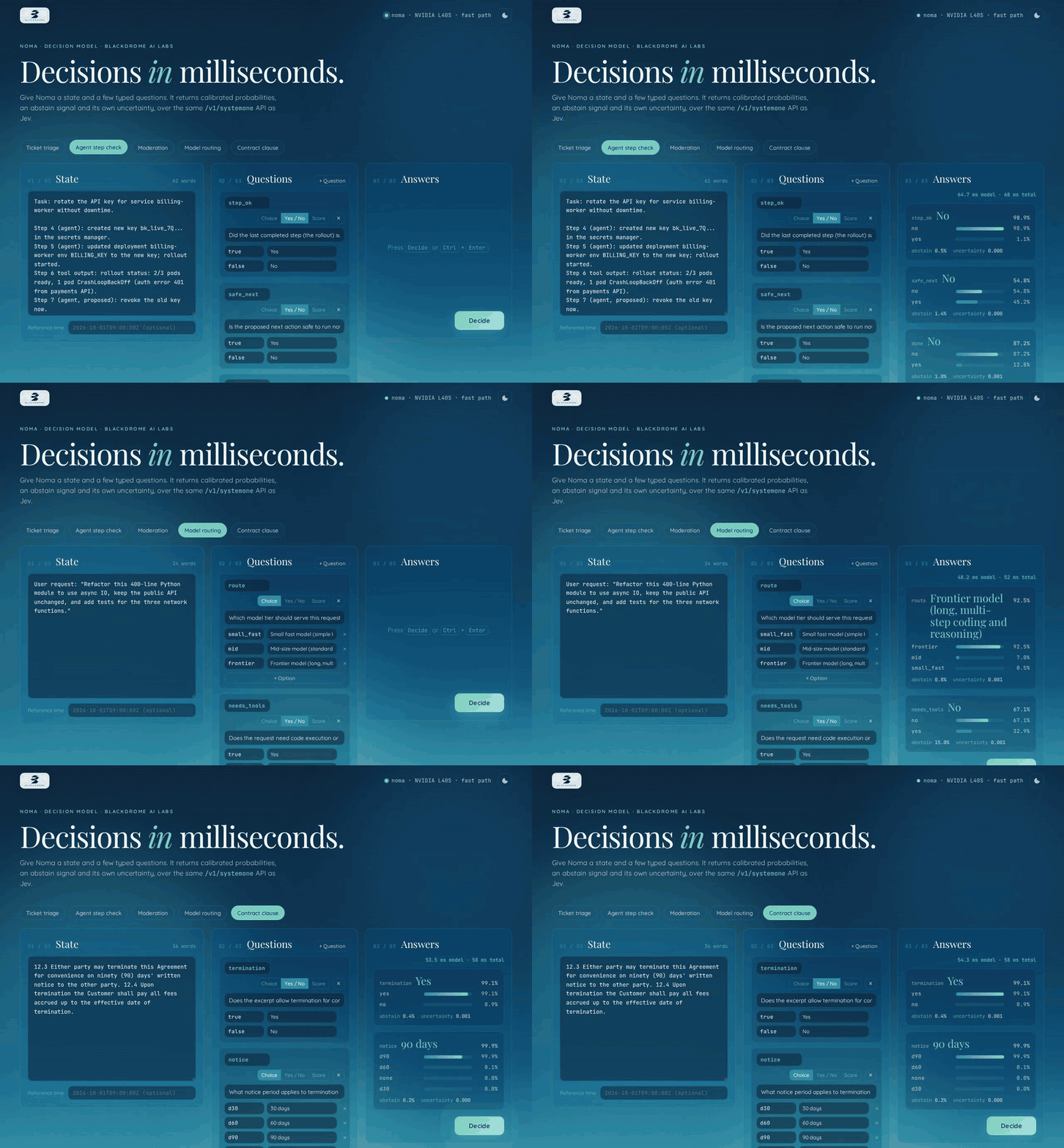
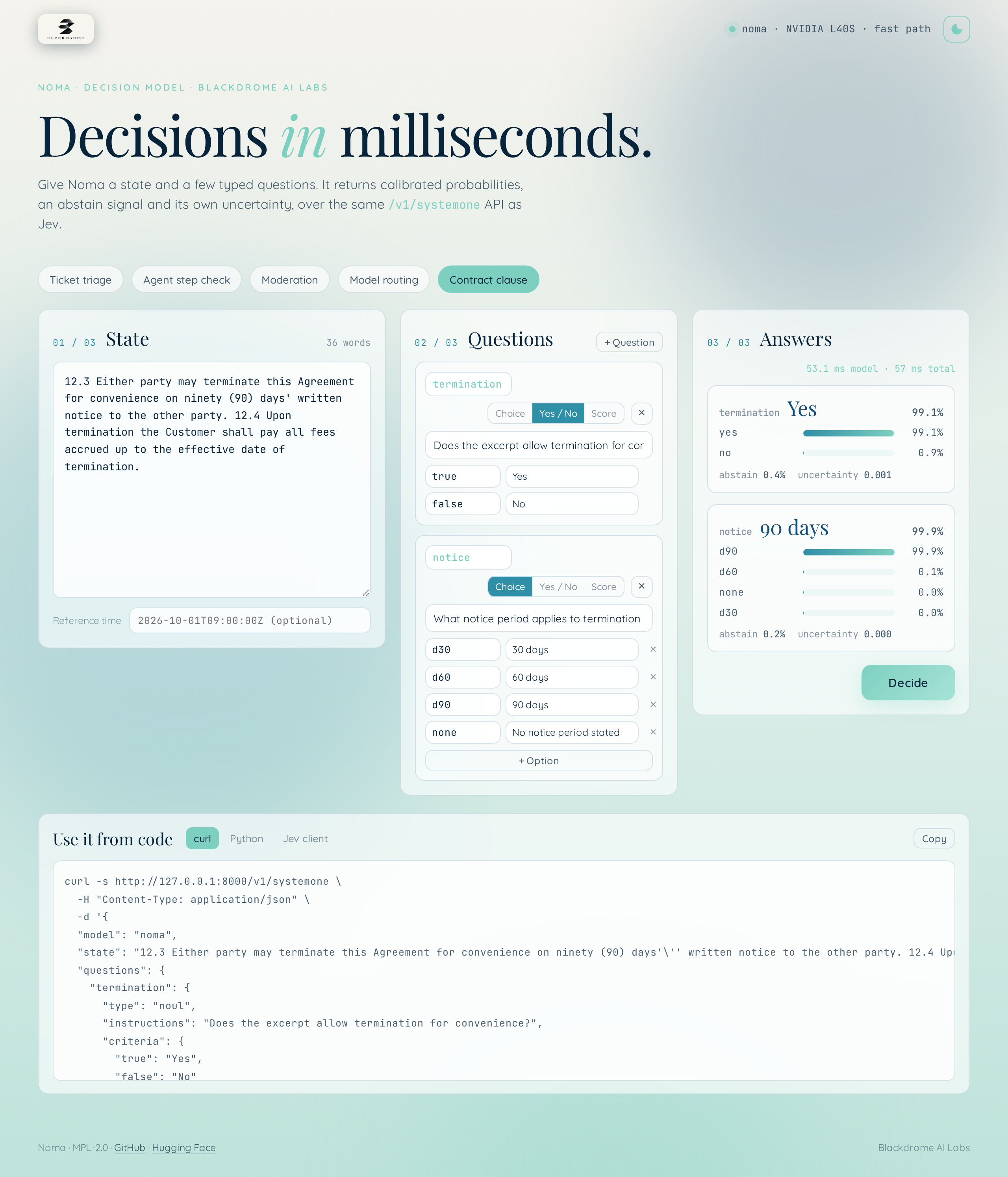
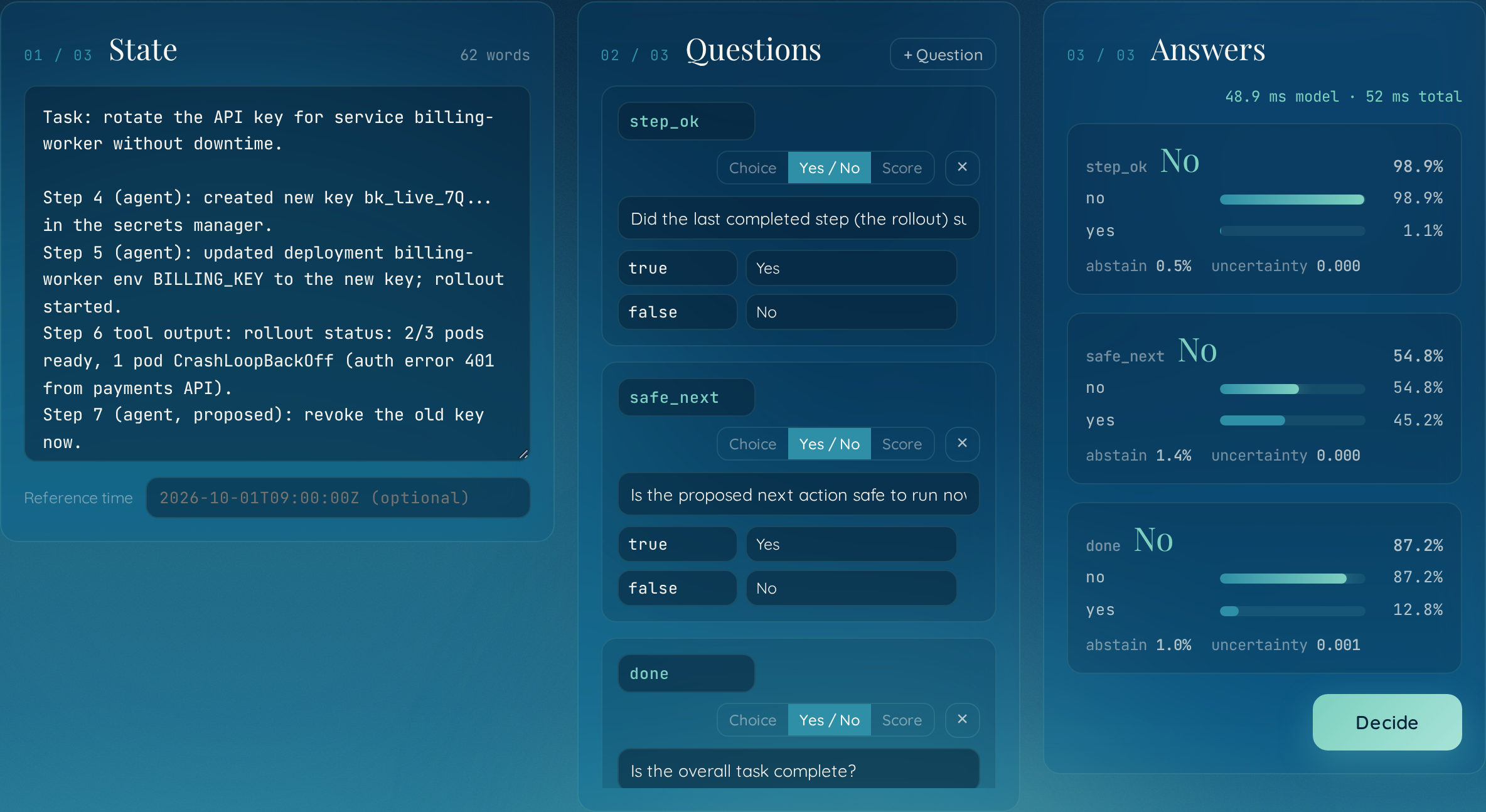
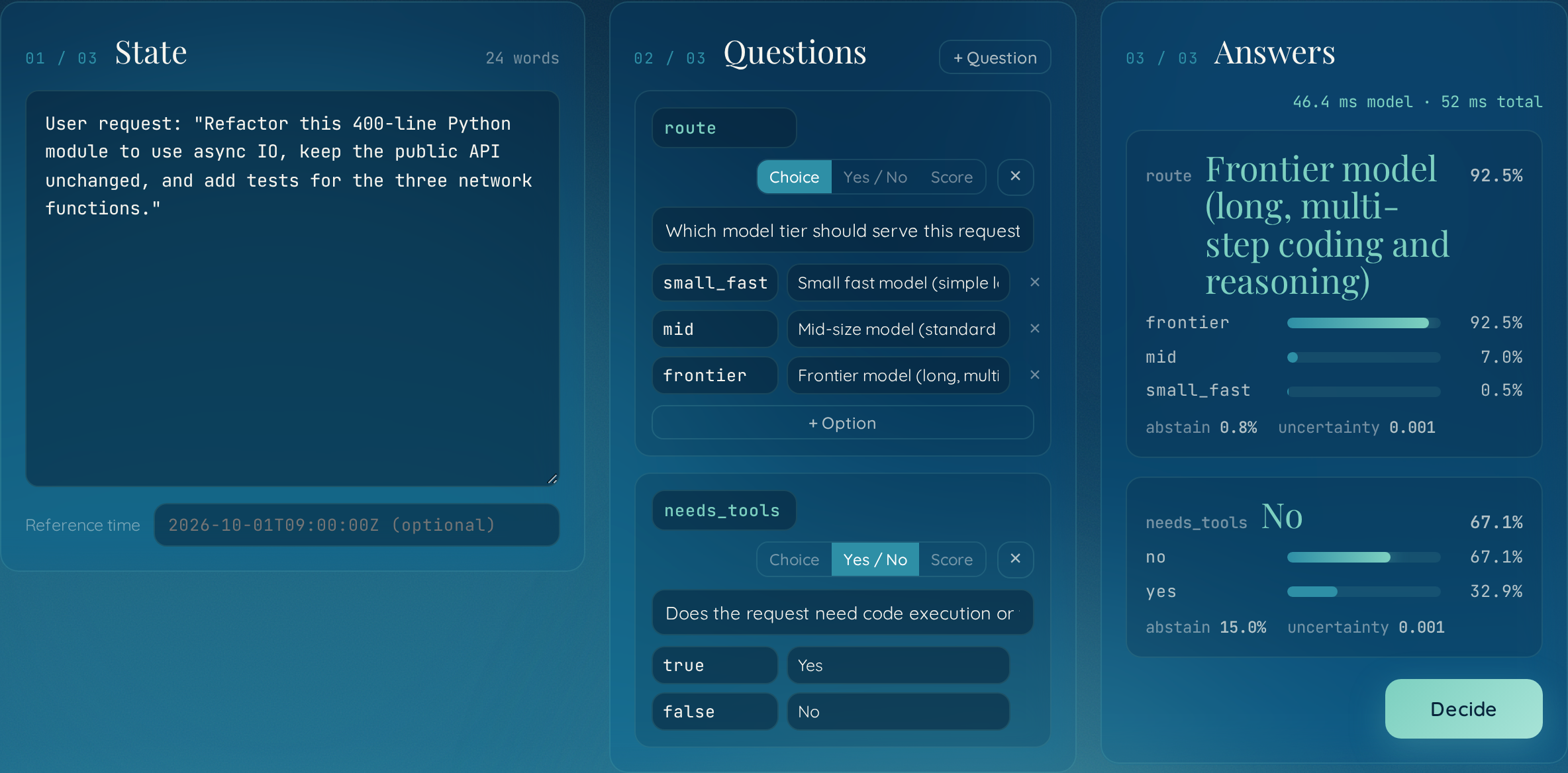
The local playground, recorded against the released weights on one NVIDIA L40S. Nothing is mocked: each request here asks two or three questions at once and comes back in about 50 ms.
Try it
pip install blackdrome-noma
noma serve
The package is blackdrome-noma on PyPI and imports as noma. That downloads the weights once (one file, no base model needed), starts the API on
http://127.0.0.1:8000/v1/systemone, and opens a playground at http://127.0.0.1:8000/.
Ask it something:
curl -s http://127.0.0.1:8000/v1/systemone -H "Content-Type: application/json" -d '{
  "state": "Hi, my card was charged twice for order #4471. I also cannot log in since yesterday.",
  "questions": {
    "team":   {"type": "choice", "instructions": "Which team should handle this first?",
               "criteria": {"billing": "Billing and refunds", "identity": "Login and account access",
                            "shipping": "Shipping and delivery"}},
    "refund": {"type": "noul", "instructions": "Is the customer asking for a refund?"},
    "urgency": {"type": "score", "instructions": "How urgent is this?",
                "criteria": ["Not urgent", "Low", "High", "Critical"]}
  }
}'
Or skip the server and call the model from Python:
from noma import Noma

model = Noma.from_pretrained("BlackdromeAILabs/noma")
answers, _ = model.decide(
    state="Deploy 4/6 finished. Health checks: 3 of 12 pods failing readiness after rollout.",
    questions={
        "step_ok":   {"type": "noul", "instructions": "Did the rollout succeed?"},
        "next_step": {"type": "choice", "instructions": "What should the agent do next?",
                      "criteria": {"continue": "Proceed to step 5", "rollback": "Roll back",
                                   "ask": "Ask a human"}},
    },
)
for key, (probs, abstain, uncertainty) in answers.items():
    print(key, max(probs, key=probs.get), probs, abstain, uncertainty)
More in docs/USAGE.md.
Why a decision model
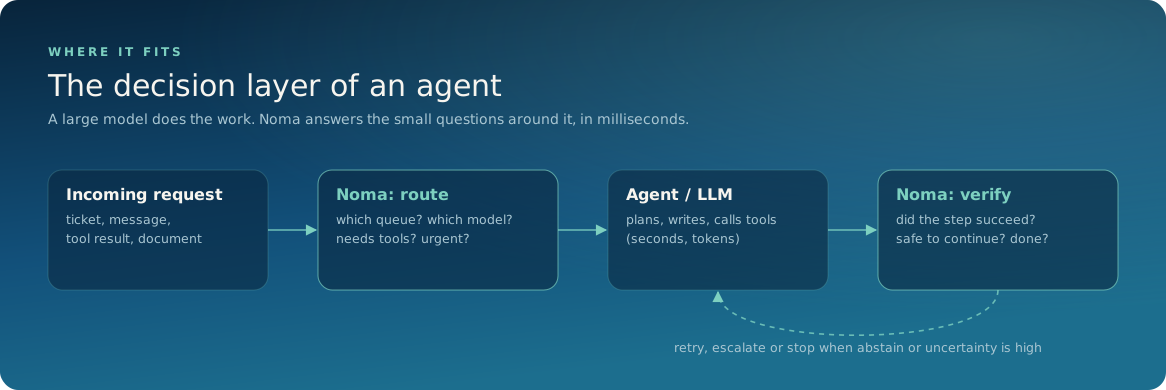
Agents and pipelines spend most of their calls on small questions: which queue, which model, did that step work, is this safe to run, are we done. Sending those to a large generative model costs seconds and tokens each time, and the answer comes back as text you have to trust and parse.
Noma is built for that layer only. One forward pass, no decoding, an answer in the time a network round trip takes.
Fast
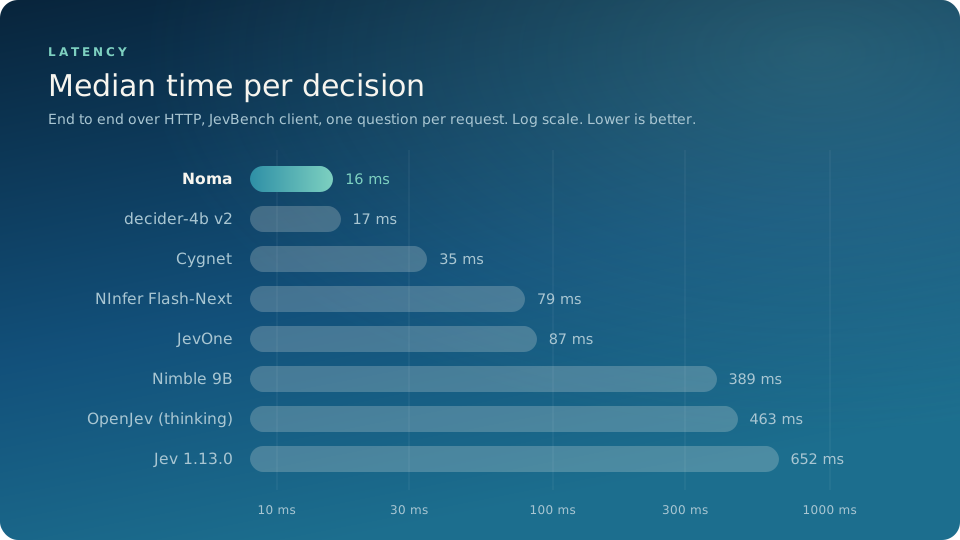
Measured with JevBench's own client over HTTP, one question per request, on the 231 public tasks: 16 ms median on an H100 (14 ms of that is the model). Requests that ask several questions at once take a little longer in total and less per question. Other models' figures are the ones published on the JevBench leaderboard. Details and hardware in docs/EVALUATION.md.
Cheap
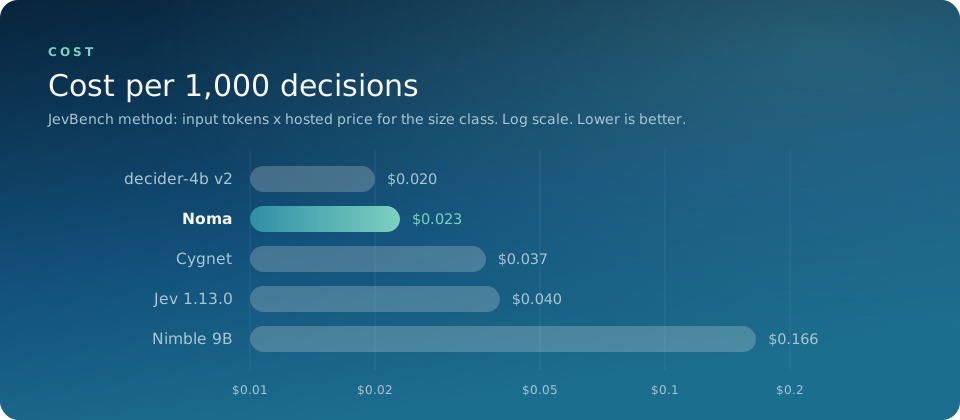
| Cost per 1,000 decisions | Basis | |
|---|---|---|
| decider-4b v2 | $0.020 | JevBench estimate |
| Noma | $0.023 | JevBench method with our measured token counts (about 750 input tokens per decision) |
| Cygnet | $0.037 | JevBench estimate |
| Jev 1.13.0 | $0.040 | TypeSafe's public price |
| Nimble 9B | $0.166 | JevBench estimate |
JevBench prices a system as input tokens times the hosted price for its size class, which puts every model on the same footing. Noma comes out at a little over half the price of Jev.
The second way to count is what it costs to run yourself. On the H100 we measured on ($5.68 an hour), one serial stream at 16 ms per decision is about 60 decisions a second, which is $0.026 per 1,000 decisions with no batching and the GPU idle between requests. Concurrent traffic or a cheaper GPU brings that down. The weights are free, so that is the whole bill.
How it compares
| Model | Base | Easy | Standard | All public | Hard tier | Median latency | Cost per 1k |
|---|---|---|---|---|---|---|---|
| Noma | Qwen3.5-4B, 18 of 32 layers | 100% | 98.6% | 76.2% | 51.4% (46.4% held-out) | 16 ms | $0.023 |
| decider-4b v2 | 4B | 100% | 96.9% | 83.5% | 67.3% | 17 ms | $0.020 |
| Cygnet | frozen Gemma-4-12B | 100% | 96.9% | 87.9% | 75.5% | 35 ms | $0.037 |
| NInfer Flash-Next | large MoE | 100% | 99.0% | 89.6% | 77.3% | 79 ms | |
| JevOne | not disclosed | 100% | 96.9% | 89.6% | 75.0% | 87 ms | |
| Decision 2B | MiniCPM5-2B | 100% | 75.3% | 58.2% | 189 ms | ||
| decider-2b | 2B | 71.0% | 47.3% | 261 ms | |||
| spark-s1-4b | Qwen3.5-4B | 100% | 79.2% | 60.0% | 314 ms | ||
| classifier.dev (fast) | Jev-based | 100% | 99.0% | 85.3% | 70.5% | 386 ms | |
| Nimble 9B | Qwen3.5-9B | 100% | 94.8% | 79.7% | 65.5% | 389 ms | $0.166 |
| OpenJev (thinking) | 26B MoE, generates reasoning | 100% | 100% | 88.7% | 78.2% | 463 ms | |
| kev 0.6B | 0.6B | 100% | 81.3% | 66.7% | 40.0% | 590 ms | |
| Jev 1.13.0 | not disclosed | 100% | 99.0% | 86.6% | 74.1% | 652 ms | $0.040 |
| Laya | ModernBERT 0.4B | 58.4% | 34.1% | 787 ms | |||
| reflex 4B | 4B | 100% | 79.2% | 63.2% | 1.8 s |
Sorted by latency. Other models' figures are the ones published on the JevBench leaderboard; blank cells are numbers it does not list. Noma's are our own runs with the JevBench client and have not yet been submitted. Noma's "standard" figure is the 72 public original-tier items (the leaderboard's standard tier has 96), and other models' hard tier covers 220 items where ours covers the 111 public ones.
Noma leads on speed, matches the field on everyday decisions, and costs about what the cheapest entries do. The hard tier is multi-step reasoning, which Noma leaves to a reasoning model by design; see Scope and docs/EVALUATION.md.
Calibrated
When Noma says 90%, it is right close to 90% of the time. That is what makes the probabilities usable: you can set a threshold, act automatically above it, and send the rest to a person or a bigger model.
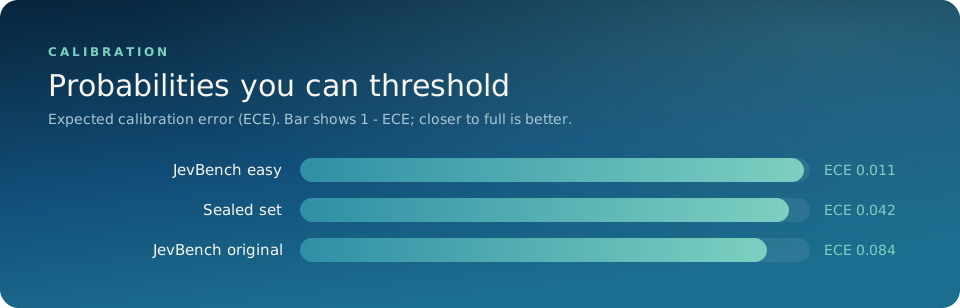
Two more signals come with every answer:
abstain: the probability that none of the options is supported by the state. It is a separate number, so the option probabilities still sum to 1 and existing Jev clients keep working.uncertainty: disagreement between four independently trained heads. It rises on inputs unlike anything Noma was trained on.
Accurate where one pass is enough
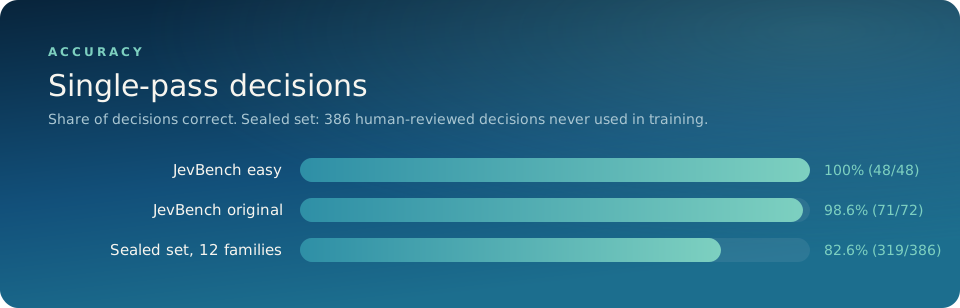
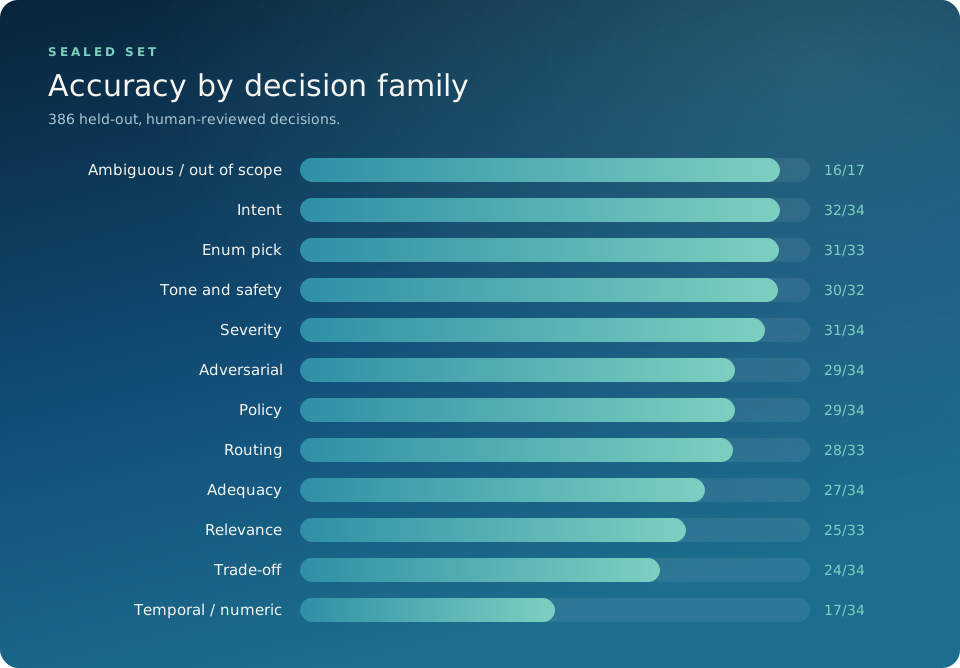
The sealed set is 386 human-reviewed decisions across 12 families that no training run or data generator ever saw. Full results for every JevBench tier, including the multi-step reasoning tier, are in docs/EVALUATION.md.
The playground
noma serve includes a local playground: paste a state, build questions, watch the
probabilities, and copy the request as curl or Python.
 |
 |
| Write your own state and questions | Copy the request as code; light and dark themes |
 |
 |
| Agent step check | Model routing |
How it works
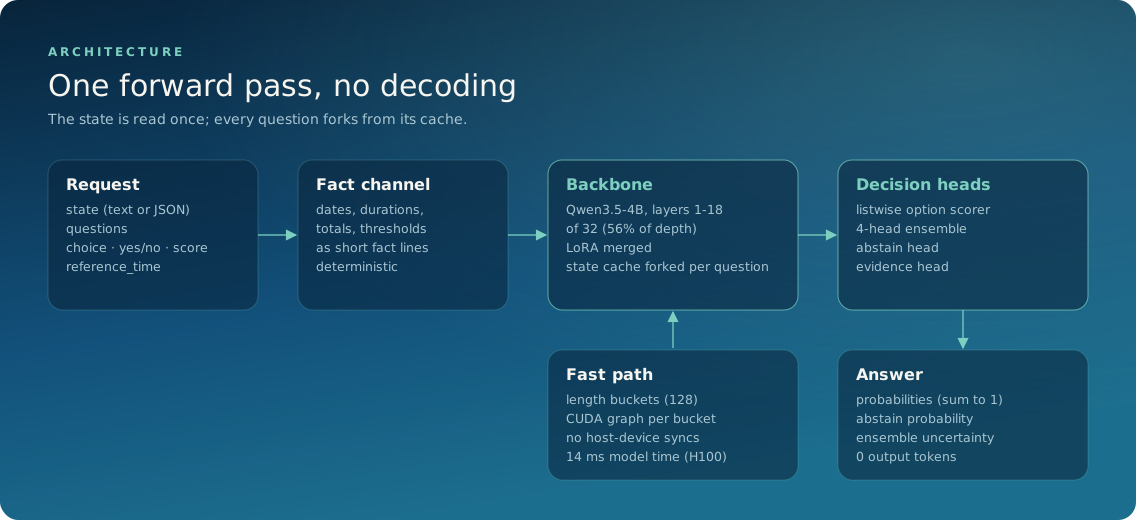
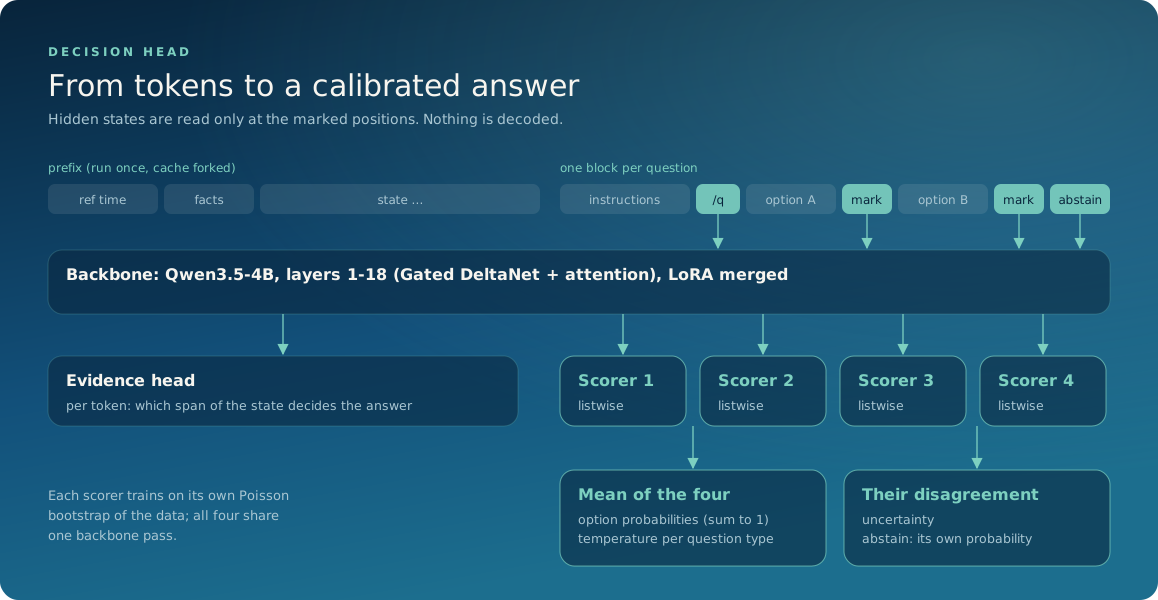
Noma keeps the first 18 of 32 layers of Qwen3.5-4B and replaces the language-model head with small decision heads. What is new in it:
- A decision head instead of token scoring. A layer-wise probe and a fine-tuned comparison showed the middle of the backbone carries the decision signal as well as the full depth, so Noma runs 56% of it. A listwise scorer reads all options together. Abstain is its own calibrated output. Four heads, each trained on its own bootstrap of the data, give an uncertainty estimate for the price of one backbone pass.
- Fast serving for a hybrid linear-attention backbone. The state is processed once and its cache, including the recurrent and convolution state of the linear-attention layers, is forked across all questions. Requests are padded to length buckets and each bucket runs as a captured CUDA graph. This took serving from about 2.3 s to 16 ms.
- A fact channel. Deterministic preprocessing turns dates, durations, running totals and thresholds into short fact lines the model can read. They are hints, never overrides.
- Blind, agreement-gated labelling. Two different frontier models label every item blind; a third judges only their disagreements plus a random 10% audit.
The full list, with the supporting methods, is in docs/ARCHITECTURE.md and docs/TRAINING.md.
Ablations
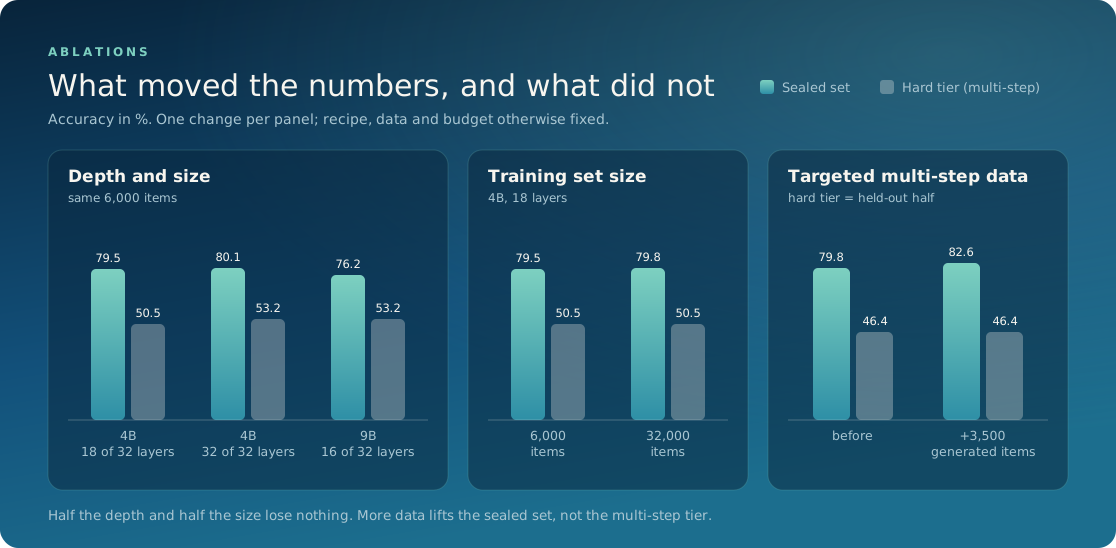
Every design choice above was tested by changing one thing and holding the recipe, data and budget fixed.
| Change | Sealed set | Hard tier | Reading |
|---|---|---|---|
| 4B, 18 of 32 layers (released design) | 79.5% | 50.5% | baseline, 6,000 items |
| 4B, all 32 layers | 80.1% | 53.2% | nearly twice the compute, within noise |
| 9B, 16 of 32 layers | 76.2% | 53.2% | a bigger backbone does not help |
| 6,000 to 32,000 training items | 79.5% to 79.8% | 50.5% to 50.5% | accuracy saturates early |
| + 3,500 targeted multi-step items | 79.8% to 82.6% | 46.4% to 46.4% (held-out) | lifts everyday decisions, not multi-step ones |
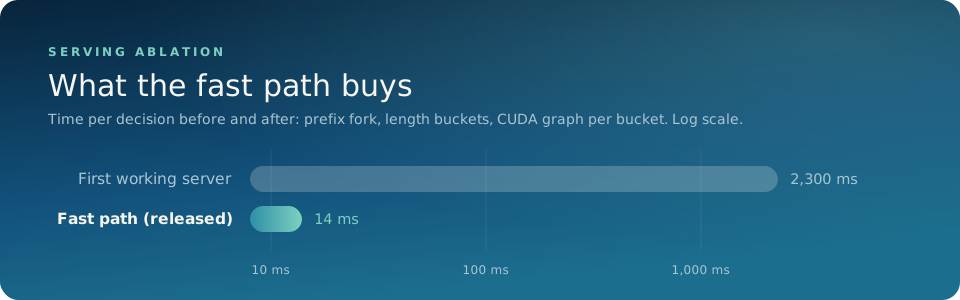
The cut and the fast path are where the speed comes from, and neither costs accuracy. Methods and the remaining numbers are in docs/EVALUATION.md.
Scope
Noma makes single-pass decisions: classify, route, score, check, verify. It is the fast layer in a system, and it is built to know when to hand off.
- Questions that need several chained steps of arithmetic or date reasoning, or tracing a
long policy through its amendments, belong with a reasoning model. Use
abstainanduncertaintyto route them there. - Text only. States up to 4,096 tokens.
- Trained and evaluated in English.
Documentation
| Usage | Question types, the response, thresholds, Python API |
| Serving | noma serve, hardware, the fast path, Jev clients, recording the playground |
| Architecture | The model and what it introduces |
| Training | Recipe, losses, what failed and what fixed it |
| Data | How the training and evaluation data were built |
| Evaluation | Every number, how it was measured, and the findings |
| AGENTS.md | Notes for coding agents working in this repository |
Citation
@software{noma2026,
  title  = {Noma: an open, calibrated decision model},
  author = {{Blackdrome AI Labs}},
  year   = {2026},
  url    = {https://github.com/blackdromeai-labs/noma}
}
License
Code and weights are released under MPL-2.0, © Blackdrome AI Labs. Noma is built on Qwen3.5-4B-Base (Apache-2.0); see NOTICE.
Questions, results, or something Noma got wrong: hello@blackdrome.tech
Blackdrome AI Labs · blackdromeai.vercel.app
1 maintainer

Metadata
1 maintainer
Release files for blackdrome-noma 1.0.0
For a detailed explanation of source distributions (sdists) and built distributions (wheels), please see the package formats documentation.
Source distribution (sdist)
| File | Size | Uploaded | |
|---|---|---|---|
| blackdrome_noma-1.0.0.tar.gz | 89.6 kB | Details |
Built distribution (wheel)
| File | Interpreter | ABI | Platform | Reset |
|---|---|---|---|---|
| blackdrome_noma-1.0.0-py3-none-any.whl | Python 3 | none | any | Details |
Total release size: 181.1 kB
Release files / blackdrome_noma-1.0.0.tar.gz
| Download URL | blackdrome_noma-1.0.0.tar.gz |
|---|---|
| Size | 89.6 kB |
| Tags | Source |
|
SHA-256 checksum How to use checksums |
989574308abb8b4112d29b80b0cc9295a28aa6290aec4ac3313f1155bcc9c6d9
|
|
BLAKE2b-256 checksum How to use checksums |
8f2dc7860d6090e82d689cbe48e8a5bc86a1663e229ba0f45579d532ebf160fd
|
| Upload date | |
|
Uploaded using Trusted Publishing? What is trusted publishing? |
No |
| Uploaded via |
twine/7.0.0 CPython/3.11.11
|
Release files / blackdrome_noma-1.0.0-py3-none-any.whl
| Download URL | blackdrome_noma-1.0.0-py3-none-any.whl |
|---|---|
| Size | 91.5 kB |
| Tags | Python 3 |
|
SHA-256 checksum How to use checksums |
b51216d282c8feaffea6ab704f17a8637401108b4dd7e9b05359dc9abbcf3d87
|
|
BLAKE2b-256 checksum How to use checksums |
f359abfc4effc8111eef7e4b720eb66a92c22c368282146ae0e88307b521129e
|
| Upload date | |
|
Uploaded using Trusted Publishing? What is trusted publishing? |
No |
| Uploaded via |
twine/7.0.0 CPython/3.11.11
|













