
BladeRecon
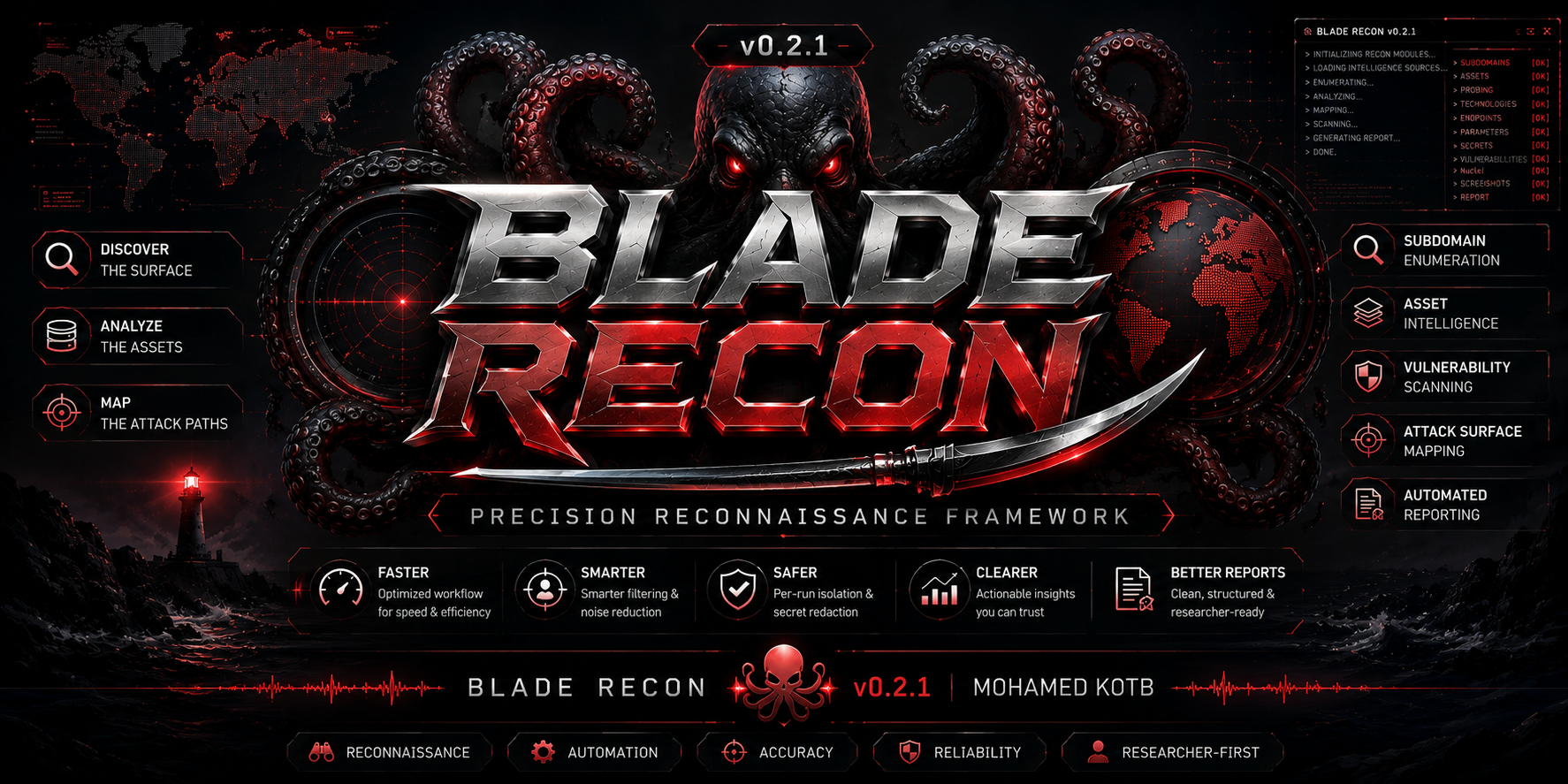





BladeRecon is a lightweight reconnaissance framework for bug bounty, web pentesting, and reporting-focused attack-surface discovery. It keeps the workflow terminal-native and modular while producing clean TXT, JSON, JSONL, Markdown, and HTML outputs.
Developer: Mohamed Kotb
Project Overview
BladeRecon helps you move from a target domain to a readable reconnaissance report:
subdomains -> probe -> js -> endpoints -> secrets -> parameters -> intelligence -> advanced -> screenshots -> nuclei -> report
It is designed to be:
- Lightweight and Windows-friendly
- Beginner friendly without hiding operational details
- Useful for bug bounty and small pentest workflows that need safe defaults
- Easy to inspect manually, automate from files, and hand over as reports
It is not intended to replace Amass, distributed recon stacks, or enterprise scanners.
Use BladeRecon only on assets you own or are authorized to test. Public issue reports and shared artifacts should be sanitized before posting.
CLI Preview
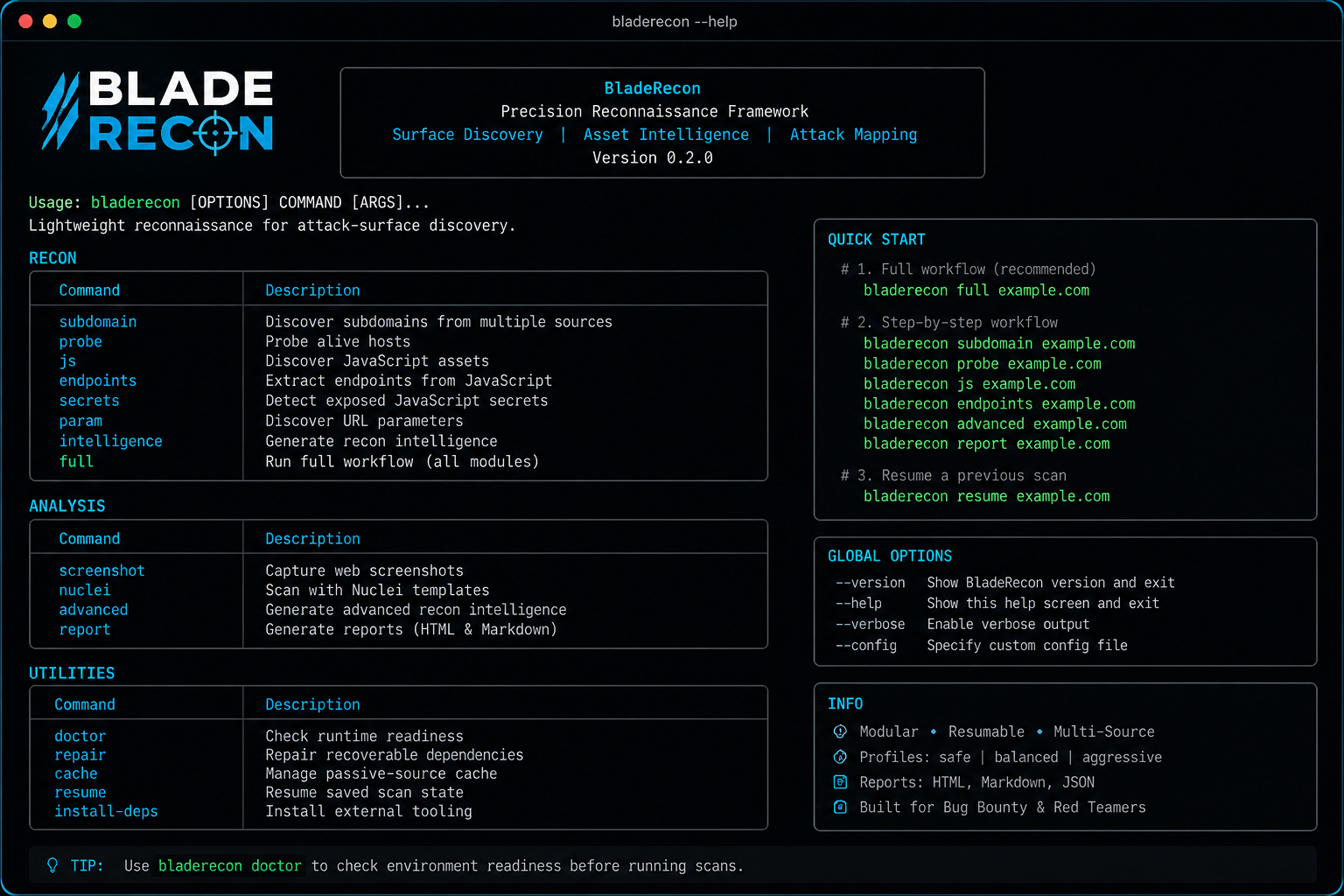
The CLI preview demonstrates the terminal-first workflow: branded startup, module status output, dependency checks, and scan summaries. This matters because BladeRecon is designed for researchers who need to understand what is running, what was skipped, and where artifacts were written.
Data policy: sanitized example.com target, no fake findings, no sensitive data.
Report Preview
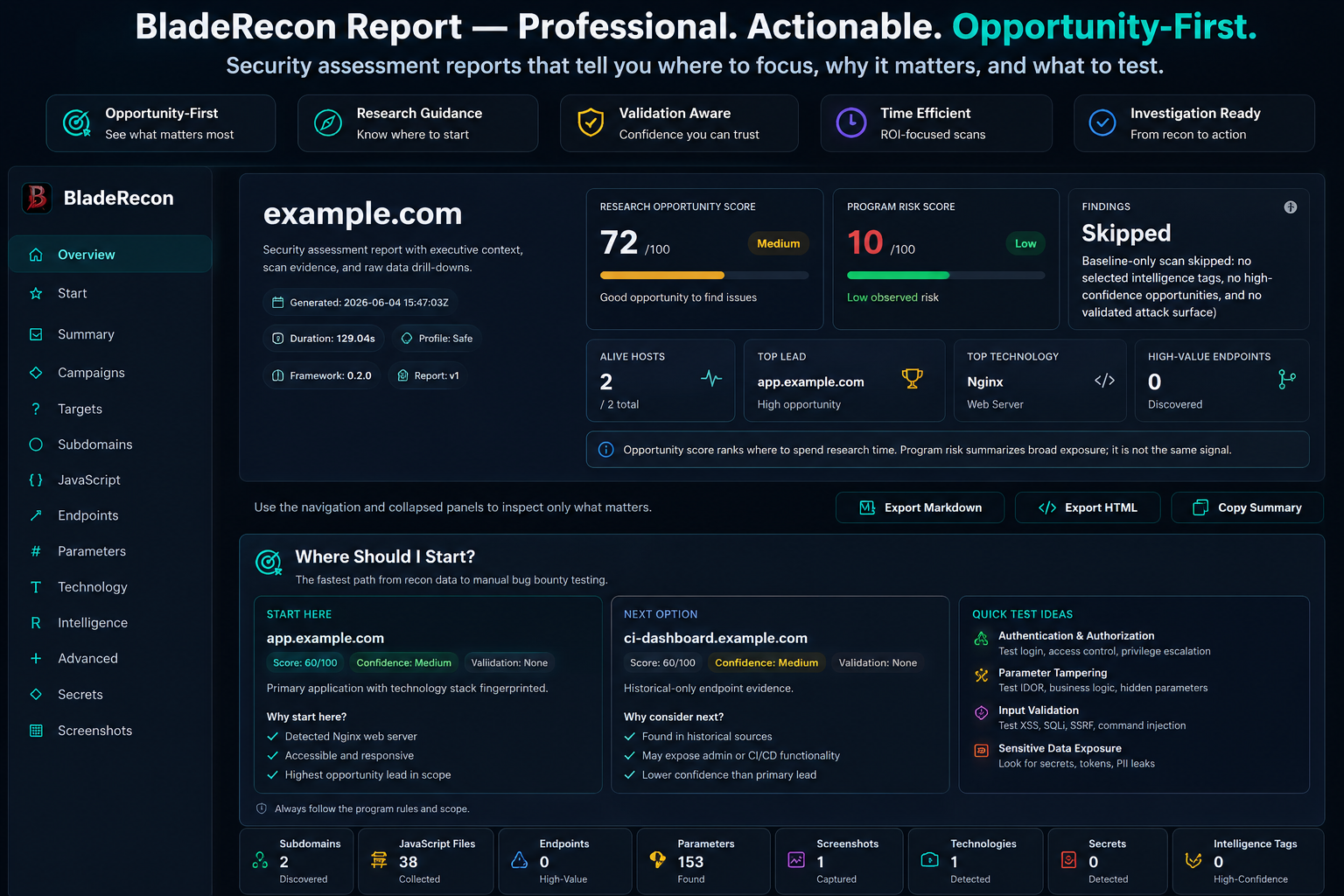
The report preview demonstrates the dark offline report, including a decision dashboard, start-here investigation queue, campaign test plans, supporting evidence, findings status, and performance analytics. This matters because BladeRecon's output is meant to help researchers prioritize follow-up work, not just count discovered artifacts.
Data policy: sanitized sample data with zero fake findings.
Features
| Area | Capability |
|---|---|
| Subdomains | Passive sources, source attribution, cache, optional lightweight DNS expansion |
| Probe | Alive hosts, status codes, redirects, titles, content length, server/CDN/WAF hints |
| JavaScript | Finds external JavaScript assets from alive hosts and can reuse historical JS when live HTML is blocked |
| Endpoints | Extracts endpoint candidates from downloaded and historical JavaScript |
| Secrets | Informational secret pattern detection with confidence and risk labels |
| Parameters | Historical URL sources plus local fallback URL inventory and wordlist candidates |
| Screenshots | Optional Playwright screenshots with duplicate/placeholder filtering |
| Intelligence | Technology, infrastructure, cloud asset, risk, and template-selection context |
| Advanced Recon | Historical URLs, historical JS, low-noise content discovery, security-header assets, and explainable asset prioritization |
| Nuclei | Optional Nuclei wrapper with safe, balanced, aggressive, intelligence-guided profiles, ROI gating, and a lightweight baseline safety net when justified |
| Reports | Dark-theme offline HTML and Markdown reports with an executive dashboard, a single Where Should I Start queue, campaign test plans, separated research/risk scoring, section search, exports, and performance analytics |
| Safety | Safety profiles, request ceilings, per-host concurrency, rate limits, and Nuclei timeout reporting |
| Utilities | Doctor, repair, cache management, resume state, and install helper |
Supported Modules
| Command | Description | Main Outputs |
|---|---|---|
subdomain |
Discover subdomains from multiple sources | subdomains.txt, subdomains.json, subdomains.jsonl |
probe |
Probe alive hosts | alive.txt, probe.json, probe.jsonl |
js |
Discover JavaScript assets | js_files.txt, js_files.json |
endpoints |
Extract endpoints from JavaScript | endpoints.txt, endpoints.json |
secrets |
Detect exposed JavaScript secret patterns | secrets.txt, secrets.json |
param |
Discover URL parameters | parameters.txt, parameters.json, parameters.jsonl |
intelligence |
Generate recon intelligence from existing artifacts | intelligence/*.json, technology/technology.json |
advanced |
Generate advanced recon intelligence from existing artifacts | historical/, historical_js/, content_discovery/, asset_priority.json |
screenshot |
Capture screenshots from alive hosts | PNG files, failed_screenshots.txt |
nuclei |
Run Nuclei templates | results.json, results.jsonl, results.md |
report |
Generate Markdown and HTML reports | report.md, report.html |
full |
Run the standard workflow | All module outputs |
Installation
See INSTALL for complete Windows, Python, Go, Nuclei, Playwright, Docker, and verification instructions.
Recommended install:
pipx install bladerecon
bladerecon doctor
Alternative install:
python -m pip install bladerecon
bladerecon doctor
Development install from source:
git clone https://github.com/mohamedxk9tb/BladeRecon.git
cd BladeRecon
python -m venv .venv
.venv\Scripts\activate
python -m pip install --upgrade pip
python -m pip install .
bladerecon doctor
Optional external tools:
bladerecon install-deps
python -m playwright install chromium
BladeRecon installs Nuclei from the v3 release line when using install-deps.
Quick Examples
Start here on a fresh install:
bladerecon doctor
bladerecon full example.com --profile safe
bladerecon report example.com
bladerecon scan example.com --profile safe is also accepted as a first-user
alias for bladerecon full.
bladerecon --help
bladerecon doctor
bladerecon subdomain hackerone.com
bladerecon probe hackerone.com
bladerecon js hackerone.com
bladerecon endpoints hackerone.com
bladerecon secrets hackerone.com
bladerecon param hackerone.com
bladerecon intelligence hackerone.com
bladerecon advanced hackerone.com --profile safe
bladerecon report hackerone.com
Full workflow:
bladerecon full hackerone.com
bladerecon full hackerone.com --profile safe
bladerecon report hackerone.com
Resume and cache:
bladerecon resume hackerone.com
bladerecon cache info
bladerecon cache clear
Docker:
docker build -t bladerecon .
docker run --rm bladerecon doctor
docker run --rm -v "%cd%\results:/app/results" bladerecon full hackerone.com
Command Reference
| Command | Example | Expected Output |
|---|---|---|
subdomain |
bladerecon subdomain hackerone.com |
results/hackerone.com/subdomains/ |
probe |
bladerecon probe hackerone.com |
results/hackerone.com/probe/ |
js |
bladerecon js hackerone.com |
results/hackerone.com/js/ |
endpoints |
bladerecon endpoints hackerone.com |
results/hackerone.com/endpoints/ |
param |
bladerecon param hackerone.com |
results/hackerone.com/parameters/ or skipped state |
intelligence |
bladerecon intelligence hackerone.com |
results/hackerone.com/intelligence/ and results/hackerone.com/technology/ |
advanced |
bladerecon advanced hackerone.com --profile safe |
Historical, content-discovery, header-asset, and priority artifacts |
secrets |
bladerecon secrets hackerone.com |
results/hackerone.com/secrets/ |
screenshot |
bladerecon screenshot hackerone.com |
results/hackerone.com/screenshots/ or skipped state |
nuclei |
bladerecon nuclei hackerone.com --profile balanced |
results/hackerone.com/nuclei/ or skipped state |
report |
bladerecon report hackerone.com |
Latest isolated full-run report, or legacy results/hackerone.com/reports/ |
full |
bladerecon full hackerone.com --profile safe |
New isolated run under results/hackerone.com/runs/<timestamp-profile-id>/ |
doctor |
bladerecon doctor |
Runtime dependency table |
resume |
bladerecon resume hackerone.com |
Resumes unfinished full workflow modules |
cache info |
bladerecon cache info |
Cache size, sources, and age |
cache clear |
bladerecon cache clear |
Safe cache cleanup summary |
--version |
bladerecon --version |
Version, build date, Python, platform |
install-deps |
bladerecon install-deps |
External dependency installation helper |
Doctor Command
Run doctor before the first real scan:
bladerecon doctor
Doctor checks:
- Go availability
- Nuclei availability
- Playwright package
- Chromium browser availability
- Results directory write permission
Optional dependencies can be missing. BladeRecon will skip the related modules and continue the workflow.
Scan Safety Profiles
BladeRecon defaults to balanced. Use safe for bug bounty programs or shared infrastructure, and aggressive only when you explicitly want higher active-request volume.
| Profile | Intended Use | Active Safeguards |
|---|---|---|
safe |
Bug bounty and conservative validation | Low concurrency, low RPS, tighter request ceilings, one request per host for HTTP/browser modules |
balanced |
Default day-to-day recon | Moderate concurrency, capped JS/screenshots/Nuclei targets, per-host limits |
aggressive |
Explicit opt-in speed | Higher ceilings and concurrency while still retaining rate limits |
Profiles control request pressure and ceilings, not a guaranteed wall-clock
ordering. A safe scan can take longer than aggressive when lower
concurrency, one-request-per-host browser work, retries, or target-side delays
dominate runtime. Reports show full scan duration and per-module timings so the
slow path is visible.
Examples:
bladerecon probe hackerone.com --profile safe
bladerecon js hackerone.com --profile safe
bladerecon screenshot hackerone.com --profile safe
bladerecon nuclei hackerone.com --profile safe
bladerecon full hackerone.com --profile safe
The active profile is written to the run marker, scan_state.json, module metadata, and the HTML report. bladerecon resume <target> resumes the latest isolated run and preserves that run's stored profile.
Smart Nuclei keeps technology-guided tag selection, but it is no longer the
only coverage layer. When tags are selected automatically, BladeRecon may run
a lightweight tag-free baseline pass for critical,high severities, but only
for uncovered high-confidence or validated opportunity hosts. When no tags,
validated attack surface, or high-confidence opportunities exist, the ROI gate
skips baseline-only Nuclei instead of spending runtime on low-value templates.
If the ROI gate justifies a baseline-only run, BladeRecon scopes the target list
to the validated or high-confidence opportunity hosts first instead of scanning
every alive host. Reports and nuclei/metadata.json show
coverage_strategy, roi_decision, target_scope, baseline_reason,
baseline_skip_reason, baseline_roi, baseline_targets, and the
baseline_scan status.
Explicit --templates paths can point to a single Nuclei template file or a
directory of custom templates; they do not need the official template repository
layout.
Output Structure
Full scans are isolated by run. Each bladerecon full <target> creates a new
folder under results/<target>/runs/, and results/<target>/latest_run.json
points to the most recent valid run. bladerecon report <target> reads that
latest valid run; if no isolated run exists, it falls back to the legacy flat
results/<target>/ layout used by individual module commands.
results/
`-- example.com/
    |-- latest_run.json
    `-- runs/
        `-- 20260611T121505Z-safe-ea0a5419/
            |-- .bladerecon_run.json
            |-- scan_state.json
            |-- subdomains/
            |   |-- subdomains.txt
            |   |-- subdomains.json
            |   `-- subdomains.jsonl
            |-- probe/
            |   |-- alive.txt
            |   |-- metadata.json
            |   |-- probe.json
            |   `-- probe.jsonl
            |-- js/
            |   |-- js_files.txt
            |   |-- metadata.json
            |   |-- js_files.json
            |   `-- files/
            |-- endpoints/
            |   |-- endpoints.txt
            |   |-- endpoints.json
            |   `-- metadata.json
            |-- secrets/
            |   |-- secrets.txt
            |   `-- secrets.json
            |-- parameters/
            |   |-- parameters.txt
            |   |-- parameters.json
            |   |-- parameters.jsonl
            |   `-- parameters_from_urls.txt
            |-- technology/
            |   |-- technology.txt
            |   `-- technology.json
            |-- intelligence/
            |   |-- attack_surface.json
            |   |-- cloud_assets.json
            |   |-- historical_dns.json
            |   |-- infrastructure.json
            |   |-- infrastructure_assets.json
            |   |-- risk_score.json
            |   `-- template_intelligence.json
            |-- historical/
            |   |-- urls.txt
            |   |-- urls.json
            |   |-- parameters.txt
            |   |-- endpoints.txt
            |   |-- endpoints.json
            |   `-- metadata.json
            |-- historical_js/
            |   |-- js_urls.txt
            |   |-- js_urls.json
            |   |-- endpoints.txt
            |   |-- endpoints.json
            |   |-- parameters.txt
            |   `-- metadata.json
            |-- content_discovery/
            |   |-- interesting_paths.txt
            |   |-- interesting_paths.json
            |   `-- metadata.json
            |-- historical_diff.json
            |-- security_headers_assets.json
            |-- asset_priority.json
            |-- advanced_metadata.json
            |-- screenshots/
            |-- nuclei/
            |   |-- metadata.json
            |   |-- results.json
            |   |-- results.jsonl
            |   `-- results.md
            |-- reports/
            |   |-- report.html
            |   `-- report.md
            `-- logs/
                |-- scan.log
                |-- errors.log
                `-- scan_meta.json
Screenshots
Screenshots are optional and require Playwright Chromium:
python -m playwright install chromium
bladerecon screenshot hackerone.com
If Chromium is missing, BladeRecon displays a skip reason and continues. Screenshot metadata includes average capture time, slow targets, timeout targets, and per-target timings so slow browser captures are visible instead of hidden inside total runtime.
Signal Quality
Endpoint discovery suppresses third-party API URLs found inside in-scope JavaScript unless the endpoint host is in scope. Historical JS endpoint artifacts are merged into the same endpoint output so blocked live pages can still contribute attack-surface evidence.
Advanced recon metadata includes source-level ROI for historical URL sources, including selected URLs, opportunity candidates, source duration, and signal-to-noise ratios. Use this to decide whether a source is worth its runtime on future scans.
Roadmap
Current Release Candidate (v0.2.1)
- Finalize release consistency across CLI, reports, metadata, and scan state
- Validate real-world scans across Safe, Balanced, and Aggressive profiles
- Continue improving detection quality while keeping runtime efficient
- Expand regression coverage using real production-inspired scenarios
- Keep optional dependencies graceful, transparent, and well documented
- Gather community feedback before the first stable release
Future Development (v0.3.0)
- Improve Opportunity Intelligence and evidence correlation
- Smarter target prioritization based on recon confidence
- Additional report intelligence without increasing noise
- Performance optimizations for very large scopes
- Better observability, diagnostics, and debugging information
- Continued UX improvements for researchers and bug bounty hunters
Documentation
License
MIT
1 maintainer

Download files
Download the file for your platform. If you're not sure which to choose, learn more about installing packages.
Source Distribution
Built Distribution
Filter files by name, interpreter, ABI, and platform.
If you're not sure about the file name format, learn more about wheel file names.
Copy a direct link to the current filters
File details
Details for the file bladerecon-0.2.1.tar.gz.
File metadata
- Download URL: bladerecon-0.2.1.tar.gz
- Upload date:
- Size: 1.8 MB
- Tags: Source
- Uploaded using Trusted Publishing? No
- Uploaded via:
twine/6.2.0 CPython/3.12.10
File hashes
| Algorithm | Hash digest | |
|---|---|---|
| SHA256 |
317fe6ef0a67e9fa77d1ff4f6ffa4911f66e8dd91f8c66bf1fba1110a36373a1
|
|
| MD5 |
3936c4ddc767f2183a961fb60738a3a5
|
|
| BLAKE2b-256 |
9c17599835ce574131ef726f143e0af3b3596ec90cff4ffd4a9a6ee855f84955
|
File details
Details for the file bladerecon-0.2.1-py3-none-any.whl.
File metadata
- Download URL: bladerecon-0.2.1-py3-none-any.whl
- Upload date:
- Size: 1.8 MB
- Tags: Python 3
- Uploaded using Trusted Publishing? No
- Uploaded via:
twine/6.2.0 CPython/3.12.10
File hashes
| Algorithm | Hash digest | |
|---|---|---|
| SHA256 |
bd822a56884cc59af5e4a793b18df726d04a0a2c32c070ac482b28b2d4aa3b5b
|
|
| MD5 |
4362e8d8b6769d3acde638b8d6717478
|
|
| BLAKE2b-256 |
45f4eeb02d6563b1746035e736baf0a815c01ef66801461c160a194b0d28728e
|













