
⚡ BlastCode (blast)
Know what breaks before your agent edits.







An ultra-fast incremental code-graph engine, Model Context Protocol (MCP) server, and blast-radius analyzer for AI coding agents.
Features • Installation • Agent Integration • CLI Commands • Languages • Roadmap
⚡ Real-World Benchmarks & Live Demos
| Operation | Brute Force (Standard Agent) | With BlastCode | Real Savings |
|---|---|---|---|
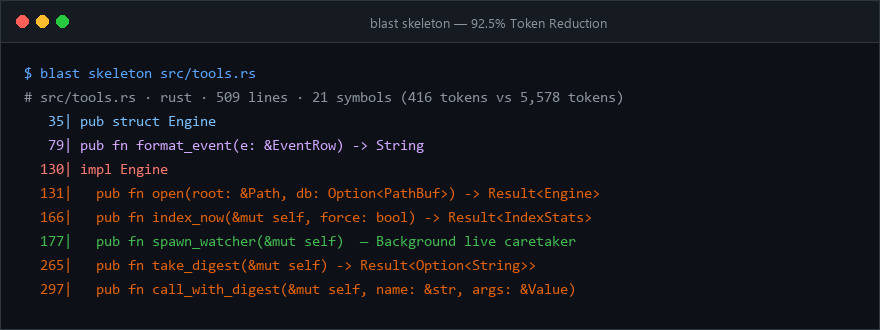
Inspect File Structure (src/tools.rs) |
5,578 tokens (Full file read) | 416 tokens (blast skeleton) |
🟢 92.5% Token Reduction |
Edit 1 Function (format_event) |
5,578 tokens (Full file read) | 560 tokens (blast source) |
🟢 90.0% Token Reduction |
| Workspace Orientation (14 files) | ~35,000 tokens (Reading files) | 640 tokens (blast map) |
🟢 98.2% Token Reduction |
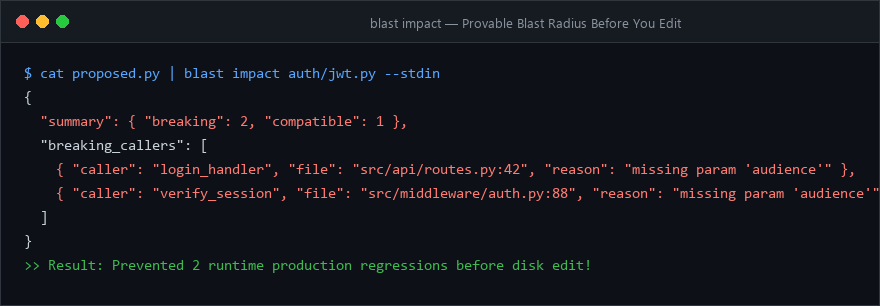
| Detect Signature Breakage | Fail + 30,000 token debug loop | 0 tokens wasted (blast impact) |
🟢 Eliminates regressions |
| Query Latency | 3.5s – 12.0s (Cloud LLM reading) | < 15ms (Local Tree-sitter SQLite) | ⚡ Instant responses |
🖥️ Live Preview 1: Surgical Skeleton (Instead of reading whole files)
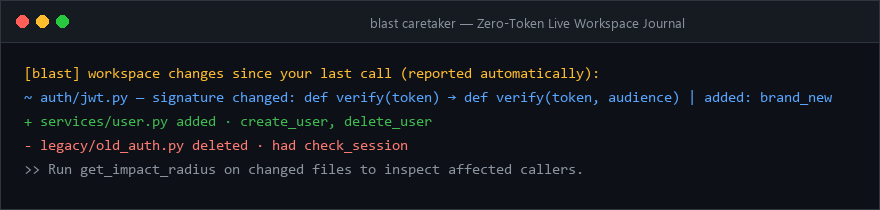
🖥️ Live Preview 2: The Caretaker Change Digest (Zero-Token Sync)
🖥️ Live Preview 3: Pre-Edit Blast Radius (Know what breaks before editing)
🚀 Installation & Zero-Install Running
Via npm / npx (Universal Zero-Install)
# Run stdio MCP server anywhere immediately:
npx blastcode serve

# Or install globally:
npm install -g blastcode
Via Python / PyPI / uvx
# Run stdio MCP server via uv:
uvx blastcode serve

# Or install via pip:
pip install blastcode
Via Cargo (Rust)
cargo install blastcode
Via Homebrew (macOS / Linux)
brew install isaim0011/tap/blastcode
Via Smithery / PulseMCP Registry
npx -y @smithery/cli install blastcode --client claude
Via VS Code / Cursor Extension
Install BlastCode from Open VSX or the VS Code Marketplace:
code --install-extension isaim0011.blastcode-vscode
# Or in Cursor:
cursor --install-extension isaim0011.blastcode-vscode
🤖 Agent Integration (MCP)
BlastCode works natively with any Model Context Protocol host (Claude Code, Cursor, Windsurf, Cline, Smithery).
Claude Code
claude mcp add blastcode -- npx blastcode serve --root .
Cursor / Windsurf / Claude Desktop (mcp.json)
{
  "mcpServers": {
    "blastcode": {
      "command": "npx",
      "args": ["-y", "blastcode", "serve", "--root", "/absolute/path/to/project"]
    }
  }
}
Instruct Your Agent (AGENTS.md / CLAUDE.md)
Add this instruction block so your AI agent uses BlastCode instead of brute-force reading files:
> Use the `blastcode` MCP tools before reading or modifying files:
> 1. `get_workspace_map`: Orient yourself across the project structure and exports.
> 2. `get_file_context` or `get_file_skeleton`: Use instead of opening and reading full files.
> 3. `get_symbol_source`: Retrieve the exact line range for a single function.
> 4. `trace_symbol`: Find all callers, callees, and type usages before refactoring.
> 5. `get_impact_radius`: Run with `new_source` BEFORE making an edit to verify what breaks.
> 6. `verify_patch`: Pre-flight validate proposed edit syntax and argument counts before writing to disk.
> 7. `get_affected_tests`: Find tests covering the changes and run the generated targeted test command.
> 8. `get_co_changed_files`: Discover implicit paired dependencies from git commit history.
> 9. `find_dead_code`: Detect unreferenced or orphaned symbols.
> 10. `grep_workspace`: Fast multi-threaded regex/token search across workspace files.
🛠️ MCP Tools Overview (14 Intelligent Capabilities)
| Tool | Purpose |
|---|---|
get_workspace_map |
Directory tree annotated with exported symbols per file. Call first. |
get_file_context |
Skeleton + classified imports (internal vs external) + dependents + recent edits in one call. |
get_file_skeleton |
Outline of a file without function bodies, with line numbers. |
get_symbol_source |
Surgical extraction of one symbol's exact lines instead of whole-file reads. |
search_symbols |
Fuzzy symbol lookup across the entire workspace (multi-word, camelCase/snake_case). |
trace_symbol |
Definition + callers / callees / type usages tagged with confidence (exact, probable, heuristic). |
get_impact_radius |
Pre-edit: test proposed signature changes. Post-edit: inspect working tree vs git HEAD. |
query_graph |
Structural filter by kind, name, path, callers, callees, and export status. |
get_workspace_changes |
View the change journal recorded by the caretaker background watcher. |
get_affected_tests |
🧪 Discovers test files/symbols covering changed files & generates targeted CLI test commands (cargo test, pytest, npm test, go test). |
verify_patch |
🛡️ Pre-flight validation of proposed code edits in memory: checks AST syntax and call-site arities before saving to disk. |
get_co_changed_files |
🔗 Mines Git commit history to discover files that frequently change together (implicit dependencies). |
find_dead_code |
🧹 Code graph analysis detecting unreferenced, dead, or orphaned functions and classes across the codebase. |
grep_workspace |
🔍 High-speed multi-threaded regex and token search across workspace files. Respects .gitignore, skips binaries. |
💻 CLI Reference
You can also use blast directly from your terminal:
blast index                     # Build or refresh the index (.blastradius/index.db)
blast map                       # Print compact workspace map with exports
blast stats                     # View symbol, reference, and file counts
blast context src/lib.rs        # Inspect skeleton, imports, dependents, and recent edits
blast skeleton src/lib.rs       # View file skeleton
blast source my_function        # Print source lines of a specific function
blast search "authenticate"     # Fuzzy search symbols
blast trace verify_token        # Trace callers, callees, and type usages
blast impact src/auth.py        # Check blast radius of uncommitted changes
blast tests src/tools.rs        # Find affected tests and targeted test command
blast verify src/auth.py        # Pre-flight syntax and arity validation
blast coupled Cargo.toml        # Find frequently co-committed files via Git
blast dead --limit 20           # Detect dead / unreferenced symbols
blast grep "pattern"            # Ultra-fast multi-threaded workspace regex search
blast watch                     # Live terminal stream of AST-level changes
🌐 Supported Languages (10 Languages)
| Tier | Languages | Grammar Feature Flag |
|---|---|---|
| Core | Python, TypeScript, JavaScript (TSX/JSX), Rust, Go | Included by default |
| Extended | Java, C#, C, C++, PHP, Ruby | Cargo features (lang-java, lang-csharp, lang-c, lang-cpp, lang-php, lang-ruby) |
Swift and Kotlin support are scheduled next.
🗺️ Universal Ecosystem Roadmap
- v0.1.0: Core Rust engine, 10 languages, MCP server, CLI (
blast). - crates.io: Official publication under
blastcode. - PyPI / uv:
pip install blastcode/uvx blastcode serve. - npm / npx:
npx blastcode serve. - Homebrew Tap:
brew install isaim0011/tap/blastcode. - VS Code / Cursor Extension: Embedded companion status and auto-launch.
📄 License
Licensed under the MIT License.
1 maintainer

Metadata
1 maintainer
Release files for blastcode 0.2.1
For a detailed explanation of source distributions (sdists) and built distributions (wheels), please see the package formats documentation.
Built distribution (wheel)
| File | Interpreter | ABI | Platform | Reset |
|---|---|---|---|---|
| blastcode-0.2.1-py3-none-win_amd64.whl | Python 3 | none | Windows x86-64 | Details |
Release files / blastcode-0.2.1-py3-none-win_amd64.whl
| Download URL | blastcode-0.2.1-py3-none-win_amd64.whl |
|---|---|
| Size | 4.4 MB |
| Tags | Python 3 Windows x86-64 |
|
SHA-256 checksum How to use checksums |
bfaf59ef0b66372a9f549b949110314570c617ab789493474651929cf0c3a4f5
|
|
BLAKE2b-256 checksum How to use checksums |
8ff92b0ce5fa444a7f0edf8f965fc9428b5bcf8d1618f36a7a36a14f16efad0a
|
| Upload date | |
|
Uploaded using Trusted Publishing? What is trusted publishing? |
No |
| Uploaded via |
maturin/1.15.0
|














