
A blazing-fast, minimalist, and researcher-friendly simulation framework for Federated Learning.

Project description





Feature Highlights
-
🚀 High Performance: Optimized for single-node simulations, BlazeFL leverages Python 3.14's free-threading to deliver top-tier performance, especially in the multi-threaded mode.
-
🧩 High Extensibility: BlazeFL focuses on core communication and parallelization interfaces, avoiding excessive abstraction to maintain flexibility.
-
🍃 Minimal Dependencies: The framework's core relies only on PyTorch, ensuring a lightweight and straightforward setup.
-
🔄 Robust Reproducibility: Ensures true experimental reproducibility with advanced strategies, from full random-state snapshotting to isolated random number generators, guaranteeing consistency in any parallel environment.
-
🛡️ Structured and Type-Safe by Design: By leveraging dataclasses and protocols, BlazeFL enables the creation of clear, type-safe, and self-documenting communication packages (
UplinkPackage,DownlinkPackage). This design enhances code readability, maintainability, and reduces errors in FL workflows.
Execution Modes
BlazeFL offers three distinct execution modes, each providing a different balance between implementation simplicity and performance.
1. Multi-Threaded Mode (Recommended)
Leverages multiple threads to process clients in parallel within the same process.
This mode, implemented via the ThreadPoolClientTrainer class, can offer faster performance while maintaining a simpler implementation than multi-processing.
[!IMPORTANT] To achieve true parallelism, this mode requires a Python 3.14+ free-threading build. Without it, performance will be limited by the Global Interpreter Lock (GIL), resulting in concurrency rather than true parallelism. Python 3.13 also offers an experimental version of this feature.
graph LR
    subgraph "`BaseServerHandler`"
      STS[Server]
    end

    subgraph "ThreadPoolClientTrainer (e.g. Max Threads = 3)"
      MEM@{ shape: win-pane, label: "Memory" }
      STJ1@{ shape: f-circ, label: "Junction" }
      subgraph "Thread 1"
        ST1[Client 1] --> ST4[Client 4]
        ST4 -.-> STK-2[Client K-2]
      end
      subgraph "Thread 2"
        ST2[Client 2] --> ST5[Client 5]
        ST5 -.-> STK-1[Client K-1]
      end
      subgraph "Thread 3"
        ST3[Client 3] --> ST6[Client 6]
        ST6 -.-> STK[Client K]
      end
      STJ1 --> ST1
      STJ1 --> ST2
      STJ1 --> ST3
      STK-2 --> STJ2@{ shape: f-circ, label: "Junction" }
      STK-1 --> STJ2
      STK --> STJ2
      STJ2 --> STJ1
      STJ1 --Write/Read--> MEM
      ST1 --Read/Write--> MEM
      ST5 --Read/Write--> MEM
      STK --Read/Write--> MEM
    end
    STJ1 --> STS
    STS --> STJ1
2. Multi-Process Mode
Utilizes separate processes to achieve true parallelism and robust resource isolation.
This mode, corresponding to the ProcessPoolClientTrainer class, offers excellent performance. It provides two options for Inter-Process Communication (IPC), configurable via the ipc_mode parameter, to suit your needs:
- Storage Mode: Shares parameters via disk, reducing memory usage.
- Shared Memory Mode: Shares parameters directly in shared memory for potentially faster performance.
graph LR
    subgraph "`BaseServerHandler`"
      STS[Server]
    end

    subgraph "ProcessPoolClientTrainer (e.g. Max Processes = 3)"
      SHM[("<center>Shared Memory<br>or<br>Storage</center>")]
      SPJ1@{ shape: f-circ, label: "Junction" }
      subgraph "Process 1"
        SP1[Client 1] --> SP4[Client 4]
        SP4 -.-> SPK-2[Client K-2]
      end
      subgraph "Process 2"
        SP2[Client 2] --> SP5[Client 5]
        SP5 -.-> SPK-1[Client K-1]
      end
      subgraph "Process 3"
        SP3[Client 3] --> SP6[Client 6]
        SP6 -.-> SPK[Client K]
      end
      SPJ1 --> SP1
      SPJ1 --> SP2
      SPJ1 --> SP3
      SPK-2 --> SPJ2@{ shape: f-circ, label: "Junction" }
      SPK-1 --> SPJ2
      SPK --> SPJ2
      SPJ2 --> SPJ1
      SPJ1 --Write/Read--> SHM
      SP1 --Read/Write--> SHM
      SP5 --Read/Write--> SHM
      SPK --Read/Write--> SHM
    end
    SPJ1 --> STS
    STS --> SPJ1
3. Single-Threaded Mode
Executes clients sequentially in a single thread.
This is the most straightforward mode, making it ideal for simple simulations or debugging, though it offers the lowest throughput. This mode is implemented using the BaseClientTrainer class.
graph LR
    subgraph "`BaseServerHandler`"
      STS[Server]
    end
    subgraph "BaseClientTrainer"
      STJ@{ shape: f-circ, label: "Junction" } --> ST1[Client 1]
      ST1 --> ST2[Client 2]
      ST2 --> ST3[Client 3]
      ST3 -...-> STK-2[Client K-2]
      STK-2 -..-> STK-1[Client K-1]
      STK-1 --> STK[Client K]
    end
    STK --> STJ
    STJ --> STS
    STS --> STJ
Getting Started
Installation
BlazeFL is available on PyPI and can be installed using your preferred package manager.
For example, using uv:
uv add blazefl
Examples
| Example | Description |
|---|---|
| Quickstart: FedAvg | Learn the fundamentals of BlazeFL with a standard Federated Averaging (FedAvg) implementation, covering single-threaded, multi-process, and multi-threaded modes. |
| Step-by-Step Tutorial: DS-FL | Build a custom distillation-based Federated Learning algorithm from scratch, and understand how to implement your own algorithms on the BlazeFL framework. |
Robust Reproducibility
BlazeFL provides two strategies to ensure the reproducibility of your experiments, especially in complex scenarios like multi-process or multi-threaded environments. To use these features, please install the required dependencies:
uv add blazefl[reproducibility]
1. Global Seeding Strategy
This approach uses a single global seed. As the diagram illustrates, after the parent process calls seed_everything(), each child process is responsible for its own state management. It must capture a RandomStateSnapshot of its random number generators, save it to storage after its work is done, and restore it before the next round.
This strategy works for ProcessPoolClientTrainer because each process has its own memory space. However, it is not compatible with ThreadPoolClientTrainer, as all threads would share and alter a single global state non-deterministically.
Click to see the diagram
sequenceDiagram
    participant Parent as Parent Process <br> (ProcessPoolClientTrainer)
    participant Storage
    participant Child1 as Child Process 1 <br> (worker)
    participant Child2 as Child Process 2 <br> (worker)

    Parent->>Parent: seed_everything()

    par Round 1
        Parent->>Child1: Spawn
        activate Child1
        Child1->>Child1: seed_everything()<br>snapshot = RandomStateSnapshot.capture()
        activate Child1
        deactivate Child1
        Child1->>Storage: Save snapshot
        deactivate Child1
    and
        Parent->>Child2: Spawn
        activate Child2
        Child2->>Child2: seed_everything()<br>snapshot = RandomStateSnapshot.capture()
        activate Child2
        deactivate Child2
        Child2->>Storage: Save snapshot
        deactivate Child2
    end

    loop T rounds
        par Round t
            Parent->>Child1: Spawn
            activate Child1
            Storage->>Child1: Load snapshot
            Child1->>Child1: snapshot.restore()
            activate Child1
            deactivate Child1
            Child1->>Child1: snapshot = RandomStateSnapshot.capture()
            Child1->>Storage: Save snapshot
            deactivate Child1
        and
            Parent->>Child2: Spawn
            activate Child2
            Storage->>Child2: Load snapshot
            Child2->>Child2: snapshot.restore()
            activate Child2
            deactivate Child2
            Child2->>Child2: snapshot = RandomStateSnapshot.capture()
            Child2->>Storage: Save snapshot
            deactivate Child2
        end
    end
2. Generator-Based Strategy (Recommended)
This is the recommended approach. It provides each worker its own isolated RNGSuite (a collection of random number generators), avoiding global state entirely. The handling differs based on the trainer used:
-
With
ProcessPoolClientTrainer: Since processes don't share memory, each worker creates its ownRNGSuiteon the first round. For subsequent rounds, it saves itsRNGSuiteto storage and loads it back, as shown in the diagram. -
With
ThreadPoolClientTrainer: Since threads share memory, the parent process can create anRNGSuitefor every worker and hold them in a list. Each thread then directly accesses its assignedRNGSuitefrom shared memory for each round.
This ensures robust reproducibility in all scenarios.
Click to see the diagram
sequenceDiagram
    participant Parent as Parent Process
    participant Storage
    participant ChildProc as Child Process i <br> (worker)
    participant Memory
    participant ChildThread as Child Thread i <br> (worker)

    Parent->>Parent: setup_reproducibility()<br>rng_suite: RNGSuite = create_rng_suite()

    opt ProcessPoolClientTrainer
        loop For each training round t
            par
                Parent->>ChildProc: Spawn
                activate ChildProc
                ChildProc->>ChildProc: setup_reproducibility()
                alt Round t = 1
                    ChildProc->>ChildProc: rng_suite: RNGSuite = create_rng_suite()
                else Round t >= 2
                    Storage->>ChildProc: Load rng_suite
                end
                ChildProc->>ChildProc: Use rng_suite for all random operations
                ChildProc->>Storage: Save rng_suite
                deactivate ChildProc
            end
        end
    end
    opt ThreadPoolClientTrainer
        Parent->>Memory: create_rng_suite() for each client<br>Hold rng_suite_list
        loop For each training round t
            par
                Parent->>ChildThread: Start
                activate ChildThread
                ChildThread->>Memory: Access rng_suite_list
                activate ChildThread
                ChildThread->>ChildThread: Use rng_suite = rng_suite_list[i]<br>for all random operations
                deactivate ChildThread
                deactivate ChildThread
            end
        end
    end
User Guide
When adopting the generator-based strategy, there's a crucial consideration. Libraries that internally rely on the global random number generator, such as RandomCrop or RandomHorizontalFlip from torchvision.transforms, will not benefit from the RNGSuite out of the box.
To resolve this, you must create a custom version of such transforms by inheriting from the original class and modifying it to accept and use a torch.Generator instance.
Example Implementation: GeneratorRandomHorizontalFlip
import torch
from torchvision.transforms import RandomHorizontalFlip

class GeneratorRandomHorizontalFlip(RandomHorizontalFlip):
    def __init__(self, p=0.5, generator: torch.Generator | None = None):
        super().__init__(p)
        self.generator = generator

    def forward(self, img):
        if torch.rand(1, generator=self.generator) < self.p:
            return F.hflip(img)
        return img
By integrating these custom transforms into your dataset pipeline, you can achieve full reproducibility across all execution modes, including ThreadPoolClientTrainer.
Simulation Benchmarks
To showcase the performance of BlazeFL, we conducted a benchmark against Flower, a popular FL framework. With the official support for free-threading in Python 3.14, BlazeFL's multi-threaded mode now offers exceptional performance for single-node simulations.
Benchmark Setup
The benchmark was performed using the FedAvg algorithm on the CIFAR-10 dataset. The simulation was configured with 100 clients, 5 communication rounds, and 5 local epochs for two models: a small CNN and a larger ResNet18.
Execution Environment
The benchmark was conducted on a single node with the following specifications:
- CPU: AMD EPYC 7542 (32 Cores)
- Memory: 256 GB
- GPU: 4 x Quadro RTX 6000
- Shared Memory: 32 GB
- Python: BlazeFL was run with Python 3.13.7 (experimental free-threading build), while Flower was run with Python 3.13.7 (with GIL) due to library compatibility at the time of testing
Results
The results demonstrate that BlazeFL's multi-threaded mode is the clear winner, outperforming both its own multi-process mode and Flower in nearly all scenarios.
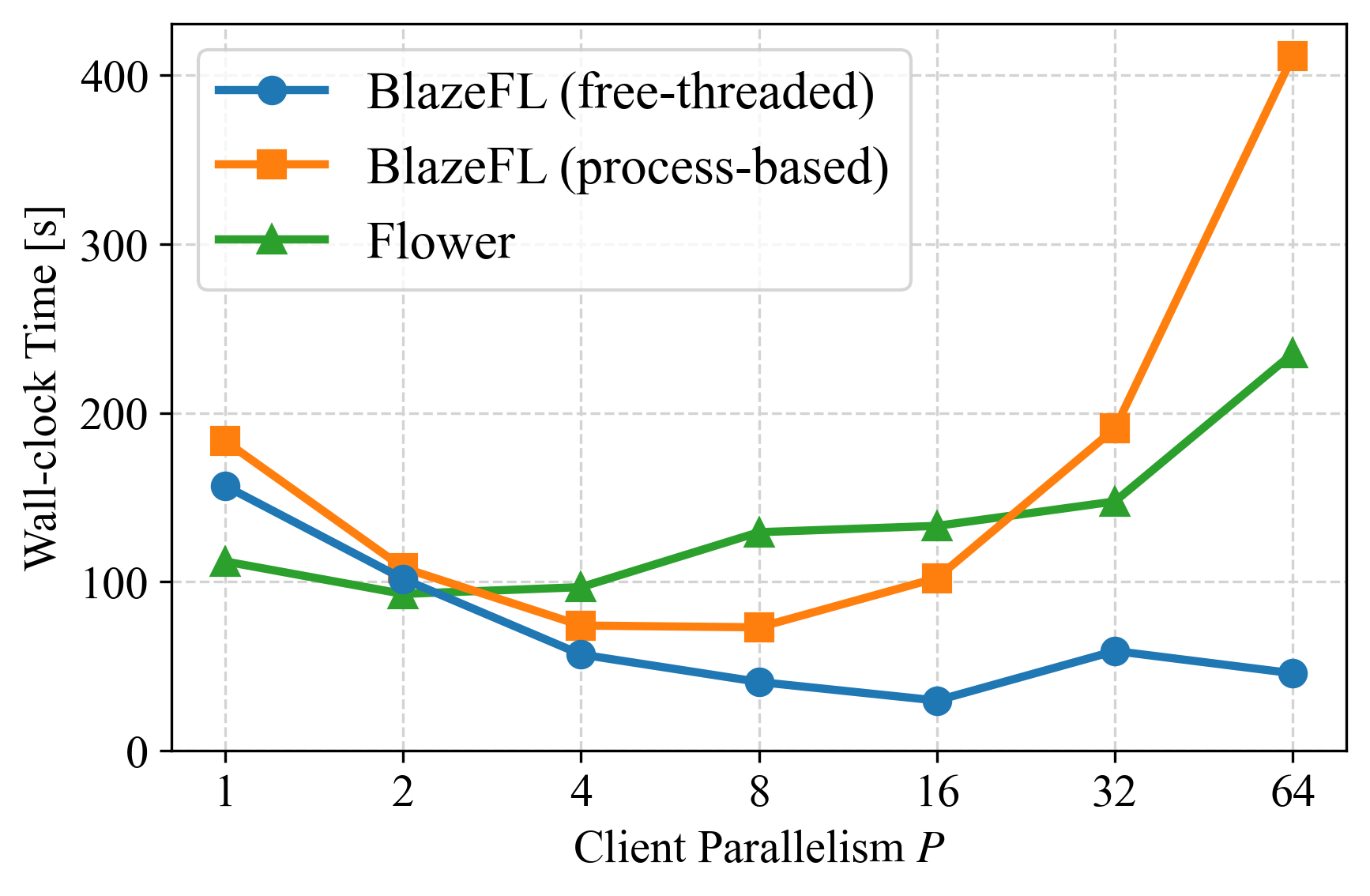
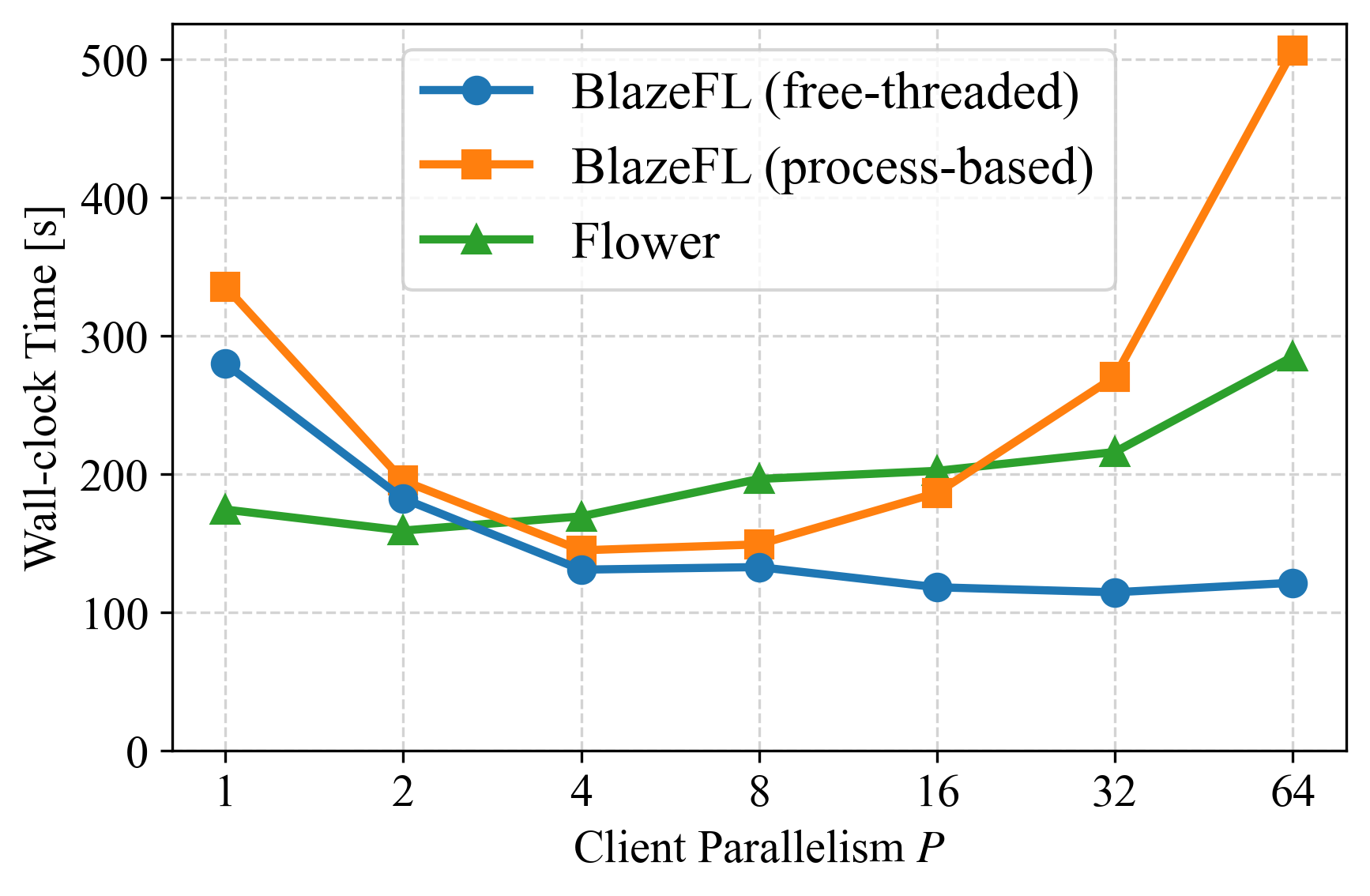
For both the lightweight CNN and the more demanding ResNet-18, the multi-threaded mode scales exceptionally well, leveraging the direct memory access between threads to minimize overhead. This advantage is particularly pronounced in the CNN benchmark, where the overhead of process-based methods (BlazeFL's multiprocessing and Flower's Ray backend) is more significant relative to the computation time. Even with the heavier ResNet-18 model, the multi-threaded mode maintains a consistent performance lead.
This benchmark highlights the power of free-threaded Python for CPU-bound, data-intensive workloads like FL simulations. By eliminating the GIL and avoiding the costs of serialization and inter-process communication, BlazeFL's multi-threaded mode offers a simpler and faster solution for researchers and developers.
Contributing
We welcome contributions from the community! If you'd like to contribute to this project, please see our contribution guidelines for more information on how to get started.
Please note that this project is governed by our Code of Conduct. By participating, you are expected to uphold this code.
Release history Release notifications | RSS feed


Download files
Download the file for your platform. If you're not sure which to choose, learn more about installing packages.
Source Distribution
Built Distribution
Filter files by name, interpreter, ABI, and platform.
If you're not sure about the file name format, learn more about wheel file names.
Copy a direct link to the current filters
File details
Details for the file blazefl-2.0.3.tar.gz.
File metadata
- Download URL: blazefl-2.0.3.tar.gz
- Upload date:
- Size: 903.5 kB
- Tags: Source
- Uploaded using Trusted Publishing? Yes
- Uploaded via: twine/6.1.0 CPython/3.13.7
File hashes
| Algorithm | Hash digest | |
|---|---|---|
| SHA256 |
789ccf39ae51c86804a422ede2301633c4cb8299aeff6e007249c7c1a877c224
|
|
| MD5 |
0527fba897bd1723f6462fead92647a4
|
|
| BLAKE2b-256 |
c218f521450b1ba1b8828cb8cee24f794b0060ba4f358410dfdf42fd956e36d6
|
Provenance
The following attestation bundles were made for blazefl-2.0.3.tar.gz:
Publisher:
publish.yaml on blazefl/blazefl
-
Statement:
-
Statement type:
https://in-toto.io/Statement/v1 -
Predicate type:
https://docs.pypi.org/attestations/publish/v1 -
Subject name:
blazefl-2.0.3.tar.gz -
Subject digest:
789ccf39ae51c86804a422ede2301633c4cb8299aeff6e007249c7c1a877c224 - Sigstore transparency entry: 665334756
- Sigstore integration time:
-
Permalink:
blazefl/blazefl@a63fb0b24846dbe9d43f8a52bd43cc67481e9f84 -
Branch / Tag:
refs/tags/v2.0.3 - Owner: https://github.com/blazefl
-
Access:
public
-
Token Issuer:
https://token.actions.githubusercontent.com -
Runner Environment:
github-hosted -
Publication workflow:
publish.yaml@a63fb0b24846dbe9d43f8a52bd43cc67481e9f84 -
Trigger Event:
release
-
Statement type:
File details
Details for the file blazefl-2.0.3-py3-none-any.whl.
File metadata
- Download URL: blazefl-2.0.3-py3-none-any.whl
- Upload date:
- Size: 33.1 kB
- Tags: Python 3
- Uploaded using Trusted Publishing? Yes
- Uploaded via: twine/6.1.0 CPython/3.13.7
File hashes
| Algorithm | Hash digest | |
|---|---|---|
| SHA256 |
0642dff0cca080f2c42d574f1ea440364ba4ded2fbe40b449439696c5c473182
|
|
| MD5 |
33e80a736b28bd37d002bbe6758f1202
|
|
| BLAKE2b-256 |
9c0bd674b9481a7acb2994771eea194cdd00052ae58c0fe51c9edc8480a917c1
|
Provenance
The following attestation bundles were made for blazefl-2.0.3-py3-none-any.whl:
Publisher:
publish.yaml on blazefl/blazefl
-
Statement:
-
Statement type:
https://in-toto.io/Statement/v1 -
Predicate type:
https://docs.pypi.org/attestations/publish/v1 -
Subject name:
blazefl-2.0.3-py3-none-any.whl -
Subject digest:
0642dff0cca080f2c42d574f1ea440364ba4ded2fbe40b449439696c5c473182 - Sigstore transparency entry: 665334789
- Sigstore integration time:
-
Permalink:
blazefl/blazefl@a63fb0b24846dbe9d43f8a52bd43cc67481e9f84 -
Branch / Tag:
refs/tags/v2.0.3 - Owner: https://github.com/blazefl
-
Access:
public
-
Token Issuer:
https://token.actions.githubusercontent.com -
Runner Environment:
github-hosted -
Publication workflow:
publish.yaml@a63fb0b24846dbe9d43f8a52bd43cc67481e9f84 -
Trigger Event:
release
-
Statement type:






