
This release is a pre-release and may not be stable for production use.
blended-tiling



This module adds support for splitting NCHW tensor inputs like images & activations into overlapping tiles of equal size, and then blending those overlapping tiles together after they have been altered. This module is also fully Autograd & JIT / TorchScript compatible.
This tiling solution is intended for situations where one wishes to render / generate outputs that are larger than what their computing device can support. Tiles can be separately rendered and periodically blended together to maintain tile feature coherence.
Setup:
Installation Requirements
- Python >= 3.6
- PyTorch >= 1.6
Installation via pip:
pip install blended-tiling
Dev / Manual install:
git clone https://github.com/progamergov/blended-tiling.git
cd blended-tiling
pip install -e .

# Notebook installs also require appending to environment variables
# import sys
# sys.path.append('/content/blended-tiling')
Documentation
TilingModule
The base blended tiling module.
blended_tiling.TilingModule(tile_size=(224, 224), tile_overlap=(0.25, 0.25), base_size=(512, 512))
Initialization Variables
tile_size(int or tuple of int): The size of tiles to use. A single integer to use for both the height and width dimensions, or a list / tuple of dimensions with a shape of:[height, width]. The chosen tile sizes should be less than or equal to the sizes of the full NCHW tensor (base_size).tile_overlap(int or tuple of int): The amount of overlap to use when creating tiles. A single integer to use for both the height and width dimensions, or a list / tuple of dimensions with a shape of:[height, width]. The chosen overlap percentages should be in the range [0.0, 0.50] (0% - 50%).base_size(int or tuple of int): The size of the NCHW tensor being split into tiles. A single integer to use for both the height and width dimensions, or a list / tuple of dimensions with a shape of:[height, width].
Methods
num_tiles()
- Returns
num_tiles(int): The number of tiles that the full image shape is divided into based on specified parameters.
tiling_pattern()
- Returns:
pattern(list of int): The number of tiles per column and number of tiles per row, in the format of:[n_tiles_per_column, n_tiles_per_row].
split_into_tiles(x): Splits an NCHW image input into overlapping tiles, and then returns the tiles. The base_size parameter is automatically readjusted to match the input.
- Returns:
tiles(torch.Tensor): A set of tiles created from the input image.
get_tile_masks(channels=3, device=torch.device("cpu"), dtype=torch.float): Return a stack of NCHW masks corresponding to the tiles outputted by .split_into_tiles(x).
- Variables:
channels(int, optional): The number of channels to use for the masks. Default: 3device(torch.device, optional): The desired device to create the masks on. Default: torch.device("cpu")dtype(torch.dtype, optional): The desired dtype to create the masks with. Default: torch.float
- Returns:
masks(torch.Tensor): A set of tile masks stacked across the batch dimension.
rebuild(tiles, border=None, colors=None): Creates and returns the full image from a stack of NCHW tiles stacked across the batch dimension.
- Variables:
tiles(torch.Tensor): A set of tiles that may or not be masked, stacked across the batch dimension.border(int, optional): Optionally add a border of a specified size to the edges of tiles in the full image for debugging and explainability. Set to None for no border.colors(list of float, optional): A set of floats to use for the border color, if using borders. Default is set to red unless specified.
- Returns:
full_image(torch.Tensor): The full image made up of tiles merged together without any blending.
rebuild_with_masks(tiles, border=None, colors=None): Creates and returns the full image from a stack of NCHW tiles stacked across the batch dimension, using tile blend masks.
- Variables:
tiles(torch.Tensor): A set of tiles that may or not be masked, stacked across the batch dimension.border(int, optional): Optionally add a border of a specified size to the edges of tiles in the full image for debugging and explainability. Set to None for no border.colors(list of float, optional): A set of floats to use for the border color, if using borders. Default is set to red unless specified.
- Returns:
full_image(torch.Tensor): The full image made up of tiles blended together using masks.
forward(x): Takes a stack of tiles, combines them into the full image with blending masks, then splits the image back into tiles.
- Variables:
x(torch.Tensor): A set of tiles to blend the overlapping regions together of.
- Returns:
x(torch.Tensor): A set of tiles with overlapping regions blended together.
Supported Tensor Types
The TilingModule class has been tested with and is confirmed to work with the following PyTorch Tensor Data types / dtypes: torch.float32 / torch.float, torch.float64 / torch.double, torch.float16 / torch.half, & torch.bfloat16.
Usage
The TilingModule class is pretty easy to use.
from blended_tiling import TilingModule


full_size = [512, 512]
tile_size = [224, 224]
tile_overlap = [0.25, 0.25]  # 25% overlap on both H & W

tiling_module = TilingModule(
    tile_size=tile_size,
    tile_overlap=tile_overlap,
    base_size=full_size,
)

# Shape of tiles expected in forward pass
input_shape = [tiling_module.num_tiles(), 3] + tile_size

# Tiles are blended together and then split apart by default
blended_tiles = tiling_module(torch.ones(input_shape))
Tiles can be created and then merged back into the original tensor like this:
full_tensor = torch.ones(1, 3, 512, 512)

tiles = tiling_module.split_into_tiles(full_tensor)

full_tensor = tiling_module.rebuild_with_masks(tiles)
The tile boundaries can be viewed on the full tensor like this:
tiles = torch.ones(9, 3, 224, 224)
full_tensor = tiling_module.rebuild_with_masks(tiles, border=2)
And the number of tiles and tiling pattern can be obtained like this:
num_tiles = tiling_module.num_tiles()

tiling_pattern = tiling_module.tiling_pattern()
print("{}x{}".format(tiling_pattern[0], tiling_pattern[1]))
Custom Classes
It's also easy to modify the forward function of the tiling module:
from typing import Union, List, Tuple
from blended_tiling import TilingModule

class CustomTilingModule(TilingModule):
    def __init__(
        self,
        tile_size: Union[int, List[int], Tuple[int, int]] = [224, 224],
        tile_overlap: Union[float, List[float], Tuple[float, float]] = [0.25, 0.25],
        base_size: Union[int, List[int], Tuple[int, int]] = [512, 512],
    ) -> None:
        TilingModule.__init__(self, tile_size, tile_overlap, base_size)
        self.custom_module = torch.nn.Identity()

    def forward(self, x: torch.Tensor) -> torch.Tensor:
        x = self.rebuild_with_masks(x)
        x = self.custom_module(x) + 4.0
        return self._get_tiles_and_coords(x)[0]
Examples
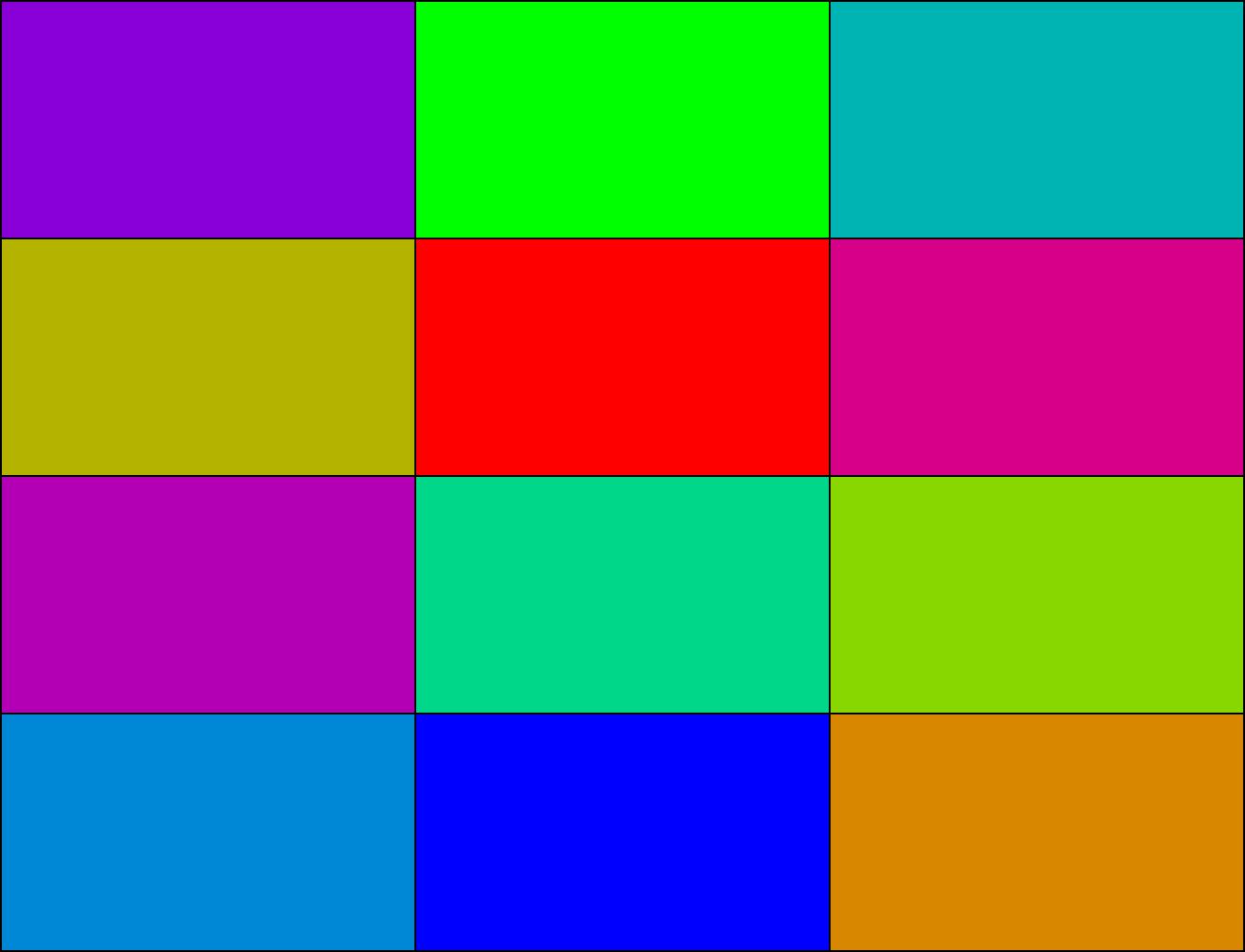
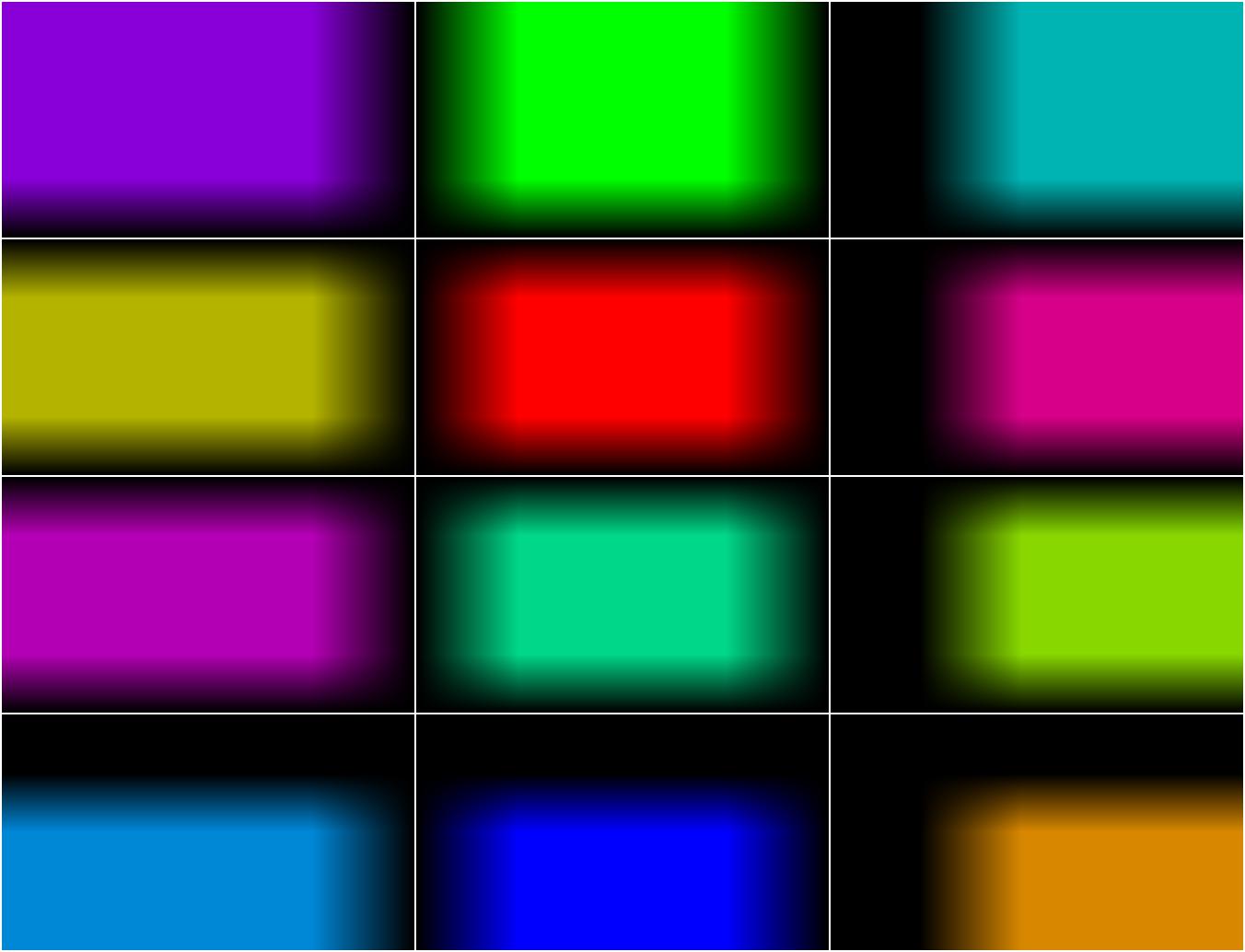
To demonstrate the tile blending abilities of the TilingModule class, an example has been created below.
First we'll create a set of tiles & give them all unique colors for this example:
# Setup TilingModule instance
full_size = [768, 1014]
tile_size = [256, 448]
tile_overlap = [0.25, 0.25]
tiling_module = TilingModule(
    tile_size=tile_size,
    tile_overlap=tile_overlap,
    base_size=full_size,
)

# Create unique colors for tiles
tile_colors = [
    [0.5334, 0.0, 0.8459],
    [0.0, 1.0, 0.0],
    [0.0, 0.7071, 0.7071],
    [0.7071, 0.7071, 0.0],
    [1.0, 0.0, 0.0],
    [0.8459, 0.0, 0.5334],
    [0.7071, 0.0, 0.7071],
    [0.0, 0.8459, 0.5334],
    [0.5334, 0.8459, 0.0],
    [0.0, 0.5334, 0.8459],
    [0.0, 0.0, 1.0],
    [0.8459, 0.5334, 0.0],
]
tile_colors = torch.as_tensor(tile_colors).view(12, 3, 1, 1)

# Create tiles
tiles = torch.ones([tiling_module.num_tiles(), 3] + tile_size)

# Color tiles
tiles = tiles * tile_colors
Next we apply the blend masks to the tiles:
tiles = tiles * tiling_module.get_tile_masks()
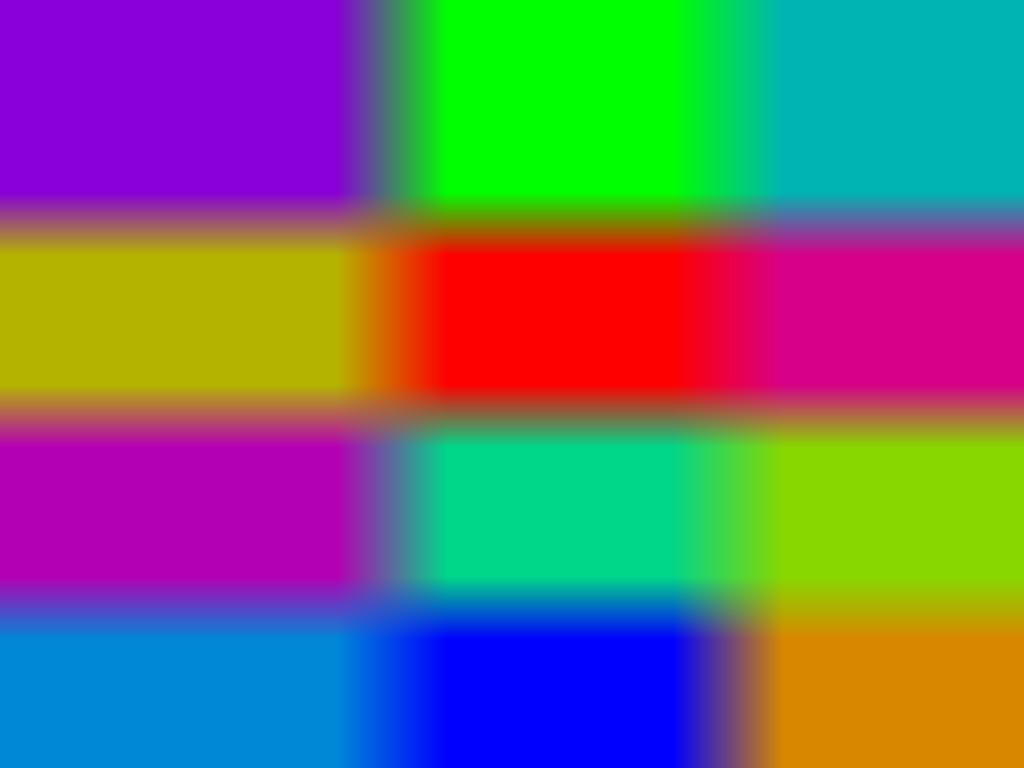
We can now combine the masked tiles into the full image:
# Build full tiled image
output = tiling_module.rebuild(tiles)
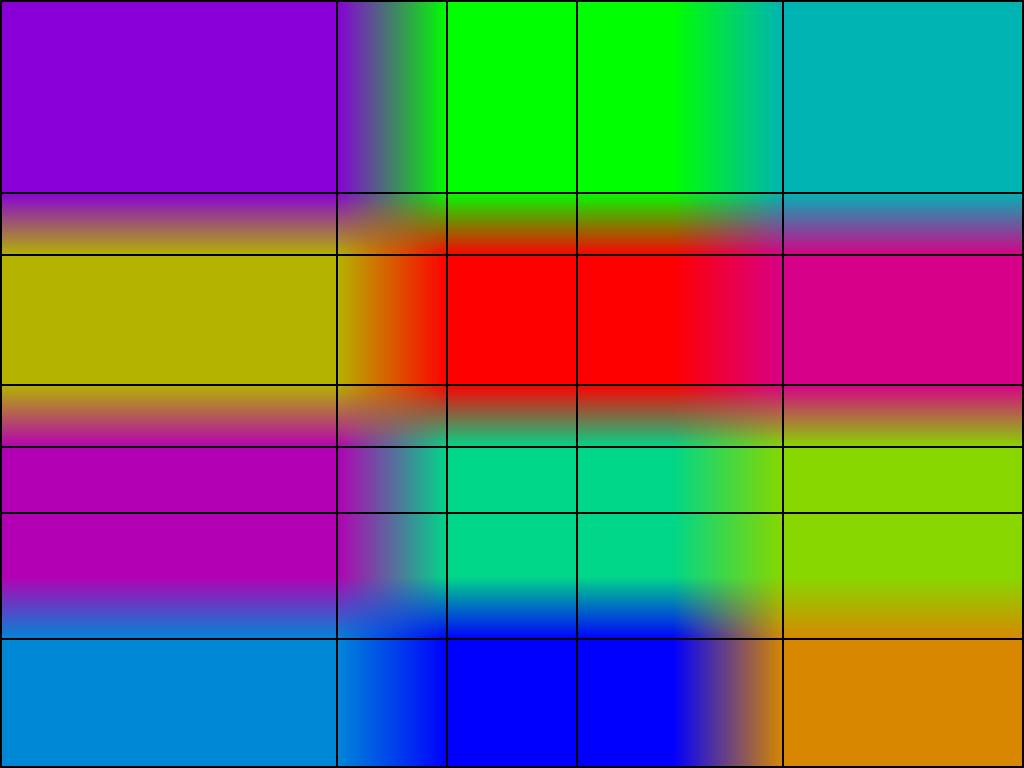
We can also view the tile boundaries like so:
# Build full tiled image
output = tiling_module.rebuild(tiles, border=2, colors=[0,0,0])
We can view an animation of the tiles being added like this:
from torchvision.transforms import ToPILImage

tile_steps = [
    tiling_module.rebuild(tiles[: i + 1]) for i in range(tiles.shape[0])
]
tile_frames = [
    ToPILImage()(x[0])
    for x in [torch.zeros_like(tile_steps[0])] + tile_steps + [tile_steps[-1]]
]
tile_frames[0].save(
    "tiles.gif",
    format="GIF",
    append_images=tile_frames[1:],
    save_all=True,
    duration=700,
    loop=0,
)

2 maintainers


Metadata
2 maintainers
Release files for blended-tiling 0.0.1.dev7
For a detailed explanation of source distributions (sdists) and built distributions (wheels), please see the package formats documentation.
Source distribution (sdist)
| File | Size | Uploaded | Provenance | Actions |
|---|---|---|---|---|
| blended_tiling-0.0.1.dev7.tar.gz | 14.6 kB | Without provenance | Details for blended_tiling-0.0.1.dev7.tar.gz |
Built distribution (wheel)
| File | Interpreter | ABI | Platform | Actions Reset |
|---|---|---|---|---|
| blended_tiling-0.0.1.dev7-py3-none-any.whl | Python 3 | none | any | Details for blended_tiling-0.0.1.dev7-py3-none-any.whl |
Total release size: 25.1 kB
Release files / blended_tiling-0.0.1.dev7.tar.gz
| Download URL | blended_tiling-0.0.1.dev7.tar.gz |
|---|---|
| Size | 14.6 kB |
| Tags | Source |
|
SHA-256 checksum How to use checksums |
04b2ddd7d54ca688823171741948f04f8180205c92e9d3e662336c1a4372c267
|
|
BLAKE2b-256 checksum How to use checksums |
eda0867beb4490a8da97a205441317e592c0e75e26f502c54ef2b0d56120a2d8
|
| Upload date | |
|
Uploaded using Trusted Publishing? What is trusted publishing? |
No |
| Uploaded via |
twine/6.0.1 CPython/3.10.12
|
Release files / blended_tiling-0.0.1.dev7-py3-none-any.whl
| Download URL | blended_tiling-0.0.1.dev7-py3-none-any.whl |
|---|---|
| Size | 10.4 kB |
| Tags | Python 3 |
|
SHA-256 checksum How to use checksums |
d16eebd461b21380b8ad8d74f94a3c4455c1dd7384f84d8cb15a3a9fafd5a173
|
|
BLAKE2b-256 checksum How to use checksums |
7daf05d2e1e62965f719665a8e8c9653daaab3d074416f90b206e22177950a71
|
| Upload date | |
|
Uploaded using Trusted Publishing? What is trusted publishing? |
No |
| Uploaded via |
twine/6.0.1 CPython/3.10.12
|
Security for blended-tiling 0.0.1.dev7
Provenance
Provenance describes where a file came from. On PyPI, provenance is shared via attestations, which provide a verifiable record of the build or publishing details. View details, limitations and caveats.
No provenance found
None of the files in this release were uploaded with provenance metadata.
A note on package security
PyPI is a repository for distributing packages, not a service for auditing them. While third-party security researchers and our staff do their best to detect and remove malicious packages, PyPI cannot guarantee the quality, security or suitability of any given package.
To learn more about protecting yourself from malicious actors, visit our package security documentation.














