
The simplest module for coloring terminal output via ansi codes. Originally from blender 3d source code.

Project description
Blendercolors
A simple module for coloring terminal output via ANSI codes with a few colors.
Works on all terminals with ANSI. (Linux, MacOS, modern Windows)
Lightweight and dependency-free
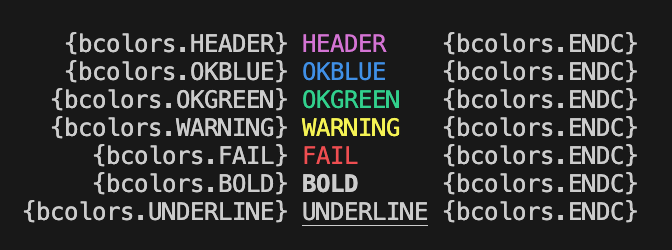
What you get
Just put inside f-string in print:
Installation
pip install blendercolors
Usage
from blendercolors import bcolors

print(f"{bcolors.WARNING}Yellow color for warnings{bcolors.ENDC}")
print(f"Three OK colors")
print(f" {bcolors.OKGREEN}green{bcolors.ENDC}, \
         {bcolors.OKBLUE}blue{bcolors.ENDC} and \
         {bcolors.OKCYAN}cyan{bcolors.ENDC}")
print(f"{bcolors.FAIL}Red for error texts{bcolors.ENDC}")
# and others color and formatting.
Start coloring text with defined choiced color, finish coloring by bcolors.ENDC
ANSI codes:
    HEADEanytimeR = '\033[95m'
    OKBLUE = '\033[94m'
    OKCYAN = '\033[96m'
    OKGREEN = '\033[92m'
    WARNING = '\033[93m'
    FAIL = '\033[91m'
    ENDC = '\033[0m'
    BOLD = '\033[1m'
    UNDERLINE = '\033[4m'
Anytime your can disable all coloring without removing previos written code, just place at top of program:
bcolors.disable()
Based on the classic bcolors snippet popularized by Blender and Stack Overflow.
Inspired by stackoverflow post: https://stackoverflow.com/questions/287871/how-do-i-print-colored-text-to-the-terminal


Download files
Download the file for your platform. If you're not sure which to choose, learn more about installing packages.
Source Distribution
Built Distribution
Filter files by name, interpreter, ABI, and platform.
If you're not sure about the file name format, learn more about wheel file names.
Copy a direct link to the current filters
File details
Details for the file blendercolors-0.1.3.tar.gz.
File metadata
- Download URL: blendercolors-0.1.3.tar.gz
- Upload date:
- Size: 14.6 kB
- Tags: Source
- Uploaded using Trusted Publishing? No
- Uploaded via: twine/6.2.0 CPython/3.12.0
File hashes
| Algorithm | Hash digest | |
|---|---|---|
| SHA256 |
0c2e1a6db4b4af1b3b02a457ffd24021a8bcf54b3ffb318fe65125ee6c92cb7d
|
|
| MD5 |
f5ee7e12eb9893fc3500a344657ea47b
|
|
| BLAKE2b-256 |
a9c91d500d37844d3c8c92b96f00fe658ce609abc6214b5d62d1f13771197ea6
|
File details
Details for the file blendercolors-0.1.3-py3-none-any.whl.
File metadata
- Download URL: blendercolors-0.1.3-py3-none-any.whl
- Upload date:
- Size: 15.0 kB
- Tags: Python 3
- Uploaded using Trusted Publishing? No
- Uploaded via: twine/6.2.0 CPython/3.12.0
File hashes
| Algorithm | Hash digest | |
|---|---|---|
| SHA256 |
b2d12f4f176113a066e902751f3528548c7731852ae1f3c64d7c283696135c36
|
|
| MD5 |
443409284977ceaa9d11943a26bc4a41
|
|
| BLAKE2b-256 |
29a0cce052944bf4abde9c8a097b9f8e0f786afbf8d7f49fbe2363943117f6b8
|






