






1. Table of Contents
Table of Contents
2. Description
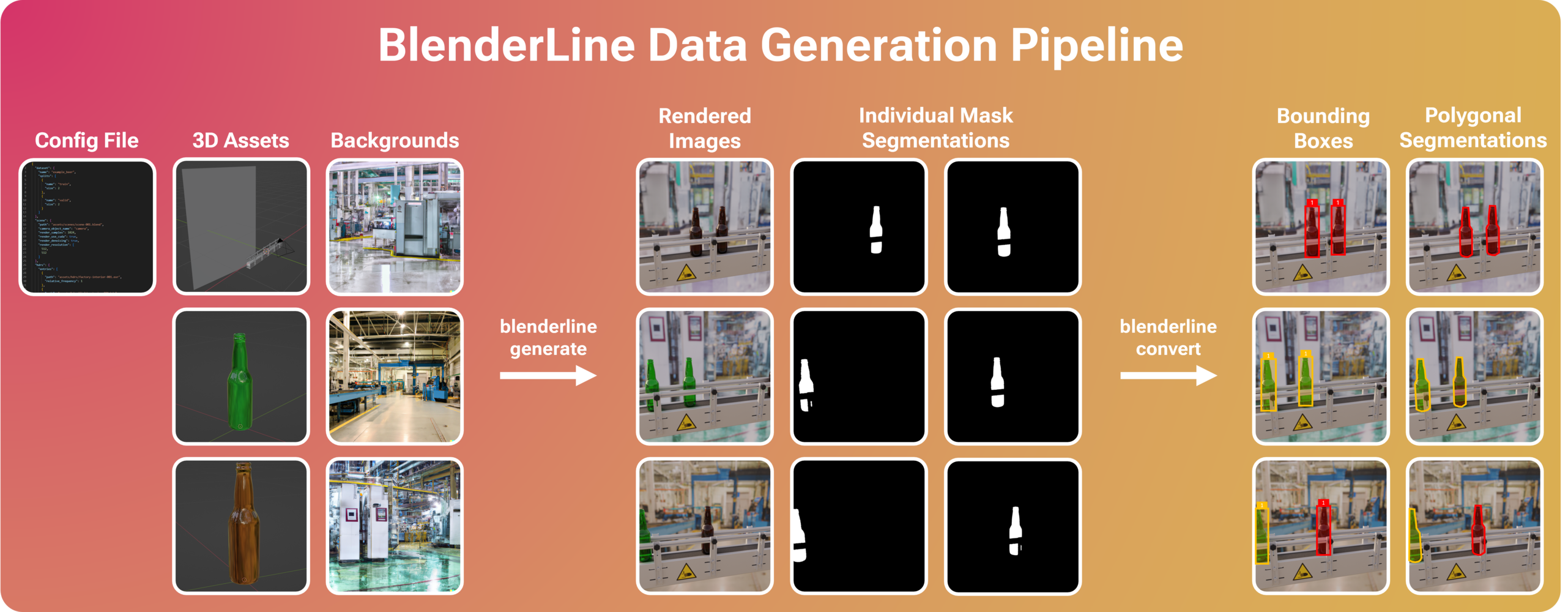
BlenderLine is an open-source tool for generating synthetic image data for object detection, segmentation, and counting tasks in manufacturing settings. Leveraging 3D CAD models commonly found in manufacturing plants, BlenderLine automatically generates large and diverse datasets with pixel-perfect labels, reducing the time and effort traditionally required for manual data collection and annotation.
3. Overview
4. Features
- Flexible: BlenderLine imposes as little constraints on your 3D modeling workflow as possible, giving you the freedom to model your production line as you see fit.
- Declarative: Instead of having to write the generation code yourself, BlenderLine enables you to define the desired behavior of objects on your production line using declarative configuration files.
- Powerful: Despite using declarative configuration files, BlenderLine is powerful enough to support a wide variety of use cases, ranging from narrow bottle counting lines (see
examples/example_beer) to wide conveyor belts (example planned). - Convenient: BlenderLine includes tools to easily convert generated datasets into common computer vision dataset formats:
yolo_detectionyolo_segmentation(planned)coco_detection(planned)coco_segmentation(planned)
5. Installation
The simplest way to install BlenderLine is using pip:
pip install blenderline
Alternatively, you can choose to clone the repository to make a local pip installation:
git clone https://github.com/maxvandenhoven/blenderline
cd blenderline
pip install -e .
Note that, by default, BlenderLine assumes that Blender is installed and available on your system PATH, meaning that the Blender CLI can be invoked using only the blender command. The platform-dependent documentation below can help you add Blender to your system PATH:
Alternatively, you can use the optional --blender argument in blenderline generate to specify where Blender is installed on your system.
6. Usage
Generate Images
The blenderline generate command is used to generate a dataset of synthetic images from a configuration file. You can test BlenderLine with the provided examples/example_beer/images.json example as follows:
blenderline generate --config examples/example_beer/images.json --target data/raw
This will generate a dataset with the following structure:
data/
+- raw/
   +- example_beer/
      +- train/
      |  +- 0/
      |  |  +- image__f0825a6262fc__0001.png
      |  |  +- mask__0__8acdea079f10__0001.png
      |  |  +- mask__1__0181a303d637__0001.png
      |  |  +- ...
      |  +- 1/
      |     +- image__7abe7f02c7d9__0001.png
      |     +- mask__1__19abef8a5cef__0001.png
      |     +- mask__1__d980d4a83682__0001.png
      |     +- ...
      +- valid/
      |  +- 0/...
      |  +- 1/...
      +- label_mapping.json
While not strictly necessary, setting --target data/raw will create a folder structure that allows you to track different versions of the data, e.g., after using the blenderline convert command.
Note that the dataset root folder (here named example_beer) contains subfolders for different splits defined in the configuration file. Each split contains a numbered list of instance folders, each containing a rendered image and a set of masks. An example instance might look as follows:
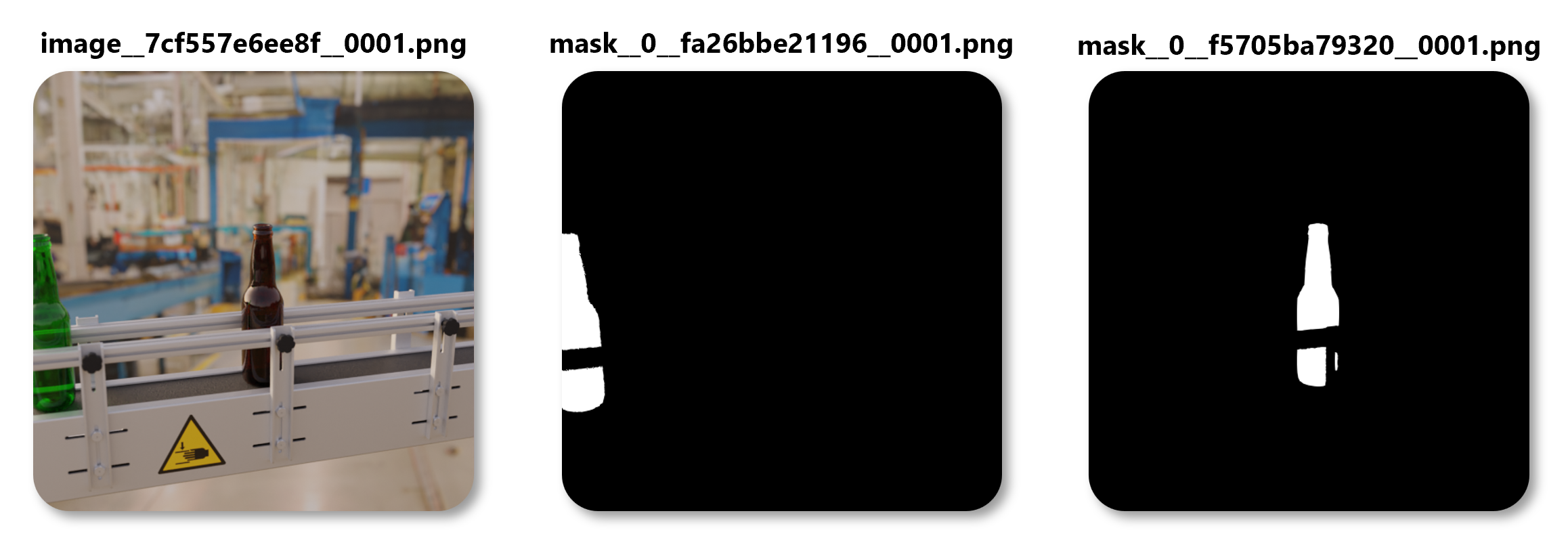
Image and mask files use the following naming convention:
image__<random image ID>__0001.png
mask__<class ID>__<random mask ID>__0001.png
Convert Dataset
Coming soon!
7. Roadmap
| Version | Features |
|---|---|
| v0.1.0 (current) | Image generation pipeline + CLI interface |
| v0.2.0 | YOLO detection conversion pipeline + CLI interface |
| v0.3.0 | Documentation + tutorial + second example |
| v0.4.0 | YOLO segmentation conversion pipeline + CLI interface |
| v0.5.0 | COCO detection conversion pipeline + CLI interface |
| v0.6.0 | COCO segmentation conversion pipeline + CLI interface |
1 maintainer

Metadata
1 maintainer
Release files for blenderline 0.1.6
For a detailed explanation of source distributions (sdists) and built distributions (wheels), please see the package formats documentation.
Source distribution (sdist)
| File | Size | Uploaded | |
|---|---|---|---|
| blenderline-0.1.6.tar.gz | 35.7 kB | Details |
Built distribution (wheel)
| File | Interpreter | ABI | Platform | Reset |
|---|---|---|---|---|
| blenderline-0.1.6-py3-none-any.whl | Python 3 | none | any | Details |
Total release size: 77.8 kB
Release files / blenderline-0.1.6.tar.gz
| Download URL | blenderline-0.1.6.tar.gz |
|---|---|
| Size | 35.7 kB |
| Tags | Source |
|
SHA-256 checksum How to use checksums |
faa6bcc2450b334a98edda42274e636086b8bd959f133ee08a2f36a7eee321b3
|
|
BLAKE2b-256 checksum How to use checksums |
e35154e63a04e0978e0e2a7dfb395f42f46fd9b829c937fa32dc62c46263dc27
|
| Upload date | |
|
Uploaded using Trusted Publishing? What is trusted publishing? |
No |
| Uploaded via |
twine/4.0.2 CPython/3.10.10
|
Release files / blenderline-0.1.6-py3-none-any.whl
| Download URL | blenderline-0.1.6-py3-none-any.whl |
|---|---|
| Size | 42.2 kB |
| Tags | Python 3 |
|
SHA-256 checksum How to use checksums |
6e304fa5373aa8182c4b4151b3672ecffc0ba190173199125baea91514b6ba62
|
|
BLAKE2b-256 checksum How to use checksums |
9430910a56255cd17074b42fe13b710a3a6c94e30ae995ce120c1c034858ccce
|
| Upload date | |
|
Uploaded using Trusted Publishing? What is trusted publishing? |
No |
| Uploaded via |
twine/4.0.2 CPython/3.10.10
|














