
blessedtable
Python module for creating colorful formatted ASCII tables.

Dependencies
This package combines the texttable and the blessed package; and thus, blessedtable.
Installing the package
pip install blessedtable
Getting started
Inializing the table with default parameters will print the a table without any formatting. To know more about structuring the ascii table follow this link
from blessedtable import Blessedtable

table = Blessedtable()
table.set_deco(15)
table.set_cols_align(["l", "r", "c"])
table.set_cols_valign(["t", "m", "b"])
table.add_rows([["Name", "Age", "Nickname"],
    ["Mr\nXavier\nHuon", 32, "Xav'"],
    ["Mr\nBaptiste\nClement", 1, "Baby"],
    ["Mme\nLouise\nBourgeau", 28, "Lou\n\nLoue"]])

print(table.draw())
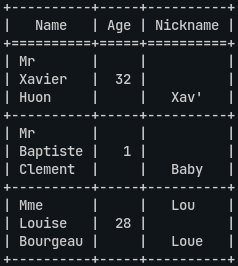
For styleing blessedtable uses three parameters over textable. These are border_format, header_format, and column_format.
border_format needs to be either None , or of type str
header_format needs to be either None, or of type str, or a list of strings
column_format needs to be either None, or of type str, or a list of strings
Note: The strings should be formatting strings. Examples are given below.
'normal_on_norma' # text and background both have default color
'red' # text color is red, background has default color
'red_on_white' # text color is red, background is white
'italic_red_on_blue' # text italic and red, and background is white
All the color options can be found here. To know more about blessed's formatting, follow this link
The three parameters can be set either while initializing or using setters.
table = Blessedtable(header_format='green_on_blue', border_format='blue', column_format='blue_on_rosybrown2')
#or
table = Blessedtable()
table.set_deco(15)
table.set_cols_align(["l", "r", "c"])
table.set_cols_valign(["t", "m", "b"])
table.add_rows([["Name", "Age", "Nickname"],
    ["Mr\nXavier\nHuon", 32, "Xav'"],
    ["Mr\nBaptiste\nClement", 1, "Baby"],
    ["Mme\nLouise\nBourgeau", 28, "Lou\n\nLoue"]])
table.header_format = 'green_on_blue'
table.border_format = 'blue'
table.column_format = 'blue_on_rosybrown2'

print(table.draw())
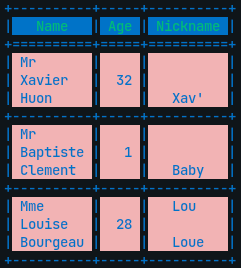
To achieve different colors for the columns for both header and the rows, pass a list having format string for each of the columns.
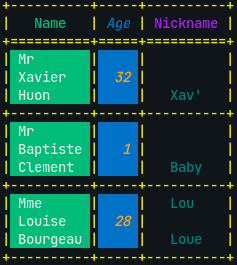
Note: The number of elements in the list should be equal to the number of columns in a row; each element (format string) correspomds to successive columns. If header_format is None then it inherits the column_format and vice versa. If you don't want it to inherit the styles, set the header_format or column_format to "normal_on_normal"
hf = ['green', 'italic_blue', 'purple']
cf = ['white_on_green', 'italic_orange_on_blue', 'teal']
table.header_format = hf
table.border_format = 'yellow'
table.column_format = cf

print(table.draw())
1 maintainer

Metadata
1 maintainer
Release files for blessedtable 1.0.0
For a detailed explanation of source distributions (sdists) and built distributions (wheels), please see the package formats documentation.
Source distribution (sdist)
| File | Size | Uploaded | |
|---|---|---|---|
| blessedtable-1.0.0.tar.gz | 8.7 kB | Details |
Built distribution (wheel)
| File | Interpreter | ABI | Platform | Reset |
|---|---|---|---|---|
| blessedtable-1.0.0-py2.py3-none-any.whl | Python 2, Python 3 | none | any | Details |
Total release size: 14.4 kB
Release files / blessedtable-1.0.0.tar.gz
| Download URL | blessedtable-1.0.0.tar.gz |
|---|---|
| Size | 8.7 kB |
| Tags | Source |
|
SHA-256 checksum How to use checksums |
fe17ae42b08fe25f7fe3155246a40335f2190a4a0ce342001b53b4deeae6bbb9
|
|
BLAKE2b-256 checksum How to use checksums |
31769461f482f73ab156f2482a389af79ae011ea5402419e48c087d7039f3958
|
| Upload date | |
|
Uploaded using Trusted Publishing? What is trusted publishing? |
No |
| Uploaded via |
twine/3.4.1 importlib_metadata/4.6.1 pkginfo/1.7.0 requests/2.25.1 requests-toolbelt/0.9.1 tqdm/4.61.2 CPython/3.7.9
|
Release files / blessedtable-1.0.0-py2.py3-none-any.whl
| Download URL | blessedtable-1.0.0-py2.py3-none-any.whl |
|---|---|
| Size | 5.7 kB |
| Tags | Python 2 Python 3 |
|
SHA-256 checksum How to use checksums |
cdab56820dddc5349124d0a1d2e301a5be397cf935c174a8f5de725918fa67b5
|
|
BLAKE2b-256 checksum How to use checksums |
899b20765395596bc94b84522834796ca9707c6342340a6a5fea3f8f3ebe2500
|
| Upload date | |
|
Uploaded using Trusted Publishing? What is trusted publishing? |
No |
| Uploaded via |
twine/3.4.1 importlib_metadata/4.6.1 pkginfo/1.7.0 requests/2.25.1 requests-toolbelt/0.9.1 tqdm/4.61.2 CPython/3.7.9
|














