

Eight super-bright RGB LED indicators, ideal for adding visual notifications to your Raspberry Pi on their own or on a pHAT stacking header.
Installing
Full install (recommended):
We’ve created an easy installation script that will install all pre-requisites and get your Blinkt! up and running with minimal efforts. To run it, fire up Terminal which you’ll find in Menu -> Accessories -> Terminal on your Raspberry Pi desktop, as illustrated below:
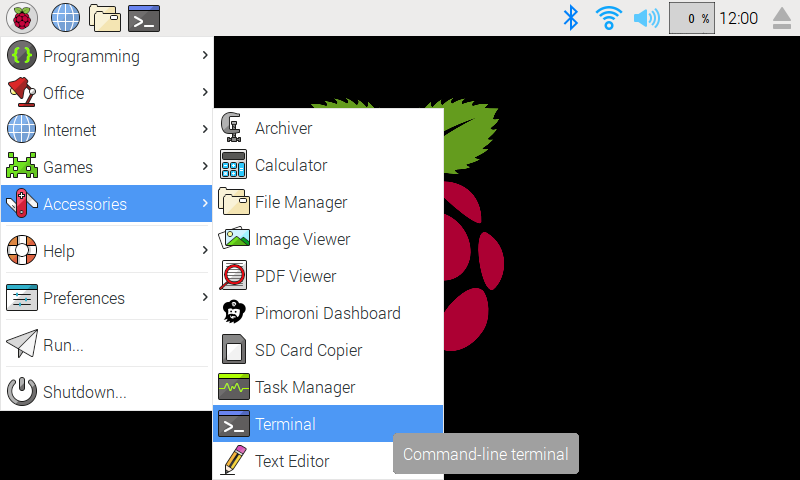
In the new terminal window type the command exactly as it appears below (check for typos) and follow the on-screen instructions:
curl https://get.pimoroni.com/blinkt | bashAlternatively, on Raspbian, you can download the pimoroni-dashboard and install your product by browsing to the relevant entry:
sudo apt-get install pimoroni(you will find the Dashboard under ‘Accessories’ too, in the Pi menu - or just run pimoroni-dashboard at the command line)
If you choose to download examples you’ll find them in /home/pi/Pimoroni/blinkt/.
Manual install:
Library install for Python 3:
on Raspbian:
sudo apt-get install python3-blinktother environments:
sudo pip3 install blinktLibrary install for Python 2:
on Raspbian:
sudo apt-get install python-blinktother environments:
sudo pip2 install blinktDevelopment:
If you want to contribute, or like living on the edge of your seat by having the latest code, you should clone this repository, cd to the library directory, and run:
sudo python3 setup.py install(or sudo python setup.py install whichever your primary Python environment may be)
Documentation & Support
Guides and tutorials - https://learn.pimoroni.com/blinkt
Function reference - http://docs.pimoroni.com/blinkt/
GPIO Pinout - https://pinout.xyz/pinout/blinkt
Get help - http://forums.pimoroni.com/c/support
Unofficial / Third-party libraries
Golang library & examples by Alex Ellis - https://github.com/alexellis/blinkt_go_examples
Java library by Jim Darby - https://github.com/hackerjimbo/PiJava
0.1.2
BugFix: Added sleep to data output, see: https://github.com/pimoroni/blinkt/issues/62
0.1.1
New: Added get_pixel to return colour and brightness of a single pixel
0.1.0
Removed try/except from RPi.GPIO import, output was misleading at best
Reverted default behaviour of clear on exit
0.0.9
Added set_all method to set all pixels
Changed default behaviour of clear on exit to reduce module side-effects
Move GPIO initialisation to show() to reduce module side-effects
0.0.8
Tweaked some methods to show intent as implementation detail only
Added docstrings detailing public methods
0.0.7
Fixed bug with APA102 pixels that have a small, black die (vs the larger, paler one)
0.0.6
set_clear_on_exit now method
0.0.5
Range clamping and coercion to integers
0.0.4
Various bug fixes
0.0.3
Switch to Python
0.0.2
Bug fixes for C Library
0.0.1
Original C Library
1 maintainer

Release files for blinkt 0.1.2
For a detailed explanation of source distributions (sdists) and built distributions (wheels), please see the package formats documentation.
Source distribution (sdist)
| File | Size | Uploaded | |
|---|---|---|---|
| blinkt-0.1.2.tar.gz | 5.2 kB | Details |
Built distributions (wheels)
| File | Interpreter | ABI | Platform | Reset |
|---|---|---|---|---|
| blinkt-0.1.2-py3-none-any.whl | Python 3 | none | any | Details |
| blinkt-0.1.2-py2-none-any.whl | Python 2 | none | any | Details |
Total release size: 18.3 kB
Release files / blinkt-0.1.2.tar.gz
| Download URL | blinkt-0.1.2.tar.gz |
|---|---|
| Size | 5.2 kB |
| Tags | Source |
|
SHA-256 checksum How to use checksums |
db8f54a22a7382476e4ac7531974fe01baee916b01f415bf3817c02820d59f3f
|
|
BLAKE2b-256 checksum How to use checksums |
c033fb5a3bfc2e9d467a6f9892088f08c0b88b4bbb0237a696b1b25cacab54d5
|
| Upload date | |
|
Uploaded using Trusted Publishing? What is trusted publishing? |
No |
Release files / blinkt-0.1.2-py3-none-any.whl
| Download URL | blinkt-0.1.2-py3-none-any.whl |
|---|---|
| Size | 6.6 kB |
| Tags | Python 3 |
|
SHA-256 checksum How to use checksums |
b090d1eccb5b8b5caaaeb25cfdb96f51cc12e98a8ab81c667c19b58b365f2818
|
|
BLAKE2b-256 checksum How to use checksums |
b924b8244726dd74e6d140a162e2587e6df7d65cac18558f5df7cad9e9f9f1ff
|
| Upload date | |
|
Uploaded using Trusted Publishing? What is trusted publishing? |
No |
Release files / blinkt-0.1.2-py2-none-any.whl
| Download URL | blinkt-0.1.2-py2-none-any.whl |
|---|---|
| Size | 6.6 kB |
| Tags | Python 2 |
|
SHA-256 checksum How to use checksums |
5a77cf0236c7257bf0045ecf67d6963d35baf2f070b1c1acaf752b676906c3a1
|
|
BLAKE2b-256 checksum How to use checksums |
e8bcff38ec1073c5570c058ce57820fb66613483d260b5470e786483916f9649
|
| Upload date | |
|
Uploaded using Trusted Publishing? What is trusted publishing? |
No |














