
blitcp — High-Speed File Copier with Deduplication & SSH Streaming







blitcp is the new name of fast-copy (renamed in v4.0.0 — "blit" as in bit-block transfer, which is what the block-order engine does). Existing installs upgrade in place via
--update; on-disk state andFAST_COPY_*environment variables keep working. See the CHANGELOG.
A fast, cross-platform tool for copying files and directories at maximum sequential disk speed — built for USB drives, external HDDs, NAS backups and large SSH transfers. CLI + desktop GUI, in 7 languages.
Why blitcp?
| Problem | Solution |
|---|---|
cp -r is slow on HDDs due to random seeks |
Reads files in physical disk order for sequential throughput |
| Thousands of small files copy painfully slow | Bundles small files into tar stream batches |
| Duplicate files waste space and time | Content-aware dedup — copies once, hard-links or reflinks the rest |
| No space check until copy fails mid-way | Pre-flight space check before any data is written |
| Copies that quietly fail half-way | Post-copy verification — every copied file is read back and its content hashed against the source, with an exit code a script can act on |
| Copying between two servers is painful | Remote-to-remote relay via SSH tar pipe streaming |
| SFTP is slow | Raw SSH tar streaming bypasses SFTP overhead — 3–5× faster |
Quickstart
pip install blitcp            # CLI — zero dependencies, Python 3.8+

blitcp /data /media/usb/data                # local → local
blitcp /data user@host:/backup              # local → remote over SSH
blitcp user@host:/data s3://bucket/backup   # any combination of local/SSH/cloud
blitcp --help                               # everything else
Optional: pip install paramiko for SSH, blitcp[cloud] for S3/Azure/GCS/SMB,
xxhash for ~10× faster hashing. Prebuilt CLI and GUI binaries for Linux,
macOS and Windows are on the
Releases page — no Python needed.
Key features
- Block-order reads — files are read in physical disk order (
FIEMAP/fcntl/FSCTL), eliminating random seeks on HDDs - Reflink copies on btrfs / XFS / APFS / bcachefs — metadata-only CoW clones make a 10 GB same-volume copy complete in milliseconds
- Content-aware deduplication — xxHash-128/SHA-256; each unique file is copied once, duplicates become hard links or reflinks, with a cross-run SQLite cache
- SSH transfers without SFTP — chunked ~100 MB tar batches over raw SSH channels, local↔remote and remote↔remote relay
- Cloud object storage —
s3://,az://,gs://as source or destination, with encrypted saved connections and a built-in passphrase generator - SMB / UNC shares — copy straight to
\\server\sharewith saved credentials - Sparse-file awareness — VM images copied via
SEEK_DATA/SEEK_HOLE; holes never hit the wire - Faithful metadata — permissions, timestamps, owner, xattrs and POSIX ACLs / NTFS DACLs+ADS, matching
cp -a - Safety rails — pre-flight space check, post-copy verification with proper exit codes, honest dedup accounting on FAT32/exFAT
--use-sudoself-elevation with a tamper-resistant (chattr +i) JSONL audit log- Interface in 7 languages — English, Ελληνικά, 中文, Deutsch, Italiano, Español, 日本語
- Multiple sources, globs, single-file renames —
cp -r-style ergonomics across every mode - Works on Linux, macOS, Windows (long paths included) · Synology/busybox-friendly · self-updating
Measured, not marketed
| Scenario | Result |
|---|---|
| Linux, 12,347 small files, cold HDD → SSD | 2.5× faster than cp -ar (5.9s vs 15.0s, dedup+verify ON) |
| Windows, 9,578 files off USB 2.0 | 1.3× faster than robocopy — with verification ON |
| SSH, many small files over LAN | 3–5× faster than scp/SFTP via tar streaming |
Full methodology and more scenarios: blitcp.dev/benchmarks · DOCUMENTATION.md
Desktop GUI
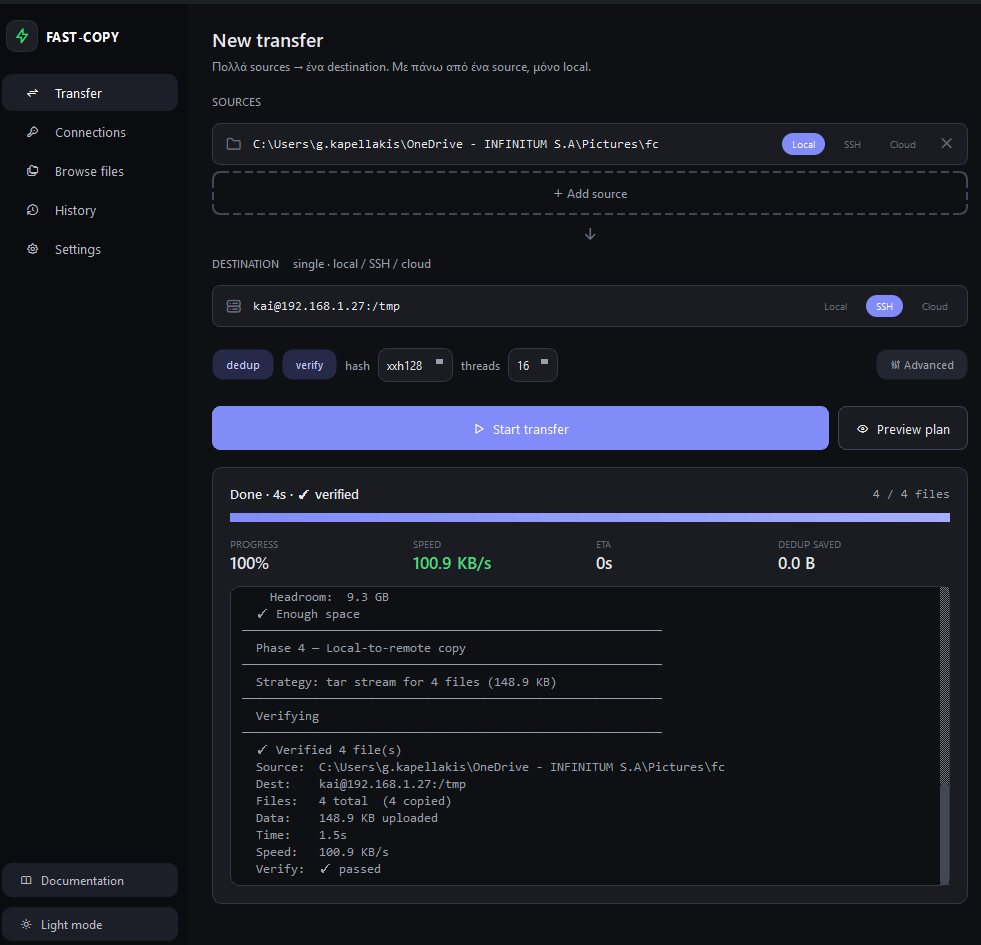
pip install "blitcp[gui]" && blitcp-gui
Transfers, saved connections, file browser, history and settings — same engine, point and click. More screenshots →
Documentation
- blitcp.dev/docs — guides: local copies, SSH transfers, cloud storage, sparse files, everyday options
- DOCUMENTATION.md — the full manual: every option, how it works internally, examples, benchmarks
- CHANGELOG.md — release history
Support
blitcp is free and Apache-2.0 licensed, and stays that way. Donations via Ko-fi go towards the Windows code signing certificate, hosting for blitcp.dev, and the hardware the published benchmarks run on. Starring the repository or filing a good bug report helps just as much.
License
Apache License 2.0 — see LICENSE. The --index-existing /
--dedup-existing features were contributed by
York-Simon Johannsen (#3).
1 maintainer

Download files
Download the file for your platform. If you're not sure which to choose, learn more about installing packages.
Source Distribution
Built Distribution
Filter files by name, interpreter, ABI, and platform.
If you're not sure about the file name format, learn more about wheel file names.
Copy a direct link to the current filters
File details
Details for the file blitcp-4.1.6.tar.gz.
File metadata
- Download URL: blitcp-4.1.6.tar.gz
- Upload date:
- Size: 459.6 kB
- Tags: Source
- Uploaded using Trusted Publishing? No
- Uploaded via:
twine/7.0.0 CPython/3.13.14
File hashes
| Algorithm | Hash digest | |
|---|---|---|
| SHA256 |
edf1d37c55922a75e4eef21224d4f464a31a0405512edc125641db88913468aa
|
|
| MD5 |
21b6f7612e05f64312251aa59a87f4e1
|
|
| BLAKE2b-256 |
cbc0d9fc202cf5d2b971b0a427c32e18d964926d22fbf1ef8025be572b95d4eb
|
File details
Details for the file blitcp-4.1.6-py3-none-any.whl.
File metadata
- Download URL: blitcp-4.1.6-py3-none-any.whl
- Upload date:
- Size: 475.9 kB
- Tags: Python 3
- Uploaded using Trusted Publishing? No
- Uploaded via:
twine/7.0.0 CPython/3.13.14
File hashes
| Algorithm | Hash digest | |
|---|---|---|
| SHA256 |
eb2c6867ead816b73cf1ff3d257261f58ecf0dda7a4d5d42db6e1c9dc8c87b04
|
|
| MD5 |
c72fbcbf84a9dcc243b59db1f47cf251
|
|
| BLAKE2b-256 |
e79c57d6566f4be010802e149c068c77c7b1d0214596e15c9b1428c57de9700b
|














