
blitzcrop


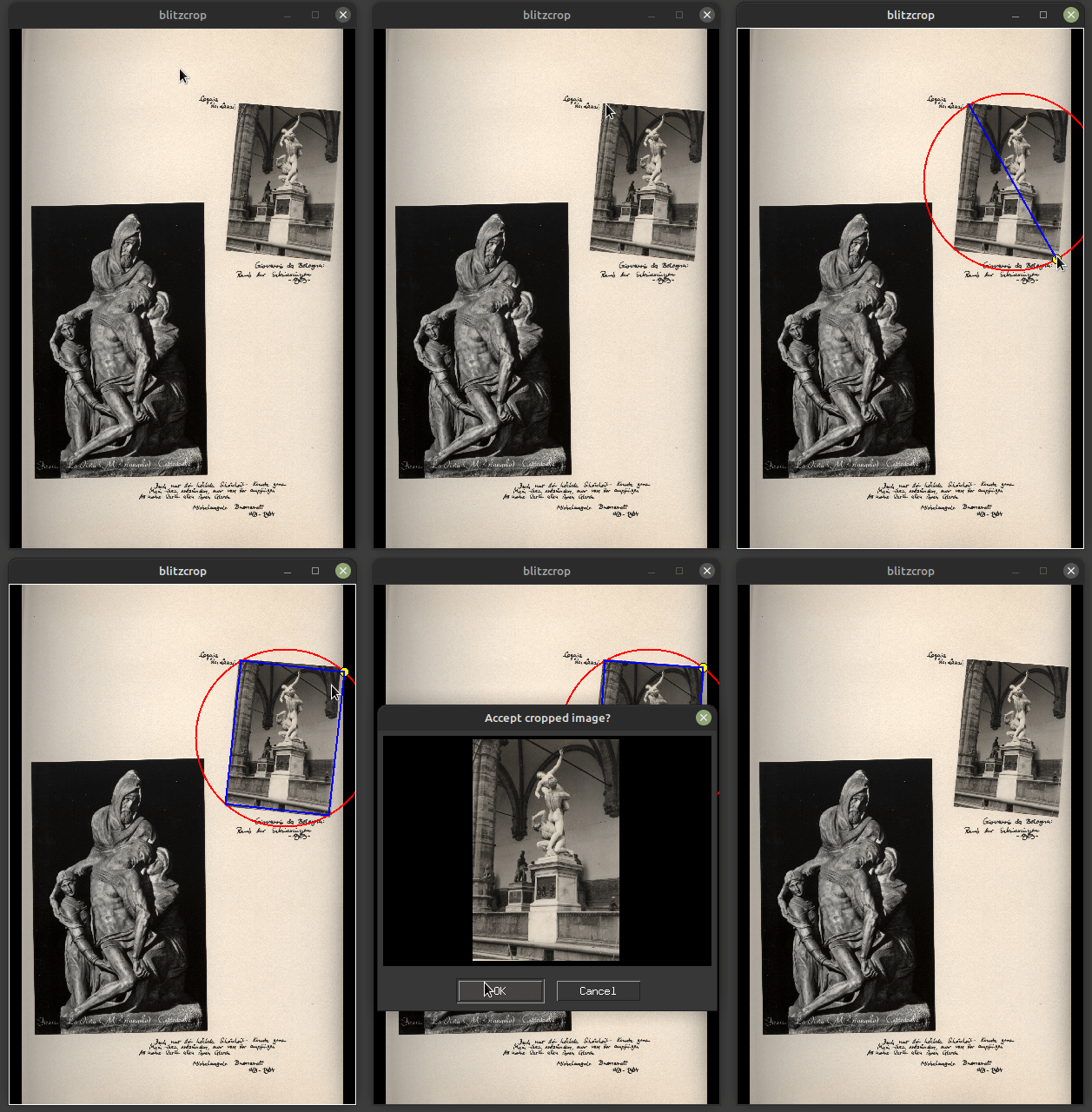
GUI for interactive batch image cropping:
- Drag along the diagonal of the image from upper left to lower right corner and release the mouse button.
- Move the mouse to the upper right corner and click.
- Accept or reject the cropped image in the dialog popping up.
Features
- Batch crop large amounts of images in a short amount of time
- Drag and click to crop an image
- Crop rotated images
- Pass images via command line
- Navigate between images using
left arrow/right arroworA/D - Accept cropped images by
EnterorSpaceand reject them byEsc
Install
You can install blitzcrop using pip with
pip3 install blitzcrop
Alternatively, you can download blitzcrop.py and then run it using python3 with
python3 blitzcrop.py
In this case, you need to ensure that Pillow and tkinter (including ImageTk) is installed on your system and available to python3. If you work on an Ubuntu-based Linux distribution, you may achieve that by means of
sudo apt install python3-tk python3-pil python3-pil.imagetk
History
0.3.0 (2022-10-17)
- Abort rectangle selection by clicking with the right mouse button or by pressing
Esc - Specify file name template by
-f/--file-name-templatewith placeholdersimageandnow - Specify image quality by
-q/--quality - Specify
-m/--forget-metadatato prevent storing original image metadata in cropped image; otherwise metadata will be preserved (including original image resolution)
0.2.1 (2022-10-10)
- Support Pillow < 9.10 by monkey-patching
Image.Resampling
0.2.0 (2022-10-09)
- Implement core cropping interaction with drag + click
- Support multiple images via command line arguments
- Support basic keybindings for image navigation and crop accept / reject
0.1.0 (2022-04-03)
- Created using cookiecutter-pyscript
Credits
Main developer is luphord luphord@protonmail.com. cookiecutter-pyscript is used as project template.
History
0.1.0 (2022-04-03)
- Initial release.
1 maintainer

Metadata
1 maintainer
Release files for blitzcrop 0.3.0
For a detailed explanation of source distributions (sdists) and built distributions (wheels), please see the package formats documentation.
Source distribution (sdist)
| File | Size | Uploaded | Provenance | |
|---|---|---|---|---|
| blitzcrop-0.3.0.tar.gz | 8.2 kB | Without provenance | Details |
Built distribution (wheel)
| File | Interpreter | ABI | Platform | Reset |
|---|---|---|---|---|
| blitzcrop-0.3.0-py2.py3-none-any.whl | Python 3, Python 2 | none | any | Details |
Total release size: 17.5 kB
Release files / blitzcrop-0.3.0.tar.gz
| Download URL | blitzcrop-0.3.0.tar.gz |
|---|---|
| Size | 8.2 kB |
| Tags | Source |
|
SHA-256 checksum How to use checksums |
a51865ed067f875264fc6ec1ac933650742767c2be5356f3d0ae09d60d812587
|
|
BLAKE2b-256 checksum How to use checksums |
0c77f1143a784dd4cb96b66dbdc414c0fabcd6c3337029203a41478d62378c86
|
| Upload date | |
|
Uploaded using Trusted Publishing? What is trusted publishing? |
No |
| Uploaded via |
twine/4.0.0 CPython/3.10.6
|
Release files / blitzcrop-0.3.0-py2.py3-none-any.whl
| Download URL | blitzcrop-0.3.0-py2.py3-none-any.whl |
|---|---|
| Size | 9.3 kB |
| Tags | Python 2 Python 3 |
|
SHA-256 checksum How to use checksums |
fd2109ab7c13a6380ac574af376c556fcefda735f83e07efce7b7b27bc425356
|
|
BLAKE2b-256 checksum How to use checksums |
818936297e350bf99feb25de91d23f645c1611fc3fff40e89fd72bbe893e82b2
|
| Upload date | |
|
Uploaded using Trusted Publishing? What is trusted publishing? |
No |
| Uploaded via |
twine/4.0.0 CPython/3.10.6
|
Security for blitzcrop 0.3.0
Provenance
Provenance describes where a file came from. On PyPI, provenance is shared via attestations, which provide a verifiable record of the build or publishing details. View details, limitations and caveats.
No provenance found
None of the files in this release were uploaded with provenance metadata.
A note on package security
PyPI is a repository for distributing packages, not a service for auditing them. While third-party security researchers and our staff do their best to detect and remove malicious packages, PyPI cannot guarantee the quality, security or suitability of any given package.














