
Build prompts like lego blocks and weave them through code like regular functions

Project description
tldr
pip install block_weave
About
Welcome to BlockWeave! This project aims to inspire creative connections between "regular" code, language models and programmers by:
- Creating reliable input and output in language models - by introducing types in prompts.
- Simplify prompt writing by writing prompts more like code.
- Making it fun to build, use and connect language models.
Cool, but why?
When you start using many different instances of language models, handling many prompts gets unwieldy, annoying, and makes it difficult to track compounding errors throughout the system. This project aims to solve all, by simplifying prompt writing and management, and creating limits of what can go in and out of an LLM, by adding types into prompts. Types can also allow additional functionality to be built on top of them. I also like to use it for quickly making complex prompts and copy pasting them in ChatGPT.
Overview
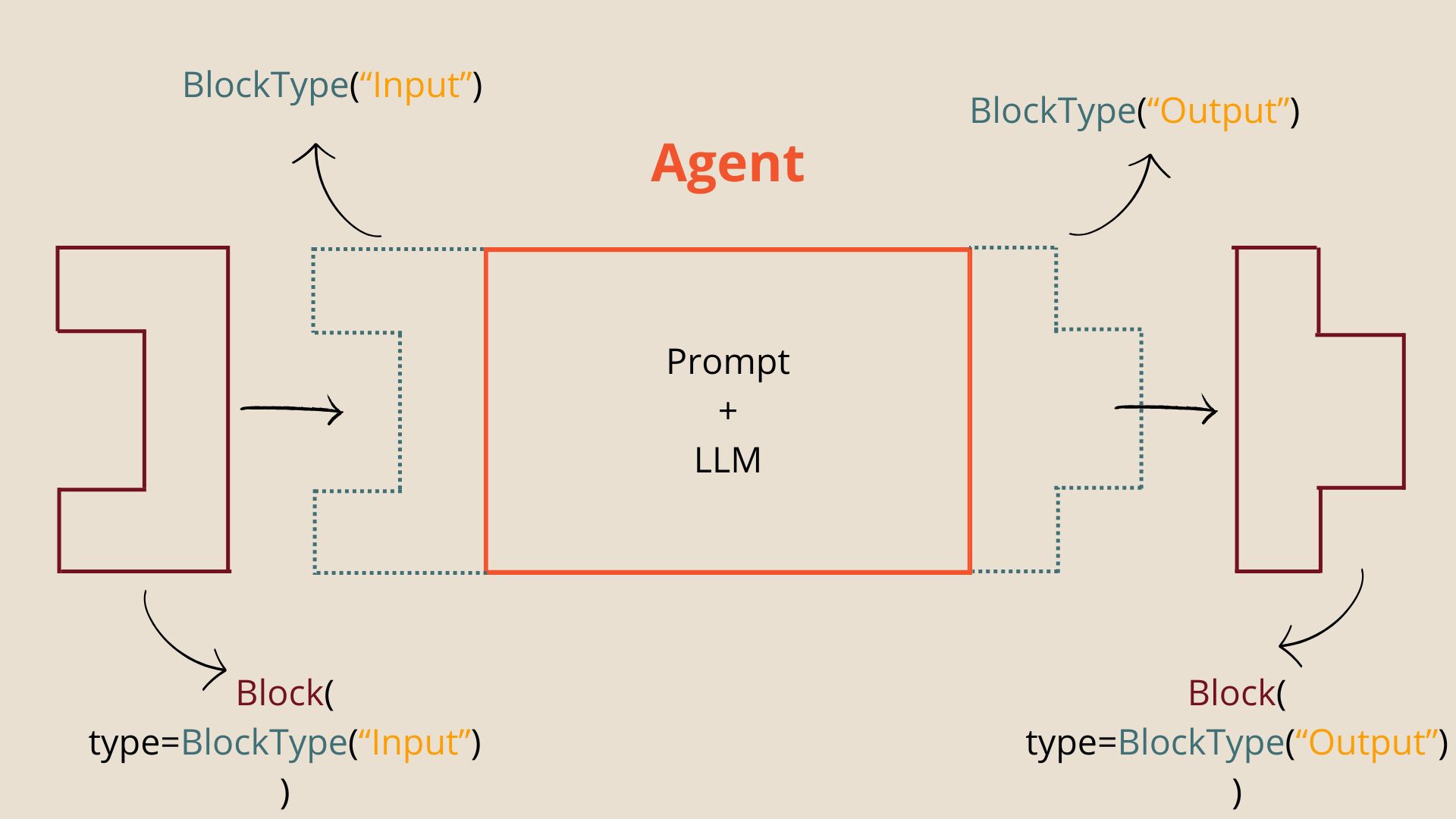
Agent is essentially a prompt template that can receive a list of Blocks, of the given BlockTypes (here BlockType("Input")). It calls a language model and returns Blocks of the output block types (here BlockType("Output")).
Block is a container for input or output text, with a specific BlockType.
BlockType is analogous to type in Python like int or str, but a BlockType always indicates the type of a piece of text. E.g. in Block(block_type="Topic", content="Python programming"), the content "Python programming" has the type "Topic", because it's in a Block of block_type "Topic".
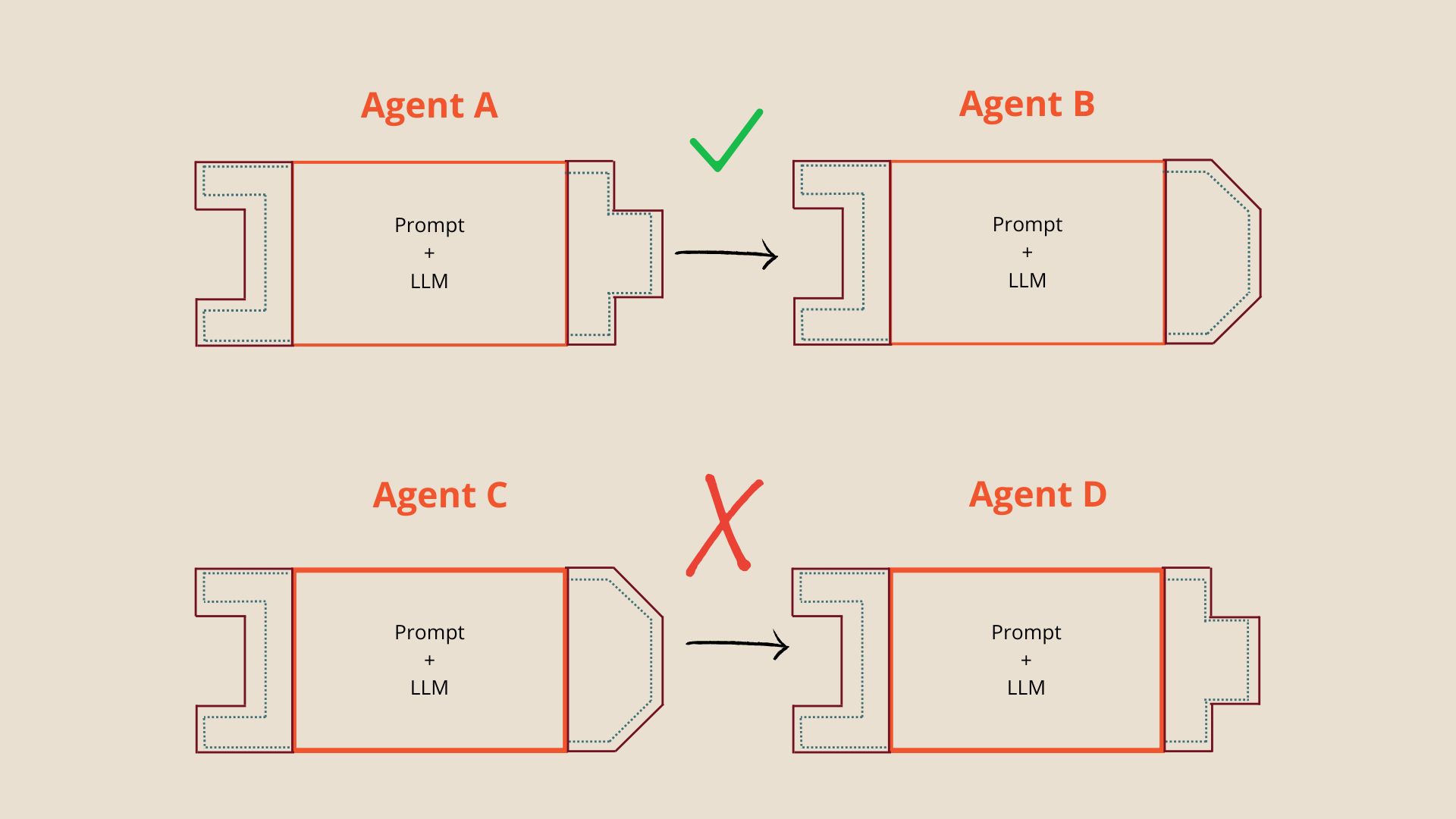
Only an agent with the same output type as the input type of the other agent can pass its output to another agent. Since Agent C has a different output type, than the input type of Agent D, the output of Agent C cannot be given to Agent D.
Quick start
pypi:
pip install block_weave
git:
git clone git@github.com:ThijmenVanBuuren/block_weave.git
Create a simple agent
In block_weave we explicitly define the input types and output types, as input_blocks and output_blocks
In this example we will make an agent that generates research questions, given a topic.
Schematic view:
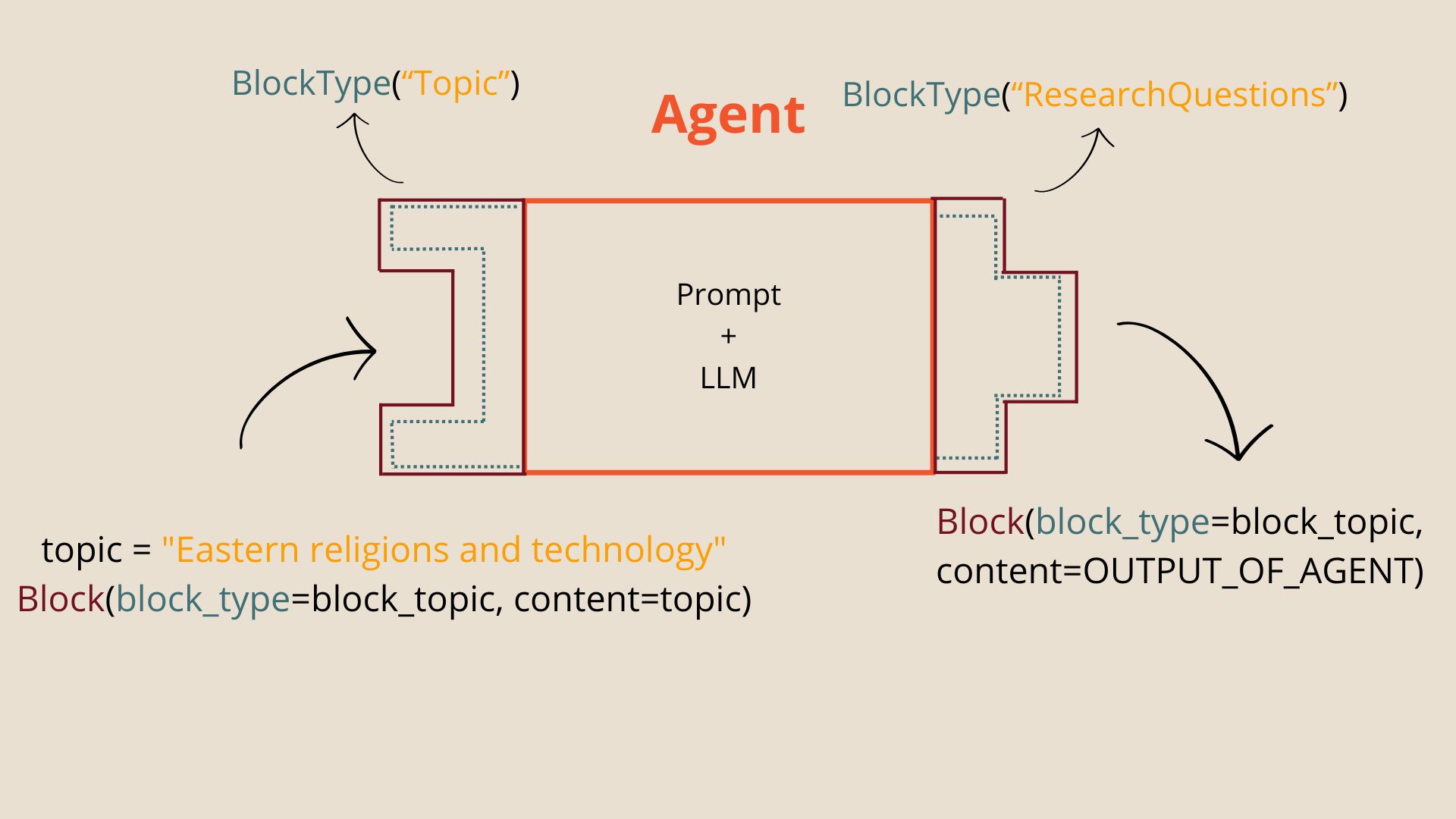
Code:
Imports
from block_weave.core.block import Block
from block_weave.core.block_type import BlockType
from block_weave.core.agent import Agent
Define a new agent
# Generate research questions

# Who's performing the task?
role = "an expert scientific researcher"

# what the agent function does
# This is what you would write as the first line in a docstring
summary = "Creates 5 research questions related to the topic"

# agent signature
# variable blocks for input
# indicate the types like we would with variables
block_topic = BlockType("Topic")
input_block_types = [block_topic]

# return type
block_rqs = BlockType("ResearchQuestions")
output_block_types = [block_rqs]

# example of input
# Index the same as input and output block types
input_example = ["A topic for research here"]
output_example = ["""1. RQ1
2. RQ2
3. RQ3
4. RQ4
5. RQ5"""
]

# Block variable names
topic_block = "topic_block"
input_block_names = [topic_block]

rq_block = "rq_block"
output_block_names = [rq_block]

# The code of the function
# Line by line what happens in this algorithm
# reference the block variables
algorithm = [f"1. Analyze {topic_block}",
f"2. Create 5 research questions",
f"3. return the research questions as {rq_block}"]

# init agent
topic_agent = Agent(role=role,
				summary=summary,
				input_block_types=input_block_types,
				output_block_types=output_block_types,
				input_block_names=input_block_names,
				output_block_names=output_block_names,
				input_example=input_example,
				output_example=output_example,
				algorithm=algorithm,
				default_llm=None,
			)
Input a block
# The topic we want research questions for
topic = "Eastern religions and technology"
# Same BlockType as defined above
inp_block = Block(block_type=block_topic, content=topic)
Show the prompt
full_prompt = topic_agent.get_full_prompt(inp_block)

print(full_prompt)
==>
Assume the role of an Expert scientific researcher. You will behave like an algorithm that: Creates 5 research questions related to the topic. You perform this task by converting the "input_blocks" into the "output_blocks", according to the rules of the "algorithm", like the "example" below.

# Input_blocks
## @Block Topic topic_block
|---
Eastern religions and technology
---|

# Output_blocks
## @Block ResearchQuestions rq_block
|---
ANSWER HERE
---|

# Example

## Input example
## @Block Topic topic_block
|---
A topic for research here
---|

## Output example
## @Block ResearchQuestions rq_block
|---
1. RQ1
2. RQ2
3. RQ3
4. RQ4
5. RQ5
---|

# Algorithm
1. Analyze topic_block
2. Create 5 research questions
3. return the research questions as rq_block

Give the output in the exact format of the "example".
Simulate using a language model, for testing:
research_questions = topic_agent.mock_call(inp_block)
print(type(research_questions))
==>
<class 'block_weave.core.block.Block'>
print(research_questions)
==>
## @Block ResearchQuestions {block_name}
|---
THIS IS A MOCK RESPONSE FOR TESTING PURPOSES ONLY
---|
Get the string content
str_research_questions = research_questions()
print(type(str_research_questions))
==>
<class 'str'>
Call a language model
Any language model or function that receives a string and returns a string will work: llm --> call: llm() This project supports ollama and OpenAI api.
# install ollama first: https://github.com/ollama/ollama
llm = CallLM(provider="ollama", model="llama3")
# Add your api key in environment/.env as OPEN_AI_API_KEY = key_here
# Available models:  https://platform.openai.com/docs/models/overview
llm2 = CallLM(provider="openai", model="gpt3.5-turbo")

# call
research_questions = topic_agent(inp_block, llm=llm)

# Or add in class definition
agent = Agent(...,
			 default_llm=llm)
Tested and built with Python3.10
Folder structure
src/
	demo.py
	block_weave/
		core/
			agent.py
			block_type.py
			block.py
			data_loader.py
			llm.py
			prompt_templates/
				# fill in templates
	tests/
Advanced
TODO
- Run files in
src/in test environment:python3 -m src.block_weave.core.agent - Extending block types by defining them as classes
- two ways to create block types
- as class
- as global variable
BLOCK_TYPE_DEMO = BlockType("Demo")
- Three ways to create agents
- Procedural (above)
- As classes: see
src/demo.py - As functions:
TODO
- Suggested folder structure for larger projects
- config for models
- New prompt file templates
- Detailed description of how the code works
Contact
Release history Release notifications | RSS feed

Download files
Download the file for your platform. If you're not sure which to choose, learn more about installing packages.
Source Distribution
Built Distribution
Filter files by name, interpreter, ABI, and platform.
If you're not sure about the file name format, learn more about wheel file names.
Copy a direct link to the current filters
File details
Details for the file block_weave-0.0.1.tar.gz.
File metadata
- Download URL: block_weave-0.0.1.tar.gz
- Upload date:
- Size: 220.6 kB
- Tags: Source
- Uploaded using Trusted Publishing? No
- Uploaded via: twine/5.0.0 CPython/3.10.12
File hashes
| Algorithm | Hash digest | |
|---|---|---|
| SHA256 |
3751935c0deb5e94e531a85ad040a3677ec089f2c8e0a9755c35da0af99ed213
|
|
| MD5 |
24766fc727eaee486237a9ece479b4c5
|
|
| BLAKE2b-256 |
3d2e22ff8471c42f02fe9dfa8504cca31d8473e94e3b559bc4a46942883e1eac
|
File details
Details for the file block_weave-0.0.1-py3-none-any.whl.
File metadata
- Download URL: block_weave-0.0.1-py3-none-any.whl
- Upload date:
- Size: 18.6 kB
- Tags: Python 3
- Uploaded using Trusted Publishing? No
- Uploaded via: twine/5.0.0 CPython/3.10.12
File hashes
| Algorithm | Hash digest | |
|---|---|---|
| SHA256 |
ce3bdbb8d51c897ae48c74a4937bbbb338bb0609fe69a738201c3c1b3197deda
|
|
| MD5 |
14e3f7590b9013546f5d82822b025a84
|
|
| BLAKE2b-256 |
149e0af3985d9ac5c19f1b480f3fc9ca29d0ed19b69e4e309caa8d13c321d0ef
|






