
The Blockchain Bay:
The Blockchainbay is a torrent distribution tool hosted on a EVM-compatible blockchain. This is a tool similar to Pirate Bay, but using a EVM-compatible blockchain (Ethereum, polygon, BSC, etc.) as a database.
Doesn't require any funds to search and download torrents, only to upload a new torrent (As write operations modify the database).
Installation:
The easiest way is to use pip in this way:
pip install blockchainbay
Optionally, install transmission-cli to download magnet torrents:
sudo apt install transmission-cli
Or the equivalent in your OS (transmission-cli need to be in the path). This executable can be configured in the config.ini file.
The Blockchainbay tool by default only reads from the blockchain and this operation don't require any balance in the account, so it can be empty. You don't need to setup any account as one is provided by default.
Those instructions are for using the polygon network with the Ankr gateway, but you can use any network (Ethereum, optimism, etc.) with any web3 gateway, like Infura. By default, Blockchain bay uses a contract deployed in the Polygon network, and uses the Ankr web3 gateway.
Searching torrents
Execute the command-line tool:
$ blockChainBay.py
At start, the utility will sync with the database on the blockchain, downloading all torrents locally (this can take some minute). It's much faster to search in a local database, however you can also search for torrents remotely using the /remote command.
Issuing /help will show you the available commands:
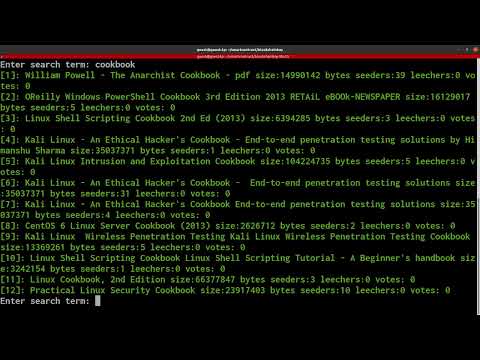
Demo video:
Commands
Available commands:
      /quit          :Exit to shell
      /getid <n>     :Show the torrent n in the remote database
      /remote <str>  :Search for <str> in the remote database
      /sync          :Downloads all torrents to the cache file
      /link <n>      :Obtain link from search result
      /download <n>  :Launch bittorrent client on search result
      /vote <n>      :Vote torrent up (Warning: consumes balance from account)
      /benchmark     :Perform simple query benchmark
      /help          :Print help
      <string>       :Search for string in the local torrent cache
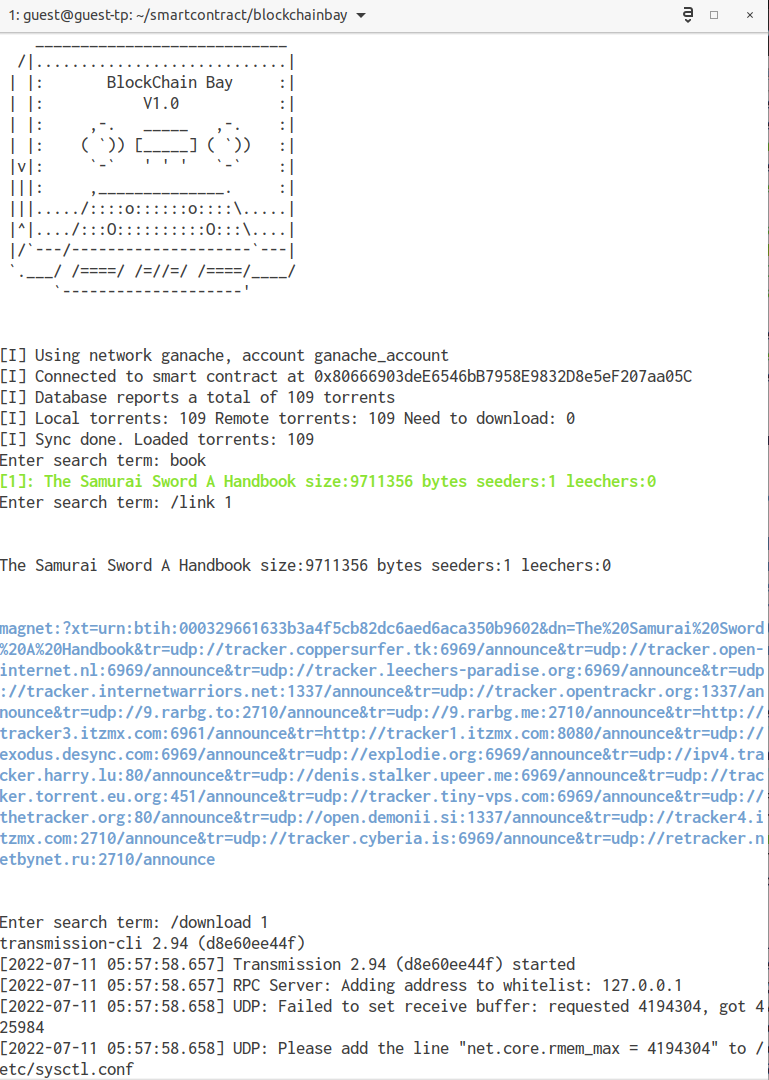
To search for a torrent, just enter a substring:
Enter search term: book
[1]: The Samurai Sword A Handbook size:9711356 bytes seeders:1 leechers:0
To display the magent link, use the /link command:
Enter search term: /link 1


The Samurai Sword A Handbook size:9711356 bytes seeders:1 leechers:0


magnet:?xt=urn:btih:000329661633b3a4f5cb82dc6aed6aca350b9602&dn=The%20Samurai%20Sword%20A%20Handbook&tr=udp://tracker.coppersurfer.tk:6969/announce&tr=udp://tracker.open-internet.nl:6969/announce&tr=udp://tracker.leechers-paradise.org:6969/announce&tr=udp://tracker.internetwarriors.net:1337/announce&tr=udp://tracker.opentrackr.org:1337/announce&tr=udp://9.rarbg.to:2710/announce&tr=udp://9.rarbg.me:2710/announce&tr=http://tracker3.itzmx.com:6961/announce&tr=http://tracker1.itzmx.com:8080/announce&tr=udp://exodus.desync.com:6969/announce&tr=udp://explodie.org:6969/announce&tr=udp://ipv4.tracker.harry.lu:80/announce&tr=udp://denis.stalker.upeer.me:6969/announce&tr=udp://tracker.torrent.eu.org:451/announce&tr=udp://tracker.tiny-vps.com:6969/announce&tr=udp://thetracker.org:80/announce&tr=udp://open.demonii.si:1337/announce&tr=udp://tracker4.itzmx.com:2710/announce&tr=udp://tracker.cyberia.is:6969/announce&tr=udp://retracker.netbynet.ru:2710/announce
If you have the transmission-cli bittorrent client installed, you can directly download the torrent using:
/download 1
Uploading torrents
You need to configure an account in blockChainBay, but with funds on it (just to pay for the transactions, no money goes to any person or entity). Never put more funds than strictly necessary. For example, at this date (July 2022) uploading 1000 torrents consumes about 5 matic in the Polygon network. This is about 2 USD for every 1000 torrents uploaded. Other networks like Ethereum might be hundreds of times more expensive.
Then you need a file in this format:
2dd9e39e18a6409c6344e30ffb2f38ea12b9f69b;ubuntu-9.10-server-i386.iso;671686656;1256817840;1;0;1;1651169962
2ddb7840d75aac5330a2d1e902d2569f716726ea;Python Crash Course, 2nd Edition;6282986;1564965900;31;0;253;1651169962
Fields are ';' separated as following:
#infohash;name;size_bytes;created_unix;seeders;leechers;completed;scraped_date
You can assign any value to the seeders and leechers fields, as they are only a copy of the torrent values when scrapped. Note: This is the file format used in the torrents.txt file from https://gitea.com/heretic/torrents-csv-server Once you have written your torrents in a file name I.E. 'torrentuploads.txt', execute:
./blockChainBay.py --upload torrentuploads.txt
And if correctly configured, the tool should start uploading your torrents to the smartcontract database specified in config.ini.
Custom smart-contract
You can compile and deploy your own smart-contract database, for this, issue this command from the root dir:
You will need the eth-brownie framework installed, using pip3, or pipx:
pip3 install eth-brownie
To compile the smart contract:
brownie compile
And to deploy the smart contract, modify your account info editiny deploy.py and run it:
brownie run scripts/deploy.py
Deploying a smart contract will require funds in your account. The price will depend on the blockchain that you configured.
Once your smartcontract is deployed, you must copy his address to the config.ini configuration, and blockchainbay will start using your custom smart contract.
1 maintainer

Metadata
1 maintainer
Release files for blockchainbay 1.5.5
For a detailed explanation of source distributions (sdists) and built distributions (wheels), please see the package formats documentation.
Built distribution (wheel)
| File | Interpreter | ABI | Platform | Actions Reset |
|---|---|---|---|---|
| blockchainbay-1.5.5-py3-none-any.whl | Python 3 | none | any | Details for blockchainbay-1.5.5-py3-none-any.whl |
Release files / blockchainbay-1.5.5-py3-none-any.whl
| Download URL | blockchainbay-1.5.5-py3-none-any.whl |
|---|---|
| Size | 106.8 kB |
| Tags | Python 3 |
|
SHA-256 checksum How to use checksums |
b9f6009a8e342498c02ed7b38d3781b3a2419600d9e8987c662f21dcc1b66d73
|
|
BLAKE2b-256 checksum How to use checksums |
3f85f63ec4a0c97d75293a459b18bdce777598ee21b5cb2c34455eab9b772e3a
|
| Upload date | |
|
Uploaded using Trusted Publishing? What is trusted publishing? |
No |
| Uploaded via |
twine/4.0.1 CPython/3.10.6
|
Security for blockchainbay 1.5.5
Provenance
Provenance describes where a file came from. On PyPI, provenance is shared via attestations, which provide a verifiable record of the build or publishing details. View details, limitations and caveats.
No provenance found
None of the files in this release were uploaded with provenance metadata.
A note on package security
PyPI is a repository for distributing packages, not a service for auditing them. While third-party security researchers and our staff do their best to detect and remove malicious packages, PyPI cannot guarantee the quality, security or suitability of any given package.
To learn more about protecting yourself from malicious actors, visit our package security documentation.














