
A python API wrapper for blocket.se

Project description
BlocketAPI
BlocketAPI allows users to query saved searches, known as "Bevakningar", on blocket.se. This means you can either retrieve results from a specific saved search or list all listings/ads across all saved searches. The results from these queries are returned in a json format.
Blocket is one of Sweden's largest online marketplaces. It was founded in 1996 and allows users to buy and sell a wide range of items, including cars, real estate, jobs, services, and second-hand goods. The platform is known for its extensive reach and user-friendly interface, making it a popular choice for Swedes looking to purchase or sell items quickly and efficiently.
✨ Features
- List saved searches, called "Bevakningar".
- Query all listings/ads filtered on a region.
- Query listings related to a saved search.
🧑💻️ Install
BlocketAPI is available on PyPI.
pip install blocket-api
💁♀️ Usage
>>> from blocket_api import BlocketAPI
>>> api = BlocketAPI("YourBlocketTokenHere")
saved_searches()
Saved searches are your so called "Bevakningar" and can be found here. Each saved search has and unique id which can be used as a parameter to get_listings(), see below.
>>> api.saved_searches()
[
   {
      "id":"4150081",
      "new_count":0,
      "total_count":41,
      "push_enabled":false,
      "push_available":true,
      "query":"cg=1020&q=buggy&st=s",
      "name":"\"buggy\", Bilar säljes i hela Sverige"
   },
]
get_listings(search_id, limit)
Returns all listings related to a saved search.
Parameters:
search_id(int, optional) - Get listings for a specific saved search. If not provided, all saved searches will be combined.limit(int, optional) - Limit number of results returned, max is 99.
>>> api.get_listings(4150081)
{
   "data":[
      {
         "ad":{
            "ad_id":"1401053984",
            "list_id":"1401053984",
            "zipcode":"81290",
            "ad_status":"active",
            "list_time":"2024-07-15T19:07:16+02:00",
            "subject":"Volkswagen 1500 lim 113 chassi",
            "body":"Säljer ett chassi/bottenplatta till en volkswagen 1500 lim 113 1967, blästrat och målat.\nFinns en beach buggy kaross att få med om man vill det. \nReg nmr ABC123",
            "price":{
               "value":10000,
               "suffix":"kr"
            },
            ...
         },
      },
   ],
   "total_count":41,
   "timestamp":"2024-07-16T08:08:43.810828006Z",
   "total_page_count":1
}
custom_search(search_query, region, limit)
Make a custom search through out all of blocked. A region can be passed in as parameter for filtering.
Parameters:
search_query(str, required) - A string to search for.region(str, optional) - Filter results on a region, default is all of Sweden.limit(int, optional) - Limit number of results returned, max is 99.
>>> from blocket_api import Region
>>> api.custom_search("saab", Region.blekinge) # search for term "saab" in region of "Blekinge"
{
   "data":[
      {
         "ad_id":"1401038836",
         "ad_status":"active",
         "advertiser":{
            "account_id":"684279",
            "name":"Stefan Ingves",
            "type":"private"
         },
         ...
         "location":[
            {
               "id":"22",
               "name":"Blekinge",
               "query_key":"r"
            },
            {
               "id":"256",
               "name":"Ronneby",
               "query_key":"m"
            }
         ],
         ...
      }
    ]
}
🔓 Blocket API token
Your token is located in the request headers in the "Bevakningar"-section on Blocket.
- Login to blocket.se: Sign in with your credentials.
- Click "Bevakningar": Go to the "Bevakningar" section.
- Inspect the page: Right-click the page and select "Inspect".
- Open the Network tab: Switch to the Network tab in the Developer Tools.
- Find request headers: Locate a request where the domain is "api.blocket.se" and the file is "searches". Pretty much every request to api.blocket.se contains this auth-header, so any request will do.
- Inspect request headers: Look at the request headers to find your token under "Authorization".
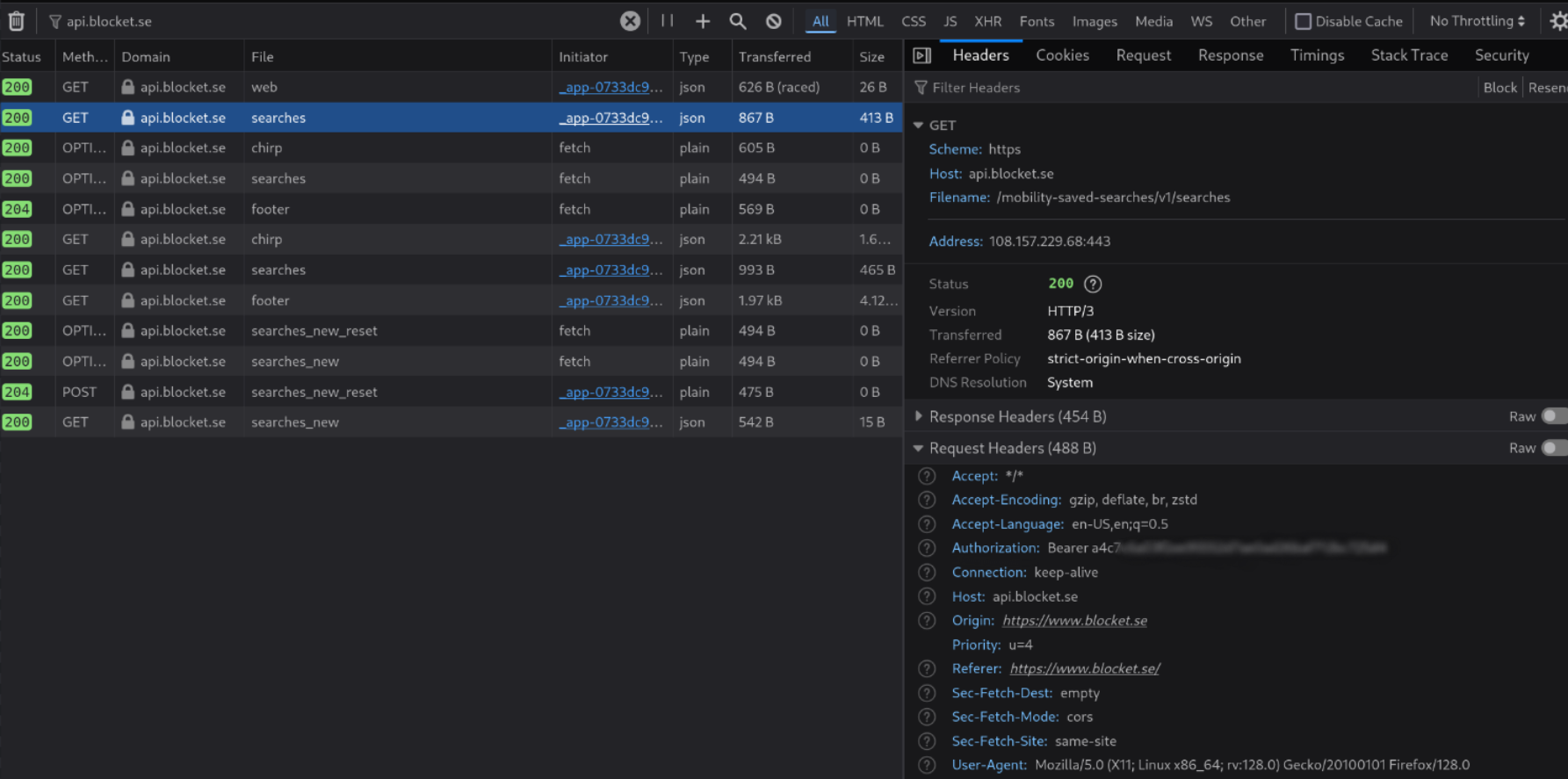
My token has never expired or changed during this project. However, if your're met with a 401 Unauthorized at some point, you may want to refresh your token by repeating the steps above.
📝 Notes
- Source repo: https://github.com/dunderrrrrr/blocket_api
- PyPI: https://pypi.org/project/blocket-api/
Release history Release notifications | RSS feed


Download files
Download the file for your platform. If you're not sure which to choose, learn more about installing packages.
Source Distribution
Built Distribution
Filter files by name, interpreter, ABI, and platform.
If you're not sure about the file name format, learn more about wheel file names.
Copy a direct link to the current filters
File details
Details for the file blocket_api-0.1.3.tar.gz.
File metadata
- Download URL: blocket_api-0.1.3.tar.gz
- Upload date:
- Size: 4.5 kB
- Tags: Source
- Uploaded using Trusted Publishing? No
- Uploaded via: poetry/1.8.3 CPython/3.12.4 Linux/6.5.0-1023-azure
File hashes
| Algorithm | Hash digest | |
|---|---|---|
| SHA256 |
df6c4bf36f1f7bfbe2eb1d71ae61717dc2402a07214945fd938d9c4d117b2ea4
|
|
| MD5 |
f2b71dc1f13d600730c8d4eceb4264ee
|
|
| BLAKE2b-256 |
7221f9485fb9cad0df413b204b5c954cc0c0bd0adfa6037adfb6cfb9ea83f512
|
File details
Details for the file blocket_api-0.1.3-py3-none-any.whl.
File metadata
- Download URL: blocket_api-0.1.3-py3-none-any.whl
- Upload date:
- Size: 5.1 kB
- Tags: Python 3
- Uploaded using Trusted Publishing? No
- Uploaded via: poetry/1.8.3 CPython/3.12.4 Linux/6.5.0-1023-azure
File hashes
| Algorithm | Hash digest | |
|---|---|---|
| SHA256 |
739208764c6efbb3c3f1d7828412bea3763a2ba3d12f0595104525396d4d5987
|
|
| MD5 |
59877241ab9b7df322e18bdc33d02d2d
|
|
| BLAKE2b-256 |
23b81e9205509f838a1c4f9d7588074ab3ca20432c4b9d38b9725f310af97f74
|






