
A fast way to build Block Kit interfaces in Python.

Project description




Blockkit is a Python library for building UI interfaces for Slack apps. It allows you to compose the interface from Python classes, so you type less, and your code becomes more maintainable.
Blockkit performs validation at runtime and provides user-friendly errors when data is invalid.
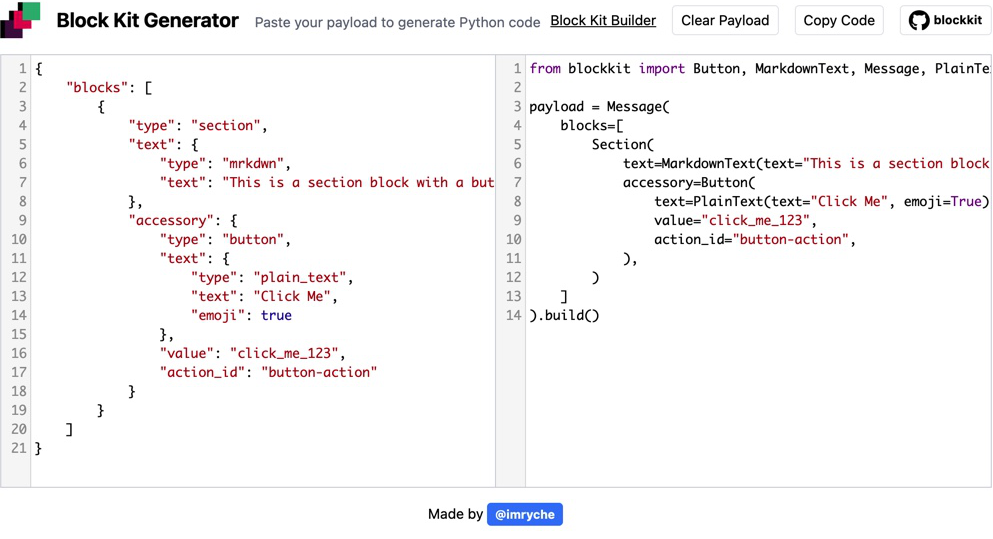
Generate
You don't even need to write code yourself. Go to blockkit-generator.com paste your JSON payload from Block Kit Builder and get corresponding Python code!
Installation
pip install blockkit
Usage
Start with one of the Home, Modal, or Message surface classes and follow the structure as you would follow it in JSON.
The library supports all types of surfaces, blocks, block elements, and composition objects Slack provides.
Once UI is ready, call the build() method to render components to dictionary:
from blockkit import Section, MarkdownText

Section(text=MarkdownText(text="hello world")).build()

{"type": "section", "text": {"text": "hello world", "type": "mrkdwn"}}
Here's the list of types of components and corresponding classes:
Surfaces
| Type | Class |
|---|---|
| home | Home |
| modal | Modal |
| Message | |
| workflow_step | WorkflowStep |
Blocks
| Type | Class |
|---|---|
| actions | Actions |
| context | Context |
| divider | Divider |
| header | Header |
| image | ImageBlock |
| input | Input |
| section | Section |
Block elements
| Type | Class |
|---|---|
| button | Button |
| checkboxes | Checkboxes |
| datepicker | DatePicker |
| type | Image |
| multi_static_select | MultiStaticSelect |
| multi_users_select | MultiUsersSelect |
| multi_channels_select | MultiChannelsSelect |
| multi_conversations_select | MultiConversationsSelect |
| multi_external_select | MultiExternalSelect |
| overflow | Overflow |
| plain_text_input | PlainTextInput |
| radio_buttons | RadioButtons |
| static_select | StaticSelect |
| users_select | UsersSelect |
| channels_select | ChannelsSelect |
| conversations_select | ConversationsSelect |
| external_select | ExternalSelect |
| timepicker | Timepicker |
Composition objects
| Type | Class |
|---|---|
| plain_text | PlainText |
| mrkdwn | MarkdownText |
| Confirm | |
| Option | |
| OptionGroup | |
| Filter | |
| DispatchActionConfig |
Contributing
Pull requests are welcome. For major changes, please open an issue first to discuss what you would like to change.
Please make sure to update tests as appropriate.
License
Release history Release notifications | RSS feed


Download files
Download the file for your platform. If you're not sure which to choose, learn more about installing packages.
Source Distribution
Built Distribution
Filter files by name, interpreter, ABI, and platform.
If you're not sure about the file name format, learn more about wheel file names.
Copy a direct link to the current filters
File details
Details for the file blockkit-1.1.5.tar.gz.
File metadata
- Download URL: blockkit-1.1.5.tar.gz
- Upload date:
- Size: 12.5 kB
- Tags: Source
- Uploaded using Trusted Publishing? No
- Uploaded via: twine/3.2.0 pkginfo/1.5.0.1 requests/2.24.0 setuptools/49.2.1 requests-toolbelt/0.9.1 tqdm/4.48.2 CPython/3.8.11
File hashes
| Algorithm | Hash digest | |
|---|---|---|
| SHA256 |
339ea55cac9cae4b10e27136285e63911f790580e865526fb94150af0c4602ad
|
|
| MD5 |
e7a62a3028385c229328d01a522e8c30
|
|
| BLAKE2b-256 |
3ec4fac88a481d15570e80add456978ab6593373d190996f34fd6511868ebe81
|
File details
Details for the file blockkit-1.1.5-py2.py3-none-any.whl.
File metadata
- Download URL: blockkit-1.1.5-py2.py3-none-any.whl
- Upload date:
- Size: 13.8 kB
- Tags: Python 2, Python 3
- Uploaded using Trusted Publishing? No
- Uploaded via: twine/3.2.0 pkginfo/1.5.0.1 requests/2.24.0 setuptools/49.2.1 requests-toolbelt/0.9.1 tqdm/4.48.2 CPython/3.8.11
File hashes
| Algorithm | Hash digest | |
|---|---|---|
| SHA256 |
524cf29ccdc6840ff9d19aad62ceca5ec0896ecb80da54463c2e7655ccd40cb4
|
|
| MD5 |
41160f8da410b4f61d8b17ec903e2b04
|
|
| BLAKE2b-256 |
10313b23d4dce3e850b9774b137792a084dd219598f1cb3ca328e6a237f779de
|






