









⚡ OSINT Intelligence Framework ⚡
🩸 Blood is the Key 🩸
A comprehensive OSINT toolkit for cybersecurity professionals, penetration testers, bug bounty hunters, and digital forensics investigators.
🎉 What's New in v2.2.0
- 📦 Package hardening — secrets (
config.py, Shodan JSON) stay out of git and PyPI wheels - ⌨️ Interactive pause — About / Connect / Theme wait for Enter before redrawing the menu
- 🔑 Shodan keys outside the tree —
~/.config-vritrasecz/only (legacy in-treeconfig.pyread-only) - 📚 Docs sync — README, layout, and install paths match the
bloodrecon/package
v2.0.1 / v2.0.0 / v1.2.0 release notes
v2.0.1 — single professional palette, menu alignment fixes, --list, interactive aliases. See CHANGELOG.md.
v2.0.0 — themeable redesign, package entry points, registry architecture, and module hardening.
v1.2.0 — Shodan --shodan-api CLI setup and ~/.config-vritrasecz/bloodrecon-shodan.json storage.
📖 Table of Contents
- 🎯 Overview
- ✨ Key Features
- 🛠️ Installation
- 🚀 Usage
- 🔧 Modules
- 🔑 API Key Configuration
- 📸 Screenshots
- 📁 Folder Structure
- 🧪 Testing
- ⚖️ Legal Disclaimer
- 👨💻 Author
- 🤝 Contributing
- 📄 License
🎯 Overview
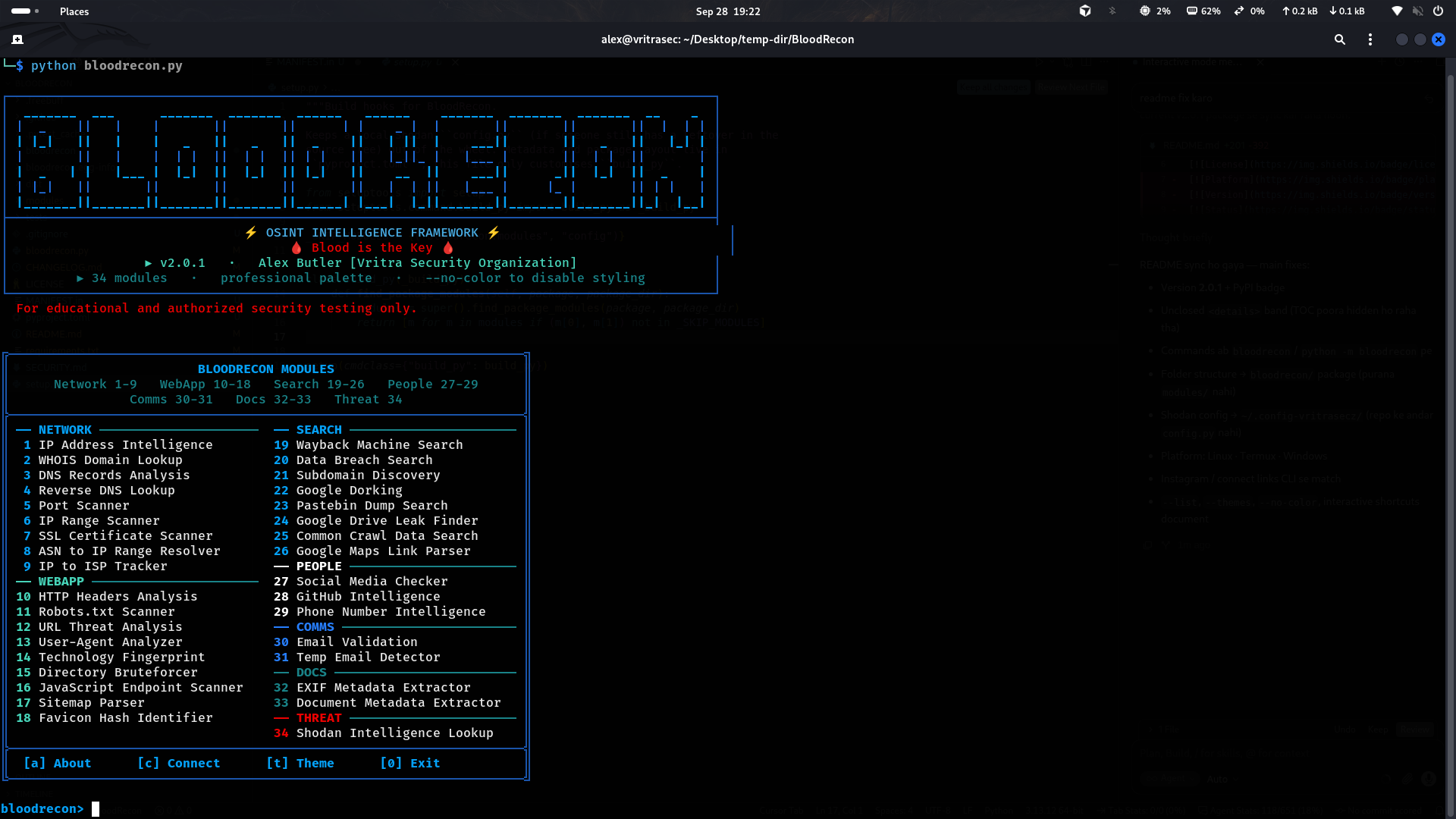
BloodRecon is an OSINT (Open Source Intelligence) framework with 34 specialized modules for reconnaissance and intelligence gathering. It ships as a Python package with an interactive menu and a full CLI.
✨ Key Features
🔍 34 specialized OSINT modules
🌐 Network & infrastructure — IP, DNS, WHOIS, SSL, ports, ASN, ISP
🔒 Web application recon — headers, robots, directories, JS endpoints, tech stack
👥 People & social intel — GitHub, username checks, phone analysis
📄 Document & metadata — EXIF, document properties
🔎 Search & discovery — Google dorking, Wayback, Common Crawl, leaks
📞 Communication intel — email validation, temp-mail detection
🛡️ Threat intelligence — Shodan host lookup
🎨 Interactive CLI — examples, colored output, --list / --about / --connect
🛠️ Installation
From PyPI (recommended)
pip install bloodrecon

bloodrecon --interactive
python -m bloodrecon --interactive
bloodrecon --dns google.com
From source (Linux / Windows)
git clone https://github.com/MrHacker-X/BloodRecon.git
cd BloodRecon

# editable install (dev)
pip install -e ".[dev]"

# or runtime only
pip install -r requirements.txt
pip install .

bloodrecon --interactive          # console script
python -m bloodrecon --interactive
python bloodrecon.py --interactive  # legacy launcher
Termux
pkg update && pkg upgrade
pkg install git python
git clone https://github.com/MrHacker-X/BloodRecon.git
cd BloodRecon
pip install .
bloodrecon --interactive
Dependencies
colorama==0.4.6
dnspython==2.7.0
mmh3==5.1.0
phonenumbers==9.0.10
Pillow==11.3.0
requests==2.32.4
urllib3==2.5.0
whois==1.20240129.2
The
shodanclient library is not required — BloodRecon talks to the Shodan REST API viarequests.
🚀 Usage
Interactive Mode
bloodrecon                 # default: interactive menu
bloodrecon --interactive   # same
Menu shortcuts: module number · [a] About · [c] Connect · [t] Palette · ? / help list · 0 / q quit.
Command Line
# Core examples
bloodrecon --ip 8.8.8.8
bloodrecon --whois example.com
bloodrecon --dns google.com
bloodrecon --headers https://example.com
bloodrecon --social username123
bloodrecon --email test@example.com
bloodrecon --phone +1234567890
bloodrecon --shodan 8.8.8.8

# Advanced
bloodrecon --dork "site:example.com filetype:pdf"
bloodrecon --subdomains example.com
bloodrecon --ssl example.com:443
bloodrecon --dir-brute https://example.com
bloodrecon --js-endpoints https://example.com
bloodrecon --ip-scan 192.168.1.0/24
bloodrecon --wayback example.com
bloodrecon --github octocat

# Meta
bloodrecon --list          # all modules / flags / examples
bloodrecon --about
bloodrecon --connect
bloodrecon --themes        # active palette
bloodrecon --no-color
bloodrecon --version
bloodrecon --help
python bloodrecon.py … and python -m bloodrecon … accept the same flags.
🔧 Modules
34 modules from bloodrecon/modules/registry.py:
Network & Infrastructure
| Module | Description | Example |
|---|---|---|
| IP Lookup | Geolocation, ISP, ASN | --ip 8.8.8.8 |
| WHOIS Lookup | Domain registration / ownership | --whois example.com |
| DNS Lookup | A, AAAA, MX, TXT, NS | --dns google.com |
| Reverse DNS | PTR lookup | --reverse 8.8.8.8 |
| Port Scanner | Open ports / services | --ports scanme.nmap.org |
| SSL Scanner | Certificate & TLS assessment | --ssl example.com:443 |
| IP Range Scanner | Active hosts in a range | --ip-scan 192.168.1.0/24 |
| ASN Resolver | ASN → IP ranges | --asn AS15169 |
| ISP Tracker | IP → ISP | --isp 8.8.8.8 |
Web Application Security
| Module | Description | Example |
|---|---|---|
| HTTP Headers | Security headers | --headers https://example.com |
| Robots Scanner | robots.txt |
--robots https://example.com |
| Directory Bruteforce | Path discovery | --dir-brute https://example.com |
| Sitemap Parser | XML sitemaps | --sitemap https://example.com |
| JS Endpoint Scanner | API endpoints in JS | --js-endpoints https://example.com |
| Favicon Hash | mmh3 favicon fingerprint | --favicon https://example.com |
| Tech Fingerprint | Stack identification | --tech https://example.com |
| URL Analyzer | URL structure / risk signals | --url https://example.com |
| User-Agent Detector | UA string analysis | --useragent "Mozilla/5.0..." |
People & Social / Communication
| Module | Description | Example |
|---|---|---|
| Social Checker | Username across platforms | --social johndoe |
| GitHub Intel | User / repo intel | --github octocat |
| Phone Intel | Carrier / region | --phone +14155552671 |
| Email Validator | Format + domain checks | --email user@example.com |
| Temp Email Checker | Disposable mail detection | --temp-email test@10minutemail.com |
Document & Metadata
| Module | Description | Example |
|---|---|---|
| EXIF Extractor | Image metadata | --exif /path/to/photo.jpg |
| Doc Metadata | PDF / Office metadata | --metadata /path/to/document.pdf |
Search & Discovery
| Module | Description | Example |
|---|---|---|
| Google Dorking | Advanced search queries | --dork "site:example.com filetype:pdf" |
| Subdomain Finder | Subdomain enumeration | --subdomains example.com |
| Wayback Machine | Archive.org history | --wayback example.com |
| Common Crawl | CC index search | --common-crawl example.com |
| Pastebin Search | Paste dumps | --pastebin password |
| Leak Search | Breach / leak signals | --leak user@example.com |
| Google Drive Leaks | Public Drive finds | --gdrive folderID |
| Maps Parser | Google Maps link parse | --maps "https://maps.google.com/..." |
Threat Intelligence
| Module | Description | Example |
|---|---|---|
| Shodan Lookup | Host intel via Shodan API | --shodan 8.8.8.8 |
🔑 API Key Configuration
Shodan (recommended)
# one-time setup
bloodrecon --shodan-api "your_shodan_api_key_here"

# then use
bloodrecon --shodan 8.8.8.8
- Storage:
~/.config-vritrasecz/bloodrecon-shodan.json - Directory is created automatically; new keys replace old ones
- Get a key at account.shodan.io
Alternatives
# environment variable
export SHODAN_API_KEY="your_api_key_here"
bloodrecon --shodan 8.8.8.8
Optional file (outside the package tree):
# ~/.config-vritrasecz/config.py
SHODAN_API_KEY = 'your_shodan_api_key_here'
If no key is configured, interactive mode prompts and saves it.
📸 Screenshots
Interactive Menu
📁 Folder Structure
BloodRecon/
├── bloodrecon.py                 # Legacy launcher
├── pyproject.toml                # Package / PyPI metadata
├── setup.py                      # Wheel build hook (excludes local secrets)
├── MANIFEST.in
├── requirements.txt
├── LICENSE
├── README.md
├── CHANGELOG.md
├── SECURITY.md
├── .github/                      # CI + issue templates
├── tests/                        # Offline pytest suite
└── bloodrecon/                   # Installable package
    ├── __init__.py
    ├── __main__.py               # python -m bloodrecon
    ├── cli.py                    # Banner, menu, argparse, dispatch
    └── modules/
        ├── registry.py           # Single source of truth for modules
        ├── colors.py
        ├── list-imp/
        │   ├── common.txt        # Dir-bruteforce wordlist
        │   └── temp_domains.txt  # Disposable-mail domains
        └── *.py                  # 34 OSINT modules
🧪 Testing
pip install -e ".[dev]"
pytest -q

bloodrecon --version
bloodrecon --help
bloodrecon --list
bloodrecon --temp-email test@10minutemail.com   # offline-friendly
bloodrecon --dns google.com                     # live network
⚖️ Legal Disclaimer
This tool is for educational use and authorized security testing only.
Authorized
- Learning OSINT techniques
- Authorized pentests and assessments
- In-scope bug bounty work
- Authorized digital forensics / security research
Prohibited
- Unauthorized surveillance or stalking
- Illegal data collection or privacy violations
- Malicious recon or attack preparation
- Anything that violates applicable law
You are responsible for lawful use in your jurisdiction.
👨💻 Author

Alex Butler
Vritra Security Organization
Connect









🤝 Contributing
- Fork the repository
- Create a branch (
git checkout -b feature/AmazingFeature) - Commit (
git commit -m 'Add some AmazingFeature') - Push (
git push origin feature/AmazingFeature) - Open a Pull Request
Ideas: bug reports, new modules (add one row in registry.py), docs, tests.
📄 License
MIT — Permissions, Limitations & Requirements
Permissions




Limitations


Requirements

See LICENSE.
⭐ If you found BloodRecon useful, please consider giving it a star!
Made with ❤️ by Alex Butler1 maintainer

Metadata
1 maintainer
Release files for bloodrecon 2.2.0
For a detailed explanation of source distributions (sdists) and built distributions (wheels), please see the package formats documentation.
Source distribution (sdist)
| File | Size | Uploaded | Provenance | Actions |
|---|---|---|---|---|
| bloodrecon-2.2.0.tar.gz | 146.2 kB | Without provenance | Details for bloodrecon-2.2.0.tar.gz |
Built distribution (wheel)
| File | Interpreter | ABI | Platform | Actions Reset |
|---|---|---|---|---|
| bloodrecon-2.2.0-py3-none-any.whl | Python 3 | none | any | Details for bloodrecon-2.2.0-py3-none-any.whl |
Total release size: 301.9 kB
Release files / bloodrecon-2.2.0.tar.gz
| Download URL | bloodrecon-2.2.0.tar.gz |
|---|---|
| Size | 146.2 kB |
| Tags | Source |
|
SHA-256 checksum How to use checksums |
9b9c287abf8228939ebc6ba9f8ed3e63abb198fae177808f51e0cd7bcd3220d7
|
|
BLAKE2b-256 checksum How to use checksums |
de774c19deca792c0b6ad653f2d56b089768adb04fda05c5ac5ef8d86ee91b88
|
| Upload date | |
|
Uploaded using Trusted Publishing? What is trusted publishing? |
No |
| Uploaded via |
twine/6.1.0 CPython/3.13.14
|
Release files / bloodrecon-2.2.0-py3-none-any.whl
| Download URL | bloodrecon-2.2.0-py3-none-any.whl |
|---|---|
| Size | 155.8 kB |
| Tags | Python 3 |
|
SHA-256 checksum How to use checksums |
beb4c21c208f876b0e25df10fc240d4000acf5abcb50ec953b172722785716c2
|
|
BLAKE2b-256 checksum How to use checksums |
0f32a834a12a02db556f7dd2b740ab085c7b422f9949a6b2b51e0913aebbc432
|
| Upload date | |
|
Uploaded using Trusted Publishing? What is trusted publishing? |
No |
| Uploaded via |
twine/6.1.0 CPython/3.13.14
|
Security for bloodrecon 2.2.0
Provenance
Provenance describes where a file came from. On PyPI, provenance is shared via attestations, which provide a verifiable record of the build or publishing details. View details, limitations and caveats.
No provenance found
None of the files in this release were uploaded with provenance metadata.
A note on package security
PyPI is a repository for distributing packages, not a service for auditing them. While third-party security researchers and our staff do their best to detect and remove malicious packages, PyPI cannot guarantee the quality, security or suitability of any given package.
To learn more about protecting yourself from malicious actors, visit our package security documentation.














