
Advanced OSINT Intelligence Framework for cybersecurity professionals

Project description
🩸 BloodRecon 🩸









⚡ OSINT Intelligence Framework ⚡
🩸 Blood is the Key 🩸
A comprehensive OSINT toolkit for cybersecurity professionals, penetration testers, bug bounty hunters, and digital forensics investigators.
🎉 What's New in v1.2.0
🚀 Enhanced Shodan Integration
We've completely revamped the Shodan integration with powerful new features that make API key management effortless!
✨ Key Improvements:
🔧 Command Line API Management
# Set your Shodan API key instantly - no more interactive prompts!
python3 bloodrecon.py --shodan-api "your_api_key_here"
📁 Streamlined Configuration
- New Location:
~/.config-vritrasecz/bloodrecon-shodan.json - Auto Directory Creation: Tool creates config directories automatically
- JSON-Only Storage: Simplified, reliable configuration management
🔒 Smart API Key Handling
- Automatic Replacement: New API keys seamlessly replace existing ones
- Input Validation: Enhanced validation prevents empty or invalid keys
- Better Error Messages: Clear, actionable feedback for users
⚡ Improved User Experience
- One-Command Setup: Get Shodan running with a single command
- Non-Interactive Mode: Perfect for automation and scripting
- Cleaner Output: More intuitive and professional interface
🛠️ Quick Setup Example:
# 1. Set your API key (one time setup)
python3 bloodrecon.py --shodan-api "your_shodan_api_key"

# 2. Start using Shodan immediately
python3 bloodrecon.py --shodan 8.8.8.8
python3 bloodrecon.py --shodan google.com
💡 Pro Tip: Your API key is saved securely and will be used automatically for all future Shodan queries!
📋 What Changed:
- Moved from
~/.osint_shodan_configto organized~/.config-vritrasecz/directory - Removed dual config.py file management for simplified workflow
- Enhanced error handling and user feedback
- Added
--shodan-apicommand line argument
🔗 Get Started: View complete changelog • API Configuration Guide
📖 Table of Contents
- 🎯 Overview
- ✨ Key Features
- 🛠️ Installation
- 🚀 Usage
- 🔧 Modules
- 🔑 API Key Configuration
- 📸 Screenshots
- 📁 Folder Structure
- ⚖️ Legal Disclaimer
- 👨💻 Author
- 🤝 Contributing
- 📄 License
🎯 Overview
BloodRecon is a state-of-the-art OSINT (Open Source Intelligence) framework that provides cybersecurity professionals with 34+ specialized modules for comprehensive reconnaissance and intelligence gathering. Built with Python 3.x, it offers both interactive menu-driven and command-line interfaces for maximum flexibility.
✨ Key Features
🔍 34 Specialized OSINT Modules
🌐 Network & Infrastructure Analysis (IP, DNS, WHOIS, SSL, Ports)
🔒 Web Application Security Testing (Headers, Robots, Directories)
👥 Social Media & Personal Intelligence (GitHub, Social Platforms)
📄 Document & Metadata Analysis (EXIF, Document Properties)
🔎 Advanced Search Capabilities (Google Dorking, Wayback Machine)
📞 Communication Intelligence (Email, Phone Number Analysis)
🛡️ Threat Intelligence Integration (Shodan)
💾 Data Breach & Leak Detection
🎨 Interactive CLI Interface with Target Input Examples
🌈 Colored Terminal Output for Enhanced Readability
🛠️ Installation
Linux Installation
# Clone the repository
git clone https://github.com/VritraSecz/BloodRecon.git

# Navigate to the project directory
cd BloodRecon

# Install Python dependencies
pip install -r requirements.txt

# Make the script executable
chmod +x bloodrecon.py

# Run the tool
python bloodrecon.py --interactive
Termux Installation
# Update packages and install dependencies
pkg update && pkg upgrade
pkg install git python

# Clone the repository
git clone https://github.com/VritraSecz/BloodRecon.git

# Navigate to the project directory
cd BloodRecon

# Install Python dependencies
pip install -r requirements.txt

# Run the tool
python bloodrecon.py --interactive
Dependencies
BloodRecon requires the following Python packages:
colorama==0.4.6
dnspython==2.7.0
mmh3==5.1.0
phonenumbers==9.0.10
Pillow==11.3.0
requests==2.32.4
shodan==1.31.0
urllib3==2.5.0
whois==1.20240129.2
🚀 Usage
Interactive Mode
Launch BloodRecon in interactive mode for a user-friendly menu experience:
python bloodrecon.py --interactive
Command Line Usage
BloodRecon supports extensive command-line options for automation and scripting:
Basic Usage Examples
# IP Address Analysis
python bloodrecon.py --ip 8.8.8.8

# Domain WHOIS Lookup
python bloodrecon.py --whois example.com

# DNS Records Analysis
python bloodrecon.py --dns google.com

# HTTP Headers Analysis
python bloodrecon.py --headers https://example.com

# Social Media Username Check
python bloodrecon.py --social username123

# Email Validation
python bloodrecon.py --email test@example.com

# Phone Number Intelligence
python bloodrecon.py --phone +1234567890

# Shodan Intelligence Lookup
python bloodrecon.py --shodan 8.8.8.8
Advanced Usage Examples
# Google Dorking
python bloodrecon.py --dork "site:example.com filetype:pdf"

# Subdomain Discovery
python bloodrecon.py --subdomains example.com

# SSL Certificate Analysis
python bloodrecon.py --ssl example.com:443

# Directory Bruteforcing
python bloodrecon.py --dir-brute https://example.com

# JavaScript Endpoint Scanner
python bloodrecon.py --js-endpoints https://example.com

# IP Range Scanner
python bloodrecon.py --ip-scan 192.168.1.0/24

# Wayback Machine Search
python bloodrecon.py --wayback example.com

# GitHub Intelligence
python bloodrecon.py --github octocat
Tool Information
# Display detailed tool information
python bloodrecon.py --about

# Show developer contact information
python bloodrecon.py --connect

# Show version
python bloodrecon.py --version

# Display help
python bloodrecon.py --help
🔧 Modules
BloodRecon features 34+ specialized OSINT modules organized into categories:
Network & Infrastructure
| Module | Description | Usage Example |
|---|---|---|
| 🌐 IP Lookup | Comprehensive IP address intelligence including geolocation, ISP, ASN | --ip 8.8.8.8 |
| 🔍 WHOIS Lookup | Domain registration information and ownership details | --whois example.com |
| 📋 DNS Lookup | DNS records analysis (A, AAAA, MX, TXT, NS) | --dns google.com |
| 🔄 Reverse DNS | Reverse DNS lookup for IP addresses | --reverse 8.8.8.8 |
| 🔌 Port Scanner | Network port scanning and service detection | --ports 192.168.1.1 |
| 🔐 SSL Scanner | SSL/TLS certificate analysis and security assessment | --ssl example.com:443 |
| 🌍 IP Range Scanner | Scan IP ranges for active hosts | --ip-scan 192.168.1.0/24 |
| 🏢 ASN Resolver | Resolve ASN numbers to IP ranges | --asn AS15169 |
| 🌐 ISP Tracker | Track IP addresses to ISP information | --isp 8.8.8.8 |
Web Application Security
| Module | Description | Usage Example |
|---|---|---|
| 📄 HTTP Headers | HTTP security headers analysis | --headers https://example.com |
| 🤖 Robots Scanner | Robots.txt file analysis and discovery | --robots https://example.com |
| 📁 Directory Bruteforce | Web directory and file discovery | --dir-brute https://example.com |
| 🗺️ Sitemap Parser | XML sitemap parsing and analysis | --sitemap https://example.com |
| ⚡ JS Endpoint Scanner | JavaScript file analysis for API endpoints | --js-endpoints https://example.com |
| 🎨 Favicon Hash | Generate favicon hashes for fingerprinting | --favicon https://example.com |
| 🔧 Tech Fingerprint | Web technology stack identification | --tech https://example.com |
| 🔍 URL Analyzer | URL threat analysis and reputation check | --url https://suspicious-site.com |
| 🌐 User-Agent Detector | User-Agent string analysis and detection | --useragent "Mozilla/5.0..." |
Social Media & Personal Intel
| Module | Description | Usage Example |
|---|---|---|
| 👥 Social Checker | Username availability across social platforms | --social johndoe |
| 🐙 GitHub Intel | GitHub user and repository intelligence | --github octocat |
| 📱 Phone Intel | Phone number intelligence and carrier info | --phone +1234567890 |
| 📧 Email Validator | Email address validation and domain analysis | --email test@example.com |
| 🗑️ Temp Email Checker | Temporary/disposable email detection | --temp-email test@tempmail.com |
Document & Metadata Analysis
| Module | Description | Usage Example |
|---|---|---|
| 📷 EXIF Extractor | Image metadata and EXIF data extraction | --exif image.jpg |
| 📄 Doc Metadata | Document metadata extraction (PDF, DOCX, etc.) | --metadata document.pdf |
Search & Discovery
| Module | Description | Usage Example |
|---|---|---|
| 🔍 Google Dorking | Advanced Google search queries | --dork "site:example.com filetype:pdf" |
| 🌐 Subdomain Finder | Subdomain discovery and enumeration | --subdomains example.com |
| ⏰ Wayback Machine | Historical website data from Internet Archive | --wayback example.com |
| 🕷️ Common Crawl | Search Common Crawl web archive data | --common-crawl example.com |
| 📋 Pastebin Search | Search Pastebin for data dumps and leaks | --pastebin searchterm |
| 💾 Leak Search | Data breach and leak detection | --leak email@example.com |
| 📂 Google Drive Leaks | Search for leaked Google Drive files | --gdrive folderID |
| 🗺️ Maps Parser | Parse and analyze Google Maps links | --maps "https://maps.google.com/..." |
Threat Intelligence
| Module | Description | Usage Example |
|---|---|---|
| 🛡️ Shodan Lookup | Shodan API integration for host intelligence | --shodan 8.8.8.8 |
🔑 API Key Configuration
Some modules require API keys for enhanced functionality. BloodRecon now offers multiple convenient ways to configure your API keys:
Shodan API Key
🚀 Recommended Method: Command Line Setup (v1.2.0+)
- Get your free API key at Shodan.io
- Set it instantly with one command:
# Set your Shodan API key (replaces any existing key)
python3 bloodrecon.py --shodan-api "your_shodan_api_key_here"
- Start using Shodan immediately:
# Your API key is now saved and ready to use!
python3 bloodrecon.py --shodan 8.8.8.8
python3 bloodrecon.py --shodan google.com
📁 Configuration Details
- Storage Location:
~/.config-vritrasecz/bloodrecon-shodan.json - Auto Directory Creation: Config directories are created automatically
- Key Replacement: New keys seamlessly replace existing ones
- Persistent Storage: API key is saved for all future sessions
🔄 Alternative Methods
Environment Variable:
export SHODAN_API_KEY="your_api_key_here"
python3 bloodrecon.py --shodan 8.8.8.8
Legacy config.py (still supported):
# modules/config.py
SHODAN_API_KEY = 'your_shodan_api_key_here'
Interactive Mode:
- The tool will prompt for the key if not configured
- Entered keys are automatically saved for future use
API Key Security
🔒 Security Best Practices:
- ✅ Use the
--shodan-apicommand for secure local storage - ✅ Use environment variables for server deployments
- ❌ Never commit API keys to version control
- ❌ Avoid hardcoding keys in scripts
💡 Pro Tip: The new JSON config system in v1.2.0 provides the most reliable and user-friendly API key management!
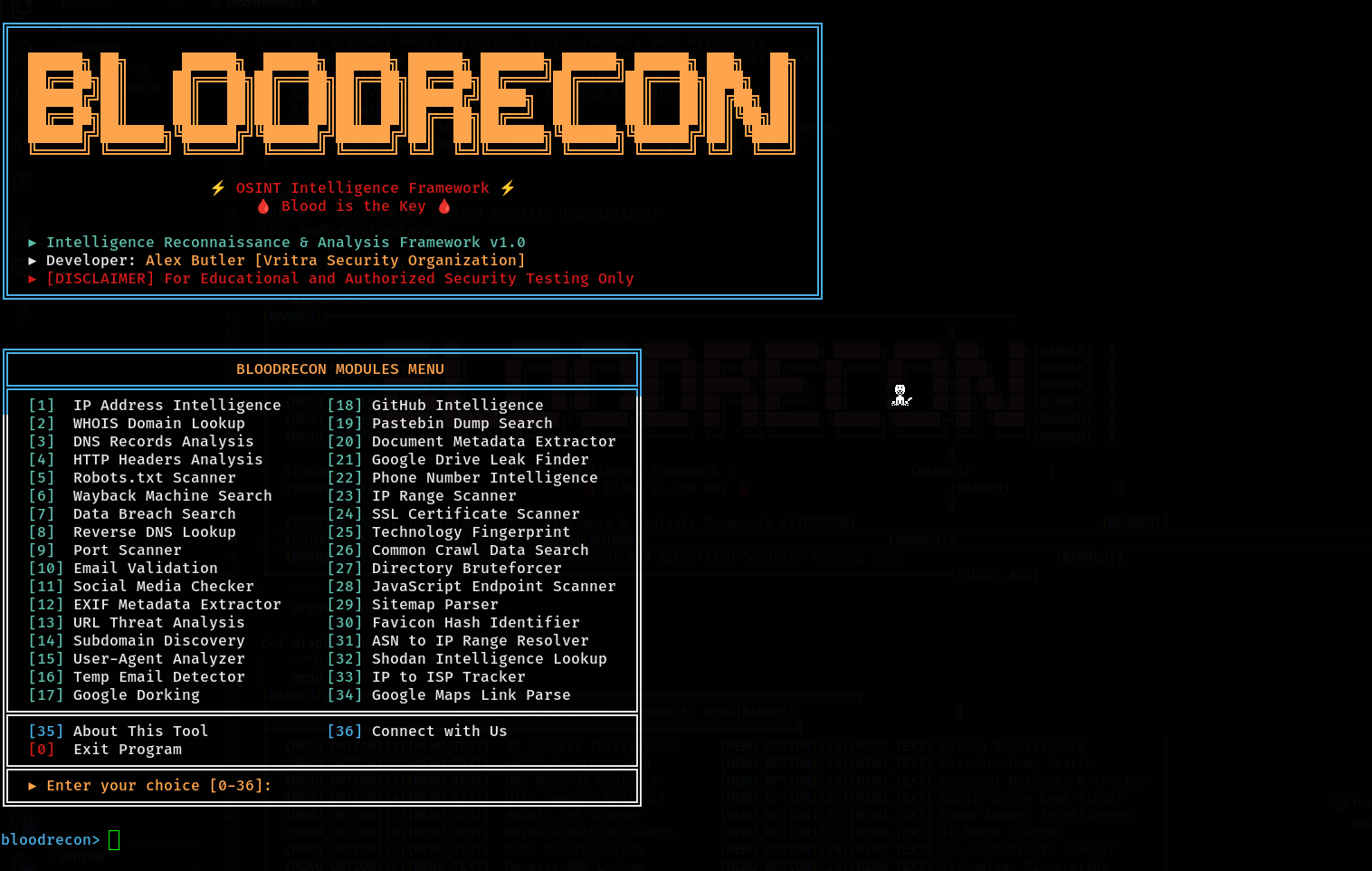
📸 Screenshots
Interactive Menu
📁 Folder Structure
BloodRecon/
│
├── 📄 bloodrecon.py             # Main application file
├── 📄 requirements.txt          # Python dependencies
├── 📄 LICENSE                   # License File
├── 📄 README.md                 # This file
├── 📄 CHANGELOG.md              # Version history and changes
│
└── 📁 modules/                  # OSINT modules directory
    ├── 📁 list-imp/             # Important list
    │   ├── 📄 common.txt        # Password list for Dir Bruteforce
    │   └── 📄 temp-domains.txt  # Temp mail domain list
    │
    ├── 📄 __init__.py           # Module initialization
    ├── 📄 colors.py             # Color management and styling
    ├── 📄 config.py             # Configuration file (API keys)
    │
    ├── 🌐 Network & Infrastructure
    ├── 📄 ip_lookup.py          # IP address intelligence
    ├── 📄 whois_lookup.py       # WHOIS domain lookup
    ├── 📄 dns_lookup.py         # DNS records analysis
    ├── 📄 reverse_dns.py        # Reverse DNS lookup
    ├── 📄 port_scanner.py       # Port scanning functionality
    ├── 📄 ssl_scanner.py        # SSL certificate analysis
    ├── 📄 ip_range_scanner.py   # IP range scanning
    ├── 📄 asn_resolver.py       # ASN to IP range resolution
    ├── 📄 isp_tracker.py        # ISP tracking
    │
    ├── 🔒 Web Application Security
    ├── 📄 http_headers.py       # HTTP headers analysis
    ├── 📄 robots_scanner.py     # Robots.txt scanner
    ├── 📄 directory_bruteforce.py # Directory bruteforcing
    ├── 📄 sitemap_parser.py     # Sitemap analysis
    ├── 📄 js_endpoint_scanner.py # JavaScript endpoint discovery
    ├── 📄 favicon_hash.py       # Favicon hash generation
    ├── 📄 tech_fingerprint.py   # Technology fingerprinting
    ├── 📄 url_analyzer.py       # URL threat analysis
    ├── 📄 useragent_detector.py # User-Agent analysis
    │
    ├── 👥 Social & Personal Intel
    ├── 📄 social_checker.py     # Social media username check
    ├── 📄 github_intel.py       # GitHub intelligence
    ├── 📄 phone_intel.py        # Phone number analysis
    ├── 📄 email_validator.py    # Email validation
    ├── 📄 temp_email_checker.py # Temporary email detection
    │
    ├── 📄 Document & Metadata Analysis
    ├── 📄 exif_extractor.py     # EXIF metadata extraction
    ├── 📄 doc_metadata.py       # Document metadata analysis
    │
    ├── 🔍 Search & Discovery
    ├── 📄 google_dorking.py     # Google dorking
    ├── 📄 subdomain_finder.py   # Subdomain discovery
    ├── 📄 wayback_machine.py    # Wayback Machine search
    ├── 📄 common_crawl.py       # Common Crawl search
    ├── 📄 pastebin_search.py    # Pastebin searching
    ├── 📄 leak_search.py        # Data breach search
    ├── 📄 google_drive_leaks.py # Google Drive leak search
    ├── 📄 maps_parser.py        # Google Maps link parser
    └── 📄 shodan_lookup.py   # Shodan API integration
⚖️ Legal Disclaimer
⚠️ IMPORTANT: This tool is designed exclusively for educational purposes and authorized security testing.
✅ Authorized Uses
- Educational purposes and learning OSINT techniques
- Authorized penetration testing and security assessments
- Bug bounty programs with proper scope authorization
- Digital forensics investigations by authorized personnel
- Security research within legal boundaries
❌ Prohibited Uses
- Unauthorized surveillance or stalking
- Illegal data collection or privacy violations
- Malicious reconnaissance or attack preparation
- Any activity violating local, state, or federal laws
Users are solely responsible for ensuring compliance with applicable laws and regulations in their jurisdiction.
👨💻 Author

Alex Butler
Vritra Security Organization
🌐 Connect With Us









🤝 Contributing
Contributions are welcome! Here's how you can help:
- 🍴 Fork the repository
- 🌿 Create a feature branch (
git checkout -b feature/AmazingFeature) - 💾 Commit your changes (
git commit -m 'Add some AmazingFeature') - 📤 Push to the branch (
git push origin feature/AmazingFeature) - 🔄 Open a Pull Request
💡 Ways to Contribute
- 🐛 Report bugs and issues
- 💡 Suggest new features or modules
- 📖 Improve documentation
- 🔧 Add new OSINT modules
- 🧪 Write tests
- 🌍 Translate to other languages
📄 License
🏷️ MIT License — Permissions, Limitations & Requirements
✅ Permissions




❌ Limitations


⚠️ Requirements

⭐ If you found BloodRecon useful, please consider giving it a star!
Made with ❤️ by Alex ButlerRelease history Release notifications | RSS feed


Download files
Download the file for your platform. If you're not sure which to choose, learn more about installing packages.
Source Distribution
Built Distribution
Filter files by name, interpreter, ABI, and platform.
If you're not sure about the file name format, learn more about wheel file names.
Copy a direct link to the current filters
File details
Details for the file bloodrecon-1.2.1.tar.gz.
File metadata
- Download URL: bloodrecon-1.2.1.tar.gz
- Upload date:
- Size: 132.1 kB
- Tags: Source
- Uploaded using Trusted Publishing? No
- Uploaded via: twine/6.1.0 CPython/3.13.5
File hashes
| Algorithm | Hash digest | |
|---|---|---|
| SHA256 |
15e99c0dbe73b725d82ee765bb6a27b6f79ed2956eb5d86c744dd867a897b9e6
|
|
| MD5 |
b01fc5d0dd19a463e8169c0e26508898
|
|
| BLAKE2b-256 |
22c18c70fa5beb8559db5bf035e1070be60d307fafd4d423520a6a8ba7ba1ec2
|
File details
Details for the file bloodrecon-1.2.1-py3-none-any.whl.
File metadata
- Download URL: bloodrecon-1.2.1-py3-none-any.whl
- Upload date:
- Size: 145.3 kB
- Tags: Python 3
- Uploaded using Trusted Publishing? No
- Uploaded via: twine/6.1.0 CPython/3.13.5
File hashes
| Algorithm | Hash digest | |
|---|---|---|
| SHA256 |
0ab6aa8ca0b60fa6e55c3f767c91581405720c85156abe5e4d43c2f928db5eb2
|
|
| MD5 |
947fdb68277a3e6587c980aa27220c41
|
|
| BLAKE2b-256 |
b930cc73c07e6473f878cd8ce26bd85cbff464a3e9da561ab65d18c2264c48ab
|






