
BluEcho
Look deeper. See what matters.
Sonar imagery → potential findings → human review → portable evidence.
Open the dashboard · Install from PyPI · Explore the models · Documentation · Report an issue
The homepage sonar is a decorative illustration. The inspection examples below use real sonar data and saved detector outputs.
Made for Smart India Hackathon (SIH) 2026 by Khushi Mhamane, Sharon Melhi, Kirti Rajput, Peeyush Rampal, Aditya Banerjee, and Aditya SS Varma.
BluEcho is a modular Python toolkit and browser dashboard for inspecting side-scan and forward-looking sonar imagery. It connects detection, acoustic context, metadata-backed locations and human review, so the evidence behind a finding travels with the report. Use the website for browser inference or run the Python application locally, offline after setup.
The problem · Features · Real examples · Quick start · Models · Development · Team · Licences
The problem
Sonar is difficult to interpret. Speckle, changing resolution, acoustic shadows and motion-related dropouts can obscure objects or make natural seafloor features resemble debris. A box alone does not establish what an object is, where it is, or whether an operator should act on it.
BluEcho brings the next steps into the same workspace: examine the original pixels, check image quality, review the candidate, attach a supported location and export the evidence. Its emphasis is traceability from source image to reviewed finding.
This is a research and hackathon prototype. Sensor-specific models have different training origins and validation limits; no universal underwater detector or independently proven ocean-wide performance is claimed.
What you can do
| Capability | In the workflow |
|---|---|
| Sensor-specific detection | Select a model for SSS or FLS imagery; inspect original-pixel bounding boxes and model scores. |
| Acoustic context | Examine shadows, quality flags and surrounding seabed. Brightness and contrast controls change the display, preserving the inference input. |
| Human-in-the-loop review | Every review action opens a save confirmation. Saved controls remain locked until explicitly edited; notes, corrections and previous decisions stay in the audit trail. A separate inspection report presents findings, next steps, available locations and downloads. |
| Guided live uploads | Recognized presentation files select their matching detector by exact file hash. Other uploads start with a fresh sensor/model choice. Small images and incompatible selections are flagged before inference; empty results offer a model-selection retry. |
| Metadata-backed locations | Map findings when matching coordinates support them. Missing geography stays unavailable rather than being invented. |
| Batch inspection | Queue images for sequential processing with separate source records, results and failures. |
| Portable reporting | Export annotated imagery, PDF briefs, JSON, CSV, GeoJSON, HTML evidence bundles and review candidates for further curation. |
| Local execution | Run ONNX in the browser or use the Python application. Model files are acquired explicitly and checked against recorded hashes. |
| Real-data demonstration | Explore different sonar samples, review saved predictions and download reports without setting up models. |
The interface keeps Home, Inspect and Reports close at hand. The ocean illustration, gentle bubbles and sonar sweep can be paused and respect reduced-motion preferences. Detector selection appears when needed, after an upload.
Real sonar examples
These screenshots show real sonar pixels with predictions from actual saved CPU runs. They illustrate the workflow, not ground-truth confirmation or independent accuracy. Opening a demo reuses saved results; uploading your own image runs inference.
Side-scan pipeline candidate
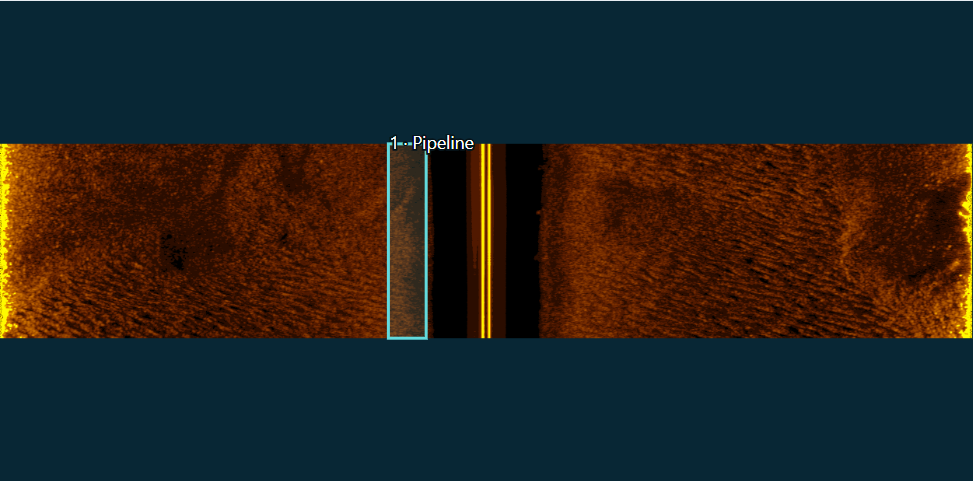
SubPipe low-frequency imagery, processed by BluEcho's pipeline route. The sample belongs to the existing development collection; per-image geographic metadata is unavailable. Image source: SubPipe, CC BY 4.0; see the attribution below.
Forward-looking debris candidates
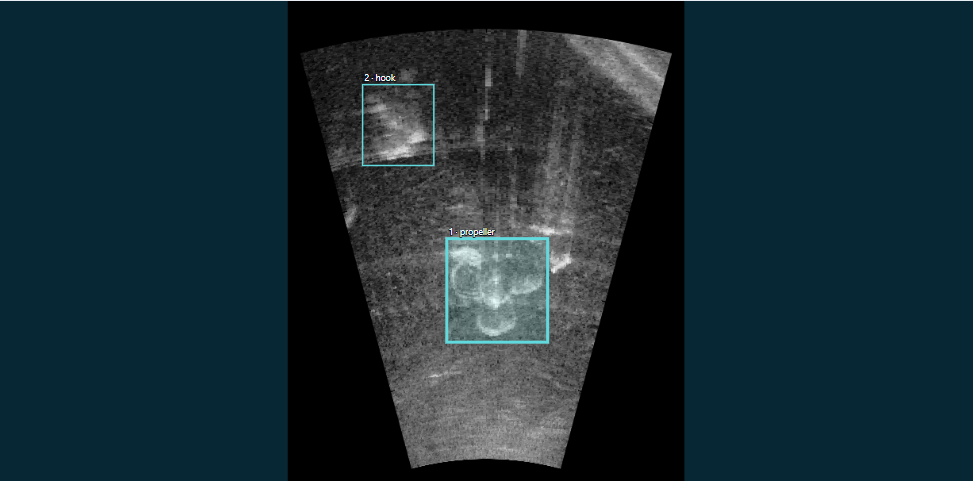
Marine Debris FLS water-tank imagery with propeller- and hook-labelled predictions from the FLS11 model. Predicted identities are unverified. This is a separate sensor/model route, not an open-sea pipeline result. Image source: Marine Debris FLS, CC BY-NC-SA 4.0; see the attribution below.
A survey with real geolocation
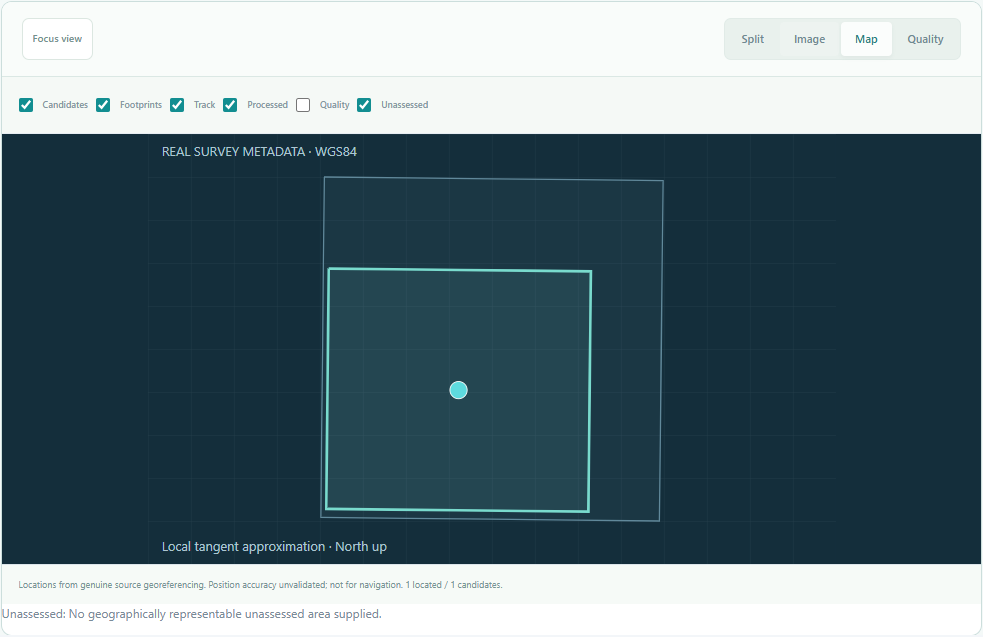
NOAA H12907 side-scan imagery (CC0 1.0). The geographic view uses the source GeoTIFF affine transform, converted from NAD83 / UTM zone 15N to WGS84. The map shows an unconfirmed model candidate at a metadata-derived position; it is not a verified wreck or navigation chart.
Try the complete flow
- Open the live dashboard and choose Try demo.
- Switch between pipeline, seabed, georeferenced NOAA and eight forward-looking debris samples, or choose Surprise me.
- Inspect the original imagery, select a candidate and record a review decision.
- Open Location, image context & provenance to see what supports the finding.
- Use the collection filter to browse the ten FLS source labels, then download a PDF brief or an evidence bundle. Use Reports to revisit saved inspections.
The seabed sample includes an empty detector result. An empty result does not prove an area is clear. The Georeferenced survey sample uses genuine NOAA H12907 raster metadata. Select Map to see its survey footprint and a metadata-derived candidate position in the Gulf of Mexico. The candidate is an unconfirmed model prediction; the location is not field verified. The other NOAA window remains outside the featured picker.
The expanded debris library covers can, chain, drink-carton, valve, propeller, hook, shampoo-bottle, standing-bottle, bottle and tire. Each scene contains a separately executed saved detector result. Public demonstrations do not include unverified ghost-net detections. Approved-access crab-pot imagery can be shown in a separately prepared localhost presentation bundle; it is excluded from the public assets while its source licence statements remain inconsistent.
Choose how to run BluEcho
| Website | Local Python application | |
|---|---|---|
| Start | Open the dashboard; no installation | Install the package and start the local server |
| Inference | Selected ONNX model runs in your browser | Native/ONNX execution through the installed model route |
| Inputs | PNG, JPEG, BMP and supported portable images such as PBM | Image workflows plus local TIFF/GeoTIFF and XTF support |
| Metadata | Matching affine JSON; bundled NOAA demos retain verified transforms | Broader raster and sonar metadata workflows |
| Storage | Browser-local imagery and review records | Files and inspection records on your computer |
| Offline use | Saved resources depend on browser caching | Available after dependencies and weights are prepared |
The web edition accepts images up to 32 MiB and 8 million pixels. Keep its tab open during inference; export important reports before clearing site data. First use downloads the selected model and WebAssembly runtime. The Python dashboard includes its frontend and needs no Node.js installation to run.
Quick start
Install the Python package
Use Python 3.12 in a virtual environment. CPU package checks run in Linux CI; local development and browser workflows have also been exercised on Windows. A GPU is not required for this setup.
Linux/macOS shell (the full application CI target is Linux x86-64):
python3.12 -m venv .venv
source .venv/bin/activate
Windows PowerShell:
py -3.12 -m venv .venv
.\.venv\Scripts\Activate.ps1
Then install the CPU inference stack:
python -m pip install torch==2.4.1+cpu torchvision==0.19.1+cpu --index-url https://download.pytorch.org/whl/cpu
python -m pip install --upgrade "bluecho-sonar[inspection,inference,onnx,api]"
bluecho --version
bluecho doctor
bluecho capabilities
The distribution is bluecho-sonar; the command and Python import are bluecho. The base package uses NumPy and Pillow. Optional extras add inference, inspection, ONNX, geospatial, API and training dependencies. Install the geospatial extra for raster georeferencing. macOS is not verified for the complete pinned CPU stack.
Start the local dashboard
bluecho serve --registry ./bluecho-models --storage ./bluecho-inspections --port 8010
Open localhost:8010. The real-data demo works without downloading detector weights. For your own images, prepare the matching model first; interactive API documentation is available at localhost:8010/docs.
Run a local detector
This example selects the forward-looking sonar debris route. Use your own matching FLS image and a new output directory:
bluecho models fetch --model fls11-debris --registry ./bluecho-models
bluecho models verify --model fls11-debris --registry ./bluecho-models
bluecho inspect ./sonar.png --modality FLS_ARIS --model fls11-debris --registry ./bluecho-models --output ./inspection-output
Weights and large datasets are separate from the package. Model acquisition preserves source-specific terms and checksums. For the main side-scan pipeline detector, use the verified weight/manifest import documented below.
Models and evidence
| Model | Sensor route | Intended labels | Current evidence and setup |
|---|---|---|---|
sss-pipeline-v3 |
SSS_LF |
Pipeline | Evaluated on correlated development observations from one survey. Requires verified local weights and their original manifest. |
ghost-pot |
SSS |
Crab-Pot | GhostVision YOLO26s, source-test sample check; new-survey accuracy unmeasured. Browser and local ONNX. |
fls11-debris |
FLS_ARIS |
11 source classes | Third-party YOLO11n: propeller, shampoo-bottle and can runtime checks; mine-labelled outputs remain unvalidated proposals. Browser and local ONNX. |
sonarvision-sss |
SSS |
unknown_debris, airplane, mine, wreck | Experimental SonarVision YOLOv8n; mine proposals unvalidated. Browser and local ONNX. |
sss-wreck-experimental |
SSS |
Experimental pipeline and wreck candidates | Pinned ONNX download. Independent wreck performance is unavailable; additional native labels remain unvalidated proposals. |
uatd-fls |
FLS_UATD |
Ten native classes, including cylinder | Selected compatibility sample; source overlap is unknown. Pinned acquisition with restricted conversion on Linux. |
fls-debris-development |
FLS_ARIS |
Ten debris classes | Trained development detector without an independent benchmark. Requires verified local import; inherited CC BY-NC-SA terms apply. |
The FLS debris labels are can, bottle, drink-carton, chain, propeller, tire, hook, valve, shampoo-bottle, and standing-bottle. A bottle label alone does not establish plastic composition. FLS cylinder support does not establish SSS cylinder detection. Verified real ghost-net detection is unavailable.
For the pipeline route, keep the original manifest.json beside your authorized native checkpoint, then import it:
bluecho models import --model sss-pipeline-v3 \
  --registry "$HOME/.cache/bluecho/models" \
  --local '/absolute/path/sss-v3/native.pt'

bluecho inspect '/absolute/path/pipeline.pbm' \
  --modality SSS_LF \
  --model sss-pipeline-v3 \
  --registry "$HOME/.cache/bluecho/models" \
  --output '/absolute/path/new-pipeline-inspection'
The FLS11 route additionally includes the source label mine; mine-labelled outputs remain unvalidated proposals. Do not use these outputs for ordnance clearance. The full class map and fixed runtime settings are in the model catalog.
What a report means
- Scores: uncalibrated model scores, not probabilities of correct identification.
- Locations: estimates derived from available source metadata, with method and limitations. No fabricated latitude or longitude.
- Dimensions: pixel boxes and, when supported, mapped image footprints; these do not automatically establish physical object size.
- Review: operator decisions retained alongside original predictions. Review does not silently retrain a model or create exhaustive ground truth.
- Evaluation: repeated survey frames are correlated. Within-survey development evidence does not establish new-site, open-ocean or onboard-drone performance.
Verified real ghost-net detection and material identification are unavailable. FLS cylinder labels do not establish SSS cylinder performance. An image-only result remains useful when geographic metadata is missing.
Architecture
Sonar image / supported local recording
                  |
          Source and geometry checks
                  |
           Sensor-specific model
                  |
       Original-image candidate boxes
                  |
   Quality context + available source metadata
                  |
       Human review and persistent history
                  |
      Annotated evidence + structured reports
Browser and Python execution are separate runtimes. The web exports use the explicit bluecho-browser/1.0 schema; the Python API retains its own existing schema. Consult the interface guide before integrating them.
Development
git clone https://github.com/Sharon-codes/SIH-2026.git
cd SIH-2026
python -m pip install -e ".[inspection,inference,onnx,api,dev]"
npm ci --prefix frontend
npm run build --prefix frontend
python scripts/verify_demo_assets.py
python -m pytest tests -q
Create the Python environment and install the CPU Torch versions from the setup section first. The default frontend build targets the local application. Set VITE_BROWSER_ENGINE=1 before building the browser edition. The CI workflow builds both editions, verifies demo assets, checks package distributions and runs the Python tests.
frontend/src/          React workspace, browser inference and exports
src/bluecho/           Python CLI, API, inference and inspection modules
src/bluecho/catalog/   Model routes, metadata and pinned hashes
frontend/public/real-demo/  Real samples, saved predictions and attribution
docs/                 Interfaces, evidence, licences and workflow guides
scripts/              Build and data-asset verification tools
tests/                Python regression tests
For issues, include the package version, OS, chosen model/modality, command or UI steps, and a non-sensitive description of the input. For contributions, describe the change, how it was verified and any effect on model/data provenance. Keep credentials, private imagery, large datasets and weight files out of source commits.
Documentation
| Guide | Contents |
|---|---|
| Dashboard | Local setup, demonstration, review, exports, and troubleshooting |
| Models and licences | Model acquisition, hashes, offline use, and inherited terms |
| CLI and Python interfaces | Programmatic integration and command reference |
| Validation | Evaluation evidence and limitations |
| Review workflow | Persistent review records and controlled export |
| Geolocation | Source binding, coordinate enrichment, and missing metadata |
| Physics assumptions | Sonar geometry, altitude prerequisites, and uncertainty |
| SSS detection workflow | Boxes, crops, structured outputs, and local HTML reports |
| Experimental verifiers | Optional learned review scores and development comparisons |
Team
Built for Smart India Hackathon (SIH) 2026 by:
- Khushi Mhamane
- Sharon Melhi
- Kirti Rajput
- Peeyush Rampal
- Aditya Banerjee
- Aditya SS Varma
Licences and attribution
BluEcho application source is AGPL-3.0-or-later. See LICENSE. Models, datasets and example imagery retain their separate terms; the application licence does not replace them.
| Example collection | Source and creators | Data terms |
|---|---|---|
| SubPipe | Zenodo 12666132; Olaya Álvarez-Tuñón, Luiza Ribeiro Marnet, László Antal, Martin Aubard, Maria Costa, Yury Brodskiy; OceanScan-MST / REMARO | CC BY 4.0 |
| Marine Debris FLS | Zenodo 15101686; Matias Valdenegro, Bilal Wehbe, Yvan Petillot | CC BY-NC-SA 4.0 |
| NOAA H12907 | NOAA/NOS survey archive; R/V Ocean Explorer | CC0 1.0; not for navigation |
SubPipe is a public dataset of a submarine outfall pipeline, property of Oceanscan-MST. This dataset was acquired with a Light Autonomous Underwater Vehicle by Oceanscan-MST, within the scope of Challenge Camp 1 of the H2020 REMARO project.
The example screenshots add detector boxes and interface presentation to real source images. FLS examples and their annotated derivatives retain the noncommercial/share-alike terms and are included for this noncommercial SIH research demonstration. No dataset author or model creator endorsement is implied. No gated GhostVision imagery is bundled.
The FLS11 model was originally trained by Bhoumik Chandra Bagh; BluEcho provides its documented ONNX integration, not authorship of that original model. Other model origins and licence conditions are preserved in the model documentation, specialist evidence and full demo attribution.
1 maintainer

Metadata
1 maintainer
Release files for bluecho-sonar 0.6.4
For a detailed explanation of source distributions (sdists) and built distributions (wheels), please see the package formats documentation.
Source distribution (sdist)
| File | Size | Uploaded | |
|---|---|---|---|
| bluecho_sonar-0.6.4.tar.gz | 6.9 MB | Details |
Built distribution (wheel)
| File | Interpreter | ABI | Platform | Reset |
|---|---|---|---|---|
| bluecho_sonar-0.6.4-py3-none-any.whl | Python 3 | none | any | Details |
Total release size: 13.0 MB
Release files / bluecho_sonar-0.6.4.tar.gz
| Download URL | bluecho_sonar-0.6.4.tar.gz |
|---|---|
| Size | 6.9 MB |
| Tags | Source |
|
SHA-256 checksum How to use checksums |
2d5333c7bb7bea21ead255fa9d6f7a1ba47ae7876120a163999805869c8a6205
|
|
BLAKE2b-256 checksum How to use checksums |
1cfb24bfb083b7426b40e843225ef4bcee76bbbbbb9de92dd2032c4acc08ab89
|
| Upload date | |
|
Uploaded using Trusted Publishing? What is trusted publishing? |
No |
| Uploaded via |
twine/7.0.0 CPython/3.12.13
|
Release files / bluecho_sonar-0.6.4-py3-none-any.whl
| Download URL | bluecho_sonar-0.6.4-py3-none-any.whl |
|---|---|
| Size | 6.1 MB |
| Tags | Python 3 |
|
SHA-256 checksum How to use checksums |
dc372a70b01237e5c3ae4f0737caa3e6aea296afab8eea5b7836ded202dbb356
|
|
BLAKE2b-256 checksum How to use checksums |
5bff52c367df9c9a4d801debb0ae0a6f0612a510c653a49ac15ea8ea596d814f
|
| Upload date | |
|
Uploaded using Trusted Publishing? What is trusted publishing? |
No |
| Uploaded via |
twine/7.0.0 CPython/3.12.13
|














