
An influence map generator

Project description
bluemap - Influence map generator







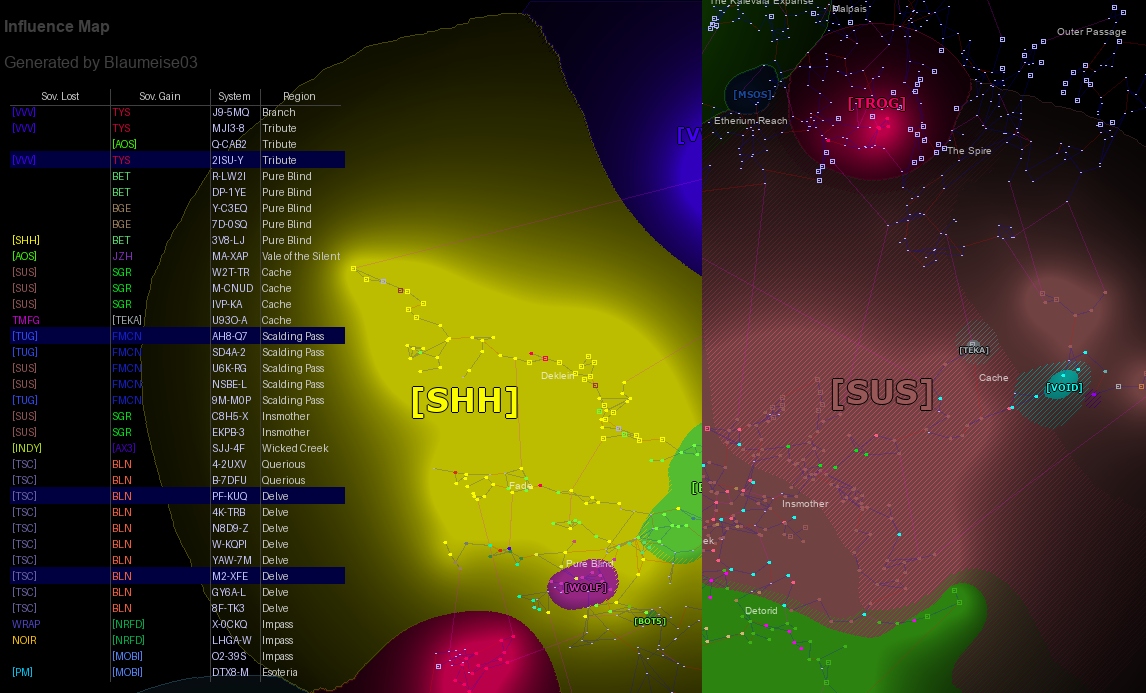
Bluemap is an influence map generator for games like Eve Online/Echoes. It is based on the algorithm from Paladin Vent (which was continued by Verite Rendition), but was written from scratch in C++ and Cython. It is designed to be faster and easier to use.
While the algorithm for the influence layer itself stayed the same, it was not a stable implementation as the
final output depended on the processing order. Which, when using structures like maps or sets, is not guaranteed to be
the same every time. It is especially different between the legacy Java implementation and the new C++ one. Also, this
was an issue because the actual ids of owners and systems change how the final output looks like. So the original
recursive DFS algorithm was replaced with an iterative BFS algorithm to ensure the same output every time. The legacy
algorithm can be found at the legacy-algorithm tag.
The python API documentation can be found here.
This project is still work in progress. The API might change until a stable version is released. If you decide to already use it, please make sure to pin the version in your requirements.txt file. Until version 1.0.0 is released, minor versions might contain breaking changes. I will try to keep the changes as minimal as possible, but I cannot guarantee that there will be no breaking changes.
If you find a bug or have a feature request, please open an issue on GitHub.
Overview
As stated before, this project is implemented in C++ and Cython. The C++ part is responsible for the rendering of the influence layer, and the calculation of the owner label positions. All other parts are implemented in Cython and Python.
The C++ library does work in general standalone, but except for a testing tool that requires a specific file format as input, there is no real way to use it directly. So you would have to write your own wrapper around it, which loads the data from some source.
Installation
PyPi has precompiled wheels for Windows (64bit), Linux and macOS (min version 14.0, untested). 32bit Windows is supported but not automated. PyPi may or may not have a precompiled wheel for 32bit Windows.
We support Python 3.12 and higher (atm 3.12 and 3.13 on PyPi)
The precompiled package can be installed via pip. There are multiple variations that can be installed via pip:
| Name | Map | Tables | MySQL DB |
|---|---|---|---|
bluemap[minimal] |
✅ | ❌ | ❌ |
bluemap[table] |
✅ | ✅ | ❌ |
bluemap[CLI] |
✅ | ✅ | ✅ |
e.g. to install the full version, you can use the following command:
pip install bluemap[CLI]
- Map: The module for rendering the influence map
- Tables: The module for rendering tables (depends on Pillow)
- MySQL DB: The module for loading data from a MySQL database (depends on pymysql)
Also note all functionality is available in the bluemap package. The extras are only for the convenience of the
installation. You can also install the base version and add the dependencies manually.
Usage (CLI)
The CLI supports rendering of maps with data from a mysql database. The program will create all required tables on the first run. However, you do have to populate the tables yourself. You can find the static data for Eve Online on the UniWIKI. For the sovereignty data, you need to use the ESI API.
| Arg | Description |
|---|---|
--help,-h |
Show the help message |
--host HOST |
The host of the db |
--user USER |
The user for the db |
--password PASSWORD |
The password for the db (empty for no password) |
--database DATABASE |
The database to use |
--text [header] TEXT |
Extra text to render (see below) |
--output,-o OUTPUT |
The output file for the image |
--map_out,-mo PATH |
The output file for the map data |
--map_in,-mi PATH |
The input file for the old map data |
The database args are all required, the other ones are optional. map_in and map_out are used for the rendering of
changed influence areas. If the old map is provided, in areas where the influence changed, the old influence will be
rendered as diagonal lines. These files in principle simply store the id of the owner for every pixel. Please refer
to the implementation for the exact format.
The text argument is used to render additional text in the top left corner. This argument may be repeated multiple
times for multiple lines of text. There are three ways to use this
--text "Some text": This will render the text in the default font--text header "Some text": This will render the text in the header font (bold)--text: This will render an empty line (but an empty string would also work)
(all three ways can be chained for multiple lines)
Example usage:
python -m bluemap.main \
       --host localhost \
       --user root \
       --password "" \
       --database evemap \
       -o influence.png \
       -mi sovchange_2025-02-16.dat \
       -mo sovchange_2025-02-23.dat \
       --text header "Influence Map" \
       --text \
       --text "Generated by Blaumeise03"
Usage (Library)
The library is very simple to use. You can find an example inside the main.py file. The main class
is the SovMap class. This does all the heavy lifting. The load_data method is used to load the data into the map.
Please note that the API is subject to change until a stable version is released. I recommend pinning the version in your requirements.txt file and manually update it.
🚨 IMPORTANT 🚨: Before you use any of the
SovMap.set_XYZ_functionmethods, read theCustomizationsection below. Otherwise, you may run into memory leaks.
from bluemap import SovMap

sov_map = SovMap()

sov_map.load_data(
    owners=[{
        'id': 10001,
        'color': (0, 255, 0),
        'name': 'OwnerA',
        'npc': False,
    }],
    systems=[
        {
            'id': 20001, 'name': 'Jita',
            'constellation_id': 30001, 'region_id': 40001,
            'x': -129064e12, 'y': 60755e12, 'z': -117469e12,
            'has_station': True,
            'sov_power': 6.0,
            'owner': 10001,
        }, {'id': 20002, 'name': ...}
    ],
    connections=[
        (20001, 20002),
    ],
    regions=[{'id': 40001, 'name': 'The Forge',
              'x': -96420e12, 'y': 64027e12, 'z': -112539e12},
             ],
    filter_outside=True, # Will skip all systems outside the map
)
For the rendering, please refer to the render method inside the main.py. You can see the usage
with documentation there.
Rendering
Some more special methods. First of all, the rendering is implemented in C++ and does not interact with Python. Therefore, it can be used with Python's multithreading. In general, all methods are thread safe. But any modifications to the map are blocked as long as any thread is rendering. The rendering will split the map into columns, every thread will render one column. There is a default implementation inside _map.pyx:
from bluemap import SovMap, ColumnWorker
sov_map = SovMap()
if not sov_map.calculated:
    sov_map.calculate_influence()
from concurrent.futures.thread import ThreadPoolExecutor
with ThreadPoolExecutor(max_workers=16) as pool:
    workers = sov_map.create_workers(16)
    pool.map(ColumnWorker.render, workers)
But please make sure, two ColumnWorkers who overlap are not thread safe. The create_workers method will generate
disjoint workers. But if you call the method multiple times, you have to make sure the workers are disjointed. See the
source code of the SovMap.render functions for more information.
Tables
The module bluemap.table contains classed for rendering of tables. This requires the Pillow package. Please refer
to the example inside the main.py file on how to use it.
Algorithm Details
The algorithm is based on the algorithm from Paladin Vent. It has two steps: The spreading of influence over neighbored systems, and the actual calculation of influence per pixel. Every system starts with an optional owner and a power value.
Influence Spreading
In the first step, this initial power is spread over the neighbors via the connections. The initial power is first
converted into its actual power used for the algorithm. That was done because in the original implementation, the power
input was simply the ADM level of the system which needed to be converted to yield nicer results. This power_function
can be modified by the user. The default implementation is:
def power_function(
        sov_power: float,
        has_station: bool,
        owner_id: int) -> float:
    return 10.0 * (6 if sov_power >= 6.0 else sov_power / 2.0)
Any function that matches this signature can be used. In the C++ implementation, this can be done by providing a
matching std::function. When compiled against CPython (which happens in the PyPi builds), a python callable may be
provided via SovMap.set_sov_power_function.
The spreading of the influence is done via a BFS algorithm. The influence is spread over the connections to the neighbored systems. For every jump, the influence is being reduced. By default, the influence is reduced to 30% of the previous value. This can be modified as well:
def power_falloff_function(
        value: float,
        base_value: float,
        distance: int) -> float:
    return value * 0.3
This function is evaluated every time the distance is increased. The value is the current influence, the base_value
is the original influence and the distance is the current distance from the source system. If the falloff returns
0 or less, the algorithm will stop spreading the influence. This can be used to limit the influence to a certain range.
This is WIP, at the moment there is still a hard limit of two jumps (three for systems with an ADM of 6 or above).
For every system, a map of owners with their accumulated influence is created.
Influence Aggregation
The second step is done on the image itself for every pixel, the topology of the map is no longer relevant. For every
pixel, the influences of all systems in a 400 pixel radius are accumulated. The influence is weighted by the following
formula: power / (500 + dist_sq). This is done for every owner for every system. The owner with the highest influence
is considered the owner of the pixel and will be rendered in the final image.
The influence is rendered as the color of the owner, with the alpha channel representing the influence according to the following function:
import math


def influence_to_alpha(influence: float) -> float:
    return float(min(
        190,
        int(math.log(math.log(influence + 1.0) + 1.0) * 700)))
Additionally, the borders of the influence areas are rendered with a stronger color (higher alpha value).
Old Owner Overlay
The algorithm does generate two images. The first one is the RGBA image itself. But additionally, a second image containing the owner id for every pixel is generated. This image can be provided the next time to the algorithm to highlight areas where the influence changed. The old owner will be rendered as diagonal lines in the final image.
Customization
As stated before, a lot of functions for the rendering can be customized. The default functions are implemented in C++ are really fast. Replacing them with Python functions adds considerable overhead. For the influence spreading, this is not a big issue, as this is pretty fast anyway and does not scale with the size of the image. But for the influence aggregation, this can be a problem. Simply replacing the C++ functions with Python functions will double the rendering time.
It is planned to provide a more efficient way of specifying simple mathematical expressions a strings, which get compiled into a callable that does not hook into python. This is not implemented yet.
All objects that are a function, a bound method, or a callable (that implements
__call__) can be used as a function. For bound methods, theselfargument is allowed in the signature.
🚨 IMPORTANT 🚨: Do not provide methods of the SovMap class (or ony inherited class) as a function. This will cause a circular reference and will prevent the garbage collector from collecting the object. The underlying C++ object will hold a reference to the callable and the SovMap class holds a reference to the C++ class. If a bound method is provided (which holds a reference to the bound object), we have a cycle. I do not think the garbage collector is able to infer that this is a cycle and thus will never collect the object.
Alternatively, you can implement a wrapper function that holds a weak reference to the callable. As long as you ensure that the callable is not deallocated while the SovMap is in use, this should work.
The return types of the functions are strict. The functions must exactly return the type they are supposed to return.
One last thing that can be customized is the automatic color generation. If the algorithm tries to render an owner that
does not yet have a color assigned, it will generate a new color. By default, the SovMap class has this function
implemented (SovMap.next_color). But another function may be passed, it must have this signature:
def next_color(owner_id: int) -> tuple[int, int, int]:
    pass
But please note, the set_generate_owner_color_function does only affect the rendering of the influence layer. The
function SovMap.draw_systems does also generate colors for owners, but it will always use the next_color function
from the SovMap class.
Building
Python
On windows, this project requires the MSVC compiler. The library requires at least C++17, if you use a different
compiler on windows, you will have to modify the extra_compile_args inside the setup.py file.
Also, this project requires Python 3.12 or higher. I have not tested it with lower versions, but the C++ code gets compiled against CPython and uses features from the C-API that require Python 3.12. That being said, this is technically speaking not required. You could disable the C-API usage, but at the moment, you would have to remove the functions from the Cython code that depend on the C-API.
Compiling can either happen via
python -m build
or, if you want to build it in-place
python setup.py build_ext --inplace
this will also generate .html files for an analysis of the Cython code.
Standalone
This project has a small CMakelists.txt file that can be used to compile the C++ code as a standalone executable. It
does download std_image_write from GitHub to write the png image. However, as I have mentioned, the C++ code has no
nice way to load the data. Refer to Map::load_data inside the Map.cpp file for the required format.
Credits
The original algorithm was created by Paladin Vent and continued by Verite Rendition. Verite's version can be found at https://www.verite.space/. I do not know if Paladin Vent has a website (feel free to contact me to add it here). The original algorithm was written in Java and can be found on Verite's website.
Release history Release notifications | RSS feed


Download files
Download the file for your platform. If you're not sure which to choose, learn more about installing packages.
Source Distribution
Built Distributions
Filter files by name, interpreter, ABI, and platform.
If you're not sure about the file name format, learn more about wheel file names.
Copy a direct link to the current filters
File details
Details for the file bluemap-0.2.0a1.tar.gz.
File metadata
- Download URL: bluemap-0.2.0a1.tar.gz
- Upload date:
- Size: 365.1 kB
- Tags: Source
- Uploaded using Trusted Publishing? No
- Uploaded via: twine/6.0.1 CPython/3.12.3
File hashes
| Algorithm | Hash digest | |
|---|---|---|
| SHA256 |
8929d01dc671fd641ba0ad6a61adcdcd19298284428a0cb161034dea31af470a
|
|
| MD5 |
e17313616f7ca1b017e36f46fdc6ed4f
|
|
| BLAKE2b-256 |
d5ba2f4f82c026ff9576652643b12eadce1015d63984d44cf1a63bed8c50b965
|
File details
Details for the file bluemap-0.2.0a1-cp313-cp313-win_amd64.whl.
File metadata
- Download URL: bluemap-0.2.0a1-cp313-cp313-win_amd64.whl
- Upload date:
- Size: 573.0 kB
- Tags: CPython 3.13, Windows x86-64
- Uploaded using Trusted Publishing? No
- Uploaded via: twine/6.0.1 CPython/3.12.3
File hashes
| Algorithm | Hash digest | |
|---|---|---|
| SHA256 |
701abbe73b66ad60fa78a98025fcbeb6fa910d889ba10adc05b697972b2938e2
|
|
| MD5 |
3f28125206549f034ca92f35baa3b168
|
|
| BLAKE2b-256 |
619395b08ac39045ee0629c35a238138746cbd619aa40f30369f134deae4774d
|
File details
Details for the file bluemap-0.2.0a1-cp313-cp313-musllinux_1_2_x86_64.whl.
File metadata
- Download URL: bluemap-0.2.0a1-cp313-cp313-musllinux_1_2_x86_64.whl
- Upload date:
- Size: 3.6 MB
- Tags: CPython 3.13, musllinux: musl 1.2+ x86-64
- Uploaded using Trusted Publishing? No
- Uploaded via: twine/6.0.1 CPython/3.12.3
File hashes
| Algorithm | Hash digest | |
|---|---|---|
| SHA256 |
fbec963ee1845b89ea734b6c8e79934cb7bfd1f2c8f3bc5964f86e314732d9b6
|
|
| MD5 |
25238e0cc5953caf6163b704aeefee40
|
|
| BLAKE2b-256 |
52ed0f2c3c632973cb219b20b27e297e9f5dc557b25c604d5fff124ca9e49664
|
File details
Details for the file bluemap-0.2.0a1-cp313-cp313-musllinux_1_2_i686.whl.
File metadata
- Download URL: bluemap-0.2.0a1-cp313-cp313-musllinux_1_2_i686.whl
- Upload date:
- Size: 3.6 MB
- Tags: CPython 3.13, musllinux: musl 1.2+ i686
- Uploaded using Trusted Publishing? No
- Uploaded via: twine/6.0.1 CPython/3.12.3
File hashes
| Algorithm | Hash digest | |
|---|---|---|
| SHA256 |
e7bd0fe438fa3beb61b5a6af080229a217f1143d46c7222f455c514feedf63ad
|
|
| MD5 |
c3de62baf3f91f09081072dd0d41cb27
|
|
| BLAKE2b-256 |
fc6cd9ed69e19a1c22757fcfebcbac999048dc25b538d0bdf89872104788f29a
|
File details
Details for the file bluemap-0.2.0a1-cp313-cp313-manylinux_2_17_x86_64.manylinux2014_x86_64.whl.
File metadata
- Download URL: bluemap-0.2.0a1-cp313-cp313-manylinux_2_17_x86_64.manylinux2014_x86_64.whl
- Upload date:
- Size: 2.6 MB
- Tags: CPython 3.13, manylinux: glibc 2.17+ x86-64
- Uploaded using Trusted Publishing? No
- Uploaded via: twine/6.0.1 CPython/3.12.3
File hashes
| Algorithm | Hash digest | |
|---|---|---|
| SHA256 |
3d4688b93fffba4d9abfa822206f057b0405e96d4d0c27a5fc9c1d9f10feab38
|
|
| MD5 |
33ec9ce1537601ad3039412b74cf05cb
|
|
| BLAKE2b-256 |
6c5cac1589c17e38abe58e75bc0155683a00c69c9dc813d9b073486c0fdcf831
|
File details
Details for the file bluemap-0.2.0a1-cp313-cp313-manylinux_2_17_i686.manylinux2014_i686.whl.
File metadata
- Download URL: bluemap-0.2.0a1-cp313-cp313-manylinux_2_17_i686.manylinux2014_i686.whl
- Upload date:
- Size: 2.5 MB
- Tags: CPython 3.13, manylinux: glibc 2.17+ i686
- Uploaded using Trusted Publishing? No
- Uploaded via: twine/6.0.1 CPython/3.12.3
File hashes
| Algorithm | Hash digest | |
|---|---|---|
| SHA256 |
13e9489c0d5c1dc6c813d465370f90b8f096f83a2bf81f0e3bddf88b808356f3
|
|
| MD5 |
5d4be1b2267e3f2f2896a154dff89d0b
|
|
| BLAKE2b-256 |
a3120daa1c7ac8a08713b242c5ada6d0fc90031c7e2629d2a72035cda146a637
|
File details
Details for the file bluemap-0.2.0a1-cp313-cp313-macosx_14_0_arm64.whl.
File metadata
- Download URL: bluemap-0.2.0a1-cp313-cp313-macosx_14_0_arm64.whl
- Upload date:
- Size: 1.7 MB
- Tags: CPython 3.13, macOS 14.0+ ARM64
- Uploaded using Trusted Publishing? No
- Uploaded via: twine/6.0.1 CPython/3.12.3
File hashes
| Algorithm | Hash digest | |
|---|---|---|
| SHA256 |
34c42ee8a14e57ed11876eec5d773ab921e91a300ff924f04b370d8f4f432053
|
|
| MD5 |
34cd3d100c22dfe342ed9c47d0570f3d
|
|
| BLAKE2b-256 |
ccea002284deb04cce1460976d68722e53a35b9b5c873fbd4d731a270da0abe8
|
File details
Details for the file bluemap-0.2.0a1-cp312-cp312-win_amd64.whl.
File metadata
- Download URL: bluemap-0.2.0a1-cp312-cp312-win_amd64.whl
- Upload date:
- Size: 574.1 kB
- Tags: CPython 3.12, Windows x86-64
- Uploaded using Trusted Publishing? No
- Uploaded via: twine/6.0.1 CPython/3.12.3
File hashes
| Algorithm | Hash digest | |
|---|---|---|
| SHA256 |
6d525493e50cd23a64fea3ad0120a41c728c8f7d720ed3f0dfc11de4fa525bb2
|
|
| MD5 |
3841d342eae7792fed314f713e3ef802
|
|
| BLAKE2b-256 |
c73435289896f6d46a297f84f9104b54b5815c29d1c518a6613f30101a81f888
|
File details
Details for the file bluemap-0.2.0a1-cp312-cp312-musllinux_1_2_x86_64.whl.
File metadata
- Download URL: bluemap-0.2.0a1-cp312-cp312-musllinux_1_2_x86_64.whl
- Upload date:
- Size: 3.6 MB
- Tags: CPython 3.12, musllinux: musl 1.2+ x86-64
- Uploaded using Trusted Publishing? No
- Uploaded via: twine/6.0.1 CPython/3.12.3
File hashes
| Algorithm | Hash digest | |
|---|---|---|
| SHA256 |
acd2ee8ccee3e523178d16ca5ece2e493aa72d6ea4468817d4718ca612c01848
|
|
| MD5 |
9b35eaa1d8e9e896ed7658d56343fcb9
|
|
| BLAKE2b-256 |
47aa43dee56969687d1c6e4aa7b66917d3ffc285c27137764c9b3d14089f8a64
|
File details
Details for the file bluemap-0.2.0a1-cp312-cp312-musllinux_1_2_i686.whl.
File metadata
- Download URL: bluemap-0.2.0a1-cp312-cp312-musllinux_1_2_i686.whl
- Upload date:
- Size: 3.6 MB
- Tags: CPython 3.12, musllinux: musl 1.2+ i686
- Uploaded using Trusted Publishing? No
- Uploaded via: twine/6.0.1 CPython/3.12.3
File hashes
| Algorithm | Hash digest | |
|---|---|---|
| SHA256 |
2f04d99679e40f550b4ceea17c166a8aabc5d3952585b6f0f8bd4711f7f21a49
|
|
| MD5 |
2a2b183015ae3bda26e4e5f8f3a35e6f
|
|
| BLAKE2b-256 |
b2b36a017b012a495e2d95d292d0baab1223350959dbe1e81dc5d81a09b507cb
|
File details
Details for the file bluemap-0.2.0a1-cp312-cp312-manylinux_2_17_x86_64.manylinux2014_x86_64.whl.
File metadata
- Download URL: bluemap-0.2.0a1-cp312-cp312-manylinux_2_17_x86_64.manylinux2014_x86_64.whl
- Upload date:
- Size: 2.6 MB
- Tags: CPython 3.12, manylinux: glibc 2.17+ x86-64
- Uploaded using Trusted Publishing? No
- Uploaded via: twine/6.0.1 CPython/3.12.3
File hashes
| Algorithm | Hash digest | |
|---|---|---|
| SHA256 |
6ce26170d4ea47c411da0cb21232c09c59c1aa7edf5a649aabd38401dca14156
|
|
| MD5 |
d379289be667513c39155fde7525e357
|
|
| BLAKE2b-256 |
b6884dfef9a48c75466050d1430fa571bbe4fe28f80160aa352a95b0ef3efb85
|
File details
Details for the file bluemap-0.2.0a1-cp312-cp312-manylinux_2_17_i686.manylinux2014_i686.whl.
File metadata
- Download URL: bluemap-0.2.0a1-cp312-cp312-manylinux_2_17_i686.manylinux2014_i686.whl
- Upload date:
- Size: 2.5 MB
- Tags: CPython 3.12, manylinux: glibc 2.17+ i686
- Uploaded using Trusted Publishing? No
- Uploaded via: twine/6.0.1 CPython/3.12.3
File hashes
| Algorithm | Hash digest | |
|---|---|---|
| SHA256 |
71a33b1fecaf7b2f08cda6e263dc08196cd1700ed4384084a0bef19c28bd1293
|
|
| MD5 |
bb9bee29441ac2b0ef8db8bfaca1d56e
|
|
| BLAKE2b-256 |
0925c81614e0004160baf6925e7c0905c08ab9dbc512f84cb3fbfc9282eabae7
|
File details
Details for the file bluemap-0.2.0a1-cp312-cp312-macosx_14_0_arm64.whl.
File metadata
- Download URL: bluemap-0.2.0a1-cp312-cp312-macosx_14_0_arm64.whl
- Upload date:
- Size: 1.7 MB
- Tags: CPython 3.12, macOS 14.0+ ARM64
- Uploaded using Trusted Publishing? No
- Uploaded via: twine/6.0.1 CPython/3.12.3
File hashes
| Algorithm | Hash digest | |
|---|---|---|
| SHA256 |
c369d689ff61800126ef9779aeae7942427d02d4958cc9a4e6eb01cc4a8ba2c6
|
|
| MD5 |
c79c56e8e87a8fa8808c06c3f2f4b371
|
|
| BLAKE2b-256 |
511d867b5b728fa87d3d8383d47c8e9b68026ca64eebdf1bd398093ca6a8f63f
|






