






Bluetooth Clocks
Set and get the time on various Bluetooth Low Energy clocks
This project offers a way to easily recognize Bluetooth Low Energy (BLE) clocks from their advertisements and has a device-independent API to set and get the time on them.
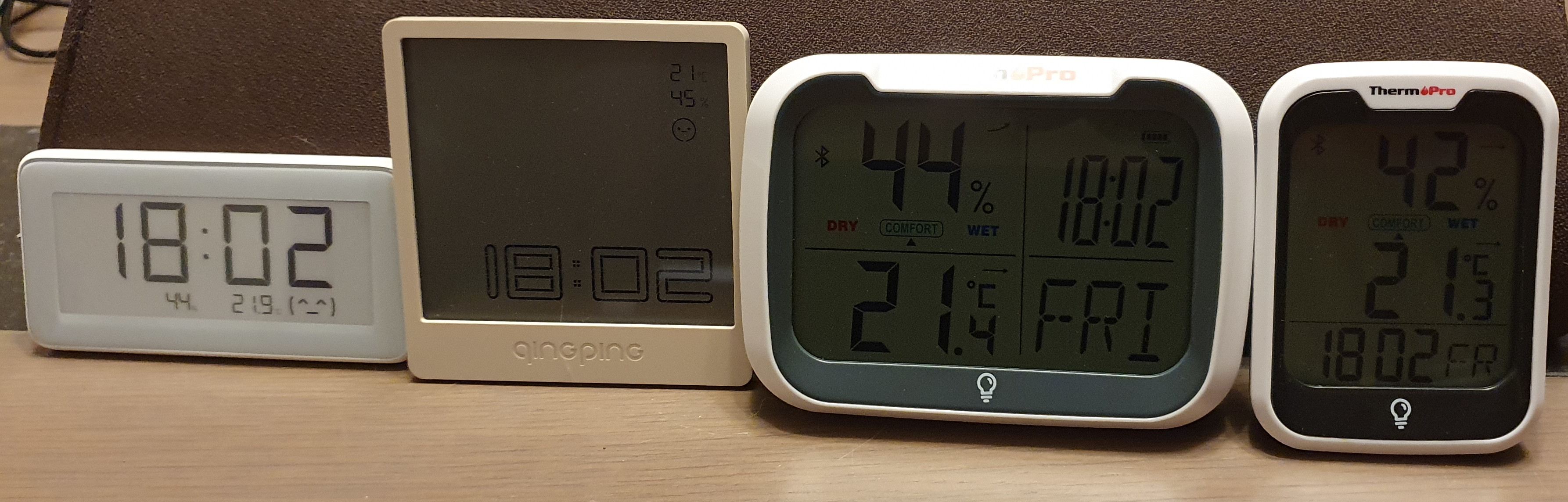
Supported devices
Bluetooth Clocks supports the following devices:
Device |
Set time |
Set 12/24h format |
Read time |
|---|---|---|---|
Current Time Service (e.g. PineTime with InfiniTime firmware) |
Yes |
No |
Yes |
PVVX firmware (LYWSD03MMC, MHO-C401, CGG1, CGDK2, MJWSD05MMC, MHO-C122) |
Yes |
No |
Yes |
Qingping BT Clock Lite |
Yes |
No |
No |
ThermoPro TP358/TP393 |
Yes |
Yes |
No |
Xiaomi LYWSD02 |
Yes |
No |
Yes |
Installation
You can install bluetooth-clocks as a package from PyPI with pip:
pip install bluetooth-clocks
Usage of the command-line program
If you have installed the package with pip, you can run the program as bluetooth-clocks:
$ bluetooth-clocks -h
usage: bluetooth-clocks [-h] [--version] [-v] [-vv] {discover,get,set} ...

Bluetooth Clocks

options:
  -h, --help           show this help message and exit
  --version            show program's version number and exit
  -v, --verbose        set loglevel to INFO
  -vv, --very-verbose  set loglevel to DEBUG

Subcommands:
  {discover,get,set}
    discover           discover supported Bluetooth clocks
    get                get the time from a Bluetooth clock
    set                set the time of a Bluetooth clock
Discovering Bluetooth clocks
You can discover supported Bluetooth clocks with bluetooth-clocks discover:
$ bluetooth-clocks discover
Scanning for supported clocks...
Found a ThermoPro TP358: address BC:C7:DA:6A:52:C6, name TP358 (52C6)
Found a Xiaomi LYWSD02: address E7:2E:00:B1:38:96, name LYWSD02
Found a ThermoPro TP393: address 10:76:36:14:2A:3D, name TP393 (2A3D)
Found a Qingping BT Clock Lite: address 58:2D:34:54:2D:2C, name Qingping BT Clock Lite
Found a Current Time Service: address EB:76:55:B9:56:18, name F15
These are the options that the discover subcommand recognizes:
$ bluetooth-clocks discover -h
usage: bluetooth-clocks discover [-h] [-s SCAN_DURATION]

options:
  -h, --help            show this help message and exit
  -s SCAN_DURATION, --scan-duration SCAN_DURATION
                        scan duration (default: 5 seconds)
Setting the time
Set the time of a clock with a given Bluetooth address:
$ bluetooth-clocks set -a E7:2E:00:B1:38:96
Scanning for device E7:2E:00:B1:38:96...
Writing time to device...
Synchronized time
If you want to regularly synchronize the time on the device, you can run this command as a service, e.g. with a systemd service or in a cron job in Linux.
These are the options that the set subcommand recognizes:
$ bluetooth-clocks set -h
usage: bluetooth-clocks set [-h] -a ADDRESS [-s SCAN_DURATION] [-t TIME] [-p]

options:
  -h, --help            show this help message and exit
  -a ADDRESS, --address ADDRESS
                        Bluetooth address (e.g. 12:34:56:78:9A:BC)
  -s SCAN_DURATION, --scan-duration SCAN_DURATION
                        scan duration (default: 5 seconds)
  -t TIME, --time TIME  the time to set, in ISO 8601 format (e.g. 2023-01-10T16:20,
                        default: current time)
  -p, --am-pm           use AM/PM format (default: 24-hour format)
Getting the time
Get the time from a clock with a given Bluetooth address:
$ bluetooth-clocks get -a E7:2E:00:B1:38:96
Scanning for device E7:2E:00:B1:38:96...
Reading time from device...
2023-01-14T17:54:17
These are the options that the get subcommand recognizes:
$ bluetooth-clocks get -h
usage: bluetooth-clocks get [-h] -a ADDRESS [-s SCAN_DURATION]

options:
  -h, --help            show this help message and exit
  -a ADDRESS, --address ADDRESS
                        Bluetooth address (e.g. 12:34:56:78:9A:BC)
  -s SCAN_DURATION, --scan-duration SCAN_DURATION
                        scan duration (default: 5 seconds)
Usage of the library
The functionality of the command-line program can also be used in your own Python programs by using this project as a library.
See the module reference for complete API documentation.
Documentation
Read the online documentation of Bluetooth Clocks.
Learn more about Bluetooth Low Energy development
If you want to learn more about Bluetooth Low Energy development, read the book Develop your own Bluetooth Low Energy Applications for Raspberry Pi, ESP32 and nRF52 with Python, Arduino and Zephyr and the accompanying GitHub repository koenvervloesem/bluetooth-low-energy-applications.
License
This project is provided by Koen Vervloesem as open source software with the MIT license. See the LICENSE file for more information.
1 maintainer

Metadata
1 maintainer
Release files for bluetooth-clocks 0.2.0
For a detailed explanation of source distributions (sdists) and built distributions (wheels), please see the package formats documentation.
Source distribution (sdist)
| File | Size | Uploaded | |
|---|---|---|---|
| bluetooth-clocks-0.2.0.tar.gz | 532.7 kB | Details |
Built distribution (wheel)
| File | Interpreter | ABI | Platform | Reset |
|---|---|---|---|---|
| bluetooth_clocks-0.2.0-py3-none-any.whl | Python 3 | none | any | Details |
Total release size: 553.1 kB
Release files / bluetooth-clocks-0.2.0.tar.gz
| Download URL | bluetooth-clocks-0.2.0.tar.gz |
|---|---|
| Size | 532.7 kB |
| Tags | Source |
|
SHA-256 checksum How to use checksums |
42bf2cec2cdafa0d435050c12f0cc192a42d59148badf96b18bfce7dcc06abbe
|
|
BLAKE2b-256 checksum How to use checksums |
77cf6d677e33e696173a88263b234043b7ae057f7107ff82f8eeb8015d53a82a
|
| Upload date | |
|
Uploaded using Trusted Publishing? What is trusted publishing? |
No |
| Uploaded via |
twine/4.0.2 CPython/3.10.6
|
Release files / bluetooth_clocks-0.2.0-py3-none-any.whl
| Download URL | bluetooth_clocks-0.2.0-py3-none-any.whl |
|---|---|
| Size | 20.5 kB |
| Tags | Python 3 |
|
SHA-256 checksum How to use checksums |
099c7cd989323fbefce3ed998859e7a52c432c8fd9f26d75de29939d1e04fef3
|
|
BLAKE2b-256 checksum How to use checksums |
b6d99088d67c58c0158a15bbb5502f88e4de538efa1de96653d12bef43f175e0
|
| Upload date | |
|
Uploaded using Trusted Publishing? What is trusted publishing? |
No |
| Uploaded via |
twine/4.0.2 CPython/3.10.6
|














