
 blurbox
A small desktop tool to hide parts of a video: draw one or more rectangles on the frame and cover each with a black box, a blur or pixelation, all the time or only during chosen time ranges. It is a GUI around ffmpeg and runs on Windows and Linux.
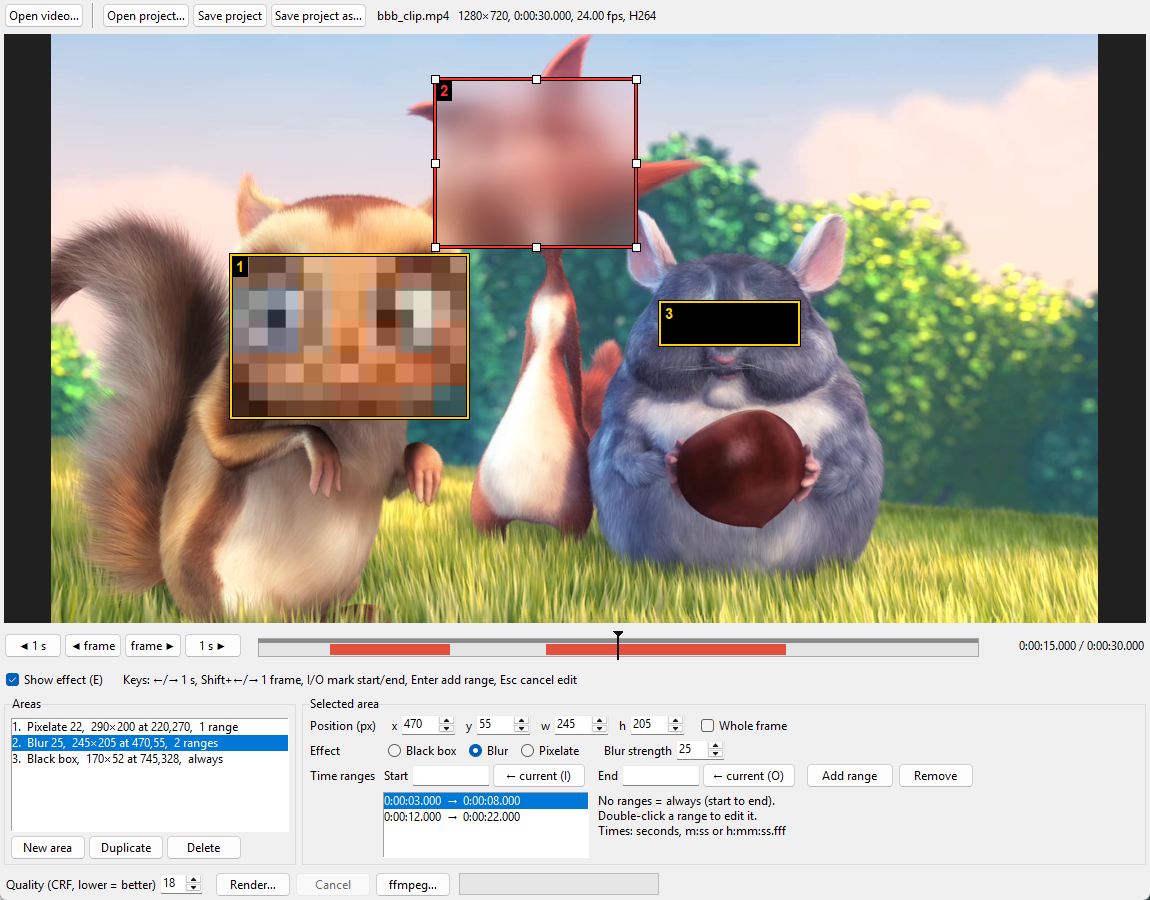
Three areas, each with its own effect and time ranges; the selected one (red, with resize handles) blurs during the two ranges shown in red on the timeline. Frame from Big Buck Bunny, © 2008 Blender Foundation, CC BY 3.0.
Requirements
- Python 3.11 or newer
- ffmpeg and ffprobe on
PATH(they are separate programs, not installed with blurbox): the latest release is recommended, 5.1 is the minimum (see ffmpeg versions). A full build is recommended, so the encoders used to keep the source codec (libx265, libsvtav1, libvpx-vp9, libopus) are available. On Windows, e.g. the "full" build from gyan.dev; on Linux, your distribution'sffmpegpackage - Tk: included with Python on Windows; on Linux
pacman -S tk(Arch) orapt install python3-tk(Debian/Ubuntu)
ffmpeg versions
- Recommended: the latest release (9.0 when this was written). The tests run on 9.0 (Windows) and 6.1 (Ubuntu 24.04's package).
- Minimum: 5.1. The render passes
-fps_mode passthrough, an option ffmpeg 5.1 introduced; older versions (e.g. 4.4 in Ubuntu 22.04) refuse the render command. - 5.1 to 7.0.x work, with blurbox 0.1.3 or newer. Without that option, these versions repeat the first frame of a video whose audio starts before it (common in MPEG-TS recordings), so the whole rendered video lands one frame late against the audio and the preview. Measured on the gyan.dev builds: 6.1.1, 7.0 and 7.0.2 repeat the frame; 7.1, 8.0 and 9.0 do not. blurbox 0.1.3 passes the option to every version, so the frames keep their source times whatever the ffmpeg.
Installing
With uv or pipx, which
put the blurbox command on your PATH in an environment of its own:
uv tool install blurbox
# or
pipx install blurbox
Then start it, optionally with a video or a project file to open:
blurbox [video | project.json]
On Windows the command starts without a console window.
Running from a source checkout
uv run --script blurbox.py [video | project.json]
On Windows, blurbox_shortcut.ps1 creates blurbox.lnk,
a shortcut that starts the tool without a console window; add -Desktop for
a copy on the Desktop. Drop a video or a project onto the shortcut to open
it. Rerun the script after reinstalling uv or moving this folder, since a
shortcut stores absolute paths.
Using it
- Layout: the frame and its timeline on the left, the areas and the selected one's settings in the sidebar on the right (drag the divider to resize it), files, quality and Render in the toolbar, messages in the status bar. The theme is light or dark as the system is; the moon button or View → Dark theme switches it. Help → Keyboard shortcuts lists the keys.
- Areas: drag on the frame to draw the selected area, drag inside any area to select and move it, drag an edge or corner of the selected area (it shows white handles) to resize it, "New area" to add another. The mouse cursor shows which of these a drag will do. Each area has its own effect, strength and time ranges; with no ranges it is on all the time (listed as "always").
- Whole frame: tick it to make the selected area cover the entire picture (e.g. blur everything from 0:12 to 0:15); untick it to get its rectangle back.
- Seeking: click or drag the timeline, use the step buttons (hold them to repeat), or the keys ←/→ (1 s) and Shift+←/→ (one frame).
- Time ranges: I and O put the current time in Start and End, Enter adds the range, a double-click on a range (in the list or on the timeline) edits it, and Cancel or Esc discards the edit. The timeline shows the selected area's ranges in red, the others' in grey. While a range is being edited, drag its edges on the timeline to change them, with the video following the edge so you can place it on the exact frame, or drag its middle to move it; Update range applies the edit. Outside edit mode the timeline only seeks.
- Show effect (E) draws every active area's effect on the frame, using the same ffmpeg filters as the render.
- Projects: Ctrl+S saves the areas, quality and position as JSON (Ctrl+Shift+S under a new name), Ctrl+O opens a project. The video is found relative to the project file first, so a folder with both can be moved to another PC.
Output
The render keeps the source's codec family (H.264, HEVC, VP9, AV1), bit depth and colour metadata (HDR included), every audio track, subtitles and chapters. Anything the chosen container cannot hold is converted (losslessly where possible) or left out, and a dialog lists it before rendering starts.
The quality setting is x264/x265-style CRF: lower means better and larger. The same number looks better with HEVC than with H.264, so 22–24 is usually enough for HEVC sources.
Development
uv sync            # creates .venv with the dependencies and pytest
uv run pytest      # the test suite, about 20 s
pyproject.toml repeats the dependencies of the script's inline metadata
(which uv run --script and the shortcut use); keep the two in sync.
tools/make_screenshot.py retakes docs/screenshot.png after a change to
the interface; its docstring says how to make the clip it needs.
The tests are in three files:
tests/test_logic.py: time parsing, areas, filtergraphs and the stream plan, with no ffmpeg runtests/test_media.py: builds small videos with ffmpeg once per session, then checks probing, frame reading against a plain sequential decode, the live preview against the real render frame by frame, 10-bit and HDR preservation, and the streams in rendered filestests/test_app.py: drives the GUI through real Tk events (areas, ranges, keys, seeking, projects); needs a display
Tests that need ffmpeg or a display are skipped when these are missing;
-m "not gui" or -m "not media" deselects them explicitly.
1 maintainer

Release files for blurbox 0.2.0
For a detailed explanation of source distributions (sdists) and built distributions (wheels), please see the package formats documentation.
Source distribution (sdist)
| File | Size | Uploaded | |
|---|---|---|---|
| blurbox-0.2.0.tar.gz | 46.8 kB | Details |
Built distribution (wheel)
| File | Interpreter | ABI | Platform | Reset |
|---|---|---|---|---|
| blurbox-0.2.0-py3-none-any.whl | Python 3 | none | any | Details |
Total release size: 82.4 kB
Release files / blurbox-0.2.0.tar.gz
| Download URL | blurbox-0.2.0.tar.gz |
|---|---|
| Size | 46.8 kB |
| Tags | Source |
|
SHA-256 checksum How to use checksums |
bdc2157dc3987ec5740b369ff515c9024f01b4f76f811fe40e4e4d568649ac31
|
|
BLAKE2b-256 checksum How to use checksums |
703834259d0de68b7dde916be31c6533a004b9905c0a7b8ec1789212029d446e
|
| Upload date | |
|
Uploaded using Trusted Publishing? What is trusted publishing? |
Yes |
| Uploaded via |
uv/0.12.19 {"installer":{"name":"uv","version":"0.12.19","subcommand":["publish"]},"python":null,"implementation":{"name":null,"version":null},"distro":{"name":"Ubuntu","version":"24.04","id":"noble","libc":null},"system":{"name":null,"release":null},"cpu":null,"openssl_version":null,"setuptools_version":null,"rustc_version":null,"ci":true}
|
Release files / blurbox-0.2.0-py3-none-any.whl
| Download URL | blurbox-0.2.0-py3-none-any.whl |
|---|---|
| Size | 35.6 kB |
| Tags | Python 3 |
|
SHA-256 checksum How to use checksums |
229e8e6d05416ecc804c1358f3259e12e371f3ebae5f0aa2e0c6b9800c7f1fb2
|
|
BLAKE2b-256 checksum How to use checksums |
e424b5229a62e93390c45707ff583d5fcb61e3aa0fb6bc2801f3ccfd4980ab0b
|
| Upload date | |
|
Uploaded using Trusted Publishing? What is trusted publishing? |
Yes |
| Uploaded via |
uv/0.12.19 {"installer":{"name":"uv","version":"0.12.19","subcommand":["publish"]},"python":null,"implementation":{"name":null,"version":null},"distro":{"name":"Ubuntu","version":"24.04","id":"noble","libc":null},"system":{"name":null,"release":null},"cpu":null,"openssl_version":null,"setuptools_version":null,"rustc_version":null,"ci":true}
|














