bodylog
A workout and food log for personal agents. You tell your agent your sets and your meals in chat, the way you would say them out loud. It stores them, counts calories and macros from real nutrition data, keeps your streaks, and sends back shareable cards.
One package for any agent: an MCP server (bodylog-mcp), a CLI (bodylog), a Python library and a
Claude skill. Everything lives in one local SQLite file. No accounts, no cloud, no social features.
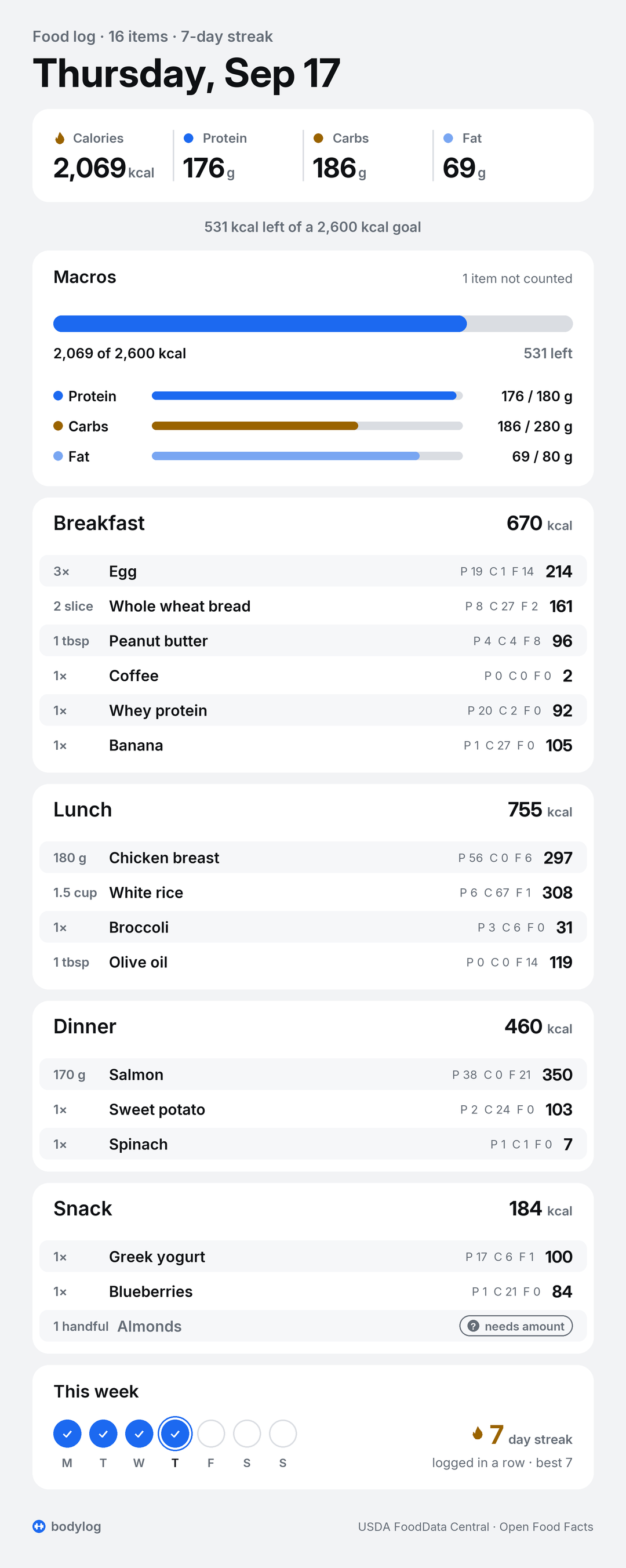
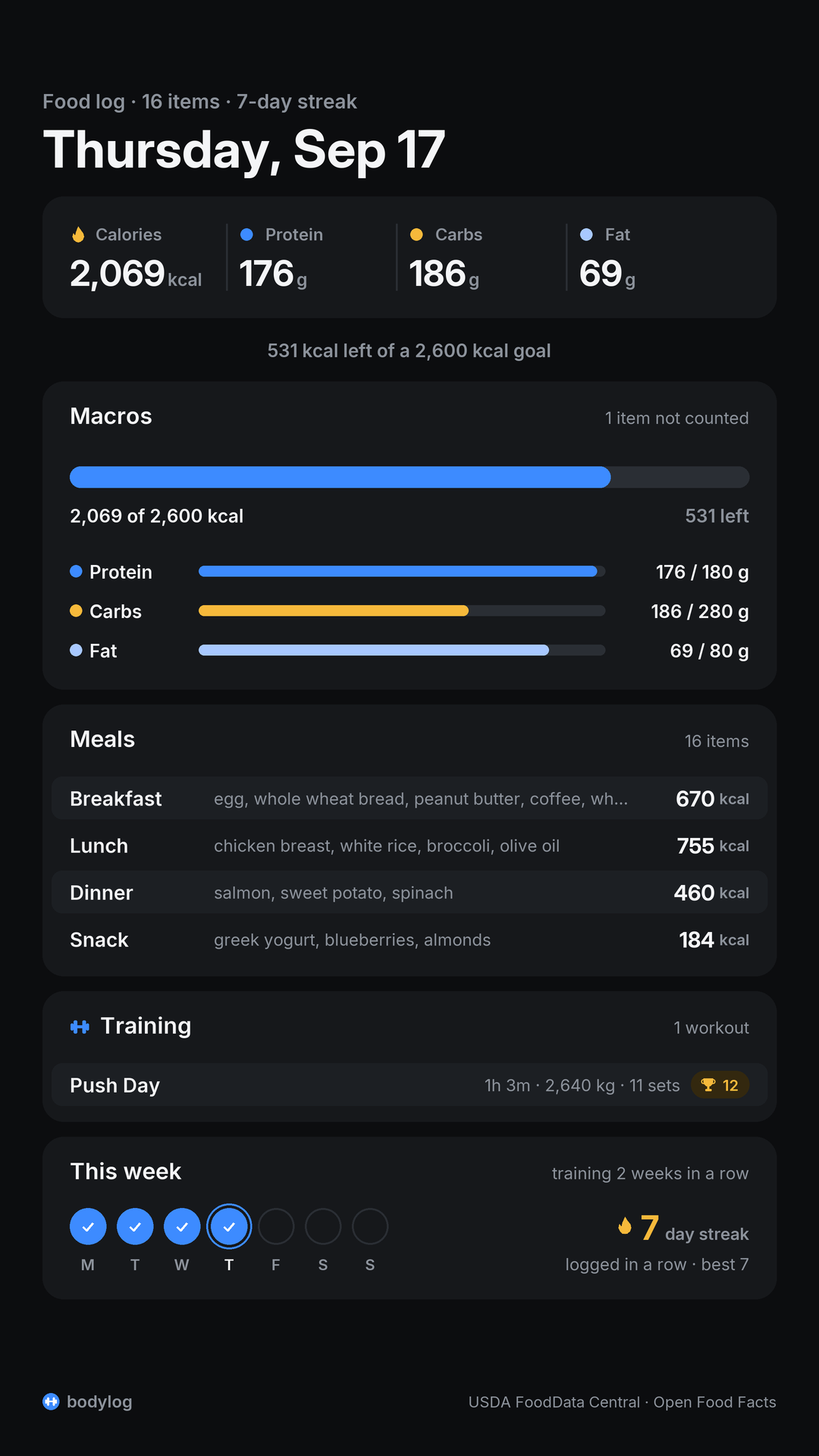
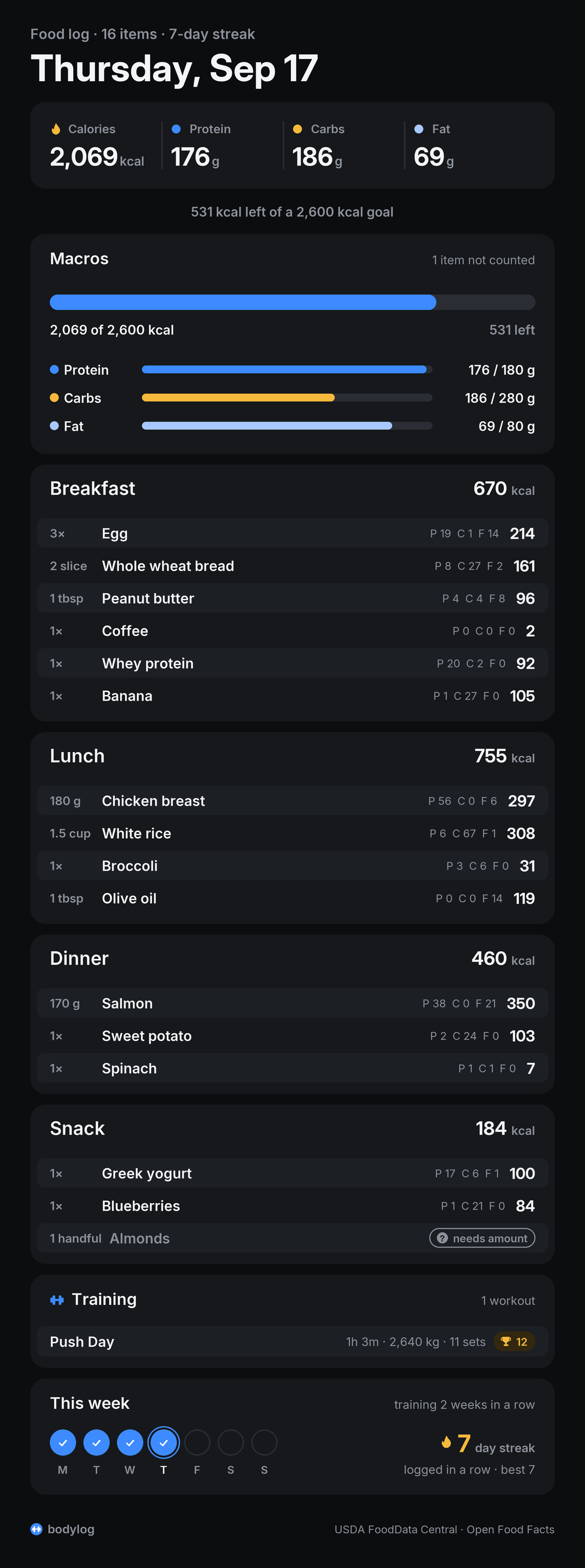
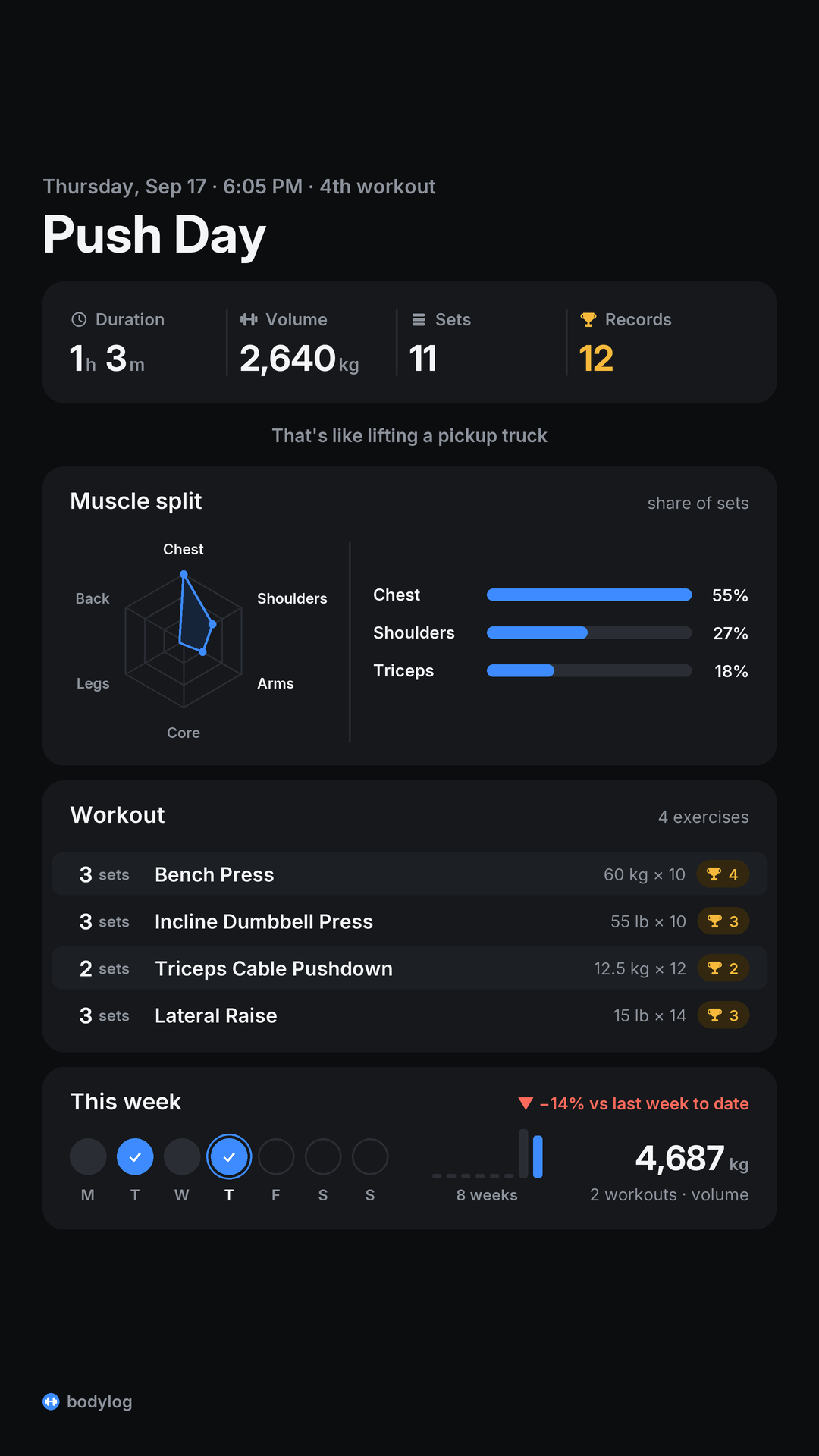
| Food day | Story | Workout |
|---|---|---|
 |
 |
 |
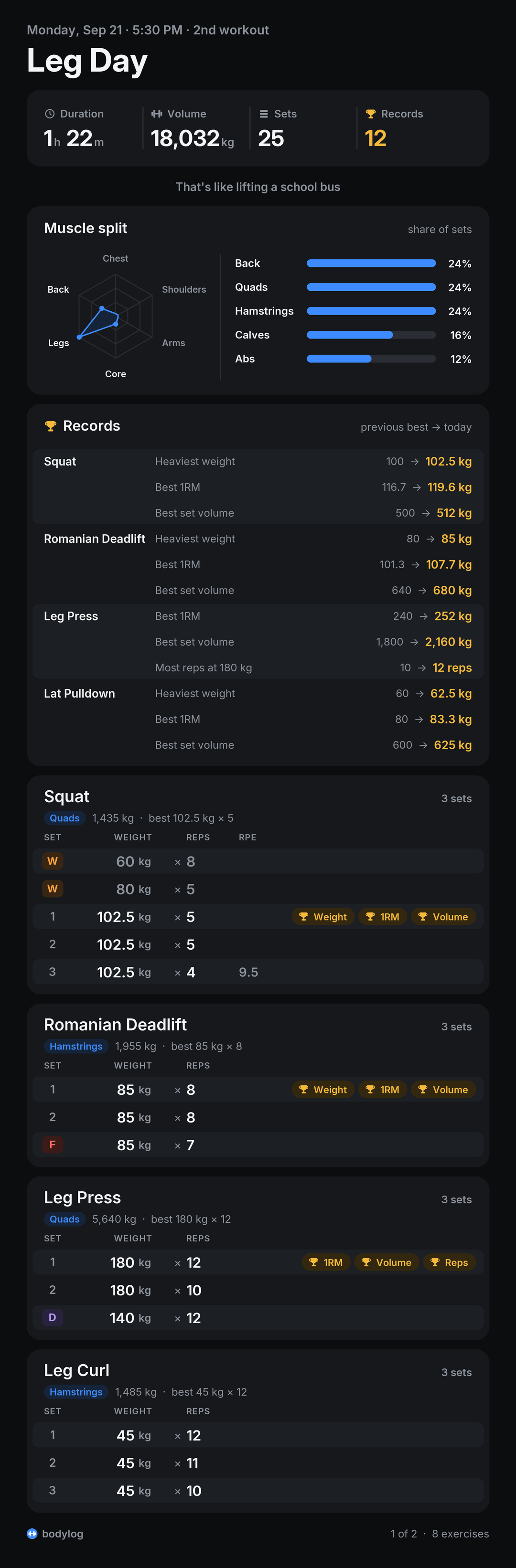
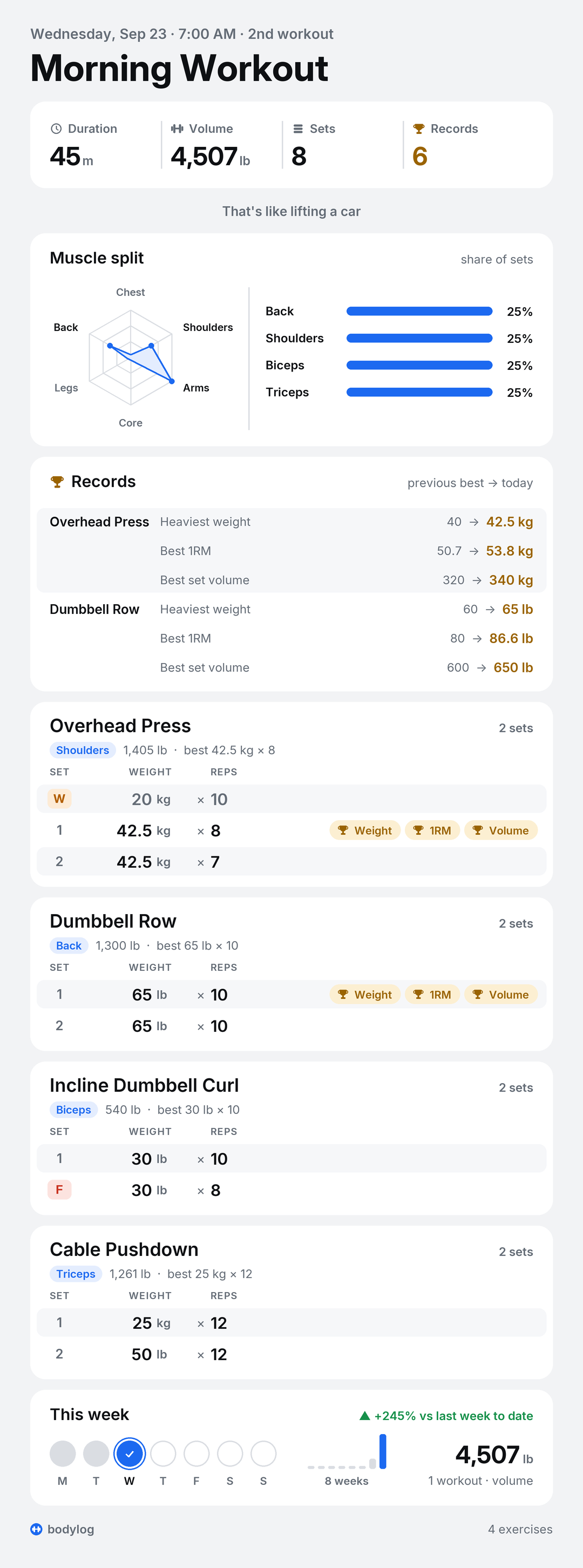
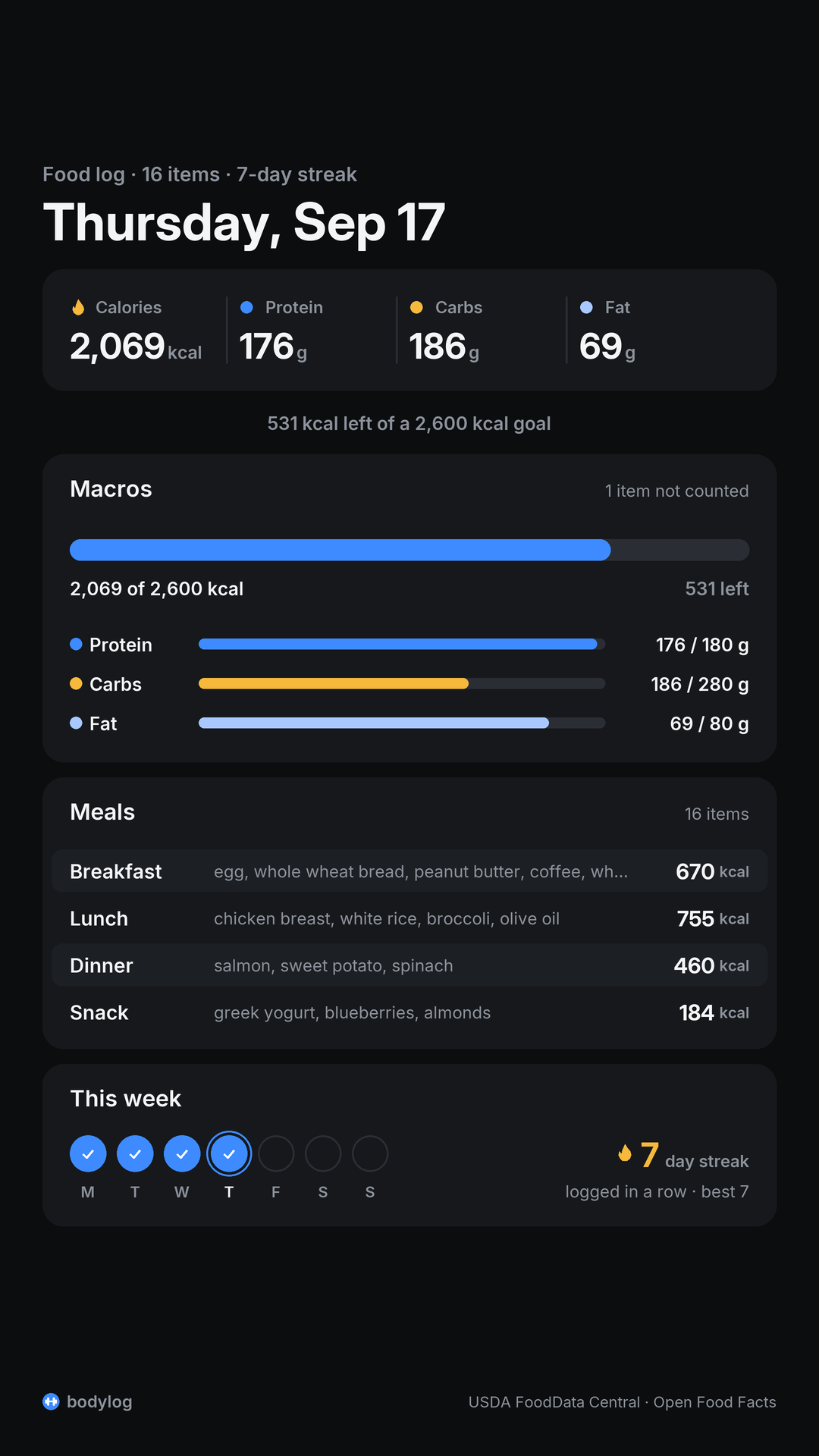
More: food, light, food + training on one day (full), workout story, 8-exercise workout, two pages, mixed kg and lb, sticker for a photo.
Install
Python 3.10+.
pip install bodylog          # CLI + library + MCP server
uvx --from bodylog bodylog-mcp   # run the MCP server without installing
Claude Code, as a plugin (skill and MCP server together):
/plugin marketplace add abhaymettu/bodylog
/plugin install bodylog@bodylog
Claude Code, MCP server only:
claude mcp add bodylog -- uvx --from bodylog bodylog-mcp
Any other MCP client:
{
  "mcpServers": {
    "bodylog": {
      "command": "uvx",
      "args": ["--from", "bodylog", "bodylog-mcp"],
      "env": { "FDC_API_KEY": "optional, free at https://api.data.gov/signup/" }
    }
  }
}
Settings, all optional:
| Variable | Default | What |
|---|---|---|
BODYLOG_DB |
~/.bodylog/log.db |
the SQLite file |
BODYLOG_CARDS |
~/.bodylog/cards/ |
where card PNGs go |
BODYLOG_UNIT |
most-logged unit | kg or lb for workout totals |
FDC_API_KEY |
DEMO_KEY |
USDA FoodData Central key; DEMO_KEY allows only a few lookups an hour |
BODYLOG_OFFLINE |
off | 1 uses only the bundled food table, no network |
The skill is skills/bodylog/SKILL.md. Outside the plugin, copy or symlink skills/bodylog/ into
your agent's skills folder.
Food
The CLI prints what the MCP tools return (bodylog eat is log_food). A real run, offline:
$ bodylog eat "2 eggs, toast and a protein shake"
#1 breakfast: 2 × egg, 100 g: 143 kcal, P 12.6 C 0.7 F 9.5
#2 breakfast: toast, 22 g: 64 kcal, P 2 C 12 F 0.9
#3 breakfast: whey protein, 26 g: 92 kcal, P 20.3 C 1.6 F 0.4
$ bodylog eat "greek yogurt with blueberries and a handful of almonds"
#4 breakfast: greek yogurt, 170 g: 100 kcal, P 17.3 C 6.1 F 0.7
#5 breakfast: blueberries, 148 g: 84 kcal, P 1.1 C 21.4 F 0.5
#6 breakfast: 1 handful almonds: not counted (no weight for a handful of almonds; give grams or one of: almond, cup, oz)
$ bodylog food-fix 6 --grams 28
#6 breakfast: 28 g almonds: 162 kcal, P 5.9 C 6 F 14
A bare count uses USDA's portion for that food: a large egg (50 g), a slice of toast, a scoop of whey (the FNDDS "1 scoop, NFS", 26 g). Through MCP, the agent asks one short question about item 6 instead of guessing.
How a food gets its numbers:
- Bundled table. 62 common foods from USDA FoodData Central (SR Legacy and FNDDS), each with its
FDC id, per-100 g values and USDA's own portion weights (a large egg, a slice of bread, a cup of
rice). Works offline. Rebuilt from the USDA downloads by
scripts/build_common_foods.py. - Cache. Anything looked up before, stored in the SQLite file.
- USDA FoodData Central search (
POST /fdc/v1/foods/search, survey, SR Legacy and Foundation foods), withFDC_API_KEYorDEMO_KEY. - Open Food Facts search for branded and packaged foods, and product lookup by barcode
(
GET /api/v2/product/<barcode>.json, no key).
A search result is used only when its name contains every word you said. Otherwise the item is kept
as unknown with the closest candidates, so the agent can ask which one you meant. An item whose
amount cannot become grams (a handful, or millilitres of something with no USDA volume weight) is kept
as needs_amount. Neither counts toward totals until it is fixed, and neither is ever filled with
made-up numbers. Numbers you read off a label are stored as given (manual).
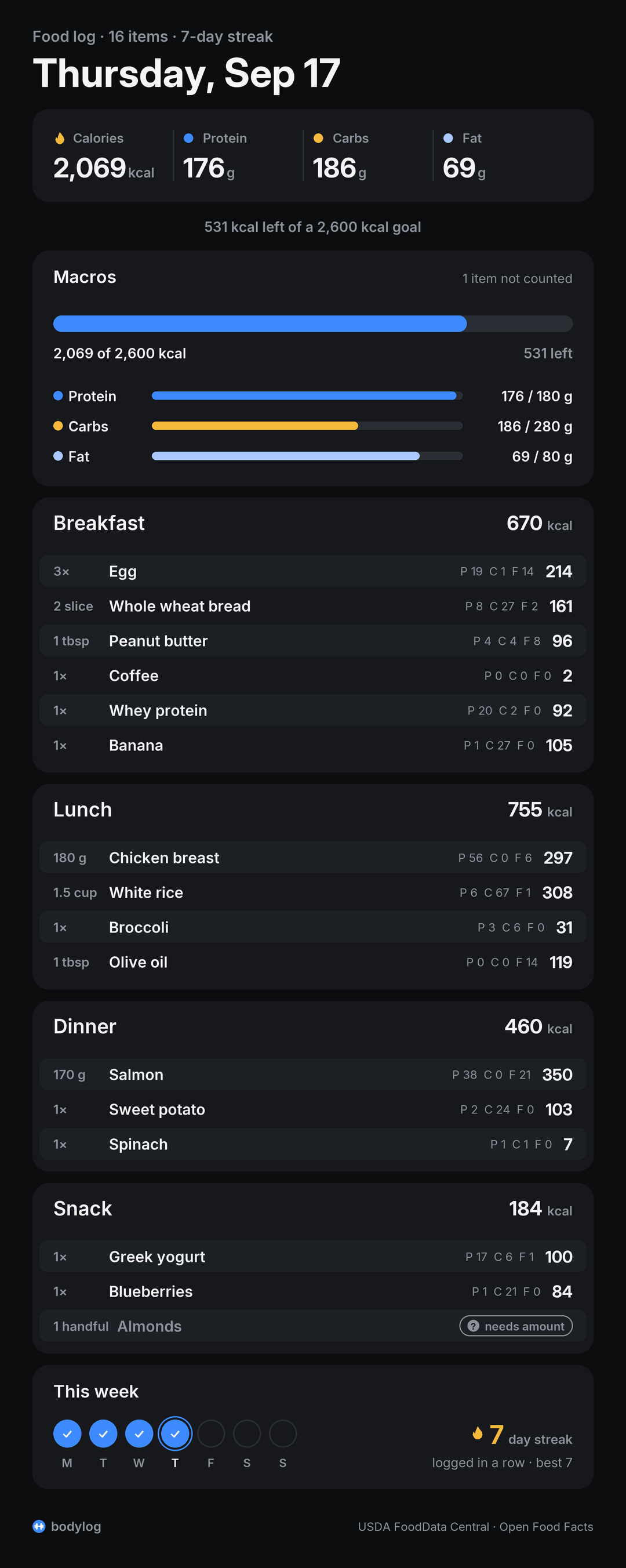
Also: daily goals for kcal, protein, carbs and fat; a logging streak in days (a day you have not logged yet does not break it) and a training streak in weeks; and a day card in dark, light, clear or story format. On a day you also trained, the card adds a Training block.
Workouts
30-second demo
The chat below comes from a real run through log_set(text=...). The right column shows what the
store recorded for each message.
you:   push day                                  -> title: Push Day
you:   bench 20 kg x 10 warm up                  -> Bench Press: 20 kg x 10 (warmup)
you:   60kg x 10                                 -> Bench Press: 60 kg x 10
you:   67.5 kg x 4                               -> Bench Press: 67.5 kg x 4
you:   62.5 kg x 8 rpe 9                         -> Bench Press: 62.5 kg x 8
you:   next incline db press 55 lb x 10          -> Incline Dumbbell Press: 55 lb x 10
you:   same                                      -> Incline Dumbbell Press: 55 lb x 10
you:   55lb x 9                                  -> Incline Dumbbell Press: 55 lb x 9
you:   12.5 kg x 12                              -> Incline Dumbbell Press: 12.5 kg x 12
you:   that was triceps pushdowns on the cable   -> named 1 set(s) Triceps Cable Pushdown
you:   12.5 kg x 11                              -> Triceps Cable Pushdown: 12.5 kg x 11
you:   lateral raise 15 lb x 14                  -> Lateral Raise: 15 lb x 14
you:   15 lb x 12                                -> Lateral Raise: 15 lb x 12
you:   one more                                  -> Lateral Raise: 15 lb x 12
you:   wrapped up, workout took 1h 3m            -> ended session 4
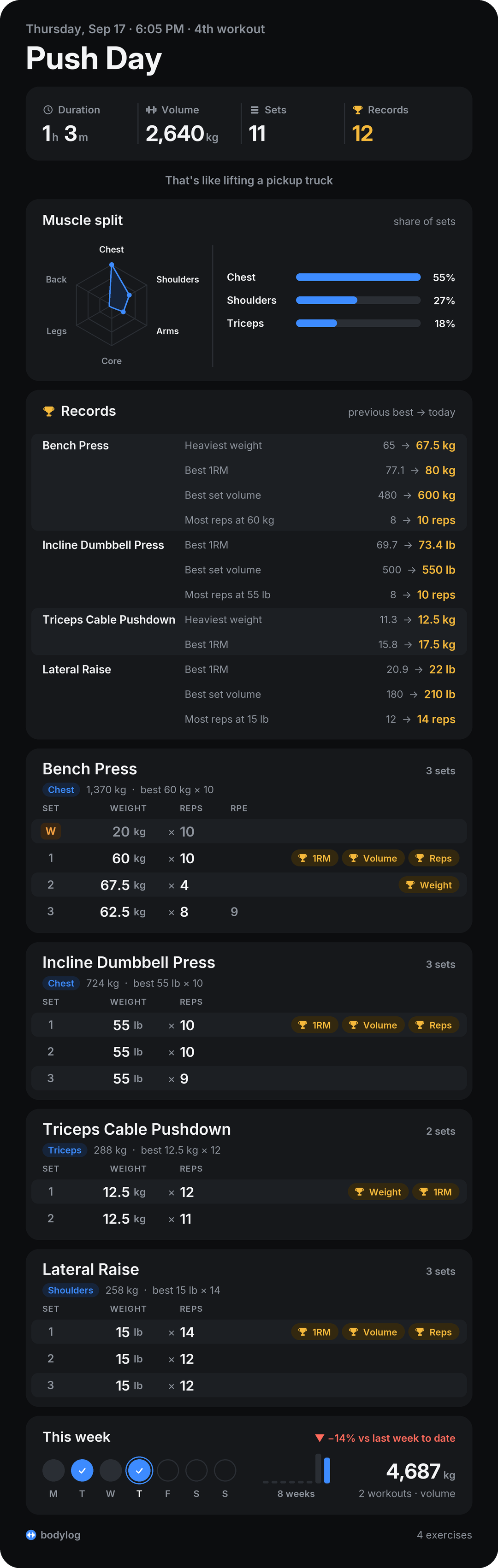
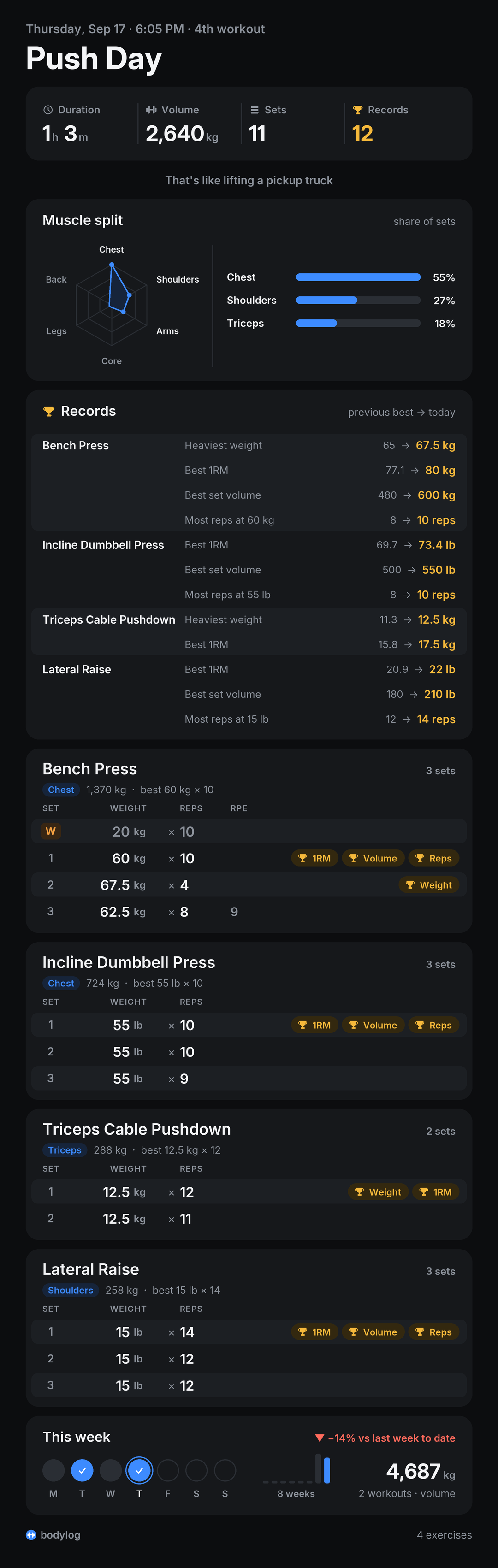
**Push Day**
Thursday, Sep 17 · 6:05 PM
1h 3m · 2,640 kg · 11 sets · 12 PRs
Muscles: Chest 55%, Shoulders 27%, Triceps 18%

**Bench Press** · Chest · 3 sets · best 60 kg x 10 · PR: Heaviest weight, Best 1RM, Best set volume, Most reps
  W. 20 kg x 10 (warm-up)
  1. 60 kg x 10 🏆 Best 1RM, Best set volume, Most reps
  2. 67.5 kg x 4 🏆 Heaviest weight
  3. 62.5 kg x 8 @ RPE 9
**Incline Dumbbell Press** · Chest · 3 sets · best 55 lb x 10 · PR: Best 1RM, Best set volume, Most reps
  1. 55 lb x 10 🏆 Best 1RM, Best set volume, Most reps
  2. 55 lb x 10
  3. 55 lb x 9
**Triceps Cable Pushdown** · Triceps · 2 sets · best 12.5 kg x 12 · PR: Heaviest weight, Best 1RM
  1. 12.5 kg x 12 🏆 Heaviest weight, Best 1RM
  2. 12.5 kg x 11
**Lateral Raise** · Shoulders · 3 sets · best 15 lb x 14 · PR: Best 1RM, Best set volume, Most reps
  1. 15 lb x 14 🏆 Best 1RM, Best set volume, Most reps
  2. 15 lb x 12
  3. 15 lb x 12

This week: 2 workouts, 4,687 kg (−14% vs last week to date)
The last message ends the workout, so the tool returns this card along with the workout PNG at the top of
this page (end_session does the same). PRs are counted against the three earlier sessions in
tests/fixtures/chat.txt.
How it reads chat
- Sets:
60kg x 8,60 x 8,50lbs for 9,8 reps at 60kg,3x10 @ 90lb,60kg 3x8,12 reps(bodyweight). Flags:warmup,drop set,to failure,rpe 9. - Exercises: named at the start of a message (
incline db press 55 lb x 10), announced (now squats), or named after the fact (this is tricep cable pushdowns btw). A set without a name continues the last exercise. - Naming after the fact takes the sets that have no exercise yet. If every set already has one, it
takes the trailing run of carried-over sets at the last set's weight. That covers the usual case
where you move to a new machine and name it a set or two later. If you changed weight before naming
it, use
edit_last_set(exercise=...)for the earlier sets. - Names are folded to one exercise: case, plurals,
db/bbshorthand, word order, filler (on the), and muscle words that don't change the movement. Sotricep cable pushdowns,cable pushdownandtriceps pushdowns on the cableare one exercise, whiletriceps curlandbiceps curlstay apart.bodylog aliasteaches any other name. - Commands:
same/one morerepeats the last set;done, 1h 5m/workout took 45 minends the workout. Agent replies in a pasted log (Agent:,Assistant:,Claude:) are skipped.
What the numbers mean
- Volume is weight x reps over working sets. Warmups are listed on the card but excluded from volume,
set counts and PRs. Each set shows the unit it was logged in. Totals convert every set exactly into
one unit: the
unityou pass, else$BODYLOG_UNIT, else whichever unit most sets used. - Muscle split is the share of working sets per primary muscle group, from a name map in
muscles.pythat covers the common lifts (unknown names count as Other). Percentages always add to 100. - Estimated 1RM uses the Epley formula,
weight x (1 + reps / 30). - PRs are counted against sessions that started earlier: heaviest weight, best estimated 1RM, best set volume (weight x reps in one set), and most reps at a weight you have lifted before (one per exercise, the largest gain). The first time you do an exercise sets no PRs, so a first workout does not show a PR on every set.
- The week line compares this week with last week up to the same weekday and time, so a Monday workout is not shown as a 90% drop.
- Duration is what you say at the end. The session start is set to end time minus that duration.
MCP tools
| Tool | What it does |
|---|---|
log_set |
Add a set to the open workout (opens one if needed). Structured fields or the raw message as text. Returns any PRs the set broke. |
edit_last_set |
Fix or delete the last set. |
end_session |
End the workout with the duration the user gives ("1h 5m"). Returns the card as text plus PNG pages. |
session_card |
Card for any session: theme dark, light or clear; style full or story; unit kg or lb. |
exercise_history, prs, weekly_volume |
Progress per exercise, all-time records, volume per week. |
import_chat |
Backfill workouts from a pasted chat log. Safe to repeat. |
log_food |
Log food from the user's words, or one item by name, barcode or food id with an amount, or with label numbers. Returns each item's status and the day's totals. |
edit_food |
Fix an item: amount, food, meal or numbers; or delete it. |
lookup_food |
Search by name or barcode without logging. |
food_day |
A day's items by meal, totals, goals, what is left, streaks, flagged items, workouts. |
food_card |
The day card as text plus a PNG: theme, style full or story. |
set_goals, streaks |
Daily targets; logging and training streaks. |
CLI and library
bodylog log "bench 60kg x 8"
bodylog end "1h 5m" --title "Push Day"
bodylog eat "chicken breast 180g, 1.5 cups rice and broccoli"
bodylog food-fix 12 --grams 28
bodylog goals --kcal 2400 --protein 160
bodylog food-card --style story
bodylog --help
from bodylog import Store, log_text, log_food, day_summary, summary, render_png
from bodylog.foodcard import render_png as food_png

store = Store()                                  # ~/.bodylog/log.db
log_text(store, "bench 60kg x 8")
log_food(store, "2 eggs, toast and a protein shake")
food_png(day_summary(store), "today.png", style="story")
Why Python
The MCP Python SDK needs a few lines per tool, Pillow draws the cards with no browser, and sqlite3
and urllib ship with Python. Runtime dependencies are Pillow and mcp. Cards use Inter (SIL Open
Font License, bundled in src/bodylog/fonts/), so they look the same everywhere.
Development
uv sync
uv run pytest                                            # offline: API calls replay recorded responses
uv run python scripts/render_examples.py   # regenerate examples/ (offline)
Tests never touch the network or the repo: tests/fixtures/http/ holds real USDA and Open Food Facts
responses, and every file a test writes goes to a temp dir.
Layout: store.py (SQLite), names.py, chatlog.py, stats.py, muscles.py, card.py (workouts),
food.py (meal parsing, matching, totals, streaks), sources.py (USDA and Open Food Facts),
foodcard.py (day card), cli.py, server.py (MCP), data/common_foods.json (bundled USDA table).
Credits
Food data: USDA FoodData Central (public domain) and Open Food Facts (Open Database License; product data is attributed to Open Food Facts contributors).
1 maintainer

Release files for bodylog 0.1.0
For a detailed explanation of source distributions (sdists) and built distributions (wheels), please see the package formats documentation.
Source distribution (sdist)
| File | Size | Uploaded | |
|---|---|---|---|
| bodylog-0.1.0.tar.gz | 7.3 MB | Details |
Built distribution (wheel)
| File | Interpreter | ABI | Platform | Reset |
|---|---|---|---|---|
| bodylog-0.1.0-py3-none-any.whl | Python 3 | none | any | Details |
Total release size: 7.9 MB
Release files / bodylog-0.1.0.tar.gz
| Download URL | bodylog-0.1.0.tar.gz |
|---|---|
| Size | 7.3 MB |
| Tags | Source |
|
SHA-256 checksum How to use checksums |
a1d4ac2694740971f3e2e7a3866b165091ed1da5df862997e00b7ad590e03a9c
|
|
BLAKE2b-256 checksum How to use checksums |
bd3a12ffc2d19dac1392b993e53a4a292725886cbe9f7be7091de610ec4d7973
|
| Upload date | |
|
Uploaded using Trusted Publishing? What is trusted publishing? |
Yes |
| Uploaded via |
twine/7.0.0 CPython/3.13.14
|
Provenance
Provenance describes where a file came from. On PyPI, provenance is shared via attestations, which provide a verifiable record of the build or publishing details. View details, limitations and caveats.


PyPI Publish Attestation
PyPI verified that this artifact, at this checksum, originated from the publisher listed below.
Signed by GitHub Actions, verified by PyPI on Sep 23, 2026.
Transparency logRelease files / bodylog-0.1.0-py3-none-any.whl
| Download URL | bodylog-0.1.0-py3-none-any.whl |
|---|---|
| Size | 666.4 kB |
| Tags | Python 3 |
|
SHA-256 checksum How to use checksums |
c4c3009bd0022430251a41eeb74e8dd0a4aec5c031aef92b85830b29f3b70f73
|
|
BLAKE2b-256 checksum How to use checksums |
98e118828bfd5692f166644ff93fbef59c40f4a01fbe95e56b31e71fde357aa5
|
| Upload date | |
|
Uploaded using Trusted Publishing? What is trusted publishing? |
Yes |
| Uploaded via |
twine/7.0.0 CPython/3.13.14
|
Provenance
Provenance describes where a file came from. On PyPI, provenance is shared via attestations, which provide a verifiable record of the build or publishing details. View details, limitations and caveats.
PyPI Publish Attestation
PyPI verified that this artifact, at this checksum, originated from the publisher listed below.
Signed by GitHub Actions, verified by PyPI on Sep 23, 2026.
Transparency log