
BokehLab
BokehLab is an interactive plotting library with the familiar matplotlib/matlab syntax.
Built upon the Bokeh visualization library. Works with both classic Jupyter notebooks and JupyterLab.
Installation:
This branch requires Python 3.12 or newer, Bokeh 3.10.x, and jupyter_bokeh 4.1 or newer (4.x). Bokeh 2 is no longer supported. Install the upgraded library from this checkout:
python -m pip install .
For JupyterLab 4 or Notebook 7, install the frontend in the same environment:
python -m pip install 'jupyterlab>=4,<5' 'notebook>=7,<8'
Classic Notebook 6 is supported in a separate Python 3.12 environment:
python -m pip install . 'notebook==6.5.7' 'ipykernel==6.29.5' 'setuptools<81'
jupyter nbextension enable --py widgetsnbextension --sys-prefix
jupyter nbextension enable --py jupyter_bokeh --sys-prefix
The setuptools constraint supplies the legacy distutils module used by
Notebook 6. Use CDN or inline resources in modern Jupyter; local resource
serving below is tested with classic Notebook 6.
To load this extension in jupyter notebook (both classic jupyter and jupyter lab):
%load_ext bokehlab
Or even shorter:
%bokehlab
To make the short syntax working, either run
python -m bokehlab.install_magic
Or manually copy bokehlab_magic.py from the distribution directory to ~/.ipython/profile_default/startup.
Basic plotting:
plot([1,4,9])             # dots
plot([1,4,9], '.-')       # line and dots
plot([1,2,3], [1,4,9])    # x and y
plot([1,2,3], [1,4,9], '.-')    # x, y and line style
Several plots in one figure:
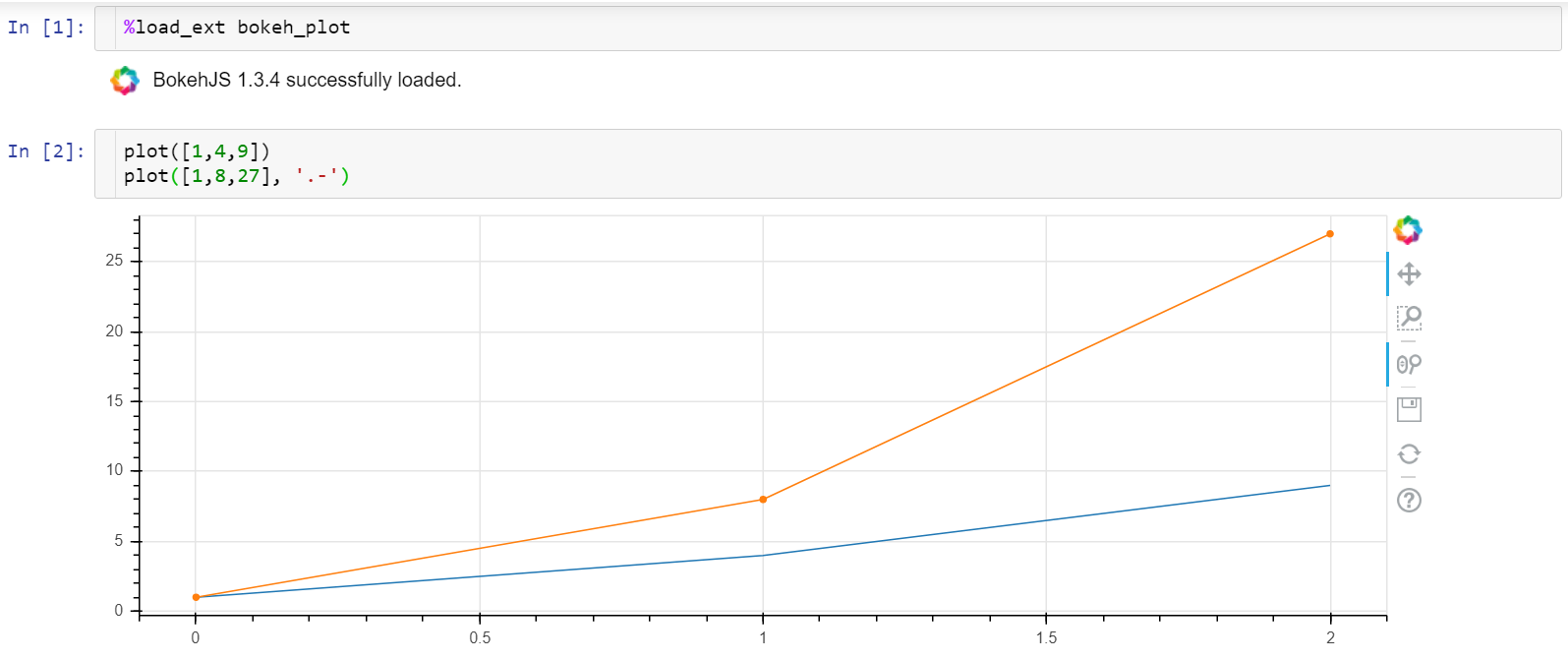
Interactive controls:
click and drag = pan
mouse wheel = zoom,
wheel on x axis = zoom horizontally
wheel on y axis = zoom vertically
Multiple plots syntax (equivalent ways to draw it):
x = [1,5,10]
y1 = [1,4,9]
y2 = [1,8,27]

- plot(x, y1, '.-')        # solid line with dots
  plot(x, y2, '.-g')       # the second plot is green

- plot([y1, y2])           # auto x, auto colors

- plot(x, [y1, y2])

- plot([y1, y2], '.-bg')   # blue and green

- plot([y1, y2], style=['.', '.-'], color=['b', 'g'])

- plot(x, y1, '.-', x, y2, '.-g')
The following markers are supported so far:
'.' dots
'-' line
'.-' dots+line
The following colors are supported so far:
'b' blue
'g' green
'r' red
'O' orange  (capital O to avoid clashes with 'o' for open dots)
NB The color specifier must go after the marker if both are present.
Legend:
- plot([1,2,3], [1,4,9], label='plot1')
  plot([1,2,3], [2,5,10], label='plot2')

- plot([y1, y2], label=['y1', 'y2'])
Legend location:
- plot([1,2,3], [1,4,9], label='plot1', legend_loc='top_left')
  plot([1,2,3], [2,5,10], label='plot2')
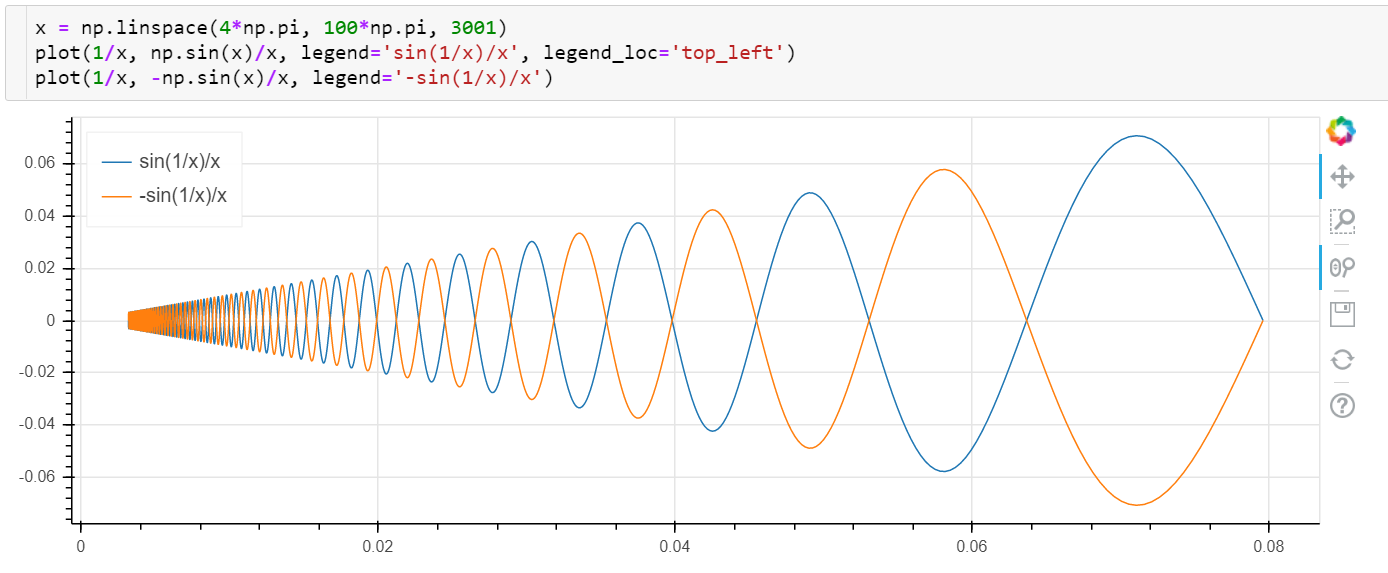
Other legend locations: https://docs.bokeh.org/en/latest/docs/user_guide/styling.html#location
Axes labels:
- plot([1,2,3], xlabel='time', ylabel='value')
- xlabel('time'); ylabel('value')
- xylabels('time', 'value')
Other uses:
-
semilogx(),semilogy()andloglog()show (semi)logarithmic plots with the same syntax asplot(). -
hist(x)displays a histogram of x -
plot(x, y, hover=True)displays point coordinates on mouse hover. -
plot(x, y, vline=1, hline=1.5, vline_color='red')in addition to the (x, y) plot displays an infinite vertical line with x=1 and custom red color and an infinite horizontal line with y=1.5 and the default pink color.
Visualizing Pandas Dataframes
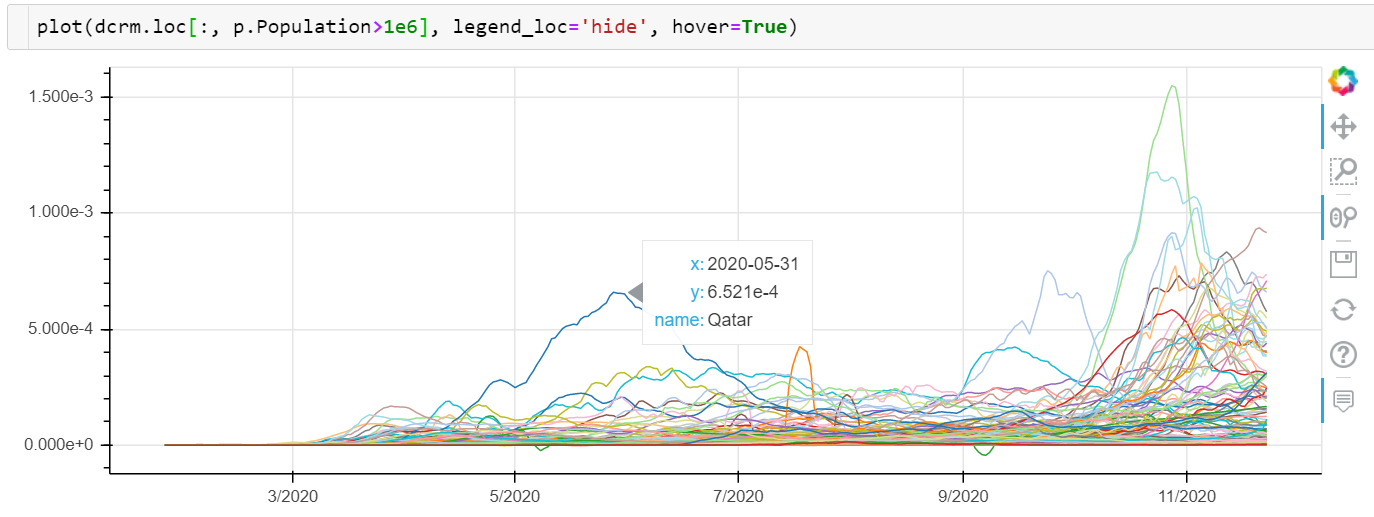
plot(df)plots all columns of the dataframe as separate lines on the same figure with column names displayed in the legend and with index taken as the x axis values. If the legend grows too long, it can be hidden withlegend_loc='hide'(new in v0.1.13):
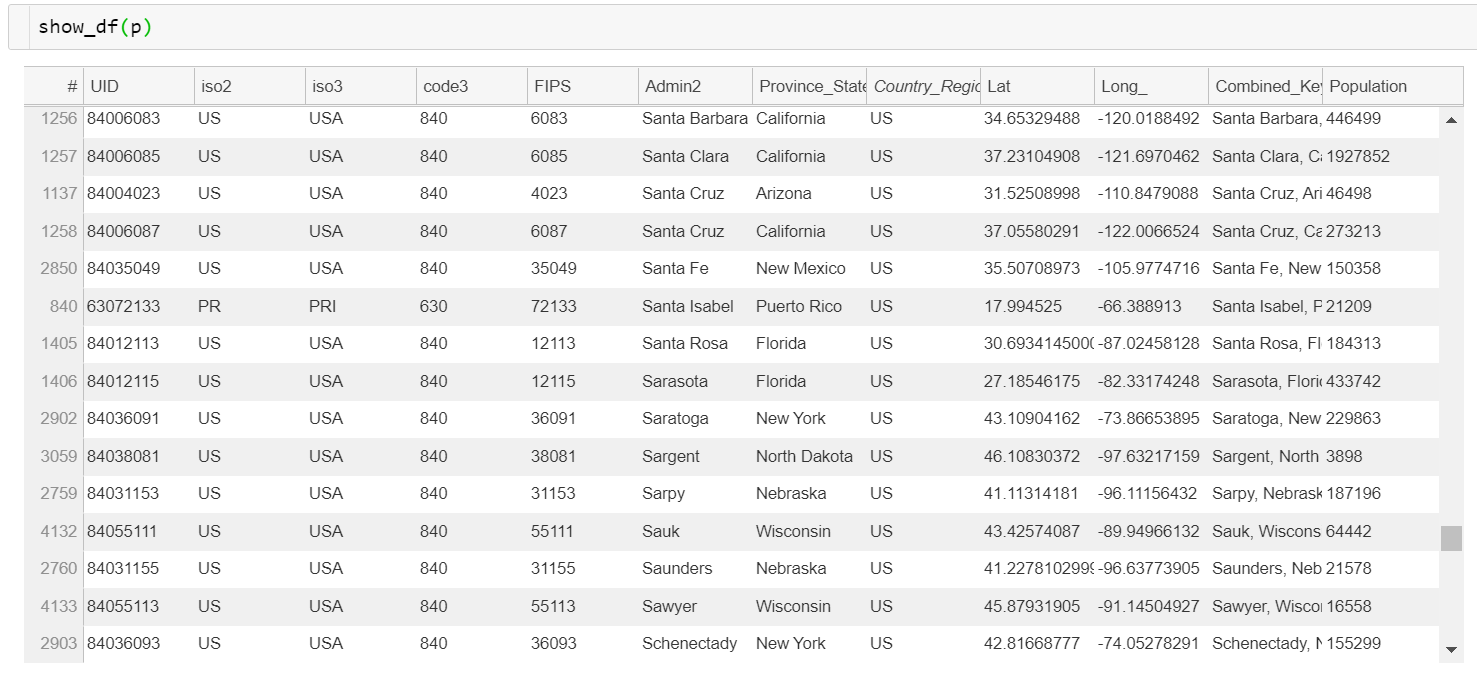
show_df(df)displays pandas dataframe as a table (new in v0.1.14):
Displaying Images
imshow(a)displays an array as an image:

Complete list of colormaps: https://matplotlib.org/3.5.0/tutorials/colors/colormaps.html
imshow(im1, im2, ...)shows several images side by side with linked panning and zooming (link=Falseto disable):

imshow([[im1, im2, ...], [im3, im4, ... ], ...])displays a matrix of images with panning and zooming linked row-wise:

See also a contour plot example in the bokeh gallery page.
Location of the JavaScript code
The Bokeh library consists of two parts: backend is written in Python, the frontend is in javascript.
By default, Bokehlab (just like Bokeh) will get the required BokehJs code from the internet, from cdn.bokeh.org. This mode is called 'cdn' (=content delivery network). Generally it is fine, except that it doesn't work offline.
Another option is to bundle the javascript into the ipynb notebook:
%bokehlab inline
Inline mode embeds the JavaScript in the notebook, increasing its size but allowing saved plots to be viewed offline. Running cells and Python callbacks still requires the Python environment. Bokehlab introduces a third option:
%bokehlab local
It serves javascript files from the locally installed Bokeh library. It both works offline and does not take any extra space. The only issue with this mode is that it needs a one-shot setup:
python -m bokehlab.install_resources --sys-prefix
Run this command in the classic Notebook server environment, with the same
Bokeh version as the kernel. It preserves the existing
/nbextensions/bokeh_resources/static/ URLs. Omit --sys-prefix for a user-level
installation. Re-run it after upgrading Bokeh.
The installer copies assets because current Tornado rejects the external
symlinks made by the old bokeh-resources installer. It replaces an existing
static symlink without modifying the installed Bokeh package. %bokehlab local-dev uses the unminified copies. Local serving is not claimed for Notebook
7 or JupyterLab 4; use inline mode for offline plots there.
Execute the resource-loading cell before plotting and allow BokehJS to finish
loading, especially with CDN resources. The legacy
python -m bokehlab.fix_copy_paste patch is obsolete and now changes no files.
Configuring the defaults
You can set the default size of the figure with %bokehlab_config magic command (or its shorter alias %blc):
%blc width=500 height=200
This size will apply to all figures in the current notebook. To make this change permanent, use -g (or --global flag):
%blc -g width=500 height=200
It will save those values to ~/.bokeh/bokehlab.yaml and use them in the future Jupyter sessions.
You can also make Bokehlab remember your preferred mode of loading the javascript half of the library, so instead of always writing %bokehlab local in every ipynb file can do
%blc -g resources=local
and %bokehlab will use locally served resources from now on.
Config is also capable or 'memorizing' the repeated arguments to any of the commands described above. For example, to tell Bokehlab to use thicker lines:
%blc plot.line_width=2
and all subsequent calls to plot will assume line_width argument to be 2 (pixels) instead of one (this feature is work-in-progress, not all options are configurable yet).
To revert any configured option:
%blc -d plot.line_width
A list of currently active settings is displayed with
%blc
Comparison to bokeh
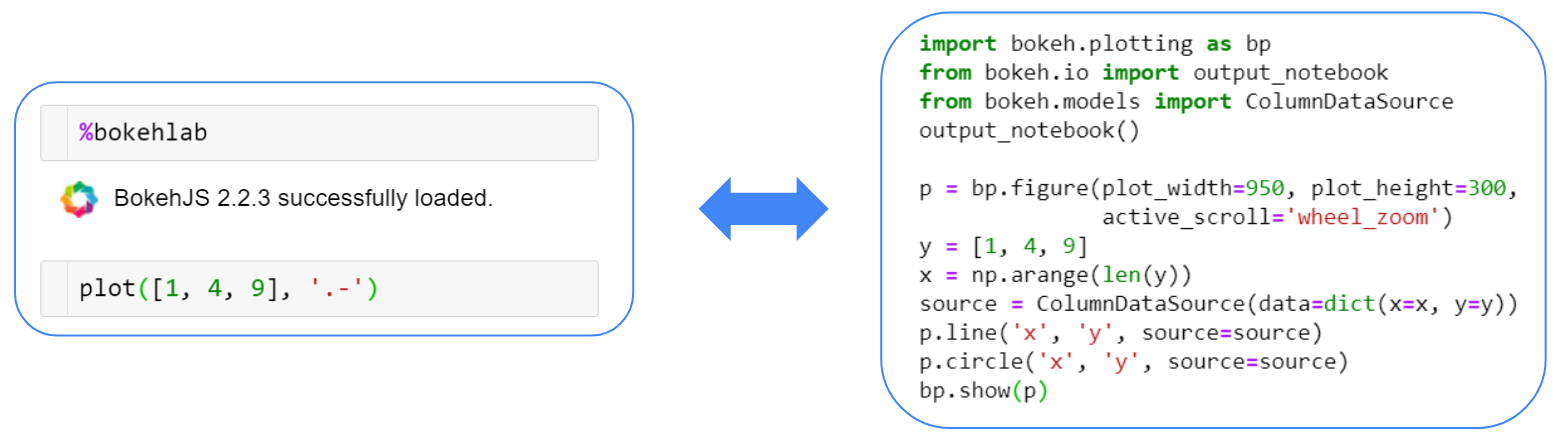
Bokehlab is a thin wrapper over the excellent library bokeh primarily aimed at cutting down the amount of boilerplate code.
The following commands are equivalent:
Development and validation
Package metadata and runtime dependencies live in pyproject.toml.
requirements.txt installs this project; setup.py is only a compatibility
entry point. The development environment is reproducible with uv.lock:
uv sync --locked
uv run pytest -q
uv run python -m build
Tests cover argument parsing, configuration, plotting, model serialization,
widget callbacks, and execution of demo.ipynb. CI runs on Python 3.12 and 3.13.
Browser tests exercise hover, pan, zoom, linked ranges, Python tap callbacks,
and source updates; see integration/README.md.
1 maintainer

Metadata
1 maintainer
Release files for bokehlab 0.3.0
For a detailed explanation of source distributions (sdists) and built distributions (wheels), please see the package formats documentation.
Source distribution (sdist)
| File | Size | Uploaded | Provenance | |
|---|---|---|---|---|
| bokehlab-0.3.0.tar.gz | 38.6 kB | With provenance | Details |
Built distribution (wheel)
| File | Interpreter | ABI | Platform | Reset |
|---|---|---|---|---|
| bokehlab-0.3.0-py3-none-any.whl | Python 3 | none | any | Details |
Total release size: 64.4 kB
Release files / bokehlab-0.3.0.tar.gz
| Download URL | bokehlab-0.3.0.tar.gz |
|---|---|
| Size | 38.6 kB |
| Tags | Source |
|
SHA-256 checksum How to use checksums |
330560f54d75bd55374491c6d1aa55ea663d7f9f6f30de68a4e3d3bc834ee20e
|
|
BLAKE2b-256 checksum How to use checksums |
3efac3cb03ea983a3c7446221e5fc30f104043d8ace2e409a2e5f16d47421087
|
| Upload date | |
|
Uploaded using Trusted Publishing? What is trusted publishing? |
Yes |
| Uploaded via |
twine/7.0.0 CPython/3.13.14
|
Provenance
Provenance describes where a file came from. On PyPI, provenance is shared via attestations, which provide a verifiable record of the build or publishing details. View details, limitations and caveats.


PyPI Publish Attestation
PyPI verified that this artifact, at this checksum, originated from the publisher listed below.
Signed by GitHub Actions, verified by PyPI on Sep 23, 2026.
Transparency logRelease files / bokehlab-0.3.0-py3-none-any.whl
| Download URL | bokehlab-0.3.0-py3-none-any.whl |
|---|---|
| Size | 25.8 kB |
| Tags | Python 3 |
|
SHA-256 checksum How to use checksums |
e98feb2c05b536fadd60c1001bc1552a99fad8bded6760f2d96e41d7c37c18e0
|
|
BLAKE2b-256 checksum How to use checksums |
06a6c6b3e5a3f1163bc3aef900b13000ccbef92a6893ac2db24a91c51a59dbf0
|
| Upload date | |
|
Uploaded using Trusted Publishing? What is trusted publishing? |
Yes |
| Uploaded via |
twine/7.0.0 CPython/3.13.14
|
Provenance
Provenance describes where a file came from. On PyPI, provenance is shared via attestations, which provide a verifiable record of the build or publishing details. View details, limitations and caveats.
PyPI Publish Attestation
PyPI verified that this artifact, at this checksum, originated from the publisher listed below.
Signed by GitHub Actions, verified by PyPI on Sep 23, 2026.
Transparency logSecurity for bokehlab 0.3.0
Provenance
Provenance describes where a file came from. On PyPI, provenance is shared via attestations, which provide a verifiable record of the build or publishing details. View details, limitations and caveats.
Full provenance
All 2 files in this release have been uploaded with provenance metadata.
Attestation for bokehlab-0.3.0.tar.gz
PyPI Publish Attestation
PyPI verified that this artifact, at this checksum, originated from the publisher listed below.
Signed by GitHub Actions, verified by PyPI on Sep 23, 2026.
Transparency logA note on package security
PyPI is a repository for distributing packages, not a service for auditing them. While third-party security researchers and our staff do their best to detect and remove malicious packages, PyPI cannot guarantee the quality, security or suitability of any given package.
To learn more about protecting yourself from malicious actors, visit our package security documentation.














