
BOLDigger2


An even better Python program to query .fasta files against the COI database of www.boldsystems.org
Introduction
DNA metabarcoding datasets often comprise hundreds of Operational Taxonomic Units (OTUs), requiring querying against databases for taxonomic assignment. The Barcode of Life Data system (BOLD) is a widely used database for this purpose among biologists. However, BOLD's online platform limits users to identifying batches of only 50 sequences at a time. Additionally, using BOLD's API does not completely address this issue as it does not provide access to private and early-release data.
BOLDigger2, the successor to BOLDigger, aims to overcome these limitations. As a pure Python program, BOLDigger2 offers:
- Automated access to BOLD's identification engine
- Downloading of additional metadata for each hit
- Selection of the best-fitting hit from the returned results
By leveraging these features, BOLDigger2 streamlines the process of OTU identification, making it more efficient and comprehensive.
Key Differences Between BOLDigger2 and BOLDigger
- Unified Function: BOLDigger2 uses a single function,
identify, that automatically performs identification, additional data download, and selection of the top hit. This enables direct implementation into pipelines. - Enhanced Database Query: BOLDigger2 initially uses the top 100 hits from the "species level barcode records" database. If no results are found, it falls back to the "all barcode records" database.
- Improved Speed: BOLDigger2 no longer alters the provided FASTA file. Instead, it generates all download links first and subsequently downloads the data asynchronously, increasing the speed almost two-fold.
- Secure Password Handling: BOLDigger2 no longer asks for the password in clear text.
- Simplified Arguments: The
identifyfunction in BOLDigger2 only accepts a single argument: the path to the FASTA file to be identified. It saves all results in the same folder. - Efficient Data Storage: BOLDigger2 saves the top 100 hits in a separate file, leading to much faster processing times. All outputs will also be saved in .hdf and .parquet format to facilitate subsequent processing for large tables.
- Additional Data Fields: The top hits in BOLDigger2 will contain additional data fields, such as the number of records supporting the selected top hit, the taxonomic level used for the top hit, and all BINS the selected hit belongs to if it is a species-level hit.
- Additional flag: BOLDigger2 exchanged flag 5. If the top hit is represented by multiple BINS flag 5 is used. The API verification module from BOLDigger is no longer needed.
- Adjusted Species-Level Threshold: BOLDigger2 accepts hits with a similarity of >= 97% as species-level records. This decision aligns with the 3% OTU clustering threshold commonly used in DNA metabarcoding.
- Increased process safety: BOLDigger2 can be stopped at any point in the processing and will simply continue where it was stopped. BOLDigger2 will no longer alter the provided FASTA file. BOLDigger2 accepts both common FASTA formats.
- Dynamic downloads: BOLDigger2 will automatically adjust the number of sequences per query to the BOLD database. If the connection times out the query size will be reduced, if the request is successful, the query size will be increased.
- Improved error handling: Broken records in the BOLD database are now detected and directly reported as a "BrokenRecord" in addition to "NoMatches". If the BOLD website is not accessible, BOLDigger2 will simply wait until it is up again. In addition to that, BOLDigger2 also introduces the "ImcompleteTaxonomy" hit. This is returned when all of the hits contain specials or a complete higher taxonomic level (e.g. Class / Phylum) is missing.
Installation and Usage
BOLDigger2 requires Python version 3.10 or higher and can be easily installed using pip in any command line:
pip install boldigger2
This command will install BOLDigger2 along with all its dependencies.
To run the identify function, use the following command:
boldigger2 identify PATH_TO_FASTA
To automate the identify function in bioinformatic pipelines, the BOLD credentials can also by passed directly as optional arguments
boldigger2 identify PATH_TO_FASTA -username USERNAME -password PASSWORD
To costumize the implemented thresholds for user-specific needs, the tresholds can be passed as an additional (ordered) argument. Up to 5 different thresholds can be passed for the different taxonomic levels (Species, Genus, Family, Order, Class). Thresholds not passed will be replaced by default, but BOLDigger2 will also inform you about this.
boldigger2 identify PATH_TO_FASTA -thresholds 99 97
Output:
19:16:16: Default thresholds changed!
19:16:16: Species: 99, Genus: 97, Family: 90, Order: 85, Class: 50
19:16:16: Trying to log in.
BOLD username:
BOLDigger2 will prompt you for your username and password, and then it will perform the identification.
When a new version is released, you can update BOLDigger2 by typing:
pip install --upgrade boldigger2
How to cite
Buchner D, Leese F (2020) BOLDigger – a Python package to identify and organise sequences with the Barcode of Life Data systems. Metabarcoding and Metagenomics 4: e53535. https://doi.org/10.3897/mbmg.4.53535
BOLDigger2 Algorithm
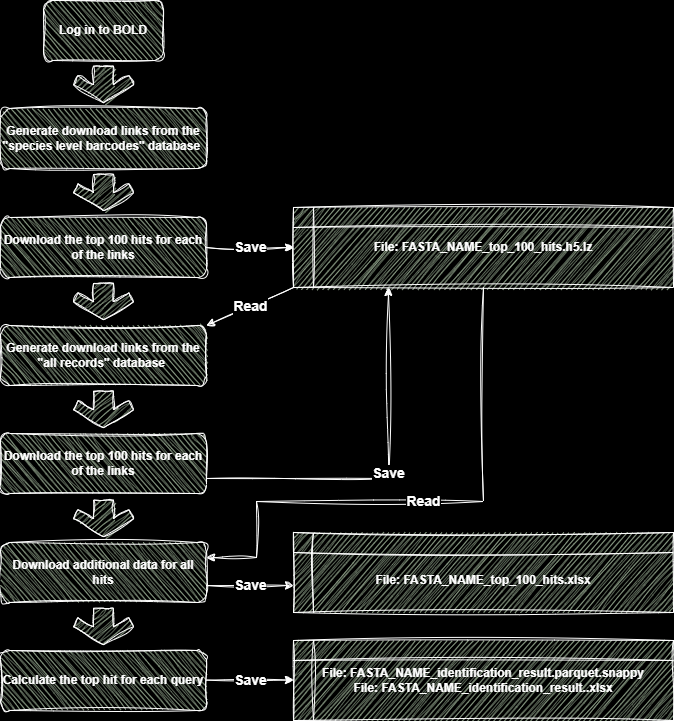
The BOLDigger2 algorithm operates according to the following flowchart:
-
Log in to BOLD:
- Authenticate with the BOLD data systems.
-
Generate Download Links for Species-Level Barcodes:
- Generate the download links for the species-level barcode database for a batch of sequences.
-
Download Top 100 Hits:
- Retrieve the download links from the previous step.
- Download the top 100 hits for each link.
- Save the results to an HDF storage with the key
"top_100_hits_unsorted". - Continue until all sequences are identified.
-
Identify Sequences Without Species-Level Hits:
- Read the unsorted top 100 hits.
- Identify sequences that did not yield a species-level hit.
-
Generate Download Links for All Records:
- Generate download links for a batch of sequences without species-level hits for the "all records on BOLD" database.
-
Download Top 100 Hits for All Records:
- Retrieve the download links from the previous step.
- Download the top 100 hits for each link.
- Save the results to an HDF storage with the key
"top_100_hits_unsorted". - Continue until all sequences are identified.
-
Sort and Save Top Hits:
- Read all top 100 hits.
- Remove duplicate entries.
- Sort the hits in the same order as in the FASTA file.
- Identify all public records and trigger the additional data download.
- Save them in the HDF storage with the key
"top_100_hits_sorted".
-
Save Additional Data:
- Save the hits including additional data to the HDF storage with the key
"top_100_hits_additional_data".
- Save the hits including additional data to the HDF storage with the key
-
Export Additional Data to Excel:
- Save the additional data in Excel format.
- Split the data into tables of 1,000,000 lines each.
-
Calculate and Save Top Hits:
- Calculate the top hit for each sequence.
- Save the top hits in both Excel format (
identification_result.xlsx) and Parquet format (identification_result.parquet.snappy) for fast further processing.
Top hit selection
Different thresholds (97%: species level, 95%: genus level, 90%: family level, 85%: order level, <85% and >= 50: class level) for the taxonomic levels are used to find the best fitting hit. After determining the threshold for all hits the most common hit above the threshold will be selected. Note that for all hits below the threshold, the taxonomic resolution will be adjusted accordingly (e.g. for a 96% hit the species-level information will be discarded, and genus-level information will be used as the lowest taxonomic level).
The BOLDigger2 algorithm functions as follows:
-
Identify Maximum Similarity: Find the maximum similarity value among the top 100 hits currently under consideration.
-
Set Threshold: Set the threshold to this maximum similarity level. Remove all hits with a similarity below this threshold. For example, if the highest hit has a similarity of 100%, the threshold will be set to 97%, and all hits below this threshold will be removed temporarily.
-
Classification and Sorting: Count all individual classifications and sort them by abundance.
-
Filter Missing Data: Drop all classifications that contain missing data. For instance, if the most common hit is "Arthropoda --> Insecta" with a similarity of 100% but missing values for Order, Family, Genus, and Species.
-
Identify Common Hit: Look for the most common hit that has no missing values.
-
Return Hit: If a hit with no missing values is found, return that hit.
-
Threshold Adjustment: If no hit with no missing values is found, increase the threshold to the next higher level and repeat the process until a hit is found.
BOLDigger2 Flagging System
BOLDigger2 employs a flagging system to highlight certain conditions, indicating a degree of uncertainty in the selected hit. Currently, there are five flags implemented, which may be updated as needed:
-
Reverse BIN Taxonomy: This flag is raised if all of the top 100 hits representing the selected match utilize reverse BIN taxonomy. Reverse BIN taxonomy assigns species names to deposited sequences on BOLD that lack species information, potentially introducing uncertainty.
-
Differing Taxonomic Information: If there are two or more entries with differing taxonomic information above the selected threshold (e.g., two species above 97%), this flag is triggered, suggesting potential discrepancies.
-
Private or Early-Release Data: If all of the top 100 hits representing the top hit are private or early-release hits, this flag is raised, indicating limited accessibility to data.
-
Unique Hit: This flag indicates that the top hit result represents a unique hit among the top 100 hits, potentially requiring further scrutiny.
-
Multiple BINs: If the selected species-level hit is composed of more than one BIN, this flag is raised, suggesting potential complexities in taxonomic assignment.
Given the presence of these flags, it is advisable to conduct a closer examination of all flagged hits to better understand and address any uncertainties in the selected hit.
1 maintainer

Metadata
1 maintainer
Release files for boldigger2 2.2.1
For a detailed explanation of source distributions (sdists) and built distributions (wheels), please see the package formats documentation.
Source distribution (sdist)
| File | Size | Uploaded | Provenance | Actions |
|---|---|---|---|---|
| boldigger2-2.2.1.tar.gz | 24.4 kB | Without provenance | Details for boldigger2-2.2.1.tar.gz |
Built distribution (wheel)
| File | Interpreter | ABI | Platform | Actions Reset |
|---|---|---|---|---|
| boldigger2-2.2.1-py3-none-any.whl | Python 3 | none | any | Details for boldigger2-2.2.1-py3-none-any.whl |
Total release size: 47.6 kB
Release files / boldigger2-2.2.1.tar.gz
| Download URL | boldigger2-2.2.1.tar.gz |
|---|---|
| Size | 24.4 kB |
| Tags | Source |
|
SHA-256 checksum How to use checksums |
eb4aa957f88bc3a32cb207df5b5f7c6aae4017481dcbc0cfd03ae34c4f463f96
|
|
BLAKE2b-256 checksum How to use checksums |
a2cafcc9d921923a68fd2783a82eb2f666a40784f7c15e417d273a95bcda4aee
|
| Upload date | |
|
Uploaded using Trusted Publishing? What is trusted publishing? |
No |
| Uploaded via |
twine/4.0.2 CPython/3.11.2
|
Release files / boldigger2-2.2.1-py3-none-any.whl
| Download URL | boldigger2-2.2.1-py3-none-any.whl |
|---|---|
| Size | 23.2 kB |
| Tags | Python 3 |
|
SHA-256 checksum How to use checksums |
b9d77f6b639a320eae01b9cb84cb3c4681074be6bc3c7c1bc3e062258590e3d0
|
|
BLAKE2b-256 checksum How to use checksums |
5159f34ab10f057ad020349f04d89e3482c3c35241dbab0e97f18723b82c69a3
|
| Upload date | |
|
Uploaded using Trusted Publishing? What is trusted publishing? |
No |
| Uploaded via |
twine/4.0.2 CPython/3.11.2
|
Security for boldigger2 2.2.1
Provenance
Provenance describes where a file came from. On PyPI, provenance is shared via attestations, which provide a verifiable record of the build or publishing details. View details, limitations and caveats.
No provenance found
None of the files in this release were uploaded with provenance metadata.
A note on package security
PyPI is a repository for distributing packages, not a service for auditing them. While third-party security researchers and our staff do their best to detect and remove malicious packages, PyPI cannot guarantee the quality, security or suitability of any given package.
To learn more about protecting yourself from malicious actors, visit our package security documentation.














