
Bonbast
bonbast.com publishes accurate and reliable gold prices and Iranian Rial (IRR) exchange rates. Bonbast is the most accurate and reputable collector of foreign exchange data for the Iranian market.
This tool doesn't alter any of the data; it all comes from bonbast. Its only purpose is to give you a different way to get bonbast prices: in your terminal, as JSON for other programs, or from Python.
All prices are in Toman (1 Toman = 10 Rials), except Gold Ounce and Bitcoin, which are in US Dollars.
Contents
Installation
Bonbast needs Python 3.10 or newer.
uv / pipx
uv tool install bonbast
# or
pipx install bonbast
pip
python -m pip install bonbast
To update, run uv tool upgrade bonbast, pipx upgrade bonbast or python -m pip install -U bonbast.
Homebrew
brew install samadipour/bonbast/bonbast
Arch Linux (AUR)
Use any AUR helper, such as yay or paru:
yay -S python-bonbast
or build the package manually:
git clone https://aur.archlinux.org/python-bonbast.git
cd python-bonbast
makepkg -si
Usage
Run bonbast --help, or bonbast <command> --help, to see every option. python -m bonbast works too.
Current prices
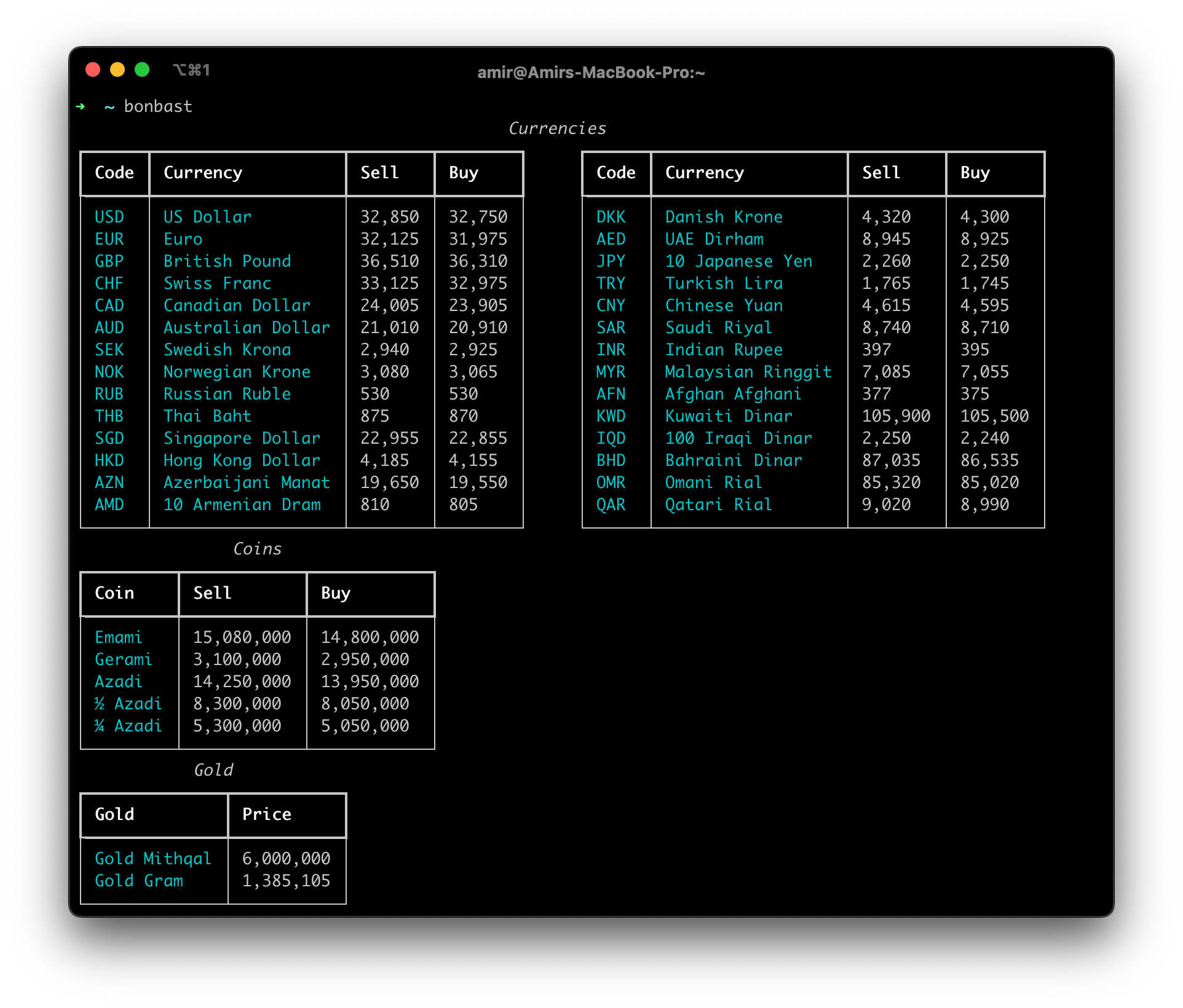
Running bonbast without a command shows the current prices of currencies, coins and gold in separate tables.
bonbast
bonbast --show-only usd,eur,emami1,mithqal
Live
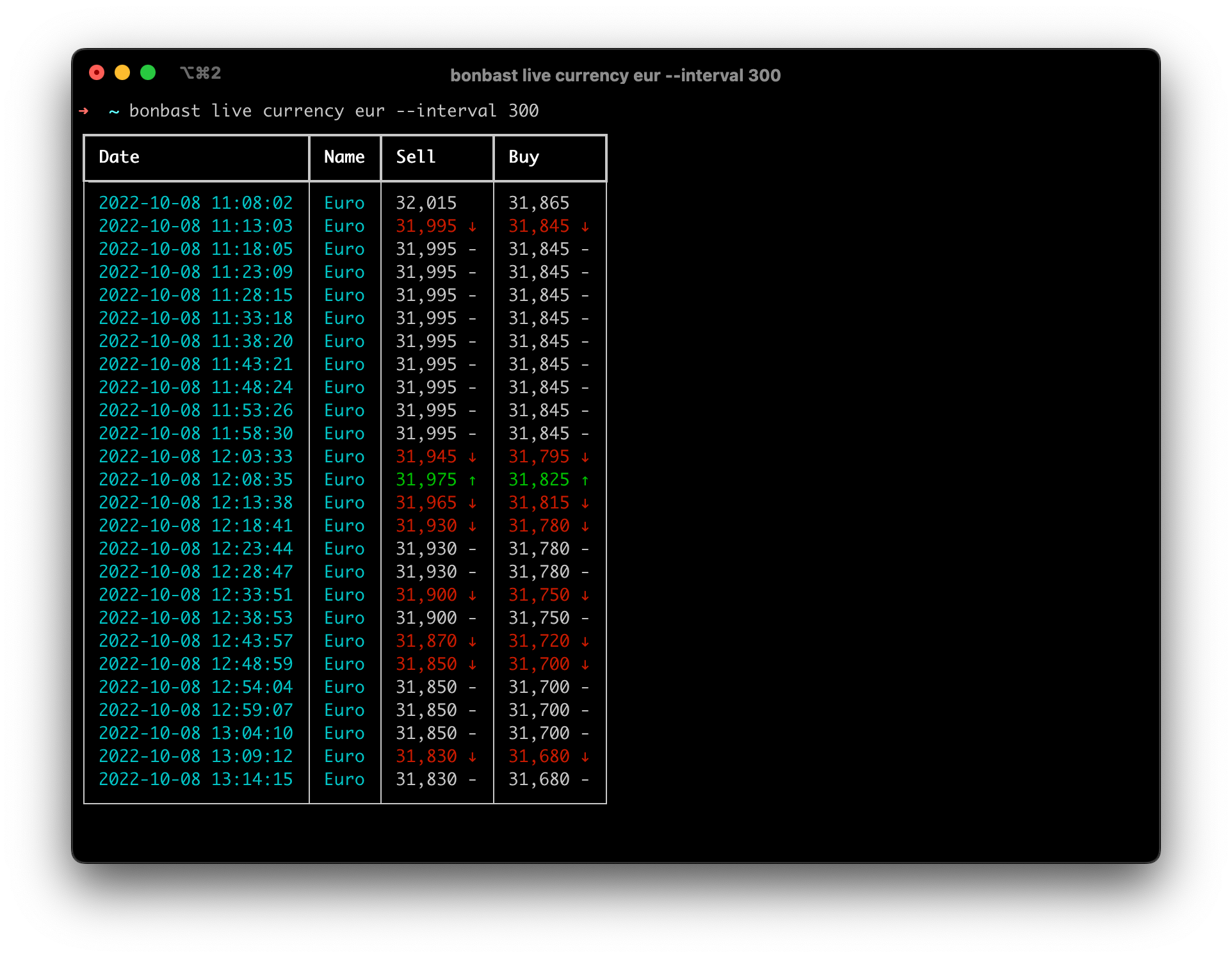
Live mode keeps the prices on screen and refreshes them periodically. Prices that went up turn green with a ↑,
prices that went down turn red with a ↓. Press Ctrl+C to stop.
bonbast.com updates its prices every 30 seconds, which is also the default interval. Change it with -i / --interval.
# The full tables
bonbast live --show-only usd,eur,gbp,azadi1 -i 60
Simple
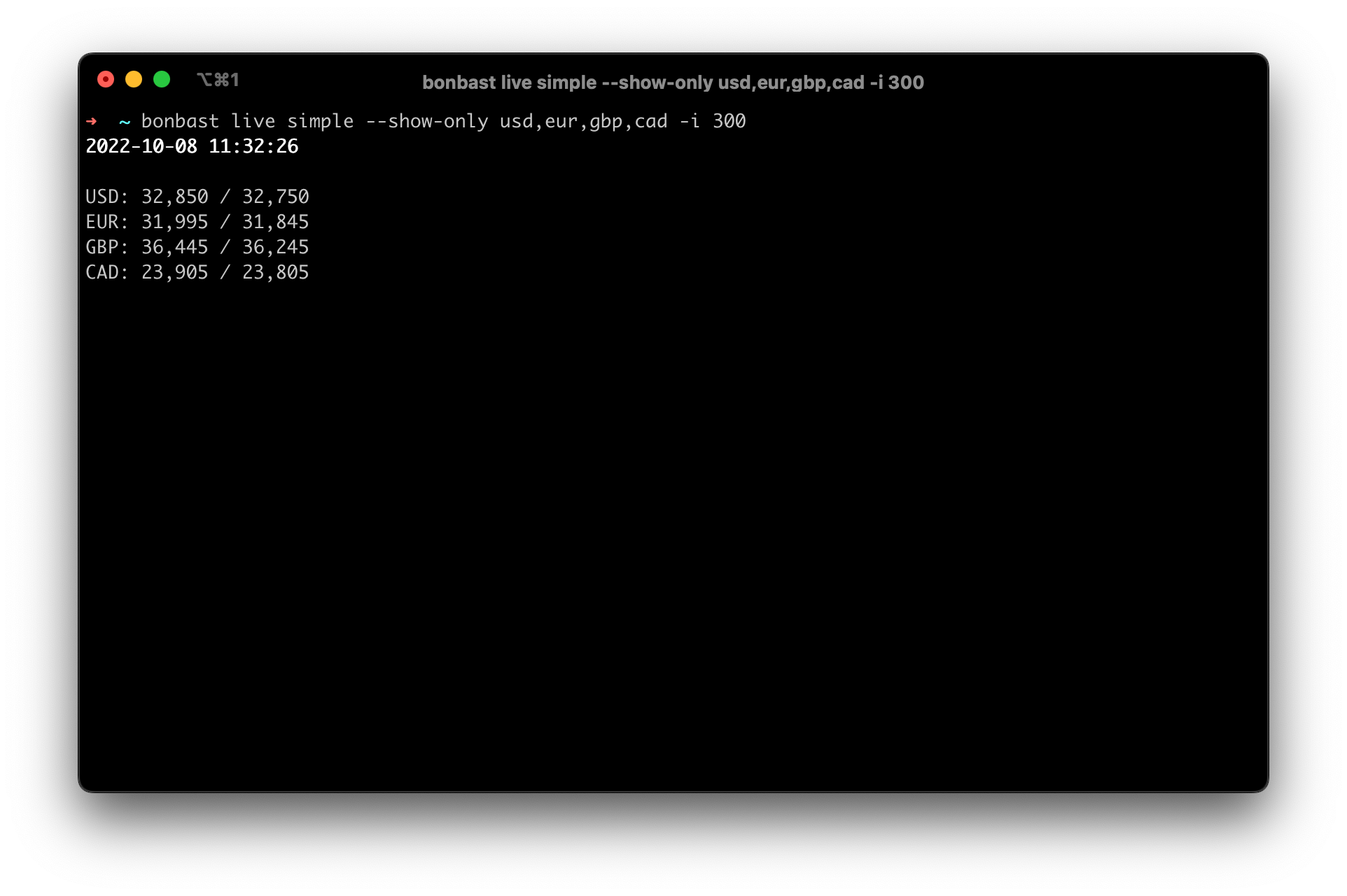
Shows the prices as lines of text.
bonbast live simple --show-only usd,eur,gbp,cad -i 300
Currency
Tracks a single currency, coin or gold price and adds a row on every refresh.
bonbast live currency usd -i 300
History
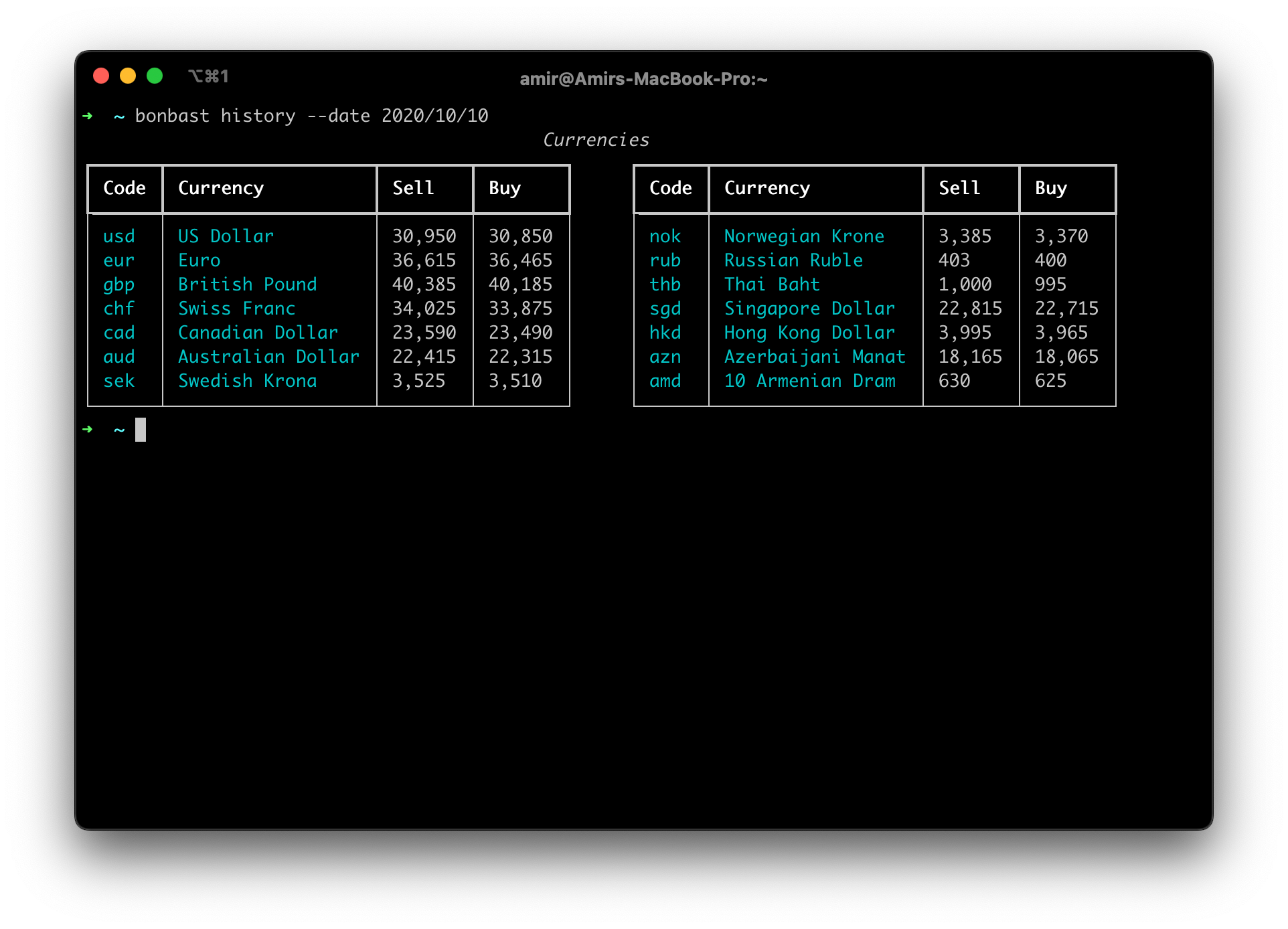
Shows the currency and coin prices of a past day. Pass a Gregorian date as YYYY-MM-DD or YYYY/MM/DD with -d /
--date. bonbast has data from 2012-10-09 up to yesterday.
bonbast history --date 2020/10/10
bonbast history --date 2020-10-10 --show-only usd,eur
bonbast history --date 2020-10-10 --json
Graph
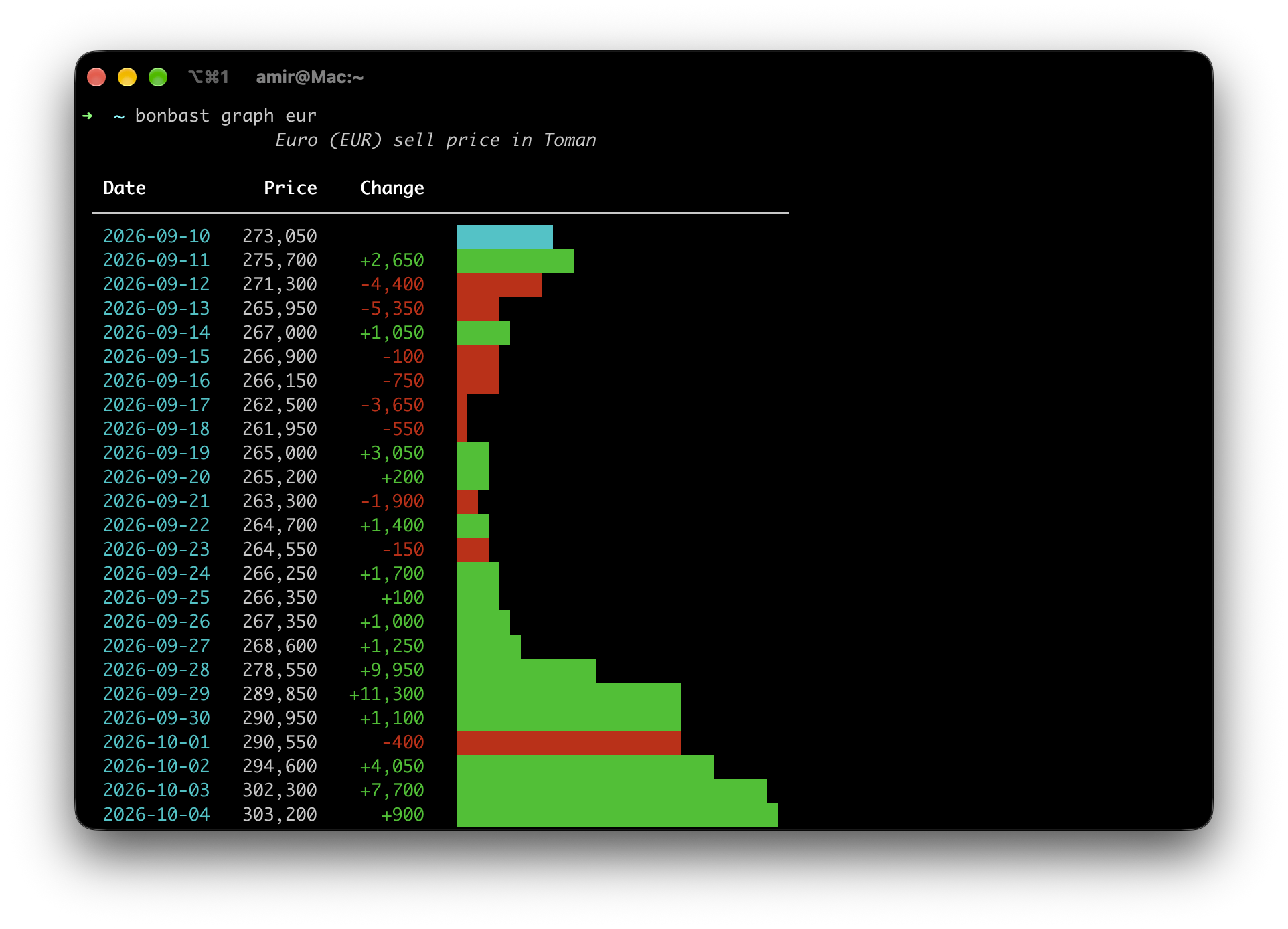
Shows the daily sell price of a currency over a date range, with a bar for each day and a summary (low, high, average and change). Both ends of the range are included.
Without --end-date, the range ends today. Without --start-date, it starts 30 days before the end date.
bonbast graph eur
bonbast graph eur --start-date 2023-01-02
bonbast graph eur --start-date 2023-02-12 --end-date 2023-05-09
bonbast graph eur --json   # {"2023-02-12": 590000, ...}
Convert
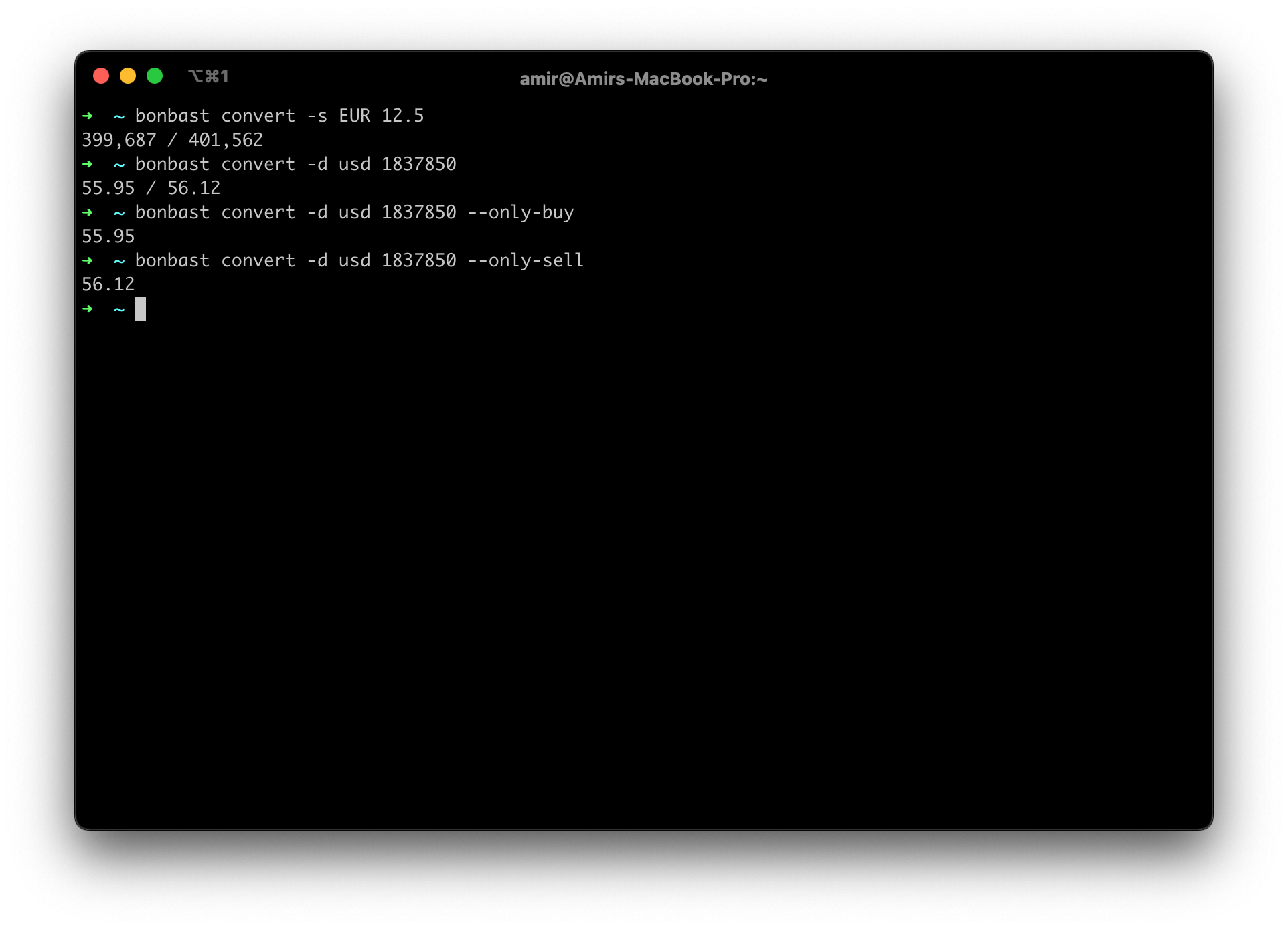
Converts an amount of a currency to Toman with -s / --source:
bonbast convert -s eur 12.5
or an amount of Toman to a currency with -d / --destination:
bonbast convert -d usd 1837850
The output is buy / sell. Use --only-buy or --only-sell to print only one of them.
bonbast convert -d usd 1837850 --only-buy
JSON output
export prints the current prices as JSON, to use in other programs or to pipe into tools like jq. Add --pretty
for indented, highlighted output.
bonbast export
bonbast export --pretty --show-only usd,emami1,mithqal
bonbast export | jq .USD.sell
{
  "USD": {"name": "US Dollar", "sell": 269300, "buy": 269200},
  "emami1": {"name": "Emami", "sell": 271000000, "buy": 267000000},
  "mithqal": {"name": "Gold Mithqal", "price": 114370000}
}
history --json prints the same format.
Supported codes
Use these codes with --show-only (comma separated), live currency, graph, convert and as keys in the JSON
output. Codes are case-insensitive.
Currencies
| Flag | Currency | Code |
|---|---|---|
| 🇺🇸 | US Dollar | USD |
| 🇪🇺 | Euro | EUR |
| 🇬🇧 | British Pound | GBP |
| 🇨🇭 | Swiss Franc | CHF |
| 🇨🇦 | Canadian Dollar | CAD |
| 🇦🇺 | Australian Dollar | AUD |
| 🇸🇪 | Swedish Krona | SEK |
| 🇳🇴 | Norwegian Krone | NOK |
| 🇷🇺 | Russian Ruble | RUB |
| 🇹🇭 | Thai Baht | THB |
| 🇸🇬 | Singapore Dollar | SGD |
| 🇭🇰 | Hong Kong Dollar | HKD |
| 🇦🇿 | Azerbaijani Manat | AZN |
| 🇦🇲 | 10 Armenian Dram | AMD |
| 🇩🇰 | Danish Krone | DKK |
| 🇦🇪 | UAE Dirham | AED |
| 🇯🇵 | 10 Japanese Yen | JPY |
| 🇹🇷 | Turkish Lira | TRY |
| 🇨🇳 | Chinese Yuan | CNY |
| 🇸🇦 | Saudi Riyal | SAR |
| 🇮🇳 | Indian Rupee | INR |
| 🇲🇾 | Malaysian Ringgit | MYR |
| 🇦🇫 | Afghan Afghani | AFN |
| 🇰🇼 | Kuwaiti Dinar | KWD |
| 🇮🇶 | 100 Iraqi Dinar | IQD |
| 🇧🇭 | Bahraini Dinar | BHD |
| 🇴🇲 | Omani Rial | OMR |
| 🇶🇦 | Qatari Riyal | QAR |
bonbast quotes AMD and JPY per 10 units and IQD per 100 units. convert takes that into account.
Coins
| Coin | Code |
|---|---|
| Emami | emami1 |
| Gerami | azadi1g |
| Azadi | azadi1 |
| ½ Azadi | azadi1_2 |
| ¼ Azadi | azadi1_4 |
Gold
| Name | Code | Unit |
|---|---|---|
| Gold Mithqal | mithqal | Toman |
| Gold Gram | gol18 | Toman |
| Gold Ounce | ounce | USD |
| Bitcoin | bitcoin | USD |
Usage in other programs
The JSON output is the easiest way to use the prices in another program.
Python
bonbast can also be used as a library:
from datetime import date

from bonbast import BonbastClient

with BonbastClient() as client:
    prices = client.prices()
    usd = prices.get("usd")
    print(usd.sell, usd.buy)

    for coin in prices.coins:
        print(coin.name, coin.sell)

    old = client.history(date(2020, 10, 10))
    chart = client.graph("eur", date(2023, 1, 1), date(2023, 1, 31))  # {date: sell price}
Errors are raised as bonbast.BonbastError subclasses: NetworkError, ParseError and InvalidDateError.
Mac Shortcuts
Use the JSON output or the convert command in a shortcut, for example to show the price of a currency as a
notification.
Raycast
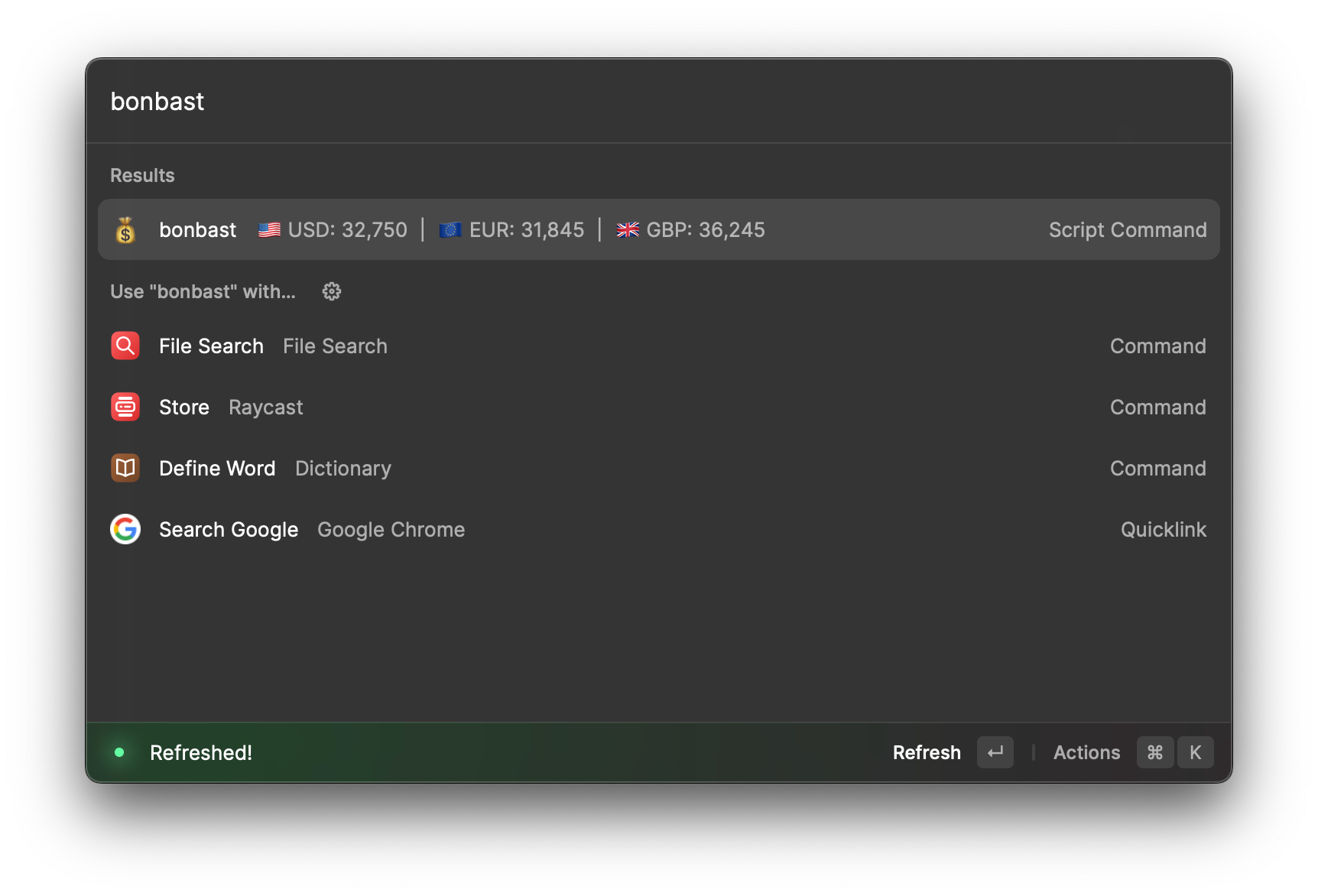
Raycast is a launcher for macOS that can run script commands. The raycast_script folder contains a script command that shows prices inline in Raycast, using the JSON output.
Setup for Raycast
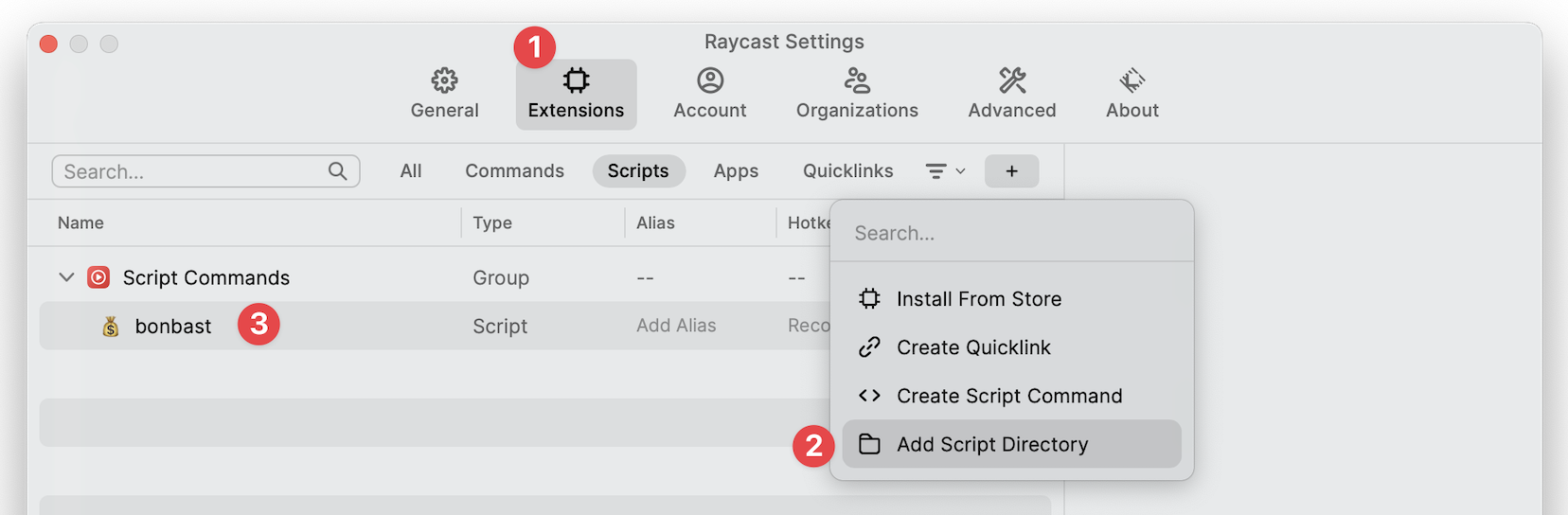
Use the setup-raycast.sh script to set up the script command, then follow the instructions in the image below or the Raycast docs.
chmod +x setup-raycast.sh

./setup-raycast.sh standalone
# or
./setup-raycast.sh python
Or set it up manually:
- Enable script commands in Raycast.
- Copy bonbast.sh into the Raycast
script-commandsfolder. - Follow the instructions below or read the Raycast docs.
Development
The project uses uv.
git clone https://github.com/SamadiPour/bonbast.git
cd bonbast
uv sync                 # create .venv with the package and dev dependencies
uv run bonbast          # run the CLI from source
uv run pytest           # run the tests
The tests run offline against pages recorded from bonbast.com in tests/fixtures. To also check that the real website
still works with the parsers, run BONBAST_LIVE_TESTS=1 uv run pytest.
Layout
| Module | Purpose |
|---|---|
bonbast/cli.py |
The bonbast command (click) |
bonbast/client.py |
BonbastClient: talks to bonbast.com |
bonbast/parsers.py |
Turns bonbast.com responses into models |
bonbast/models.py |
Currency, Coin, Gold and Prices dataclasses |
bonbast/catalog.py |
Every currency, coin and gold bonbast.com publishes |
bonbast/render.py |
Tables and text for the terminal (rich) |
bonbast/token_cache.py |
Caches the bonbast.com access token between runs |
Releasing
uv version --bump patch   # or minor / major
git commit -am "bump version $(uv version --short)" && git tag "$(uv version --short)"
git push --follow-tags    # the publish workflow tests, builds and uploads to PyPI
To build or install locally, use uv build or scripts/local_install.sh.
1 maintainer

Metadata
1 maintainer
Release files for bonbast 2.0.1
For a detailed explanation of source distributions (sdists) and built distributions (wheels), please see the package formats documentation.
Source distribution (sdist)
| File | Size | Uploaded | |
|---|---|---|---|
| bonbast-2.0.1.tar.gz | 33.1 kB | Details |
Built distribution (wheel)
| File | Interpreter | ABI | Platform | Reset |
|---|---|---|---|---|
| bonbast-2.0.1-py3-none-any.whl | Python 3 | none | any | Details |
Total release size: 55.9 kB
Release files / bonbast-2.0.1.tar.gz
| Download URL | bonbast-2.0.1.tar.gz |
|---|---|
| Size | 33.1 kB |
| Tags | Source |
|
SHA-256 checksum How to use checksums |
02162386b37a6c6eaeff6229f80cc69dd22fdb48ba425201327f243b7bbc43c8
|
|
BLAKE2b-256 checksum How to use checksums |
61d8df348b43a54ec3614926cdf27b10f0fa8aadab81b0e018125396c901d0df
|
| Upload date | |
|
Uploaded using Trusted Publishing? What is trusted publishing? |
No |
| Uploaded via |
uv/0.13.0 {"installer":{"name":"uv","version":"0.13.0","subcommand":["publish"]},"python":null,"implementation":{"name":null,"version":null},"distro":{"name":"Ubuntu","version":"24.04","id":"noble","libc":null},"system":{"name":null,"release":null},"cpu":null,"openssl_version":null,"setuptools_version":null,"rustc_version":null,"ci":true}
|
Release files / bonbast-2.0.1-py3-none-any.whl
| Download URL | bonbast-2.0.1-py3-none-any.whl |
|---|---|
| Size | 22.8 kB |
| Tags | Python 3 |
|
SHA-256 checksum How to use checksums |
70a03cfeccaf5e77a0b1b2c1324618819fb8210d3eb443541c18667ca506f667
|
|
BLAKE2b-256 checksum How to use checksums |
f04172c263d54e93d4cff4b20dfe323bd0f0cbb0b4fdf95155c873dd8e163496
|
| Upload date | |
|
Uploaded using Trusted Publishing? What is trusted publishing? |
No |
| Uploaded via |
uv/0.13.0 {"installer":{"name":"uv","version":"0.13.0","subcommand":["publish"]},"python":null,"implementation":{"name":null,"version":null},"distro":{"name":"Ubuntu","version":"24.04","id":"noble","libc":null},"system":{"name":null,"release":null},"cpu":null,"openssl_version":null,"setuptools_version":null,"rustc_version":null,"ci":true}
|














