
A living bonsai that grows in your browser during Claude Code sessions.
Verified details
These details have been verified by PyPIProject links
GitHub Statistics
Maintainers

Project description
bonsai-cc
A living bonsai that grows in your browser during Claude Code sessions.
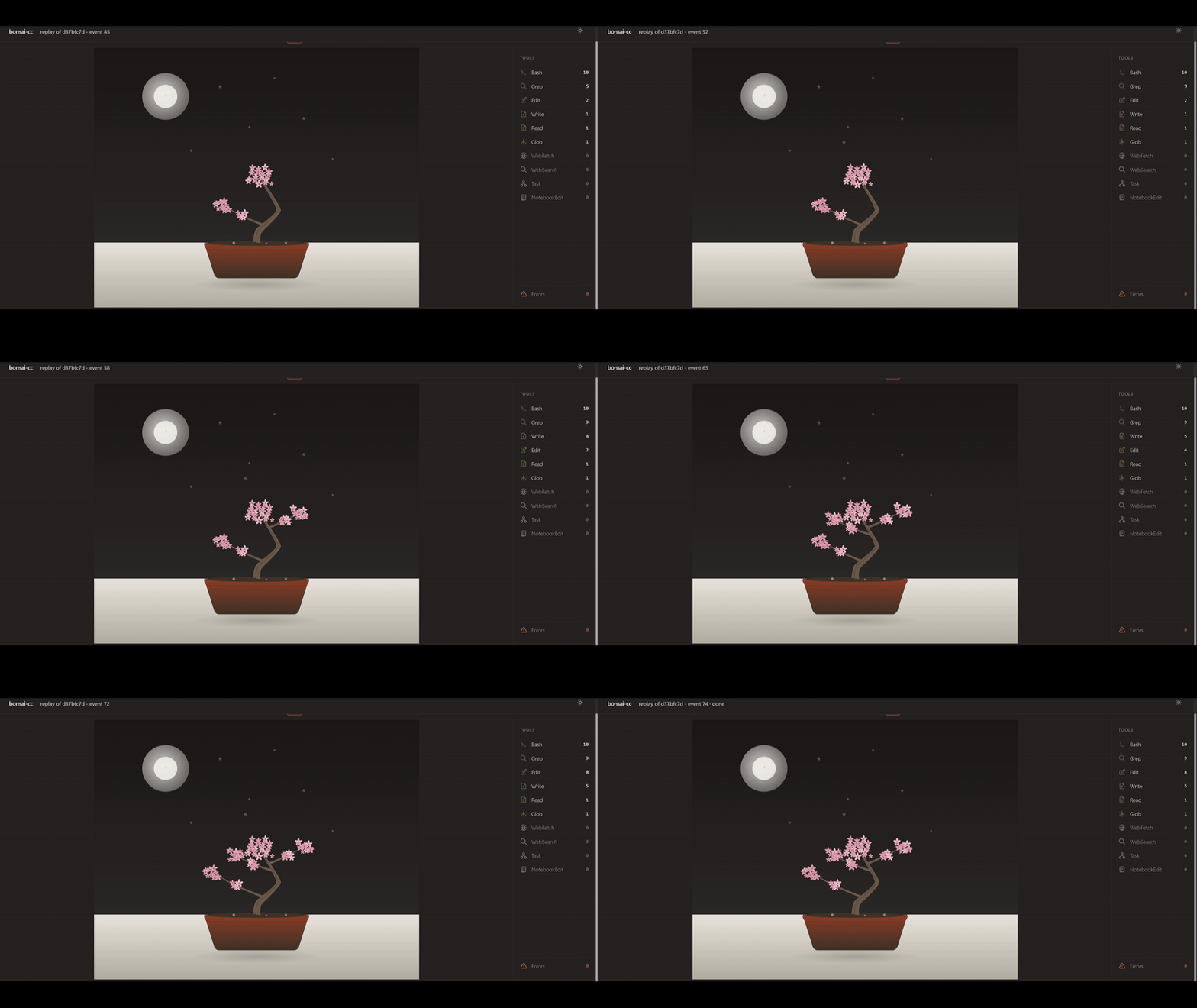
Every tool call shapes the tree. Bash commands grow roots, file edits grow branches, reads add leaves, web fetches bloom into flowers. When the session ends the tree is saved to your local garden and can replay bit-for-bit from its event log.




Why bonsai-cc
You've just finished a Claude Code session. What did the agent actually do? A glance at the transcript answers it eventually; a single picture answers it in one second.
bonsai-cc turns each session into a tree. The shape of that tree is a visual map of the work — thick trunk for long sessions, lots of branches for many files touched, flowers for web research, wilted leaves where things broke. You see at a glance what got done.
The renderer is a local web view (one inline-SVG page, no CDN, no bundler, no framework). Twelve language themes pick the silhouette automatically: bamboo for Python, pine for Rust, willow for JavaScript, sakura for Swift, and so on. Sessions persist in a local SQLite garden you can browse and replay later.
How it works
Three pieces, kept independent on purpose:
- The hook — a tiny Python script Claude Code runs on every tool call.
It appends one JSONL line to
~/.bonsai-cc/journals/<session>.jsonland exits. Fail-silent, <500 ms, stdlib only. No daemon required. - The garden —
~/.bonsai-cc/garden.db, one SQLite row per saved session with the final tree state and a cached SVG thumbnail. - The web view —
bonsai-ccboots a local HTTP server, watches the journals folder, and pushes new growth to the browser over SSE.
If bonsai-cc isn't running when you use Claude, nothing's lost — the
journal stays on disk and the next launch catches up.
Quickstart
Requires Python 3.11+ and Claude Code.
uv tool install bonsai-cc
bonsai-cc install-hook --global   # one-time, global

# now run claude as you normally would in any project:
claude

# whenever you want to see the garden:
bonsai-cc
That's it. The hook fires automatically on every Claude Code event; when you
launch bonsai-cc (no args) a browser tab opens with:
- a live tree at the top if a session is currently active, animating as events arrive;
- a garden grid below: every saved session as a card with thumbnail SVG, language tag, event count, age, and a one-click animated replay.
Need a smoke test before turning on a real session? Replay one of the shipped fixtures:
bonsai-cc watch --replay tests/fixtures/events/mixed_tools.jsonl
Preview
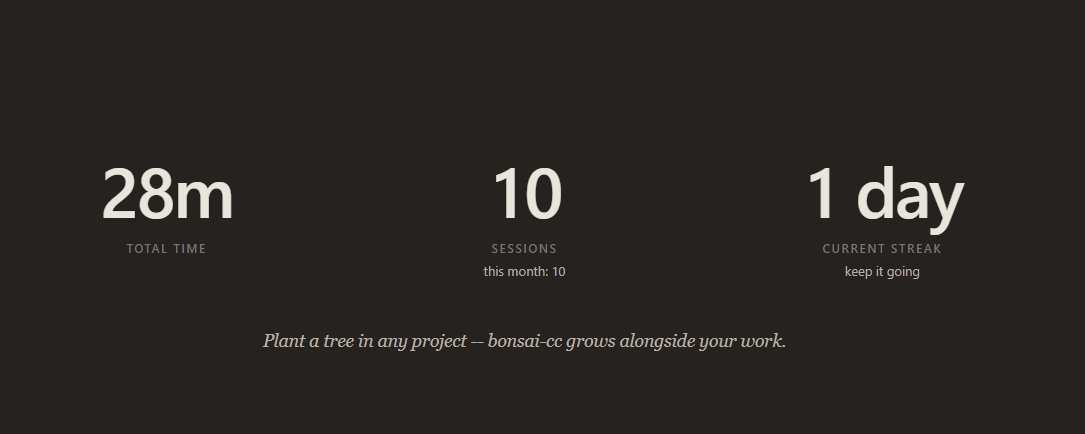
| Garden hero: total time, sessions, streak | A bonsai growing in real time |
 |
 |
Twelve language themes
bonsai-cc detects the language at the project root and picks a themed
silhouette:












| Theme | Detected from | Silhouette |
|---|---|---|
python |
pyproject.toml, setup.py, requirements.txt, Pipfile |
bamboo — four vertical stalks with horizontal nodes |
rust |
Cargo.toml |
pine — gnarled trunk, flat-topped horizontal tiers |
go |
go.mod |
oak — thick squat trunk, wide rounded canopy |
typescript |
tsconfig.json or package.json mentioning typescript |
willow + small TS-blue fruits |
javascript |
package.json (no TS) |
willow — slanted trunk, drooping curtains |
swift |
Package.swift, *.xcodeproj, *.xcworkspace |
sakura — bunjin literati trunk, cherry blossoms |
ruby |
Gemfile, *.gemspec |
maple — five-lobed leaves, fallen leaves on soil |
c / cpp |
CMakeLists.txt, meson.build, Makefile, *.vcxproj |
old oak — very thick trunk with deadwood and knots |
java |
pom.xml, build.gradle[.kts], settings.gradle[.kts] |
banyan — aerial roots descending to the soil |
haskell |
*.cabal, stack.yaml, dune-project, elm.json |
ginkgo — golden fan-shaped leaves |
zig |
build.zig, build.zig.zon |
birch — pale slender trunk with horizontal lenticels |
| default | nothing matched | generic — asymmetric S-curve, ellipse leaf clusters |
Manifest detection runs first; if none match, a histogram over the top two
directory levels picks the dominant extension. Override with
BONSAI_CC_FORCE_THEME=python (or any theme name).
Event → growth mapping
| Hook event | Visual effect |
|---|---|
SessionStart |
Plant the seed, detect language, pick palette |
PostToolUse(Bash) |
Grow a root cluster from cwd |
PostToolUse(Edit | Write | NotebookEdit) |
Extend (or create) the branch for file_path |
PostToolUse(Read) |
Add a leaf to that file's branch |
PostToolUse(Glob | Grep) |
Drop a 3-leaf cluster on the most-recent branch |
PostToolUse(WebFetch | WebSearch) |
Bloom a flower at the canopy |
PostToolUse(Agent) / SubagentStart |
Spawn a small offshoot from the trunk |
SubagentStop |
Cap the offshoot with a • berry |
PostToolUseFailure |
Yellow the last leaf; a second failure drops it |
PreCompact |
Prune the oldest leaves (visual: small falling) |
Notification |
Wind ripple across the canopy |
SessionEnd |
Freeze the tree and commit it to the garden |
Time-of-day ambient layers ride on top: sun at noon, moon during night sessions, dew at dawn, snowflakes after eight-hour marathons.
Commands
bonsai-cc                       # open the web garden + live view (default)
bonsai-cc install-hook          # add hook (--project default; --global available)
bonsai-cc garden                # alias of the default (web garden)
bonsai-cc list                  # plain-text listing of saved sessions
bonsai-cc show <id-prefix>      # print final ASCII to stdout
bonsai-cc export <id> --format png -o tree.png
bonsai-cc replay <id>           # open one saved session in the browser
bonsai-cc doctor                # diagnose what's wired up
bonsai-cc uninstall-hook        # remove the hook cleanly
bonsai-cc --version             # print version and exit
Run any command with --help for the full flag list. --port N pins the web
server to a known port; --no-browser skips the auto-open (useful over SSH
with port-forwarding).
Data & Privacy
bonsai-cc is 100% local — no telemetry, no auto-update, no network
calls of any kind. But the hook records the full Claude Code payload to a
local journal so sessions can replay byte-identical. You should know what's
on disk.
Where data lives
| Path | What it holds |
|---|---|
~/.bonsai-cc/journals/<session_id>.jsonl (POSIX) / %LOCALAPPDATA%\bonsai-cc\journals\ (Windows) |
One JSONL per session. Each line is the raw hook payload. |
~/.bonsai-cc/garden.db |
SQLite store: one row per saved session. Final ASCII + state JSON + thumbnail. |
~/.bonsai-cc/hook_client.py |
The verbatim hook script installed by install-hook. Stdlib-only. Auditable. |
~/.bonsai-cc/logs/ |
Optional debug log (only when BONSAI_CC_DEBUG=1). |
~/.bonsai-cc/exports/ |
Files written by bonsai-cc export. |
What the journal contains
The raw hook payload from Claude Code, which includes:
prompttext on everyUserPromptSubmitevent (what you typed).tool_inputfor every tool call — the literal command forBash, the patch text (old_string/new_string) forEdit, the file content forWrite, search patterns forGrep, the URL forWebFetch.cwd,transcript_path,session_id, model name.
Nothing leaves your machine. But the journal is plain JSON on disk — backup software, cloud sync (Dropbox / iCloud / OneDrive following your home), an antivirus that ships samples — will see it.
Opt-in redaction: BONSAI_CC_REDACT=1
export BONSAI_CC_REDACT=1     # POSIX
$env:BONSAI_CC_REDACT = "1"   # PowerShell
The hook blanks prompt, old_string, new_string, and content in every
record (replaced with [redacted by BONSAI_CC_REDACT]). Everything the
growth engine needs — hook_event_name, tool_name, file_path, cwd — is
preserved, so the rendered tree is byte-identical with or without redaction.
Off by default; the lossless mode is what makes deterministic replay
possible.
The HTTP server binds to 127.0.0.1 only and validates the Host header
against a loopback allowlist to defeat DNS rebinding.
FAQ
Does it slow down Claude Code? No. The hook is a stdlib-only Python script with a 500 ms hard budget and ~60 ms p99 cold start. Disk full / bad JSON / permission denied — all exit 0 without complaining.
Does Ctrl+C lose my tree?
No. Each event is fsync'd to disk before Claude Code continues. Even if
bonsai-cc is never running, journals accumulate; next launch picks them
up.
Can I share my trees?
bonsai-cc show <id> prints the ASCII to stdout (good for chat / commit
messages). bonsai-cc export <id> --format png writes a PNG. A proper
share command is on the roadmap.
What if Claude Code adds new hook events? Unknown events are journaled raw and ignored by the growth pipeline. After a bonsai-cc update they replay byte-identical, no data lost.
Tests
uv sync
uv run pytest                     # all 364 tests
uv run pytest -k determinism      # the load-bearing tests
uv run ruff check src tests       # lint
uv run mypy src/bonsai_cc         # type-check (strict)
License
MIT — use it, fork it, ship it. © 2026 Davvik.
Project details
Verified details
These details have been verified by PyPIProject links
GitHub Statistics
Maintainers


Download files
Download the file for your platform. If you're not sure which to choose, learn more about installing packages.
Source Distribution
Built Distribution
Filter files by name, interpreter, ABI, and platform.
If you're not sure about the file name format, learn more about wheel file names.
Copy a direct link to the current filters
File details
Details for the file bonsai_cc-0.2.3.tar.gz.
File metadata
- Download URL: bonsai_cc-0.2.3.tar.gz
- Upload date:
- Size: 800.0 kB
- Tags: Source
- Uploaded using Trusted Publishing? Yes
- Uploaded via: twine/6.1.0 CPython/3.13.12
File hashes
| Algorithm | Hash digest | |
|---|---|---|
| SHA256 |
37a124b65324eb1a80cd64eb0c5f2748df834287131b43634f4cb1f0b5163e20
|
|
| MD5 |
910a17d4bd5db0143acacb9679f4e1ce
|
|
| BLAKE2b-256 |
817b1b6fed1f459a009ccf9a02136a8ef4ee5f95d1b2418abd8a4d1cb39cf3f6
|
Provenance
The following attestation bundles were made for bonsai_cc-0.2.3.tar.gz:
Publisher:
release.yml on davvikq/bonsai-cc
-
Statement:
-
Statement type:
https://in-toto.io/Statement/v1 -
Predicate type:
https://docs.pypi.org/attestations/publish/v1 -
Subject name:
bonsai_cc-0.2.3.tar.gz -
Subject digest:
37a124b65324eb1a80cd64eb0c5f2748df834287131b43634f4cb1f0b5163e20 - Sigstore transparency entry: 1562610353
- Sigstore integration time:
-
Permalink:
davvikq/bonsai-cc@3a623087e92e73fbf74439636cd23deaa0f928f6 -
Branch / Tag:
refs/tags/v0.2.3 - Owner: https://github.com/davvikq
-
Access:
public
-
Token Issuer:
https://token.actions.githubusercontent.com -
Runner Environment:
github-hosted -
Publication workflow:
release.yml@3a623087e92e73fbf74439636cd23deaa0f928f6 -
Trigger Event:
push
-
Statement type:
File details
Details for the file bonsai_cc-0.2.3-py3-none-any.whl.
File metadata
- Download URL: bonsai_cc-0.2.3-py3-none-any.whl
- Upload date:
- Size: 207.3 kB
- Tags: Python 3
- Uploaded using Trusted Publishing? Yes
- Uploaded via: twine/6.1.0 CPython/3.13.12
File hashes
| Algorithm | Hash digest | |
|---|---|---|
| SHA256 |
76bd7b4c3d3fc9066e0bc5b472e7ba32aecc2bbd8cdb334bc5f92a3a4bddcdb5
|
|
| MD5 |
f6058d88a5931e13f48c39576100862d
|
|
| BLAKE2b-256 |
9cdb54e124dcf101d6af2e9793b9eb836d46b2cd5713d453cc6e8a9ca64a94ca
|
Provenance
The following attestation bundles were made for bonsai_cc-0.2.3-py3-none-any.whl:
Publisher:
release.yml on davvikq/bonsai-cc
-
Statement:
-
Statement type:
https://in-toto.io/Statement/v1 -
Predicate type:
https://docs.pypi.org/attestations/publish/v1 -
Subject name:
bonsai_cc-0.2.3-py3-none-any.whl -
Subject digest:
76bd7b4c3d3fc9066e0bc5b472e7ba32aecc2bbd8cdb334bc5f92a3a4bddcdb5 - Sigstore transparency entry: 1562610434
- Sigstore integration time:
-
Permalink:
davvikq/bonsai-cc@3a623087e92e73fbf74439636cd23deaa0f928f6 -
Branch / Tag:
refs/tags/v0.2.3 - Owner: https://github.com/davvikq
-
Access:
public
-
Token Issuer:
https://token.actions.githubusercontent.com -
Runner Environment:
github-hosted -
Publication workflow:
release.yml@3a623087e92e73fbf74439636cd23deaa0f928f6 -
Trigger Event:
push
-
Statement type:






