









Spec-driven authoring toolkit for novels, essays, and memoirs.
Léeme en español
Bookwright applies the Spec-Driven Development pattern to long-form writing: you distill your ideas into a handful of canonical documents (constitution, bible, outline, scenes) and let an AI agent write from them, not from a free-form chat. Your book lives in plain text, versioned in git, fully auditable, and outlives the toolkit.
Why? Because it warns you that your character has blue eyes in chapter 3 and green eyes in chapter 12 — before your reader does. Bookwright derives a knowledge graph from your work and validates continuity (characters, settings, chronology, focalization) deterministically.
Status: v0.5.13 — usable for researching, structuring, drafting and validating continuity. It researches with provenance, ingests the narrative structure (units, functions and sequences) and types it against the Propp and Greimas vocabularies, now flagging any unrecognized term with a non-fatal warning instead of typing it in silence. Validation is now robust: a validator reports
not-evaluated(reason)instead of a misleading clean pass when it has nothing to look at. Semantic judgment has landed its first full wave:bookwright-continuitynow flags characters used in the prose but never declared in the bible, head-hopping under limited-third point of view, and first-person voice breaks slipping into third-person narration — three dimensions of an LLM-assisted continuity pass that stays out of the deterministic gate. Change-by-change detail in the CHANGELOG.
How you use it, in one sentence
Bookwright is a CLI plus a set of skills for your agent. That defines where you type each thing, and it's the idea worth being clear on before you start:
| When | Where | What |
|---|---|---|
| Once, at the start | in your terminal | bookwright init |
| 95% of the time | inside your agent (Claude Code, etc.) | you invoke skills: /bookwright-constitution, /bookwright-bible, … |
| Now and then | in your terminal | bookwright graph build · bookwright validate · bookwright status |
Skills are invoked inside the agent, by typing /bookwright-<command>
in the prompt. Whatever you type after the command reaches the skill as its
input (a reference to a file, pasted text, or the prior conversation).
Installation
The PyPI package is bookwright-cli; the command it installs is bookwright.
uv tool install bookwright-cli   # with uv (recommended)
pipx install bookwright-cli      # or with pipx
bookwright version
Want to try it once without installing anything?
uvx --from bookwright-cli bookwright version
Straight from the repository (latest main):
uv tool install "git+https://github.com/jmorenobl/bookwright"
# or:  pipx install "git+https://github.com/jmorenobl/bookwright"
To work on the toolkit itself, clone the repo and sync the environment:
git clone https://github.com/jmorenobl/bookwright && cd bookwright
uv sync
uv run bookwright --help
Quickstart: your first validated scene
1 · Create the project · [in your terminal]
bookwright init my-novel --integration claude
cd my-novel
This generates the structure (bible/, outline/, manuscript/), the
manifest.toml, and materializes the Bookwright skills in .claude/skills/.
Dump your idea into a free-form Markdown, with no required format — the premise, the characters you already know, the tone:
echo "A pilgrim abandons the Camino de Santiago at stage 17..." > idea.md
2 · Distill your idea with the skills · [in your agent]
Open the project in Claude Code and invoke the first skill. This is typed in the agent's prompt, not in the terminal:
/bookwright-constitution read idea.md and distill the constitution
The skill reads your brief, drafts the artifact, and marks with
[PENDING: …?] what your material does not yet decide — without inventing
canon. A typical session:
You  ▸ /bookwright-constitution read idea.md and distill the constitution

Claude ▸ I've read idea.md and drafted the constitution in
         bible/constitution.md. Summary:
           · Voice: close third person, focused on the pilgrim
           · Pact with the reader: psychological realism, no supernatural twists
           · Red lines: don't resolve the conflict with coincidences
         I've left 2 pending items I need you to decide:
           · [PENDING: what year does it take place?]
           · [PENDING: does the narrator know the ending from the start?]
You resolve the pending items whenever you like (by editing the .md or
re-invoking the skill) and continue with the rest of the pipeline, in
order:
/bookwright-bible      ← characters, settings, chronology, relationships
/bookwright-outline    ← arcs and act/chapter structure
/bookwright-scenes     ← breakdown into concrete scenes
/bookwright-draft      ← draft the prose of ONE scene
These five are the main path. There are other support skills (
/bookwright-synopsis,/bookwright-clarifyto list open questions,/bookwright-checklistto check whether an artifact is complete,/bookwright-analyze,/bookwright-continuity,/bookwright-research,/bookwright-verify) that you'll use when you need them.
3 · Build and validate · [in your terminal]
bookwright graph build      # derives the GOLEM graph → bible/graph.ttl
bookwright validate         # exit 0 if there are no continuity errors
The loop, not the staircase
That five-step order is only your first pass. Writing isn't linear: researching a scene you discover a fact that changes a character, you rethink the structure mid-draft, a late decision contradicts something you took as settled. Bookwright is built for that back-and-forth, not for a single descent down a staircase.
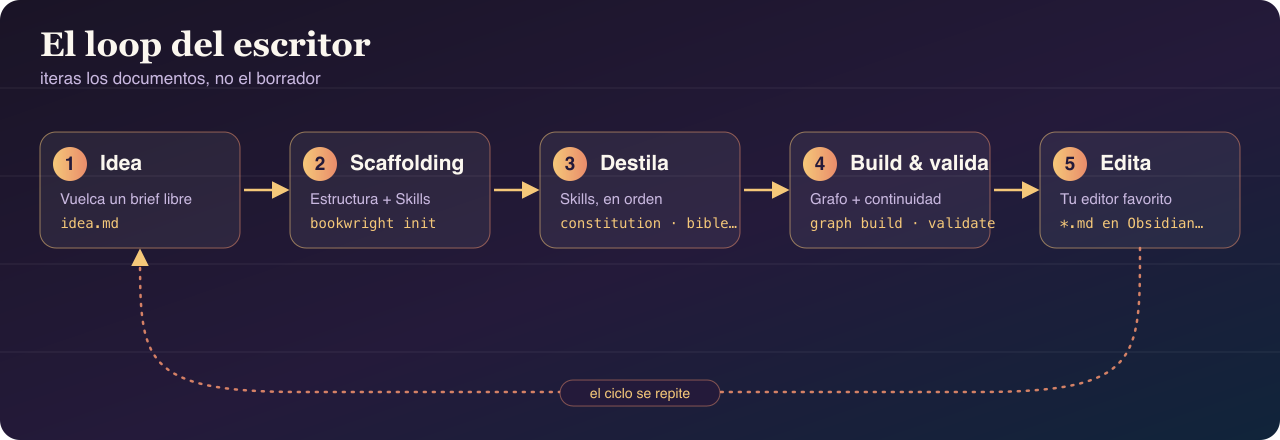
From the first pass onward, you work in a loop:
- You discover something that changes the canon (while researching, or
just thinking) → you re-invoke the affected skill (
/bookwright-bible,/bookwright-outline…). The generative skills update in place: they respect your prose and the pending items you've already resolved, and only fill in what's still open. They don't rewrite what you already decided. - You rethink the structure → you go back to
/bookwright-outline, and/bookwright-analyzepoints out what was left dangling across constitution, bible, outline and scenes (pre-draft consistency). - You already have prose and want to know what you broke →
bookwright validate(deterministic check over the graph) and/bookwright-continuity(the manuscript against the bible: compliance, arcs, chronology, post-draft). - For fact-based work, research is its own sub-loop:
/bookwright-researchdocuments findings with provenance and marks which ones are anchors that constrain the fiction;/bookwright-verifychecks the already-written prose against those anchors (anachronisms, procedural errors). - Forgot where you were?
bookwright focus setpins your current objective andbookwright statusderives the state and the next step.
The engine behind all of this is the [PENDING] protocol: you leave a
marked gap, keep moving, and resolve it once the material is ripe. An
unanswered [PENDING] is treated as undecided, not as an answer — so a
voice declaration still left as [PENDING: …] stays invisible to the
continuity checks until you actually decide it, never a false alarm.
/bookwright-clarify lists the project's open questions for you at any
time. There is no "definitive" pass: there's a manuscript and a graph
that converge iteration by iteration.
The full walkthrough is in the Tutorial.
Design principles
- Plain text is the source of truth. Manuscript, bible, constitution and graph are Markdown, TOML or Turtle (RDF). Human-auditable, git-diffable, portable.
- Batch, not conversational. You consolidate the input; the skill distills it into a versionable artifact. You iterate on the documents, not the chat. The agent is not a sentence-by-sentence co-writer.
- Agent-agnostic. Skills are materialized as portable
Agent Skills. Bookwright ships two integrations
(
claude,generic); agents like Codex, Cursor or Copilot consume thegenericoutput directly. - GOLEM underneath. The narrative graph uses the GOLEM ontology serialized in Turtle. You don't need to touch RDF to use Bookwright.
Roadmap and out of scope
Bookwright already covers research with provenance, context orchestration (authored focus and derived state with a next step) and ingestion of the narrative structure: units, functions and sequences, with optional typing against the Propp and Greimas vocabularies and a narrative-continuity validator. The durable intent across versions lives in bookwright-roadmap.md.
Demand-pulled horizon (no version assigned), activated only by a concrete trigger, never as speculative plumbing: vector search (activated by a real multi-book / series corpus or a measured structural-recall failure) and export to EPUB / PDF / print (activated once the end-to-end flow is proven on a real book).
Cancelled (owner's decision), don't ask for it: genre presets /
template packages; the Grafeo / GrafeoIndexer engine; integrations
beyond claude and generic; the extension system.
Project documents
Note: the project documentation — the documentation site and the design spec linked below — is currently available in Spanish only. This README is the English-language entry point; the rest of the docs have not been translated yet.
- Documentation site — full user guide (getting started, commands, validation, extending, FAQ).
- bookwright-design.md — the complete design specification.
- bookwright-roadmap.md — the durable intent across versions.
- CONTRIBUTING.md — install, quality gates and how to extend the toolkit (new integration, validator, vocabulary).
- CHANGELOG.md — change history.
License
EUPL-1.2 (European Union Public Licence v. 1.2; the LICENSE file carries the official Spanish and English texts). See NOTICE for attribution.
This license covers the bookwright software only. The content you author with it — story bibles, outlines, manuscripts, and the derived knowledge graphs — remains entirely yours.
1 maintainer

Metadata
1 maintainer
Release files for bookwright-cli 0.5.13
For a detailed explanation of source distributions (sdists) and built distributions (wheels), please see the package formats documentation.
Source distribution (sdist)
| File | Size | Uploaded | |
|---|---|---|---|
| bookwright_cli-0.5.13.tar.gz | 244.6 kB | Details |
Built distribution (wheel)
| File | Interpreter | ABI | Platform | Reset |
|---|---|---|---|---|
| bookwright_cli-0.5.13-py3-none-any.whl | Python 3 | none | any | Details |
Total release size: 575.9 kB
Release files / bookwright_cli-0.5.13.tar.gz
| Download URL | bookwright_cli-0.5.13.tar.gz |
|---|---|
| Size | 244.6 kB |
| Tags | Source |
|
SHA-256 checksum How to use checksums |
3cf912d13e74e0422280dc97d0da6977ce92395796eebc4a0d904465cde2025d
|
|
BLAKE2b-256 checksum How to use checksums |
3de930d5ef8a6ded460a416dd36e88ee9e98ac96f88632e1e300cd28ba0a46bc
|
| Upload date | |
|
Uploaded using Trusted Publishing? What is trusted publishing? |
Yes |
| Uploaded via |
uv/0.11.24 {"installer":{"name":"uv","version":"0.11.24","subcommand":["publish"]},"python":null,"implementation":{"name":null,"version":null},"distro":{"name":"Ubuntu","version":"24.04","id":"noble","libc":null},"system":{"name":null,"release":null},"cpu":null,"openssl_version":null,"setuptools_version":null,"rustc_version":null,"ci":true}
|
Release files / bookwright_cli-0.5.13-py3-none-any.whl
| Download URL | bookwright_cli-0.5.13-py3-none-any.whl |
|---|---|
| Size | 331.3 kB |
| Tags | Python 3 |
|
SHA-256 checksum How to use checksums |
b7fc8e1611f76d9edaa04215afa7a1649bb09eebf276a208afcb12bde5ed5c1b
|
|
BLAKE2b-256 checksum How to use checksums |
3636b439abf9d6da24c86b1a08204937ff20ffb089fe8664ae5380c8be55e4d0
|
| Upload date | |
|
Uploaded using Trusted Publishing? What is trusted publishing? |
Yes |
| Uploaded via |
uv/0.11.24 {"installer":{"name":"uv","version":"0.11.24","subcommand":["publish"]},"python":null,"implementation":{"name":null,"version":null},"distro":{"name":"Ubuntu","version":"24.04","id":"noble","libc":null},"system":{"name":null,"release":null},"cpu":null,"openssl_version":null,"setuptools_version":null,"rustc_version":null,"ci":true}
|














