
Booley
The open-source Agentic Development Environment (ADE) for FPGA and ASIC development




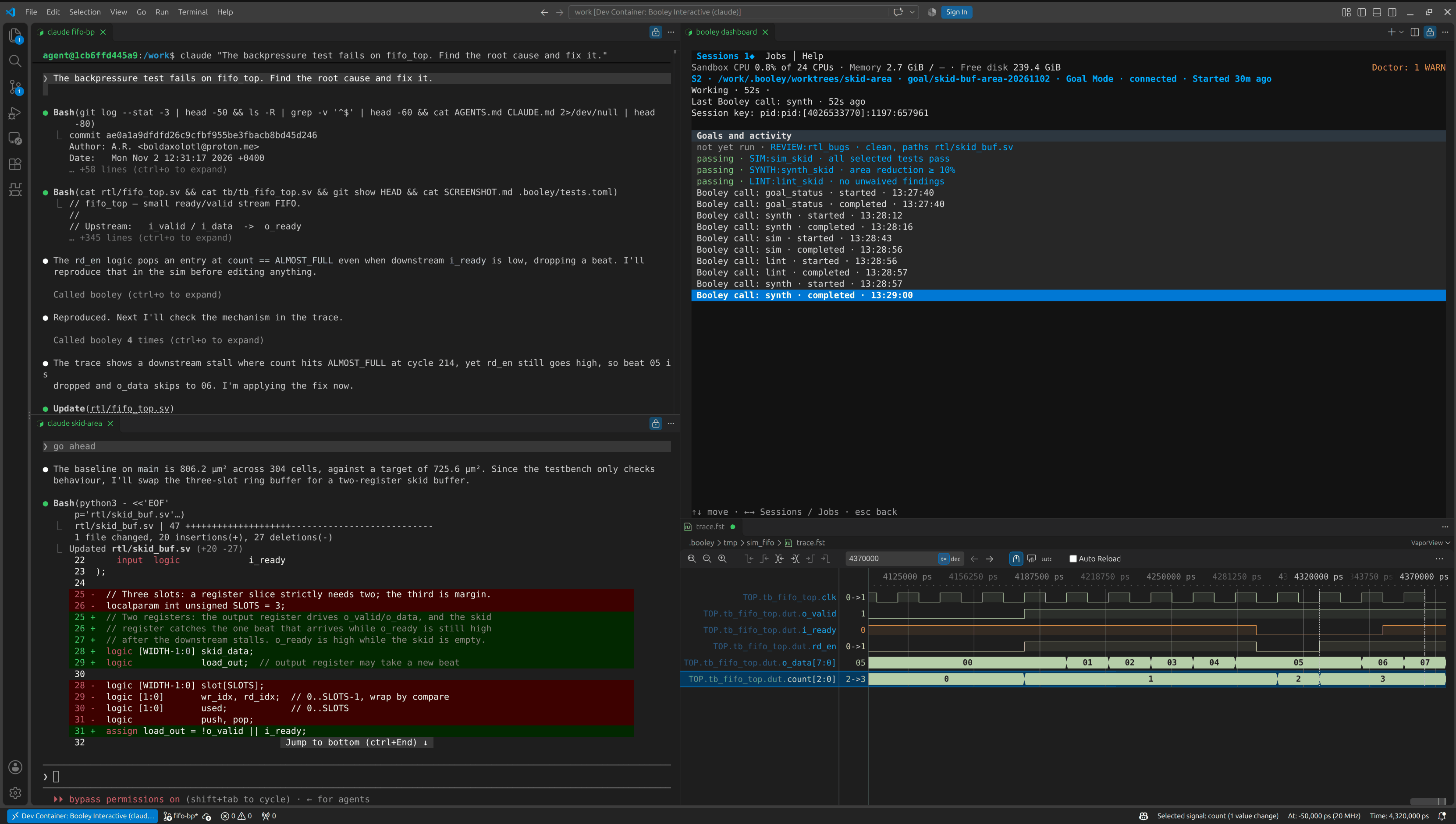
Booley is an agentic development environment (ADE) for hardware: you direct Claude Code or Codex agents while they do the RTL work. Booley runs each Developer Agent in a sandbox, hands it real EDA tools, and checks its work against your acceptance criteria: passing tests, area and timing budgets, cycle counts, coverage, and more.
Website: booley.dev for the full feature tour, videos, and blog.
What it does
- Typed EDA Flows:
sim,lint,synth, andfpgareplace per-repo glue Tcl scripts. Each Flow runs an EDA job end to end and returns a structured result: pass/fail plus metrics such as area, timing, or cycle counts, not just raw logs. Flows are built on FuseSoC, and the interface stays the same across tools and projects:simstayssimwhether it runs Verilator today or Xcelium tomorrow. - Reproducible team environment: Configure the project once, and its Docker environment supplies the same pinned EDA stack, agent tooling, and system dependencies to everyone on the project (why Docker).
- One window for all your agents: RTL work is usually scattered across editors, tool-specific commands, build environments, logs, and waveform viewers. Booley puts your Developer Agent sessions, RTL, terminals, EDA runs, waveforms, and the Booley Dashboard side by side in one VS Code window, so you can direct several agents at once and see what each one is doing.
- Sandboxed Developer Agent: Booley treats the agent like a talented junior engineer. It can write RTL and testbenches, but it is inexperienced with EDA tools, prone to questionable design decisions, and too risky to give unrestricted host access. So the agent and every command it runs stay inside a Docker container with restricted mounts and network access, and its work goes through explicit specifications, automated checks, and human review. That lets it work unattended.
- Goal Mode: You set mandatory Goals up front, such as
SYNTH:synth_fifo (area increase ≤ 10%)orCOVERAGE:sim_fifo (line ≥ 90%, tests all). Goals cover passing tests, lint, area, timing, cycle counts, coverage, mutation testing, and code review. Booley checks each one in deterministic code against fresh recorded Flow results, not against the agent's claim of success (details). - Waveform queries:
bwavelets the agent find, sample, snapshot, and measure real simulation traces. Ask "When diddata_oequal0xDEADBEEF?" and it answers from simulation data instead of guessing from RTL.
The Features page is the complete feature reference.
Quick Start
Three ways in, ordered by how much you want to invest:
- Watch. See an engineer drive Booley on a demo project, start to finish. Zero setup.
- Demo. Open the demo free in your browser, or clone it, then type your first request to the agent.
- Your own project. Full integration on your own RTL.
Watch
Two videos on the Videos page show an engineer driving Booley on a demo project end to end, so you can see the workflow before touching anything.
Demo
Try the demo in browser VS Code with one click. It is free, needs no install, and works on macOS too:

The Codespace fits in GitHub's free monthly Codespaces allowance, and the agent runs GPT-6 Luna on us after a quick GitHub sign-in. Connect your own Claude or ChatGPT account if you want a smarter model. The first launch takes 3-4 minutes while the container image builds. How the free demo works.
Or follow the demo repository's README to run the demo locally, after you install Booley.
Your own project
Follow the Setup guide to integrate Booley with your own RTL project, after you install Booley.
Installation
Booley runs on Windows and Linux (macOS is not supported) for SystemVerilog or Verilog designs. It needs Python 3.11+, Git, Docker, VS Code, and a Claude Code or Codex CLI. With pipx installed:
pipx install booley-rtl
booley bootstrap
The Install guide has the full
requirements, upgrade steps, and what booley bootstrap does.
Next: try the demo or set up your own project.
Supported EDA Tools
Current integrations:
- Simulate / elaborate — Verilator, Icarus Verilog; cocotb testbenches supported
- Lint — Verilator, Verible
- ASIC synthesis (PPA estimate, not tape-out) — logical Yosys or physical Yosys + OpenROAD
- Waveform debug —
bwave(+ VaporView GUI in VS Code) - FPGA implementation — AMD Vivado
- Coming soon — Synopsys VCS, Cadence Xcelium
For exact versions, provisioning, trace support, and platform constraints, see Supported EDA tools. Support for additional commercial EDA tools is coming soon; see the roadmap.
Documentation
- Features
- Architecture
- Setup
- Usage
- Flow reference
- Supported EDA tools
- Limitations
- How Booley is built
Contributing
Booley is still early, so the most useful contribution is trying it and reporting what works, what doesn't, and what you want next. Tell /booley-feedback in your Developer Agent chat; it gathers and redacts any needed evidence. Opinions need no reproduction, and nothing leaves your machine until you approve the exact text (feedback guide, configuration).
Code and documentation contributions are welcome; see CONTRIBUTING.md. Please keep feedback technical and specific; broader debates about AI's effects on society or employment are outside the project's scope.
For suspected vulnerabilities, follow the private reporting process in SECURITY.md instead of opening a public issue.
Acknowledgments
Booley stands on a lot of other people's work. Thank you to:
- The authors of Edalize and FuseSoC, and especially their lead maintainer, Olof Kindgren, for the framework that makes Booley's whole idea of a simple, unified CLI-over-EDA interface possible.
- The author of vcdvcd, Ciro Santilli, for the VCD-parsing work that seeded the
bwaveidea. - The author of wavepeek, another neat waveform-to-CLI EDA tool, for the clean top-level CLI interface that inspired
bwave's top-level CLI (the internals started well before wavepeek and are quite different). - The author of VaporView, Lloyd Ramseyer, for the excellent VS Code waveform viewer that
bwave guidrives for scoped waveform inspection right in VS Code. - The authors of Yosys, Verilator, Icarus Verilog, Verible, and sv2v, for the excellent open-source EDA tools that make Booley possible at all.
- Matt Pocock, for his great agentic software engineering techniques, which shaped how Booley's agents are built and driven.
License
Apache 2.0. See LICENSE for details.
1 maintainer

Metadata
1 maintainer
Release files for booley-rtl 0.4.0
For a detailed explanation of source distributions (sdists) and built distributions (wheels), please see the package formats documentation.
Source distribution (sdist)
| File | Size | Uploaded | Provenance | Actions |
|---|---|---|---|---|
| booley_rtl-0.4.0.tar.gz | 2.8 MB | With provenance | Details for booley_rtl-0.4.0.tar.gz |
Built distribution (wheel)
| File | Interpreter | ABI | Platform | Actions Reset |
|---|---|---|---|---|
| booley_rtl-0.4.0-py3-none-any.whl | Python 3 | none | any | Details for booley_rtl-0.4.0-py3-none-any.whl |
Total release size: 5.7 MB
Release files / booley_rtl-0.4.0.tar.gz
| Download URL | booley_rtl-0.4.0.tar.gz |
|---|---|
| Size | 2.8 MB |
| Tags | Source |
|
SHA-256 checksum How to use checksums |
f7884ed83e712ab28d67eca3726a113fff849f7b438fdaf52820964f05a1e100
|
|
BLAKE2b-256 checksum How to use checksums |
9c75a4c6f4801be1711bc61258d3bcd61fd231de0927116f1062a1b72803e09f
|
| Upload date | |
|
Uploaded using Trusted Publishing? What is trusted publishing? |
Yes |
| Uploaded via |
twine/7.0.0 CPython/3.13.16
|
Provenance
Provenance describes where a file came from. On PyPI, provenance is shared via attestations, which provide a verifiable record of the build or publishing details. View details, limitations and caveats.


PyPI Publish Attestation
PyPI verified that this artifact, at this checksum, originated from the publisher listed below.
Signed by GitHub Actions, verified by PyPI on Nov 3, 2026.
Transparency logRelease files / booley_rtl-0.4.0-py3-none-any.whl
| Download URL | booley_rtl-0.4.0-py3-none-any.whl |
|---|---|
| Size | 2.9 MB |
| Tags | Python 3 |
|
SHA-256 checksum How to use checksums |
32e7923944f9c7865a7abd516143f2c26e287b28d79573610827031d00c51af9
|
|
BLAKE2b-256 checksum How to use checksums |
862a92f48e58da44f4544cd2b5146d38122cd5983e79d3086fcd369371d9e9b7
|
| Upload date | |
|
Uploaded using Trusted Publishing? What is trusted publishing? |
Yes |
| Uploaded via |
twine/7.0.0 CPython/3.13.16
|
Provenance
Provenance describes where a file came from. On PyPI, provenance is shared via attestations, which provide a verifiable record of the build or publishing details. View details, limitations and caveats.
PyPI Publish Attestation
PyPI verified that this artifact, at this checksum, originated from the publisher listed below.
Signed by GitHub Actions, verified by PyPI on Nov 3, 2026.
Transparency logSecurity for booley-rtl 0.4.0
Provenance
Provenance describes where a file came from. On PyPI, provenance is shared via attestations, which provide a verifiable record of the build or publishing details. View details, limitations and caveats.
Full provenance
Both files in this release have been uploaded with provenance metadata.
Attestation for booley_rtl-0.4.0.tar.gz
PyPI Publish Attestation
PyPI verified that this artifact, at this checksum, originated from the publisher listed below.
Signed by GitHub Actions, verified by PyPI on Nov 3, 2026.
Transparency logA note on package security
PyPI is a repository for distributing packages, not a service for auditing them. While third-party security researchers and our staff do their best to detect and remove malicious packages, PyPI cannot guarantee the quality, security or suitability of any given package.
To learn more about protecting yourself from malicious actors, visit our package security documentation.














