
Collection of common tools in Python

Project description
[toc]
bools-0.4.3.2
常用功能集合,更高效的编写代码
安装
pip3 install -U bools
文档
dbc 「数据库连接」
ElasticSearch
支持方便的对ES进行读写操作
兼容ES6,ES7
支持便捷的和pandas互操作
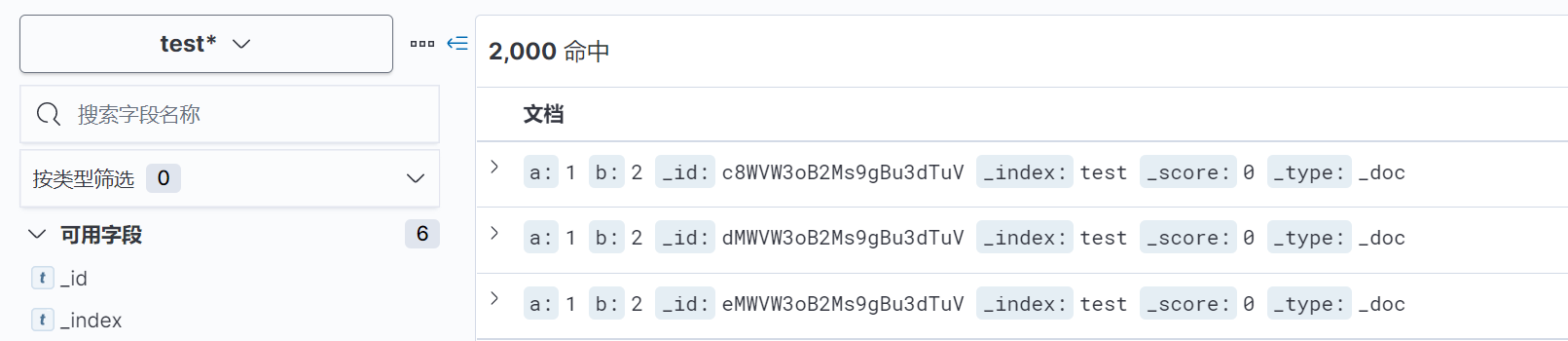
write
>>> from bools.dbc import ElasticSearch
>>> es = ElasticSearch('localhost', 9200)
>>> es.write(index='test', data=[{'a':1,'b':2}]*2000, batch_size=1000)
query、scroll_query
>>> from bools.dbc import ElasticSearch
>>> es = ElasticSearch('localhost', 9200, patch_pandas=True)
>>> es.query('test', {
...             "query": {
...                 "terms": {
...                     "a": [1]
...                 }
...             }
...	    })


>>> es.scroll_query('test', {
...             "query": {
...                 "terms": {
...                     "a": [1]
...                 }
...             }
...         }, batch_size=1000)
pd.read_es、pd.DataFrame.to_es
特性:写入es自动完成类型映射(date,object,number),还可指定numeric_detection完成数值字符串的转换。读取直接转化为DataFrame
>>> from bools.dbc import ElasticSearch
>>> import pandas as pd
>>> es = ElasticSearch('localhost', 9200, patch_pandas=True)
# 数据写入
>>> pd.DataFrame({'v':[4,5,6]}).to_es(index='test')
>>> pd.DataFrame({'v':['3.14','2.4',6]}).to_es(index='test', numeric_detection=True)
>>> pd.DataFrame({'v':[7,8,9],'index':['test-1','test-2','test-1']}).to_es(index_col='index')

# 数据读取
>>> pd.read_es('test', query_body={})   # 读取index="test"的全部数据(自动scroll读取)
InfluxDB
支持方便的对influxdb进行常用操作及基础优化
支持便捷的和pandas互操作
write、query
同Elasticsearch操作
pd.read_influxdb、pd.DataFrame.to_influxdb
特性:自适应time列(字符串,date(有无时区),任意位时间戳)
>>> from bools.dbc import InfluxDB
>>> import pandas as pd
>>> influxdb = InfluxDB(host='localhost', port=8086, database='bowaer', patch_pandas=True)
>>> pd.read_influxdb('select * from test').head()
                           count     src  succ_count
time
2021-07-07 18:07:52+08:00      0  bowaer           0
2021-07-07 18:07:53+08:00      1  bowaer           1
2021-07-07 18:07:54+08:00      2  bowaer           2
2021-07-07 18:07:55+08:00      3  bowaer           3
2021-07-07 18:07:56+08:00      4  bowaer           4
datetime「时间日期处理」
Datetime
默认带有时区信息(Asia/Shanghai),支持和timedelta等互相操作。保留原生datetime.datetime所有方法和属性
有一系列比原生datetime更简洁、高效的与时间字符串交互方式
fromtimestamp
特性:支持任意位数的时间戳
>>> from bools.datetime import Datetime
>>> Datetime.fromtimestamp(1660000000000)
Datetime(2022, 8, 9, 7, 6, 40, tzinfo=tzfile('/usr/share/zoneinfo/Asia/Shanghai'))
from_str
特性:无须指定format,且性能高于strptime(约2倍)
>>> Datetime.from_str('2021-1-1 12:32:24')
Datetime(2021, 1, 1, 12, 32, 24, tzinfo=tzfile('/usr/share/zoneinfo/Asia/Shanghai'))
>>> Datetime.from_str('2021-1-1T12:32')
Datetime(2021, 1, 1, 12, 32, tzinfo=tzfile('/usr/share/zoneinfo/Asia/Shanghai'))
to_str、str
特性:便捷的输出时间字符串的任意部分
>>> Datetime.now().str
'2021-06-18 16:20:23'
>>> Datetime.now().to_str(3,6)
'16:20:30'
from_datetime
将原生datetime转化为Datetime对象
>>> Datetime.from_datetime(datetime.now())
Datetime(2021, 6, 18, 16, 23, 11, 569620, tzinfo=tzfile('/usr/share/zoneinfo/Asia/Shanghai'))
Timedelta
同datetime.timedelta,均可与Datetime互操作
>>> Datetime.now()+Timedelta(days=1)
Datetime(2021, 6, 19, 16, 25, 33, 188782, tzinfo=tzfile('/usr/share/zoneinfo/Asia/Shanghai'))
>>> Datetime.now()+timedelta(hours=1)
Datetime(2021, 6, 18, 17, 25, 43, 40131, tzinfo=tzfile('/usr/share/zoneinfo/Asia/Shanghai'))
set_default_tz
通过tz_id修改Datetime默认时区
>>> from bools.datetime import set_default_tz
>>> set_default_tz('Asia/Shanghai')
set_default_format
设置Datetime.to_str()输出的时间字符串格式,格式同strptime format
>>> from bools.datetime import set_default_format
>>> set_default_format('%Y-%m-%d %H:%M:%S')
log「日志输出」
Logger
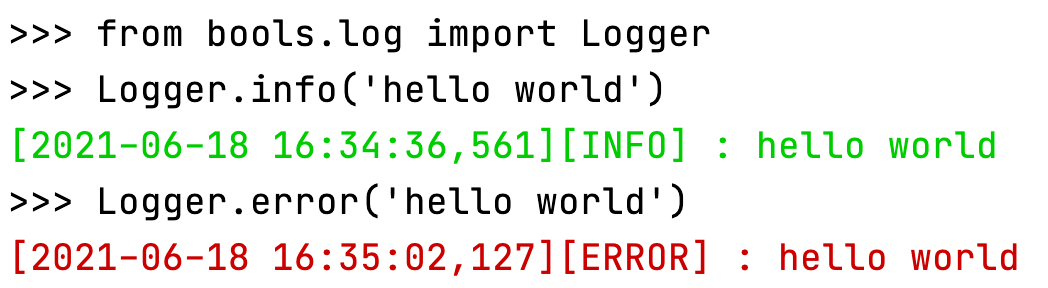
配置简单,输出带颜色区分的日志(通过ascii esc实现)
debug:灰色,info:绿色,warning:黄色,error:红色
>>> from bools.log import Logger
>>> # Logger.init("DEBUG") 可通过init调整输出日志级别,默认输出>INFO
>>> Logger.info('hello world')
[2021-06-18 16:34:36,561][INFO] : hello world
>>> Logger.error('hello world')
[2021-06-18 16:35:02,127][ERROR] : hello world
functools「工具函数」
parallel
多进程处理函数。特性:支持传递lambda函数和无参函数
>>> from bools.functools import parallel
>>> parallel(lambda x:x**2)(range(4))
[0, 1, 4, 9]
>>> parallel(lambda :2, count=2)(range(4))
[2, 2, 2, 2]
catch
异常处理装饰器,可传入闭包控制异常后执行函数或在异常后返回值
>>> from bools.functools import catch
>>> result = catch(except_return=1, log='计算报错')(lambda :1/0)()
[2021-06-18 16:39:33,449][ERROR] : 计算报错
Traceback (most recent call last):
  File "/Users/bowaer/PycharmProjects/bools/bools/functools/functools.py", line 10, in wrapper
    return func(*args, **kwargs)
  File "<stdin>", line 1, in <lambda>
ZeroDivisionError: division by zero
>>> result
1
>>> @catch(except_return=2)
... def func(n):
...  return 1/n
...
>>> func(2)
0.5
>>> func(0)
[2021-06-18 16:41:31,912][ERROR] :
Traceback (most recent call last):
  File "/Users/bowaer/PycharmProjects/bools/bools/functools/functools.py", line 10, in wrapper
    return func(*args, **kwargs)
  File "<stdin>", line 3, in func
ZeroDivisionError: division by zero
2
timeit
函数时间统计装饰器
>>> from bools.functools import timeit
>>> costs = timeit(count=10, return_costs=True)(time.sleep)(0.1)
[2021-06-18 17:29:37,064][INFO] : 平均执行时间: 0.103s
>>> costs
[0.10266709327697754, 0.105194091796875, 0.10502386093139648, 0.10092806816101074, 0.10246896743774414, 0.10508394241333008, 0.10145998001098633, 0.10406613349914551, 0.10434389114379883, 0.10046100616455078]
>>> from bools.functools import timeit
>>> @timeit
... def test():
...  for i in range(1000000):
...   'hello'+'world'
...
>>> test()
[2021-06-18 18:03:16,937][INFO] : 平均执行时间: 0.019s
版本历史
0.4.0
增加dbc(数据库连接)包,包含Elasticsearch模块
支持es读写以及对应pandas的操作
支持influxdb常用操作及对应pandas操作
优化pandas dataframe写入数据库性能和内存
解决numpy特殊版本下(已知1.19.3)dtype类型in list判断时报Cannot interpret xxxx as a data type
0.3.3
增加并行处理函数parallel,支持传递lambda函数和无参函数
0.3.2
装饰器函数支持兼容无参数使用,即@timeit == @timeit()
catch增加exception参数支持自定义异常捕获类型
0.3.1
functools增加timeit统计函数执行时间
0.3.0
增加functools模块及catch异常处理
0.2.2
修复Datetime和timedelta互操作返回原生datetime对象的问题
0.2.0
增加log模块
0.1.0
增加datetime模块
Release history Release notifications | RSS feed


Download files
Download the file for your platform. If you're not sure which to choose, learn more about installing packages.
Source Distribution
Built Distribution
Filter files by name, interpreter, ABI, and platform.
If you're not sure about the file name format, learn more about wheel file names.
Copy a direct link to the current filters
File details
Details for the file bools-0.5.0.tar.gz.
File metadata
- Download URL: bools-0.5.0.tar.gz
- Upload date:
- Size: 17.7 kB
- Tags: Source
- Uploaded using Trusted Publishing? No
- Uploaded via: twine/3.4.1 importlib_metadata/3.10.1 pkginfo/1.7.0 requests/2.25.1 requests-toolbelt/0.9.1 tqdm/4.49.0 CPython/3.7.4
File hashes
| Algorithm | Hash digest | |
|---|---|---|
| SHA256 |
a57f8ccc23b6cfc94042ca41172ff02a0032b41f6a373f8972e9903e8a99cd22
|
|
| MD5 |
a8df3a39b2f97556568f3c3f51c36796
|
|
| BLAKE2b-256 |
81298bf4d8a67b9c2c9ff0ff05f0bda99a72933b487fcd453824c4f2c4fa87be
|
File details
Details for the file bools-0.5.0-py3-none-any.whl.
File metadata
- Download URL: bools-0.5.0-py3-none-any.whl
- Upload date:
- Size: 20.4 kB
- Tags: Python 3
- Uploaded using Trusted Publishing? No
- Uploaded via: twine/3.4.1 importlib_metadata/3.10.1 pkginfo/1.7.0 requests/2.25.1 requests-toolbelt/0.9.1 tqdm/4.49.0 CPython/3.7.4
File hashes
| Algorithm | Hash digest | |
|---|---|---|
| SHA256 |
69401f015b67b8b80d5a884b09ea074d836a22d025540a4e121bdcf6cc0beb8d
|
|
| MD5 |
0437777c5cb35a37ac6f2e5a3acb6558
|
|
| BLAKE2b-256 |
ae4d28420f10a19b1158bb8838559d052c7a52859128959ec10d10b798703fb6
|






