
[toc]
bools-0.4.3.2
常用功能集合,更高效的编写代码
安装
pip3 install -U bools
文档
dbc 「数据库连接」
ElasticSearch
支持方便的对ES进行读写操作
兼容ES6,ES7
支持便捷的和pandas互操作
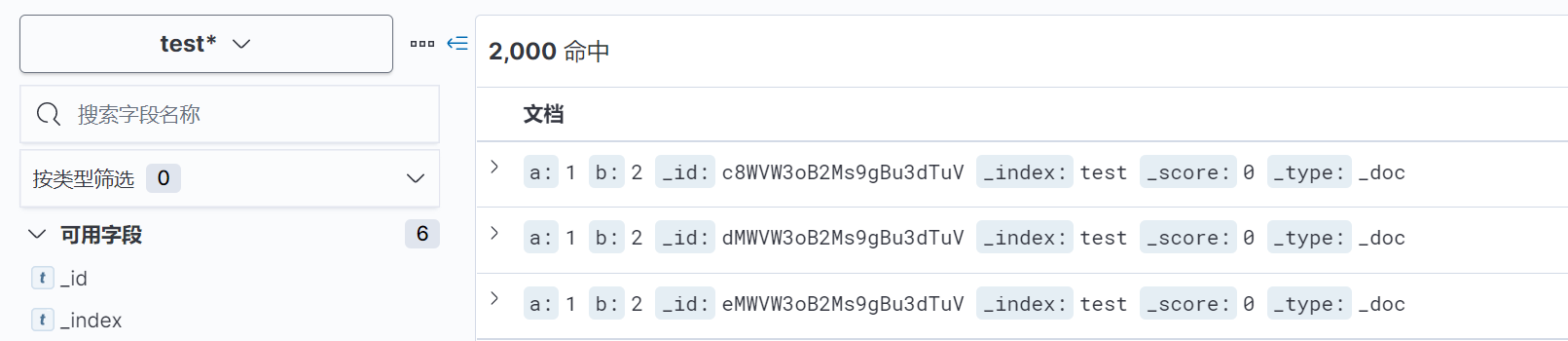
write
>>> from bools.dbc import ElasticSearch
>>> es = ElasticSearch('localhost', 9200)
>>> es.write(index='test', data=[{'a':1,'b':2}]*2000, batch_size=1000)
query、scroll_query
>>> from bools.dbc import ElasticSearch
>>> es = ElasticSearch('localhost', 9200, patch_pandas=True)
>>> es.query('test', {
...             "query": {
...                 "terms": {
...                     "a": [1]
...                 }
...             }
...	    })


>>> es.scroll_query('test', {
...             "query": {
...                 "terms": {
...                     "a": [1]
...                 }
...             }
...         }, batch_size=1000)
pd.read_es、pd.DataFrame.to_es
特性:写入es自动完成类型映射(date,object,number),还可指定numeric_detection完成数值字符串的转换。读取直接转化为DataFrame
>>> from bools.dbc import ElasticSearch
>>> import pandas as pd
>>> es = ElasticSearch('localhost', 9200, patch_pandas=True)
# 数据写入
>>> pd.DataFrame({'v':[4,5,6]}).to_es(index='test')
>>> pd.DataFrame({'v':['3.14','2.4',6]}).to_es(index='test', numeric_detection=True)
>>> pd.DataFrame({'v':[7,8,9],'index':['test-1','test-2','test-1']}).to_es(index_col='index')

# 数据读取
>>> pd.read_es('test', query_body={})   # 读取index="test"的全部数据(自动scroll读取)
InfluxDB
支持方便的对influxdb进行常用操作及基础优化
支持便捷的和pandas互操作
write、query
同Elasticsearch操作
pd.read_influxdb、pd.DataFrame.to_influxdb
特性:自适应time列(字符串,date(有无时区),任意位时间戳)
>>> from bools.dbc import InfluxDB
>>> import pandas as pd
>>> influxdb = InfluxDB(host='localhost', port=8086, database='bowaer', patch_pandas=True)
>>> pd.read_influxdb('select * from test').head()
                           count     src  succ_count
time
2021-07-07 18:07:52+08:00      0  bowaer           0
2021-07-07 18:07:53+08:00      1  bowaer           1
2021-07-07 18:07:54+08:00      2  bowaer           2
2021-07-07 18:07:55+08:00      3  bowaer           3
2021-07-07 18:07:56+08:00      4  bowaer           4
datetime「时间日期处理」
Datetime
默认带有时区信息(Asia/Shanghai),支持和timedelta等互相操作。保留原生datetime.datetime所有方法和属性
有一系列比原生datetime更简洁、高效的与时间字符串交互方式
fromtimestamp
特性:支持任意位数的时间戳
>>> from bools.datetime import Datetime
>>> Datetime.fromtimestamp(1660000000000)
Datetime(2022, 8, 9, 7, 6, 40, tzinfo=tzfile('/usr/share/zoneinfo/Asia/Shanghai'))
from_str
特性:无须指定format,且性能高于strptime(约2倍)
>>> Datetime.from_str('2021-1-1 12:32:24')
Datetime(2021, 1, 1, 12, 32, 24, tzinfo=tzfile('/usr/share/zoneinfo/Asia/Shanghai'))
>>> Datetime.from_str('2021-1-1T12:32')
Datetime(2021, 1, 1, 12, 32, tzinfo=tzfile('/usr/share/zoneinfo/Asia/Shanghai'))
to_str、str
特性:便捷的输出时间字符串的任意部分
>>> Datetime.now().str
'2021-06-18 16:20:23'
>>> Datetime.now().to_str(3,6)
'16:20:30'
from_datetime
将原生datetime转化为Datetime对象
>>> Datetime.from_datetime(datetime.now())
Datetime(2021, 6, 18, 16, 23, 11, 569620, tzinfo=tzfile('/usr/share/zoneinfo/Asia/Shanghai'))
Timedelta
同datetime.timedelta,均可与Datetime互操作
>>> Datetime.now()+Timedelta(days=1)
Datetime(2021, 6, 19, 16, 25, 33, 188782, tzinfo=tzfile('/usr/share/zoneinfo/Asia/Shanghai'))
>>> Datetime.now()+timedelta(hours=1)
Datetime(2021, 6, 18, 17, 25, 43, 40131, tzinfo=tzfile('/usr/share/zoneinfo/Asia/Shanghai'))
set_default_tz
通过tz_id修改Datetime默认时区
>>> from bools.datetime import set_default_tz
>>> set_default_tz('Asia/Shanghai')
set_default_format
设置Datetime.to_str()输出的时间字符串格式,格式同strptime format
>>> from bools.datetime import set_default_format
>>> set_default_format('%Y-%m-%d %H:%M:%S')
log「日志输出」
Logger
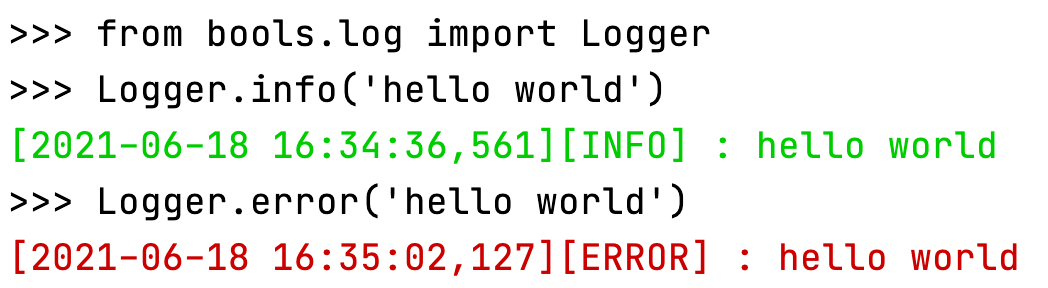
配置简单,输出带颜色区分的日志(通过ascii esc实现)
debug:灰色,info:绿色,warning:黄色,error:红色
>>> from bools.log import Logger
>>> # Logger.init("DEBUG") 可通过init调整输出日志级别,默认输出>INFO
>>> Logger.info('hello world')
[2021-06-18 16:34:36,561][INFO] : hello world
>>> Logger.error('hello world')
[2021-06-18 16:35:02,127][ERROR] : hello world
functools「工具函数」
parallel
多进程处理函数。特性:支持传递lambda函数和无参函数
>>> from bools.functools import parallel
>>> parallel(lambda x:x**2)(range(4))
[0, 1, 4, 9]
>>> parallel(lambda :2, count=2)(range(4))
[2, 2, 2, 2]
catch
异常处理装饰器,可传入闭包控制异常后执行函数或在异常后返回值
>>> from bools.functools import catch
>>> result = catch(except_return=1, log='计算报错')(lambda :1/0)()
[2021-06-18 16:39:33,449][ERROR] : 计算报错
Traceback (most recent call last):
  File "/Users/bowaer/PycharmProjects/bools/bools/functools/functools.py", line 10, in wrapper
    return func(*args, **kwargs)
  File "<stdin>", line 1, in <lambda>
ZeroDivisionError: division by zero
>>> result
1
>>> @catch(except_return=2)
... def func(n):
...  return 1/n
...
>>> func(2)
0.5
>>> func(0)
[2021-06-18 16:41:31,912][ERROR] :
Traceback (most recent call last):
  File "/Users/bowaer/PycharmProjects/bools/bools/functools/functools.py", line 10, in wrapper
    return func(*args, **kwargs)
  File "<stdin>", line 3, in func
ZeroDivisionError: division by zero
2
timeit
函数时间统计装饰器
>>> from bools.functools import timeit
>>> costs = timeit(count=10, return_costs=True)(time.sleep)(0.1)
[2021-06-18 17:29:37,064][INFO] : 平均执行时间: 0.103s
>>> costs
[0.10266709327697754, 0.105194091796875, 0.10502386093139648, 0.10092806816101074, 0.10246896743774414, 0.10508394241333008, 0.10145998001098633, 0.10406613349914551, 0.10434389114379883, 0.10046100616455078]
>>> from bools.functools import timeit
>>> @timeit
... def test():
...  for i in range(1000000):
...   'hello'+'world'
...
>>> test()
[2021-06-18 18:03:16,937][INFO] : 平均执行时间: 0.019s
版本历史
0.4.0
增加dbc(数据库连接)包,包含Elasticsearch模块
支持es读写以及对应pandas的操作
支持influxdb常用操作及对应pandas操作
优化pandas dataframe写入数据库性能和内存
解决numpy特殊版本下(已知1.19.3)dtype类型in list判断时报Cannot interpret xxxx as a data type
0.3.3
增加并行处理函数parallel,支持传递lambda函数和无参函数
0.3.2
装饰器函数支持兼容无参数使用,即@timeit == @timeit()
catch增加exception参数支持自定义异常捕获类型
0.3.1
functools增加timeit统计函数执行时间
0.3.0
增加functools模块及catch异常处理
0.2.2
修复Datetime和timedelta互操作返回原生datetime对象的问题
0.2.0
增加log模块
0.1.0
增加datetime模块
1 maintainer

Release files for bools 0.5.0
For a detailed explanation of source distributions (sdists) and built distributions (wheels), please see the package formats documentation.
Source distribution (sdist)
| File | Size | Uploaded | |
|---|---|---|---|
| bools-0.5.0.tar.gz | 17.7 kB | Details |
Built distribution (wheel)
| File | Interpreter | ABI | Platform | Reset |
|---|---|---|---|---|
| bools-0.5.0-py3-none-any.whl | Python 3 | none | any | Details |
Total release size: 38.1 kB
Release files / bools-0.5.0.tar.gz
| Download URL | bools-0.5.0.tar.gz |
|---|---|
| Size | 17.7 kB |
| Tags | Source |
|
SHA-256 checksum How to use checksums |
a57f8ccc23b6cfc94042ca41172ff02a0032b41f6a373f8972e9903e8a99cd22
|
|
BLAKE2b-256 checksum How to use checksums |
81298bf4d8a67b9c2c9ff0ff05f0bda99a72933b487fcd453824c4f2c4fa87be
|
| Upload date | |
|
Uploaded using Trusted Publishing? What is trusted publishing? |
No |
| Uploaded via |
twine/3.4.1 importlib_metadata/3.10.1 pkginfo/1.7.0 requests/2.25.1 requests-toolbelt/0.9.1 tqdm/4.49.0 CPython/3.7.4
|
Release files / bools-0.5.0-py3-none-any.whl
| Download URL | bools-0.5.0-py3-none-any.whl |
|---|---|
| Size | 20.4 kB |
| Tags | Python 3 |
|
SHA-256 checksum How to use checksums |
69401f015b67b8b80d5a884b09ea074d836a22d025540a4e121bdcf6cc0beb8d
|
|
BLAKE2b-256 checksum How to use checksums |
ae4d28420f10a19b1158bb8838559d052c7a52859128959ec10d10b798703fb6
|
| Upload date | |
|
Uploaded using Trusted Publishing? What is trusted publishing? |
No |
| Uploaded via |
twine/3.4.1 importlib_metadata/3.10.1 pkginfo/1.7.0 requests/2.25.1 requests-toolbelt/0.9.1 tqdm/4.49.0 CPython/3.7.4
|














