
Light and Fast ETL Framework

Project description
Boomba - ETL Pipeline Framework
Boomba is a lightweight and efficient ETL pipeline framework designed to simplify and automate the process of data extraction, transformation, and loading (ETL). With Boomba, you can easily create and manage data pipelines while ensuring high performance and flexibility.
Features:
[Lightweight]
- A lightweight framework with approximately 3,000 lines of code
- Minimal external dependencies, primarily built with standard libraries
[User-Friendly]
- Simple task definition through declarative programming style
- Intuitive, high-level API
[Structured]
- A structured architecture from schema design to scheduling
- Systematic design with maintainability and scalability in mind
- Intuitive management of jobs, schedules, directories, and file paths through metadata modeling
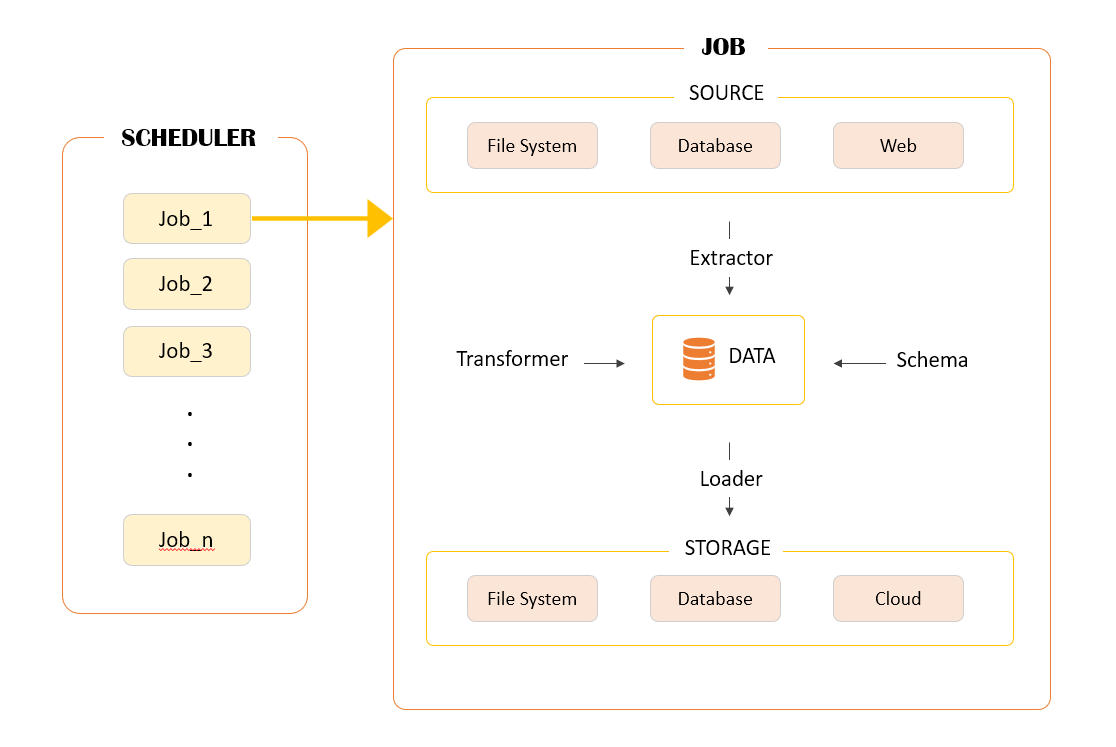
Below is the general architecture of the Boomba framework.
Beta Version:
This is a beta version of Boomba. Please note that some features may be subject to change as I continue to refine and improve the framework.
Installation:
$ pip install boomba
Quick Start:
1. Start Project
First, create a directory for the project. Then, run the CLI command to start the project from that directory. Once this process is complete, the basic directory structure and configuration files will be created.
- Note: If the directory where the project is to be created is not empty, the project will not be created.
$ mkdir my_project
$ cd my_project
$ boomba startproject
$ ls
... config  data  log
The directory structure will be as follows:
project:.
├─config
│  └─settings.py
├─data
├─log
2. Configuration
Now, open settings.py in the config directory. You need to configure the basic settings for the project here. There aren't many settings to configure, so take your time reading through the items below and adjust them according to your situation.
[BRIEF]
A. DEBUG_MODE
- Description: Determines whether debug mode is enabled
- Values: True (outputs all messages) / False (logs only error messages)
B. JOB_DATE_FORMAT
- Description: Date format for scheduling start and end dates
- Format: YYYY-MM-DD, YYYY MM DD, YYYY_MM_DD (Allowed delimiters: -, _, space)
C. FILE_DATE_FORMAT
- Description: Date format for file storage during ETL operations
- Format: Same as JOB_DATE_FORMAT
D. DATABASE
- Description: Database configuration
- Values: Differentiates between Boomba system DB and extraction/loading DB
E. BASE_DB
- Description: Key for the primary database
- Example: mydb
F. FILE_SYSTEM
- Description: File system for data storage
- Values: local, s3
- Additional Fields:
- fs_type: File system type
- allow_overwrite: Allow file overwrite (True/False)
G. BASE_FS
- Description: Key for the primary file system
- Example: myfs
[DETAIL]
-
DEBUG_MODE
- Can be set to a boolean value (True, False). When set to True, all log levels are displayed on the console, and messages at the error level or above are recorded in the log file. When set to False, only messages at the error level or higher are saved in the log file, and no console output is generated.
-
JOB_DATE_FORMAT
- This represents the date format for the start and end dates when configuring schedules. You can set it according to your preference using the ISO format (e.g., YYYYMMDD). Only the special characters -, _, and space are allowed. Therefore, formats such as YYYY-MM-DD or YYYY MM DD HH-mm-ss are permitted, but YYYYMMDD HH:mm:dd or HH.mm.ss are not allowed.
-
FILE_DATE_FORMAT
- This specifies the date format for file names, which is crucial during the load phase of ETL processes. Since all ETL tasks conclude with data loading, the default setting stores data based on the current date and time. Configure this setting to a format that makes it easier for you to check later. As with JOB_DATE_FORMAT, only the special characters -, _, and space are allowed.
-
DATABASE
- Databases can be categorized into two main types:
-
Boomba System Database: This stores information such as tasks, schedules, job queues, and file paths. The default setting uses SQLite, but you can configure it to use any database you prefer.
-
Extraction/Load Database: You can configure multiple databases as data sources since data can come from various locations. Note that the keys in the DATABASE dictionary serve as identifiers for these databases. Choose names that are easy for you to remember. Example database configurations are provided in the default settings file for your reference.
-
- Databases can be categorized into two main types:
-
BASE_DB
- This setting determines the key for the default database used by the Boomba system. If you've configured a database with the key mydb in the DATABASE dictionary and want to use it as the default, set BASE_DB to mydb.
-
FILE_SYSTEM
- This setting specifies the file system to be used for data storage. If you only store data in a database, there's no need to configure this. By default, local storage and cloud storage (currently only S3) are supported. For cloud storage, authentication credentials and bucket information are required. Examples are included in the settings file for your reference. Additional details are as follows:
- fs_type (str): Choose either local or s3.
- allow_overwrite (bool): Determines whether file overwriting is permitted.
- This setting specifies the file system to be used for data storage. If you only store data in a database, there's no need to configure this. By default, local storage and cloud storage (currently only S3) are supported. For cloud storage, authentication credentials and bucket information are required. Examples are included in the settings file for your reference. Additional details are as follows:
-
BASE_FS
- Similar to BASE_DB, this setting specifies the key for the default file system.
3. Database initiation
Once the configuration is complete, it's time to initialize the database you configured. Running the command below will create the essential tables for the system. This task needs to be performed only once when starting the project, so there's no need to worry about it afterward.
$ boomba initdb
4. Create Pipeline
Now it's time to create a pipeline for your tasks. Use the command below to add a new pipeline:
$ boomba createpipe <pipe_name>
If you create a project with the name 'my_pipe,' a new directory called 'my_pipe' will appear in the project root directory. Inside it, the following files will be included by default. The usage of these files will be explained below.
project:.
├─config
│  └─settings.py
├─data
├─log
└─pipeline
    └─first_pipe
        └─extraction.py
        └─load.py
        └─schedule.py
        └─schema.py
        └─transformation.py
[PIPELINE_DIRECTORY]
- extraction.py
- load.py
- schedule.py
- schema.py
- transformation.py
If you've completed up to this point, you are now ready to officially start the project. Refer to the following items to finalize your ETL tasks!
USAGE(Work ETL Job):
1. Schema
The schema.py file is not mandatory but is an important step for maintaining data stability. This is particularly crucial since the data is stored by date according to specific schedules, which helps prevent errors when merging and analyzing it later.
To get started, import the following two modules:
from boomba.core.dtypes import Dtype
from boomba.core.schema import Schema
Dtype is a class used to specify data types, based on Polars data types. Since the Boomba project currently relies on Polars, being familiar with this library in advance will allow you to experience faster data processing. You can now use this module to define schemas as shown below.
class MySchema(Schema):
    id = Dtype.Int32()
    name = Dtype.String()
Here, 'id' and 'name' become the column names of the DataFrame. Therefore, you only need to declaratively write the column names for your target data. All Polars data types, except container types, are supported. You can explore the available types using your IDE's autocomplete feature.
2. Extraction
Now it's time to extract data, open extraction.py. Currently, two types of extractors are available: a database extractor and an API extractor (file extraction will be added soon).
from boomba.core.etl import DBExtractor, APIExtractor
The DBExtractor class is used to extract data from a database, while the APIExtractor class extracts data through API calls. Use these classes according to your specific requirements. You can define your extraction tasks in a declarative manner, as shown below:
class UserRawData(DBExractor):
    db_name = 'mydb'
    query = '''
    SELECT *
    FROM sales
    WHERE price = :price
    '''
    query_params = {'price': 199}
    schema = MySchema

class PriceRawData(APIExtractor):
    url = 'https://some.homepage.com'
    method = 'post'
    payload = {'product': 'computer'}
The class name serves as a key to distinguish data during transformation tasks later, so make sure to remember it. Each class requires specific attributes to be set, as described below:
[DBExractor]
- db_name : (Required) The name of the database to extract data from. This should match the key value defined in your configuration file.
- query : (Required) The query to extract data.
- query_param : (Optional) Use this if the query requires parameters. This should be in dictionary format.
- schema : (Optional) You can use a defined schema here. Ensure that you import the schema class from your schema file. Note that you must provide the class itself, not an instance (e.g., use SomeSchema instead of SomeSchema()).
[APIExtractor]
- url : (Required) The API address to extract data from.
- method : (Required) The HTTP method to use.
- payload : (Optional) Provide this value in dictionary format for POST requests.
3. Trasformation
Now, open the transformation.py file and import the following two modules. Of course, you should also import the Extractor classes you created earlier!
from boomba.core.etl import Transformer
import polars as pl

from pipeline.<your_pipeline_name>.extractor import <YourClass>
All data processing is fundamentally based on Polars DataFrames. You may also convert Polars DataFrames to Pandas DataFrames for processing if necessary. However, the final result must always be returned as a Polars DataFrame, as shown below:
class MyTransformer(Transformer):
    extractor = [Sales, User]

    def process_data(self) -> pl.DataFrame:
        # this method must be implemented.
        sales = self.data['Sales']
        user = self.data['User']
        data = sales.join(user, on='id', how='inner')
        return data
The only attribute that needs to be defined here is extractor. Simply specify the classes you defined earlier. In the example above, multiple classes are listed, but you can also define just a single class if that suits your needs.
The data extracted by the defined Extractor classes is stored in the data attribute. The data attribute is of type dict[str, pl.DataFrame], where the key is the name of your Extractor class. As shown in the example, you can access the data with expressions like self.data['Sales'].
A critical point to note is that, unlike previous tasks where only attributes were declared, this class requires you to implement the process_data method. In the example above, two tables were simply joined, and the result was returned as a Polars DataFrame.
4. Load
To define a loading task, open the load.py file and import the following modules. Don't forget to import your Transformer class as well! If a schema is defined, make sure to use it too.
from boomba.core.etl import FSLoader, DBLoader

from pipeline.<your_pipe_name>.transformation import <YourTransformer>
from pipeline.<your_pipe_name>.schema import <YourSchema>
Loading tasks are categorized into filesystem and database operations. Choose the appropriate one based on your requirements and write the code as follows:
class FirstLoader(FSLoader):
    fs_name = 'myfs'
    transformer = MyTransformer
    schema = <YourSchema>
    cllection = 'my_data'
    file_name = 'my_file'

class SecondLoader(FSLoader):
    fs_name = 'myfs2'
    transformer = MyTransformer
    schema = <YourSchema>
    cllection = 'my_data'
    file_name = 'my_file'
    bucket = 'my_bucket'

class ThirdLoader(DBLoader):
    db_name = 'mydb'
    transformer = MyTransformer
    table_name = 'my_table'
    schema = <YourSchema>
This example includes three loader classes, explained as follows:
A. FirstLoader
This is an example for storing data locally. Use one of the keys defined in the FILE_SYSTEM section of the configuration file for the fs_name value. If you do not specify a value, the value set as BASE_FS will be used by default. Specify your transformer and schema classes. Note that schema is optional and can be omitted.
The collection attribute functions similarly to a table in a database and determines the directory where data will be saved. This is a required setting. The file_name attribute is optional; if not specified, the data will be saved with a filename in the format YYYYMMDD_HHmm based on the completion time of the task. This date format can be customized in the configuration file under FILE_DATE_FORMAT.
[Required and Optional Attributes]
- fs_name (optional): Key of the target filesystem. Default = value specified in BASE_FS (configuration file)
- transformer (required): Your Transformer class
- schema (optional): Your Schema class
- collection (required): A key to distinguish the data. Must be unique within the same pipeline.
- file_name (optional): Name of the file to be saved. Default = completion time in YYYYMMDD_HHmm format.
B. SecondLoader
This example stores data in an S3 cloud. It follows the same basic structure as FirstLoader but includes an additional bucket attribute. If no specific bucket is set, the bucket defined in the configuration file will be used.
[Additional Attribute]
- bucket (optional): Name of the S3 bucket. Default = value specified in the configuration file.
C. ThirdLoader
This example stores data in a database. You only need to specify the target database and table for loading. [Additional Attribute]
- db_name (required): One of the databases defined in the configuration file
- transformer (required): Your Transformer Class
- table_name (required): Table name for loading
- schema (optional): Your Schema class
5. Schedule
Finally, it's time for the last step! Open the schedule.py file to schedule your ETL tasks.
from boomba.core.schedule import register
from pipeline.<your_pipe_name>.load import <YourLoader>
Scheduling is defined using the familiar cron syntax. See the examples below:
register(
    loader=MyLoader,
    name='my_job',
    expr='0/1 * * * *'
)

register(
    loader=MySecondLoader,
    name='my_second_job',
    minute=0,
    hour='1, 2, 3',
    weekday='mon',
    start='20250208',
    end='20250301'
)
[Scheduling Methods]
- Cron Expression: The first example uses a standard cron expression to schedule the task.
- Separate Arguments: The second example specifies scheduling parameters such as minute, hour, and weekday. Note that you cannot use both cron expressions and separate arguments simultaneously.
[Parameter]
- loader: Use the loader class you defined.
- name: This is a unique identifier for the job and must not be duplicated.
- start/end: The start and end arguments define the start and end dates for the job. If not specified, the schedule will run based on the execution time of Boomba and will continue indefinitely without considering an end date.
- Ensure that the date format follows the value you set for JOB_DATE_FORMAT in your configuration file.
6. Execution_Boomba
All tasks are now complete! You can run the server using the following command:
$ boomba run
However, this approach may not be suitable for testing. For instance, if a task runs only once a month, you might have to wait an entire month for the task to complete. To bypass this, you can immediately execute a job with the following command:
$ boomba test <job_name>
This command ignores the schedule and performs the ETL task immediately.
Thank you for reading this tutorial! I hope Boomba helps you manage your ETL tasks more simply and efficiently. If you encounter any bugs or have feature requests, please feel free to share them, and I'll do my best to accommodate them whenever possible.
7. Job Status
To check information related to currently running tasks, connect to the BASE_DB specified in your configuration file.
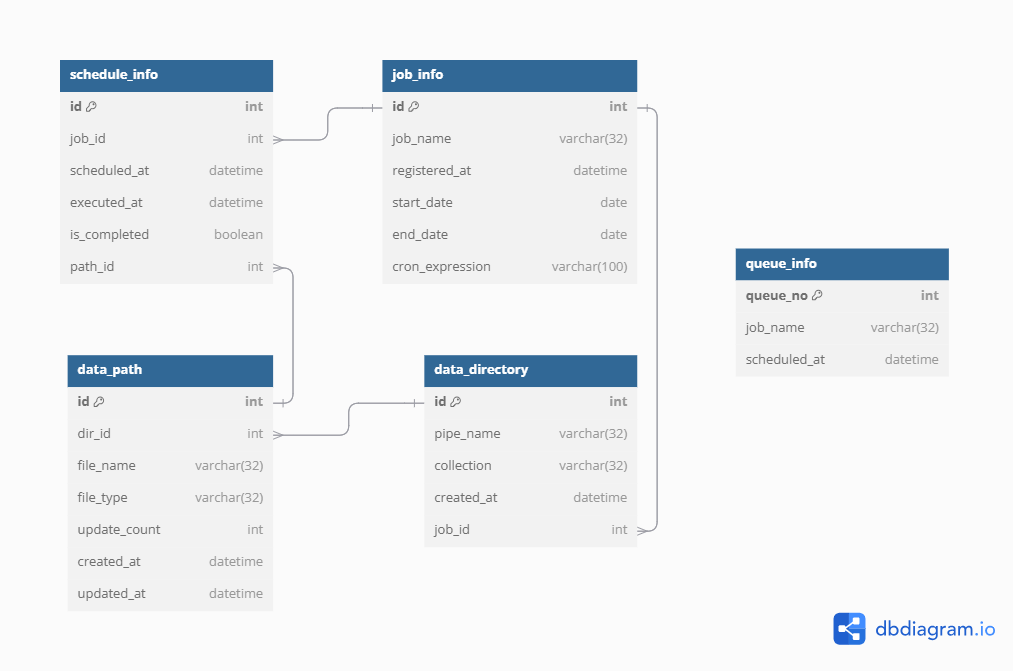
Refer to the following five tables for the necessary information.
-
job_info: Details of registered jobs
- job_name [unique]: Name of the job
- registered_at: Job registration date
- start_date: Scheduled job start date
- end_date: Expected job end date
- cron_expression: Cron expression set during job registration
-
schedule_info: Logs for scheduled and executed tasks
- job_id: Corresponding job_info ID
- scheduled_at: Scheduled execution time
- executed_at: Task completion time
- is_completed: Task completion status
- path_id: Corresponding data_path ID for stored task results
- data_directory: Information about directories for data storage
-
pipe_name: Name of the pipeline
- collection: Collection name
- created_at: Directory creation date
- job_id: Related job_info ID
- data_path: Metadata about stored data files
-
dir_id: Related data_directory ID
- file_name: File name
- file_type: File format
- update_count: Number of updates
- created_at: Creation date
- updated_at: Last update date
- queue_info: Current task queue information
-
queue_no: Queue order
- job_name: Associated job name
- scheduled_at: Task scheduled time
Refer to the ERD of the metadata tables below
License:
BSD 3-Clause License
Release history Release notifications | RSS feed


Download files
Download the file for your platform. If you're not sure which to choose, learn more about installing packages.
Source Distribution
Built Distribution
Filter files by name, interpreter, ABI, and platform.
If you're not sure about the file name format, learn more about wheel file names.
Copy a direct link to the current filters
File details
Details for the file boomba-0.1.0b5.tar.gz.
File metadata
- Download URL: boomba-0.1.0b5.tar.gz
- Upload date:
- Size: 47.2 kB
- Tags: Source
- Uploaded using Trusted Publishing? No
- Uploaded via: twine/6.1.0 CPython/3.13.2
File hashes
| Algorithm | Hash digest | |
|---|---|---|
| SHA256 |
ba08789303b6085343fcacd7baf0a333de4b8fa53a3e7b1f842f0548d115ebc6
|
|
| MD5 |
e685df2f81e021137c120600ea69fec4
|
|
| BLAKE2b-256 |
417fcf581741ea9fe3a94798f0ed91b2ccdc626b4b0dfd85b4c0291da2ce83fc
|
File details
Details for the file boomba-0.1.0b5-py3-none-any.whl.
File metadata
- Download URL: boomba-0.1.0b5-py3-none-any.whl
- Upload date:
- Size: 41.3 kB
- Tags: Python 3
- Uploaded using Trusted Publishing? No
- Uploaded via: twine/6.1.0 CPython/3.13.2
File hashes
| Algorithm | Hash digest | |
|---|---|---|
| SHA256 |
13596aecefae80dfe405dcea7f535e84d5def98e2c675018ead7d02bfe0bcd32
|
|
| MD5 |
cdd855a1feb69cb0a5dfbdd105023799
|
|
| BLAKE2b-256 |
141f7bbe388cf44ccbc24b5c5a3f06895ba90ec8cfed575927ab4c61f55abf35
|






