
🚀 Bootstrap Agent SDK
An agent SDK for config-driven chat agents.






Describe an agent in one JSON file (model, instructions, REST APIs, MCP servers, intents) and get a production-ready chat agent built on LangChain and LangGraph, with tool use, conversation summarization, streaming events for rich UIs and token usage. No graph code to write.
Quick start · .env · API · Tools · Streaming · Configuration · Examples
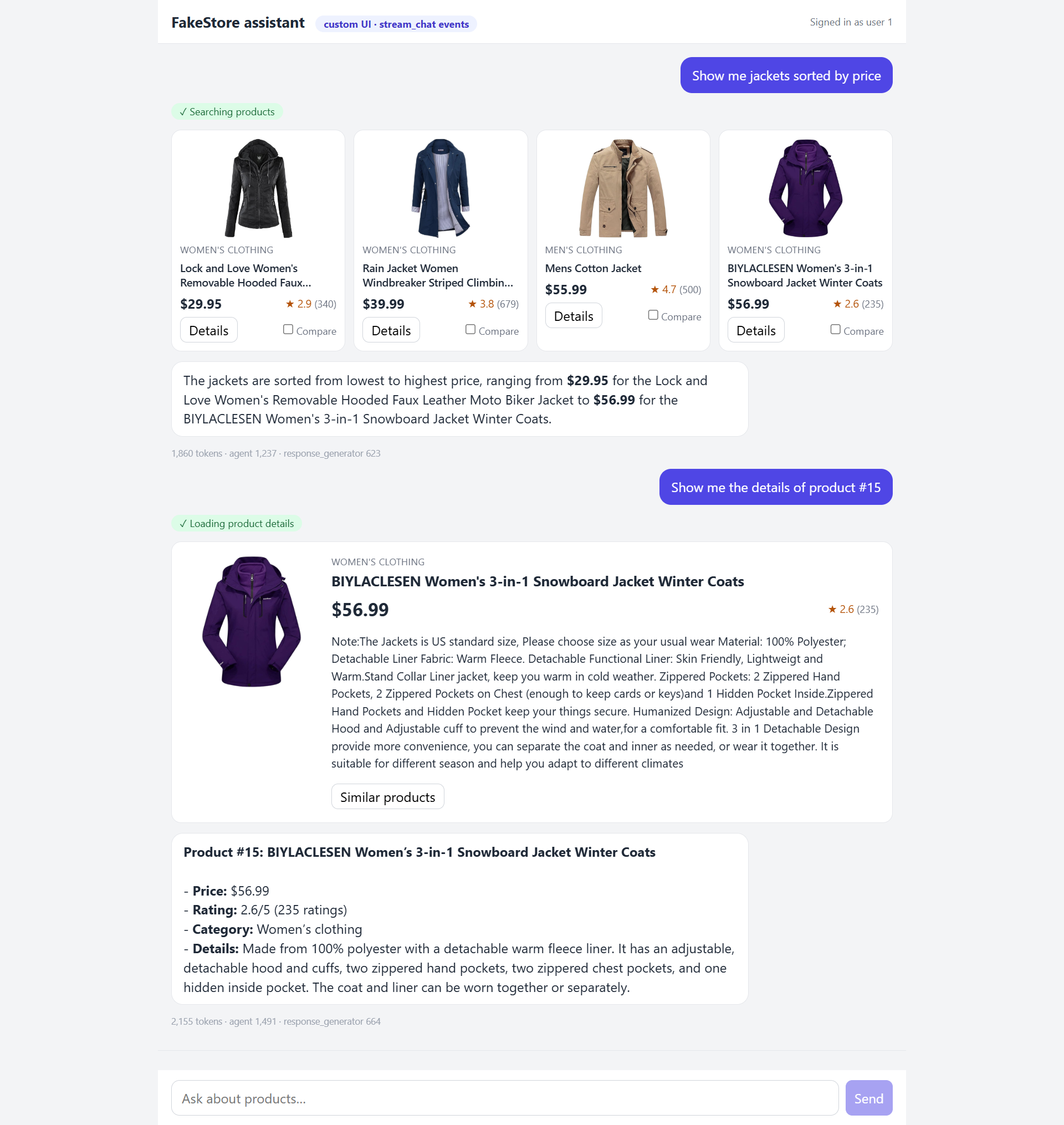
The custom UI example: tool results render as product cards while the reply streams in.
✨ Features
| 📄 Config-driven | One JSON file defines the model, prompts and tools. Any LangChain model (openai:..., anthropic:..., google_genai:...) or OpenAI-compatible endpoint. |
| 🧰 Every kind of tool | Your own Python functions, ready-made LangChain/LangGraph tools, REST endpoints declared in JSON (no code), and MCP servers. |
| 🎨 Rich UIs | Tools can return structured data next to their text. The frontend renders it as cards, tables or charts; the library stays UI-agnostic. |
| ⚡ Streaming | A small, versioned event stream that maps cleanly to SSE, AG-UI or Open WebUI. |
| 🧠 Long conversations | Older messages are summarized automatically. |
| 🧭 Intent routing | Optional: send each message to a focused agent, a direct reply or a refusal. |
| 📊 Observability | Token usage per turn and per step; LangSmith tracing through environment variables. |
| 🔒 Secure by design | Per-user values (user id, access tokens) travel in a server-side payload and are never visible to the model. |
📦 Installation
Requires Python 3.10+.
pip install bootstrap-agent-sdk
Then add your API key to a .env file (see below).
From source (to run the examples or contribute)
git clone https://github.com/indunil-19/bootstrap_agent_sdk.git && cd bootstrap_agent_sdk
python -m venv .venv
.venv\Scripts\activate           # Windows (macOS/Linux: source .venv/bin/activate)
pip install -e .
cp .env.example .env             # then add your API key
🔐 Environment variables (.env)
API keys and other secrets live in environment variables, never in the JSON config. Put them in a .env file in your project root:
# LLM provider: the key for the provider in "llm_model"
OPENAI_API_KEY=sk-...              # openai:... (also used for OpenAI-compatible endpoints set in llm_base_url)
# ANTHROPIC_API_KEY=sk-ant-...     # anthropic:...
# GOOGLE_API_KEY=...               # google_genai:...

# LangSmith tracing (optional)
# LANGSMITH_TRACING=true
# LANGSMITH_API_KEY=lsv2_...
# LANGSMITH_PROJECT=my-agent
# LANGSMITH_ENDPOINT=https://eu.api.smith.langchain.com   # only for EU accounts

# Your own secrets, used in the config as ${NAME}
# SHOP_API_KEY=...
# JIRA_TOKEN=...
| Variable | Needed for |
|---|---|
OPENAI_API_KEY / ANTHROPIC_API_KEY / GOOGLE_API_KEY |
The model provider in llm_model (only the one you use). |
LANGSMITH_* |
Optional tracing of every run in LangSmith. |
| Any other name | Referenced as ${NAME} in http_tools or mcp_servers, e.g. "X-Api-Key": "${SHOP_API_KEY}". Replaced at startup; an unset variable makes create() fail. |
The library reads environment variables but doesn't load .env itself. Load it in your application before creating the agent:
from dotenv import load_dotenv
load_dotenv()
In production, you can set the variables in your hosting platform instead of using a .env file.
🏁 Quick start
1. Describe the agent in agent_config.json:
{
  "llm_model": "openai:gpt-4o-mini",
  "llm_temperature": 0.0,
  "agent_instructions": "You are a helpful shopping assistant. Use the tools to answer.",
  "response_instructions": "Answer in a friendly tone, in one to three sentences."
}
2. Create the agent and chat:
import asyncio
from dotenv import load_dotenv
from bootstrap_agent import ChatAgent

load_dotenv()

async def main():
    agent = await ChatAgent.create("shop", "agent_config.json")
    result = await agent.chat("Hi, what can you do?", chat_id="chat-1")
    print(result["text"])

asyncio.run(main())
📘 API
ChatAgent.create(name, config_path, tools=None, log_level=logging.INFO)
Builds the agent: loads the config and the LLM, builds the HTTP tools, connects to the MCP servers and compiles the graph.
| Argument | Description |
|---|---|
name |
Agent name, used in logs. |
config_path |
Path to the JSON config. |
tools |
Optional list of Python / LangChain tools. HTTP and MCP tools from the config are added to them. |
log_level |
Logging level of the library's logs. |
agent.chat(message, chat_id, payload=None, chat_history=None)
Runs one turn and returns the result.
| Argument | Description |
|---|---|
message |
The user's message. |
chat_id |
Conversation id (the LangGraph thread_id). |
payload |
Optional server-side data for tools: user id, access tokens, locale… Never shown to the model. |
chat_history |
Optional earlier messages, oldest first, as {"role", "content"} dicts or LangChain messages. |
Returns:
{
    "text": "The SanDisk SSD is cheaper, but the Silicon Power one is better rated.",
    "tool_outputs": [{"call_id": "call_1", "name": "compare_products", "data": [...]}],
    "usage": {"input_tokens": 2051, "output_tokens": 746, "total_tokens": 2797, "llm_calls": 3,
              "by_step": {"agent": {...}, "response_generator": {...}}},
}
tool_outputs holds the structured data of the tools that ran (for the UI). usage is None when "token_usage": false or the provider reports no usage.
Same arguments, different output:
agent.start_chat(...)returns only the reply text.agent.stream_chat(...)yields events while the turn runs (see Streaming to a UI).
💬 Chat history
The agent keeps no conversation state between calls: your application stores the messages and sends the earlier ones with every turn.
history = []

for message in ["Find a backpack under $120", "Is it waterproof?"]:
    result = await agent.chat(message, chat_id="chat-1", chat_history=history)
    history += [{"role": "user", "content": message},
                {"role": "assistant", "content": result["text"]}]
Long histories are summarized automatically, so you can always send the full list.
🔑 Payload
The payload carries per-request values that the server knows and the model must not choose or see, such as the signed-in user:
result = await agent.chat(
    "What's in my cart?",
    chat_id="chat-1",
    payload={"user_id": 42, "access_token": token},   # set from your auth, never from the browser
)
Python tools read it from their config argument, and HTTP tools insert it with {payload.key} placeholders (see below). The library also adds chat_history to the payload, and intent when intent classification is on.
🧰 Tools
| Kind | Declared in | Gets the payload | UI data |
|---|---|---|---|
| 🐍 Python tools | tools=[...] |
✅ | Return (text, data) |
| 📚 LangChain / LangGraph tools | tools=[...] |
— | — |
| 🌐 HTTP tools | http_tools in the config |
✅ | "artifact": true |
| 🔌 MCP tools | mcp_servers in the config |
❌ | Automatic for JSON results |
🐍 Python tools
Pass any LangChain tool in tools. To give the UI structured data, use response_format="content_and_artifact" and return (text, data); the model sees only the text.
from langchain_core.runnables import RunnableConfig
from langchain_core.tools import tool

@tool(response_format="content_and_artifact")
def get_my_orders(config: RunnableConfig):
    """Get the signed-in user's orders."""
    user_id = config["configurable"]["payload"]["user_id"]   # from the payload, not the model
    orders = load_orders(user_id)
    return f"{len(orders)} orders", orders

agent = await ChatAgent.create("shop", "agent_config.json", tools=[get_my_orders])
📚 Built-in LangChain / LangGraph tools
Ready-made tools work the same way: anything that is a LangChain BaseTool, such as web search, Wikipedia or a calculator from langchain-community or a provider package.
from langchain_community.tools import DuckDuckGoSearchRun, WikipediaQueryRun
from langchain_community.utilities import WikipediaAPIWrapper

tools = [get_my_orders, DuckDuckGoSearchRun(), WikipediaQueryRun(api_wrapper=WikipediaAPIWrapper())]
agent = await ChatAgent.create("shop", "agent_config.json", tools=tools)
Install the packages these tools need (for example pip install langchain-community duckduckgo-search wikipedia).
🌐 HTTP tools
REST endpoints declared under http_tools, with no code. Each entry becomes a tool named after its key:
"http_tools": {
  "get_order": {
    "description": "Get one of the user's orders by its id.",
    "method": "GET",
    "url": "https://api.example.com/users/{payload.user_id}/orders/{order_id}",
    "params": {
      "order_id": {"type": "integer", "description": "Order id, e.g. 1042"}
    },
    "headers": {"Authorization": "Bearer {payload.access_token}", "X-Api-Key": "${SHOP_API_KEY}"},
    "response_path": "data",
    "artifact": true
  }
}
Values can use two kinds of placeholders, never visible to the model:
${ENV_VAR}is read from the environment once, at startup (API keys).{payload.key}is read from the payload on every call (per-user ids and tokens).
All HTTP tool fields
| Field | Description |
|---|---|
description |
What the tool does (shown to the model). Required. |
url |
Endpoint URL; {param} marks a path parameter. Required. |
method |
GET (default), POST, PUT, PATCH or DELETE. |
params |
Arguments the model fills in: type, description, required (default true), default, enum, in (path, query or body). |
headers, query, body |
Fixed values sent with every call. |
auth |
{"type": "basic", "username": ..., "password": ...} |
response_path |
Dotted path to the part of the JSON response to return, e.g. data.items. |
artifact |
true to also return the data to the UI (or a dotted path into the response). |
timeout, max_response_chars |
Defaults: 10 s and 8000 characters. |
🔌 MCP tools
MCP servers declared under mcp_servers, using local (stdio) or remote (streamable_http) servers. tools lists which of the server's tools to load:
"mcp_servers": {
  "time": {
    "transport": "stdio",
    "command": "uvx",
    "args": ["mcp-server-time"],
    "tools": ["get_current_time", "convert_time"]
  },
  "jira": {
    "transport": "streamable_http",
    "url": "https://mcp.example.com/mcp",
    "headers": {"Authorization": "Bearer ${JIRA_TOKEN}"},
    "tools": ["search_issues"]
  }
}
All MCP server fields
| Field | Description |
|---|---|
transport |
stdio (runs a local command) or streamable_http (remote server). |
command, args, env |
For stdio: the command that starts the server. |
url, headers |
For streamable_http: the server URL and headers. |
tools |
Tools to load. If omitted, all tools are loaded with a warning. |
MCP tools that return JSON produce UI data automatically. To see which ones do, run python -m bootstrap_agent.mcp_ui_check agent_config.json. MCP tools run out of process, so they don't receive the payload.
⚙️ How it works
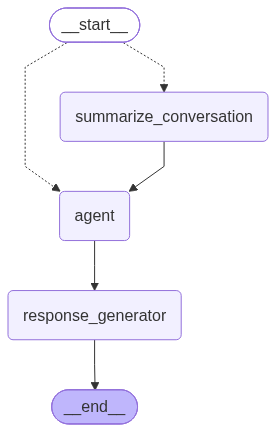
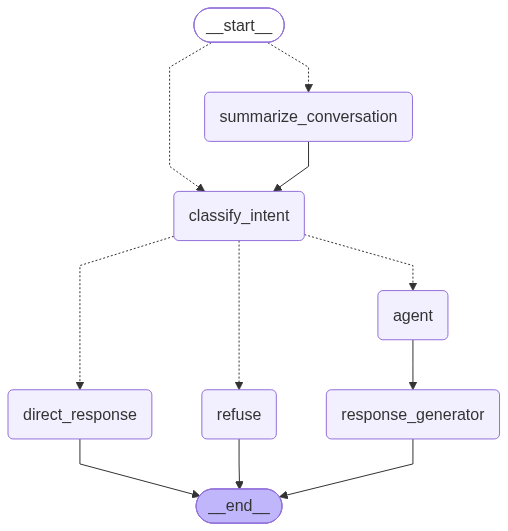
Each turn runs through a LangGraph StateGraph:
| Default | With intent classification |
|---|---|
 |
 |
| Step | What it does |
|---|---|
summarize_conversation |
Folds the oldest messages into a running summary when the history gets long (more than 20 messages). |
classify_intent |
With intent classification on: picks the message's intent and its route. |
agent |
A ReAct agent that calls tools until it has an answer. |
response_generator |
Rewrites that answer into the final reply, applying response_instructions. |
direct_response |
Replies without tools (small talk), or with a fixed message. |
refuse |
Politely declines requests outside the agent's scope. |
⚡ Streaming to a UI
stream_chat() takes the same arguments as chat() and yields events:
async for event in agent.stream_chat("Compare the two SSDs", chat_id="chat-1",
                                     payload={"user_id": 42}, chat_history=history):
    print(event["type"], event["data"])
| Event | Meaning |
|---|---|
▶️ run.started |
The turn started. |
⏳ tool.started |
A tool is running (show a status). |
✅ tool.finished |
A tool finished; data holds its structured output (render a card). |
✍️ message.delta |
The next piece of the reply. |
🏁 run.finished |
The final text, all tool_outputs and usage. |
❌ run.error |
The turn failed. |
Send them to the browser as Server-Sent Events, or translate them to a protocol such as AG-UI.
🔧 Configuration
| Key | Description |
|---|---|
llm_model |
provider:model, e.g. openai:gpt-4o-mini, anthropic:claude-sonnet-5-5. Required. |
llm_base_url |
Optional OpenAI-compatible endpoint |
llm_temperature |
Sampling temperature |
agent_instructions |
System prompt of the tool-using agent |
response_instructions |
Style of the final reply (tone, length, units) |
recursion_limit |
Maximum graph steps per turn (default 50) |
token_usage |
Count tokens (default true) |
http_tools |
REST endpoints as tools (above) |
mcp_servers |
MCP servers and the tools to load from each (above) |
intent_classification |
Optional intent routing (below) |
Intent classification example
"intent_classification": {
  "enabled": true,
  "intents": {
    "order_support": {"description": "Orders, delivery, refunds", "tools": ["get_order"]},
    "small_talk":    {"description": "Greetings, thanks", "route": "direct"},
    "out_of_scope":  {"description": "Unrelated requests", "route": "refuse", "message": "Sorry, I can only help with orders."}
  }
}
Each intent has a description and a route: agent (default; optionally limited to some tools), direct (no tools) or refuse. Messages that match no intent go to the full agent.
🧩 Examples
| Example | Frontend | Scenario |
|---|---|---|
| 🛒 Custom UI | React app reading stream_chat() events |
FakeStore shopping assistant: search, comparison table, cart |
| 🔗 AG-UI | React app with @ag-ui/client |
The same shopping assistant over the AG-UI protocol |
| 🌴 Open WebUI | Open WebUI Pipe with HTML cards | Sri Lanka travel assistant: destinations, live weather, recipes, trip notes (MCP) |
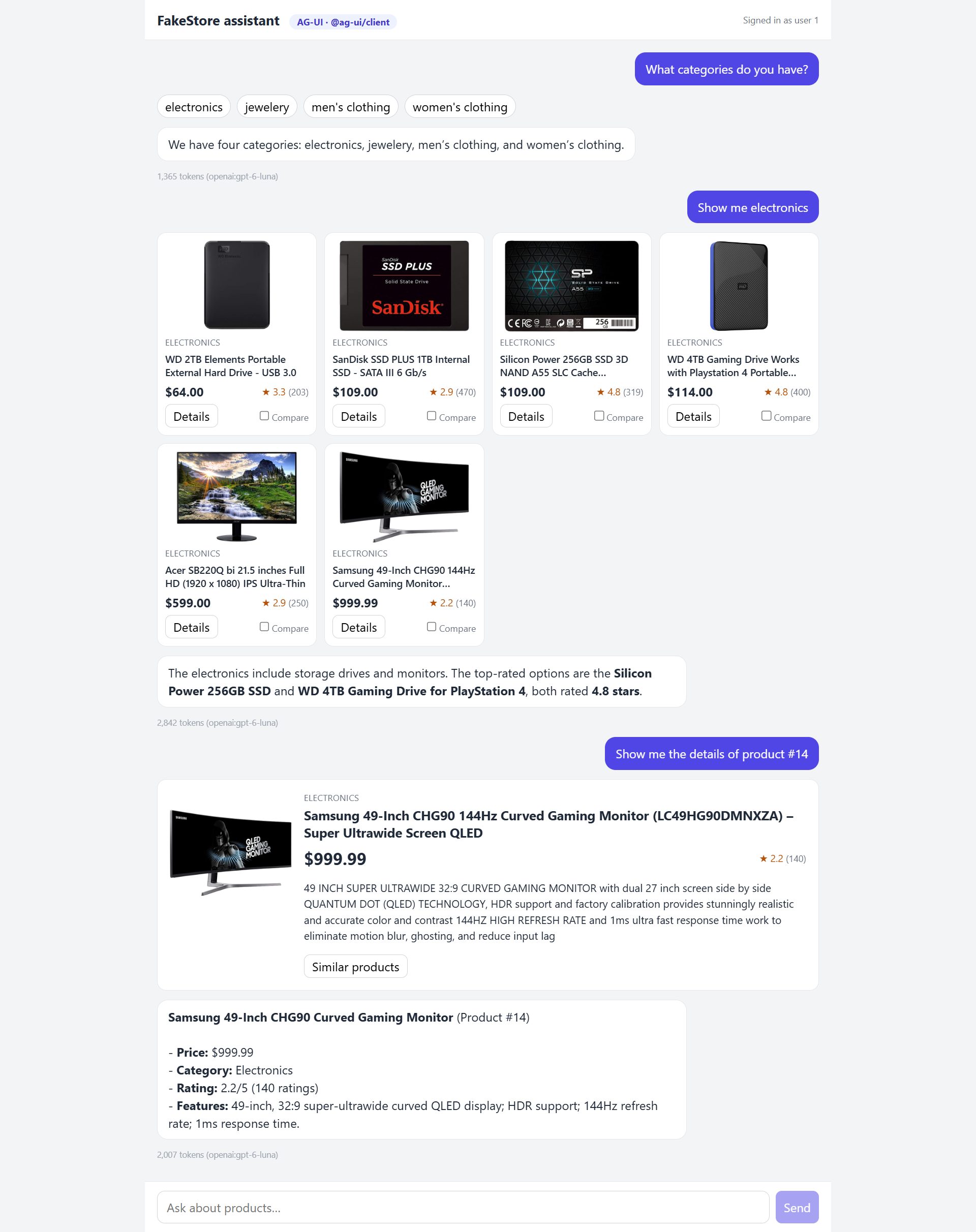 AG-UI: categories, product grid and details |
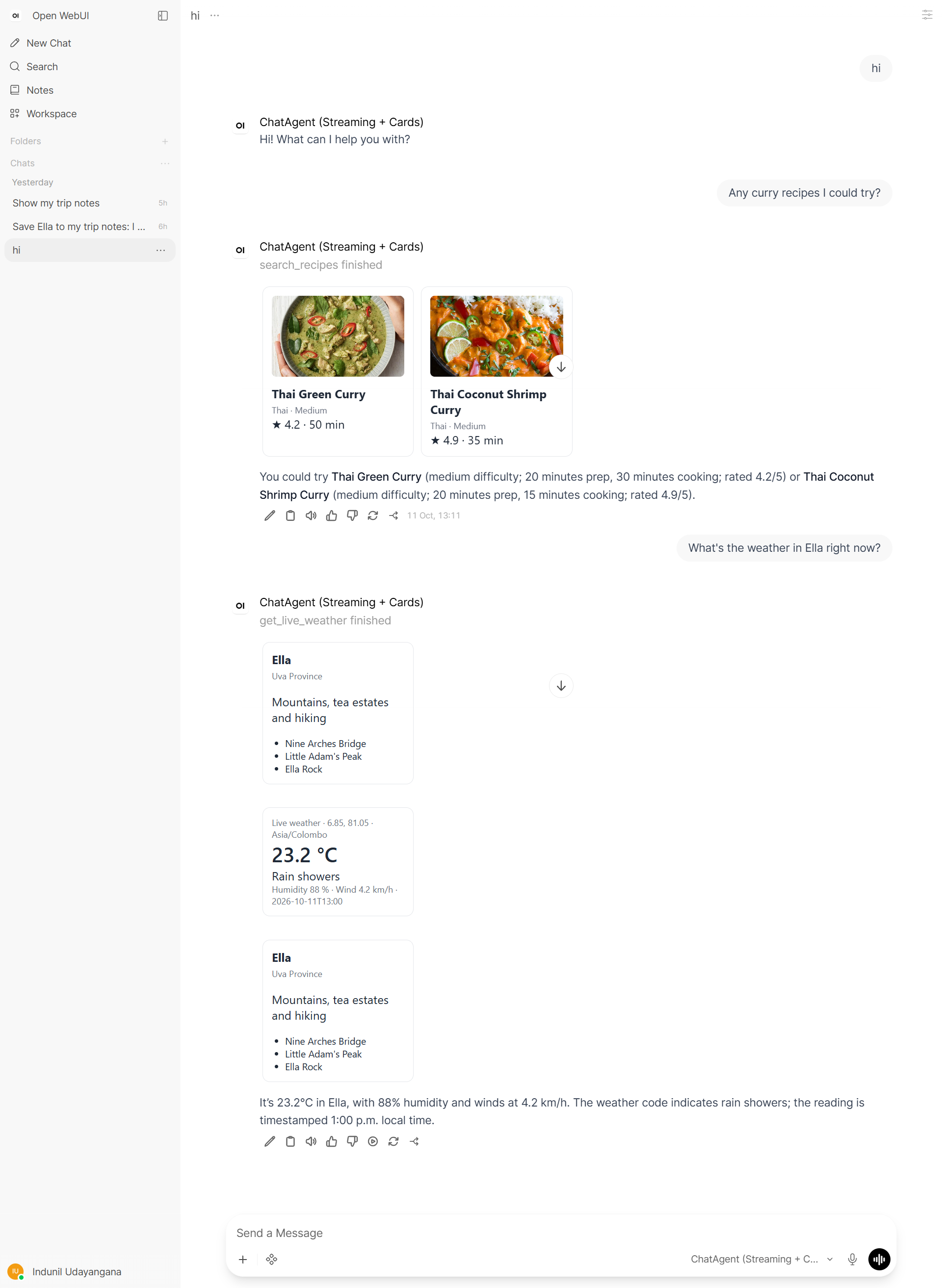 Open WebUI: recipe and live weather cards |
📄 License
Released under the Apache License 2.0.
1 maintainer

Metadata
1 maintainer
Release files for bootstrap-agent-sdk 0.1.0
For a detailed explanation of source distributions (sdists) and built distributions (wheels), please see the package formats documentation.
Source distribution (sdist)
| File | Size | Uploaded | |
|---|---|---|---|
| bootstrap_agent_sdk-0.1.0.tar.gz | 48.3 kB | Details |
Built distribution (wheel)
| File | Interpreter | ABI | Platform | Reset |
|---|---|---|---|---|
| bootstrap_agent_sdk-0.1.0-py3-none-any.whl | Python 3 | none | any | Details |
Total release size: 83.6 kB
Release files / bootstrap_agent_sdk-0.1.0.tar.gz
| Download URL | bootstrap_agent_sdk-0.1.0.tar.gz |
|---|---|
| Size | 48.3 kB |
| Tags | Source |
|
SHA-256 checksum How to use checksums |
11ed1f5c37c8435978276d466ab0ee6def1ecac9be8fea6bdc551eb144d353a1
|
|
BLAKE2b-256 checksum How to use checksums |
faa69f04a5c4f334533a6199124ea683e4e26b97a7fbba4960f4cff4b20e88fa
|
| Upload date | |
|
Uploaded using Trusted Publishing? What is trusted publishing? |
No |
| Uploaded via |
twine/7.0.0 CPython/3.14.2
|
Release files / bootstrap_agent_sdk-0.1.0-py3-none-any.whl
| Download URL | bootstrap_agent_sdk-0.1.0-py3-none-any.whl |
|---|---|
| Size | 35.3 kB |
| Tags | Python 3 |
|
SHA-256 checksum How to use checksums |
0651d6e66a4ec1813a5e445a670b3775b060c17cad81c0c3293661b7718df79e
|
|
BLAKE2b-256 checksum How to use checksums |
f8f0c15512109c656800abe1fc2b8ab9126c16988dfe942ee5b5d2a6ed911a8b
|
| Upload date | |
|
Uploaded using Trusted Publishing? What is trusted publishing? |
No |
| Uploaded via |
twine/7.0.0 CPython/3.14.2
|













