
Package for rapid development of web-based user interfaces.

Project description
Python Bootwrap






Bootwrap is a Python library for rapid developing of web-based user interfaces (WebUI). It helps creating WebUI using Python code only and can be used in conjunction with different web-development frameworks such as Flask. Under the hood, this library wraps one of the most popular front-end toolkit Bootstrap.
As a showcase of what this library is capable of please check the documentation. The entire documentation web interface is created using the Bootwrap.
Installing
Install and update using pip:
~$ pip install bootwrap
Bootwrap package has no external dependencies!
Why & where you might use Bootwrap?
The vast majority of web applications consist of frontend and backend. If you are a small team or even a solo developer you need to divide resources and time to focus on both parts. This often results in switching between different platforms such as Python and React, AngularJs, Flask templates (HTML, CSS, JS), etc. But what if your main focus is the backend and you also don't want to compromise on the quality of your WebUI. In this case, the Bootwrap library is for you! It will help you develop WebUI without leaving the Python ecosystem and not waste your time on HTML, CSS, and Javascript. To understand its capability just clone the project and run the demo application ":pig: PiggyBank".

For more information also read the Bootwrap documentation.
Hello World Application
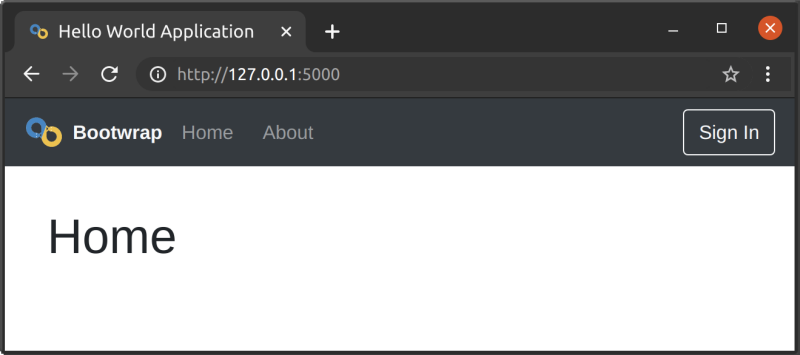
The following code will create three pages application with a top-level menu bar for navigations. Since this application is based on Flask make sure that you installed it as well.
from flask import Flask
from markupsafe import Markup
from bootwrap import Page, Menu, Image, Anchor, Button, Text

app = Flask(__name__, static_folder='docs', static_url_path='')

LOGO = 'https://github.com/mmgalushka/bootwrap/blob/main/docs/logo.png?raw=true'
FAVICON = 'https://raw.githubusercontent.com/mmgalushka/bootwrap/main/docs/favicon.ico'

class MyMenu(Menu):
    def __init__(self):
        super().__init__(
            logo=Image(LOGO, width=32, alt='Logo'),
            brand=Text('Bootwrap').as_strong().as_light().ms(2),
            anchors=[
                Anchor('Home').link('/'),
                Anchor('About').link('/about')
            ],
            actions=[
                Button('Sign In').as_outline().as_light().link('/signin')
            ]
        )

class MyPage(Page):
    def __init__(self, container):
        super().__init__(
            favicon = FAVICON,
            title='Hello World Application',
            menu=MyMenu(),
            container=container
        )

@app.route('/')
def home():
    return Markup(MyPage(container=Text('Home').as_heading(1)))

@app.route('/about')
def about():
    return Markup(MyPage(container=Text('About').as_heading(1)))

@app.route('/signin')
def signin():
    return Markup(MyPage(container=Text('Sign In').as_heading(1)))

if __name__ == '__main__':
    app.run(debug=True)
Use the following command to launch the application.
$ flask run
  * Running on http://127.0.0.1:5000/ (Press CTRL+C to quit)
The result should look like.
Contributing
For information on how to set up a development environment and how to make a contribution to Bootwrap, see the contributing guidelines.
Links
- Documentation: https://mmgalushka.github.io/bootwrap/
- PyPI Releases: https://pypi.org/project/bootwrap/
- Source Code: https://github.com/mmgalushka/bootwrap
- Issue Tracker: https://github.com/mmgalushka/bootwrap/issues
Release history Release notifications | RSS feed


Download files
Download the file for your platform. If you're not sure which to choose, learn more about installing packages.
Source Distribution
Built Distribution
Filter files by name, interpreter, ABI, and platform.
If you're not sure about the file name format, learn more about wheel file names.
Copy a direct link to the current filters
File details
Details for the file bootwrap-1.2.1.tar.gz.
File metadata
- Download URL: bootwrap-1.2.1.tar.gz
- Upload date:
- Size: 1.8 MB
- Tags: Source
- Uploaded using Trusted Publishing? No
- Uploaded via: twine/6.0.1 CPython/3.9.21
File hashes
| Algorithm | Hash digest | |
|---|---|---|
| SHA256 |
2710e262d8265bf5cc36fcca2c32b22e22fdfeda08e68d0e877ac60c71d851eb
|
|
| MD5 |
22351d805228b3ffadd4bf214fee2ee9
|
|
| BLAKE2b-256 |
22b57ea2618f3719c3a389f819275b0238b57ac70ae15ce07499b00231f9cf11
|
File details
Details for the file bootwrap-1.2.1-py3-none-any.whl.
File metadata
- Download URL: bootwrap-1.2.1-py3-none-any.whl
- Upload date:
- Size: 52.4 kB
- Tags: Python 3
- Uploaded using Trusted Publishing? No
- Uploaded via: twine/6.0.1 CPython/3.9.21
File hashes
| Algorithm | Hash digest | |
|---|---|---|
| SHA256 |
b845f35fe0687f7de5a3ba881803710598564f22f968c2f0bc1f3101ba74c4d7
|
|
| MD5 |
93b0a6457a110b85f209201ff7d44ee1
|
|
| BLAKE2b-256 |
4285f901da34a7fa3e7d5451eb2254b9bb64b6750b4816069c981cab42979fba
|






