
Borgitory











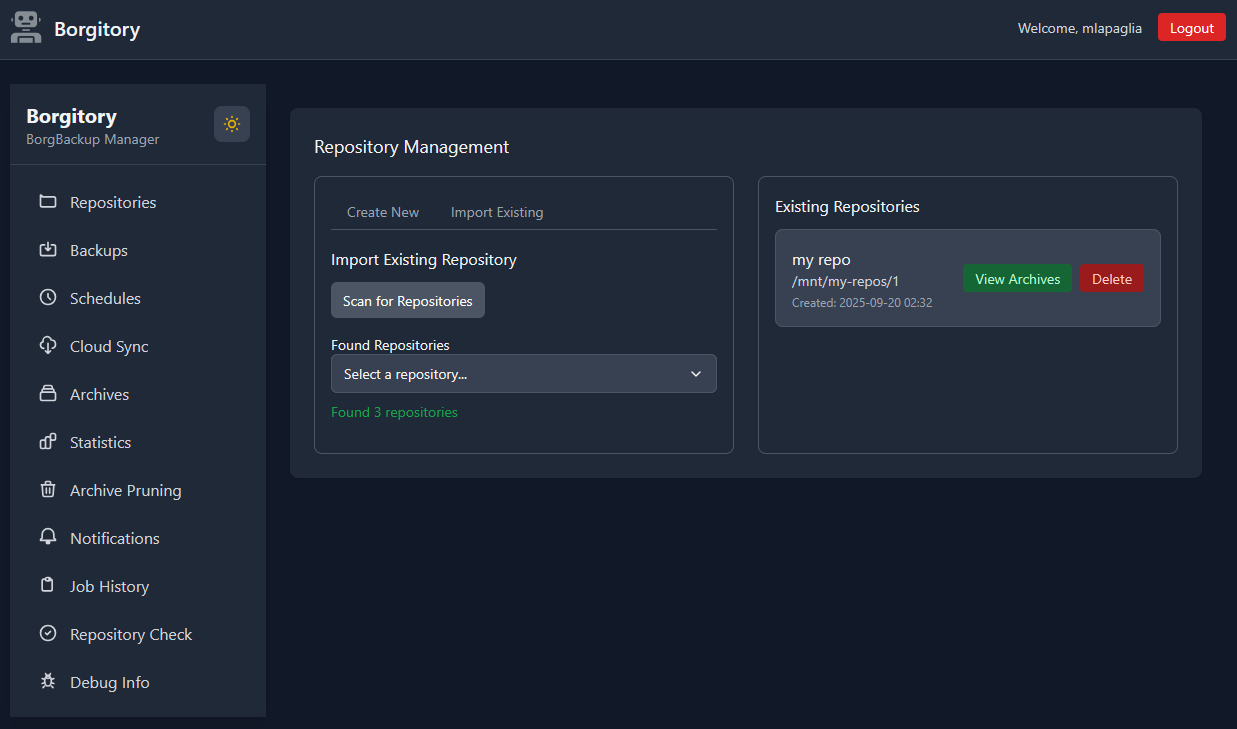
Borgitory is a comprehensive web-based management interface for BorgBackup repositories that provides real-time monitoring, automated scheduling, and cloud synchronization capabilities. It offers complete backup lifecycle management including on-demand backups, automated pruning policies, interactive archive browsing with file downloads, and cloud sync to S3-compatible storage via Rclone. The FastAPI powered system features a modern responsive web interface built with HTMX, and Tailwind CSS.
Quick Start
- full documentation is available at https://borgitory.com
Prerequisites
- Docker Installation (Recommended): Docker with Docker Compose for containerized deployment
- PyPI Installation: Python 3.14+ for direct installation from PyPI
Installation
Option 1: Docker Installation (Recommended)
-
Pull and run the Docker image
# Using Docker directly
docker run -d \
  -p 8000:8000 \
  -v ./data:/app/data \
  -v /path/to/backup/sources:/backup/sources:ro \
  -v /path/to/borg/repos:/repos \
  --cap-add SYS_ADMIN \
  --device /dev/fuse \
  --name borgitory \
  mlapaglia/borgitory:latest
Or using Docker Compose (create a
docker-compose.yml):version: '3.8' services: borgitory: image: mlapaglia/borgitory:latest ports: - "8000:8000" volumes: - ./data:/app/data # database and encryption key location - /path/to/backup/sources:/sources:ro - /path/to/any/backup/repos:/repos:ro cap_add: - SYS_ADMIN # optional, needed to mount borg archives and browse them devices: - /dev/fuse # borg uses FUSE to mount archives restart: unless-stopped
docker-compose up -d
-
Access the web interface
- Open http://localhost:8000 in your browser
- Create your first admin account on initial setup
Option 2: PyPI Installation
Install Borgitory directly from PyPI:
# Install stable release from PyPI
pip install borgitory

# Start the server
borgitory serve

# Or run with custom settings
borgitory serve --host 0.0.0.0 --port 8000
PyPI Installation Requirements:
- Python 3.14 or higher
- BorgBackup installed and available in PATH
- Rclone (optional, for cloud sync features)
- FUSE (optional, for browsing archives)
Windows Requirements:
- WSL2 (Windows Subsystem for Linux) must be installed and configured
- Inside WSL2, you need:
- BorgBackup installed (
sudo apt install borgbackupor similar) - Python 3.14+ installed
- Rclone installed (optional, for cloud sync features)
- BorgBackup installed (
- BorgBackup does not have a native Windows executable, so WSL2 is required for all backup operations
1 maintainer

Metadata
1 maintainer
Release files for borgitory 2.8.0
For a detailed explanation of source distributions (sdists) and built distributions (wheels), please see the package formats documentation.
Source distribution (sdist)
| File | Size | Uploaded | |
|---|---|---|---|
| borgitory-2.8.0.tar.gz | 995.0 kB | Details |
Built distribution (wheel)
| File | Interpreter | ABI | Platform | Reset |
|---|---|---|---|---|
| borgitory-2.8.0-py3-none-any.whl | Python 3 | none | any | Details |
Total release size: 1.9 MB
Release files / borgitory-2.8.0.tar.gz
| Download URL | borgitory-2.8.0.tar.gz |
|---|---|
| Size | 995.0 kB |
| Tags | Source |
|
SHA-256 checksum How to use checksums |
ccfc22fa32af4c9e49e556f578932de92d720fa362fb2cc21368a35ac1ceb72b
|
|
BLAKE2b-256 checksum How to use checksums |
ec7d43531e335393abc2cc3ad365225b7f2d607762139cb6b8c615c98552d37b
|
| Upload date | |
|
Uploaded using Trusted Publishing? What is trusted publishing? |
Yes |
| Uploaded via |
twine/6.1.0 CPython/3.13.13
|
Provenance
Provenance describes where a file came from. On PyPI, provenance is shared via attestations, which provide a verifiable record of the build or publishing details. View details, limitations and caveats.


PyPI Publish Attestation
PyPI verified that this artifact, at this checksum, originated from the publisher listed below.
Signed by GitHub Actions, verified by PyPI on Aug 6, 2026.
Transparency logRelease files / borgitory-2.8.0-py3-none-any.whl
| Download URL | borgitory-2.8.0-py3-none-any.whl |
|---|---|
| Size | 926.2 kB |
| Tags | Python 3 |
|
SHA-256 checksum How to use checksums |
66d4d1563969aedc424608834601310a665753e33c6d8cd5fec0631b121ca321
|
|
BLAKE2b-256 checksum How to use checksums |
70c3b31f966d80f4becab409fba4aa018f8a7f36e5642c594397ab5da863ef49
|
| Upload date | |
|
Uploaded using Trusted Publishing? What is trusted publishing? |
Yes |
| Uploaded via |
twine/6.1.0 CPython/3.13.13
|
Provenance
Provenance describes where a file came from. On PyPI, provenance is shared via attestations, which provide a verifiable record of the build or publishing details. View details, limitations and caveats.
PyPI Publish Attestation
PyPI verified that this artifact, at this checksum, originated from the publisher listed below.
Signed by GitHub Actions, verified by PyPI on Aug 6, 2026.
Transparency log













