
Token Tools for Blood on the Clocktower
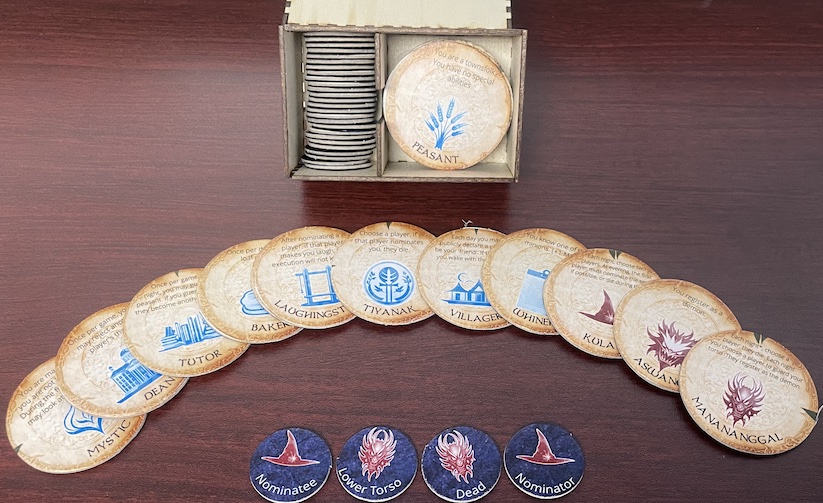
A simple fan-made utility to help create custom tokens for the game Blood on the Clocktower.
Installation
To use this tool, you will need to have Python 3 installed on your computer. You can download it from the official website.
Once you have Python installed, you can install these scripts using pip:
pip install botc_tokens
or manually by cloning this repository and running the following command in the root folder:
pip install .
We use Wand to handle image manipulation, which requires the ImageMagick library to be installed on your system. Check the wand install guide for details on how to get that set up.
Note for Apple Silicon: When running on Apple Silicon, Wand will not auto-detect the ImageMagick installation.
You will need to set the MAGICK_HOME environment variable to your homebrew root, like so:
export MAGICK_HOME=/opt/homebrew/
Usage
For a full walkthrough and for more component packages, see the example repository.
The main script is run through its entrypoint botc_tokens. For example, you might use the update command to download
the latest assets from the web, and then the create command to generate the tokens, followed by a group command to
organize them into a single printable sheet using a json file from the official script tool.
You can use the --help flag to see the available commands and options.
Updating from the web
If you want to create experimental tokens for your in-person games, you can use the update command to download the
current list from the official role data, filling in any gaps
(such as icons) from the official wiki. This is an incremental update, so it
will only download assets that are not already present in the local folder. We highly recommend double-checking the
resulting entries, especially the reminder token section. While the utility does its best to guess, it isn't perfect.
If you already know the reminder tokens, you can create a JSON file for the utility to use. See the
example repository for an example of the format.
botc_tokens update --output-dir /path/to/inputs --reminders /path/to/reminders.json
The official data labels each role with a short edition code (for example tb, bmr, snv, or carousel), and
roles are sorted into folders by that code. Use --script-filter to only pull roles from a matching edition:
botc_tokens update --output-dir /path/to/inputs --script-filter carousel
If you would rather use your own list of roles (for example a homebrew script, or a copy of the official data), pass
a local file or URL with --custom-list:
botc_tokens update --output-dir /path/to/inputs --custom-list /path/to/roles.json
Creating tokens
Once you have your role info, whether from the update command or from your own creation, you can use the create
command to generate the tokens. This will create a folder with the role name and a subfolder for each token type. If you
would like to customize the appearance of the tokens, you can use the --component-dir option to specify where to
find your custom components. Check the example repository
for an example of the expected structure.
botc_tokens create /path/to/inputs -o /path/to/tokens --components /path/to/components
Grouping tokens
Once you have created your token images, you can use the group command to organize the tokens into a single
printable sheet. This command can take a directory or a JSON file with desired role grouping, which follows the
formatting of the official script tool.
botc_tokens group /path/to/script.json --token-dir /path/to/tokens --output-dir /path/to/printables
And that's it!
You can now print your tokens and use them in your games. Remember, this is a fan-made utility and is not affiliated with the official game in any way. We do not own the rights to the game, and we do not claim to. We are just fans who want to make the game more accessible to everyone. Please support the creators by buying the game. It is absolutely worth it!
1 maintainer

Metadata
1 maintainer
Release files for botc-tokens 2026.10.18
For a detailed explanation of source distributions (sdists) and built distributions (wheels), please see the package formats documentation.
Source distribution (sdist)
| File | Size | Uploaded | Provenance | |
|---|---|---|---|---|
| botc_tokens-2026.10.18.tar.gz | 2.7 MB | Without provenance | Details |
Built distribution (wheel)
| File | Interpreter | ABI | Platform | Reset |
|---|---|---|---|---|
| botc_tokens-2026.10.18-py3-none-any.whl | Python 3 | none | any | Details |
Total release size: 5.3 MB
Release files / botc_tokens-2026.10.18.tar.gz
| Download URL | botc_tokens-2026.10.18.tar.gz |
|---|---|
| Size | 2.7 MB |
| Tags | Source |
|
SHA-256 checksum How to use checksums |
a7f841ad4717368666e0eb61ffae5ed510e3227c7a2732febf94bc1aba8306fd
|
|
BLAKE2b-256 checksum How to use checksums |
a09e67657ad162e5caea748dc19338e17174ffd05a675b4810c824f3bebb7fd2
|
| Upload date | |
|
Uploaded using Trusted Publishing? What is trusted publishing? |
No |
| Uploaded via |
twine/6.2.0 CPython/3.9.25
|
Release files / botc_tokens-2026.10.18-py3-none-any.whl
| Download URL | botc_tokens-2026.10.18-py3-none-any.whl |
|---|---|
| Size | 2.6 MB |
| Tags | Python 3 |
|
SHA-256 checksum How to use checksums |
97825c4d5529810607080d5c5db57179790607bd1d1008b9ae7f90f44ec4c9a7
|
|
BLAKE2b-256 checksum How to use checksums |
04f8ced932a400963932de1815e8be752ba9bbf3e9995013461ca1d3b8298eb9
|
| Upload date | |
|
Uploaded using Trusted Publishing? What is trusted publishing? |
No |
| Uploaded via |
twine/6.2.0 CPython/3.9.25
|
Security for botc-tokens 2026.10.18
Provenance
Provenance describes where a file came from. On PyPI, provenance is shared via attestations, which provide a verifiable record of the build or publishing details. View details, limitations and caveats.
No provenance found
None of the files in this release were uploaded with provenance metadata.
A note on package security
PyPI is a repository for distributing packages, not a service for auditing them. While third-party security researchers and our staff do their best to detect and remove malicious packages, PyPI cannot guarantee the quality, security or suitability of any given package.
To learn more about protecting yourself from malicious actors, visit our package security documentation.














