
Botgate
Botgate is a security testing tool for websites that accept cryptographically signed requests from AI agents and bots.
It checks whether the signature is valid, shows exactly which parts of the request are protected, and tests whether the server rejects requests when the signature is changed, expired, missing, or fake.
Use Botgate when building or reviewing a Web Bot Auth integration. It catches configurations that appear to authenticate bots but still accept tampered requests. Botgate is a test tool; it does not sit in front of your website or block bots itself.
If a signed request for /orders/123 is changed to /orders/999, is the bot
still authenticated? See the difference in two self-contained commands:
brew install kraftaa/tap/botgate
botgate demo weak
botgate demo strict
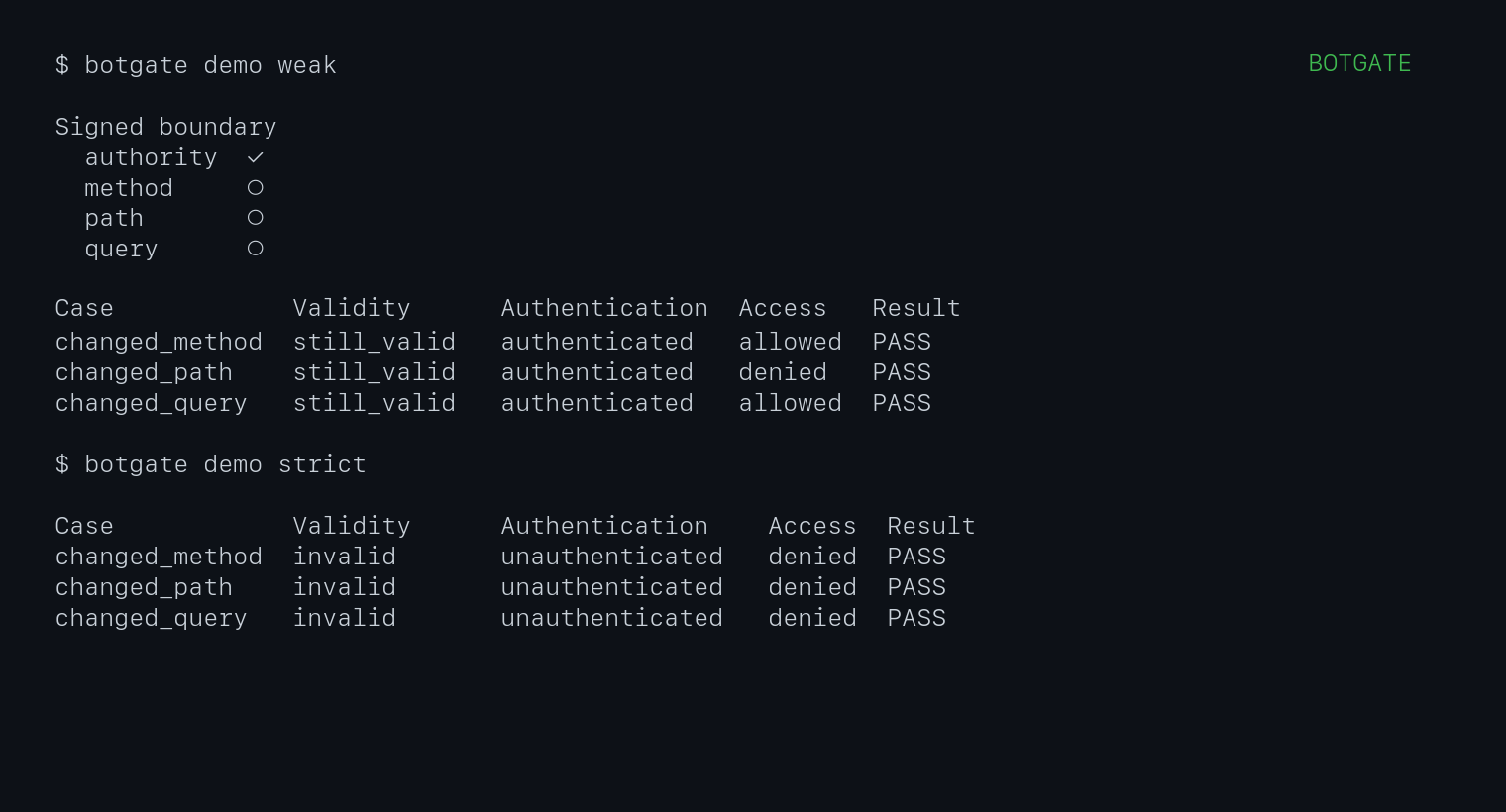
The weak demo signs only the authority:
Signed boundary
  authority  ✓
  method     ○
  path       ○
  query      ○

changed_method  still_valid  authenticated    allowed  PASS
changed_path    still_valid  authenticated    denied   PASS
changed_query   still_valid  authenticated    allowed  PASS
Those results pass because the demo intentionally declares that weak boundary. Botgate does not call a standards-compliant signature a vulnerability merely because it protects less than you expected. It shows the boundary explicitly, then checks it against the policy and access behavior you configured.
The strict demo signs authority, method, path, and query:
changed_method  invalid  unauthenticated  denied  PASS
changed_path    invalid  unauthenticated  denied  PASS
changed_query   invalid  unauthenticated  denied  PASS
Botgate keeps five questions separate:
- Is the message shaped correctly for a selected protocol profile?
- Does the signature verify with a supplied or safely discovered key?
- Which request properties are cryptographically bound?
- Does that coverage satisfy the application's declared policy?
- Does an authorized server authenticate the identity, and does the application independently allow access?
Signature validity, authenticated identity, and application access are not the same result. Botgate deliberately does not infer authentication from an HTTP status code. Live tests use a dedicated authentication signal, normally a response header, and can measure application access through a separate oracle.
Status
The current implementation includes:
- current
draft-ietf-webbotauth-httpsig-protocol-00inspection; - the current Cloudflare compatibility profile;
- current dictionary-form and legacy string-form
Signature-Agenthandling; - RFC 9421 signature-base reconstruction for the common request components;
- RFC 8941 canonicalization for selected Structured Field dictionary members;
- Ed25519 signing and verification;
- JWK thumbprint/key selection;
- semantic coverage and configurable policy evaluation;
Content-DigestSHA-256 validation;- JSON output for CI;
- an offline mutation matrix;
- controlled live-server testing with independent authentication and access oracles;
- expired, future-created, long/missing-expiry, unknown-key, method, path, query, authority, covered-header, identity-header, and corrupted-signature cases;
- SSRF-resistant
Signature-Agentdiscovery for directory,jwks_uri, and CIMD forms; - a local well-known key-directory server;
- self-contained strict, weak-boundary, and access-denial demonstrations;
- a local verifier for custom reproducible demonstrations.
Network operations disable redirects and proxies, pin a validated DNS result, cap response sizes and timeouts, and reject private, loopback, link-local, and special-use addresses by default. Local test overrides are explicit.
Install
You do not need Rust or Cargo to use Botgate.
On macOS or Linux, install with Homebrew:
brew install kraftaa/tap/botgate
If you already use Python tooling, install the same native Botgate binary on
macOS, Linux, or Windows with pipx:
pipx install botgate
Or with uv:
uv tool install botgate
Inside an existing Python virtual environment, ordinary pip works too:
python -m pip install botgate
These package-manager installs use prebuilt native binaries; they do not compile Botgate or install a Rust toolchain. Standalone archives, a Windows installer, a shell installer, and SHA-256 checksums are also available on the Releases page as fallbacks.
Confirm the installation:
botgate --version
botgate --help
Built-in demonstrations
The built-in scenarios create temporary keys, start an isolated loopback verifier on an available port, run the mutation matrix, and clean up automatically. They need no configuration files and send nothing outside the machine.
Start with the weak-boundary scenario:
botgate demo weak
It signs only the authority. Method, path, and query mutations therefore remain cryptographically valid and authenticated. Application access independently denies the changed path while allowing the changed method and query. These are passing observations under the demo's deliberately weak declared policy—not automatic policy failures.
Compare it with strict binding:
botgate demo strict
Here method, path, and query are signed. Changing any of them invalidates authentication and protected access is denied.
Finally, demonstrate authorization remaining independent of authentication:
botgate demo access
The original request has a valid signature and authenticated identity, but access to the admin resource is denied. Each scenario also supports --format json for machine-readable output.
Manual end-to-end example
Generate a test key and policy:
botgate init
This creates:
.botgate/
├── private.key       # Ed25519 PKCS#8, mode 0600 on Unix
├── public.jwk
├── directory.json
└── botgate.toml
The whole .botgate/ directory is excluded by .gitignore. Botgate never prints the private key. A conformant remote key directory must be served over HTTPS.
Running botgate init --force regenerates public.jwk and directory.json from the existing private key. It never overwrites private.key or an existing botgate.toml.
On Unix, the private key is created atomically with mode 0600. On Windows it is created with create_new but inherits the directory's ACL; restrict access to .botgate/ yourself.
Sign the example request using the current IETF form:
botgate sign examples/request.http \
  --agent https://agent.example \
  --components @authority,@method,@path,@query \
  --output signed-request.http
Inspect declared coverage without loading a key:
botgate inspect signed-request.http \
  --config examples/strict-policy.toml
Verify cryptographically using a local JWKS:
botgate verify signed-request.http \
  --jwks .botgate/directory.json \
  --config examples/strict-policy.toml
Show the offline mutation matrix (a request file means nothing is sent):
botgate test signed-request.http \
  --jwks .botgate/directory.json \
  --config examples/strict-policy.toml
The matrix is generated independently for every signature in the request.
Custom live end-to-end test
Live mode is for an endpoint you own or are explicitly authorized to test. The target must implement Web Bot Auth and expose a reliable authentication result, normally through a dedicated response header. Botgate cannot determine whether an arbitrary public website authenticated a bot merely from its HTTP status or page contents.
For custom policies and requests, start the low-level local verifier in one terminal:
botgate demo serve \
  --jwks .botgate/directory.json \
  --config examples/strict-policy.toml
Then sign and test the URL directly:
botgate test 'http://127.0.0.1:8080/orders/123?view=summary' \
  --agent https://agent.example \
  --config examples/live-test.toml
The explicit local-network and HTTP permissions are in examples/live-test.toml. Against the strict verifier, the original request must authenticate and invalid mutations must not authenticate. The demo returns HTTP 200 for both outcomes: its X-Botgate-Authenticated header is the authentication evidence, while X-Botgate-Access independently reports application access. An absent or unrecognized oracle value is indeterminate, not success.
The original weak-versus-strict demonstration is also included. Start the demo with examples/weak-policy.toml, then test with --components @authority --config examples/weak-live-test.toml. Method, path, and query mutations remain cryptographically valid and continue to authenticate; Botgate reports that as conformant behavior matching the deliberately weak signature policy, not as a vulnerability.
To test a real authorized HTTPS endpoint, private-network and HTTP overrides are unnecessary:
botgate test 'https://staging.example.com/protected' \
  --agent https://keys.agent.example \
  --auth-header X-Agent-Authenticated \
  --authenticated-value true \
  --unauthenticated-value false
Botgate generates only GET and HEAD mutations by default. Replaying another method requires --allow-unsafe-methods.
Key discovery and directory serving
The two sides have different jobs: the agent signs with private.key, while the
server needs the corresponding public key. For local tests, pass
directory.json directly with --jwks. For real discovery, the agent controls
the Signature-Agent URL and publishes its public key there; the target server
fetches that public material over HTTPS. Never publish private.key.
Verify a saved request using the key source covered by Signature-Agent:
botgate verify signed-request.http --discover
Discovery requires HTTPS, never follows redirects, validates directory content, limits response bytes and key count, and keeps key material scoped to one Signature-Agent identity. For local development, serve the generated directory at the draft's well-known path:
botgate directory serve --port 8787
The built-in directory server binds to loopback and uses HTTP, so it is for local tests only. A conformant public directory must use HTTPS and the specified media type.
Cloudflare interoperability
The September 2026 working-group draft requires new senders to emit dictionary-form Signature-Agent, keyed by the signature label:
Signature-Agent: sig1="https://agent.example"
Signature-Input: sig1=("@authority" "signature-agent";key="sig1");...
Cloudflare currently documents the older bare-string form. Generate and analyze that form explicitly:
botgate sign examples/request.http \
  --agent https://agent.example \
  --components @authority \
  --legacy-agent \
  --output cloudflare-request.http

botgate inspect cloudflare-request.http --profile cloudflare-2026-10
botgate inspect cloudflare-request.http --profile ietf-draft-00
The dated Cloudflare profile is a snapshot of Cloudflare's published behavior,
not a promise about future behavior. The shorter --profile cloudflare remains
an accepted compatibility alias. Reports include the profile snapshot date and
source. The second command above reports why the same request is legacy rather
than conformant for a new IETF-draft sender.
Policy
Policy requirements are application requirements, not claims that every conforming Web Bot Auth signature must cover the same fields.
Without --config, Botgate automatically loads .botgate/botgate.toml from the current directory when it exists; otherwise it uses the same built-in defaults produced by init. Every report names the policy it applied (Policy: in text, policy_source in JSON). In CI, pass --config explicitly so a change to .botgate/ cannot silently alter the gate. Unknown keys and negative time limits are rejected.
[policy]
require_authority = true
require_method = true
require_path = true
query = "required"
body = "ignore"
max_age_seconds = 300
max_lifetime_seconds = 300
allowed_future_skew_seconds = 30
require_nonce = false

[target]
url = "https://staging.example.com/protected"
timeout_seconds = 10
max_response_bytes = 1048576
allow_private = false
allow_http = false

[expect]
header = "X-Agent-Authenticated"
authenticated_value = "true"
unauthenticated_value = "false"

# Access is a separate application decision. Omit this table when the
# endpoint exposes authentication but not a reliable access signal.
[expect.access]
header = "X-Access-Granted"
allowed_value = "true"
denied_value = "false"

# Only listed cases are asserted. Other cases still report observed access.
[expect.access.cases]
original = "allowed"
changed_path = "denied"

[tests]
changed_method = true
changed_path = true
changed_query = true
changed_authority = true
changed_signed_header = true
changed_body = true
corrupted_signature = true
removed_signature_agent = true
changed_signature_agent = true
expired = true
future_created = true
long_expiration = true
missing_expires = true
unknown_key = true
[policy] describes the cryptographic boundary the application requires from a signature. [expect.access.cases] separately describes application access behavior expected from the live endpoint. This permits a result such as “signature valid, identity authenticated, access denied” without treating the denial as an authentication failure.
Coverage is semantic rather than a flat string check. For example, @target-uri satisfies authority, path, and query coverage, while @path does not cover the query. Body integrity requires a covered Content-Digest (the whole field, or its sha-256 member via ;key="sha-256") whose SHA-256 value matches the body bytes. Covering only another member, such as sha-512, does not count.
Individual @query-param components are reported as partial evidence and do not satisfy a policy requiring the entire query to be bound. @request-target covers path and query for the raw HTTP/1.1 requests Botgate accepts.
JSON and exit behavior
Use --format json with inspect, verify, or test.
botgate inspect request.http --format json
Machine-readable reports include schema_version. Consumers should reject a
schema version they do not understand rather than assuming later output has the
same shape.
Exit status is 0 when no error-level findings exist, 1 when conformance, compatibility, crypto, or policy findings fail, and 4 for input or configuration errors detected after argument parsing. Clap uses its conventional status 2 for command-line usage errors. JSON retains independent finding categories and cryptographic/identity states so CI does not need to infer meaning from prose.
Live JSON keeps the stable expected_crypto compatibility field alongside
expected_authentication, observed_authentication, expected_access, and
observed_access. Some values in that field—such as freshness_invalid and
policy_invalid—describe more than signature mathematics, so the text report
labels the column Expected validity. A future schema can split signature
math, protocol validity, and policy validity without conflating them. A request
can remain cryptographically valid and authenticated while application access
is denied; Botgate does not collapse those facts into a generic “accepted”
result.
Trust model
Verification with --jwks establishes that the supplied key validates the signature and reports identity as key_only. --discover reports a verified identity only when key material was fetched from the request's covered Signature-Agent locator and the signature validates with the selected key.
The signing command derives the thumbprint from the private key and refuses to proceed if --jwk names a different key pair.
Similarly, signing Content-Digest binds the digest header. Botgate separately recomputes the digest before reporting body integrity.
Supported signature components
Botgate reconstructs:
@method@authority@scheme@path@query@target-uri@request-target@query-param;name=...- ordinary HTTP fields
- dictionary field members selected with
;key=...
Unsupported derived components cause verification to fail explicitly rather than being guessed. Input files use a strict raw HTTP/1.0 or HTTP/1.1 request format; malformed control data, folded headers, and ambiguous authorities are rejected before analysis.
Non-goals
Botgate does not impersonate commercial agents, bypass bot protection, solve CAPTCHAs, crawl sites, score “AI readiness,” or replace authorization and bot-management systems.
Development
Rust and Cargo are required only when building Botgate from source or contributing to the project:
cargo build --release
cargo fmt --check
cargo clippy --all-targets -- -D warnings
cargo test
cargo deny check
The minimum supported Rust version is 1.86. CI runs the test suite on Linux, macOS, and Windows.
cargo test includes property tests for the HTTP and Structured Fields parsers. Coverage-guided fuzz targets live in fuzz/ and need a nightly toolchain and cargo-fuzz:
cargo install cargo-fuzz
cargo +nightly fuzz run parse_request
cargo +nightly fuzz run parse_signatures
cargo +nightly fuzz run signature_base
See SECURITY.md for the trust model and how to report vulnerabilities. Maintainer release setup is documented in RELEASING.md.
The protocol is still an Internet-Draft. Profile-specific behavior is kept separate in the report engine, and botgate protocol identifies the implemented draft.
References
1 maintainer

Metadata
1 maintainer
Release files for botgate 0.4.3
For a detailed explanation of source distributions (sdists) and built distributions (wheels), please see the package formats documentation.
Built distributions (wheels)
| File | Reset | |||
|---|---|---|---|---|
| botgate-0.4.3-py3-none-win_amd64.whl | Python 3 | none | Windows x86-64 | Details |
| botgate-0.4.3-py3-none-manylinux_2_17_x86_64.manylinux2014_x86_64.whl | Python 3 | none | Linux glibc 2.17+ x86-64 | Details |
| botgate-0.4.3-py3-none-manylinux_2_17_aarch64.manylinux2014_aarch64.whl | Python 3 | none | Linux glibc 2.17+ ARM64 | Details |
| botgate-0.4.3-py3-none-macosx_11_0_arm64.whl | Python 3 | none | macOS 11.0+ ARM64 | Details |
| botgate-0.4.3-py3-none-macosx_10_12_x86_64.whl | Python 3 | none | macOS 10.12+ x86-64 | Details |
Total release size: 11.5 MB
Release files / botgate-0.4.3-py3-none-win_amd64.whl
| Download URL | botgate-0.4.3-py3-none-win_amd64.whl |
|---|---|
| Size | 2.3 MB |
| Tags | Python 3 Windows x86-64 |
|
SHA-256 checksum How to use checksums |
0394d127c44f953b3dddbfe3f9119d739a31288d6c3bb0cfc0890d1829c99aae
|
|
BLAKE2b-256 checksum How to use checksums |
0800d7b15dbdafa002d4bac37d4fd14c4b5d1e53d4a7ed2a2dabcb1ccb93dcc2
|
| Upload date | |
|
Uploaded using Trusted Publishing? What is trusted publishing? |
Yes |
| Uploaded via |
twine/7.0.0 CPython/3.13.14
|
Provenance
Provenance describes where a file came from. On PyPI, provenance is shared via attestations, which provide a verifiable record of the build or publishing details. View details, limitations and caveats.


PyPI Publish Attestation
PyPI verified that this artifact, at this checksum, originated from the publisher listed below.
Signed by GitHub Actions, verified by PyPI on Oct 12, 2026.
Transparency logRelease files / botgate-0.4.3-py3-none-manylinux_2_17_x86_64.manylinux2014_x86_64.whl
| Download URL | botgate-0.4.3-py3-none-manylinux_2_17_x86_64.manylinux2014_x86_64.whl |
|---|---|
| Size | 2.4 MB |
| Tags | Linux glibc 2.17+ x86-64 Python 3 |
|
SHA-256 checksum How to use checksums |
34036b428b734bbb870121a6ee790e578344b704903c1264311ca25ba1eecc1b
|
|
BLAKE2b-256 checksum How to use checksums |
1a7e12f194f23c20ad3df5cea37a6558d475ed5e091c8631d76a092192b5d7f2
|
| Upload date | |
|
Uploaded using Trusted Publishing? What is trusted publishing? |
Yes |
| Uploaded via |
twine/7.0.0 CPython/3.13.14
|
Provenance
Provenance describes where a file came from. On PyPI, provenance is shared via attestations, which provide a verifiable record of the build or publishing details. View details, limitations and caveats.
PyPI Publish Attestation
PyPI verified that this artifact, at this checksum, originated from the publisher listed below.
Signed by GitHub Actions, verified by PyPI on Oct 12, 2026.
Transparency logRelease files / botgate-0.4.3-py3-none-manylinux_2_17_aarch64.manylinux2014_aarch64.whl
| Download URL | botgate-0.4.3-py3-none-manylinux_2_17_aarch64.manylinux2014_aarch64.whl |
|---|---|
| Size | 2.3 MB |
| Tags | Linux glibc 2.17+ ARM64 Python 3 |
|
SHA-256 checksum How to use checksums |
df196d9db947c3e239c6a7749c2309c7ad902517e070176097036adf3e5a01e6
|
|
BLAKE2b-256 checksum How to use checksums |
cf2d1355dd4294dc2d192a4da2bec86d8b97f24ee38b354bf77809107ff0e2d5
|
| Upload date | |
|
Uploaded using Trusted Publishing? What is trusted publishing? |
Yes |
| Uploaded via |
twine/7.0.0 CPython/3.13.14
|
Provenance
Provenance describes where a file came from. On PyPI, provenance is shared via attestations, which provide a verifiable record of the build or publishing details. View details, limitations and caveats.
PyPI Publish Attestation
PyPI verified that this artifact, at this checksum, originated from the publisher listed below.
Signed by GitHub Actions, verified by PyPI on Oct 12, 2026.
Transparency logRelease files / botgate-0.4.3-py3-none-macosx_11_0_arm64.whl
| Download URL | botgate-0.4.3-py3-none-macosx_11_0_arm64.whl |
|---|---|
| Size | 2.2 MB |
| Tags | Python 3 macOS 11.0+ ARM64 |
|
SHA-256 checksum How to use checksums |
165b84149c4cc6f1a08c39ca9b98789f2dc9deb7fccc1337e00bc6d4c38f0fa8
|
|
BLAKE2b-256 checksum How to use checksums |
ece466c3ab87c7e942fa5aacd7b2d341e9f5f18dd8050fbaafeff3bb82e505fe
|
| Upload date | |
|
Uploaded using Trusted Publishing? What is trusted publishing? |
Yes |
| Uploaded via |
twine/7.0.0 CPython/3.13.14
|
Provenance
Provenance describes where a file came from. On PyPI, provenance is shared via attestations, which provide a verifiable record of the build or publishing details. View details, limitations and caveats.
PyPI Publish Attestation
PyPI verified that this artifact, at this checksum, originated from the publisher listed below.
Signed by GitHub Actions, verified by PyPI on Oct 12, 2026.
Transparency logRelease files / botgate-0.4.3-py3-none-macosx_10_12_x86_64.whl
| Download URL | botgate-0.4.3-py3-none-macosx_10_12_x86_64.whl |
|---|---|
| Size | 2.3 MB |
| Tags | Python 3 macOS 10.12+ x86-64 |
|
SHA-256 checksum How to use checksums |
a2cc8c17099aa4ad0d516882ac22903b92231152854ad735826f10d99a1014a7
|
|
BLAKE2b-256 checksum How to use checksums |
b611d44083d066dd4e77b0af3bad07ec67a384c60e9c0f090d1a0ee8acb686f4
|
| Upload date | |
|
Uploaded using Trusted Publishing? What is trusted publishing? |
Yes |
| Uploaded via |
twine/7.0.0 CPython/3.13.14
|
Provenance
Provenance describes where a file came from. On PyPI, provenance is shared via attestations, which provide a verifiable record of the build or publishing details. View details, limitations and caveats.
PyPI Publish Attestation
PyPI verified that this artifact, at this checksum, originated from the publisher listed below.
Signed by GitHub Actions, verified by PyPI on Oct 12, 2026.
Transparency log













