
bottomtime
A lossless dive-log store for divers who log with more than one computer, with a Mac app for divers who don't use a terminal.
Website · Download the Mac app · Manual · Command line and Python
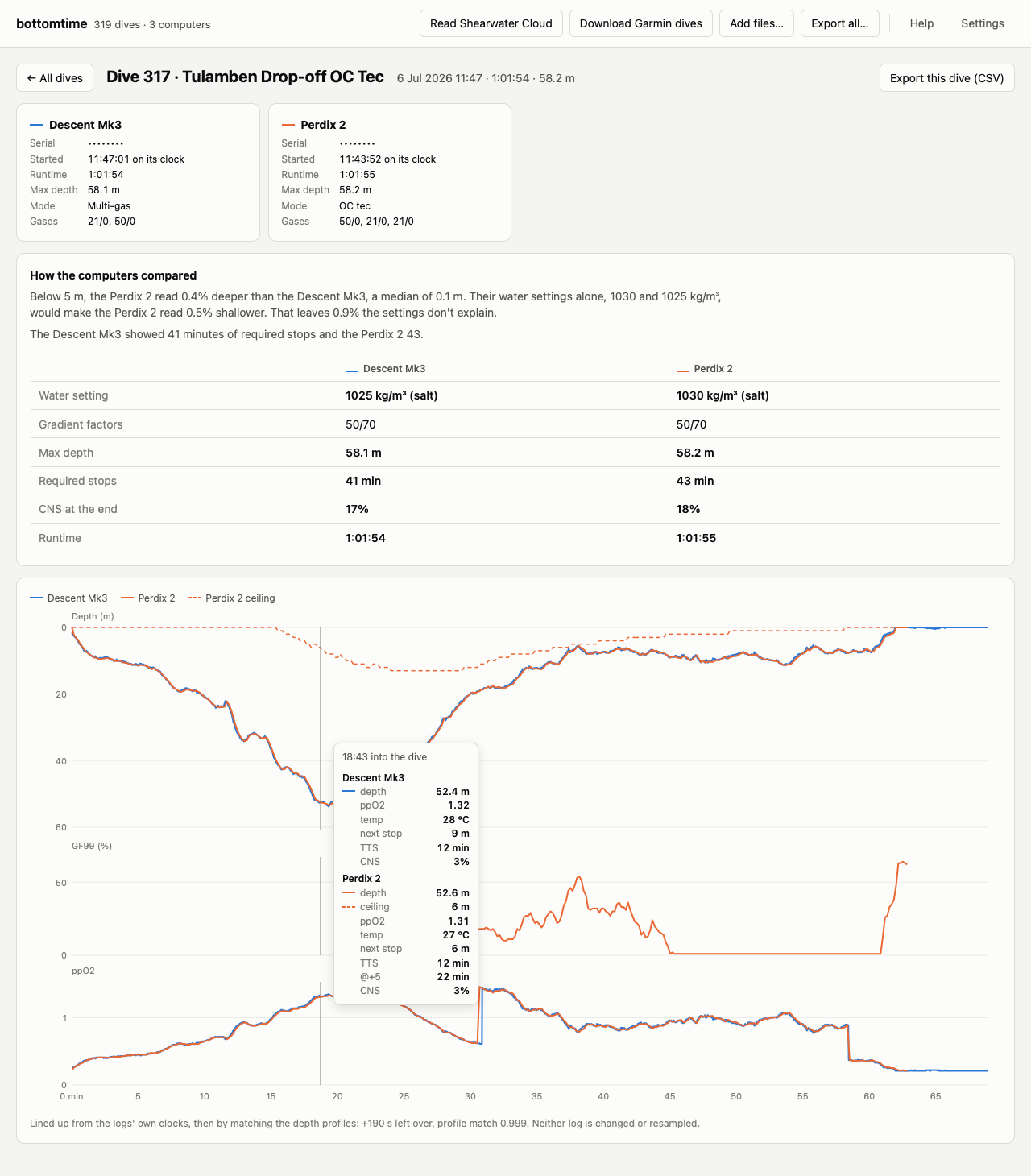
Tec divers often wear two dive computers (say, a Garmin Descent on one wrist and a Shearwater on the other). Each records the same dive differently: the Garmin logs at 1 Hz with heart rate, GPS, CNS and tissue loading; the Shearwater logs its native record with GF99, deco ceiling, ppO2 sensors and per-sample battery.
Converting to an interchange format throws most of that away, and the
converters are responsible for more of the loss than the formats are. The
specs are richer than their reputation. UDDF 3.2.3 has <gradientfactor tissue="n"> per waypoint, plus <batterychargecondition>, <cns>,
<decostop>, <setpo2> and <measuredpo2>; DAN's DL7 (2006) carries a
per-sample Current Ceiling and a per-sample hex warning word; an unpublished
UDDF 3.3.0 alpha, which real software emits, adds <batteryvoltage> and
<timetosurface>. Of the 17 channels one 101 m dive here recorded, 16 are
representable somewhere across those three.
Almost none of it gets written. Subsurface's xslt/uddf-export.xslt emits
seven element kinds, so four of those 17 channels survive a round trip through
it, even though its own struct sample holds NDL, TTS, CNS, setpoint and ppO2
sensors.
bottomtime keeps everything:
- Ingests Garmin FIT files (official garmin-fit-sdk). Known dive channels become typed columns; unknown fields and Garmin's undocumented message types are preserved raw, per sample and per message.
- Decodes Shearwater's Petrel Native Format directly from a Shearwater
Cloud database (
dive_data.db, the "Export Database" output) with pnf, including per-sample GF99, deco ceiling, @+5 and battery voltage that Shearwater's own XML/CSV exports omit. Unknown record types are preserved raw. - Archives every source file verbatim, content-addressed by SHA-256. The database is a decoded view; the archive is the source of truth.
- Reconciles dual-computer dives: interval overlap plus depth-profile cross-correlation links the two logs of the same physical dive (storing clock offset and residual skew) without ever merging or resampling the original series.
- Verifies itself: the decoder is cross-checked per-sample against Shearwater XML exports, against Shearwater Cloud's own computed values (EndGF99), and matched dives are checked for depth agreement.
- Rebuilds from the archive: the database is disposable, and
bottomtime rebuildrecreates it from the archived files.
Everything lands in a single SQLite file with a stable schema, ready for SQL, pandas, or whatever you analyze with.
The Mac app
If you'd rather not use a terminal, bottomtime is also a Mac app. It runs on macOS 11 or newer and has everything it needs inside it.
- Download
bottomtime-mac.zipfor an Apple silicon Mac, orbottomtime-mac-intel.zipfor an Intel Mac. Unzip it and dragbottomtimeinto Applications. - Open it. macOS will say it can't verify the app, because the app isn't notarized by Apple. Open System Settings, go to Privacy & Security, scroll down to the message about bottomtime, and click Open Anyway. You only do this once.
- Click Read Shearwater Cloud if you use Shearwater's desktop app (sync
it with your computer first), and Garmin Connect to sign in and
download your Garmin dives. Your Garmin password goes only to Garmin. You
can also add
.fitfiles or a Shearwater Cloud database export with Add files….
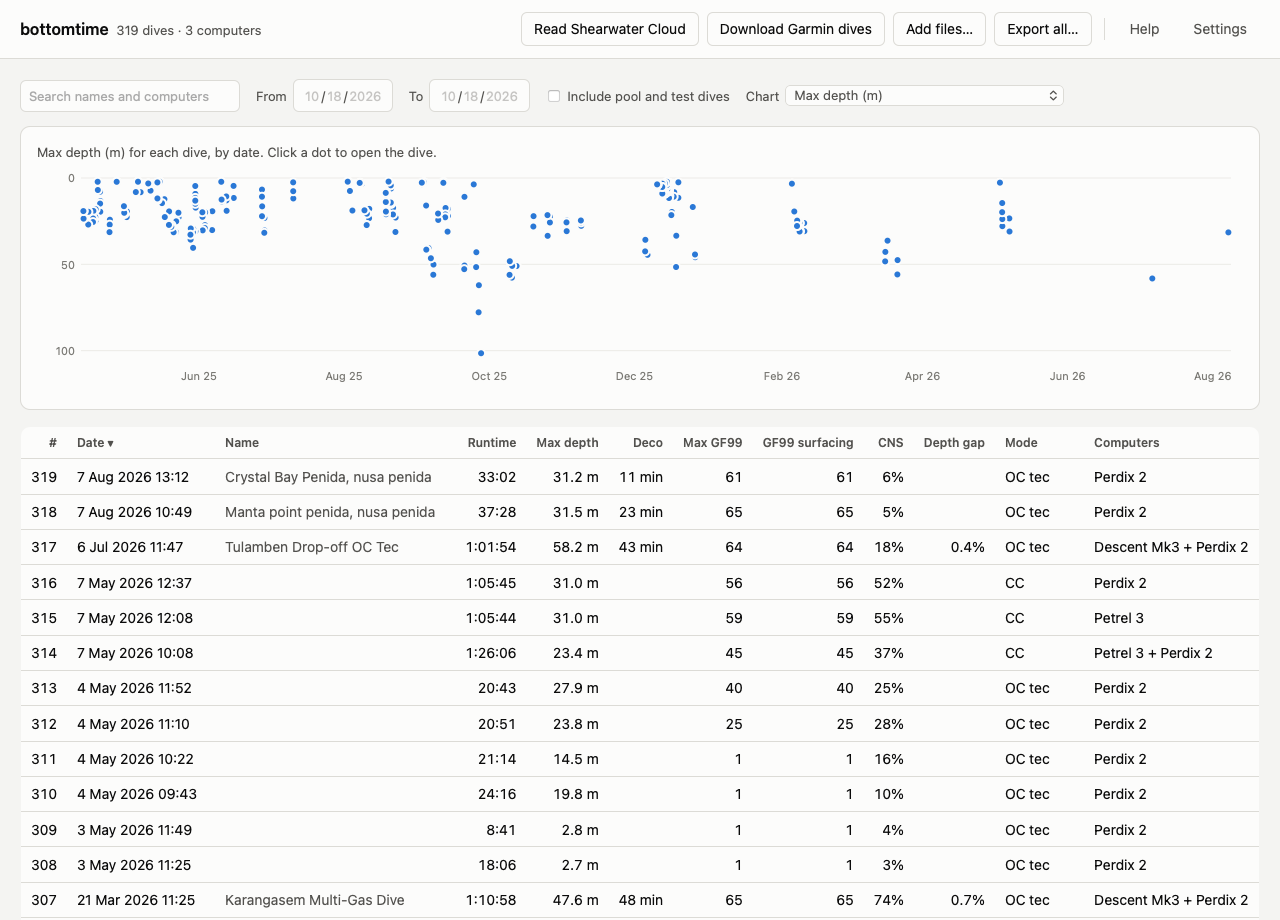
The app lists every dive with its runtime, max depth, deco time, GF99, and CNS, sorts and filters them, and charts any of those across your dives. Open a dive and every computer you wore is on one timeline: depth, the Shearwater's deco ceiling, GF99, and ppO2, with a readout of each computer at the same moment. When two computers logged a dive, the app says how far apart their depths were and how much of that their water density settings explain, and puts their settings, deco, and CNS side by side. Export all saves every dive as CSV in a zip file, so your data stays readable without bottomtime or the manufacturers' apps.
The first time you open the dive list, and the first time you open a dive, a short tour points out what each part does. Help explains every column and term and can show the tour again, and every button says what it does when you hold the pointer over it. Settings switches between metric and imperial, can look for new dives each time the app opens, and shows where your data lives. After an update the app rebuilds your dive list from the files it saved, by itself. The manual covers all of it, including what to do when something goes wrong.
Everything stays on your Mac, in ~/Library/Application Support/bottomtime.
The Garmin download uses Garmin Connect's unofficial API, through
garminconnect, so it can
break when Garmin changes something. Adding .fit files by hand still works
when it does.
To run it from source, pip install 'bottomtime[app]' and bottomtime app
(--browser shows it in a browser tab). packaging/build_mac_app.sh builds
the .app.
Install
pip install bottomtime
Usage
# create a store
bottomtime init

# ingest a directory of Garmin FIT files. A Garmin Connect index JSON
# (dives_index.json, or pass --index) adds activity ids and Connect metadata.
bottomtime ingest garmin ~/dives/garmin-fits

# ingest a Shearwater Cloud database export
bottomtime ingest shearwater ~/dives/dive_data.db

# link dual-computer dives and build the canonical dive list
bottomtime match

# run the verification suite (XML dir optional but recommended)
bottomtime verify --xml-dir ~/dives/shearwater-xml

bottomtime status
After upgrading bottomtime, run bottomtime rebuild. It re-ingests every file
in the archive into a fresh store and replaces the old one only if nothing
failed. bottomtime refuses to open a store built with an older schema and says
so.
Looking at your dives
Once the store is built, interrogate it from the CLI:
bottomtime list                 # canonical dive table (--all includes test dives)
bottomtime show 291             # one dive: computers, channels, gases, match quality
bottomtime export 291 -o d.csv  # per-source sample series (also --format json)
bottomtime plot 291 -o d.png    # aligned dual-computer profile + GF99/ppO2 panels
plot needs matplotlib: pip install 'bottomtime[plot]'. Alignment uses the
matcher's clock offset and residual skew, so both computers' profiles sit on
one time axis without resampling either.
Or from Python:
import bottomtime
import pandas as pd

for d in bottomtime.list_dives("data/dives.db"):
    print(d["dive_number"], d["start_time_utc"], d["max_depth_m"], d["sources"])

dive = bottomtime.load_dive("data/dives.db", 291)
sw = pd.DataFrame(dive["sources"]["shearwater"][0]["samples"])
sw.plot(x="t_s", y=["depth_m", "ceiling_m"])
load_dive returns everything about one dive: per-source samples
(column-oriented, ready for DataFrames), gases, events, the verbatim decoded
headers, computer model/firmware/serial, and the match metadata. Each source
maps to a list of logs, because one Garmin activity can match several
Shearwater logs from a pool session.
And it's just SQLite; the views cover the common queries directly:
sqlite3 data/dives.db "SELECT dive_number, max_depth_m FROM v_dive_summary
                       WHERE is_test=0 ORDER BY max_depth_m DESC LIMIT 10"
datasette data/dives.db   # instant web UI + JSON API, if you have datasette
All commands are idempotent. Re-running an ingest skips already-stored dives, so syncing after a dive trip only adds what's new.
Schema in one breath
raw_artifacts (archived files) → source_dives (one row per computer log,
with the verbatim header and, for Shearwater, the raw PNF blob) →
garmin_samples / shearwater_samples (wide, per-source, never resampled) +
gases, gas_segments, events, undecoded_payloads (raw bytes of
anything not yet understood) → matches (dual-computer links) → dives +
dive_members (canonical dives). Views v_dive_summary and
v_samples_unified cover the common queries.
Notes on the PNF decoder
Decoding lives in pnf, and its
SPEC.md documents
every byte of the sample record. The mappings for GF99 (byte 25), deco ceiling
(byte 24), battery voltage (bytes 17-18) and @+5 TTS (bytes 26-27) were found
by experiment, then confirmed against Shearwater Cloud's own parser.
bottomtime verify finds the decoded values identical to Shearwater's XML
export on all 142 dives I exported, and GF99 within one point of Cloud's
EndGF99 on all 144. If your dives
disagree, bottomtime verify will say so loudly; issue reports with a
failing blob are very welcome.
PNF is shared across the Predator/Petrel firmware family. The empirical
mappings above have so far been validated on Perdix 2 and Petrel 3
logs (the latter integrated with a Choptima CCR). Other models, and
standalone vs. CCR-integrated units, may populate fields differently;
unknown bytes are always preserved, and bottomtime verify cross-checks
every decoded value, so drift on other hardware is detected rather than
silently mis-decoded.
License
MIT
1 maintainer

Metadata
1 maintainer
Release files for bottomtime 0.7.0
For a detailed explanation of source distributions (sdists) and built distributions (wheels), please see the package formats documentation.
Source distribution (sdist)
| File | Size | Uploaded | |
|---|---|---|---|
| bottomtime-0.7.0.tar.gz | 66.2 kB | Details |
Built distribution (wheel)
| File | Interpreter | ABI | Platform | Reset |
|---|---|---|---|---|
| bottomtime-0.7.0-py3-none-any.whl | Python 3 | none | any | Details |
Total release size: 135.6 kB
Release files / bottomtime-0.7.0.tar.gz
| Download URL | bottomtime-0.7.0.tar.gz |
|---|---|
| Size | 66.2 kB |
| Tags | Source |
|
SHA-256 checksum How to use checksums |
767c9ff6f662d0d4655738008b210b8294784c75758fb05e1f60271059b7ae22
|
|
BLAKE2b-256 checksum How to use checksums |
e921cbf68c661c4a8c30c967e8e53ebb70e82556699120b3c603f5c978cc3ef5
|
| Upload date | |
|
Uploaded using Trusted Publishing? What is trusted publishing? |
No |
| Uploaded via |
uv/0.12.1 {"installer":{"name":"uv","version":"0.12.1","subcommand":["publish"]},"python":null,"implementation":{"name":null,"version":null},"distro":{"name":"macOS","version":null,"id":null,"libc":null},"system":{"name":null,"release":null},"cpu":null,"openssl_version":null,"setuptools_version":null,"rustc_version":null,"ci":null}
|
Release files / bottomtime-0.7.0-py3-none-any.whl
| Download URL | bottomtime-0.7.0-py3-none-any.whl |
|---|---|
| Size | 69.4 kB |
| Tags | Python 3 |
|
SHA-256 checksum How to use checksums |
d3d69317cb46eea08ea8ebdc094d64ff7b362107af39f0abb3929f208a46c75d
|
|
BLAKE2b-256 checksum How to use checksums |
9dbc8ded47d7e4db76249c6c1a5ebeaa3b6a0a9784f5cb08de556061dea079b7
|
| Upload date | |
|
Uploaded using Trusted Publishing? What is trusted publishing? |
No |
| Uploaded via |
uv/0.12.1 {"installer":{"name":"uv","version":"0.12.1","subcommand":["publish"]},"python":null,"implementation":{"name":null,"version":null},"distro":{"name":"macOS","version":null,"id":null,"libc":null},"system":{"name":null,"release":null},"cpu":null,"openssl_version":null,"setuptools_version":null,"rustc_version":null,"ci":null}
|














